Slashdot Mirror
Domain: lyx.org
Stories and comments across the archive that link to lyx.org.
Comments · 329
-
Re:"Show your boss"?
LaTeX was fine - I was a little disappointed that after decades of popularity there was still not even the simplest wysiwyg apps for it
Not What You See Is What You Get, but a What You See Is What You Mean editor.
-
Re:"Show your boss"?
LaTeX was fine - I was a little disappointed that after decades of popularity there was still not even the simplest wysiwyg apps for it.
Yeah - it's amazing that nobody has thought of writing one. -
Re:I need to ask
In contrast, when you build a KDE [QT??] app, you are tied into the KDE framework. Its a KDE app and that fact is immediately obvious.
(I presume you meant "QT" instead of "KDE" above -
Lyx
Lyx is how I do what you're talking about. It's a WYSIWYM (What You See Is What You Mean) document processor, and it's great. I use it to write term papers, HOWTO documents, and lots of other stuff. You can export your document to many different formats, including HTML, PDF, plain text and Postscript. You should try it out, I really like it.
-
Re:More than just convenience
-
Re:More than just convenience
Do you have a keyboard with the hebrew charicters on it or to you use a keyboard maping ?
yes. standard in Israel, so if you know someone travelling to Israel just ask him to buy one or two for you. (Or perhaps check with the local jewish community )
How (or do you) use vowle points?
nikud (I forget the english word) isn't normally used by advanced hebrew speakers. But IIRC you can use it with lyx.
For hebrew support of different sw search the
for nikud support in lyx lookup the lyx site tips and tricks section.
I don't know the QT situation, though.
I guess the big question is could I resonably leard to type hebrew with my standard us keyboard?
You can do everything, but I would recomend getting a hebrew keyboard. Keyboards are cheap.
good luck. -
Another word ...LyX - LaTeX with a gui.
I don't know why nobody else has mentioned it
Not that I'd use LyX for day-to-day word processing - that's what OOo is for
btw - couldn't resist:
And speaking of graphical editors, have you experienced the pain of having your careful setup, with a new page for every chapter, completely ruined by adding one line to the second paragraph of the first chapter?That's what the "Insert Page Break" function is for
-
One word...
-
LyX
Really, I figured someone would have said this by now (maybe they have and I need to refresh again
After discovering it I became a lot more productive with my writing. Admittedly that was limited mostly to writing college papers, but I spent a lot less time fighting with the word processor over formatting, focused on the writing, and the output was usually awesome looking.
YMMV I guess, if you're a formatting control freak then LyX won't work so well for you. Sometimes it's tough to make it do exactly what you want in the formatting phase too, so I eventually switched to using raw LaTeX or TeX for my docs, but LyX is a good middle of the road solution.
-
Re:Not that simpleWhich is exactly what people already do to create structured documentation in Word and "unstructured" Framemaker. It works as long as you keep a close eye on how people are using styles. The minute they get careless, the whole thing breaks down.
The OO people are experimenting with support for XML export by associating styles with XML tags. The latest version has a beta implementation of "simplified DocBook". But again, this is pretty much what people already do with Word and Framemaker. The difference is that OO is less of a mess than Word, and the OO people will certainly do a better job of defining a mapping mechanism than the one that comes with "structured" Framemaker. That last thing is very badly designed!
When you're creating a structured document, you really want an authoring tool that writes directly to whatever XML application you're using. The problem with that is that you have to define this application before you can write a single word -- which makes this approach impractical for an ordinary productivity suite like Open Office.
The one tool I really like for this is XMetal. You can feed it a DTD and a set of stylesheets, and it's instantly ready to do WYSIWYG editing of XML. Unfortunately, XMetal now belongs to Corel, which seems determined to destroy it in the name of
The leading XML/SGML editor is the Arbortext product (I foget what they changed the name to after the last rebranding). Unfortunately this one is expensive. Also, defining an XML or SGML application is non-trival.
I got all excited when I heard about Lyx, an open-source "Document Processor" that support structured documents. Unfortunately its native format is not structured. Once again, you have to define some kind of mapping between stylistic elements and your document structure.
Interesting thread here.
-
Some advice...From my (little) experience:
- Save yourself the burden of typing LaTeX directly, and get a good front-end like LyX. Btw, it can also import existing (not-too-convoluted) LaTeX, just in case you already started writing. TeXmacs could be another option if your book is on a mathematical subject.
- For vectorial diagrams and images, get Sketch and Dia and forget everything else (except perhaps Xfig, which comes handy sometimes). Sketch does a decent job at importing simple PostScript by itself (so you can retouch it), and of course it exports PS and EPS. For importing complex PostScript you may also use it together with pstoedit, which supports the Sketch format natively.
- For graphs and trees have a look at Graphviz, which can generate beautiful outputs (both EPS or bitmapped) from simple textual descriptions of nodes and arcs (and it saves you
-
lyx, graphviz, sodipodi?
-
Re:Thats a myth.
Every single app that I would want to run is already available and runs under Linux natively. For example:
mozilla, neverwinter nights(w/ expansion pack), gcc, gdb, make, gnuplot, bc, gimp, icebreaker, valgrind, electric fence, Crossfire, LyX, angband, Nethack (falcon's eye), vim, XFree86, pekwm and netpbm.
There are few apps that I run that are not on that list. Really, if you think about it. On any computer system the top 90% of the apps you run could probably be counted on one hand.
But I'm one of those unusual people who has his laser printer working in Linux and only has a windows box to test the software I write. I compile the windows version on Linux of course. (using these scripts to build the cross compiler). -
WTF? That name is already taken, try again.Jesus Christ, doesn't anyone look out for name collisions anymore? XForms is a GUI toolkit for X., in (slow) development since 1995 and still used in many useful apps like GeomView and Lyx.
Now it's also "the next generation of web forms". Gag me with a buzzword.
It's not as if the original XForms were unknown, either -- it comes up second in a Google search for "Xforms". These jokers should have known better.
Feh.
-
Re:LaTeX! :)
-
Some good comments-and one from a dtp programmer
My comments are made in light of the state of the bilingual printing industry in Japan, plus my experience in a DTP shop in the U.S.
Two really great points were made here, about fonts and trapping. The lack of good Mac-based fonts due to liscensing trouble nearly killed Mac DTP, and even now the choice of available fonts is critical. So if you already have fonts, or know what fonts are available at the output agency, the ability to use these predictably will be extremely useful. So perhaps a kerning table that matches commercial printers' fontsets will allow you to simulate printing with a certain font that you don't have.
The point about the need for trapping is also great. Trapping is basically an algorithm to control how differently colored areas overlap or don't. If you do it right you don't get wierd intersection effects, but it is hard to get a computer to do it right every time. Get some professional DTP people to try the software and send feedback about it - tough love maybe but it will make for better software for all users.
There was a question about resolution - usually people talk about lines per inch not dots per inch, and even then you choose a printer by seeing how well the cheapest version will output the file you have. For example you can get away with a cheap printer if it is just black and white laser of a document, but you other printers will give you much finer halftone screens or will be more economical at higher print volumes. I have not used PDF at say 1200 dpi but would be interested to see how well you can print color photos with the current system they are using.
Also I mentioned in the past that I had ported specialized DTP software (like a cross between Quark and Illustrator) for traditional printing presses in Japan from Mac to Windows, now used by
1500 companies. It is used for example to print national exams. Font handling precision was important so I used Quicktime. Import and export of file formats was important, and there were a large number of functions for finicky manipulations, some of which seemed unique to the way ads were printed on these machines, mimicking the way it used to be done by hand.
So it just seems that if the authors take a single very specific problem domain (say a small to medium size company printing camera-ready advertisements for a magazine, or perhaps printing a sales brochure) and actually trying this with real users they will get excellent feedback and the word will get around. But even a small DTP (design) shop wants to use tools that are going to allow quick import and creation of line art and photos, and provide the basic tools (thinking of fonts and illustrator-like drawing functions) to get as much high quality work done in as short a time as possible. $1000 bucks is nothing. The question is can a better, cheaper system be provided for any users.
Anyway this sounds like a great attempt and I'll certainly look forward to using it. If I could I'd like to make a PDF for a Japanese product brochure with it, but this may be pushing it too much. Good luck to the authors.
Finally, this is not the only DTP software for Linux, if you count LyX (the word-processor frontend to LaTeX). Though it is not exactly easy to use, and not exactly WYSIWIG perhaps.. but you can do mathematical typesetting and manuals (or man pages) pretty well with it. I wonder if Scribus can import LyX or other postscript files. Would Scribus be a good alternative for scientific researchers to write up and publish research papers? Perhaps some templates that made it easy to print a two-column article with a bibliography would be useful there. There is some interesting information about why arxiv.org does not want you to send PDFs (they prefer TeX source since it maintains context). Can Scribus import TeX? What about EPS? How much interoperation with GIMP or other software on linux or other platfo -
Re:We use it at work; I use it at home.
In XWindows (and I believe win32) you can use lyx for almost wysiwyg latex editing. It sure makes tables a whole lot easier, and is great for beginners.
-
Yes
I work for a company that works closely with mathematics reaserchers at the University of Pittsburgh. Everything we get from them is LaTeX, if that serves as any indication. Any research I've read that needs to express anything in mathematcal terms was written with LaTeX.
Also, Lyx is an editor and something of a front-end to LaTeX that automates much of what a common knowlege of LaTeX would accomplish (I suspect - I don't know LaTeX), and can call out to external DVI conversion tools that export to ps, pdf, html, text, etc. I use it to write just about everything at this point. The only problem so far has been converting to MS-Word for the business guys.
-Nick
-
Who Cares?
Who cares about OpenOffice or any other "Word Processor" when you have LYX? I know, I know, all the pointy heads use Office, blah blah blah...but nevertheless...
-
Yes!Once you get the hang of it LaTeX lets you make complex formulas far more easily than Word's equation editor. And you can use LyX to put a nice WYSIWYG on top of LaTeX which some people prefer-- it certainly makes making tables a lot easier. Anyway, if you want your papers to look professional, LaTeX is a great way to go.
/joeyo
-
Front-ends for Latex
If you want the power of Latex but don't want to have the hassle of learning to write raw Latex, then you could always go for a GUI wrapper around it. Lyx is probably the best for Latex (and I would hate to go and use anything else for generating large cross-referenced documents), but if you are also interested in generating TeX then TeXmacs may well fill the bill.
-
LyXWrong address! I mean OOo has never been designed for professional text authoring. All OOo is doing is just mimicking MS Office, which was designed for Joe Six Pack. If you remember, Word perfect was designed for professional writers.
If you really want reveal codes then you should use TeX. I specially recommend you to use LyX - excelent WYSIWIG environment for editing in TeX (actually LaTeX) code.
-
Try LyX for technical writing
-
MVC, Lyx and CVS controlcouple of points to bear in mind:-
- CVS or similar change control is your friend. This is a no-brainer for anything that is expected to scale up to any decent number of changes / forks / merges. What is less obvious is that tracking the changes will only really work on an ASCII file format (ever tried to merge two versions of a binary file?). This basically implies that if you are to use something like Word, then you will have to save all your files as RTF before performing your version control, however, the internal format of the RTF files output from Word is most definately non-obvious.
- formatting of collaboratively authored documents can be a pain unless you are planning to have a final "formatting sweep" once the document has been validated from a content viewpoint. This will be made much more painless if you have some kind of MVC style seperation of content and presentation, and some kind of process in the tool / language used to prepare the work to enforce this seperation. There is a very big difference between a verbal agreement between authors as to how to behave and an enforced layout presentation layer. LaTEX is your friend...
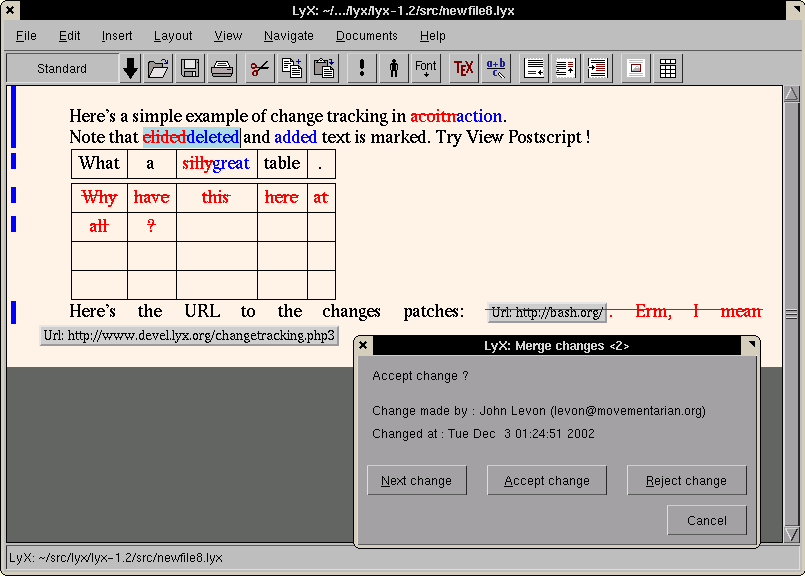
- LyX has had CVS integration for years. It also now has beta-functionality in CVS for a visual track-changes of the history of the LaTEX document. To quote from here (screenshot):-
-
MVC, Lyx and CVS controlcouple of points to bear in mind:-
- CVS or similar change control is your friend. This is a no-brainer for anything that is expected to scale up to any decent number of changes / forks / merges. What is less obvious is that tracking the changes will only really work on an ASCII file format (ever tried to merge two versions of a binary file?). This basically implies that if you are to use something like Word, then you will have to save all your files as RTF before performing your version control, however, the internal format of the RTF files output from Word is most definately non-obvious.
- formatting of collaboratively authored documents can be a pain unless you are planning to have a final "formatting sweep" once the document has been validated from a content viewpoint. This will be made much more painless if you have some kind of MVC style seperation of content and presentation, and some kind of process in the tool / language used to prepare the work to enforce this seperation. There is a very big difference between a verbal agreement between authors as to how to behave and an enforced layout presentation layer. LaTEX is your friend...
- LyX has had CVS integration for years. It also now has beta-functionality in CVS for a visual track-changes of the history of the LaTEX document. To quote from here (screenshot):-
-
MVC, Lyx and CVS controlcouple of points to bear in mind:-
- CVS or similar change control is your friend. This is a no-brainer for anything that is expected to scale up to any decent number of changes / forks / merges. What is less obvious is that tracking the changes will only really work on an ASCII file format (ever tried to merge two versions of a binary file?). This basically implies that if you are to use something like Word, then you will have to save all your files as RTF before performing your version control, however, the internal format of the RTF files output from Word is most definately non-obvious.
- formatting of collaboratively authored documents can be a pain unless you are planning to have a final "formatting sweep" once the document has been validated from a content viewpoint. This will be made much more painless if you have some kind of MVC style seperation of content and presentation, and some kind of process in the tool / language used to prepare the work to enforce this seperation. There is a very big difference between a verbal agreement between authors as to how to behave and an enforced layout presentation layer. LaTEX is your friend...
- LyX has had CVS integration for years. It also now has beta-functionality in CVS for a visual track-changes of the history of the LaTEX document. To quote from here (screenshot):-
-
Re:Click and hope
Try LyX. A document processor that writes LaTeX (and you can just write straight LaTeX when you feel like it).
-
Re:Linux sucks less (sometimes)
What really bothers me is that people who aren't ready for Linux have not got the choice of a halfway ethical solution to their problem. It's basically either use-Microsoft-or-use-nothing.
Perhaps you are overlooking MacOS? Yeah yeah Apple is partly 0wned by MS, and I'm actually not an Apple fan myself, but the Macintosh platform makes a lot of sense for many people.
By the way, if there's a single decent word processor in existence, it's escaped my radar. The last pretty-good one I used was Microsoft Word 6.
I don't think they exist. The word processing paradigm is fundamentally flawed -- I don't care about words, I care about entire documents. For this reason I don't use word processors.
I use software like LaTeX or (rarely) LyX to create documents. However, if you're used to word processors, you'll probably have a terrible time with these too, at least at first.
-
Re:crossreferences
If you're looking for a word processor that supports cross-referencing, and is surprisingly fast and stable, I'd try LyX, which is a LaTeX front-end. The latest version supports Qt for the UI, part of its ongoing "GUI-I" initiative.
Plus, if you're doing math-- well, the math editor is top-notch. Beats the hell out of anything I ever used with OpenOffice or MS Office.
Also, there's a utility called reLyX, which converts LaTeX files into LyX files, so you can edit them in GUI environment.
Great documentation, too, I might add. -
Free equivalents to other MS Office components
But now, with the 2000 versions, include Project/Project Server, Visio, MapPoint, Frontpage, Publisher, and the list goes on and on.
For Project use MrProject.
For Visio use Kivio or Dia.
I'm not familiar with MapPoint, but it seems to be more content[1] than code, unless you count the work being done with GRASS.
I'm not familiar with the full version of FrontPage, but for FrontPage Express use Mozilla Composer.
For desktop publishing use one of those graphical LaTeX editors.
[1] RMS hates the word "content", but I know of no better word to describe copyrighted works other than computer-readable descriptions of algorithms.
-
Re:Tex?
While this comment has been addressed, I'd like to point out that you can get pretty decent output from the Gutenberg texts by importing them into LyX. With just a little bit of work (basically setting up the chapters), LyX will allow you to create good looking PDF, Postscript, HTML, etc, along with the LaTeX source. Combine this with rbmake and you can even read them, complete with hyperlinks, on your eBook (if you have one!)
-
lyx & script writingI want to write the scenario on Linux (maybe with a set of Latex commands or SGML?).
Good.But why bother with typing latex commands, when you have Lyx.
Lyx, according to lyx.org, is a"LyX produces high quality, professional output
Lyx comes with templates for movie & broadway scripts & is a powerful WYSIWYM editor that lets you concentrate on writing rather than formatting. It also has an in-built & easy to use versioning system and you can output to ps/pdf/html/ascii/dvi & misc other formats right from the menu. Read this for more info on what lyx is.
The reason this post is more abt lyx rather than writing scripts is, it is not a specialised software but never the less it is highly versatile & has some great features to aid you in script-writing. -
Just to be picky... ;oP
Can he use Latex? (high probability: no, although I'm sure someone'll come along to prove me wrong
He could, with Lyx... -
Re:Why it will never be Number One.
>As an aside, I actually do use libre tools like Emacs and TeX, and even hack at them from time to time. But man, I wish all the effort that goes into yet another skinnable MP3 player for Linux somehow could be refined and channeled to bring the power of Emacs and TeX into the 21st century, instead of the graceful aging of a fine 1970's vintage.
Check. And it compiles reasonably easy. And is full featured, compared to what it replaces.
I can't wait to use TeX to document my final project. It's going to be so much easier than working with Word... Finally. -
Re:Children....The solution is to use a different approach to word processing. Linux has had the wonderful LyX word processor for years, and as a front end to LaTeX - and coupled with BibTeX - it is faster, more efficient, allows easy editing of enormous files and is far less buggy than either MS Office or OpenOffice. LyX is my word processor of choice, and I constantly regret that it's not really usable in Windows (the whole cygwin, X server setup is much too unstable to be really useful, IMO)
But all that aside, you can't say "Linux is 2-5 times slower" based on the performance of OOo in Linux vs MS Word in Windows. MS Word is a really good programme, pure and simple; OOo suffers from terminal bloat and delusions of grandeur. Hell, MS Word under WINE starts up about three times faster than native Linux OOo
KDE and GNOME are bad examples too
I've never used XP and so can't comment on its stability. But considering the extreme up-times I've experienced when running a linux box as a desktop computer (and web/file server at the same time) I'd be very surprised if XP is actually better. (IIRC the box crashed a total of three times in ten months continuous running, and we're talking RedHat 6.1 here, not Debian) In the last year of using Mandrake Linux (8.1, then 9.0) as a sole desktop OS, I cannot remember it crashing. Put simply, the underlying OS is very, very stable, and it's getting better, not worse. Now, granted XP may well be as stable, but I can't see how it can be noticably more so
-
have you tried
LyX? I know it's not a true WYSIWYG, but it does have a DocBook mode. I haven't tried it in awhile (went back to xemacs), but it might have all sorts of new goodies.
-
ASCII LyX
Like three years ago I came across a LyX (the WYSIWYG-frontend for TeX) developer at a LUG who claimed that somebody of them is developing a vt100-based terminal version of LyX... I am not sure if this yielded any results, but maybe you can search the LyX lists for that or contact the developers...
Probably a worthless because outdated info that I am giving, but such a thing would really be interesting I think, and it's a nice deigital urban legend anyway...
-
Re:Monopoly Abuse?
3. Reader is free, and the PDF spec API is open - there are some freeware products [miktex.org] that create PDF already
Most of which are crappy, and produce essentially "jpeg" PDF's - where the document is rendered as an image and stored in an PDF. Lame.I use PDFlatex, you obviously haven't. For your information, PDFlatex does not simply render to an image and embed it into a PDF. I use it from LyX to produce perfectly fine PDF files. I just have to set the document font to "times" and it uses the default Times Roman font of the reader instead of embedding its own chunky bitmap rendition of the CM font. With that small change it produces nice, small files.
Having an opinion is fine, but go spread your misinformation and assumptions somewhere else, dan.
-
Re:Get LaTeXIf "usable" means "WYSIWYG", probably not. TeX is non-WYSIWYG by design, like HTML once was; this is much of its appeal. (Giving a receptionist a copy of Word does not make him a competent typographer, any more than giving him a scalpel makes him a competent surgeon.) Nevertheless, there are several well-designed GUI front ends to TeX and LaTeX that make it easier for non-programmers to use:
- LyX for Linux/Unix, or Windows with cygwin
- TeXnic Center for Windows only (GPL), works with MikTeX
- Scientific Workplace for Windows only (commercial)
- Textures for Macintosh, another commercial product
-
Re:We did it.
How about WYSIWYM (What You See Is What You Mean)?
Try LyX.
Just click "title" and type the title. Click a button to turn italics on/off, etc.
See http://bgu.chez.tiscali.fr/doc/db4lyx/ and http://www.lyx.org/help/xml/xml.php
-Peter -
No Suitable Editors
Essentially your choices are Adobe Framemaker (~$800), Lyx (Open Source) and XMLmind (Freeware). There may be some others, but these are the ones I've looked at. These are the ones you can use like a WYSIWYG, but are more WYSIWYM (What you see is what you mean). For more info on WYSIWYM, look at Lyx's site.
DocBook is a great spec, but the editors suck for the most part. Lyx can't import DocBook in reliably, and your Docbook is stored as a lyx file (latex I think). Lyx's Docbook stuff can be a bear to set up, even on a system like RedHat where most of the software comes installed. I only recommend Lyx to people who have experience with Lyx, to someone who just wants to write docs, it tends to be more trouble than it's worth.
Framemaker will probably do everything you want and be a godsend with lots of nice features, but you'll pay for it, $800 for Win/Mac and ~$1300 for Unix.
XMLmind is pretty cool, it does Docbook well but is a little slow, it has a little bit of a learning curve, but is prolly the best Docbook editor I've found for free. It's not Open Source though. It is written in Java, so you might have some speed issues, depending on the platform you run it on. I've been recommending XMLmind to everyone I know that asks about Docbook, it has a tree view of the DOM as well as a WYSIWYM view with stylesheets applied on the fly. It has property editors and a pretty smart insert tool that follows the DTD, only allowing you to insert allowed tags into other tags. It feels like more of a programmer's tool than Framemaker, but it should be fairly easy for most WYSIWYG users to adjust.
<rant>
I don't understand why on God's green earth OpenOffice or Abiword or KOffice, or anyone else in the OpenSource world has neglected this area. It's been three years since the LDP went to DocBook, GNOME uses DocBook as their doc format. Why in the hell don't we have decent document writing tools when everyone is always screaming about the lack of documentation in the OpenSource world?
If we want more docs written, it needs to be easier to write them and shouldn't involve learning all about SGML or XML engines as well as a markup language to do it. DocBook is too big to keep in my head and I shouldn't have to think hard about how to write docs when my focus is the content I want to write for. Organizing technical info on a difficult subject is hard enough, stopping every five minutes to look up a DocBook tag or trying to better understand the structure is a huge barrier to getting the work done.
</rant>
But that's just my $.02 -
Please do not write a unified API
Look at a project like LyX. They were making great progress until they decided to have a unified GUI API. While they have been working on "GUI independence", very little improvements have been made to the actual application.
What I once considered of the most interesting applications is now spending all of development time on writing a GUI toolkit instead of improving the application.
Writing a unified API for a forms/graphics toolkit sounds great. What some people do not realize is that writing a unified API is really creating a third toolkit.
Check out this thread where Matthias Ettrich points that Netscape tried something similar with Navigator and failed and trying to make every happy makes no one happy.
A quote about users (not developers ) not wanting to use certain toolkits from Ettrich:
We still would avoid using toolkits at all (some users don't want to use XYZ toolkit, so better use Xlib. Ooops, some users don't want to use X, so better use Curses. Oops, some users have broken termcaps and cannot use Curses, better use stdout.
-
Re:Ah, Word
I've set the "Normal" stylesheet to 10 point Courier on 24 pt leading and turned off all the toolbars . . . The only reason I'm using Word is because you can import a styled Word document into InDesign and let InDesign's stylesheet override the formatting in the Word document.
Have you considered LaTeX? It lets you write your docs in a simple text editor (which is pretty much what you've turned Word into) and then apply the correct formatting, pagination, endnotes, citations, fonts, figures, and layout later.
It works great in Mac OS X, and has a few good Mac OS-native frontends. It produces PS or PDF, and doesn't cost a dime! The markup language takes a little getting used to, but there are some excellent books available, or you can use a WYSIWYG front-end.
-
LyX
I'll second what the AC said, and as a special one-time offer you get a free link to it. LyX is truly the best word processor I've come across.
-
Re:Release announcement
You could try using Lyx. It has the best support for layout, tables, equations, code, sections, multiple output formats - and yes, footnotes, of any tool I've seen. It uses LaTeX as the engine but you don't need to know any of the syntax to get started.
It depends what you want to do. If you're writing small pieces for immediate printing like letters, invoices or articles then Lyx is a bit over the top. But for academic papers, online (and printed) books, dissertations, code documentation and the like, it has no equal IMHO. -
Re:Tables, Equations, Footnotes
Tables, Equations, Footnotes still are not in...
Until you can meat [sic] the feature set of the student, you are not yet there.
Then in the meantime you may want to check out LyX, which is built on top of TeX/LaTeX. It's not as slickly polished, but damn it's useful.
Schwab
-
AbiWord Rocks
I've been following AbiWord development for a while, and I'm still amazed by this little piece of software. I use it for all my small- and medium-sized documents (anything larger and I use LyX), and I love it.
One of the strong points of AbiWord is there's all sorts of nice "little things" features, such as the ability to import and export PalmDoc and PsionWord documents (I have both a PalmOS handheld and a Psion/EPOC/Symbian/whatever handheld). The lack of tables is a drag, but once that's added, I think this will truly be the perfect lightweight word processor. None of that useless bloat a la MS Office, just the features 99% of people need 99% of the time. Kudos to the AbiWord team.
-
PDF? editing?
PDF is swell as a format to print from. Or squint at on the screen, but it doesn't exactly edit nicely. I don't know what the answer is for editable collaboration between word-users and the TeX-users. Part of the problem is that all of the conversions are (as you note) rather lossy. People who use TeX tend to care. People who use Word or WP for documents with any math in them by definition don't care what they look like
-
Latex
If this CD has an easy to install copy of LyX for Win32 I'll be more than happy to buy a copy!
Mmmmm. What you See is What you Mean editing. Mmmmmm. Yummy. Easy export of PDF, HTML or any other format from one document...
More on LyX, the BEST text processor in the world or just download it.
Linux users probably have it already.
matthewmiller.net -
Latex
If this CD has an easy to install copy of LyX for Win32 I'll be more than happy to buy a copy!
Mmmmm. What you See is What you Mean editing. Mmmmmm. Yummy. Easy export of PDF, HTML or any other format from one document...
More on LyX, the BEST text processor in the world or just download it.
Linux users probably have it already.
matthewmiller.net