Slashdot Mirror
Domain: macsales.com
Stories and comments across the archive that link to macsales.com.
Comments · 292
-
Re:Apple charges a lot for RAM
Apple charging high prices for RAM is like 7 Eleven charging ~$20 for the smallest bottle of Tylenol made-- it's all about convenience.
People in the know buy the bare minimum RAM from Apple, and max out their machines with third-party RAM from a trusted source. Personally I swear by Other World Computing's "store-brand" RAM. I buy it for myself and recommend it to clients, and I've never had a problem with any of it.
~Philly -
Processor Replacements
Is it the Pismo? If so, you can replace that processor with something a bit more speedy.
I've been eying a 500MHz G4 for my 400MHz PB G3 for some time now. The ~$300 price tag is keeping it out of reach.
I don't find 10.2.5 too terribly slow, though the boot times are now much loonger than they were with 10.1, and my PowerBook can take almost 30 seconds to sleep at times.
Of course, the processing power I have became available when the P3 wasn't widely available. -
Re:Not really.
These boards won't contain a SWIM chip,
The SWIM chip (Which stands for Super Woz Integrated Machine), was last used in the Beige G3 machine. As somebody already pointed out, it is basically a floppy controler chip - which you might have noticed, Macs don't have anymore.Apple power manager chip, Apple firmware and some other fiddly bits to boot
Apple uses open firmware which is an open spec. As for the other bits, remember that darwin boots on intel machines.An OS X CD will indeed not boot such a machine, not because of some fiddly bits, but simply because it won't contain the drivers to handle the hardware. On the other hand, if Darwin can be booted on it this would require writing the relevant kexts, then installing OS X would require the same kind of tricks used for installing OS X on older machines..
-
Re:May I dare to ask?
Here's the link to the XPostFacto page at Other World Computing. I haven't had any experience installing OS X on anything other than my 7600 (and an Indigo iMac at work), but according to the documentation, the following systems should work:
Apple PowerMac 7300, 7500, 7600, 8500, 9500, 9600, plus clone systems based on one of these systems, including Umax S900 and J700, PowerComputing PowerWave, PowerTower Pro, Daystar Genesis and Daystar Millenium.
Also check out xlr8yourmac.com, as the forums and boards there have lots of information about people doing strange and unsupported things to their Macs (and clones). -
Re:Wow, flamefest on RMS.
Actually, although many people within Apple, and Apple themselves, at various times have argued against the DMCA to varying degrees, they have in fact used it themselves. OWC used to sell a patch for iDVD so it could be used with external DVD-R/RW's rather than just the BTO ones from Apple. They were informed by Apple that this violated Apple's intellectual property and the DMCA act and told to stop selling it. which they did, immediately.
While I like a lot of what Apple is doing, and they do employ open-source guys as well as give back to the community, this was a bit off. Especially as iDVD will soon be a non-free (as in beer) app as well as only working on certain drives. I'm not sure if this is better or worse than them giving iDVD3 ability to work with all drives, as this would be even more of a slam in OWC's faces.
-
Re:Wow, flamefest on RMS.
Actually, although many people within Apple, and Apple themselves, at various times have argued against the DMCA to varying degrees, they have in fact used it themselves. OWC used to sell a patch for iDVD so it could be used with external DVD-R/RW's rather than just the BTO ones from Apple. They were informed by Apple that this violated Apple's intellectual property and the DMCA act and told to stop selling it. which they did, immediately.
While I like a lot of what Apple is doing, and they do employ open-source guys as well as give back to the community, this was a bit off. Especially as iDVD will soon be a non-free (as in beer) app as well as only working on certain drives. I'm not sure if this is better or worse than them giving iDVD3 ability to work with all drives, as this would be even more of a slam in OWC's faces.
-
Simple ... PCI Power Mac + G3/G4 Upgrade Card
Add a G3/G4 upgrade card to certain PCI-based pre-G3 Power Macs and use XPostFacto to install Mac OS X on your ride. Need a six-slot G4? Upgrade that 9600/350 with a G4 card and you're in business. Seems to me that one or more of the upgrade companies have their own software that does this, but charge for it (only support costs $$ with XPostFacto).
-
Re:Don't suffer "Go Fever" with any Apple update
XPostFacto. Haven't tried it myself, but it reportedly works.
-
Re:No more boot chip in MacOS
Have you tried Xpostfacto?
I've used it to install OSX 10.1.5 on my stock 604e 8600 without a problem. It worked real well but obviously slow. I later picked up an iMac and the 8600 is my testing machine for Linux, NetBSD, etc.
Perhaps a similar solution could be done to make these boards work. I already have an OSX box and would rather get one of these to use NetBSD, Linux, whatever on it as a slick server. Pick a nice used box if you want to run Mac OS. I can always appreciate the hack factor if you still wanted to try it. That's what drove me to try on the 8600. -
Re:what about macs?
Actually, over time I've upgraded my PowerBooks about as much as I've upgraded my PCs.
More RAM, larger HD, even a processor upgrade in my 1400. And I'm considering doing the same to my Pismo.
I've never really done much beyond adding memory to desktop Macs (Suggested some processor upgrades to a few people, though)... They always seem to have just about everything I need in them. -
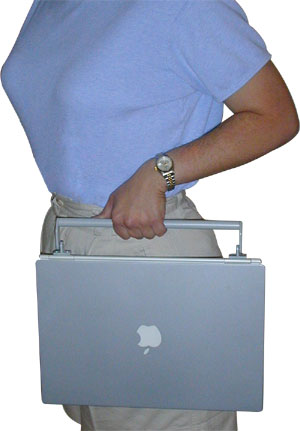
Nice handles
The model in this picture also has some nice handles.
-
PowerMac 8500 will run OS X
A PowerMac 8500 will run OS X. Just download this way-cool OS X installation aid, XPostFacto!
-
Just dismantled the 'array', but...
Well, I have an 'L' shaped computer desk (fancy thing, got it as a Christmas present a few years ago) that, until this morning, had my main PeeCee (Abit AT7/AthlonXP 1.47GHz/512MB PC2100/200GB of RAID/WinXP/ViewSonic 17" CRT,) my server (Intel MS440GX/Dual P3Xeon 700 1MB/512MB ECC PC100/18GB of 10kRPM SCSI RAID/OpenBSD/headless,) that was right next to it in the 'closed cabinet' area of the desk, which had it's door ripped off long ago because of cooling problems. On the 'L' extension was a rev.b iMac (160MB RAM/OS X Jaguar,) and a beige G3 PowerMac (233MHz/512MB RAM/OS X Jaguar/USB and FireWire cards.) But, today I finished rewiring the house, and relocated the server (hey, the thing is almost as loud as my vacuum,) cable modem, etc, to the basement server closet, and moved the iMac to the kitchen to be a recipe computer.
Also on the network are my son's Pentium II/400 with Win95 and a VooDoo3 3500TV; my wife's Pentium 3/1000 with WinXP, my Sony PictureBook (wireless,) my PowerBook 1400c with G3 upgrade (wireless,) a PowerMac 7300 (with OS X 10.1.5 thanks to XPostFacto,) a PowerMac 6100 DOS Compatible, a Quadra 660AV, a Mac IIfx, a Color Classic II, an SE/30, an SE, and a Plus. About 20 other Macs not on the network yet. (I need to find a LocalTalk to Ethernet converter.) -
Re:The other part of the question...I am no as knowledgeable in the area of the G4 chipset, so I am not sure, but all the "build your own"/"repair macs" books mention that you need ROM
As of Mac OS X, this is technically not necessary. It's possible to build (and by build I mean ordering exotic parts, heavy duty sautering, etc) a PPC motherboard using the parts described at openppc.org. Once you have a working mobo there, you could then run LinuxPPC. If you wanted to install Darwin (and by extension, Mac OS X) you'd have write your own drivers for unsupported devices, sort of similar to what has been done here.
Ordering/sautering your own hardware + writing the drivers= a very large barrier to entry. For anyone but the most hardcore, it's not work the effort.
If there were an affordable PPC motherboard, it would be a cinch to "build your own Mac" as I am sure there would be drivers for Darwin that would allow it to work on such a motherboard. And if there were a guarantee of getting Mac OS X to work on a non-Apple motherboard, I'm sure that some corporation or another would jump at the chance to make PPC boards.
It's an unfortunate Catch-22, but unless somebody is willing to risk their life savings getting PowerPC boards made, then it's not gonna happen...
-
I know this isn't what you wanted to hear...
... but I'm typing this reply on a Mac that I pieced together for less than $250 all figured. I run OS 9.1 currently, but another $100 worth of parts and I can put OS X on here.
Basically, I started with an old PowerCenter 120 (a PowerPC Mac Clone) with 32MB of RAM. Total cost? $47 from Ebay
Next up, I added 128MB of RAM from Computer Renaissance... it's fussy about is RAM (5V DIMMs). Total cost: $30
Next... I added an old SCSI drive I had knocking around (4Gb drive from an old server of mine). Total cost: $0
THEN I added a Powerlogix G3-400 upgrade card, $85 from Other World Computing. Finally, added a $49 copy of OS9.1 and OSX 10.1 (a bundled special also from OWC).
So what can I do with it? Well, I love the fact that I now have a machine that's relatively trouble-free, runs the applications I use most often with aplomb (word processing, email, Mozilla etc.) and provides me a REAL upgrade path to OSX. Yeah, OSX isn't strictly compatible with my hardware, but the only piece that's truly critical is the video; to be fixed by the addition of a Radeon 7000 in the next few weeks. Everything else can be worked around using XPostFacto.
Worth a thought if you REALLY want to play with OS X but don't want to outlay on the hardware. FYI, this thing runs OS 9.1 faster than my neighbor's 400Mhz Imac... still remains to be seen how X will run.
Total cost for the project: $300 or so
Value of knowing my 5-year old Mac is more reliable and stable than anything with Microsoft OS's on it: priceless! -
I know this isn't what you wanted to hear...
... but I'm typing this reply on a Mac that I pieced together for less than $250 all figured. I run OS 9.1 currently, but another $100 worth of parts and I can put OS X on here.
Basically, I started with an old PowerCenter 120 (a PowerPC Mac Clone) with 32MB of RAM. Total cost? $47 from Ebay
Next up, I added 128MB of RAM from Computer Renaissance... it's fussy about is RAM (5V DIMMs). Total cost: $30
Next... I added an old SCSI drive I had knocking around (4Gb drive from an old server of mine). Total cost: $0
THEN I added a Powerlogix G3-400 upgrade card, $85 from Other World Computing. Finally, added a $49 copy of OS9.1 and OSX 10.1 (a bundled special also from OWC).
So what can I do with it? Well, I love the fact that I now have a machine that's relatively trouble-free, runs the applications I use most often with aplomb (word processing, email, Mozilla etc.) and provides me a REAL upgrade path to OSX. Yeah, OSX isn't strictly compatible with my hardware, but the only piece that's truly critical is the video; to be fixed by the addition of a Radeon 7000 in the next few weeks. Everything else can be worked around using XPostFacto.
Worth a thought if you REALLY want to play with OS X but don't want to outlay on the hardware. FYI, this thing runs OS 9.1 faster than my neighbor's 400Mhz Imac... still remains to be seen how X will run.
Total cost for the project: $300 or so
Value of knowing my 5-year old Mac is more reliable and stable than anything with Microsoft OS's on it: priceless! -
It is possible to build one
Motherboards can be found at http://www.macresq.com and http://www.shrevesystems.com/ although a lot of times they are refurbished and processors new can be found here http://www.sonnettech.com/ and http://eshop.macsales.com/ . Of course if you have time all these things can be found on http://www.ebay.com/. And for everything else use http://www.pricewatch.com/ for ram, video card, etc. As for specifications on each board starting from g3s go to http://www.info.apple.com/support/applespec.html.
-
Re:Some News For Non-Software Developers/Lawers?
XPostFacto, previously Unsupported X allows you to boot Mac OS X on certain unsuppported systems. Additionally, the Fink Project is a port of the FreeBSD ports tree. Use rootless Xfree86 to run any opensource graphical apps you want. --Paul
-
I'm posting this from a Mac I bought in '96I used to be an Apple employee, and Apple used to have this program called "Loan to Own". It started in the days when most people couldn't afford to own their own home computers, so Apple would give a once-in-a-lifetime tremendous discount for the purchase of a computer by its employees, so they and their families could use them at home.
When I got my Mac 8500/150 in 1996, it was nearly the fastest personal computer money could buy. I used to say widely that it was about half the speed of a Cray 1 supercomputer that cost something like a $million back in 1980. I think the retail price at the time was like $3k.
For the longest time the only upgrade I put in Pishi was 64 MB of RAM, added to the original 32. There are 8 memory slots in here, it will take 1 GB. It is still possible to buy RAM for this box, although it's a little more expensive than today's PC memory.
I used it to bring work home, and later for consulting, for quite a long time. The last paid consulting work I did on her was in the spring of 2001.
In the middle of that job, I finally upgraded, and got a PowerLogix PowerPC G4 CPU upgrade card, as well as some more RAM.
I still have the original 2 MB of video RAM, but I'm thinking of upgrading to the maximum of 4 MB. I could put in a video card, but there are only three PCI slots.
Finally, I bought an Adaptec 29160N Ultra160 SCSI host bus adapter.
I put Mac OS X on it using Ryan Rempel's XPostFacto, and it works OK but is not really fast enough for production work. When I got a contract to do some OS X work I got a 700 Mhz G3 iBook which is really sweet.
The only reason I would want a G4 laptop is so I can do AltiVec programming, but for that I can use my old Mac, it's just not that fast. I'd also like a dual G4 machine to do SMP kernel coding.
What has given Pishi new life, though, was to install Linux on it. It's my main desktop machine, where I do all my web browsing and email. I have a much faster PC that runs Windows 2000 and Slackware, but I have been doing a lot of windows programming this last year so I can't leave it in Linux.
Pishi is running Debian 3.0 (woody) with kernel 2.4.19. And it works just fine.
Besides the increased video ram (so I can run 32-bit at the resolution I use) I'd also like to get an Ultra160 hard drive. The Adaptec card is running a SCSI-II hard drive I've had for years, which has my linux installation. There's only 2 GB on the drive, so I can't really use it for a fileserver, and it gets unresponsive if there's a lot of swapping. If I got a 40 GB Ultra160 drive and maybe some more ram, I could easily get five more years out of this machine.
My Mac is named after my cat Pishi. I say in the above web page about the machine that my parents are looking after her. They eventually brought her to me in Maine, and she was with me for a few months, but sadly she passed away from cancer. I named the machine Pishi because she used to like to sit on top of my monitor a lot back when I was doing a lot of BeOS programming.
Oh, one more thing - the BeOS won't boot with the PowerLogix card. But I understand it will boot with a Newer Technology G3 card. I'm hoping it will also boot with a Newer G4 card. Newer Tech is out of business but it's still possible to buy their cards, even brand new.
-
Re:This is why Apple isn't deadAnd I ran a PowerMac 8500/120 (from 1995) till last year (6 years) with proc (g3 400, $225) and ram (768MB, $110) and disk (18GB SCSI-2, $100) upgrades. And I ran OS 9.x successfully and 10.1 just fine too (with Ryan Rempel's XPFextension package...
And while I can't prove it to you in person, OSX ran a ton better on an G3 400 than WinXP did on the PIII450s I doled out to employees when we upgraded boxes this fall... P Sure, I could have bought a new iMac for the money spent, but from a install/archive/manage standpoint, it was a win...
-
Re:If only apple would support this.
If you really want to try out OSX, you could just go to ebay and buy a Mac 8500, or something like that, then buy some extra ram and a faster processor card. I managed to get all of this for less than $100.
Then just buy OSX and use XPostFacto, which allows you to run OSX on unsupported macs. Now you have a Mac that allows you to fiddle with OSX for under $150. -
Re:don't get all excited
Don't get all excited just yet. Even if this came to fruition, it would almost certainly be on a very narrow subset of x86 (apple-controlled) hardware - not just something you could buy in a box and install on your existing generic box.
I'd bet that within weeks of a hypothetical OS X x86 release, if it ran only on Apple-built x86 hardware, someone would create an XPostFacto-type utility to allow it to run on non-Apple x86 hardware. -
Re:Sheesh
Lucky you. My PowerTower Pro (with G3 400) puked after I installed Jaguar on it (using XPostFacto). Puked as in all over the screen, followed by a kernel panic, when it restarted. Fortunately I made a point of not installing it over the working copy of 10.1.5.
Guess I was unclear. I still haven't done 10.2 yet, as I've outgrown my warez dayz and don't have the cash right now. I was also waiting for others braver than I to figure out the perfect unsupported install.
It seems Ryan Rempel has been cranking out builds faster than Apple was, but I've already seen success stories on most "normal" unsupported machines. (But only with a G3 or G4, not with their original 603 or 604 chips.)
There was something about the PTP recently. I don't remember quite what it was, but the user did eventually get around it. I think it may have had something to do with the NVRAM, but I'm probably wrong. -
Re:(don't flame me) Why?
My only problem is that I have a 10 gig HD in my iBook. Is it possible to upgrade the iBook hard drive?
Absolutely! I've bought a few drives from Other World Computing, and I've been blissfully happy. You can get 2.5" drives for your iBook for about $100 for 20 GB all the way up to 60 GB for almost $400.
Their web site is at macsales.com. Don't let their crappy site put you off; they're worth doing business with. -
enumerated answers
Yes.- Are modern G4 towers quieter and/or cooler than comparable x86 workstations?
Niether. Buy a middle of the line machine to get the 'sweet spot' in MHz/$. Get your extra memory from a third party (I would suggest SmallDog, Other World Computing, or Multiwave Direct) since Apple routinely overcharges for memory.- Is it wiser to spend money on memory or megahertz?
In general, yes, but it depends. You might as well get the stock optical drive and hard disk, since you have to get something anyway. Never buy more memory than is absolutely necessary from Apple, for the reason stated above. Almost anything else is a toss-up and depends on the exact item and current third-party pricing.- Is it best to buy everything directly from Apple, or just a minimum to be fleshed out with cheaper, after-market add-ons?
Shop around before you buy. With Apples current attitude toward industry standard parts, you can, generally, use all sorts of commodity, over-the-counter parts that are labled for PCs (NOTE: video cards don't follow this rule. Niether do modems. For most other types of cards you can either find Mac drivers online, or you can download programs from the manuacturers to flash that card's ROM for Mac use. It is best to do some research before you buy)
Best by what measure? The ATI 7500 is a nice enough card (I use a RADEON 7000 PCI at home in B&W G3) but I'd prefer an 8500. It's a shame that Apple doesn't offer it. OTOH, the NVidia card does sound very nice.- What's the best video option for dual-head on Jaguar?
I don't know, what are you planning to use the machine for? Most applications, IMO, don't benefit too much from SMP, and the premium kills and 'sweet spot' opportunity. Still, it depends on your application.- Does OS X make SMP worth the investment?
On a server, sure, but not for most desktop applications. Besides, you can always add a third-party SCSI card at a later date.- Is the SCSI performance gain great enough to be worth the investment over IDE?
Overall, my advice is to buy a middle of the line machine, skimp on memory directly from Apple (upgrade though a third party), possibly skimp on the hard drive as well (upgrade through a third party), get the best optical drive and video card Apple offers (software support is vital for both, so get them from Apple), and everything else is a toss-up. Buying middle of the line saves you some money, which is good since this is your first Mac: if you discover you don't like Apple products (not that I think that's likely to happen) you won't feel so bad about the money you spent. Once you are comfortable with Apple hardware, you can decide home much (or little) you want to spend on your next machine.
In general, unless there are compelling reasons to go for the top of the line, buying middle of the line is a good policy. When your machine is, inevitably, made obsolete, you won't feel so bad, since you weren't cutting edge to begin with. With Macs, you have the added advantage of, generally, being able to upgrade the system (new CPU, memory, disks, etc.) without needing an entirely new motherboard, so the middle of the line system will last longer than similar systems on the PC side.
-
Re:Not likely...
Mac OS simply will not run without the hardware ROMs.
This is getting less and less true, so called new world machines only rely on the ROM for booting (all machines since the iMac are new worlds machines). The ROM that contains the toolbox code is basically a memory mapped file (you can see this file in the system folder).
Darwin does not need any special ROMs (how would it run on x86 machines?). And Mac OS X basically runs on top of darwin (this is how unsupported machines can run OS X). The only part of the Mac ROM that needs to be somehow emulated is the open firmware booting code that sets up the device tree and hands it to the kernel. Open firmware is IEEE standard.
So roughtly to run OSX on a unsupported machine, you need to implement a booting system that can hand a device tree to the kernel and write darwin drivers for your hardware / emulation plateform. As far as I know, you can do both legally.
Of course there might be some hidden checks in OSX, but the open source nature of Darwin make this improbable. I don't think that Apple will care about this simply because it does not seem to be a serious threat to their marketshare...
-
Re:YDL vs. OSX
Your 8500 will most likely run Mac OS X - given that it has a G3 card, and assuming that it has at least 128MB of RAM (more is of course better).
You'll need a utility to be able to do an unsupported install, such as XPostFacto (free) or Sonnet's software for $30, and you may want a utility to adjust your G3's cache.
You should at least upgrade it to 9.1. -
Re:YDL vs. OSX
I've got OSX running (well, limping) on an 8500/120 without a g3 upgrade using Xpostfacto. Extremely stable, and feels like it needs ram more than a cpu bump.
-
Re:YDL vs. OSXResponding to your question re OS X on a PPC 8500 with a G3 upgrade card. It's doable, at least as far as OS X Server is concerned. I used the great little hack, XPostFacto, from Ryan Rempel at http://eshop.macsales.com/OSXCenter/XPostFacto/ .
I stopped using it because I decided the whole "Apple Server" thing was too oriented toward Mac only networks. I'll probably wipe the drive and put plain OS X on it in the future and use it for SMTP and backup storage.
The Aqua GUI will probably be too slow for every day use though.
-
Re:Nope, poster was just a dope
It is easier than that to install OS X on an unsupported PowerMac. I used Xpostfacto to install 10.1 on my PowerMac 8600/300.
I thought OS X would totally crawl on it but I went ahead and tried for the perverse pleasure of saying I did it. It actually works decently if you aren't in a big hurry. I moved it to the side of my desk and it plays my music, chat and general webrowsing while I'm working on my main system. Probably wouldn't like it for my primary system. -
Re:goodbye beige
Actually... both the G3 All-in-one and original G3 were both fully supported in OS X by Apple, while the 7500-9600 series where able to use X thanks to XPostFacto
-
You just don't know where to put it...
"I love my iPod, but you just don't know where to put it," he said. "So I had no other choice than designing the case."
This is funny enough that I don't feel I really need to make a comment. I will say, however, that I really like the Pod Protector I bought from Other World Computing (OWC).
Fits like a glove, has a nice swivel belt clip, and it's only $30. It's no fashion accessory, but then I'm normally using my iPod at the gym and shiny black designer leather doesn't go so well with a profusely sweating, rich, yuppie elitist.
Oh wait... maybe it does.
-
Re:MacOS X
I was just thinking about this.
These guys did the necessary kernel hacks to OS X in order to get it running on the legacy Macs, so i wouldn't expect it to take too long for someone to do the same for these boards. I'd LOVE to be able to build my own Mac. -
Re:OK, I'm now officially torn
If by proprietary you mean an open and fully documented standard like Open Firmware, then yes.
http://playground.sun.com/pub/p1275/
The guys working on Darwin have done some amazing work on getting OS X to run on legacy Mac hardware. Check out the incredible work that Ryan Rempel has done on XPostFacto:
http://eshop.macsales.com/OSXCenter/framework.cfm
? page=XPostFacto.htmlfor a fantastic example -- he's written kernel extensions and an installer that allow users to install OS X on older macs it was never really designed for. And it works great -- I've got OS X running on an old 7500, and it truly was a trouble free installation; three clicks more than a normal OS X install.
~jeff
-
Re:Only part of Mac OS X is open sourceWrong, if Darwin runs on those board and the processor on those board are PPC processors, then the higher levels of OS X will run. Only the Darwin layer interacts with the hardware, all the other layers interact with the Darwin kernel (that's one point of having a kernel). So Aqua cannot "know" if the motherboard is genuine Apple or not.
This is one reason people were able torun OS X on unsupported machines.
The high-level components like Cocoa and Carbon don't run on Darwin/Intel because the available binary code is PPC code.
-
iPod Carrying Case (was:Huh?)
OWC sells a leather carrying case for the iPod for $29.
Details are at http://eshop.macsales.com/Search/Search.cfm?Colum
n =Description&Criteria=ipod -
Power.
You had no power to say "I want OSX to support my older Powermacs!"
Incorrect. Not only can you do just that (since the core OS code is available openly), but someone has already done it for you.
Many of your comments about Apple, while on-target, refer to a very different company than exists today. -
And what about Unsupported Utility X?
Get it here:
-
Re:Whats wrong with a maci have a 9600 power mac at home with my pc's but it wont run the latest release
You can run OSX on your 9600. Get thee hence to Ryan Rempel's OS X for Legacy Macs and download his Unsupported UtilityX. It will allow you to install OSX on a vast range of machines that Apple's installer doesn't want to run on, your 9600 included.
Granted, OSX will tax a 604 beyond its resources, and if you haven't already you'll soon want to drop ~ $350US on a fast G3 / slower G4 processor upgrade. Throw in a Firewire&USB PCI card for another ~$100US and you've got yerself a fairly modern mac to play with.
-
Re:Why are we having this conversation?I've recently started a fixed wireless ISP and was torn between running Yellow Dog Linux and OS X. The reason why I planned on running YDL is because of the two 8600/300's I'm turning into mail and web servers along with a 7500/180 I'm planning on using for billing and a bit of DNS services. This was before I heard about Ryan Rempel's Unsupported UtilityX.
Now, I'm running BIND, Apache and am getting ready to configure CommuniGate Pro on the 8600's. I can SSH into the boxes and do everything I need to do, remotely, via the command line. It's possible to run VNC on Mac OS X via an X-Windows interface.
I honestly think OS X provides an excellent GUI front-end for those who aren't familiar or comfortable with a command-line interface while providing the power of command-line for those are prefer it.
Just my two cents.
-
Even better prices are available!
-
My thoughtsI run a public Linux/Open Source mirror server. It hosted at a university with lot's of I1 and I2 bandwidth and the mirror is quite large and soon to be larger. It gets the crap pounded out of it and runs flawlessly. It's an old 7500/100 with a G3 card in it. That card is a 300 overclocked to 380Mhz. That card costs next to nothing now. The machine very reliable. I build all my servers on PPC Linux boxes. If it's a first generation PowerPC (61xx, 71xx, or 81xx), which means it has a Nubus slot instead of PCI, it has to run MkLinux. Mk has been turned over to the public to maintain. David Gatewood is one of those maintainers (last I checked) as does a helluva good job. It will be a little unfamilar to you because of it micro kernel layout but it still works well. You would be best off picking up a PCI based machine. You probably already have one, but you could always nab one from eBay. Look for a 75xx, 76xx, 82xx, 73xx, 85xx, 95xx, 86xx, or 96xx in that order. Get yourself a copy of Guru from Newer Technologies (yes they are out of business but this tool is the best in the world for this and is still available). That will help you find which is best for you. Just like with any Linux, secure the hell out of it. I highly recommend LinuxPPC but I'm a bit biased. Yellowdog Linux should also be good. I would not use Debian PPC, Suse, or NetBSD unless you really really really want to. My opinion again. That machine won't really need to be fast, but I recommend sticking a G3 card in it up front. I also highly recommend using the XLR8 MachCarrier ZIF card. It puts a ZIF socket on a daughter card (what all those PCI Macs stick their processors on is a daughter card) so you can upgrade it easily and with what is available on the market in mass. Buy from OWC too. Here's a specials page. Well, that's a lot of info and ideas for you. I do this every day so if you would like more insight or tips, fix my email address and drop me a line. Good luck!
--