Slashdot Mirror
Domain: polarcloud.com
Stories and comments across the archive that link to polarcloud.com.
Comments · 83
-
openwrt
maybe they should port tomato to a tractor.
-
Tomato
I use a build of Tomato by Shibby on my Asus "Black Knight" RT-N66U . It has tons of features and is easy to setup. You could also try some of the other Tomato builds.
http://tomatousb.org/
https://en.wikipedia.org/wiki/Tomato_(firmware) -
Keep buying Cisco
And a lot of other brands... if those are the routers where you can replace the original firmware with a more free, openly auditable alternatives like DD-WRT, Tomato, OpenWRT or others. Or even put Cummulus in supported models. Or if you go to a more generic pc like alternative, directly putting linux or some BSD flavors.
-
Re:Routable IPs on a LAN
He should be easier to get rid of. Maybe make his Achilles Heal a tomato or something. He could also be attracted to Cheetos dust but that might make him too easy. His signature "move" could be altering the keyboard layout to Dvorak or something. Next we'll need an artist. Also a writer 'cause I suck at it.
-
Re:Isn't there an OS box that'll solve this?
This, perhaps?
Uh. Nope. I'm looking for a disk image I could fire up on a tiny pc (or in a VM) that'd meter wifi...
You could also consider rolling your own solution, if you have a particular program or suite of apps in mind; basically, just install the distro of your choice, install and configure your apps, then add them to cron.
-
Re:Upgrade Instructions for Cisco Clients
-
Tomato
I used DD-WRT for some time, but if you want QOS bandwith managment for games (which was what I was really after), you have to buy your way into the forum where a premium version can be downloaded.
Anyway, after some more looking I found 'Tomato' which fitted what I was looking for a lot better. Feel free to try it for yourself.
-
Re:Software / Firmware
Alternative firmware or BIOS would rarely be useful. Working, less buggy firmware and BIOS on the other hand would be really nice.
Au contraire. Several alternative firmwares were/are available for the WRT54G series of wifi routers that have basically allowed linux to be run on them.
-
Tomato
I use Tomato firmware on a WRT54G v2 router. It has many ways of viewing used bandwidth.
-
Re:We're not in Kansas anymore
Because wireless cannot provide the bandwidth... should give you an idea how far away from reality thoughts that wired is expired and wireless is the way to go are
Sounds like you are saying wireless can not provide the bandwidth...which I totally agree with,
... however than you say wireless is the way to go or at least it seemed to me. I must disagree with that...which is it?.
Not that it matters as anything other than Fiber To The Home (FTTH) is a ponzi scheme, false promises, waste of time and money. Only FTTH offers us a viable future! Why should Americans continue to settle for less? Japan had 100Mb/100Mb in 2000 and 1Gb/1Gb in 2006, its 2011...hello, 768Kbps is broadband, really? NOT!
The current NON-synchronous Internet providers are NOT providing you the bandwidth you are paying for? Instead of “up to” some lie, how about a money back guarantee if your upstream bandwidth falls below the FCC definition? Even that is over 11 years out of date and way too slow. There is no way in heck they are going to provide more bandwidth via wireless, it does not matter how many Gs they promise you. Everyone knows that wired infrastructure, specifically Fiber To The Home (FTTH) is far, far superior to wireless 3G, 4G, 10G anything.
I bet I can serve more clients on a wired synchronous FTTH home network with a DD-WRT, OpenWRT or tomato firmware enabled firewall/router than the cellular company can serve via any level of G wireless...but that is not the point, even if it is not entirely accurate. At least I would know with 100% certainty exactly what my broadband bandwidth really is 24X7X365 thanks to the bandwidth monitors in those firmwares! Speed Tests lie!
Any technology other than Fiber all the way into the Home (FTTH) (not GPON, FTTC, DOCSIS, 3G, 4G,...10G, etc...) is simply a waste of time and a very poor attempt by your provider to extend the bandwidth scarcity myth. They use lies, like bandwidth scarcity to extort higher and higher monthly fees from you (going up yearly) forever. Or until you can no longer afford it and they dump you.
If any market was honestly FREE, prices would fluctuate both up and down, unless of course the market is NOT FREE or the provider is severely incompetent. I know what I believe and somewhat know to be true....WAKE UP.
... if its all evenly distributed... that means you would need 800 Gig's per square mile of wireless bandwidth.. We are talking data capacity... Realistically your not going to go for the wired equivalent... capacity of one of the points of aggregation/concentration...
But any way you look at it... To do a project like what Google is envisioning is not feasibly done because neither the spectrum availability is there nor equipment that could provide this type of point to multi-point network...
Back in 2006, people way smarter than you and I managed to take a single strand of Fiber and multiplex it (increase the bandwidth) from 1X bandwidth to 1024X bandwidth. This was over 4 years ago. So to say we do NOT have the technology to provide it is not accurate either. Virtually unlimited bandwidth if you are smart and run Fiber, un-interrupted by inferior technologies, all the way into the subscribers home. Not just to their neighborhood.
As for not being feasible, tell the over 20 communities with synchronous FTTH listed on this map...they all did it, therefore your hypothesis is very, very wrong. It most certainly can be done. It has been done. Hopefully you are not a shill for the industry, but if you are, be
-
Re:My Airport Base Station with a Time Machine dri
would beg to differ. However, it still isn't a computer. Embedded devices might be functionally capable of doing many of the same things, but what distinguishes a computer is whether it provides the ability to install and run arbitrary software (not just whatever the manufacturer installed) that allows the user to create and store significant amounts of information without hacking the device in any way.
Keep begging, I'm not letting you "differ"; Not with that bogus argument anyhow.
I SSH into my WRT54GL router w/ Tomato Linux firmware. My router runs Linux from the factory and has a "firmware upgrade" option that I used to install the aforementioned Tomato Linux.
I write my own small C programs, cross compile them for the router scp (copy) them into and run them in the router. It is every bit as much a computer as a web server is -- Hint: you use the HTTP web server interface to configure most every router. My "embedded" router IS a computer. It stores data & programs that processes my data, and transmits information.
Hell, my wired "router" that is connected to the actual modem is a Linux box with 5 NICs -- each of my WIFI routers (one for my devices only, the other for friends / relatives) are plugged into one of the NICs on the Linux box. This Y router configuration prevents devices on the "friends" router from being able to ARP poison machines on the other wireless router (my small programs running in the wifi router can detect and report ARP poisoning and other funny business, disable the WIFI and alert me).
Anyone who gains access to my "friends" WIFI router can ARP poison anyone connected to that router, MiTM attack & DoS attack them as well -- This judge is misinformed. Hacking into the "friends" router can actually allow someone to "steal" my own copyrighted software that it STORES and RUNS.
Anyone who gains access to my wired "firewall" router can subvert the whole system, and screw with my public GIT repositories (thankfully PGP signing exists).
Something you can do on a computer is play a Tetris clone against multiple live opponents and add to or view the stored high score tables. Well, I created a terminal application that uses Ncurses to do just this -- I run it inside the "embedded" WIFI router (4 players at once actually doesn't kill the router performance too much). Hell, search Ncurses games to find games you can run in your Linux based router and play via SSH. Also checkout OpenWRT, you may prefer it to Tomato Linux.
Rule of thumb: If you can play & create games on it and it can keep a persistent high score table its a damn computer.
-
Re:web interface on OpenWRT / DD-WRT and branded
Tomato has a web interface which lets you do everything.
-
Re:ipv6 support on Cisco/Linksys routers
tomato for more win
For less win, actually, if you want IPv6, because Tomato, while a fine piece of firmware, doesn't support IPv6 and most likely never will.
-
Re:ipv6 support on Cisco/Linksys routers
tomato for more win
-
Re:Use the souce.
My phone, my router, my PCs, my GPS, all have firmware I've compiled myself.
Who modded this insightful?
Do you even have the source code for your GPS firmware, the baseband in your phone, your PC's BIOS and so on?
::Sigh:: Yes, yes I do. You may not, but I do. Modding your GPS hardware, your phone, etc may not be your thing, but you can get started with modding your PC's BIOS, and/or Router pretty easily.
It also helps if you research the mod-ability of your device before purchasing them.
Even if you did, are you seriously saying that you've perfectly audited hundreds of thousands of lines of code?
No, I haven't audited it all, perfectly, but really, no one has with any large project -- perfect is a goal, and as I've previously stated, the goal is to provide more security via quickly patching my own hardware's firmware if any issues are discovered (smaller vulnerability window = more secure).
Where's the "-1 this is really stupid" option?
Are you seriously saying that educating myself about my own hardware/software that is essential to my security is stupid?
I'd offer even more info, but I'm not going to waste any more time since you were such a dick. Perhaps just try asking, "How can I compile my own firmware for my devices," next time instead of being so caustic. Good luck with Google.
-
Re:50/20 isn't the fastest
Hmm, I'm actually afraid to say I'll pass. Been pretty happy with the 25/15 service. My WRT54Gv4 router just barely keeps up with that as it is, and only then because I updated from HyperWRT to Tomato. (HyperWRT couldn't push past 20Mbps on my hardware)
Would rather spend money on additional mobile bandwidth for the wife, or maybe even the car
-
Re:Yup, just crazy
Having IPv6 on your LAN doesn't mean you lose IPv4 connectivity. Both protocols can and do co-exist on your network. Hosts on my networks that are dual stacked IPv4/IPv6 include Windows XP, Windows 2000 (there was a developer pack a while back), Linux and MacOS X.
Originally when I first started playing with IPv6 on my network I took one of my MacOS X machines, got a subnet from Sixxs (tunnel broker) and installed Aiccu (their client software). With a little extra configuration to setup the machine to do router advertisements and make it act as router everything was up and running. All the machines that had IPv6 activated got themselves a routable IPv6 address and were able to connect to IPv6 web sites.
Later on I decided to buy myself an Apple Airport, which has IPv6 support and then simply enabled 6to4. Ideally I would have connected to Sixxs again, but there is a firmware issue when using PPPoE, that they have failed to fix thus far (if they want better advertising then they should have a longer firmware maintenance window).
Because of the limitation of the Apple Airport, I have been keeping my eyes open for alternative solutions. For me any viable solution needs to provide a GUI for configuration. OpenWRT and DD-WRT both have IPv6 support, but not from the UI last time I looked. The one that seems the most interesting is Tomato, which has a UI and is the one that a Canadian ISP known as Teksavvy is playing with (see here). Buffalo seems to have IPv6 in its firmware, but it is not a feature that is marketed, so I will need to try one out before going for it.
It should be noted that much of my knowledge on IPv6 has been garnered by spending time on the Sixxs.net forums and wiki.
For the most part once you have IPv6 installed on your network most people shouldn't notice. One thing to make sure is the router has a properly configured IPv6 firewall.
-
Or a cheap router . . .
Plug computers are widely overrated. For the same price you can get a cheap home oriented NAS box like http://www.lacie.com/us/products/product.htm?pid=11384 with 1TB of storage that can be reflashed http://lacie.nas-central.org/wiki/Main_Page to do whatever you want.
If you don't need the storage as much as you need the always-on/low power processing, you can get a WRT54-based router that can be relfashed with Tomato or DD-WRT, then you can install optware. The Asus WL-500G has enough guts to run Asterisk while still doing its primary purpose. Or maybe a cvs, svn or other repository. All for maybe half the price of the Sheevaplug. And much more available. Of course, it doesn't have the wall wart form factor, for good or bad. And it's not quite as discreet, if that's a requirement.
-
Exploit used on default configurations & firmw
How about against 3rd party firmware, ala Tomato for Buffalo / Linksys?
Didn't see any mention of it in the article.
-
Re:Use your local ham radio club
I've heard from some DD-WRT-using friends bragging about how they cranked up the radio power on their router, and read just as many online 'hacking guides' on how to crank up your power for 'better wi-fi reception'. I run Tomato firmware specifically for two reasons: static DHCP and reducing my WiFi radio power. There's no need to broadcast beyond the walls of my relatively small apartment.
-
Re:NO gig-e low # ports and pci bus for most of th
I have fibre to my house connected to the 2 Gbit ring that my local government owns (i.e. I am a co-owner of this). I subscribe to a 100 mpbs service on my fibre and when I connect a laptop directly to the fibre hub I get over 85-90 mbps download speed. I am not sure why I didn't get full upload speed during these tests, but it doesn't bother me too much.
Now I am connected through a Buffalo Technology WHR-HP-G54 WIFI router, running Tomato Firmware so the actual throughput in the Buffalo is never more than about 40 mbps. But even when my s/w development team is here in the house, all 12 of them, nobody ever complains over bandwidth. (But we don't run torrrents all of us normally.)
Here is a link to an online test result: http://www.speedtest.net/result/264255518.png
I live in a suburb of Stockholm, Sweden. Our local government has built the local fibre infrastructure and I can subscribe to 100 mbps IP services from four different ISPs for about US$33/month.
-
Not enough Tomato love in this thread
http://www.polarcloud.com/tomato
Made my WRT54G v4 perform well enough (compared to stock / HyperWRT) that I didn't need a new router to keep up with my 25Mbps FiOS uplink
-
Re:Or.
-
Re:Problem Is More Widespread Than Reported!
-
Re:This isn't a bad thing.
At some point, I was thinking of trying to set this up on my Linksys WRT54Gv4 when moving from HyperWRT to Tomato. But it seemed like too much work... maybe if I somehow end up with another WRT54G so I don't have to dink with my production configuration.
Also, Tomato has gotten a good reputation for performance... when I recently upgraded my FiOS to 25/15Mbps, I benchmarked my unit using http://speedtest.net/ and only got about 20/10Mbps using HyperWRT, but upgrading to Tomato allowed it to max out my link... which saved me from having to run out and buy a new router or go back to the awful but beefier ActionTec router that came from Verizon.
I've also wanted to play with OpenWRT, which has an OLSRD module that takes your open access point a step further and makes it part of a mesh. But sounds like that would involve actual work
Anyway, my machines are pretty up-to-date... and the only one I care about is the server which is serving out in the DMZ anyway. So I just leave my station wide open. I make sure I use encryption on anything I care about going out wirelessly (I wouldn't trust even WPA much anyway). And if the neighbors or wardrivers get to be a problem, then I might set up one of my older crap wifi routers up for them instead and monitor and rate-limit the heck out of it.
-
Re:DMCA notice coming
What does the FCC care? It's still compliant, even if it's hacked.
Not necessarily true. For instance, most open firmware for routers (Tomato, for instance) allows you to boost the transmitter power beyond FCC certified levels. You can also enable the use of frequencies not allowed in the USA. So hacking firmware can certainly break compliance.
-
Re:The best
I'm running Tomato, and reviews seems to indicate that it should be slightly faster than DD-WRT in some cases, but the difference would not be major in any sense. There's a year and a half old review of the two firmwares with some figures here.
None of them get close to 100 Mpbs unfortunately. Overclocking would help, but I doubt it would be enough. There's some info on overclocking DD-WRT here.
As for the RouterStation Pro there's some info on the recently completed competition to develop a Open-WRT based admin interface for it, posted in slashdot a few weeks ago, some furher details here.
I really like the WRT-routers, they're stable and cheap, but a bit too slow.
-
Re:OpenWRT is stable, feature rich and *unusable*
-
skip the wifi adapter
Get yourself an inexpensive ASUS WL520gu router and install the latest tomato firmware. Blammo! Instant wireless bridge for 4 ethernet devices, no client drivers required. You're welcome.
-
Re:Detect and fix DNS hijacks locally?
Tomato uses dnsmasq, and I think DD-WRT may as well. You can also install it to OpenWRT if you so choose.
-
Re:How did this happen?
-
Re:The rise of Hulu
In my experience, Tomato is a better router package, and isn't offered by a guy that likes to play fast and loose with the GPL and rebrand other peoples' work as his own.
-
Re:How to measure my bandwidth
On those same routers you can also install Tomato, which I've found to be a *much* better package than DD-WRT, and without the questionable history.
-
Re:How to measure my bandwidth
This was exactly my thought. So I started using a Linksys router with tomato FW on it and it has bandwidth logging. I started last year for this exact reason and it has shown me that I will be screwed with a 40GB cap.
There are others but I like tomato. It has served me well. Not to mention the QOS (quality of service) features are great. -
Re:Tomato IPv6
Tomato for the win!
Doesn't support IPv6 AFAIK, which a lot of us would like to play with.
Well, if you basically like the offering, write to the author and see if he's willing to add support.
-
Tomato IPv6
Tomato for the win!
Doesn't support IPv6 AFAIK, which a lot of us would like to play with.
-
I have a suggestion ...
Tomato for the win!
-
I'm a Signal Officer that just got back from Iraq
I haven't been to Afghanistan yet, but just got back from Iraq. Some things to consider:
- AT&T trailers, when available, are usually pretty expensive. However the Chaplains usually have AT&T cards to give away so that you can call home.
- I know that many FOB's in Iraq have civilian Internet available, and many do not. Ours did, but it was very expensive and had poor bandwidth. We purchased our own satellite system, but many FOBs (especially where AAFES is the Internet provider) won't allow you to have your own satellite system. This is so that the FOB commander can "pull one plug" if something happens and not have to worry about somebody emailing home about the incident. There's no real way to stop this, but it makes commanders feel better. If you are relatively sure about the FOB to which you're deploying, see if you can contact the signal folks at that FOB and see if there are any restrictions on personally-owned satellite Internet.
- We purchased a satellite and service from Macrosat. They had the best rates we could find, no data cap, and the service was phenomenal. They let us try various band plans for a couple of days each until we found the one that best met our needs. We had about 70 people on our link, which was the 3meg down and 512k up, and what with shift work and all it was sufficient. Not great, but sufficient. We ended up paying $200 each for the equipment, I think, and then $50/month each for the service. MAKE SURE THEY KNOW IT'S FOR AFGHANISTAN! We had one provider prior to Macrosat sell us a U.S.-only satellite system, and we had a hell of a time getting our money back.
- I purchased a Vonage router and plan, and put it in the commo shop for anybody to use. I chose a U.S. phone number that was local to most of our troops, and put a regular wireless phone (encrypted 5.8GHZ) on the router. Our family members were able to call us when emergencies arose and we were able to call home quite well. We had to cut down the call quality to ensure enough bandwidth, and there was plenty of lag during heavy Internet-usage times, but it went a long way to keeping the stress down. The cost after taxes and all was around $31 per month, and we could dial anywhere in the U.S., which was nice for the guys who got attached to us from other states.
- If you do go with MacroSat, or any other satellite Internet provider, you will probably want to get a satellite meter/finder. Check with your provider to ensure that you can get one that's compatible with your dish. It will save you HOURS of trying to get the danged dish pointed at the correct satellite. It's well worth the money.
- You will need to ensure that your troops are not doing peer-to-peer with a satellite Internet connection. This is because that upload pipe gets saturated FAST. We typed up a user agreement that stated that each user wouldn't use peer-to-peer and that we reserved the right to boot the user from the agreement if they violated it. Unfortunately sometimes the user doesn't realize that when they're downloading that movie, that it's using peer-to-peer software. My solution was to purchase a Linksys WRT54GL and replace the firmware with Tomato, which gave me the ability to:
- Assign one IP to each MAC to help ensure only subscribers got access
- Slow down peer-to-peer traffic (blocking the ports entirely just makes the port-agile software find a new port. Throttling the bandwidth on the port keeps the same port, but preserves the bandwidth for legitimate uses)
- See who was using peer-to-peer software, and work with them to disable or remove it.
- Please, PLEASE ensure that all of your troops understand that ANY personal communications are monitored by the enemy. At our FOB, we knew that Iran was monitoring our cellphone communications, and probably the scatter from some of our satellite comms as well. Saying "I love you" is okay. Giving out y
-
Re:measuring usage?
It looks like Tomato does what you want.
-
Re:tomato firmware
The Tomato firmware lets you scan each channel and identifies all wireless networks (including hidden w/o ssid) before you pick the channel you will use.
Among many other seriously cool features. You didn't see fit to include a link to the Tomato firmware so there it is. Check the list of supported routers to make sure yours is in there, and then flash it in. Blows the stock firmware out of the water.
-
Re:Linksys + alternative firmware
I ran DD-WRT for a year or so on my WRT54Gv2, and had all sorts of stability problems (silly neighbors running BitTorrent), requiring router reboots every week or so. I switched to Tomato and went half a year without a reboot...
As always, my usage is not your usage, so YRMV.
-
Re:Why...
I agree that the WRT54GL with Tomato firmware has better QOS than stock Linksys firmware. I have 2 VOIP lines at home with this router and the call quality is noticeably better after the firmware push.
-
Re:A bit off-topic, but...
I don't know- I was under the impression that all the cool kids stopped using DD-WRT ages ago. tc disciplines should work for any network connection though (eg eth0 eth1 eth2). I use it to automatically throttle bandwidth on a public wireless internet connection with a satellite uplink and a 17GB rolling 30 day cap.
-
Re:first proust!
Linksys WRT54GL , Tomato Firmware
Install Tomato via the Linksys web interface. Couldn't be easier.
-
Re:I have true unlimited
In my case, I have a Linksys WRT54G V4 with the Tomato alternate firmware flashed into it. It's a phenomenal piece of work, and bandwidth monitoring is only one of the improvements it has over the stock firmware. QOS is another area where Tomato really helps, particularly if your network has multiple users behind your router and you do a lot of downloading. Helps keep everybody happy.
-
Get a router with stable software and stable lines
I never reboot my router just because something is unstable and I have not seen it reboot on its own since I got it. I have a Linksys WRT-54GL with Tomato (http://www.polarcloud.com/tomato) running on it. Currently I have an uptime of 36 days and that is because I tweaked some settings requiring a reboot. The router is hooked to an APC UPS but we have pretty good power here.
-
Re:The most likely reason
For me, it seems to depend on many factors. I have two WRT54G routers (pre vxworks switch) and I had the same rebooting problem. I switched to DD-WRT which helped for a while, then I began using BitTorrent frequently. This caused my router to get "bogged-down" and I had to start rebooting it again. A few months ago, I switched to the Tomato firmware and everything has been running perfectly. This firmware is much lighter and cleaner and over-all is just better than DD-WRT (which I used to swear by). Perhaps you should give it a try.
-
Caveat - Re:I never have to
For those with experience running earlier revisions of Linksys routers, it's known that they are much more stable than the newer and cheaper (component-wise) brethren. While Tomato may be very stable and have a good QoS implementation, it unfortunately shuts out those with Linksys units v5 or newer as described below. Even with it's QoS functionality being questionable at best, at least DD-WRT offers that segment of users a viable choice to using the stock firmware.
Following excerpt on Tomato firmware can be found here:
"This will not work on Linksys WRT54G/GS v5 or newer WRT54G/GS routers." -
Re:I've got 2 routers
Try a WRT54G V1-4 or the -GL and flash it with Tomato.
-
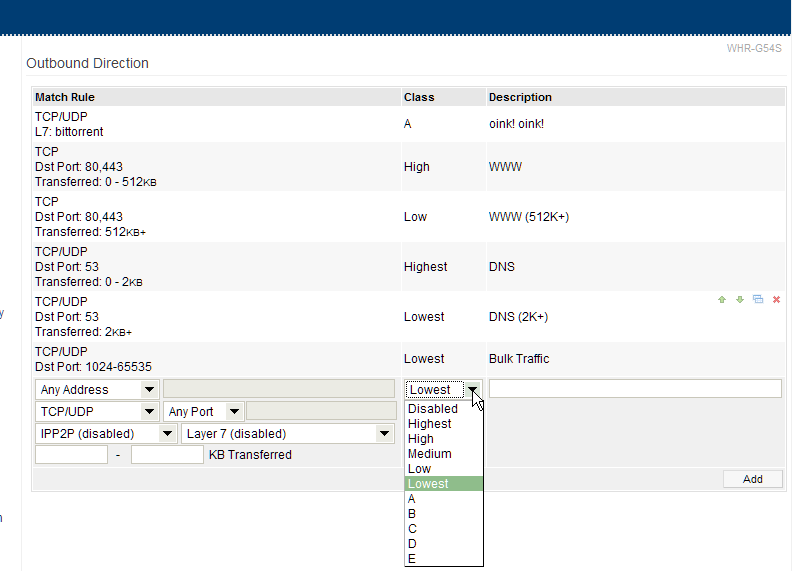
QOS in Tomato
It's really easy enough that your grandma could do it.
Seriously, Tomato has a very clean interface that just does what you would expect. I'd toy with it a bit if I were you.
Best place to get a feel for the QOS settings is probably a screenshot of the interface.