Slashdot Mirror
Domain: remotecentral.com
Stories and comments across the archive that link to remotecentral.com.
Comments · 105
-
Re:Only european and asian companies
On a related note: philips already makes a programmable remote that you can program by pointing it at an other remote. You then press the button on the first remote and you can assign it to a button on the philips remote. Very handy.
Err...so do about 2 dozen other companies. Take a look at Remote Central. -
Huh? What's so original?
This just looks like the kind of alphanumeric pad you get on cellphones, just on a wired USB dongle.
You can already get IR remote controls with these built in! -
Sites with more info about the One For All remotes
Here is a picture of the model 6012 that I've got: http://www.oneforall-int.com/ussite/urc6012.html
And here is a picture of the model 8910 (more advanced, with learning capabilities, etc): http://www.oneforall-int.com/ussite/urc8910.html
A clickable link to the One For All info site: http://www.hifi-remote.com/ofa/
A good universal remote site, with reviews, forums, etc: http://www.remotecentral.com -
Startup time?!
I was looking around for the battery life specs (I couldn't get to the specs page on the Philips website)
-
Re:I want a programmable, SIMPLE remote!!You could try a look at the Weemote and its "big" brother the Weemote Snr. They do have that simple layout you were asking for...
For the control issues, a Pronto may do the trick but you would need to use "discrete power codes" (separate IR codes for power-on and power-off rather than a toggle) - and whether these are available or not depends on the equipment you have (sometimes there are workarounds even when the codes aren't there - eg pressing Play will switch on many DVD players if they are off, so Play=Discrete Power On, Play+Power=Discrete Power Off). Check out your equipment by going to RemoteCentral, visiting the Files section and checking the Discrete Codes (go here for codes in Pronto format).
-
Re:I want a programmable, SIMPLE remote!!You could try a look at the Weemote and its "big" brother the Weemote Snr. They do have that simple layout you were asking for...
For the control issues, a Pronto may do the trick but you would need to use "discrete power codes" (separate IR codes for power-on and power-off rather than a toggle) - and whether these are available or not depends on the equipment you have (sometimes there are workarounds even when the codes aren't there - eg pressing Play will switch on many DVD players if they are off, so Play=Discrete Power On, Play+Power=Discrete Power Off). Check out your equipment by going to RemoteCentral, visiting the Files section and checking the Discrete Codes (go here for codes in Pronto format).
-
Re:I want a programmable, SIMPLE remote!!You could try a look at the Weemote and its "big" brother the Weemote Snr. They do have that simple layout you were asking for...
For the control issues, a Pronto may do the trick but you would need to use "discrete power codes" (separate IR codes for power-on and power-off rather than a toggle) - and whether these are available or not depends on the equipment you have (sometimes there are workarounds even when the codes aren't there - eg pressing Play will switch on many DVD players if they are off, so Play=Discrete Power On, Play+Power=Discrete Power Off). Check out your equipment by going to RemoteCentral, visiting the Files section and checking the Discrete Codes (go here for codes in Pronto format).
-
Re:I want a programmable, SIMPLE remote!!You could try a look at the Weemote and its "big" brother the Weemote Snr. They do have that simple layout you were asking for...
For the control issues, a Pronto may do the trick but you would need to use "discrete power codes" (separate IR codes for power-on and power-off rather than a toggle) - and whether these are available or not depends on the equipment you have (sometimes there are workarounds even when the codes aren't there - eg pressing Play will switch on many DVD players if they are off, so Play=Discrete Power On, Play+Power=Discrete Power Off). Check out your equipment by going to RemoteCentral, visiting the Files section and checking the Discrete Codes (go here for codes in Pronto format).
-
Re:What a lazy SOBI would agree - this review was a rush-job and scarcely worth the paper it wasn't printed on
Further work with the Pronto should have come up with its greater flexibility and the ability to directly edit IR codes (gaining access in some cases to functions not available on the original remote - like service codes and discrete power codes). Last but not least, he should have checked the online resources available - like the Files section at RemoteCentral.
-
Re:proud pronto ownerNevo may be OK for providing the sort of functionality you might expect from a One-for-All but it falls well short of what a Pronto-class remote provides.
With Pronto you have almost total freedom on how you arrange your buttons and what shapes you use (Nevo limits you to a 5x3 button layout - although I believe you can change the button styles). You can also edit the IR code directly to access features not found on the original remote (manufacturer service settings, discrete power codes being two examples).
Best of all, you can share your files with others. Check out RemoteCentral (specifically the Files section) for some examples of what is available. With Nevo, you are limited to what UEI allow you to download from their website.
PDAWin for the Ipaq would be a more credible alternative (it can use the Pronto CCF file format) - you then just have the hardware issues of the Ipaq (not enough buttons) and the software issues (PocketPC - need more be said?) to deal with.
-
Use an extender
I'm in the process of shifting all my AV gear and the PC into the attic to free up more space. I have one of the original Prontos, which is truly excellent if you are prepared to put in the time to build the interface - see Remote Central for more.
I am going to keep the Pronto and use a simple remote control extender like this one. I use an IRMan to control the jukebox on the PC (Monkey's Audio rips of my CDs). -
Home Theatre Master - No competition
I feel I am somewhat of an authority on this subject. Shortly after Christmas, I embarked on a crusade to find the perfect remote, that offered maximum flexibility and ease of use.
Over the next 2 months, I purchased and returned remote after remote, always dissapointed (until the final one.. keep reading). Here are some opinions on the various types.
Touchscreen models: Sexy, sleek, great cool factor. COMPLETELY AWKWARD TO USE once the "gee wow" factor wears off. You have to press the screen to activate it, then visually search for the button you want, then press the screen again. Zero tactile feedback. I want to be able to find the function I want without even looking at the thing.
All button models: Great for basic use, but too hard to remember what you've set special functions to, and tedious to program (when the red light blinks twice, hold down X until the red light blinks rapidly. If the light is steady and unblinking, you must then proceed to alternately pressing Y and Z while standing on your head and pointing the remote at the constellation Orion.. etc) Aside: With JP1 programming, the Radio Shack
So... where does this leave us? I wanted a remote with the customizability, clarity, and easy programming of a screen model, with the tactile feedback of a buttoned model.
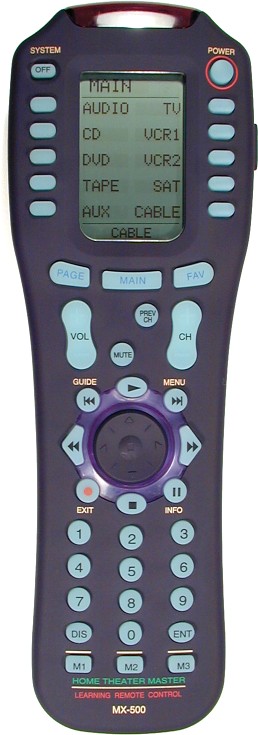
Enter the Home Theatre Master MX-500. (Big picture)
This is truly a dream remote. You have wonderful ergonomic design, thoughtfully placed controls, and the real show stopper: the LCD screen and side buttons. These side buttons are used to select options from the screen, in much the same way a bank machine works. You main menu consists of 10 devices (which you can rename of course), and each of these 10 devices has 2 LCD screens (20 functions) worth of programmable, custom named functions, in addition to all the regular buttons, all of which are fully programmable. And of course the LCD screen provides a full menu driven interface to the remote's features.
Here is an extremely in-depth professional review.
Here is a long list of user reviews. (Average score is 4.82 / 5, from 113 reviews)
The only remote that can top this is from the same company, the MX-700. This remote comes with a small, fully programmable buddy remote, can set full length macros on any key, and is computer programmable. It also costs $500 USD! (The MX-500 is ~MSRP $200, I got mine for $112 online)
All my friends are jealous of this remote, I can fully operate it it absolute darkness with just one hand (either left or right), a complete stranger can figure out how to operate my entire entertainment system in 5 minutes flat, it has insane IR power.. I can bounce it from other rooms no problem, and I haven't even SEEN my other remotes since the day I got this. No other remote even comes close. If you're sick of remote clutter, you need to get one these babies. I cannot heap enough praise on this thing. -
Home Theatre Master - No competition
I feel I am somewhat of an authority on this subject. Shortly after Christmas, I embarked on a crusade to find the perfect remote, that offered maximum flexibility and ease of use.
Over the next 2 months, I purchased and returned remote after remote, always dissapointed (until the final one.. keep reading). Here are some opinions on the various types.
Touchscreen models: Sexy, sleek, great cool factor. COMPLETELY AWKWARD TO USE once the "gee wow" factor wears off. You have to press the screen to activate it, then visually search for the button you want, then press the screen again. Zero tactile feedback. I want to be able to find the function I want without even looking at the thing.
All button models: Great for basic use, but too hard to remember what you've set special functions to, and tedious to program (when the red light blinks twice, hold down X until the red light blinks rapidly. If the light is steady and unblinking, you must then proceed to alternately pressing Y and Z while standing on your head and pointing the remote at the constellation Orion.. etc) Aside: With JP1 programming, the Radio Shack
So... where does this leave us? I wanted a remote with the customizability, clarity, and easy programming of a screen model, with the tactile feedback of a buttoned model.
Enter the Home Theatre Master MX-500. (Big picture)
This is truly a dream remote. You have wonderful ergonomic design, thoughtfully placed controls, and the real show stopper: the LCD screen and side buttons. These side buttons are used to select options from the screen, in much the same way a bank machine works. You main menu consists of 10 devices (which you can rename of course), and each of these 10 devices has 2 LCD screens (20 functions) worth of programmable, custom named functions, in addition to all the regular buttons, all of which are fully programmable. And of course the LCD screen provides a full menu driven interface to the remote's features.
Here is an extremely in-depth professional review.
Here is a long list of user reviews. (Average score is 4.82 / 5, from 113 reviews)
The only remote that can top this is from the same company, the MX-700. This remote comes with a small, fully programmable buddy remote, can set full length macros on any key, and is computer programmable. It also costs $500 USD! (The MX-500 is ~MSRP $200, I got mine for $112 online)
All my friends are jealous of this remote, I can fully operate it it absolute darkness with just one hand (either left or right), a complete stranger can figure out how to operate my entire entertainment system in 5 minutes flat, it has insane IR power.. I can bounce it from other rooms no problem, and I haven't even SEEN my other remotes since the day I got this. No other remote even comes close. If you're sick of remote clutter, you need to get one these babies. I cannot heap enough praise on this thing. -
Home Theatre Master - No competition
I feel I am somewhat of an authority on this subject. Shortly after Christmas, I embarked on a crusade to find the perfect remote, that offered maximum flexibility and ease of use.
Over the next 2 months, I purchased and returned remote after remote, always dissapointed (until the final one.. keep reading). Here are some opinions on the various types.
Touchscreen models: Sexy, sleek, great cool factor. COMPLETELY AWKWARD TO USE once the "gee wow" factor wears off. You have to press the screen to activate it, then visually search for the button you want, then press the screen again. Zero tactile feedback. I want to be able to find the function I want without even looking at the thing.
All button models: Great for basic use, but too hard to remember what you've set special functions to, and tedious to program (when the red light blinks twice, hold down X until the red light blinks rapidly. If the light is steady and unblinking, you must then proceed to alternately pressing Y and Z while standing on your head and pointing the remote at the constellation Orion.. etc) Aside: With JP1 programming, the Radio Shack
So... where does this leave us? I wanted a remote with the customizability, clarity, and easy programming of a screen model, with the tactile feedback of a buttoned model.
Enter the Home Theatre Master MX-500. (Big picture)
This is truly a dream remote. You have wonderful ergonomic design, thoughtfully placed controls, and the real show stopper: the LCD screen and side buttons. These side buttons are used to select options from the screen, in much the same way a bank machine works. You main menu consists of 10 devices (which you can rename of course), and each of these 10 devices has 2 LCD screens (20 functions) worth of programmable, custom named functions, in addition to all the regular buttons, all of which are fully programmable. And of course the LCD screen provides a full menu driven interface to the remote's features.
Here is an extremely in-depth professional review.
Here is a long list of user reviews. (Average score is 4.82 / 5, from 113 reviews)
The only remote that can top this is from the same company, the MX-700. This remote comes with a small, fully programmable buddy remote, can set full length macros on any key, and is computer programmable. It also costs $500 USD! (The MX-500 is ~MSRP $200, I got mine for $112 online)
All my friends are jealous of this remote, I can fully operate it it absolute darkness with just one hand (either left or right), a complete stranger can figure out how to operate my entire entertainment system in 5 minutes flat, it has insane IR power.. I can bounce it from other rooms no problem, and I haven't even SEEN my other remotes since the day I got this. No other remote even comes close. If you're sick of remote clutter, you need to get one these babies. I cannot heap enough praise on this thing. -
Home Theatre Master - No competition
I feel I am somewhat of an authority on this subject. Shortly after Christmas, I embarked on a crusade to find the perfect remote, that offered maximum flexibility and ease of use.
Over the next 2 months, I purchased and returned remote after remote, always dissapointed (until the final one.. keep reading). Here are some opinions on the various types.
Touchscreen models: Sexy, sleek, great cool factor. COMPLETELY AWKWARD TO USE once the "gee wow" factor wears off. You have to press the screen to activate it, then visually search for the button you want, then press the screen again. Zero tactile feedback. I want to be able to find the function I want without even looking at the thing.
All button models: Great for basic use, but too hard to remember what you've set special functions to, and tedious to program (when the red light blinks twice, hold down X until the red light blinks rapidly. If the light is steady and unblinking, you must then proceed to alternately pressing Y and Z while standing on your head and pointing the remote at the constellation Orion.. etc) Aside: With JP1 programming, the Radio Shack
So... where does this leave us? I wanted a remote with the customizability, clarity, and easy programming of a screen model, with the tactile feedback of a buttoned model.
Enter the Home Theatre Master MX-500. (Big picture)
This is truly a dream remote. You have wonderful ergonomic design, thoughtfully placed controls, and the real show stopper: the LCD screen and side buttons. These side buttons are used to select options from the screen, in much the same way a bank machine works. You main menu consists of 10 devices (which you can rename of course), and each of these 10 devices has 2 LCD screens (20 functions) worth of programmable, custom named functions, in addition to all the regular buttons, all of which are fully programmable. And of course the LCD screen provides a full menu driven interface to the remote's features.
Here is an extremely in-depth professional review.
Here is a long list of user reviews. (Average score is 4.82 / 5, from 113 reviews)
The only remote that can top this is from the same company, the MX-700. This remote comes with a small, fully programmable buddy remote, can set full length macros on any key, and is computer programmable. It also costs $500 USD! (The MX-500 is ~MSRP $200, I got mine for $112 online)
All my friends are jealous of this remote, I can fully operate it it absolute darkness with just one hand (either left or right), a complete stranger can figure out how to operate my entire entertainment system in 5 minutes flat, it has insane IR power.. I can bounce it from other rooms no problem, and I haven't even SEEN my other remotes since the day I got this. No other remote even comes close. If you're sick of remote clutter, you need to get one these babies. I cannot heap enough praise on this thing. -
Re:$60 touchscreen remote
The 8-1 touch screen is currently clearanced for 29.99 at Radio Shack (B&M only...can't find it online).
-
Re:It's a sad day when...
I just picked up the 8-1 touch screen remote at Radio Shack 2 days ago. MSRP was originally 99.99 but they are currently on clearance for 29.99. It's definitely no pronto, but I have been very happy with it so far. It had built in codes for 4 of my 5 devices (DVD is an off brand) with full functionality that I've found so far. The remote is learning, so the DVD will be programmed as soon as I get the time. The only thing that I have a gripe about is that there is no "feel" of the buttons...but that is the result of a smooth touch screen.
-
remote division thinks different
Philips remote control division has recently released a remote based on Linux and Java. You would think Microsoft hates that if they cared.
-
Re:How about....
I think we have the same remote. I think that it can (with some extra massaging) do everything that your receiver remote could do - provided you have the original remote, available and working.
It controls everything in my house that can accept some sort of IR commands. It will learn any command you can output from your original remote. So if the specific command(s) you are looking for aren't part of the default Oykno entry, there is still hope. I know that the Sony remote doesn't fully control a Replay TV and you need to program 2 or so button commands. If you don't, and you don't have an original working Replay TV remote, there is functionality that you lose with the Replay TV simply from having no access to it.
-
There are Component Switchers
If I needed one, I'd get one like this . It is remote controlled so I could set up my ProntoPro's macros to switch to the proper video source.
-
Not A TouchscreenThe headline and the blurb are wrong, at least as near as I can tell from reading the linked articles. The interface is not "a blank electro-luminescent touch-screen". It is not true that "The 'buttons' are animated graphics drawn to match any device you choose". The buttons are buttons, the normal bumpy find-them-while-looking-at-the-TV-screen kind. They are electro-luminescent, but they aren't flat and they aren't on a touch-screen and they aren't drawn using pixel-mapped graphics and they aren't particularly flexible in their appearance.
The picture clearly shows that the graphics are mostly static and unchanging; they simply either light up or stay dark depending on what mode the remote is in. The exceptions are the arrows around the four-way pad at the middle bottom, and the six transport-control buttons below the pad. Those have banks of dots that can be used like crude, low-res pixels to draw crude, low-res pictures.
The posters comparing this to a pronto have been misled by the headline and blurb, as have those posters talking about the no-tactile-feedback problems of touchscreen remotes. As the advertisement says, this remote "combines the flexibility of a touch-screen with the push button feel of a traditional remote control". That claim is probably a bit overblown; the flexibility can't possibly match that of the Pronto, although it might be comparable to the Sony RM-AV3000.
Irrelevant Side Note:
I spent a lot of time looking for the "perfect" remote, once. I settled on a One-For-All six-way, primarily for its physical form factor. It was small and light, but still had enough buttons to perform all the required routine functions, and the buttons were nicely laid out with good tactile contrast, so that it was very easy to know exactly which button was which without looking. I think that particular model is no longer available; I've never seen it in stores ever again.
Then I got a Tivo. The Tivo "peanut" remote is the end-all in tactile remotes: button placement, button shape, and hand-feel (remote size, wieght, and shape) are the best I have ever seen (or rather, felt). It is unfortunately not a learning remote, and has almost no customizability, and I can't use it to switch modes on my AV system. But I rarely desire to switch the AV system away from Tivo any more, so that's not much of an inconvenience.
At any rate, the article submitter and the slashdot editors have done another fine job of completely misunderstanding the very articles they link to. -
did you update the firmware?
[problems with pronto]
There's firmware updates for the Pronto models that solve the problems you describe.
it's not any faster than picking up a regular remote and hitting the button
I've had my ProntoPro for a few weeks now and can say it's much faster than using the regular remotes. My setup includes HDTV, surround sound receiver, cable, DVD, Laser disk, PS2, and SVHS deck. What makes it faster than normal remotes is the macros you can program - you can set up a single button to control all your equipment.
For example, I have mine set up so that hitting the HDTV button will power on the TV, receiver & cable box, switch the TV & receiver to the HD inputs, and finally change the display to show 9 channel logos for the HD stations I receive. Pressing a single logo and the 3 digit channel code is sent to the cable box. - So to watch any HD show I only have to grab a single remote and press 2 buttons.
Prior to that I had to dig the TV remote out of the stack, turn it on, swith it's input, dig the receiver remote out of the stack, turn it on, switch it's input, and finally dig the cable remote out, turn it on and enter the channel number.
A major benefit is that my mom(currently visiting) can work my TV without calling me at work -
did you update the firmware?
[problems with pronto]
There's firmware updates for the Pronto models that solve the problems you describe.
it's not any faster than picking up a regular remote and hitting the button
I've had my ProntoPro for a few weeks now and can say it's much faster than using the regular remotes. My setup includes HDTV, surround sound receiver, cable, DVD, Laser disk, PS2, and SVHS deck. What makes it faster than normal remotes is the macros you can program - you can set up a single button to control all your equipment.
For example, I have mine set up so that hitting the HDTV button will power on the TV, receiver & cable box, switch the TV & receiver to the HD inputs, and finally change the display to show 9 channel logos for the HD stations I receive. Pressing a single logo and the 3 digit channel code is sent to the cable box. - So to watch any HD show I only have to grab a single remote and press 2 buttons.
Prior to that I had to dig the TV remote out of the stack, turn it on, swith it's input, dig the receiver remote out of the stack, turn it on, switch it's input, and finally dig the cable remote out, turn it on and enter the channel number.
A major benefit is that my mom(currently visiting) can work my TV without calling me at work -
This is not at all new...
... learning, programmable, touch-screen remotes have been around for years in the consumer market. This one is just another that doesn't seem as programmable as many of the others (most of the "buttons" look to merely be on an on/off toggle rather than truly modular) and tends to be a bit cheaper as a result (Radio Shack lists it for $99 IIRC). Check out Remote Central or most A/V sites and you'll find a mess of other remotes.
-
Home Theater Master MX-1000
Animated LCD and programmable is neat, but they should really take a clue from the MX-1000. People like physical buttons.
I can fast-forward and rewind and pause and change the volume or channel without ever looking away from the TV because the physical buttons can be located by (get this) touch.
A review of the MX-1000 -
Already there?
This doesn't sound like anything new. Any CCF format device such as a Pronto featured at RemoteCentral can handle your A/V equipment. There is software and hardware for controlling this on an iPaq. Using a BX24-AHT which is currently compatible with the Misterhouse home automation system, you will soon be able to control your lights and other X10 modules from such CCF devices by simply adding a $7 IR receiver. Add some IR repeaters around the house and you can control it all from anywhere in the house. Use something like a wireless Aquapad to access the home network and the Misterhouse web interface to control it all. What "Future"? The tech is already here. Just use it.
-
Better technology is already available for sale.
Devices already exist to do this, without their kludgery of needing a laptop to actually do the IR transmission.
The Philips Pronto is the most popular of the fully programmable universal remote. You can control thousands of devices with the Pronto, including X10 modules to control lamps, fans, and other appliances.
It has a PC application to set set the GUI for controlling all the devices. It comes pre-programmed for many devices, and just about any other can be downloaded from various internet sites or manufacturers.
The GUI to program it has a bit of a learning curve. If they wanted to make that process even easier, they could have saved a lot of effort by just making a better config GUI, rather than re-inventing the hardware.
Another option, if you really want a PDA as your remote is the Nevo software for the new iPaq, which includes a more powerful IR transmitter. -
What are they doing?
Research?
Are they talking about universal remote controls? The Philips Pronto TSU2000 and VAR derivatives, like the Yamaha RAV-2000 and Marantz RC5000i are not "in research" products - they are current universal remotes with a user defined interface. If you had a Microwave that accepted IR controls, these would work with it, and quite nicely so. If they are interested in bringing a universal remote to the market, they have a tough act to follow.
Or are they researching controlling everything in the normal house? Like using Bluetooth wireless technology, or using JNDI as a naming and control mechanism? (Well, they used X-10, but that's besides the point) If that is their focus, I wish them luck in bringing the industry into a situation where they both care and cooperate with standards.
They seem to be doing everything with RF (not IR) wireless technology, but that is both uncommon and unsupported on current and legacy systems. I don't know how they plan on supporting, in a cost effective way, IR and wireless in a single remote, as well as all the wireless devices you would have to deploy around the house to justify the cost of the remote. Perhaps in a market of sufficient scale this would be viable.
-
What are they doing?
Research?
Are they talking about universal remote controls? The Philips Pronto TSU2000 and VAR derivatives, like the Yamaha RAV-2000 and Marantz RC5000i are not "in research" products - they are current universal remotes with a user defined interface. If you had a Microwave that accepted IR controls, these would work with it, and quite nicely so. If they are interested in bringing a universal remote to the market, they have a tough act to follow.
Or are they researching controlling everything in the normal house? Like using Bluetooth wireless technology, or using JNDI as a naming and control mechanism? (Well, they used X-10, but that's besides the point) If that is their focus, I wish them luck in bringing the industry into a situation where they both care and cooperate with standards.
They seem to be doing everything with RF (not IR) wireless technology, but that is both uncommon and unsupported on current and legacy systems. I don't know how they plan on supporting, in a cost effective way, IR and wireless in a single remote, as well as all the wireless devices you would have to deploy around the house to justify the cost of the remote. Perhaps in a market of sufficient scale this would be viable.
-
What are they doing?
Research?
Are they talking about universal remote controls? The Philips Pronto TSU2000 and VAR derivatives, like the Yamaha RAV-2000 and Marantz RC5000i are not "in research" products - they are current universal remotes with a user defined interface. If you had a Microwave that accepted IR controls, these would work with it, and quite nicely so. If they are interested in bringing a universal remote to the market, they have a tough act to follow.
Or are they researching controlling everything in the normal house? Like using Bluetooth wireless technology, or using JNDI as a naming and control mechanism? (Well, they used X-10, but that's besides the point) If that is their focus, I wish them luck in bringing the industry into a situation where they both care and cooperate with standards.
They seem to be doing everything with RF (not IR) wireless technology, but that is both uncommon and unsupported on current and legacy systems. I don't know how they plan on supporting, in a cost effective way, IR and wireless in a single remote, as well as all the wireless devices you would have to deploy around the house to justify the cost of the remote. Perhaps in a market of sufficient scale this would be viable.
-
What I want in an HEPC
I see a lot on what case to use to minimize the eye carnage when you web a PC and your living room, and also I've read on what OSes to use. But what I have not seen is a comiplation of software to use.
I want to be able to:
* Have TIVO functionality
* Play my MP3s
* RIP CDs
* Download multimedia files via broadband inernet
* Manage my downloaded and existing media
* Be able to copy a CD without having to use my PC
* Play DVDs
* Listen to the radio
* Record radio shows (I like talk radio and Art Bell)
* Be able to transfer files to and from my PC
* And most of all, BE SO EASY TO USE MY PC-ILLITERATE WIFE CAN USE IT!
I think I have the remote control problem licked. I have a Philips Pronto T-1000. Probably the best remote control you can have, but I know newer versions with RF exist. Mine is IR only, but that is fine, I want my HEPC for one room, for now.
I can build the PC, I know how to install Linux perfectly, but want software will let me do all of the above and probably more in one cohesive GUI that can be controlled with a remote control. Keep in mind, again, that I can do A LOT with my Pronto remote control including creating macros. -
What I want in an HEPC
I see a lot on what case to use to minimize the eye carnage when you web a PC and your living room, and also I've read on what OSes to use. But what I have not seen is a comiplation of software to use.
I want to be able to:
* Have TIVO functionality
* Play my MP3s
* RIP CDs
* Download multimedia files via broadband inernet
* Manage my downloaded and existing media
* Be able to copy a CD without having to use my PC
* Play DVDs
* Listen to the radio
* Record radio shows (I like talk radio and Art Bell)
* Be able to transfer files to and from my PC
* And most of all, BE SO EASY TO USE MY PC-ILLITERATE WIFE CAN USE IT!
I think I have the remote control problem licked. I have a Philips Pronto T-1000. Probably the best remote control you can have, but I know newer versions with RF exist. Mine is IR only, but that is fine, I want my HEPC for one room, for now.
I can build the PC, I know how to install Linux perfectly, but want software will let me do all of the above and probably more in one cohesive GUI that can be controlled with a remote control. Keep in mind, again, that I can do A LOT with my Pronto remote control including creating macros. -
slow news day? Time to dredge up old toys?
This has been out and well-publicized for months! Why is it on slashdot? It's been onsale since about september of last year!
Everyone and their brother has reviewed it! It's been featured on remotecentral since february!
Is slashdot near death? Tell me something new, not something that has been beat to death elsewhere!
-
Big sales from Home Theater people possible
If people are willing to pay almost $1,000 for the new Pronto remote, and MUCH more for other remotes, I can see this selling in large numbers if the IR range was bumped up. Perhaps this device will have a serious impact on high-end remote control prices. Try RemoteCentral for remote info/reviews.
-
Harman-Kardon TakeControl TC-1000
I bought this remote for $200 several months ago. All I can say is that it's a fantastic remote. Not only does it have just the right tactile buttons for channel changing, muting and volume control, but you can program it very nicely and it works very well. Also, I've gotten really good comments from people not tech-savvy about how nice the remote is and how easy and fun it is to use. To me, a low-tech person not being intimidated by an LCD remote of this calibur is more than enough reason to consider purchasing it.
BTW, my remote has a black case, not clear like pictured here. It's probably the best $200 I ever spent. -
Re:Pronto doesn't do it all
The Home Logic UR362 has this feature. Check out the bottom of page 3 on the review.
Krishna -
Re:Universal Remote
I have the MX-500, and it's great. It has normal buttons for everything, and also a touch screen LCD. It has a complete list of devices pre-programmed, and you can also re-program any button you want from another remote.
It supports 10 devices, each with a completely different setup for the hard buttons and touch screen sub menus. I've combined devices, so I only use 3 buton sets, Tivo/TV, Receiver/TV/DVD, and Receiver/CD/tuner...
Also, I had to change the batteries just this week, and I was a bit apprehensive about it losing all the programmed info, but it didn't, and all is well. I think the batteries lasted about 10 months, but I'm not sure exactly when we got it...
review page on remotecentral -
Re:Timer anyone?
The Philips Pronto is excellent at timer functions. Mine switches my sat box to BBC News 24, and my amp on at a certain volume level on weekday mornings, and my sat channel to Sky One at 19:00 weekdays for the Simpsons. When I go to bed at night, one button powers down all my kit and fires an X10 macro to deal with lights and appliances (coffee machine etc) It also holds a disc listing for my Sony 300 DVD changer and my Pioneer 25 CD changer, and fires up my selected disc within a second or two. All functionality is only limited by memory space (I've got the original 1MB, but there's also a 2MB and I think the colour one is 8) so you can have 5000 timers if they fit in the memory.....! I love my Pronto
-
Marantz RC-1200
I currently own a Marantz RC2000 MK-II, it's an awesome pushbutton/LCD combo remote (was $200). They are releasing a new one called RC-1200, it's really cool looking (http://www.remotecentral.com/ces2000/photo22.htm
) . I for one will be lined up to get this when available. -
Remote Central Reviews
Give this website a try. Lots of info and reviews on many different remote styles. I bought my 'Crisp Solutions UCommand 515' after checking out the reviews there. They were pretty much right on. The few things they didn't like I think suck too(no hard buttons for one), but over all a nice remote.
-
TheaterTouch from RTI
This is a matter of personal preference, of course: do yourself a favor and play with a bunch of remotes before you pick one.
My remote of choice is the TheaterTouch from RTI.
It's main advantage is that it has a programmable touch screen interface and hard keys. The touch screen isn't nearly as programmable as the Pronto, but I don't mind that so much, because I find the hard keys indispensable.
I owned a Pronto and found that having to constantly look at the screen to see what I was doing made for a bad user experience, at least for me.
Another nice thing about the TheaterTouch is that it has an RF box that you can buy, which makes the remote much more useful. I've put most of my equipment into a cabinet, and strung IR emitters into the cabinet.
Also, an excellent place to find out about remotes is Remote Central.
-
Sony Rm-VL900I've got a Sony RM-VL900, which goes for about $60 retail. While it has limited macro capability (11 macros with 16 steps), it can control up to eight devices and each button is trainable. Plus, it's all hard buttons - no touchscreen (which is a huge plus for me since I don't want to look at the remote when I'm using it).
Here's a review at Remote Central:
-
Sony RM-VL900 Learning Remote
This Sony remote is pretty good as an inexpensive learning remote.
One of the major problems with most cheap learning remotes is the lack of memory available to learn alot of functions. This one actually has enough keys and enough memory to totally memorize the functions for a Tivo remote with it's mass of buttons (4-way switch, menus, play/pause/slow, etc). It also has macros for those that have all of their TV sound output through their receiver (can turn TV and receiver on simultaneously).
At $40 here, it's pretty decent for the price.
It's not the extreme high end, but it's enough to control my TV, Receiver, VCR, DVD, Laserdisc and have enough memory to copy my Philips Tivo remote.
Reviews are here and here. -
Re:Ecch.
My wife gave me a Sony lVL-900 6 months ago, and none of my other remotes have been out of the drawer since.
This remote is all buttons, but it is a totally programmable LEARNING remote. You don't have to worry about whether the button you want is preprogramed because you can "teach it" It also can do 11 macros, and even though it will control 8 devices, since you can put any function on any button you can put all the stuff you need one device and not have to switch back and forth. This thrills my wife because she only has to puch one button to turn everything on to watch cable, or a DVD.
Compared to $400 for a full GUI, I'll take the $50 buttons.
-
Remote Central
Remote Central has reviews, forums, and for those that can use them all sorts of custom files. Its the best source for any information relating to remotes.
-
LCD Remote not sillyEvery seen the Philips Printo remote control? It is very useful and very very powerful. You can download free software from their site and truly customize all the screen to your heart's content.
Check out a review from one of the better remote control websites.
-
Pronto, Pilot etc.I am a happy user of a Phillips Pronto remote. I also have a Palm Pilot and I had tried using that to control my devices.
In brief, here are the main points of Pronto vs. Pilot:
- With its own IR transmitter, the Pilot is pretty much useles as a remote (you need to be about 3-4 feet from the device, which is too close). However, there is a little gadget that plugs into the cradle port and is supposed to extend the range, which I haven't tried.
- The Pilot's screen is too small to accomodate enough buttons (personally, I'd be happier even if the Pronto had a bigger screen, which is already much bigger than the Palm's).
- If, like me, you like the lights low when watching movies, then the Pilot will eat up batteries in no time (whereas the Pronto's batteries tend to last much longer for this particular use -- even without the charging cradle, I don't really have a problem, I change batteries every 2-3 months, and I use it evey day for at least an hour).
- First of all Take Control is partly developed by Microsoft (the software etc. are Microsofts). This is not necessarily a bad thing... Anyway, it's up to you to decide whether it counts.
- From what I've read, Pronto has a stronger beam. In particular, the beam's dispersion is much wider (unless all your devices are dead ahead from where you're sitting, you should probably take this into account).
- The Pronto's programming capabilities are much better. However, Take Control is supposedly easier to program by your mom and dad that do not know anything about computers. But, if you're a "poweruser" then Pronto is probably the best.
- The receiver (but not the transmitter) on Take Control can handle higher frequencies than Pronto's. However, you can find Pronto CCFs on the net for most of the devices that emit non-standard high-frequency codes (see below).
- The distribution network in the US for Take Control is better and you'll probably find it a little cheaper than Pronto.
If you want more information about these and other programmable remotes, an excellent site is:
www.remotecentral.comFinally, for the Pronto, you do not have to take my (or anyone's) word: There is a user community at www.prontoedit.com, with links to the Pronto emulator (runs under MS Windoze) and many CCFs (that is configuration files with screens, commands, macros, etc etc that you can incorporate into your own... designs and download into Pronto). Good luck!
-
Bite the bullet......and get the Sony. As the guy says, it can be found cheap (I got it for $125), and if you get over the spelling error on the LCD (mine says "Sound Feild" instead of "Sound Field"), it's a great remote.
I especially like the fact that the batteries for the backlight are separate from the batteries for the remote memory...that's just intelligent design.
-
Oh boy...
I have the same woes.
It appears to be impossible to find a good remote.
Check this site for a ton of info. Beware, big companies give this guy free remotes so don't expect a hell of a lot of journalistic integry anywhere but the user forums.
For cheap and good, the SL-9000 does look quite nice. I've never tried it though. It has decent punch-through and macro options (most important).
For high-end, the Philips one looks pretty good but I don't really like those screens because you actually have to look at it to get to a button. I can hit most of the buttons on my five separate remotes (works for now, I'm afraid of the lost functionality of multi-remotes). There is also the fact that you can't fit a hell of a lot of buttons on those screens, you'll probably find yourself scrolling a lot.
If you like those screens and want something kind of cheap, there is software you can get for a palm but the IR port isn't all that high-powered. I heard somewhere (can't remember where) that there will be a remote control addition to the Visor.
My advice: a number of high-end home theatre stores will let you bring a remote home to try it out. Do this and don't buy anything fancy unless you need the functionality.
I have also thought about designing my own remote. Simply use a PIC, a 2-wire EEPROM, a serial port, and a load of buttons and you can program your remote graphically on your PC. A lot of low-level remote info can be found through the LIRC (Linux Infrared Remote Control) project. This way you can get a remote that does pretty much anything you want and you won't have to worry about setting punch-throughs, macros, switching between components, etc. The software would allow you to print a sheet which you can cut up and place under a clear plastic cover on your remote that has the key names on it. Some remotes have little stickers that you can place under the buttons so that would be an option (although not so elegant) as well.
Yes, I'm very serious about designing my own remote. I have done much thought on it. I want it to be as good or better quality than commercial remotes. If anyone is interested in helping out/discussing it email me and we'll maybe set up a mailing list and web page, etc. -
Pronto is better than Take ControlI used to own a Take Control. I sold it shortly after buying the Pronto. The Pronto is a superior product for many reasons:
- The IR output is stronger on the Pronto. It operates my equipment no matter where I point the Pronto. I needed to point the Take Control directly at the equipment.
- The Pronto desktop software (ProntoEdit) is easier to use than the Take Control software. I programmed the Pronto in a fraction of the time it took to do the same tasks with the Take Control.
- ProntoEdit comes with an emulator for the device. No need to wait for the download to try things out.
- ProntoEdit supports import from other configuration files. The Take Control does not. Import is a huge feature. There's a large body of configurations availabe at Remote Central.
- The Pronto is more configurable. You can use your own bitmaps, assign macros to any button, and so on. Take a look at these configuration files to see what people are doing with the thing.
- The wheel button on the Take Control is annoying to use. The conventional hard buttons on the Pronto work better.
- There are more hard buttons on the Pronto.
- The contrast on the Pronto screen is higher.
- The batteries last longer on the Pronto.
I know one of the developers from MS who worked on the Take Control. He tells me that it does not use WinCE.