Slashdot Mirror
Domain: seagate.com
Stories and comments across the archive that link to seagate.com.
Comments · 344
-
Windows as well, Seagate External Drives are bad
I recently had a 1.5TB External Seagate drive. it worked for a few months then started clicking and within 2 weeks the thing failed. I did some google searching and really REALLY wish i had done more research before buying the drive because it is a very common problem. I even got a replacement and the same thing happened. I have read of someone having 5 replacements in 6 months. Seagate are aware there is a problem as they replace the drive instantly but no public recall.
Google Link to LOTS of web pages details the issues http://www.google.co.uk/search?sourceid=chrome&ie=UTF-8&q=Seagate+External+drive+clicking
Seagate Forums
http://forums.seagate.com/t5/Other-External-products/Seagate-Expansions-producing-loud-clicking-sound/td-p/30962/page/3
http://forums.seagate.com/t5/Maxtor-OneTouch-Products/Maxtor-External-Hard-Drive-Clicking-Noise-Not-Working/td-p/16446
http://forums.seagate.com/t5/Other-External-products/Solution-Seagate-Expansion-Desktop-External-Drive-clicking/td-p/49865
I could supply more links, but from a personal view NEVER use seagate for anything but Throw away data. I was using it as a backup for my PC and in the end lost 500gb of data in the process.
Do not by Seagate hard drives -
Windows as well, Seagate External Drives are bad
I recently had a 1.5TB External Seagate drive. it worked for a few months then started clicking and within 2 weeks the thing failed. I did some google searching and really REALLY wish i had done more research before buying the drive because it is a very common problem. I even got a replacement and the same thing happened. I have read of someone having 5 replacements in 6 months. Seagate are aware there is a problem as they replace the drive instantly but no public recall.
Google Link to LOTS of web pages details the issues http://www.google.co.uk/search?sourceid=chrome&ie=UTF-8&q=Seagate+External+drive+clicking
Seagate Forums
http://forums.seagate.com/t5/Other-External-products/Seagate-Expansions-producing-loud-clicking-sound/td-p/30962/page/3
http://forums.seagate.com/t5/Maxtor-OneTouch-Products/Maxtor-External-Hard-Drive-Clicking-Noise-Not-Working/td-p/16446
http://forums.seagate.com/t5/Other-External-products/Solution-Seagate-Expansion-Desktop-External-Drive-clicking/td-p/49865
I could supply more links, but from a personal view NEVER use seagate for anything but Throw away data. I was using it as a backup for my PC and in the end lost 500gb of data in the process.
Do not by Seagate hard drives -
Windows as well, Seagate External Drives are bad
I recently had a 1.5TB External Seagate drive. it worked for a few months then started clicking and within 2 weeks the thing failed. I did some google searching and really REALLY wish i had done more research before buying the drive because it is a very common problem. I even got a replacement and the same thing happened. I have read of someone having 5 replacements in 6 months. Seagate are aware there is a problem as they replace the drive instantly but no public recall.
Google Link to LOTS of web pages details the issues http://www.google.co.uk/search?sourceid=chrome&ie=UTF-8&q=Seagate+External+drive+clicking
Seagate Forums
http://forums.seagate.com/t5/Other-External-products/Seagate-Expansions-producing-loud-clicking-sound/td-p/30962/page/3
http://forums.seagate.com/t5/Maxtor-OneTouch-Products/Maxtor-External-Hard-Drive-Clicking-Noise-Not-Working/td-p/16446
http://forums.seagate.com/t5/Other-External-products/Solution-Seagate-Expansion-Desktop-External-Drive-clicking/td-p/49865
I could supply more links, but from a personal view NEVER use seagate for anything but Throw away data. I was using it as a backup for my PC and in the end lost 500gb of data in the process.
Do not by Seagate hard drives -
Re:If you want CD-quality audio, buy CDs
Wrong. My 21 MB Seagate ST-225 (MFM) was still operating until a few years ago. I purchased it in 1987~1988, together with an IBM PS/2 Model 30 Clone:
-
Re:old machinery
Did someone let them know that the company they hired to back up their data is garbage? (i365, a Seagate company: https://services.seagate.com/contact.aspx)
They must be using all that Maxtor ( http://www.maxtor.com/home-en-us.html ) junk to store the data.I wish New Orleans could catch a break, just one time.
-
Re:use in other mac's?
Go for a hybrid like the Seagate Momentus XT (review on CNet).
Which seem to be having problems with MBPs.
-
Re:Show me the price of 3 TB of SSD.
What ever happened to the hybrid drives that were supposed to be the practical solution...
Seagate Momentus XT drives are available at your favorite computer part reseller in 250GB, 320GB and 500GB flavors.
See also: Wikipedia - Hybrid drive and Seagate's Momentus XT landing page. -
3TB is old
Seagate did this months ago ($250 for 3TB).
http://www.seagate.com/www/en-us/products/external/external-hard-drive/desktop-hard-drive/
-
Re:And here you go.
I recently bought some http://www.seagate.com/www/en-us/products/network_storage/freeagent_dockstar/ (they're really cheap nowadays, got them for 25€ each here in France, saw that you can have them for 20$ in the USA). Same 1.2GHz ARM, 4 USBs, and GigE, but only 128MB of RAM. I installed some ArchLinux-based distro on it (http://www.plugapps.com/index.php5?title=Portal:PlugBox_Linux), and thought it would happily serve as a web gallery server (written with C, using the EFLs). Those things really miss some DSP or Neon instructions, the thumbnail generation is really slow as hell...
-
Re:WD HD Live
Seagate's does everything the Western Digital box does, plus it does Netflix Streaming. It's also $100 without a hard drive.
http://www.seagate.com/www/en-us/products/home_entertainment/freeagent_theater_plus/
-
Re:WD HD Live
Same with the Seagate FreeAgent Theater+(TM) HD Media Player STCEA201-RK. I picked one up last week from Newegg for $50 shipped. http://www.newegg.com/Product/Product.aspx?Item=N82E16822148499
They are OOS now but other places have them for about $80.
It will stream over the network, play from any old USB HD plugged into it, or has a custom slot for a Seagate Go drive. I have mine plugged into a bridged wireless router but it also supports several $15 and under wireless USB cards. I have it connected to several Samba shares and it works fine. The interface is a little cludgy and sometimes is slow to respond but I have not noticed any issues while it is actually playing content. I have also used he Netflix streaming and it played fine, quality was comparable to my Xbox with Netflix.
It is not perfect but damn, for under $100, it is small, silent, uses very little power, and will play 90% of audio and video formats. I've messed a little with some of the other features it has like Youtube videos, Picasa, and Flickr long enough to test them but not long enough to critique them. I never opened the included software that comes with it, I think it includes some type of sync software if you are using it with a USB HD.
The published specs of what it can play:
Streams Netflix
Easily enjoy your photos, movies and music on your TV.
HDMI connectivity and 1080p HD video playback.
Dolby Digital and DTS audio support
Ethernet connection for accessing shared content on your network.
Unique docking system eliminates fumbling with cables and connections.
Front-mounted USB port for digital cameras and additional storage devices.
Includes sync software for PC and Mac computers.
Intuitive user interface with DVD-style navigation.
Windows XP, Vista, Windows 7, and Mac OS X compatible.Supported Video Formats
Formats: MPEG-1, MPEG-2 (VOB/ISO), MPEG-4 (DivX
Subtitles: SAMI(smi), SRT and SUB
Video resolutions: NTSC 480i/480p, PAL 576i/576p, 720p, 1080i, 1080pSupported Audio Formats
AAC, MP3, Dolby Digital, DTS, ASF, FLAC, WMA, LPCM, ADPCM, WAV, OGG
Playlist: M3U, PLSSupported Photo Formats
JPEG files up to 20 megapixels, BMP, GIF, PNG, TIFFOutput
Video: Composite, Component, HDMI 1.3
Audio: Stereo, Optical S/PDIF, HDMI 1.3
Interface: 1x USB 2.0 at front, 1x USB 2.0 at back
Network: Ethernet 10/100 mbps -
Re:Advancing the Past
-
Re:Looking at the numbers....
60 watts? A 2TB performance SATA III drive (not the "green" low power drives) is about 8W (6 on idle, 9 on load).
So that's 8x24*365 = 70KW, more like $6.
http://www.seagate.com/www/en-us/products/internal-storage/barracuda-xt-kit/#tTabContentSpecificationsAnyway, the cost of the hardware is almost zero compared to the other costs, except is you use SAS or SSD drives.
-
Re:Prices on the article are bunk
As a budget consumer, or cheapskate, I like the prices of Seagate's hybrid drives.
-
Re:It's been obvious to me for a while...
This would allow you to return the 'written' status to the OS much faster,
This may be my inexperience showing, but why would such a suggestion enable you to return the 'written' status to the OS any faster than it currently is? If a write request comes in for less than the free cache space, can't you just return "written" almost immediately?
If the cache is full, how does this idea fix the problem that you're bounded by the rate at which that cache can be flushed?Or are you suggesting that you the Seagate Momentus XT was your idea?
...and use the flash as a cache for 'hot' portions of the drive.
I think someone's beaten you to it.
Or are you suggesting that Windows Vista was your idea?
-
Re:One drive are two?
Dammit. I had a nicely linked response all written. And then I clicked on one of my own links in the preview. Sigh.
Ok. I actually did read TFA before I posted (having long since learned not to trust Slashdot headlines
I have now visited Seagate's own tech pageon the drives. They do not clearly state anywhere that it is a single drive inside the case. But you can infer that from the external case dimensions of 6.22 in x 4.88 in x 1.73 in that there isn't enough room for two 3.5" drives.
Having been in this business for a long time I have learned that if you don't ask the right questions computer manufacturers will happily sell you a 'pig in a poke'.
-
Re:Not interesting
From the dimensions here
http://www.seagate.com/www/en-us/products/external/external-hard-drive/desktop-hard-drive/?intcmp=bac-en-us-home-h_hero1-goflexdesk-3tb#tTabContentSpecificationsI don't think you could get two drives in there, but it could be a fat 3.5" drive similar to the 2.5" 1TB drives you get from various places.
-
Re:I'm not impressed
What are you on about? 3kW is nothing... YATTA YATTA SNIP
I guess you missed the point. My own situation is fairly modest. But my own situation is in a very small amount of space, and my 42U rack is actually not that full, most of the racks around mine are much more utilized than mine. Multiply that by THOUSANDS and your "piddly" 3kW becomes a very big number. And, this power IS backed up, IS fully redundant, and IS running 24x7.
Similarly "many terabytes" is unimpressive when I can get 2TB drives for well under $200... YATTA YATTA SNIP
Do you actually think I'm putting consumer grade hard drives into my production cluster? Really? this is more my style, since performance DOES matter and double the cost since everything we do is RAID level 1. Go ahead - look at the cost for a 600 GB, 15k SAS drive.
-
Re:How long can the growth last?
"Kryder's Law" states that areal density doubles every year (yes, 12 months), which hasn't held true since 2005. As far as the capacity of drives themselves (which is not strictly platter density), it took 28 months to go from 750GB to 1.5TB (April 2006 to August 2008), and looks to be another 28 months between 1.5TB and 3TB. Which is quite disappointing, IMO, particularly since I've been holding off upgrading until 3TB drives hit the market.
The question is whether this slowdown is due to a lack of consumer demand, technological limitations, or a combination of the two.
-
err, that is..
...specifies
consumer grade discs - , which is often what people criticize.Redundant power is the second - addressed by commercial JBOD hardware, the price difference of which can pay for your discs or upgraded disc..
Preview, itomato, preview.
-
Re:I can seem some enterprise paying for this.
A 15k drive should last a company at least 3 years [...] Can an SSD (that's under high I/O) last that long?
Well, the fastest 15k SAS drive I can find clocks in at just under 400 I/O per second. That's 3.79 × 10^10 operations over its lifetime
Intel's Enterprise drives clock in at 3,300 IOPS for writes and 35,000 for reads. For the same work load, the Intel SSD would only have to survive constant writing for 133 days, or 12.5 days for reads.
Suppose for a moment, that the Intel SSD only lasts for a year before it becomes a read-only device. That's a third the life time of the Seagate Cheetah, but in that time it will have delivered between 1.04 × 10^11 and 1.1 × 10^12 operations. That's between 2.75 and 29.16 times as much work in a third of the life time.
As is obvious, the SSD option is a complete waste of money and resources. I mean - who would ever want to spend more money on something and only get upwards of 30 times the performance?
-
Re:$100 ... PLUS $10-$15 Charger PER Title
Although TFA didn't state this, a bit of investigation reveals that the drive is external. Still, $140 for an external 500 GB drive is still a rip-off.
Interestingly, Seagate's own site seems to not actually list what movies are included.
-
More information
Seagate has a press release with more information about this.
The drive is an external drive, which Newegg is selling for $100.
-
Re:...Or an arms race
The could be selling those at a loss, especially if you throw in the entire supply chain (that is, it may be 'cheaper' to sell the drives at $40 than it is to throw them away, even though they cost $60).
I have no idea if this is the case or not, I'm just pointing out that the retail price doesn't necessarily reflect cost to manufacture the item. Looking closer, Seagate does list the 160 GB drives on their website:
http://www.seagate.com/www/en-us/products/desktops/barracuda_hard_drives/
(The 160 GB should appear in the dropdown selector).
So presumably the drives are indeed wholesaling for less than $40.
-
Re:With SSDs, who needs it?
How expensive are they?
If you're looking at hundreds of thousands of writes a day to your database, you really only need somewhere between 10 and 100 IO/second (there are 86,400 seconds in a day). Most hard drives handle that somewhat decently, especially if you use a good RAID configuration.
Looking at 100,000,000 updates a day (1,158 writes/second)? Intel's X25-M is rated at more than 4 times that
Iometer* Queue Depth 32
Random 4 KB Write:
80 GB - Up to 6.6 K IOPS
160 GB - Up to 8.6 K IOPSLet's compare that to a 15k.2 Seagate Savvio harddrive. Oh, right, they don't list their IOPS ratings. Let's look at what they do have though:
Not including controller overhead (msec):
Single track, typical: 0.2 (read) 0.42 (write)
Average, typical: 2.9 (read) 3.3 (write)Intel lists these figures:
Latency Specification:
- Read: 65 micro seconds
- Write: 85 micro secondsIn other words, for a single track, the Intel drive will be almost 5 times as quick to start the write, and on average the Intel drive will be 38 times faster.
Or looking at it in another way, the absolute best case scenario where we simply ignore actually writing something, the Seagate drive can achieve 205,714,286 write operations per day (86,400 seconds/0.42 milliseconds). The Intel drive will hit 1.016.470.588.
While I can't find anyone benchmarking Intel's SSD offerings directly against the Savvio, I can find a mix of tests. From Tom's Hardware we see that SAS drives tops out at about 400 IOPS for any given task.
Using Tom's Hardware for a comparison, their review of the X25-M had it bottoming out at around 900 IPOS, making it perform 225% better at its worst, compared to the SAS drive's best.
Prices:
Newegg.com doesn't have the Savvio, so I'm using Google instead:
Seagate Savvio 15k.2 146 GB edition: US$ 226.44 or US$1.55/GB
Intel X25-M 160 GB edition: US$ 439 or US$ 2.74/GBConsidering the performance advantage of at least 225%, you'd have to spend at least US$ 509.49 just to get the same kind of performance as you'd get from the US$ 439 drive from Intel. And that's just their mainstream edition. AND we're talking SSD's worst case scenario vs. SAS's best case scenario. Realistically we're talking much greater advantages for the SSD.
And you keep talking about "commodity SSDs" but refer to datacenters. A commodity harddrive is a 7.200 RPM 8 MB SATA drive, and they aren't suitable for a datacenter either. Duh! So why the fixation of comparing commodity hardware from one technology to enterprise hardware from another? Stop buying commodity hardware for your datacenter needs.
Sorry, the FACT that SSD has had write performance problems, wear leveling, and write endurance issues is by no means 10 year old information.
And yet you haven't caught on to the fact, that this isn't that big of a problem. Anandtech wrote an excellent paper on write performance problems, and his benchmarks are based on used drives (the drive has to perform deletes before writing), and he got these performances:
4KB Random Write Speed
Intel X25-E 31.7 MB/s
Intel X25-M 23.1 MB/s
Western Digital VelociRaptor 1.63 MB/sThe VelociRaptor i
-
Re:A Very Shortsighted Article
The part they specify is a Seagate ST31500341AS [pdf spec sheet]. That says 750,000 hours MTBF. 667 drives leaves you with one drive failing every 1,124 hours or once every 46 days. That comes out as 16 failed drives in 2 years.
That's not entirely bad. The drive has a 5 year limited warrenty, so you'd end up with something like 40 failed drives in that time.
Seagate also claim an annualized failure rate of 0.34%. Going with that, two years down the line you'd expect to have 5 drives fail. And at five years you'd expect to see 12.
To be honest, I actually expected this system to come out a lot worse than that.
As for ZFS, you could probably just install on your own. You won't have Sun support behind you, but wouldn't this be completely feasible?
And there is still a matter of performance and power consumption. I haven't a clue how either the x4550 or this product will fare - but I am curious.
-
Re:How is this a Patent Troll?
made possible by larger faster hard disks.
Actually, not faster, slower.
There were 7200 RPM drives out when the first Tivos shipped, but they chose to use 4500 RPM drives, which performed fine for the use they intended.
-Doc
-
Re:ZFS still needs more miles under the belt
The UER of enterprise SATA disks has reached 10^15 a while ago. See http://www.seagate.com/www/en-us/products/servers/barracuda_es/.
And SAS drives are soon arriving in TWO TB: http://www.seagate.com/www/en-us/products/servers/constellation/constellation_es/
-
Re:ZFS still needs more miles under the belt
The UER of enterprise SATA disks has reached 10^15 a while ago. See http://www.seagate.com/www/en-us/products/servers/barracuda_es/.
And SAS drives are soon arriving in TWO TB: http://www.seagate.com/www/en-us/products/servers/constellation/constellation_es/
-
Re:Using hard drives as removable cartridges
Think Geek's dard drive dock sounds good, but it limits you to one hard drive interface standard.
Depending on how long your "long term" backups are, I'd favor something with a wider standard - like USB.
Your MB/$ ratio is going to be a lot worse, and you are limited to 500gb today for USB-powered models. On the plus side you get a platform independent interface that doesn't involve opening up a case. Something like these:
http://freeagent.seagate.com/en-us/hard-drive/Free-Agent.html?showIntro=falseImagine trying to track down an MFM controller today - you'll have the same problem with SATA & IDE in the future. I expect USB to be supported a lot longer than today's generation of HD interfaces.
-
I'm using FreeAgent Go
This is what I decided to use for backup and offline storage:
http://freeagent.seagate.com/en-us/hard-drive/portable-hard-drive/Free-Agent.html
They are a convenient size, they come in colors, and all you need to plug one in is a USB cable. I haven't bought the dock yet, but I'm planning to buy a couple.
I love using a 500 GB FreeAgent drive with my netbook... it hardly adds any weight to my carrying bag, and then I have all this storage. And yes, it's just USB bus-powered, and my Acer Aspire One has no trouble powering it. (You don't need one of those two-headed USB cables, to draw power from two USB ports, either. Just one USB cable.)
These aren't too expensive, but they aren't as cheap as just using internal drives with some sort of dock. The ultimate in density/price will always be boring internal drives... but these aren't bad. Around $110 on Newegg for the 500 GB one; compare to $90 for a 3.5" 7200 RPM internal SATA hard drive on Newegg. If you don't need the speed of the internal drive, the convenience of the external may be worth it.
steveha
-
Re:Not good enough.
Article Quote Is From
http://www.electronista.com/articles/09/01/05/seagate.barracuda.7200.12/Original Product Site
http://www.seagate.com/ww/v/index.jsp?vgnextoid=0732f141e7f43110VgnVCM100000f5ee0a0aRCRDWestern Digital
http://www.engadget.com/2009/01/27/western-digitals-2tb-caviar-green-hard-drive-launches-gets-preLast one is 2TB, but 500GB per platter, and also mentions that Samsung has one...
-
Re:Not good enough.
Some vendors would beg to differ...
-
Check the HD model
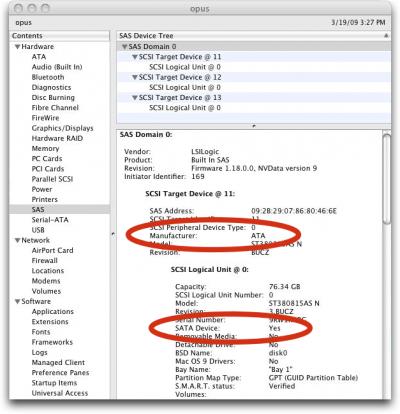
In this image : http://db.tidbits.com/tbthumbs/tn10166_System-Profiler-SAS-report.jpg
the drive model is listed as : st380815as n
2 seconds of googling shows this page : http://www.seagate.com/ww/v/index.jsp?vgnextoid=809a4d4b57cb0110VgnVCM100000f5ee0a0aRCRD
Uh... that doesn't look like a server / enterprise class disk to me. It looks like a normal old Seagate disk that Apple want to charge lots for cause it has an Apple sticker on it.
-
Re:Here we go again
If you read the warranties, you will see that enterprise scsi/fibre channel drives are warranted for 24x7 operation. Consumer ATA/SATA drives are not. The myth that they are really the same thing with a different interface is silly.
-
Re:Expect it to be slow
Software encryption is slow, but using drives with encryption on the hardware will be quicker. I'm not making a product recommendation with Seagate, I understand Fujistsu also has a FDE solution. In an enterprise environment, you can set up centralized password recovery utilities (for when the user goes under the bus, or over the wall to your competitor)...
-
Maxtorman, are you reading this?
Maxtorman,
First, THANK YOU for posting info about what is really going
on with the 7200.11 and related drives. That helps a lot.A few questions for you (or anyone who knows the answers):
Re: The 320, or a multiple of (320 + x*256) counter.
How can we end-users find out how many log entries our disk has?
Is this the SMART error log or some other log counter?
(Smartmontools will provide the SMART error log.)If the counter is, say 320, how can we change it to get
our drive out of danger. (short term fix only) What
events advance the counter?I've see reference to an ISO that boots FreeDOS.
How does one update the firmware on a disk that is attached
to a non-x86 machine? (Alpha, Sparc, PPC, etc.) Which
might be running *BSD, Plan-9, Opensolaris, Penguinix, etc.Assuming Seagate eventually comes out with a firmware rev that
really works, is updating the firmware fail-safe, or would a
power failure partway through "brick" the drive?The web page http://support.seagate.com/sncheck.html
does NOT work properly. It says "If you use a popup blocker,
please disable it to use the serial number checker." Well,
I'm not using a popup blocker, Seagate's web page is broken.
Web pages need to work with all possible web browsers.
Could Seagate please just post the list of drive models with firmware
revs affected? (and serial number ranges, etc. if necessary)How do we read the special location to see if the test pattern was
left there or not? If we have a drive with the test pattern, how
do we zero it?Thank you.
-
Re:On linux...
Now you can get your model, serial and firmware number on linux (also on 3ware and Adaptec RAID) with: http://ge.mine.nu/seagate-207931.html
That's great! From your page I found https://apps1.seagate.com/rms_af_srl_chk/
which lets you paste in the drive serial number and reports automatically whether it's affected. I found out mine are not. (Supposedly. Thanks, AC! -
Questions for Maxtorman
Maxtorman,
First, THANK YOU for posting info about what is really going
on. That helps a lot, especially the part about it only
"bricks" if it has exactly 320 log entries.> IF the drive is powered down when there are 320 entries in
> this journal or log, then when it is powered back up, the
> drive errors out on init and won't boot properly> Also, I cannot say for sure it's EXACTLY 320 entries.
Question 1: Can you find out for sure what the evil number
of entries is?Question 2: How can we end-users find out how many entries
our disk has? Is this in the SMART data somewhere? Do
we need the RS-232 adapter? Or what? BTW, we might
have this disk connected to a box that isn't x86 and/or
might be running *BSD, Plan-9, Opensolaris, Penguinix, etc.Question 3: Let's say the evil number is in fact 320.
If we have a disk sitting at say 315-320, how can change
the number of entries to get it away from the danger zone?Question 4: I've seen references to failure when powered
up, and failure when rebooting. If it just a power-up
problem or does rebooting put us in danger?Question 5: Assuming Seagate eventually comes out with a
firmware rev that really works, is updating the firmware
fail-safe, or would a power failure partway through "brick"
the drive?Question 6: I've see reference to an ISO that boots FreeDOS.
How does one update the firmware on a disk that is attached
to a non-x86 machine? (Alpha, Sparc, PPC, etc.)Question 7: The web page http://support.seagate.com/sncheck.html
does NOT work properly. It says "If you use a popup blocker,
please disable it to use the serial number checker." Well,
I'm not using a popup blocker, Seagate's web page is broken.
Web pages need to work with all possible web browsers.
Why can't Seagate just post the list of drive models with firmware
revs affected? (and serial number ranges, etc. if necessary)Question 8: Why can't Seagate just put the new firmware
on the web/ftp with info on exactly which disks it is
for? (Yes I know the recent firmware got yanked because it
is worse than the original, I mean when they get a firmware
that actually works properly.) -
Re:Seagate's forum is on fire from this mess.
Definitely read this super long thread: http://forums.seagate.com/stx/board/message?board.id=ata_drives&message.id=6272 (42 pages).
That thread has been deleted.
Can't have all of that negativity on the company board, you know!
-
Re:Seagate's forum is on fire from this mess.
Ah, try http://forums.seagate.com/stx/board/message?board.id=ata_drives&thread.id=4771 (another thread).
-
Re:THE FACTS
From: Moderator AlanM
Ref: Your post referring to slashdot
Date: 01-21-2009 05:58 PM
Hello:I am sorry to inform you that I have deleted your post referring to slashdot.
Your post violates the rules: http://forums.seagate.com/stx/acceptable_use_policy
Specifically, this section: "Our forum is provided as a service to our users and customers and is not intended for the promotion of third party services, products, websites, or organizations. Please do not post advertisements, junk mail, spam, chain letters, charity requests, petitions for signatures or any other form of solicitation."Please refrain from now on from referring to this article on these forums. Believe me, this is the highest priority for Seagate Support right now. All I can do at this time is request patience, but I hope you will consider it.
This will be your only warning on this count. Any further violation on this point will result in a ban.
Best Regards,
AlanM
ModeratorThis really pisses me off. How can a link to your comments in Slashdot be a "promotion of third party websites". BS! These comments have been the best source of information I have received from Seagate (albeit indirectly) in the last 3 weeks! AlanM seriously needs to change his attitude. I am sure his got some policies to follow but a link to a Slashdot article where you can get more information about the HDD issues is certainly no harm nor publicity. I would certainly prefer Seagate to be posting updates officially in their forums but as they don't this is all we have...
-
They dropped the 5 year warranty too...
http://www.seagate.com/www/en-us/support/warranty_&_returns_assistance/product_warranty_matrix/
Wow! They are doing us a favor it reads like...
Bare Drive Warranty Change FAQs
Please consult these FAQs for answers to questions you may have regarding the recent transition to a 3-year warranty for bare drives.
Q. When does this change go into effect?
A. January 3, 2009
Q. What about products purchased before Jan. 3, 2009? Will Seagate still honor the warranty offered at time of time of original purchase?
A. Yes, any Seagate customers who purchase(d) products prior to Jan. 3 will be covered by the warranty in place at the time of purchase.
Q. Will there be any changes to the warranties of enterprise storage or retail products?
A. No. Seagate does not anticipate any changes to warranties of enterprise storage or retail products at this time.
Q. Why is this change being made now?
A. We have identified the opportunity to offer our customers warranty terms that we believe are in line with industry standard warranty offerings, and that better align to the requirements of our partners and customers.
Q. Why are enterprise-class hard drives still receiving a 5-year warranty?
A. Based on available market data, the standard industry warranty for enterprise-class products is 5 years.
Q. Isnâ(TM)t this a step backward in terms of demonstrating your confidence in the quality of your products?
A. Absolutely not. Our product quality remains excellent, and, as the worldwide leader in drive storage, Seagate is committed to providing our customers with the most reliable storage solutions available anywhere. Based on our data, we know that 95% of all returns take place during the first three years, so by going to a 3-year warranty period (which is more in line with the rest of the industry and the needs of our partners and customers) we can make other aspects of our customer and warranty support programs more attractive, with negligible impact on customer product return needs.
Q. What will happen to the inventory authorized distributors currently have?
A.On-hand inventory of Seagate customers will maintain the warranty in place at the time of original purchase. The 3-year warranty will apply to products shipped starting Jan 3 rd, 2009.
-
Re:A thank-you! (and some questions)
That's the same place I'm in. Business stuff has redundant backups (sometimes doubly so
What's worse is Seagate's own forum seemed to be constantly proving them wrong on the scope of affected drives. This thread in particular had enough "me-too's" to worry me. Add to that I've had 4 drives die out of 18 with totally different hardware setups brought this a little too close to home.
My concern was with inevitably dying meaning within the next month on most of these. Maxtorman's been very up-front in his answers though, so I'll trust his knowledge and wait a week.
I appreciate the concern. You might get a cohort in buying WD if things don't pan out.
-Matt
-
Seagate's forum is on fire from this mess.
Go here http://forums.seagate.com/stx/board?board.id=ata_drives to see the angry users and posts in Seagate's official forum. Most of us are pretty angry and upset. Definitely read this super long thread: http://forums.seagate.com/stx/board/message?board.id=ata_drives&message.id=6272 (42 pages).
I find it ironic that our HDDs are about to be bricked EITHER way (on its own) or with the pulled firmware updater (released twice already too; first one crashed with memory dumps and stuff for everyone; second one bricks 500 GB models).
FYI, http://support.seagate.com/firmware/MooseDT-32MB-SD1A.ISO was the ISO file that was released (404 error now due to brickings) according to my download history. Seagate needs to get the next one right!
-
Seagate's forum is on fire from this mess.
Go here http://forums.seagate.com/stx/board?board.id=ata_drives to see the angry users and posts in Seagate's official forum. Most of us are pretty angry and upset. Definitely read this super long thread: http://forums.seagate.com/stx/board/message?board.id=ata_drives&message.id=6272 (42 pages).
I find it ironic that our HDDs are about to be bricked EITHER way (on its own) or with the pulled firmware updater (released twice already too; first one crashed with memory dumps and stuff for everyone; second one bricks 500 GB models).
FYI, http://support.seagate.com/firmware/MooseDT-32MB-SD1A.ISO was the ISO file that was released (404 error now due to brickings) according to my download history. Seagate needs to get the next one right!
-
Seagate's forum is on fire from this mess.
Go here http://forums.seagate.com/stx/board?board.id=ata_drives to see the angry users and posts in Seagate's official forum. Most of us are pretty angry and upset. Definitely read this super long thread: http://forums.seagate.com/stx/board/message?board.id=ata_drives&message.id=6272 (42 pages).
I find it ironic that our HDDs are about to be bricked EITHER way (on its own) or with the pulled firmware updater (released twice already too; first one crashed with memory dumps and stuff for everyone; second one bricks 500 GB models).
FYI, http://support.seagate.com/firmware/MooseDT-32MB-SD1A.ISO was the ISO file that was released (404 error now due to brickings) according to my download history. Seagate needs to get the next one right!
-
Re:Not just A
http://apcmag.com/seagate_settles_class_action_cash_back_over_misleading_hard_drive_capacities.htm
All manufacturers clearly state the units they are using NOW, however none of them lists BOTH sizes and none of them clearly state what the relationship this might be to the sizes listed in popular operating systems.
Windows until Vista and 7 happily displayed size/some-base-2-number as Gigabytes, which always meant the disk you bought that was "100GB" actually turned out to be "98GB" or so. Hard disk manufacturers are absolutely guilty of manipulating their product marketing such that you buy one size disk and get it home to reveal it's lower than expected.
Imagine if you clicked Properties on a folder and found it was "100GB" in Windows. You might go out and buy a 100GB disk to back it up. Obviously this would never have worked and you'd be a few files short of backing it up totally. Who would have known, if not an engineer or technician or software developer or worked in professional IT support?
USB 3.0 is going to suffer the same thing because of the 8b10 encoding (which means that the bandwidth is actually 4/5ths of the speed it says on the box, even before packet header overhead; http://articles.techrepublic.com.com/5100-10878_11-1056753.html)
I've seen some articles on, for instance, the Seagate website which explain that the value is the "fastest speed at which the drive can send data across the cable (or bus) from the drive buffer" which is not an outright lie, but does move into the realms of blurring and misinformation;
-
"e-mail contact"
Does anyone has a plain e-mail address of Seagate to contact to for the firmware and instructions?
Their page does state about contacting them via e-mail, but no e-mail address is given (http://www.seagate.com/www/en-us/about/contact_us/ http://www.seagate.com/www/en-us/about/contact_us/world_wide_contacts/contact-techsupport-emea). -
"e-mail contact"
Does anyone has a plain e-mail address of Seagate to contact to for the firmware and instructions?
Their page does state about contacting them via e-mail, but no e-mail address is given (http://www.seagate.com/www/en-us/about/contact_us/ http://www.seagate.com/www/en-us/about/contact_us/world_wide_contacts/contact-techsupport-emea).