Slashdot Mirror
Domain: tomshardware.com
Stories and comments across the archive that link to tomshardware.com.
Comments · 3,394
-
So many things to comment on
I've been reading through the discussion, and I've been thinking of responses, but it's all a muddied mess out there. so, I've decided to lay out the basic discussion points and my thoughts as one post.
First of all, why do we need faster-response LCD screens, when we already have 4ms?
There are a few key reasons for this. For starters, the 4ms number doesn't mean much. It is the time the panel takes to turn a pixel from black to white, then back to black. In a traditional panel, this is usually the fastest transition possible...and all other tranitions (Grey to Grey) are MUCH slower. Sometimes GTG transitions can be as much as 3x slower than the Black-White-Black number.
The industry has concocted a possible solution to this called Overdrive.
Overdrive takes advantage of the fast transition in Black-White-Black. Every time an input pixel changes color, the pixel on-screen is bootsted up to white, and allowd to fall back down to the new color.
This is slightly slower than the Black-White-Black transition time, but it's much faster than going Grey-to-Grey.
Unfortunately, Overdrive has a drawback that is DIRECTLY tied to the response time. Every time a pixel changes, it is overdriven WHITE for a fraction of a second, until it settles down to the target color. In darker scenes, or in cases where where colors are almost uniform, as pixels change these white pixels are painfully obvious. Better response times are the only thing that can remove this annoying artifacting.
Read about these artifacts at Tom's, who did the first review ever on Overdrive panels in May.
This link to Tom's also addresses the other issue discussed in this thread:
What's wrong with 18-bit color?
The dithering algorithms used by panels to simulate 24-bit color are not all that bad, but they have a serious drawback:
Dithering yields poor quality in scenes which require high contrast. Foggy, smoky or dark scenes, which tend to have subtlte color transitions, look like crap on an 18-bit panel. The panel is constantly changing pixels that are VERY close to each other in color, resulting in a muddy image. Unfortunately, the only way to avoid such artifacts it to buy an MVA panel with true 24-bit color (and sacrifice response time). -
Five months old display is "news" ?
Wow... never seen this old "news" on slashdot...
TomsHardware even had a review (not the best of grades either) about this display in June, and it has been available from retailers all through the summer, even in a backwater country such as Sweden. -
Re:Lemme get this straight...
Well that would be the right solution, but as I understand it the physical properties of the liquid crystals will always display this property. I don't know if you've ever seen a chart of color vs. reponse time, but you will notice a sort square root function going on. You will always have some colors that switch faster than others. So really a 3ms panel would generally be better than a 10ms panel because it's curve starts lower. It's some tricky stuff that goes on so it's not always black and white.
-
If colour is a concern try this one...
This EIZO has very accurate colour rendition. What I like about EIZO is that they not try to cheat their customers with the latency specs. They give the average latency not the ISO latency which would have been considerable better. Unfortunatly its a bit expensive
While you are at tomshardware page, you might find this latency graph of the viewsonic VX924 interesting.
-
If colour is a concern try this one...
This EIZO has very accurate colour rendition. What I like about EIZO is that they not try to cheat their customers with the latency specs. They give the average latency not the ISO latency which would have been considerable better. Unfortunatly its a bit expensive
While you are at tomshardware page, you might find this latency graph of the viewsonic VX924 interesting.
-
LCD ms numbers are a lie
I learned from this old Slashdot comment that LCD timings are highly misleading. The '3ms' number means something quite different from what you think it means. In short, see this article, or this forum topic. I've reposted the contents of the latter below.
-------
"Quoted response times by manufacturers are largely meaningless and misleading.
It's the same reason why monitors based on the 20ms Hydis panel outperform the 12ms Samsung panel, the 16ms AU Optronics panel, the 16ms LG/Phillips panel.......
In real world use, the vast majority of monitors (over 95% of them) don't perform anywhere near the quoted response times. That's why you see streaking on the 12ms Samsung panel - its performing at 25-30ms.
Let me try and explain further.
Look at the response times for the so called 'fast' Samsung 172X which is based on a '12ms' panel:-
http://www.xbitlabs.com/images/other/samsung-2/gr2 -2.gif
Since most people have their monitors set to medium brightness (about 80-180 on the grey level scale on the graph) and many applications - particularly games use grey to grey pixel transitions (or one colour to another colour) - the typical response time is somewhere between 25-30ms. Not quite 12ms is it?
Now look at the same response time graph for the Acer AL1721 - a mid level TFT with claimed 16ms response time:-
http://www.xbitlabs.com/images/other/response-6/a2 1-grey.gif
The graph is much flatter, so across brightness and contrast levels, you're going to get consistent response times. At most common user settings, the "slower" 16ms is actually faster than the "quicker" 12ms panel.
Not quite as straightforward as the manufacturers would like you to think. The problem is, by that time, most people have parted with their money. When I was first looking to buy a TFT monitor, I thought that Kustom PCs were a bit mad to stock the Acer monitors in preference to others. However, it's only on further examination that you discover they perform very very well in games - for example, the AL1731M is based on the Hydis panel - and will in fact, outperform the so called 'faster' TFT panels.
From Toms Hardware Guide:-
"For games, the Hydis 20ms panel is still the one to beat. It's not yet perfect, but we know of no other that is faster (based on our tests, of course, and not manufacturers' specifications). Once again, we must insist strongly that the manufacturers' specifications are not to be trusted. "
http://graphics.tomshardware.com/display/20040326/ lcd-08.html
"The response times suppliers associate with their panels vary, anywhere from 16 ms to 25 ms. The only problem is that these figures mean nothing. Or at least, not a lot. An article published in 2001 that can be viewed at Xtremtech explains the situation pretty well, and we have summarized it for you in the section entitled "RT between colors". But this isn't the only problem..."
http://graphics.tomshardware.com/display/20031105 -
LCD ms numbers are a lie
I learned from this old Slashdot comment that LCD timings are highly misleading. The '3ms' number means something quite different from what you think it means. In short, see this article, or this forum topic. I've reposted the contents of the latter below.
-------
"Quoted response times by manufacturers are largely meaningless and misleading.
It's the same reason why monitors based on the 20ms Hydis panel outperform the 12ms Samsung panel, the 16ms AU Optronics panel, the 16ms LG/Phillips panel.......
In real world use, the vast majority of monitors (over 95% of them) don't perform anywhere near the quoted response times. That's why you see streaking on the 12ms Samsung panel - its performing at 25-30ms.
Let me try and explain further.
Look at the response times for the so called 'fast' Samsung 172X which is based on a '12ms' panel:-
http://www.xbitlabs.com/images/other/samsung-2/gr2 -2.gif
Since most people have their monitors set to medium brightness (about 80-180 on the grey level scale on the graph) and many applications - particularly games use grey to grey pixel transitions (or one colour to another colour) - the typical response time is somewhere between 25-30ms. Not quite 12ms is it?
Now look at the same response time graph for the Acer AL1721 - a mid level TFT with claimed 16ms response time:-
http://www.xbitlabs.com/images/other/response-6/a2 1-grey.gif
The graph is much flatter, so across brightness and contrast levels, you're going to get consistent response times. At most common user settings, the "slower" 16ms is actually faster than the "quicker" 12ms panel.
Not quite as straightforward as the manufacturers would like you to think. The problem is, by that time, most people have parted with their money. When I was first looking to buy a TFT monitor, I thought that Kustom PCs were a bit mad to stock the Acer monitors in preference to others. However, it's only on further examination that you discover they perform very very well in games - for example, the AL1731M is based on the Hydis panel - and will in fact, outperform the so called 'faster' TFT panels.
From Toms Hardware Guide:-
"For games, the Hydis 20ms panel is still the one to beat. It's not yet perfect, but we know of no other that is faster (based on our tests, of course, and not manufacturers' specifications). Once again, we must insist strongly that the manufacturers' specifications are not to be trusted. "
http://graphics.tomshardware.com/display/20040326/ lcd-08.html
"The response times suppliers associate with their panels vary, anywhere from 16 ms to 25 ms. The only problem is that these figures mean nothing. Or at least, not a lot. An article published in 2001 that can be viewed at Xtremtech explains the situation pretty well, and we have summarized it for you in the section entitled "RT between colors". But this isn't the only problem..."
http://graphics.tomshardware.com/display/20031105 -
LCD ms numbers are a lie
I learned from this old Slashdot comment that LCD timings are highly misleading. The '3ms' number means something quite different from what you think it means. In short, see this article, or this forum topic. I've reposted the contents of the latter below.
-------
"Quoted response times by manufacturers are largely meaningless and misleading.
It's the same reason why monitors based on the 20ms Hydis panel outperform the 12ms Samsung panel, the 16ms AU Optronics panel, the 16ms LG/Phillips panel.......
In real world use, the vast majority of monitors (over 95% of them) don't perform anywhere near the quoted response times. That's why you see streaking on the 12ms Samsung panel - its performing at 25-30ms.
Let me try and explain further.
Look at the response times for the so called 'fast' Samsung 172X which is based on a '12ms' panel:-
http://www.xbitlabs.com/images/other/samsung-2/gr2 -2.gif
Since most people have their monitors set to medium brightness (about 80-180 on the grey level scale on the graph) and many applications - particularly games use grey to grey pixel transitions (or one colour to another colour) - the typical response time is somewhere between 25-30ms. Not quite 12ms is it?
Now look at the same response time graph for the Acer AL1721 - a mid level TFT with claimed 16ms response time:-
http://www.xbitlabs.com/images/other/response-6/a2 1-grey.gif
The graph is much flatter, so across brightness and contrast levels, you're going to get consistent response times. At most common user settings, the "slower" 16ms is actually faster than the "quicker" 12ms panel.
Not quite as straightforward as the manufacturers would like you to think. The problem is, by that time, most people have parted with their money. When I was first looking to buy a TFT monitor, I thought that Kustom PCs were a bit mad to stock the Acer monitors in preference to others. However, it's only on further examination that you discover they perform very very well in games - for example, the AL1731M is based on the Hydis panel - and will in fact, outperform the so called 'faster' TFT panels.
From Toms Hardware Guide:-
"For games, the Hydis 20ms panel is still the one to beat. It's not yet perfect, but we know of no other that is faster (based on our tests, of course, and not manufacturers' specifications). Once again, we must insist strongly that the manufacturers' specifications are not to be trusted. "
http://graphics.tomshardware.com/display/20040326/ lcd-08.html
"The response times suppliers associate with their panels vary, anywhere from 16 ms to 25 ms. The only problem is that these figures mean nothing. Or at least, not a lot. An article published in 2001 that can be viewed at Xtremtech explains the situation pretty well, and we have summarized it for you in the section entitled "RT between colors". But this isn't the only problem..."
http://graphics.tomshardware.com/display/20031105 -
University of Tübingen
Toms hardware has an artickle about the 70 TB online backupsystem of University of Tübingen
http://www.tomshardware.com/storage/20030425/index .html -
RAIDCore S-ATA
Build a system based on the Broadcom RAIDCore BC4852 controller.
http://www.broadcom.com/products/Enterprise-Small- Office/Storage-Solutions
Tomshardware sucessfully ran 32 S-ATA drives in a single box in RAID5 mode (2x 16 drive array because of software limitations). With the current generation of 500GB drives that should yield you close to 15TB. Add several more boxes along with some clustering software.
http://www.tomshardware.com/storage/20041006/index .html
In a motherboard with 4x PCI-X slots you will get very good performance for your money. S-ATA drives may not be as reliable as SCSI, but they (along with the controllers) are cheap so you can always have a few spare around in case a drive died (you would with SCSI anyway). Linux drivers are available ofcourse. -
Specialized pants.
seriously..
THG has an article
http://www.tomshardware.com/consumer/20041207/inde x.html -
65nm won't help much
Read this article:
http://www.tomshardware.com/cpu/20051007/a_sneak_p eak_at_intels_65nm_pentium_4-11.html#power_consump tion
In short, decreasing the die size has allowed Intel to reduce power consumption a bit, but it's also increased thermal density to such a degree that they can't clock them as fast as even the current crop of 90nm processors. Why upgrade to these chips? -
Re:HORUSIntel are truly screwed for at least the next 6-12 months by the looks of things unless they are hiding something seriously good.
Intel's not really hiding them, but they do have some pretty good, lesser-known 65nm things coming out in about 3-6 months. These won't beat AMD's Opterons, but I think Intel will be less screwed than you think. Intel will be able to lessen the screwing by beating AMD (by a long time) to a mature 65nm manufacturing capability. Some reviewers (like Tom's Hardware) have already benchmarked some 65nm Pentium Ds and the power savings are significant.
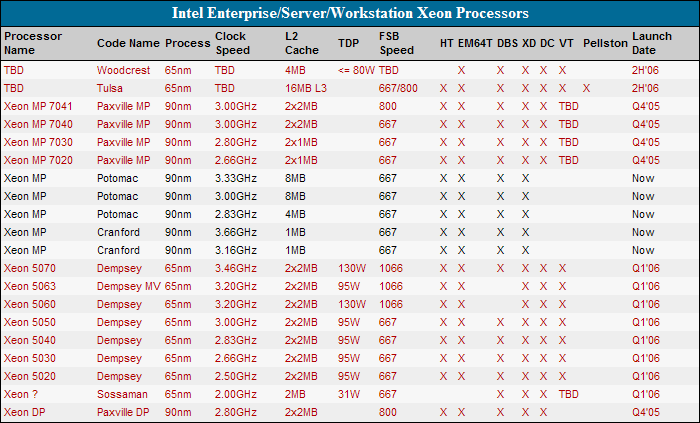
According to Intel's roadmap, Dempsey (65nm dual-core Xeon) will launch in Q1 2006 at higher clock/bus speeds and lower TDP than the Xeon reviewed in the article (2.8GHz, 667MHz, 135W TDP). At launch, Dempsey will offer a 3.2GHz (1066MHz bus) at 95W TDP.
Another interesting server CPU due in Q1 2006 is Sossaman, which is a server version of Yonah (dual-core, 2GHz, 31W TDP). Since Yonah is a 32-bit architecture, it's not really comparable to Opteron and Xeon, but it should rule the market for low-power 32-bit servers.
-
Gigabyte?
How's this any different from Gigabyte's iRAM?
-
RAM disk
Read this story about a 2Gb RAM disk. I think this was tom's hardware site. They installed WinXP on it, and got a speedup of only a few seconds I believe (31 vs 35s). Apparently, there are a lot of initialization routines that run and apart from getting a super fast CPU and memory, it's not really the disk speed that's holding the boot times back by that much.
RTFA here:
http://www.tomshardware.com/storage/20050907/index .html -
Re:The big secret...
read and write times for these devices are 3 orders of magnitude less than hard drives AND your search times go down to 0.
Why do people write things like this without quoting a reference for the figures?
NAND flash isn't that fast, especially for write.
E.g.
OneNand (the fastest sort)
http://www.samsung.com/Products/Semiconductor/Flas h/OneNAND_TM/
108MB/sec read
8.2MB/sec write
Normal NAND is much worse.
I got 60MB/sec write speeds on a SATA disk at the start. Probably the average is around
50MB/sec.
http://www.tomshardware.com/storage/20050927/hd_ro und_up-26.html#data_transfer_diagrams
So the Flash is 2x faster on a read, but 6x slower on a write.
Seek times BTW, are not zero on a flash disk. When you read the disk, there is a look up
table to convert logical sector numbers to physical addresses. Usually, this is like a
cache, so seeking to the end of the disk will cause the cache to miss and get refilled.
Cache refills require a lot of reads from the flash, so there is a penalty to seeking,
even though nothing moves physically. -
Polymer Memory Technology
My best guess is that the non-volatile memory technology is polymer based. Polymer memory has extremely high read/write throughupt.
Having a superfast disk media will not improve boot times unfortunately. There are all ready windows benchmarks of booting directly from battery-backed RAM, and the results were not much better than using a standard hard drive. -
Re:"Makes MP3 sound better than the CD" ?
Well I liked this article and found it very interesting. I have read some good reviews like the one over at Toms hardware http://www.tomshardware.com/consumer/20050818/ . I'm interested in the x-Fi Platinum and I have asked people to post them on a thread i started on the Creative X-Fi Forum http://www.productionforums.com/viewtopic.php?t=4
5 98 . I would prefer to hear what owners say on the Platinum. I would also like to know other good speaker setups I could use for my x-fi -
Multi-SLI??
Now they need to figure out how to get two of these things working together in SLI.. or what about *four* of them in gigabyte's crazy quad mb:
http://www.tomshardware.com/motherboard/20051004/i ndex.html
sweeeeeeet. -
MP3s sounding better & more
While many might believe this is marketting BS, has anybody actually compared them? As someone has already mentioned, the Gravis Ultrasound could improve audio (I owned one).
A review on Toms Hardware http://www.tomshardware.com/consumer/20050818/inde x.html also says MP3s sound better.
The card will also support multiple 3D positioned audio sources in real time.
While the card is excessive for most users, the card is still very impressive. -
This wasn't reviewed a month ago. OLD
Thanks Slashdot, this isn't OLD. http://www.anandtech.com/multimedia/showdoc.aspx?
i =2518 http://www.tomshardware.com/consumer/20050818/inde x.html -
Re:Stanford + Volkswagen
There IS a driver onboard, but the driver is in the glovebox and he's a cute little penguin.
Actually, 7 penguins kept Stanley on course and pointed at the finish line -
Tom's Hardware: Driven By Linux: Laser Sensors, Stereo Camera And GPS Navigation
http://www.tomshardware.com/game/20050713/darpa-03 .html -
Re:Resell Windows
You obviously havent checked into companies like Alienware, Falcon Northwest, or Totally Awesome Computers. Tom's Hardware recently ran a series of tests on the best pre-built machines commercially available.
You can save 20-50% building these machines yourself, granted, but most of these companies have gone and done the research of finding which componants work best with which, plus the warantees. -
Re:Resell Windows
You obviously havent checked into companies like Alienware, Falcon Northwest, or Totally Awesome Computers. Tom's Hardware recently ran a series of tests on the best pre-built machines commercially available.
You can save 20-50% building these machines yourself, granted, but most of these companies have gone and done the research of finding which componants work best with which, plus the warantees. -
THE UNEDITED VERSION
Tom's Hardware takes a closer look at Building The Ultimate Home Theater PC. "Hype aside, is it really possible to build a PC that is quiet and does everything that a high-end remote-controlled set-top box can do? And don't forget it's got to look good in your living room, too." I say YES! It was kind of refreshing to see them mangle some hardware forcing it into a small/slim form factor HTPC case, although it was less than refreshing to see them choose Windows MCE 2005 as their OS/PVR software. See also recent Ask SlashDot on MythTV extras and my favorite DIY PVR Resource
-
SLI Quad Royale
And you thought two gpus's were hot? Well not anymore with this new motherboard hotty (with pics) supporting not 2 or 3, but 4 (OMFG!) gpus via 2* SLI. Of course all this technowhoring glory comes at a cost, with 4 GPUS likely to force most average gamers into submissive bondage for a month or ten, not to mention what it will take to prevent such a toasty little box from going critical!
==Nuclear Power Now!== -
Re:How much contrast is ehough?
For the record, startup company Brightside recently introduced a 200,000:1 "extreme dynamic range" (EDR) display. Tom's Hardware stated that the 200,000:1 contrast ratio was basically "infinite". They have a few display screen images for comparison, and the differences are striking: http://www.tomshardware.com/hardnews/20050923_170
5 19.html
Specs on the Brightside display are 37", 3000 cd/m2 brightness rating, 1920x1080 resolution. Yours for the low price of just $49,000.
As to contrast ratio I wonder how 1,000,000:1 is even measureable. As the parent states, 3500:1 is comparable to color film. I also read somewhere that 70mm film has a contrast ratio of approximately 1000:1. YMMV...
Matthew Jeppsen
www.FresHDV.com -
URL Disappeared
The URL to the main article on Tom's Hardware Guide disappeard: for guys who're reading this after it had been removed: Tom's Hardware Guide: Pepping Up Windows
-
Sound Recorder replaced by Cdex?
Maybe I'm just confused but what's the relation between Sound Recorder and Cdex? One allows you to record and add effects to a WAV file. The other one is a CD-ripping utility. Where's the open-source sound recording program to replace the Windows sound recording program?
-
Re:It's painfully obvious...I agree. Blu-ray is the way to go. HD-DVD just won't be big enough. I loved the reasons MS gave for why they supprted HD-DVD. One said that it was slightly bigger. Then another reason is that with HD-DVD you could put the old DVD format on another layer so that someone without a new player could still buy the same disk and not come home and find that they can't play it. But that just seriously takes away a lot of the capacity of the HD-DVD...as in a whole layer. So the HD-DVD is down to 15 GB. Wow. So now we're comparing something that is 15GB to 30GB. So they're saying that a High-def version of a movie (which is nearly 7 times as many pixels per frame, not including information for progressive scan over interaced) can fit in only twice as much space as a DVD? I call bs.
Plus, last I read, HD-DVD doesn't have anything even in the lab that is bigger than 30 GB, whereas Bluy-ray has a prototype of 100GB. MS ought to screw off. They are supprting it for two reasons. One is the whole console war, and the second is HD-DVD will use Micorsofts own codec whereas Blu-ray will not. MS just has their panties in a wad.
And to all those who think this is a propietary Sony product, they should read this FAQ. Sony, HP, Pioneer, Hitachi, TDK, Samsung, Philips, etc. were all in on the process. In fact it was TDK that made the 100GB version. HD-DVD is a very shallow replacement and will only require a new replacement in just a few years time. Blu-ray has potential, not just as a media disk, but also as a storage disk. With people having full hard-drives over 250 GB now, would you rather back that up on 9 HD-DVDs, or 3 Blu-rays. Shutup and die MS and Intel.
-
Re:Use water cooling...
Know of any way to water cool the power supply?
Water cooled power supplies do exist, I have seen them reviewed in computer magazines before. They seem quite hard to track down though and some intensive googling may be in order. I would imagine they will be sold as part of a water cooling kit somewhere.
Alternatively there is the Zalman TNN 500A fanless case - the whole case is a heatsink and there are no fans anywhere, even in the power supply. It is very expensive though.
-
Gigabyte has a similar modelGigabyte has a similar model: a heatpipe-cooled Gigabyte Geforce 6600GT with a easy-to-remember name of Gigabyte GV-NX66T128VP. Tom's Hardware has a review of the card. AGP version is also available with a similarly easy model name of GV-N66T128VP.
I have a PCI Express version of the card in my rig, and it is nice. Gets too hot to touch after running GPU-intensive applications, but those NV chips should be designed to run hot (and they have a thermal protection which throttles down the GPU if it gets overheated).
Nice to see other manufacturers to notice that people like to have their computers silent.
-
Tomshardware Qualification Day 1 Update
Tomshardware is posting daily updates live from the Fontana Speedway http://www.tomshardware.com/hardnews/20050929_125
9 19.html -
You all have the wrong mindset... :-p
These news reminded me of the oxymoron of the day:
"We think it's a great consumer win, and it's a great industry win, to be able to ensure that with good copy protection, you can have so much functionality for the user", Jordi Rivas, Microsoft Director of Technology. (source)
Would be sig-worthy if it wasn't over 120 bytes. -
Re:No Antec or PC Power & Cooling?
-
Links to other reviews
http://www.beyond3d.com/reviews/ati/crossfire/
http://www.bit-tech.net/hardware/2005/09/26/ati_cr ossfire_detail/1.html
http://www.driverheaven.net/reviews/crossfireatire viewxxx/
http://www.hardocp.com/article.html?art=ODE1
http://www.hothardware.com/viewarticle.cfm?article id=730&cid=2
http://www.pcper.com/article.php?aid=168
http://www.tbreak.com/reviews/article.php?id=404
http://techreport.com/reviews/2005q3/ati-crossfire /index.x?pg=1
http://graphics.tomshardware.com/graphic/20050926/ index.html -
Tom's Hardware's PSU Strees Test, Aug. '05
Only 19 PSUs tested, but you can still get to the site (for now).
http://www.tomshardware.com/howto/200507111/index. html
To cut to the chase, TH recommended the Fortron FSP300-60GNF and the Seasonic S12 600. -
Re:Profligate energy use for the sake of eye candy
So unless you are complaining that 266mhz PII and 128mb of RAM are too high system requirements, then you really don't know what you are talking about.
Don't blame me, I'm just going by what I've been told by the official press releases. A PC World review said here:
[Microsoft] advises getting 512MB of RAM and a "modern" CPU--more than Windows XP needs
Past experience with prior releases from this vendor has shown that if they say 512M, you will probably really need more than that. As far as the video requirements, don't blame me, this is what a WinHEC reviewer had to say about it in this article:
for those with an older video card, Longhorn will look a lot like Windows 2000
So, if you had been hoping to get a sample of all that wonderful eye candy technology that we're supposed to be all hyped up about, the sad fact is that you didn't really get to see it. Aw... You have posted here to rave about the look and feel of a new Windows 2000 theme. Congratulations.
The same article mentions:
The top-of-the-line interface... will demand a high-end video card with at least 64MB of video memory
Note how it says "at least." So, I'm left to wonder whether the 128M you were talking about wasn't what you had in your video card instead of the motherboard.
So, then, I went to Tom's hardware, and found this:
Windows Vista's new display driver model may compel users to upgrade to a PC with 2 GByte of DDR3 SDRAM and a graphics card with at least 256 MByte memory [...] As for system RAM, Page reportedly said, 512 MByte is "heaps" for a 32-bit system. For a 64-bit system, however, "you're going to want 2 gigs of DDR3 RAM."
I can only conclude from this that you know more about this than Tom's Hardware and PC World and News.com. 128M indeed!
Oh, and we were running some of the 2D and 3D WPF applications on it, and they even worked.
Great to hear that your beta software actually runs. That's some high standards there.
As it stands now, the technologies Microsoft are starting to disclose to its partners and Developer are bombshells of technology
I'm so excited for their partners. Those lucky partners must really be on the floor hyperventilating in an epic fashion. And I thought it was just an overmarketed eyecandy-riddled program launcher disguising a rat's nest of hidden vendor lock-in schemes. But it launches bombshells too? Now that's exciting... There wouldn't be any pterosaurs flying around nearby would there? (Never mind that.)
especailly if people in here are trying to even remotely keep up with the R&D that has been producing this stuff in some hidden closet for the past 5 years.
Stuff classified as R&D expenses qualify for tax breaks don't they? So you're saying that we're actually paying twice for this thing, even if we choose not to use the convicted monopolist's lock-in product? We're almost as lucky as their beta testers, er I mean partners.
other parts of Linux and BSD that are only scrambling to catch up to Windows
Really? Tell us more about this modern technology you would like to see in Linux and BSD. No doubt I can read more about it in your newsletter.
-
native command queueing
Here's an interesting quote from Tom's Hardware:
"In sum, we must state that all Command Queuing enabled drives have an advantage over those that do not support this feature. At the same time, CPU load is also slightly higher when Command Queuing technologies are used. However, considering the performance of today's processors, the additional CPU load is a marginal factor."
Basically, you put some load on the processor for increased disk performance... Why not include it? -
Re:What about cost/price? expect to pay more ...
My system is faster than hers at integer operations but throw something like world of warcraft at it and hers is faster
she now has 1.25gb ram. (radeon 9800 128mb agp 4x vs my 9600 aiw xt 128mb agp 8x)
Yeah, you get back to me when the 9600 suddenly performs anywhere near as well as a 9800.
If you were trying to make a point, perhaps you'd better start over from the beginning. -
AMD and Intel
The intel range of processors for a long time have held the mainstream mobile processor power/watt and with the Pentium M they have consolidated much of that. however from many sources the new Turion 64 is meant to be very nearly as good in the power area however it does have 64bit memory addressing and all the benefits of the AMD 64 line of processors.
http://www.tomshardware.com/mobile/20050830/index. html -
The Ultimate Toolbox
Lots of good tool tips in this old article at Tom's Hardware Guide:
http://www6.tomshardware.com/howto/20020820/index. html -
Initial sales dont look good...
Slow start as prices are at least $50 too high - follow the link to appleinsider.
-
Re:Huh ?I see your point with Spotlight, but, as far as I can tell, WinFS is a file system.
Of course, wikipedia's article says it isn't a file system, because it uses NTFS underneath, or is at least based on NTFS. Even so, most sources can agree that the best definition is WinFS is a file system with some added features.
Anyway, I don't think the comparison is so bad. Spotlight, WinFS and Reiser4 may not technically work the same, but they all have the goal of presenting the user with a database interface and allowing the user to query that interface, much like a desktop search, only built into the OS itself. It is this level, the interface level, at which comparison is apporpriate. Not at the implementation level, as you already mentioned.
-
Re:No, it's giga*bit*.
You mean this article?
Samsung builds foundation for 32 GByte Flash cards
http://www.tomshardware.com/hardnews/20050912_0001 00.html -
Re:Firewire compatibility...
I've replied elsewhere in this thread as well about USB and Firewire, but consider looking at Tom's Hardware's review of FW vs. USB for data transfer as well (FW trumps USB, not the other way around).
-
Re:go EPSON
Sorry, forgot to mention Tom's Hardware does have a review on one of the models. Epson Perfection 3200: http://www.tomshardware.com/consumer/20030822/ind
e x.html/ -
HP ScanJet 4600I recently got one of these for about $35 at OfficeMax.
See thru top, small, light, cheap, reasonable quality. One of the cool things is you can scan 'anything'. If needed, you can flip it over or lift it up and scan the side of your face. Or any other 3D object.
Labels for the front edge buttons are printed on both faces of the lid. -
Tom's Hardware
Are there any quasi-reputable sites (a la Tom's Hardware?) that have reviews on such things?
Well, Tom's Hardware does have some scanner reviews. Although I don't know if they have the detail you're looking for:
http://www17.tomshardware.com/search/search.html?c ategory=consumer&words=scanner
http://www.tomshardware.com/consumer/20020327/inde x.html -
Tom's Hardware
Are there any quasi-reputable sites (a la Tom's Hardware?) that have reviews on such things?
Well, Tom's Hardware does have some scanner reviews. Although I don't know if they have the detail you're looking for:
http://www17.tomshardware.com/search/search.html?c ategory=consumer&words=scanner
http://www.tomshardware.com/consumer/20020327/inde x.html