Slashdot Mirror
Domain: xlr8yourmac.com
Stories and comments across the archive that link to xlr8yourmac.com.
Comments · 210
-
Re:IBM? Apple???
FYI See this link You are able to upgrade RAM, CPU, Video, and stuff (Unsure of G5 u/g though).
-
Re:Sounds reasonable.
If the mini's all started to exhibit failures and poor workmanship than that would harm the crossover (new mac users) market more than anything the competition could hope for.
Strangely enough, that seems to be happening.
I've been drooling over screenshots/reviews of OS X for ages now (Unix? Nice interface?), and I was pretty much ready to shell out for a Mini as my first Mac until I saw that report -- and many others like them.
It's a shame, but I don't really want to shell out £350+ with the risk that I won't be able to use it with my monitor. I guess I'll just keep looking for a cheap, second-hand G4 PowerMac on eBay.
Or I might just completely flip my lid and buy a new Amiga.
-
ask and you are answered...
-
Detailed review
As Tiger coverage, this is definitely not in-depth. If it is anything, it's the sort of review you can expect after having worked with Tiger for one day. For real in-depth coverage, take a look at Ars Technica's 20+ page review. Other worthwhile information can be found on XLR8YourMac.com. And yet another that isn't too bad: the IT-Enquirer. That site even has a free downloadable eBooklet on Tiger.
-
But...
Before anybody asks: yes, it does run Linux.
-
Not sure about the QuickSilver
Power Mac G4 (QuickSilver) and Power Mac G4 (Mirrored Drive Door) systems both had room for 2 5.25" optical drives, PLUS 4 internal 3.5" drive bays.
The QuickSilver models were only equipped to handle a Zip drive in that second bay. There was a sled for the optical drive and optional Zip, similar to the one found in the Graphite models. It might technically be possible to mount one but it would require a casemod to do so. For reference, check out this URL:
http://www.xlr8yourmac.com/systems/quicksilver_noi se/quieting_quicksilver_noise.html
Note the last photo. It's cropped a bit close, but you can see where that metal part surrounding the drives is large at the top but smaller on the bottom, making it only appropriate for Zip/floppy-sized drives. -
Re:Why not... add a 7200RPM 2.5" drive?
-
Re:Warranty?Anyone know if many other Macs are overclockable this way.
http://www.xlr8yourmac.com/ will tell you what you can and cant do
-
Re:Cooling?
Actually the Cube has proven to be pretty good at cooling judging by the number of processor, video and hard drive/CD/DVD upgrades for it.
You can get up to a 1.7 GHz G4 processor upgrade and there was even a Dual 800 MHz G4 upgrade offered at one point. Some people have been able to put in nVidia GeForce 3 and ATI Radeon 8500, 9000 Pro and 9200 graphics cards in these things. Not to mention you can put a full-size hard drive into it.
The Cube will probably end up being a lot more upgradable than the Mini, but the Mini sure has a better price.
--
Join the Pyramid - Free Mini Mac | Free Flat Screens -
Re:Form factor had nothing to do with it for me...Couple of things about the 96 FPS in Quake 3 Arena:
1. It doesn't say what resolution it is running. 640x480? 1280x1024??
2. Quake 3 is a terribly old game, so getting 100 FPS in it isn't exactly good.
3. With a real graphics card & fast Mac the performance is far higher. Mac benchmarks,
4. And your comment that all games are CPU bound, is crap. Go find some benchmarks of FarCry, you'll soon see it is very much graphics card limited!The 9200 is an ok card, don't get me wrong, but it is several generations behind the mainstream cards.
-
Re:Form factor had nothing to do with it for me...
Not being able to upgrade the video is a big deal to me. The radeon 9200 chip they have is ok for playing basic mpg's or tetris but that's about it.
Okay, I'm sick of this. You're a gamer, plain and simple. You have to play the latest games when they come out. You upgrade your video card every six months to a year (and it costs over half of a Mac Mini). How do I know this?
Because the built-in graphics on the Mini can handle anything but that particular subset, as can any damn video card today. You can playback any video format you want (especially since I can with an 800Mhz G3 and Radeon 7500) - they tend to be CPU bound these days, as the graphics cards are all insanely powerful. You can play any games up to a couple years ago just fine. If you're getting a Mac in the first place, you're not getting it as a gaming platform, so I see this as moot.
For example, it performs damn well in Quake 3 Arena, a standard for quick benchmarking. 96FPS at highest settings, on a budget $600 computer. Kick. Ass.
And, of course, Apple doesn't believe anyone could want better sound than what they have built in so *no* mac's have upgradable sound. wtf is that about?
Because Apple has always had integrated sound. How long did it take PC's to get beyond a simple startup beep? No, you can't buy a sound card for a Mac - Creative made a half-assed effort several years ago, but since we all already have sound, nobody bought them (that, and the drivers were some of the worst written - ATI worthy). On the other hand, since the G5's (and hopefully others with time) support fibre optic audio out, and OS X supports surround sound, what's the big deal? What would a new sound card add? You're already surround and pure digital - am I missing something? -
Re:...except for HDTV playback.
Yes that's what they say on their website but reader reports from XLR8YourMac.com show that people have gotten this thing running on machines far less powerful than the Mini. There's a report from a Cube owner with an 800 MHz G4 who said that it works fine. There are also reports from an 800 MHz iMac and PowerBook G4 867 MHz owner.
So while Elgato might not give you support if you run it on a slower machine it sounds like it does work.
--
Join the Pyramid - Free Mini Mac -
Re:...except for HDTV playback.
Yes that's what they say on their website but reader reports from XLR8YourMac.com show that people have gotten this thing running on machines far less powerful than the Mini. There's a report from a Cube owner with an 800 MHz G4 who said that it works fine. There are also reports from an 800 MHz iMac and PowerBook G4 867 MHz owner.
So while Elgato might not give you support if you run it on a slower machine it sounds like it does work.
--
Join the Pyramid - Free Mini Mac -
Re:Max OS X is great, but...
I'm a switcher, but my switch happened so long ago as to be lost to history. Against that, I can offer you the fact that I use Windows XP at work every day, so I live in both worlds.
iBooks do not support extended desktop
This is something I can speak to: they do support it. I have a iBook G4 12", and it's a very simple hack to fix this. Apple has created a setting in OpenFirmware which prevents it, but the hardware can do it. Run the hack, and voila: mega-desktop goodness. I run a 19" external monitor when I decide to chain myself to a desk.
On the subject of annoyances, I'm scratching my head. I can talk for hours about the annoyances that I have when working with XP, but usually, the Mac annoyances come down to compatibility issues
- Web sites that only work in IE. Sometimes even IE 5.2 for Mac doesn't cut it, but this whole situation is becoming rarer every day.
- Brainwashed corporate people who believe that everything should be a Word document (but you can $choke out for a very nice Mac version of Office). Exchange/Outlook/Entourage is the same deal.
- Finding out a particular piece of software isn't available. With OS X, though, this is not usually an issue, not like in the System 7.x to 9.x days.
Come to think of it, that's the same list you'd have for a Linux box, except the Office solution in that case is OO.o. As long as you can be flexible, you're okay.
On the hardware front, you have to deal with the fact that you can't plunk PC graphics cards in a G5 and expect it to work, but ATI and nVidia both churn out quality cards for Macs. Hard drives and other (CD-R, DVD) drives for x86 are variously possible to put in a Mac, but check with the Mac hardware geek community first.
HBH -
Re:Excellent free resource...
Also visit MacFixItand XLR8YourMac...
-
Desktop Spanning w/ iBook firmware hack
"Apple still cripples the iBook with mirrored-only video. No desktop spanning. The Radeon chipsets they use do support it, but Apple reserves that feature for the Powerbooks"Actually my G4 iBook (800MHz vintage) does dual display spanning just fine - 1280x1024 on the external, 1024x768 on the iBook's own screen. But I had to void my warranty to do it.
There's a firmware hack that unlocks this. Note that it can be RISKY (read article), but it's been working great for me for nearly a year.
Fantastic little laptop, by the way. I crammed 640MB of RAM into it though. A laptop with less than 512MB RAM (from any vendor) is not seeing its full potential.
-
Re:Not recommended for G4 users, G5 seems ok...
Most of the problems I've encountered are with Safari. The following sites all have similar problems and are entirely unusable with Safari after applying the patch:
...and if those sites update the version of OpenCube's QuickMenu Pro that they're using, to fix the browser type/version check, they'll probably be usable again. See the 9/8/04 item on this site and a 9/8/04 item on this site.
-
Re:Oft-Overlooked Point
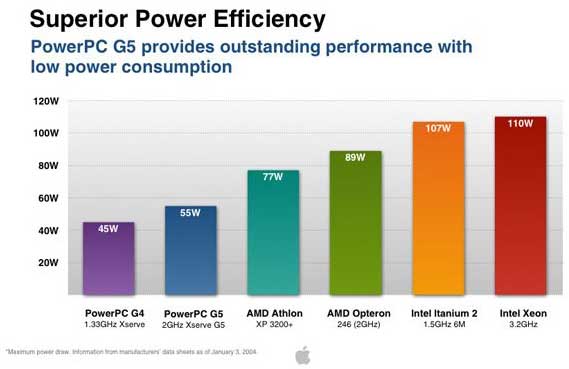
This graph (from this Xserve G5 page) suggests the G5's thermal characteristics are similar to the AMD64 HE range; ~55W max. Whether the same chips are used in the iMac, I don't know.
-
Re:Oft-Overlooked Point
This graph (from this Xserve G5 page) suggests the G5's thermal characteristics are similar to the AMD64 HE range; ~55W max. Whether the same chips are used in the iMac, I don't know.
-
Re:Try Apple's Switch Page
The web is definitely your friend when it comes to switching. The parent links will help.
MacNN Forums
xlr8yourmac.com's forums
MacFixIt Forums
MacWorld Forums
That should be a good start. You'll find that the Mac community is more than willing to go out of its way to help you, especially if you're a new convert. Just tell people you've switched from Windows, you'll get all the help you'll ever need.
Apple have support forums too, they're worth a look, especially to track bugs - people normally go whinge over there.
Finally, as someone mentioned, VersionTracker and MacUpdate are the places to search for software. Even if you don't know the name of the software, type in what kind of thing you're looking for (eg MP3) and you're bound to find something of use.
Good luck, and most of all, have fun
-- james -
Raid 0 on OS X... hardware or software.
Since 2002, I have been using the SIIG Raid 0 http://www.siig.com/product.asp?pid=424 card on a 1999 Sawtooth G4 with 0.48TB of internal storage. Hardware-wise, this is an OEM Acard card; also available from Sonnet and Miglia.
No disk failures to date ---I backup weekly with Apple's Backup 2.0
Here are some benchmarks that compare software RAID 0 performance (included free with OS X) vs. hardware RAID 0: http://www.xlr8yourmac.com/OSX/OSX_RAIDvsIDE_Card_ RAID.html
-
Compatibilty...
Have you tried using Patchburn to get that DVD-R working?
-
Re:WHAT?
The majority of my contacts with Mac customers entail software issues, the vast majority of those involving lack of disk maintenance. I usually run Norton's Disk Doctor and Speed Disk, charge a nominal fee and send them on their merry ways.
Then, I get a lot of machines from do-it-yourselfers who get stuck out of their depth. They buy crappy memory, put it in themselves, and then wonder why their machine freezes on POST after a few uses. They don't jumper ATA hard drives correctly. They don't know about the excellent third-party hardware installation support from this site. I make quite a bit on those
Next, I see a lot of stuff that has just plain worn out. Especially hard drives. Some people's drives are adversely affected by moving from drier, mainland climes to the humidity here, but Apple customers--by and large--wear their stuff out. I just had to turn away someone who wanted her Apple IIe fixed (the spring that ejected her floppies was worn out).
Electricity here isn't the stable commodity it is on the mainland, so I see more damage due to that than I would normally. Some early iMacs have weak flyback transformers that don't stand up well under fluctuating power and monster thunderstorms.
I don't carry a parts inventory and I advise customers with machines older than the original Power Macintosh G3 to get another machine. I refer them either to Apple's website or to Powermax because used Macs retain their resale value and are usually a great buy.
My only regret is that I can't sell new Macs. Oh, well... surf's up. -
Re:The ol' Hardware Monopoly
man, you didn't even try, did you?
it took google
here, i'll even give you the damn link: external drives in idvd
-
Re:eyeHome instead?
I got an eyeHome last week and I must say it's fantastic. Check out the xlr8 feedback at:
http://www.xlr8yourmac.com/feedback/eyehome_review
Plus, even though you don't *have* to hack it, you definitely can... it's all XML and such. -
Re:Story has got it all wrongYep, pretty lame. My brother has been using X10's PC remote for a few years now to do the same thing(which has decent Linux support).
Elgato just released EyeHome which streams audio/video from your Computer(Mac Only) via Ethernet to a TV for the same price. It looks sweet, XLR8YourMac has had a bunch of users review it. It only accepts Mpeg1, Mpeg2(non-VBR), and DIVX streams from their "EyeHome Media Server". The same company Sells nice firewire tuners with TIVO like software that incorporates into the setup.
Seriously though, if you want a good TV frontend for your computer, get an Xbox and put Linux on it (no, you don't need to buy a mod-chip). It costs less than any other option and is a lot more flexable.
-
I weep for Buymusic.com
Poor babies. Sometimes when you have terrible customer service, you sell music without the artists' permission and the press demonstration of your service fails, you have a bad product. But then again, maybe not...
-
Re:Using x86 PCI adapters in the Macintosh?
Does in fact work on ATi and (I believe) nVidia. I have a 64MB Radeon 7000 PCI meant for x86 flashed and working in a Power Mac.
Accelerate Your Mac has more info. -
Re:Throw some G5s into the mix
-
Re:sorry for more of the obvious
Yes, but not all Drives work with iDVD/iMovie, check out Mac Drive compatability Database. I have the Panasonic DVR-106D DVD+-RW drive in a external USB/Firewire enclosure I bought for $200 about 6 months ago, works great on my iMac and Linux boxen, I don't have anything that runs Windows, but I bet it would work there to.
-
Re:Slashdotters==Curmudgeons?
You won't hear about failures unless you actually look.
Try this: iPod Reliability Reports. -
Re:Are notebook HD's still slower than desktop HD'
I've just put a Hitachi 7k60 in my TiBook 500, the speed difference over the old 4200 rpm 20gb drive is pretty impressive, it feels like having a new 'book at the moment. The install was very straightforward.
I'll be a bit worried about putting it in an aluminium powerbook myself if this is what's still current when the time comes to replace the TiBook, but it seems it is possible.
-
External monitor and iBook G4
Also, if you decide to buy an iBook, be aware that it CAN'T run with an external monitor in any higher resolution than it's internal LCD, something my old Dell latitude from 1997 does with no problems at all
This is only true if you blindly follow what Apple tells you on their website. But this is
I applied this hack the same afternoon I got my iBook G4 12", and it worked like a charm.
HBH -
Re:Will it fit in a G4 Quicksilver case?
The pinouts are likely different. I have a sawtooth, and I'm about to try swapping the noisy stock PSU with a Zalman one, following these directions (and double-checking voltages myself). You probably want to google for someone else who's done the same thing with a quicksilver, or at least get yourself a multimeter.
-
Re:Cheapest Mac
I'm looking to get the cheapest Mac that runs Darwin.
There is a difference between the cheapest Mac that runs OS X, and that runs Darwin. Darwin (the core) will run on a lot older hardware than OS X itself. For instance, you can run Darwin on the PowerMac 8NNN series, but dont try to take a retail OS X and install.
Have a lookt at Low End Mac and Accelerate your Mac. Perhaps they can give you some kind of hint. Now finally, i'd just like to point out that if you indeed want to run OS X, keep in mind that the "minimum requirements", like 128MB ram, is NOT sufficient imho. My G5 even choked on 512MB -
Or, a modded g4
By replacing the stock HD with a Seagate Barracuda V 120gb ($130) and the fan with a Papst fan ($15), I've made it so the the only audible noise my g4 makes comes from the PSU. Pretty quiet and pretty cheap, considering I needed a bigger HD anyway.
But I want it dead quiet, since I use it to record music, and I hate computer noise anyway. So next step is to replace the PSU, probably with one of these ($80). The only problem is, Apple doesn't follow ATX guidelines with its power supplies, but lucky for me some guy's already figured out the differences. Unfortunately, that's only for the Sawtooth g4s, those of you who have something else may be SOL. But there's no reason why you couldn't find out the pinouts of your own particular g4's PSU and match it to the ATX standard.
Only thing is, I'm never going to want to buy a newer machine, b/c my current one rocks so hard (or rather, so softly). So I started looking into g4 upgrade cards (more). I'm probably going to try and hold out till they come out with something that lets me upgrade to a g5, but i figure an upgrade card with the heatsink replaced with something more like this, perhaps with a fan controller, might be the way to go. Anyone know if it's possible to use a heatsink like that on an apple chip?
Of course, if I've got a heatsink like that, I'm going to have to cut a window into the case to show it off. Anyone know anything about how much EM shielding the case offers, and if cutting a big hole in it is a bad idea? I mean, I see all-plexiglass cases around, how do they get around the EMI problem? -
Re:Except
Photoshop isn't very 64-bit native either.
xlr8yourmac.com did some tests and found Photoshop, in its current and almost current versions, can't use more then 2 gigabytes of ram. Plus, they found Photoshop CS slower then 7.0.1 w/ G5 patches. -
Final Cut Pro update and PCI Macs
And like always, since they've updated the version of Final Cut Pro, non-AGP Mac users will need to edit the application's Info.plist file again, changing "AGP" to "PCI". Instructions here.
This little hack has let me delay buying a new G5 until I have gathered sufficient funds. -
Re:Sawtooth/GeForceI have an AGP version, so I don't have any experience with the PCI version. However, here's what I did.
Created a Windows boot floppy with the nVidia flasher on it plus a copy of the Mac ROMs for my card (Twinview, ROM version 1075). Stuck the card in a PC and booted it. Ran the flasher and backed up the existing ROM from the card onto the floppy. Then re-ran the flasher and flashed the Mac ROM onto the card.
After the flash, the card went into the Sawtooth and it worked perfectly (well until 10.3, at any rate).
I know there were problems with Quartz Extreme and PCI video cards in general -- although there seems to be info about the PCI versions of the GF2MX at www.xlr8yourmac.com. It seems you need to boot into OpenFirmware and execute some commands to force it to recognise the card on the PCI bus. Have a look, you should be able to get it working!
-
Re:will it work with mac
The only compatability problem on Macs seems to be that you have to hang the DVD-/+RW drive off of the internal IDE bus. For some reason, Apple decided not to support most external Firewire-based DVD-/+RW drives. Disclaimer: This is what I have read on various Apple sites. See http://www.xlr8yourmac.com/ for the real hoe down. -
Re:Use an LCD for crisp 2D.
I don't understand how this is possible. With DVI, the graphics card should not affect the picture quality.
Don't forget that a DVI-I connector can piggyback a DVI-A, you know, analog signal that used to be a VGA.
The DVI-D digital part is what you want from your video card and being interpreted by your monitor.
That was one chunklet of information that I needed to learn in my migration to DVI.
The other important chunk of information was that The One Cool Number was no longer RAMDAC frequency. (I used to run a Viewsonic P815.)
Now you want a video card capable of high frequency TMDS to be able to drive high resolution digital monitors.
Perhaps these days more video cards can support high resolutions easily, but a couple of years ago I had to carefully look at the video cards to see if they could drive my Samsung 240T (1920x1200).
-
Re:8Gb RAM?
i guess not all of us have read the 256MB to 8GB RAM G5 test results...
some interesting results. diminishing returns after 1.5GB of RAM. (which is a good choice now)
i wish they had more video coding tests... especially for higher res.... -
xlr8 link
Dang it... left out the xlr8yourmac url.
Here's the iMac take apart at xlr8
"That's what the preview button is for" etc. -
Big Endian/Little Endian
The reason that is a potential incompatibility is that Motorola-based systems traditionally use big endian addressing, and x86-based hardware uses little-endian addressing.
I'm not a hardware wiz, but Interestingly Apple's Developer Docs suggest that PCI-Based PowerMacs can deal with both on the PCI bus (mixed endian support), but apparently some manufacturersstill seem to have trouble with this -
Big Endian/Little Endian
The reason that is a potential incompatibility is that Motorola-based systems traditionally use big endian addressing, and x86-based hardware uses little-endian addressing.
I'm not a hardware wiz, but Interestingly Apple's Developer Docs suggest that PCI-Based PowerMacs can deal with both on the PCI bus (mixed endian support), but apparently some manufacturersstill seem to have trouble with this -
Re:Is SMB support fixed yet?Apple would not have replaced the motherboard with a revision 2. I can no longer find the technote on apple's site, unfortunately, but it clearly said that the solution was to purchase FWB Toolkit or a similar package and install a non-apple disk driver which will allow you to set your DMA mode to multiword. They said this was the case because non-Apple hard drives are not supported.
I can't find the technote that says what I say above, but I did find the following note from 6/22/99 here:
(B&W G3) Rev. 1 and Rev. 2 logic boards are similar. To differentiate, check the number printed on the CMD chip at location U1. The CMD chip on Rev. 1 logic boards is PCI646U2 and on Rev. 2 logic boards is 646U2-402.
Rev. 1 and Rev. 2 boards must be returned like for like. Note that when you return a Rev. 1 logic board, you may receive logic board 661-2104 or a logic board equivalent to 661-2194 as your replacement module."Which is to say, if they're out of rev 1 boards, you'll get a rev 2 board. But they are not replacing rev 1 boards with rev 2 boards as a matter of course. Or I should say, they were not.
I found another snip here which was allegedly from a page at FWB (whose techinfo database is currently down.)
" There is a potential for data loss or data corruption with certain Ultra DMA hard drives when transfering data at the full ultra dma speed on the new Blue and White G3's. Western Digital AC420400D, Maxtor 90840D6, and the Quantum Bigfoot TX series. Symptoms include the inability to copy or open data files, launch applications, or even installing an OS. A quick test is to open a self mounting disk image file (a file created by Apple's DiskCopy 6.2 or above). If an error occurs while opening this file, you most likely have the problem."
3rd party IDE cards are cheap for PCs, but they are expensive for macs. The cheapest one I found was $89.99. You can buy the exact same SIIG card with a PC rom for $19.99. It's certainly not worth it today for a 350MHz G3 mac, not even powerful enough to play (say) a SVCD-resolution MPEG4 stream. It can only play DVDs because the video card has acceleration
Also, another poster (an AC) is claiming that this is a problem with MacOS 8.5.1. This is not the case. It is a problem with the hardware, not the OS; the workaround is in software, but it's not a very good workaround as you sacrifice performance. (I'm replying here just to get the info out, not picking on you in this issue.) There have been reports of it being fixed in MacOS X but that certainly was not my experience; actually, I got more corruption under X. (The corruption seems to occur when the CPU is running near maximum load.)
My G3 has an Adaptec 2930-MAC in it, so if I wanted to run SCSI drives, then that would be an adequate solution, but I wanted to run an IDE drive, which is much cheaper, and which I had lying around. Switching to another bus is not a solution to a stupid hardware bug.
I'm sorry I haven't succeeded in finding the apple technote itself. I've actually seen it before, but I have no idea how I found it. Apple has trashed the old TechInfo Library (TIL) - for an example of the results go to this page and click on "PowerBook G3 Series: Data Corruption When Reading Audio CDs (#24985)". It looks quite a bit like Apple folded TIL into the AppleCare documentation system, while removing any documents which they found unfavorable. This is just my paranoia, but I can't seem to find it. this page has a note where Apple claims that all G3 and newer pages are present, so either they're lying or I just cannot find the document. Of course, I could be lying about it existing in the first place, and you'll just have to make your own call.
-
Re:Is SMB support fixed yet?Apple would not have replaced the motherboard with a revision 2. I can no longer find the technote on apple's site, unfortunately, but it clearly said that the solution was to purchase FWB Toolkit or a similar package and install a non-apple disk driver which will allow you to set your DMA mode to multiword. They said this was the case because non-Apple hard drives are not supported.
I can't find the technote that says what I say above, but I did find the following note from 6/22/99 here:
(B&W G3) Rev. 1 and Rev. 2 logic boards are similar. To differentiate, check the number printed on the CMD chip at location U1. The CMD chip on Rev. 1 logic boards is PCI646U2 and on Rev. 2 logic boards is 646U2-402.
Rev. 1 and Rev. 2 boards must be returned like for like. Note that when you return a Rev. 1 logic board, you may receive logic board 661-2104 or a logic board equivalent to 661-2194 as your replacement module."Which is to say, if they're out of rev 1 boards, you'll get a rev 2 board. But they are not replacing rev 1 boards with rev 2 boards as a matter of course. Or I should say, they were not.
I found another snip here which was allegedly from a page at FWB (whose techinfo database is currently down.)
" There is a potential for data loss or data corruption with certain Ultra DMA hard drives when transfering data at the full ultra dma speed on the new Blue and White G3's. Western Digital AC420400D, Maxtor 90840D6, and the Quantum Bigfoot TX series. Symptoms include the inability to copy or open data files, launch applications, or even installing an OS. A quick test is to open a self mounting disk image file (a file created by Apple's DiskCopy 6.2 or above). If an error occurs while opening this file, you most likely have the problem."
3rd party IDE cards are cheap for PCs, but they are expensive for macs. The cheapest one I found was $89.99. You can buy the exact same SIIG card with a PC rom for $19.99. It's certainly not worth it today for a 350MHz G3 mac, not even powerful enough to play (say) a SVCD-resolution MPEG4 stream. It can only play DVDs because the video card has acceleration
Also, another poster (an AC) is claiming that this is a problem with MacOS 8.5.1. This is not the case. It is a problem with the hardware, not the OS; the workaround is in software, but it's not a very good workaround as you sacrifice performance. (I'm replying here just to get the info out, not picking on you in this issue.) There have been reports of it being fixed in MacOS X but that certainly was not my experience; actually, I got more corruption under X. (The corruption seems to occur when the CPU is running near maximum load.)
My G3 has an Adaptec 2930-MAC in it, so if I wanted to run SCSI drives, then that would be an adequate solution, but I wanted to run an IDE drive, which is much cheaper, and which I had lying around. Switching to another bus is not a solution to a stupid hardware bug.
I'm sorry I haven't succeeded in finding the apple technote itself. I've actually seen it before, but I have no idea how I found it. Apple has trashed the old TechInfo Library (TIL) - for an example of the results go to this page and click on "PowerBook G3 Series: Data Corruption When Reading Audio CDs (#24985)". It looks quite a bit like Apple folded TIL into the AppleCare documentation system, while removing any documents which they found unfavorable. This is just my paranoia, but I can't seem to find it. this page has a note where Apple claims that all G3 and newer pages are present, so either they're lying or I just cannot find the document. Of course, I could be lying about it existing in the first place, and you'll just have to make your own call.
-
Re:Is SMB support fixed yet?here is a page on this problem. here is some more information. and there is still more info on it here.
Unfortunately, I cannot run the tool which shows the data corruption, as the drive which I was using in my G3 is now in an Athlon 700 machine - without errors.
-
Re:Is SMB support fixed yet?here is a page on this problem. here is some more information. and there is still more info on it here.
Unfortunately, I cannot run the tool which shows the data corruption, as the drive which I was using in my G3 is now in an Athlon 700 machine - without errors.
-
Here's a link for a Quicktime version of the clip
A buddy of mine is hosting a clip he re-encoded in Quicktime for those of us who don't want to use WMP or RealPlayer. The link was posted earlier on the Accelerate Your Mac website. The direct link is here.