Slashdot Mirror
Domain: nongnu.org
Stories and comments across the archive that link to nongnu.org.
Comments · 557
-
Re:command line
At my old job we used UserTools to manage our users in Open LDAP. Had to modify it a bit tho.
-
Thanks but...
We FOSS users already have tons of music choices for free: http://nongnu.org/streamtuner/
-
Re:Linux Desktop
If you want to run X programs but hate managing so-called "windows", try ratpoison, the mouse-less, window-less window manager. It's screen(1) for X. No more space lost with decorations, no more time lost resizing and moving windows.
-
Re:Bind everything to a key combinationSimple binding save you a couple seconds here and there, but if you can type fast you might as well use it to your advantage. The standard reply would be to learn vim/emacs/full-featured-editor.
If you have taken the time to do that, why not do the same for your window managment? No two windows are more than 3 keystrokes away. Ratpoison, or (as I would see it) better Ion, allows you to completely control and automate your window mangement. The ability to add keyboard shortcuts to tasks as you prefer it (chording and/or chaining), and scripting certain events (no more annoying dialog popups, move them to a specified portion of the screen) saves a lot of time.
Also, tabs are where they belong. In the window manager, so you can have few terminals, browsers and whatever in tabs. And Ion's tiling capabilities allow you to see the information you need to on screen, without wasting screen real estate. (Though for dual-head 1600x1200 screens that's admittedly less of a problem)
-
My bestIn no particular order:
- ion | ratpoision; Pane-based (v. window-based) window managers. Little to no wasted screen real estate. Significantly reduced mouse usage.
- emacs: Wickedly powerful text editor/operating environment.
- fetchmail + procmail + mutt + spamassassin + msmtp: No-nonsense mail reading and sending.
- bash completions: Quasi-telepathic tab completion.
- Firefox
- Adblock: Saves an astonishing amount of screen real estate.
- screen: Among many other abilities, screen+ssh can provide VNC-like capabilities for your terminal sessions.
-
Re:Sense and portability
GCJ's had a plugin for a while now, but I wouldn't recommend it for untrusted applets.
-
Re:Oddly - I want the opposite.
What about Rat Poison? Cheers, mvdw
-
Isn't this already known as an Aggregator?I believe these are called aggrgators - and they com in variety of flavors, e.g. web-based, client-installed, you name it.
Just to help IBM out, here are a few I'm familiar with - your mileage may vary:FeedDemon - yeah, to get your $25 worth it helps to OPML and how to transform XML, but that's what I like about it.
Straw - for when I'm in the Gnome
BlogLines - web-native but with an API to die for.
AmphetaDesk - around for a while, great if you like shooting your foot of in Perl.
NewsGator - for Outlook - still, you can tweak it to feed event-extended RSS into your task calendar.
rss2Email - for when my Knoppix install has nothing better to do.
SharpReader - not as good as FeedDemon, but less expensive. There are a few others, the WikiPedia has a good handle on that - point is, how is the IBM tool different than all of the above? Are they not going to use RSS or ATOM feeds?
-
Re:Besides Bittorrent and Usenet....
eDonkey
Overnet
Emule-kademlia
BitTorrent
Fasttrack (Kazaa, Imesh, Grobster)
FileTP (FTP/HTTP downloads)
Gnutella (Bearshare, Limewire,etc)
Gnutella2 (Shareaza)
Soulseek
Direct-Connect
Opennap
Most of them are accessable by using a MLdonkey client, some are still in the works. MLdonkey Can be found at http://www.nongnu.org/mldonkey/ -
Re:Why Not the US Too?
The massive cost of textbooks is quite inflated. Order of magnitude reductions in textbooks costs have been shown to be possible if authors', editors' and publishers' royalties are reduced. This project FHSST has made massive progress to that end and will produce books for less than $3 per book. The first book should be out in 2006. Books shouldn't be replaced, they should form an integral part of the teaching process.
-
Re:Graphical Object Relationship Modeller
-
Re:how does this apply to ubuntu
you dont have to code, just install the latest version from
http://www.nongnu.org/orinoco/; that will give you scanning support. -
Re:Has made it? O.o
No multiple Next buttons for me. Start Synaptic, find package to install, highlight package to install, click apply and it installs the lastest available version. Run program.
For Windows it's Find CD (If you've already purchased it), insert into machine, read EULA, type in CD key, click next a few times, and then it installs. Then you reboot. Then it updates. Then you reboot again. Then you may have another reboot.
I'd say at this point Linux is easier than Windows.
Soko -
Re:Why are we hiding from the police, daddy?
vi sucks in dvorak. I use emacs.
At the very least, Dvorak users would remap hjkl to dhtn; even in emacs, however, C-x C-s C-x C-c becomes laborious.Indeed, Ratpoison is the only application I know of that was developed specifically around Dvorak.
-
ratpoison
-
Re:Mid level editing, yes
...if you have talent. Most bands don't.
Excuse me while I listen to Alice Cooper's "Poison" on my Kanotix Lite, XMMS system.
The song was ripped off Club 977 the other day with Streamtuner.
I don't know what system he used to put that together, but it sounds ok to me. -
Re:gaim works for me, but loses ground from here
I don't think this is a valid argument at all, I've found that installing (open-source) software on my debian boxes usually takes less clicks and keystrokes than installing their commercial counterparts under RedmondOS xyz. Look here.
-
Re:use fluxbox and never be bother by icons again
Fluxbox? Real Users use ratpoison!
-
Re:Linux Vs Windows
You sound like somebody who hasn't used Linux in a long time. In fact, it's amazing how far Linux has come in the last few years.
You've obviously never heard of Synaptic. I suggest you take a look at some of the screenshots. Most distributions now come with Synaptic. To install software, you just load up Synaptic, select the programmes you want to install from a list and click a big "Install" button. What could be simpler?
You seem to have a hard time grasping this but this is actually simpler and better than Windows. Windows has no dependancy tracking. I can't count the number of times I tried to install game X and the installer has told me that before I install, I need to first manually install the latest version of Internet Explorer / Windows Media Player / DirectX.
With Linux, all my programmes are on something equivalent to Windows Update. Not just the OS but also Office Suites, Games, Media Players... you name it. I can install them easily using a graphical interface and they get upgraded automatically when new versions come out.
As for driver support, Linux beats Windows out of the box, hands down. Drivers for most devices come already included with your distribution. They get loaded at boot time if that piece of hardware is detected. On my desktop, my DVB card, Sound Card, Graphics Card and Display were all detected correctly first time. Windows might have a driver for the Sound Card but a DVB Card?
Installation is so easy too. My distro of choice, Ubuntu, all you have to do is select your keyboard layout and where you want to install to and it does the rest. No intervention necessary. If you can't do that, there's something terribly wrong with you.
-
Meh, go Ratpoison
Bah, fluxbox is for wimps. Write an article on running Ratpoison on Tiger. I'm sure every Mac user was sick and tired of having all menus, icons, overlapping windows, and indeed a GUI at all. Not to mention all that effort of reaching for the mouse and giving it a quick shove upwards to get to those menus.
With Ratpoison you too can have a free -- as in, "I have no fucking clue what the First Amendment actually says, so I'll pretend that it has anything to do with contracts and licenses" -- interface to your Mac's filesystem.
Plus, nothing says Real Man like using "ls", "cd" and hitting tab 20 times to launch your favourite app or copy a file, instead of clicking or dragging an icon like those GUI-user pussies. Think of it! You'll be the talk of the party. Heck, parties will be thrown in your honour once word gets out how hardcore your keyboard skillz are. Random women on the street will come begging to have your baby.
(And yes, I realize your post was sarcasm too. I just felt like adding my own "*yawn*" while we're in a "look, we're so l33t for running KDE on, umm, unix" thread.) -
Re:Sparkle will kill puppies and old peopleit will make us pine for 1996 websites with flashing text, rainbow paragraph dividers, and parchment backdrops....
Like this monstrosity.
-
Re:What are the economics of this?The market for the thing is the people who used to do custom jobs on an offset press, of course.
It's called "vanity publishing", because it is typified by "vanity" books -- some old grandma writes up her family history and puts in photos of old ancestors and grandkids, and pays for 100 copies to be given out at the family reunion. At least that's the typical job. In reality, there is probably more work from printing out corporate reports, manuals to short runs of software, sci-fi authors who are too nuts to work with any editor and decide to sink their life savings into printing it themselves and selling it at cons, various weird people printing "christian books for teenagers," etc.
Another market is short runs of textbooks or custom notes for professors at universities, and the occasional niche-market university press stuff, etc.
Regardless of what is printed, it is considered "vanity press" if the author pays to have it printed. The normal publishing industry works by having the publisher invest in the book and share the profits with the publisher.
I have actually found myself purchasing more books that were probably "vanity press" publications recently. Paul Mahler's book on the Asterisk PBX was the most recent. Programming From the Ground Up will probably be the next one.
I think that self-publishing may offer some people in the Open Source technical world a way to quit their day jobs. You have to be really good though. Devices like this printer, cutting down on the cost per book and enabling you to print "on demand" as you sell a copy, can't do anything but help.
-
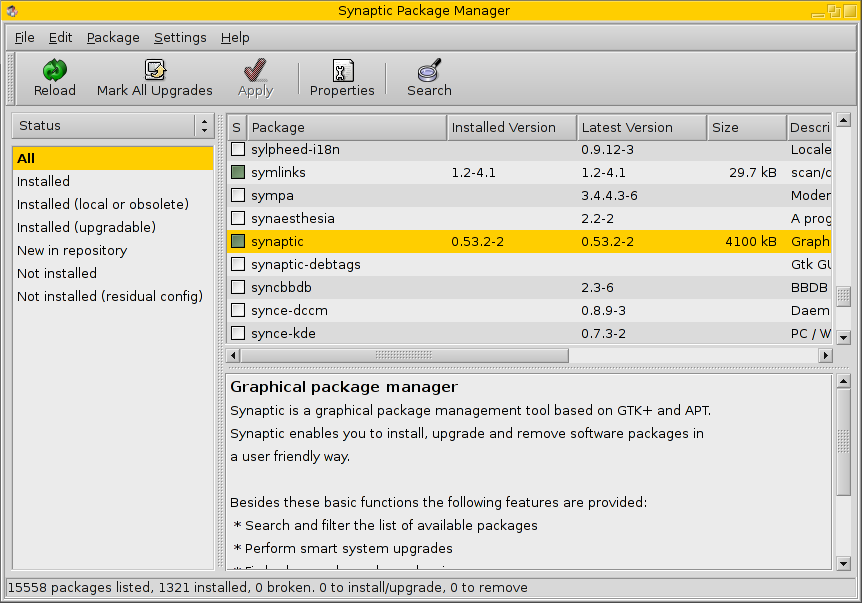
Synaptic vs CNR
There's a very clear difference to casual computer users between dealing with these two screens:
Synaptic
Click-n-Run -
Re:MAC version?
Presuming you mean MacOSX, then yes;
Check out aMule & MLDonkey. They're both quite popular and multi-platform.
There's also the offical client/version that is also supposed to work on OSX, but I haven't tried it myself.
Hope that's akin to what you were looking for. -
eDonkey
What I don't get is why the post doesn't provide link to some information about eDonkey network and some clients to use. I know it can be found on the Net within seconds, but why not make the article more useful.
-
Re:In addition.NET is Free source (as in free speech, mono or dotGNU)
Java isn't
That's right, there's no open source Java solutions. You also can't download the source code.
Oh wait...
-
Re:girls
yeah and that's why u need http://www.nongnu.org/ratpoison/, not the twm bloatware
-
Enlightenment is about eye candy...
Whoever who finds E17 cool and usable should be forced to use ratpoison for a while.
Oh boy, these days I'm so fed up with eye candy I sometimes find myself missing the Athena toolkit. And that is serious... -
Mine too... (creatively using computesr at 3.5+)> My son has been fluent with a mouse for about a year, since he was 3 1/2.
That's about the same age my younger son Jonatan started using the computer intensively. The older one (Daniel) started a bit later (about 4 1/2). But we had a laptop with only a touchpad back then so it was more difficult for him. Last year the children's demand for the computer became so high that I set them up with their own computers (photo of their room, that my wife would never have allowed me to publish if she could prevent it...).
Whatever they play, on the computer or not on the computer, the most important thing is that it should be a tool to aid their creativity, not to limit it. In "Hardware toys" it means things like Lego basic constrution sets (and other manufacturers. Both quality and quantity are mportant factors here: lack of each limits the child's creativity).
With Daniel we started with some cheap commercial games from Office Depot clearance. I don't think it's the right way. These quite limit the child to following instructions.
With Jonatan, we didn't make the effort to look for things to buy. He's a second child... So it was more like finding whatever we have that can occupy him so he doesn't bother us, and it worked better. M$ Paint turned out to be really great for him. It was simple enough to use, and he was very creative with it. Then he discovered Google: he uses Google images to look for pictures, then he cpopies and pastes them into his own works (He got a bit addicted to Google, and when we went on a 3 weeks vacation and he didn't have acess to the computer he was drawing pictures of the Google logo with his crayons... A few months ago when he wanted to find something his granfather told him it cannot be found on Google. So he said to his Grandpa: "Grandpa, anything can be found on Google if you know how to look for it!". Even searching Google requires creativity).Another good piece of Children's software that encourages creativity is Drape (Drawing Programming Environment). It is a sort of programming environment similar to to Logo in some respect, but not exactly the same. One advantage is that it allows for very easy mouse interaction, so a child can create things that "work" quite easily (i.e., with just a bit of adult intervention). Form the same source, Game Maker is more suitable for older children. It is a programming environment to create games, either by using drag and drop or a builtin programming language. I've seen nice cooperation between the younger and older brother here: the young one chooses the objects and graphics, and drwas the levels of the games. The older one completes the game by adding the more abstract parts: actions and interactions. Logo is of course a very good thing for children. For the smaller ones the online r-logo is very easy and fun to use. For more serious Logo programming MSWlogo is a much more powerful implementation (including 3-dimensionality and multi-tasking). There's no need to "choose one". My son Daniel first thinks of an idea he wants to implement, then chooses the most appropriate tool, just like a programmer choosing the most appropriate programming languge for the job (he has several flavors of Logo and choses the one that has what he needs for a project. He also uses Visual Basic that he learned at school).
What else?
For several months my kids were addicted to Enigma. It's "just a game", but actually it involved loads of creativity in solving an entirely different puzzle in each level, and has the right balance between sing the brain and coordinating mo -
Creating games as programmingEnigma is an open source game based on a programming language. Creating a level in Enigma is actually writing a program. I'm not sure it's the right tool for learning to program, but it can help Slashdotters pass their spare time (both playing and designing levels).
Game Maker is actually a programming environment. It is free as in beer (or milk if it is for kids) unless you want the extras. It is used by Prof.dr. M.H. Overmars of Universiteit Utrecht as the basis of course on game design. The students think they are learning how to make games but what they are actually learning is event driven programming. It might be more fun to learn to program in this environment, especially for kids, and not just for boys. My kids are right now quite addicted to GameMaker. Even 5 years old Jonatan can design a bit with the help of 11 years old Daniel. Daniel is just making games most of the time this summer, and learning programming on the way (last year he learned Logo, and also VB at school, but Game Maker is much more fun...).
-
Re:No.
After all, why use a web based program when a binary runs several thousand times faster, you can save data on your hard drive a lot easier and there's no lag in downloading or streaming new data for the next web page.
You're making the assumption that the bulk of data handling is going to happen in the web browser (which may be the case in AJAX, I don't know anything about it). This is simply not true.
For an example, take a look at mldonkey. The engine runs as a separate process, and lets the user access it through either a very primitive telnet interface or a web browser. If you use the latter, you get a graphical user interface without having to depend on GTK, QT or Windows (and can start the core from crontab as soon as the machine starts, without having to wait for the user to log in and start it from X-Windows).
Or take the program I'm writing. I regularly read binary newsgroups, and have accumulated thousands of image files (from fantasy-sci-fi -group, so save the jokes about porn collection), and must manage them somehow. As a solution I wrote a python script that downloads the images from desired newsgroups, decodes them, and inserts them into a PostgreSQL database together with all the headers and other data that could be collected from the message (and even checks fro dublicate posts and simply links to the old image in case one is found). The database uses a web browser (through Apache and PHP) as its user interface, but the actual data processing is done in Python, PHP, ImageMagick and PostgreSQL. This frees me from having to worry about the interface into wondering how my Python script actually works, since I forgot to comment it and can't make heads or tails out of the 3-page listing
-
Does nobody here use Freshmeat?Some of these are probably listed elsewhere, but many aren't (as of the time of this posting) and it's good to have them collected in one place, anyway.
This list is NOT comprehensive, even of what is on Freshmeat (which, in turn, is not comprehensive in what is Open Source, which in turn is not comprehensive in what exists) but it should make for a good start.
Oh, and this list was trivial to make. Once you have such a list, it is then easy to go out and try the software to see if it'll do what you want. According to the fictional character Sherlock Holmes, "it is a mistake, often made, to theorize without data". So, when you theorize as to what software you'd like to use, here is some data you can use.
- White Dune - one of the best VRML editors - but, then, who uses VRML?
- Sodipopi - a very respectable editor
- Vector Visuals - looks like a nice package
- Gnu Plotutils - long-in-the-tooth, but is pretty standard and does do SVG.
- Quantum GIS does do some GIS-related vector work, but it is unclear as to whether you can really edit the vectors, per se
- Artstream - not been maintained in a while, though
- Skencil is a package recommended by Artstream's developers as a good, modern alternative
- JFDraw - Seems to be a good drawing package.
- Sketsa - a good sketching package, looks pretty powerful
- Figurine - doesn't look terribly maintained, but does look ggood.
- Cenon - Not sure about this one, but seems OK
- Inkscape - seems to be recommended by other Slashdotians.
- GDraw for gnustep - which, of course, means you'd need to install GNUStep to be able to use it.
- Autotrace - a vital tool if you are wanting to vectorize raster images. There are a lot of tracing programs out there, but this one seems fairly popular. Not sure if it strictly fits the definition of a "drawing program", though.
- tgif
- Gestalter
- KDE 2D Workbench
- RLPlot
- Magelan Graphics Editor
- Geist
- VisIt - arguable as to whether it really counts
- X3D-Edit
- mjbWorld
- Dia
- QCad
- JGraphpad
- Flash For Linux
- Gaphor
- DoubleType - good for those doing their own fonts
- Chemtool, as molecules can be vectors too!
- Glips Graffiti SVG Editor
-
Re:Still ugly fontsIt's all about the Freetype bytecode interpreter. Here's how to turn it on:
- Download Freetype
- Unpack
$ tar jxf freetype-2.1.10.tar.bz2
- Turn on the bytecode interpreter by removing the C language comment
$ cd freetype-2.1.10
$ sed 's/^\/\* #define TT_CONFIG_OPTION_BYTECODE_INTERPRETER \*\//#define TT_CONFIG_OPTION_BYTECODE_INTERPRETER/' include/freetype/config/ftoption.h > include/freetype/config/ftoption.h.new
$ mv include/freetype/config/ftoption.h.new include/freetype/config/ftoption.h - Build and install
$ configure --prefix=/usr && make && sudo make install
- Turn off small font antialiasing by following Gleng's instructions
- Restart X
-
Skencil, another Open Source drawing proggie
http://www.nongnu.org/skencil/index.html - skencil is another system that has been around for quite some time. very cool - supports python.
-
Re:I kind of agreeAll of the above replies miss something that Windows/MacOSX does well: they allow average users to add software easily.
A question: (not to be a troll, I'm really wondering because I can't see through the eyes of a regular user)
Is it really that hard to install programs in Synaptic? I use it all day, and its much easier for me than clicking next twenty times.
-
Overlapping Windows Are Overrated
Cool solution to dealing with overlapping windows, but why deal with them at all?
I've always thought that overlapping windows caused more trouble than problems they solve. It looked advanced back in the day, and was great with small screens, and sometimes you still want to use it, but I'd find it more useful for typical use if windows diddn't overlap unless you forced them to (by continuing to drag for instance).
Or, coming from the other direction, some wish-list ideas I had while using ion are the ability to detach windows into temporary floating windows, resize neigboring frames by dragging one frame's titlebar, and somehow making it easier to use things like the Gnome panel in ion.
I recommend trying ion and similar window managers like LarsWM and Ratpoison and WMI.
Unfortunately to make window managers truly helpful, they will need to have more information about what its windows *mean* than is currently available from X11. For example, it's error prone trying to deduce whether Window X and Window Y are considered part of the same application by the user. Gnome and KDE do a pretty good job of it (e.g. grouping windows by application in the window list/task bar) but it's not perfect. And this is just the most basic information. Other useful info which could modify window behavior is how often a window is used or updated, when it was run, by what means was it launched (menu, button, terminal?), various categorizations and semantic tagging attached to the application permanently or to the window temporarily, etc.
A great advantage of an X11 system is the flexibility to experiment with the window manager, I hope to see more cool stuff in the future, especially from Gnome, KDE, and the distributions' choices. -
easier and safer ...Linux systems based on Debian have apt and an easy to use application installer called synaptic http://www.nongnu.org/synaptic/action.html
You download your applications from repositories that range from stable to experimental.. However I think you'l find the applications that are in the "testing" and stable repositories are all very stable regardless of the word "testing". everything is tested to work together, and it takes care of all the dependency problems, so that everything you need is installed. It also manages updates for your system, and for new versions of applications
I find this a much safer way to install programs than windows, because these apps are tested and go through a lot to get into the repository in the first place.. (besides, it's a matter of honor to provide clean programs) You can always go to a "respected" place like download.com and well download all the spyware you want for windows. Perhaps some day the windows world will have a look at the Debian way, and some enterprising person will set up a safe spyware-free download site who knows.
-
Shameless Plug
Open Source it.
-Peter -
Okay, blame companies - but do it intelligently.> get your government to abandon the crazy rule that exempts companies from blame
You are right but it's difficult to abandon a rule that isn't officially a rule, merely a side effect of circumstances.
Companies are driven by the desire for personal gain of their shareholders. Shareholders are quite often only interested in making money, not in exercising responsible control of their company shares. This is especially true for mutual funds.
What government can do when personal greed dictates the rules is limited, because personal greed can also sway an election.
In my opinion you need to force companies to publish ethics and adhere to these ethics. That demand has to come from as many people as possible, including but not limited to shareholders. To do this a navigable system of ethical policies seems helpful. I'm currently trying to design a recommendation for such a system: Ethics Search Protocol (ESP) for Internet Search Engines.
-
SDL and patience :^)
I've written a small game that some folks find addictive:
http://www.nongnu.org/tong
It's from an old idea I had and was looking for an excuse to teach myself SDL, which some buddies and I had chosen for a much more ambitious game we're still working on.
We chose SDL primarily because it is cross-platform. I use and develop under GNU/Linux myself, but I want all my windows-running buddies to be able to play my games. OSX and even DreamCast porting is trivial, as SDL happily runs on those platforms and many more.
http://www.libsdl.org/
SDL is very well documented and very slick to use, even to a newcomer (so long as you do have some programming experience). I'm a C and C++ guy, and SDL works with those natively, but if you wish to stick with Java or any other such language there are appropriate bindings. I highly recommend the libraries SDL_image and SDL_mixer as well, for boosting image and sound loading support. (I love being able to have my game just load up
I subscribe to master Miyamoto's game design theories, which basically amount to making your game into its own little playground, running on its own rules and rewarding the player for being clever. Keep the controls simple; a person should be able to pick up and play. Now, my game Tong is pretty rough at first, so I maybe don't follow this thinking very well in practice, but the philosophy is an implementation of the old "Keep It Simple, Stupid" that you've heard so often and I think it's very sensible. Especially for budding game developers.
Even with a well-documented API and a clear idea of what you want your game to be, it's going to take a while. Get a demo of "stuff happening on-screen" with mock-up graphics to get a feel for how you're going to render things, then trash the whole thing and start building up all the pieces you need. If your strengths are with object-oriented design, figure out all your game entities in terms of objects that all inherit things like how to draw themselves. If you're more of a procedural programmer, and even if not, figure out your main game loop, what needs to happen every cycle and what can be called out in special cases.
Take your time, let it be a pet project. The last thing you'd want is to extinguish your interest by making it a serious commitment. Starting small and building up is an obvious and good approach.
Best wishes! Long live the independant game developer! -
Don't waste your time with DHCP
Run ipsentinel, and configure it to "own" all possible IP addresses i.e. 0/0. It'll break ARP which means nothing will work, unless static ARP entries are configured on the hosts.
-
I can top this crap
Yes, TFA is yet another Mac handjob gone too far, but the biggest argument seen from the Windows fanboys is that the GUI is ugly and boring because it's meant to stay out of the way and let you productive work done (read surfing porn and wasting time playing whatever crap game released this week).If they really beleived this crap about the GUI staying outta the way they would be using an interface like http://www.nongnu.org/ratpoison/ or http://www.6809.org.uk/evilwm/. Now stfu and admit the windows interface just sucks.
-
Non-windowing
Caveat
Windowing systems, in that they simulate objects moving spatially (in front/behind, and in 2 dimensions across screen) and require hand-eye coordination to click on widgets, are basically not a great idea. You will always be fighting to translate these difficult things into a different realm, not that it can't be done.
If you instead think about what work needs to be done, possibly it could be handled using mainly audio clues and novel tactile interfaces. For example do users even type well? Aside from the hardware and UI nitty-gritty, something like emacs or ratpoison
might be more useful. I could see how a new frame being created would speak its name at a different pitch for example, so by hitting one key on your custom keyboarding device you can get all the visible frames to say their names in order from low pitch to high pitch, maybe you can scroll through them audibly with a scroll wheel type mechanism. Anyway I know lots of people are not fully blind and can use computers well so presumably you want two systems, one close to the current system and one that is a radical departure for non-sighted people. I am not even sure what the jobs are that they would want to do but I imagine the most important things will be to visualize one's surroundings and danger (for example a rangefinding and sonar type device) and interacting with at least part of the web in some way (just because it is so inexpensive to develop for it).
Of course I doubt any partially blind people are going to be reading slashdot with its tons of text but maybe? -
Re:The Positioning Sledgehammer
One good usage is for navigation. I will use GPS in my home built UAV to navigate the skys: http://www.nongnu.org/paparazzi/
But GPS is only accurate to a certain degree. Too fully land an autonomous aircraft straight down a runway using GPS would be well, ugly.
When I saw this article title I thought great, something more accurate. But it has "accuracy" within 20-40 meters? And then it's based on known locations of wi-fi access points? Hrm, I'll pass. Maybe it's good for locating the nearest starbucks or what city you are on without the need for sattelites, but it's not accurate enough for navigation without some other supplemental sensors such as GPS and existing navigation techniques (Kalman Filter, etc).
-
Cassette DaysWhat percentage of people were illegally taping off the radio or LPs or concerts back in the 80s?
Hmmm, why haven't I seen this argument before?
I Listen to streaming radio more than mp3 anymore. But every once in a while, I gotta hit that record button, be a damn shame not to use it. http://www.nongnu.org/streamtuner/
Which statistic am I?
-
Re:Nethack
Mmmm. Such a brilliant idea.
If there's one game that needs a DS port, Nethack would be it. Along with Ur-Quan Masters (though that might work better on the GameCube) and other cool OSS games =)
Still, once the homebrew stuff gets easier to run on DS without all this weird hardware, it'll probably be easier to make it a normal game rather than run it from Linux. In either case, it needs a new front-end code; judging from the number of really weird and cool front-ends there are for Nethack right now, and the fact that Nethack is very very portable, and that DS has more than the capability to run the game, I don't think it's a problem as such to port it to the thing.
-
Re:Joerg, please release cdrecord-prodvd source
Just for clarification, Joerg considers dvdrecord an unauthorized fork (if such a crime is possible for another project whose source has also been made freely available) of cdrecord. cdrecord-prodvd is Joerg's project. I think Joerg's main complaint against patched versions of cdrecord is that they supposedly reflect unfairly on the quality of cdrecord, as your experiences with dvdrecord appear to prove.
-
rdiff-backup and dar work better for this
I use rdiff-backup for actual incremental backups. rdiff-backup is based on librsync and works amazingly well. There are a few spites such as a lack of checksums and non-numerical user ID's which can be dangerous when restoring a full system, but overall it is very impressive.
If you're solely using (external) HD's for your backups, you'll like DAR (Disk ARchive) even better than rsync/rdiff-backup.
-
Re:Nice read and all, but...
Better keyboard Hyperlink navigation:
Firefox + Hit a Hint (http://users.tkk.fi/~psillanp/hah_hp/)
If you really want to do without a mouse use Ratpoison with Conk http://www.nongnu.org/ratpoison/ http://conkeror.mozdev.org/
I use ratpoison and conk when I want a happy medium between a full blown GUI and a low rez terminal.
-
Re:BeautifulUnder OS X, installation consists of downloading the application, and optionally extracting it from an archive. That's it, nothing more.
Interesting. Perhaps someday OS X will catch up with Synaptic (based on apt) package manager for Linux, where all you have to do is click a checkbox for the program you want, and click "Apply".
All deps are taken care of, the program is downloaded and installed automagically.
Updating your system is even easier: "Mark All Updates", and "Apply"
To set all this up on a Fedora system, refer to the Stanton Finley guide.
More on topic, the Apple desktop is no threat to Linux, and never will be. Apple provides a turn-key solution which some people find appealing. Linux provides more power, flexibility, runs on a wider choice of hardware, and comes with better support at a lower cost.