Slashdot Mirror
Domain: pencomputing.com
Stories and comments across the archive that link to pencomputing.com.
Comments · 36
-
Re:No worries
It's strange, for some reason, Pen Computing Magazine has always been a niche publication: http://www.pencomputing.com/ --- guess they missed out when they picked the wrong part of the device for their name --- wonder how theyd've faired if they'd named themselves ``Tablet Computing Magazine''.
-
Re:What you are saying is untrue
Rewind to 1996:
Pen Services for Windows 95Right now I know of these machines and tablets with official releases...
There have been tablets for a long time now. I own one from 1997.
-
Re:This will stifle innovation
Actually that's pretty much exactly what happened.
Yeah, Apple invented something completely out of the blue. None of those old Windows CE "PDA"s (remember those?) had animations, touch screens, etc. Nor were they smartphone shaped. They certainly wouldn't have had an 'i' anywhere in their names.
Oh, wait....
-
Compaq should sue everyone
for copying the TC1000:
http://pencomputing.com/frames/tpc_compaq.html
- Silver and black
- rounded corners
- screen takes up almost entire front surface -
Re:I'll just be right here...
Since apparently VoIP doesn't count as phone capability to you, I guess I shouldn't mention the WiMax version either.
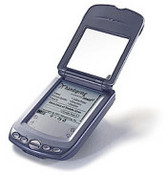
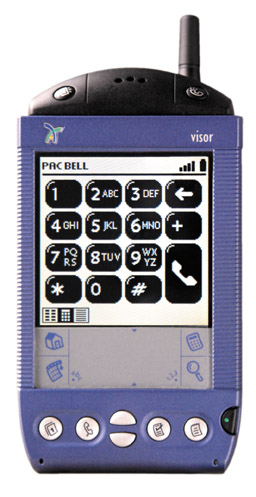
Well then would you accept the Treo 180g or Visorphone?
-
Re:Late to the game?
You are ten years too late. Here is a brief history.
Microsoft's problem was they wanted to keep the same Windows user interface on their Tablets (which was too fiddly) and they used the pen for input. Writing into computers never took the public's imagination. I prefer it though. My old PalmPilot was an amazing superior device for entering text than my iPhone. It was faster, more accurate and you could write large amounts of text without having to look at the screen. And it didn't take up most of the screen like the iPhone.
Oops, I have got sidetracked walking down memory lane.
-
Palm m100? That's nuthin
Jeez, a Palm m100? Those came out around the time I'd given up on Palm. You're apparently pretty young, though, so you're forgiven.
Still, even TFA seems pretty lacking in genuine geek cred. Lots of gushing about vapor patents filed in 2001, "long before Palm made phones." Well you know what? In 2001 I had one of these, and if you didn't mind carrying around a brick it wasn't a bad device at all. It was just a Palm III PDA melded to a phone, so you got the benefits of the address book and calendar. This was long before mobile data, but there was a mobile browser available for Palms, and I was able to use that when I coupled the phone with a Ricochet modem.
Beat that, anyone?
-
Old Story
This is Deja Vu all over again. They already had a bunch of pushes for Tablets. Like here:http://www.pencomputing.com/frames/tablet_pc.html Tablet PC is no go. Get over it.
-
Re:Lacked the Verizon network?
Back in 2002 I had a Handspring Visor with the phone module. I remember answering it in front of my friends and they just assumed I was playing crazy
-
Re:Patents
Given that Apple was the first into the whole PDA space with the Newton - remember, they coined the phrase Personal Digital Assistant - I should think that quite a few Palm features are covered by Apple patents.
Apple wasn't the first company to get into pen-based computing, GRiD predates them considerably for example. And uh, the two companies have a common ancestry (see link.)
-
Re:many carries are open, Apple is not
I heard Verizon rejected Apple because the wouldn't make the GUI theme red and because they couldn't get every option to play music changed to "Get new music from the VCast Store!".
I'm only half kidding... Seriously though, it was probably way too "open" for Verizon.
Quote from the Interview w/ Verizon's Product Distribution and Marketing Manager:
Q. Many people feel that Verizon has specifically disabled these features to force them to use your Get-it-Now and PIX Place service.
A. And your point is?
-
But it's Verizon...
-
Re:Still wating for a good e-book reader!
I'm an electrical engineer going on my fourth year, and have been using a slate-style tablet PC for a little over a year now. A Motion M1400 to be exact, which I picked off of ebay for pretty cheap (see here, pretty cheap indeed). I can say without a doubt that a tablet with One-Note is far superior to a conventional paper notebook aside from price. I was able to scan assignments in for later reference, write up my homework, save and index presentations given by professors, and most importantly search my indexed notes for past lessons. Drawing is no problem, neither is annotating scanned documents. Plus it can be used as a pretty convenient e-book reader
Now about your durability argument, the larger the book is, the weaker the spine because it has to hold together more sheets of paper. I've wrecked the binding on more than one book since starting school, and I know that chem. students use some awfully large books. If you are stepping on and wrecking stuff in your room 'cause you left it on the floor, it's not the 'ebook's fault, it's yours for leaving it there in the first place! -
But, my 5 year old cell phone does thisMy Kyocera Smartphone QCP-6035 does this, so what is new about it? Article about the Kyocera is at http://www.pencomputing.com/palm/Pen40/kyocerasma
r tphone.htmlThe 6035 has a built-in Palm Pilot and can do all kinds of stuff. I like it because it has a built-in modem and will connect to a serial port (i.e. COM1) and let's me use my laptop on the internet from my vehicle. The later 7135 with color display is even better yet.
What is so new and great about the ELnk thing?
-Maurice
-
The tablet pc has never been tried before?
>but I consider the Tablet PC (a form factor that hadn't been tried before)
I had a NCR 3125 in the 90's. It was tablet-shaped, it had crappy handwriting recognition, etc. http://www.pencomputing.com/TabletPC/pen_history_d om.html
Try again, M$! -
Look for dustproof design and heat tolerance.
The magazine Pen Computing has a nice lean towards ruggedized machines. You can always count on them for brutally honest, brutally violent reviews of the latest from Panasonic, Melard, Itronix, and whoever the latest challenger seems to be.
The issue currently on the stands is the 2005 Buyers' Guide, which deserves a read. A few issues ago, they paid a visit to a durability testing lab. The photos of the shower stall, drop test, hinge exerciser, button pusher, and screen scratcher were hilarious.
My personal go-everywhere machine is a Toughbook CF-M34. It's tiny, doesn't weigh much, and takes whatever I dish out. The other day I had it standing on top of my car when a gust of wind shoved it over the edge. A little chunk of metal was liberated from the hind corner when it hit the concrete, but the running apps didn't crash, and there was no cracking of the case beyond the ding. Thank goodness for padded hard drive mountings!
The main concern you have with desert operation is dust. A washable keyboard will let you simply rinse the grit out from under the keys. Rubber port covers will keep gunk out of the PCMCIA slot, for instance, when it's not in use.
There's an option in the BIOS of my '34 for "high-temperature operation". What it does is stop charging the battery when it reaches 80%, since operating a lithium-ion battery above its rated temperature is as simple as derating its maximum charge. Going to 100% at high temperature would significantly shorten the cycle life of the battery. -
Re:Not novel by any means
This news of IBM's entrance to this market is more noteworthy for its tardiness...
Hoohah, that's where you're wrong! IBM has had a tablet PC for a while, and it was pretty damn cool. Check it out here: IBM Transnote.
They also had the 730T, which was a monochrome 486 deal if I remember correctly, and the 7592, but I can't seem to find a good link to spec's. -
Re:it's simple, but...
Apparently, it's good to -30C, but the buttons are still too small.
I know for a fact it's OK with ice, water and whatnot - I've had mine full of water, shaken it out, and works fine, while one of my coworkers dropped his in a puddle of grout and left it overnight by accident. We got the grout off of it with a chipping hammer, and cleaned the charging contacts with a wire brush, and it worked ok (the '4' key sticks a little..). -
Not "a first" ... (rolls eyes...)Ever heard of Pen Computing magazine?? Even the earliest copies I've got on my shelf, dating back to 1997, have several rugged, vertical-market PDA's per issue that can withstand "the great outdoors."
Nothing to see here folks, move along...
blakespot -
This was a good try.
The IBM TransNote didn't sell well. Anyone here own one?
-
Try hunting down an IBM Transnote on eBay
IBM brought out an incredible machine a few years back that has a bit of a cult following. Review
Best of all it can digitise whatever is drawn on the A4/8.5" x 11" pad too!
It's 10.4" screen may seem small nowadays, but it has a keyboard underneath, so you can use it as laptop, tablet or writing pad.
-Roy
current auctions -
I went with a Handera 330 insteadI got some cash for xmas, and tried to decide what to get to replace my Palm IIIxe. I know someone with a Zaurus SL-5000 (the original developer model, 32MB RAM) and was seriously tempted to find a real Zaurus off eBay. There were just a couple of problems.
The first is the battery life. I could go weeks on two AAA batteries in the IIIxe, while all these multi-hundred MHz machines have battery lives measured in hours. On an international flight, or when vacationing on the side of a mountain in rural Italy, that makes a difference.
The second is simple efficiency. On the Palm, apps execute in place; there's no need to copy from "storage" to "executable RAM" or anything like that. This frees up a remarkable amount of memory in practice. Linux's support for XIP is still highly experimental, though it seems some progress is being made.
The other part of efficiency is the apps. The Palm apps are really well-designed, and really work for a small-screen, stylus device. A lot of Linux apps don't translate so well to a dinky screen and pen-based operation, and even the specific PIM apps have some rough spots (though I admit I haven't seen the very latest environments).
I finally decided I didn't really need to run a webserver off my PDA (however much I wanted to, yeah I'm a geek), or Quake. I got a Handera 330 off eBay (not easy, some guy had bought the last 11 of them; wtf?). CF and SD slots, 240x320 screen (but grayscale, so battery life doesn't suffer), built-in voice recorder, etc.
-
Re:I like the idea
However, i live in Wash dc, the heat and humidity capitol of, well, the country.
Care to visit Miami? Take a trip into the Everglades and DC will seem like an airconditioned room.
Back to the topic: I did some networking work for a clothes company that designs a rapper's line of clothes. The manager gave me a stack of irregulars. The jeans have lots of hidden storage space in them. I can store a few paperbacks, a crimper, a pda, my wallet, and a big key ring easilly in ONE of the front pockets. There are also pockets near the knees, one INSIDE the pants, some on the sides of the thighs, etc. If I distribute my things evenly, most people don't know that I'm carrying that much stuff. I'd never have considered buying from a rapper's line of clothes, but they sure are convenient for carying tons of stuff.
Note: I don't usually carry more than my pda-phone, wallet, and keys. -
Re:Bashing party!
Clippy
You mean MS Bob 2.0?
ClearType?
Invented by Apple, circa 1981.
All the recent MS Media inventions?
Again, links please?
handwriting recognition software
Invented by GRiD computing in the late 1980's.
Text->voice software
My Vic-20 was doing that in 1982. -
This Linux WebPad would be a good addition
I was checking out Pen Computing the other day, and saw this Linux based webpad. This would be a cool addition to the intel design.
-
I know something better...
I have a Panasonic CF01 tablet pc, which has a docking station that sets it up pretty much exactly like a picture frame.
It set me back about $300 a year ago.
Best of all, no work needed at all.
Jon Acheson -
Re:Maybe I'm just an old fart....
Hi,
While not actually a MODDED unit, since you can buy them... but Itronix recently licensed a market segment of our illuminated keyboard patent. This they are using in their new Rugged Go-Book Laptops.
IBM saw the need to use an LED to light their keys from the top in their Thinkpad Laptops. The problem with this is the added glare to the LCD screen making it a little harder to read, and the keys are not lit evenly. In fact in a recent review when the IBM is just compared to Itronix's glow in the dark keys, reviewer Conrad H. Blickenstorfer of PenComputing.com stated "A clever idea, but it doesn't come close to Itronix' solution" (see article for more info Article )
For more info on Itronix see . Itronix.com
For more info about the upcoming release of the Nite-Surfer keyboards and retail laptops watch our site at
Happy New Year!!!!!
David C. Byrd -
Re:One Word...
Takes a licking and keeps on ticking:
Timex uses that phrase for its watches, but the one computer I remember ( The Timex Sinclair) was no where near durable enough to use that phrase on it. But today that are portable pc's that can withstand a lot of abuse. Back in March an article "Rugged Requirements"was written about an Air Force testing of three rugged laptops and a gateway in a Samsonite Case. These were tested for Heat, Drops, usability and other stress testing. In the heat test the Gateway actually fared better than two of the rugged models, although it was beaten by the Itronix XC6250 Pro. And to add to their usability ratings they are now offering THE added functionality to compute in low-light environments by illuminating their keyboard according to a recent review. When the author compares the IBM Thinkpad to the Itronix XC6250 Pro, the author states " A clever idea, but it doesn't come close to Itronix' solution." Even Robert Blincoe of the register mentioned in his article comments concerning the IBM Thinkpad stating " the added glare to the LCD screen making it a little harder to read, and the keys are not lit evenly."
I can not wait to get one of these!!!
-
Old Hat IndeedWhy we used these back in the boiler room, a hundred years ago, and they were old-hat then, too!
Seems like alot of what we have seen over the past few weeks is re-cycled one way or another.
For Example, the Latest from Microsoft: The Tablet PC. (formerly know back in Win 3.1 days as Pen Computing)
but pen computing isn't old hat (to read the article at my link) - I wonder what is available in Linux? it would be amusing to steal his thunder there as well.
Check out the Vinny the Vampire comic strip
-
More info - Re:Pen Computing
- Old Pen Computers Never Die - hacking an old pen computer
- Linux: Choosing an Alternative Mobile Operating System - slightly dated, but interesting article from a pen computing perspective
- Table of various pen computing laptops, etc. with extensive specs (from 1999). These have probably changed over the past couple of years.
-
More info - Re:Pen Computing
- Old Pen Computers Never Die - hacking an old pen computer
- Linux: Choosing an Alternative Mobile Operating System - slightly dated, but interesting article from a pen computing perspective
- Table of various pen computing laptops, etc. with extensive specs (from 1999). These have probably changed over the past couple of years.
-
More info - Re:Pen Computing
- Old Pen Computers Never Die - hacking an old pen computer
- Linux: Choosing an Alternative Mobile Operating System - slightly dated, but interesting article from a pen computing perspective
- Table of various pen computing laptops, etc. with extensive specs (from 1999). These have probably changed over the past couple of years.
-
Pen ComputingThere have been several incarnations of this with different hardware probably over the past ten years, all under the name Pen Computing.
Pen computers running Windows are used primarily in vertical markets such as utilities, insurance, health care, transportation, government, and sales force automation. Unbeknownst to the general public, there are dozens of different pen computers available from companies such as Telxon, Symbol Technologies, Fujitsu PC, Fujitsu-ICL, MicroSlate, WalkAbout, Xplore, Melard, Panasonic, Intermec , Itronix (now including Husky), and others. Pen computers come as tablets, clamshells, and slates in many different sizes, configurations, and degrees of ruggedness.
Check out the link for lotsa info and lotsa links.
-
Pen/Tablet Computer
In the industry they're called pen computers . Most pen computers are Palm-like devices, although some are clipboard-sized (other names are "clipboard computer" or "pen tablet"). Telxon, Norand, Microslate, and Fujitsu make some. There also are notebook-like convertibles which hide or remove the keyboard, such as the Clio.
-
First Visor Prism reviewBelow is the first official review of the Visor Prism by Pen Computing Magazine:
http://www.pencomputing.com/palm/Pen37/visorspris
m platinum.html -
Re:1997??
Furthermore, Graffiti predates the Pilot. It was originally an addon for Newtons and other PDAs. According to this review it was introduced in Nov 1994, which is prior to even the filing date.