Slashdot Mirror


The Classic Control Panel In Windows May Be Gone

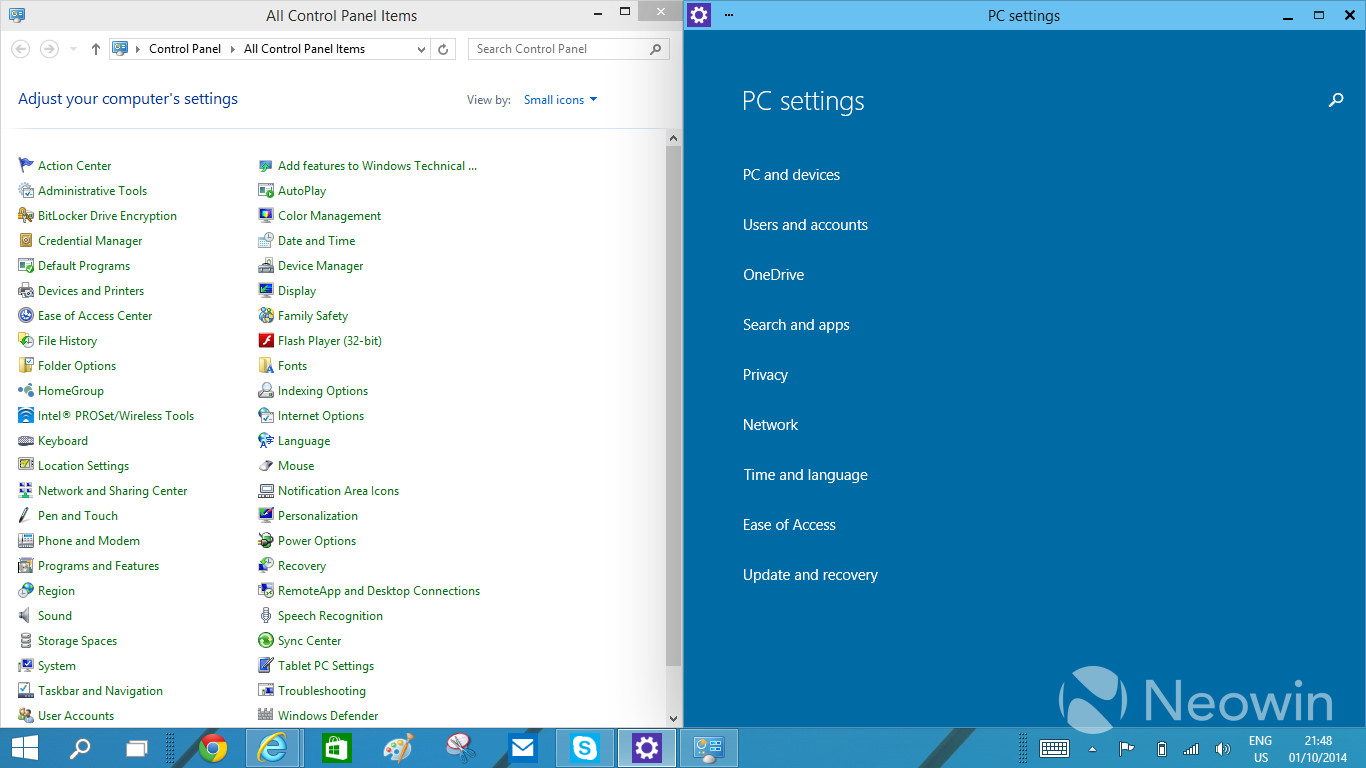
jones_supa writes In Windows 8, there was an arrangement of two settings applications: the Control Panel for the desktop and the PC Settings app in the Modern UI side. With Windows 10, having the two different applications has started to look even more awkward, which has been voiced loud and clear in the feedback too. Thus, the work at Microsoft to unify the settings programs has begun. The traditional Control Panel is being transformed to something temporarily called "zPC Settings" (sic), which is a Modern UI app that melts together the current two settings applications.
347 comments

  1. Please Microsoft... by __aaclcg7560 · · Score: 5, Insightful

    It's one thing to abuse the users with interface changes, but don't make the job for I.T. techs any harder as it it. We already got a lifetime of job security because of Windows.

    1. Re:Please Microsoft... by Anonymous Coward · · Score: 5, Funny

      Don't fret. This shouldn't affect your daily routine of telling people to restart their computers.

    2. Re:Please Microsoft... by __aaclcg7560 · · Score: 2, Funny

      We have a script that automatically boots off all the users on the weekend. That fixes half the problems. The other half of the problem is all the systems that didn't come back up from the reboot.

    3. Re:Please Microsoft... by Anonymous Coward · · Score: 3, Insightful

      But after windows 8, the users need help even to restart their machines. Who would have thought at UX meeting, that people do not find the hidden shutdown option by moving mouse cursor to magic right upper corner.

    4. Re:Please Microsoft... by PRMan · · Score: 5, Funny

      Even worse. I RDP'ed into a Server the other day and nobody, even those running Windows 8 on their laptops could figure out how to do a "log out" on the server.

      --
      Peter predicted that you would "deliberately forget" creation 2000 years ago...
    5. Re:Please Microsoft... by Anonymous Coward · · Score: 1, Funny

      We have a script that automatically boots off all the users on the weekend. That fixes half the problems.

      Really? That is your solution to problems? You realize he was joking, that telling users to "restart their computers" is the response of the IT nitwit who can't figure out what the actual problem is?

      The other half of the problem is all the systems that didn't come back up from the reboot.

      What sort of IT tech has a bunch of systems so poorly administered that they don't reboot properly? Windows might not be a shining beacon of stability but you can't just be a completely incompetent admin and blame Microsoft for it.

      That situation isn't even commonplace for people who don't have somebody to administer their system for them, sounds to me like you're causing more problems than you're solving.

    6. Re:Please Microsoft... by FSWKU · · Score: 5, Insightful

      Maybe I am wrong, but over the years I have noted an increasing condescendension of IT people over "mere users". I wonder why that is. Bear in mind that IT typically isn't the company's cash cow, but "overhead", making this condescension rather inappropriate imho. Even on /. there are many "users" that are no IT people: designers, programmers, etc. I wonder why the interface they are using is apparently less important than computer maintenance software, or any other user experience, for that matter.

      The "overhead" designation is precisely the reason IT people tend to hate users (at least in my experience). The end-user sees the IT person as nothing more than an electronic janitor who's sole purpose is to clean up the messes that they, the user, were too careless or too inept to prevent from happening in the first place. Thus, they don't bother to learn how to do things properly, they don't learn how to keep from getting a virus, they don't learn how to do even the simplest of things because "That's IT's job. I shouldn't have to know computers!" No, they don't have to know the ins and outs of every modern OS, but they should know how to at least keep it from obliterating everything they're working on (meaning stop clicking "OK" on every damn thing that pops up!). Then to top it all off, they behave as if security policies, best practices, etc. don't apply to them, even though management approved them as being a site-wide mandate...

      So in short, users see IT as "the help" and treat them as such. And much like a janitor who is constantly cleaning up after idiots who have no concern for anyone other than themselves, the IT worker learns to hate certain users because they seem to have a mission in life to make IT's job as miserable as possible.

      --
      "So after all this, you make my case for me. To end this stalemate, you must die..."
    7. Re:Please Microsoft... by __aaclcg7560 · · Score: 3, Insightful

      whoosh!

    8. Re:Please Microsoft... by __aaclcg7560 · · Score: 4, Interesting

      My job as an I.T. technician is to console hurt computers and fix broken users. I console (or remote) into computers to find out what is ailing them, which can sometimes take a substantial amount of time because no one wants to reimage their five-year-old system. As for broken users, I try to instruct them on how to take care of their computers but most users don't care about their computers.

    9. Re:Please Microsoft... by Anonymous Coward · · Score: 0

      Well maybe they're not plugged in!

    10. Re:Please Microsoft... by Joe_Dragon · · Score: 0

      shity software with memory leaks

    11. Re:Please Microsoft... by Anonymous Coward · · Score: 0

      Hasn't the remote desktop client always suppressed those options? I just use the "shutdown" command line utility. /l should logout, /r reboots. /s shuts down. etc.

    12. Re:Please Microsoft... by David_Hart · · Score: 1

      We have a script that automatically boots off all the users on the weekend. That fixes half the problems. The other half of the problem is all the systems that didn't come back up from the reboot.

      The other half are laptops that people took home with them.... Who has desktops any more...

    13. Re:Please Microsoft... by JDG1980 · · Score: 2

      Maybe I am wrong, but over the years I have noted an increasing condescendension of IT people over "mere users". I wonder why that is. Bear in mind that IT typically isn't the company's cash cow, but "overhead", making this condescension rather inappropriate imho.

      All this is the sign of a poorly run organization with excessive siloing. IT should be working with other departments, helping to streamline and automate their processes, making other people's jobs easier and less tedious. If people think of IT as "the computer janitors", your organization is throwing away a tremendous amount of potential productivity. It's bad for morale on both sides, too.

    14. Re:Please Microsoft... by hairyfeet · · Score: 1

      Which is why everyone voted with their wallets and Windows 8 flopped like a fish on the bank in August!

      I'm running Win10 on the netbook at the shop (figure if it runs good on an AMD Bobcat with a 5400RPM HDD? It'll run good on anything) and I have to say...I like the new UI, its enough like the traditional control panel you aren't sitting there playing "guess WTF they called it" like you did with Win 8 but at the same time thy have an easy mode for the casual users...I have no problem with that as long as I can bypass easy mode and get to the full tools, which at least in this build you can.

      If they set the price right I could see this killing off XP and getting a good chunk of the diehard Win 7 users (like myself) to jump on board. Its fast, has a good solid desktop, the UI works well (with the exception of that damned start menu lagging as it downloads the updates to the tiles, but that is easy enough to kill) and its easy enough for a long time user to use while giving the casual users a good hand holding...again i have no problems with this, unlike Win 8 where that shit just wouldn't fuck off.

      --
      ACs don't waste your time replying, your posts are never seen by me.
    15. Re:Please Microsoft... by Anonymous Coward · · Score: 0

      Alt + Insert is the start menu shortcut in RDP.

    16. Re: Please Microsoft... by DigiShaman · · Score: 1

      I'm sure all but the CxO's and executive, right?! God forbid if you have to be the IT grunt that has to explain data loss from a document that wasn't saved prior to them going home.

      Yeah, rebooting PCs via automated scripts is both fucking lazy, and addresses the symptoms, not root cause.

      --
      Life is not for the lazy.
    17. Re:Please Microsoft... by Anonymous Coward · · Score: 0

      You said tiles. That's all I need to know. I have a bookmark for that.

    18. Re:Please Microsoft... by careysub · · Score: 1

      ...If they set the price right I could see this killing off XP and getting a good chunk of the diehard Win 7 users (like myself) to jump on board....

      The wait for a usable Micro$oft system has already made me jump ship - I got a Mac to go with my Linux systems. There are limitations in using Linux only, not all open source alternatives are adequate replacements for commercial apps, and many commercial vendors do not support Linux. But they do support Macs pretty well. There are no compelling "windoze only" apps that can force a Windows purchase over a Macintosh.

      --
      Starships were meant to fly, Hands up and touch the sky - Nicky Minaj
    19. Re: Please Microsoft... by jd2112 · · Score: 4, Funny

      Try fixing them in the veterinary sense...

      --
      Any insufficiently advanced magic is indistinguishable from technology.
    20. Re:Please Microsoft... by lgw · · Score: 0

      The end-user sees the IT person as nothing more than an electronic janitor who's sole purpose is to clean up the messes that they, the user, were too careless or too inept to prevent from happening in the first place. Thus, they don't bother to learn how to do things properly, they don't learn how to keep from getting a virus, they don't learn how to do even the simplest of things because "That's IT's job. I shouldn't have to know computers!"

      That's the service they pay for, not having to "learn computers". IT is the data janitors. Most actual janitors don't despise the people they clean for, you know (of course, most actual janitors don't get hassled constantly either).

      --
      Socialism: a lie told by totalitarians and believed by fools.
    21. Re:Please Microsoft... by Anonymous Coward · · Score: 0

      Cant you read you insensitive clod: http://tech.slashdot.org/comme...
      RESTART THE DAMN THING.

    22. Re:Please Microsoft... by Bugamn · · Score: 1

      I bet janitors despise the people that clog the toilets on purpose, because it's the janitors' job to keep it running instead of theirs.

    23. Re:Please Microsoft... by Anonymous Coward · · Score: 0

      My job as an I.T. technician is to console hurt computers.

      you sound more like a cybernetic grief counselor - reverse Eliza?

    24. Re: Please Microsoft... by __aaclcg7560 · · Score: 1

      Yeah, rebooting PCs via automated scripts is both fucking lazy, and addresses the symptoms, not root cause.

      Computers that aren't rebooted at least once a month are likely to miss a critical patch and present a serious risk to the network. If the users aren't willing to do their part to maintain network security, then the script needs to reboot the computers. Users call the help desk to cry about their computer being rebooted, and users are reminded of the MANDATORY POLICY to reboot their computer once a month or risk losing their unsaved data.

    25. Re:Please Microsoft... by Zynder · · Score: 1

      I think those tiles are supposed to only be on the dropdown portion of the start menu and not full screen like 8. I could be wrong. I'm gonna go hunt a copy on Pirate Bay and give it a test run.

    26. Re:Please Microsoft... by __aaclcg7560 · · Score: 1

      Well maybe they're not plugged in!

      Since the I.T. department I worked for is entirely male, some department managers have taken to hiding their extra computers in the handicap stall of the women restrooms. Pretty lame. Makes our job difficult when it comes time to replace all the old computers with new computers.

    27. Re:Please Microsoft... by __aaclcg7560 · · Score: 1

      you sound more like a cybernetic grief counselor - reverse Eliza?

      Except I get paid much better than a grief counselor.

    28. Re: Please Microsoft... by __aaclcg7560 · · Score: 1

      That's what the cattle prod is for in the extreme cases.

    29. Re:Please Microsoft... by Anonymous Coward · · Score: 0

      most users don't care about their computers.

      Of course not, it's just a tool to do their job and the job of the IT department is to make sure it keeps working.

    30. Re:Please Microsoft... by X0563511 · · Score: 2

      It's difficult not to become jaded after years of (re)fixing computers or being forced to work with ridiculous arrangements because regular users insist on their dancing pigs.

      Since PCI has turned into a huge deal, this has only gotten even more irritating.

      --
      For large sets, this will be our guide even unto death, for the LORD will work for each type of data it is applied to...
    31. Re:Please Microsoft... by Anonymous Coward · · Score: 0

      They already established many times that they don't give a fuck about admins. From trying to replace you by Azure (and all software which you might install with an app store), then killing technet subscriptions, then forcing metro on servers... They're giving *everyone* the middle finger.

    32. Re:Please Microsoft... by Z00L00K · · Score: 1

      We reboot the users that complains instead.

      --
      If builders built buildings the way programmers wrote programs, then the first woodpecker would destroy civilization.
    33. Re:Please Microsoft... by Anonymous Coward · · Score: 3, Insightful

      I work at a smaller company (~150 people) and regularly chat with the janitors. They get treated like utter trash by the white-collar workers here, to the point that people will spill coffee on carpets and hardwood floor and leave it to dry, only to later get very upset over the janitors who now have even more work than normally and stains that are near-impossible to remove. It's not the job of our janitors to clean up after every little accident that people are too lazy to take care of, nor is it their job to wash the dishes or tidy up trash that people are too lazy to throw in the garbage bin, but many of my colleagues think that they can do whatever the fuck they please.

      I'd say the same goes for IT. If my computer breaks I need the help of IT, but I shouldn't assume that I can break it through negligence just because we have IT staff. If I have a service contract on my car I still need to learn how to drive it to avoid unnecessary damages, for example by learning how to change gear and not hit other cars on the road.

    34. Re:Please Microsoft... by hairyfeet · · Score: 1

      Why go to TPB when Win 10 is free to download straight from MSFT? And YES the tiles are only on the right side, where devices and printers and control panel used to be (they are on the left now, big whoop) and its easy enough to simply remove those tiles.

      On a positive note you can make those tiles anything you want (as well as nothing at all) so I have stuck the weather there, although now that I have my Windows 7 gadgets back I'll probably get rid of it as I can easily add weather along with my beloved CoreTemp there.

      --
      ACs don't waste your time replying, your posts are never seen by me.
    35. Re:Please Microsoft... by Anonymous Coward · · Score: 1

      I got a Mac to go with my Linux systems

      That's like saying you got a gerbil to go with your buttplugs.

    36. Re:Please Microsoft... by Anonymous Coward · · Score: 0

      I'm willing to bet janitors hate the people who only bother to piss or shit somewhere in the restroom, regardless of the toilet's location, because "Fuck that! Let the janitor clean it up!"

    37. Re:Please Microsoft... by Tablizer · · Score: 2

      As intuitive as molasses. All these years the option was in the lower left somewhere. Now it's at the upper right, the complete opposite, and under your name. What's a name have to do with logging out? I'm not exiting my body. That may be intuitive for an exorcist.

    38. Re:Please Microsoft... by Andtalath · · Score: 1

      Alt+f4 on the desktop.
      This also allows you to shut down the computer.

    39. Re:Please Microsoft... by Anonymous Coward · · Score: 0

      Gamers beg to differ, Steve Jobs fanboi.

    40. Re: Please Microsoft... by stealth_finger · · Score: 1

      God forbid if you have to be the IT grunt that has to explain data loss from a document that wasn't saved prior to them going home.

      That's a pretty easy explanation. 'You lost your work because you didn't save it before going home, you idiot. Even if the machines don't get auto restarted expect them to crash at any instant and save often'

      --
      Wanna buy a shirt?
      https://www.redbubble.com/people/stealthfinger/shop?asc=u
    41. Re:Please Microsoft... by bwcbwc · · Score: 3, Insightful

      Yeah, if they reorganize the "PC Settings" into categories where we have to read the minds of the MS development team to figure out what category the applet runs under,it'll be another C-F. How many IT folks here _don't_ switch the current control panel to "Classic" view on Win Server 2003/2008 or Win7? Don't force folks into an extra layer of memorization to figure out how to get to the WIndows Services dialog, etc.

      --
      We are the 198 proof..
    42. Re:Please Microsoft... by bwcbwc · · Score: 1

      ...says the junior PFK under the BOFH's tutelage.

      --
      We are the 198 proof..
    43. Re:Please Microsoft... by bwcbwc · · Score: 1

      This.

      IT isn't "overhead", it's what keeps modern businesses running. If an IT dept. is being treated as overhead or janitors, that means that business is just treading water on existing tech and is failing to take advantage of new capabilities. If you're in IT and being treated like a janitor, you probably don't want to invest in the company stock plan.

      OTOH, I've also run into some IT departments where the development teams think they are gods and treat the test teams and operations teams with the same condescension that comes from PHBs. "Teamwork" is such an inane term, but if you don't treat your co-workers with respect (at least outside of your inner thoughts) it has an erosive effect on your company's success. This applies both to the IT user who f-s up their computer AND to the guy who has to deal with that user both to fix the immediate issue and (with luck) educate the user just enough to prevent future disasters.

      --
      We are the 198 proof..
    44. Re:Please Microsoft... by PlusFiveTroll · · Score: 1

      Laptops are just as bad. Many hibernate rather than shut off, and the users never reboot them. Luckily the task scheduler can still do the same thing.

    45. Re:Please Microsoft... by PlusFiveTroll · · Score: 1

      shutdown /l

      (lower case L)

    46. Re:Please Microsoft... by Neil+Boekend · · Score: 1

      Ballistic end user management?

      --
      Well, I might have a way, but it only works on a semi spherical planet in a vacuum.
    47. Re: Please Microsoft... by TractorBarry · · Score: 1

      The real question is why is the default behaviour of the operating system not to save state whilst rebooting ? (with an alternative "reboot without saving state" command being available)

      --
      Sky subscribers are morons. They pay to be advertised at !
    48. Re: Please Microsoft... by cellocgw · · Score: 1

      Computers that aren't rebooted at least once a month are likely to miss a critical patch and present a serious risk to the network. If the users aren't willing to do their part to maintain network security, then the script needs to reboot the computers.

      And, THAT is why we call IT workers total fuckwits. Until you figure out how to tell the users they must reboot without doing a forced shutdown of apps without so much as saving the work in process, we're going to do everything we can (e.g. pulling the ethernet plug every night before going home) to stop your idiocy. Granted Windows itself is largely to blame, as it's incapable of understanding that force-quitting apps should never be allowed sans local keyboard interaction (i,e. direct user approval), but the typical IT approach of nuking from orbit is unexcusable.

      --
      https://app.box.com/WitthoftResume Code: https://github.com/cellocgw
    49. Re:Please Microsoft... by Anonymous Coward · · Score: 0

      WTF is "IT"? Information Technology has nothing to do with Operations, and is not overhead, but actually a cost-saver over pen and paper!

      Anyways, those who disrespect others have no case, no matter who they are.

      If departments and employees fail to include IT Operations or refuse to cost-optimize their business based on the latest technology, they can only blame themselves.
      Very few companies today can survive the current market-climate without some kind of IT Operations.

      To do business successfully today, you need to have your feet firmly planted in both worlds and be great at balancing...
      For the ground beneath is constantly moving and shaking!

    50. Re:Please Microsoft... by Anonymous Coward · · Score: 0

      Well played, I clicked that link

    51. Re:Please Microsoft... by Anonymous Coward · · Score: 0

      Lemmiwinks?

    52. Re: Please Microsoft... by __aaclcg7560 · · Score: 1

      pulling the ethernet plug every night before going home

      Don't come crying to help desk when you download a virus and your data goes bye-bye because you prevented your system from getting updates over the network. The I.T. department can only do so much to protect you from your own idiocy. However, one less computer on the network means I can pay attention to the other 8,000+ computers that might not have a probelm between the keyboard and the chair.

    53. Re:Please Microsoft... by MachineShedFred · · Score: 1

      click on desktop, press alt+F4.

      Seriously, that's been there since Windows 3.1 or earlier.

      --
      Slashdot still doesnâ(TM)t support Unicode after it was added to the HTML standard in 1997.
    54. Re: Please Microsoft... by afidel · · Score: 1

      Granted Windows itself is largely to blame, as it's incapable of understanding that force-quitting apps should never be allowed sans local keyboard interaction (i,e. direct user approval), but the typical IT approach of nuking from orbit is unexcusable.

      Yes, because SIGKILL (or the equivalent) doesn't exist on every OS ever...

      but the typical IT approach of nuking from orbit is unexcusable.

      This part is correct, the way we handle it is to use two deadlines, the first will prompt the user to reboot, if they ignore that for x number of days (generally 2) then it will force reboot. We make sure not to schedule patch deployments around major holidays when many people will be out and likely to miss the soft reminder.

      --
      There are 4 boxes to use in the defense of liberty: soap, ballot, jury, ammo. Use in that order. Starting now.
    55. Re:Please Microsoft... by Anonymous Coward · · Score: 0

      So install Windows on your Mac in a separate partition. And then grow up and pull your head out of your ass.

    56. Re:Please Microsoft... by Anonymous Coward · · Score: 0

      Just remember, only IT and Drug Dealers call their customers "users"...

    57. Re:Please Microsoft... by MachineShedFred · · Score: 2

      Or, better yet, in Windows 2012 when you right click on the computer and select "Manage", you get the completely useless Server Manager application that takes forever to populate with data and become usable rather than the computer management MMC snap-in that we're actually looking for since Windows 2000.

      Now I have to either run MMC manually and add the snap-in, or use the shitty start "menu" to click on administrative tools, and click computer management.

      Thanks for that.

      --
      Slashdot still doesnâ(TM)t support Unicode after it was added to the HTML standard in 1997.
    58. Re:Please Microsoft... by afidel · · Score: 2

      Hasn't the remote desktop client always suppressed those options?

      No, and in fact on server 2003 there's a race condition between the RDP process and the server service that will cause a shutdown initiated through RDP to go into limbo over 50% of the time (supposedly fixed in SP1 but it wasn't) so we too always use shutdown.exe with -r -f -t 0.

      --
      There are 4 boxes to use in the defense of liberty: soap, ballot, jury, ammo. Use in that order. Starting now.
    59. Re: Please Microsoft... by cellocgw · · Score: 0

      You're entirely missing the point. Aside from the fact that viruses almost never penetrate the corporate firewalls, what I stressed was that system (and AV-software) updates can be pushed without executing a forced shutdown. There are better ways to achieve the same goal.
      Call someone else a PEBCAC, 'mkay? I lost 2 days of work because some red flag went off and IT wasted 2 days doing their SuperSpecial scans only to find nothing at all -- and here I am with an 8-core machine but they wouldn't let me run their scans while simultaneously working.

      --
      https://app.box.com/WitthoftResume Code: https://github.com/cellocgw
    60. Re: Please Microsoft... by cellocgw · · Score: 1

      Wow -- someone's doing it right :-). Can I come work for your company pleez?

      --
      https://app.box.com/WitthoftResume Code: https://github.com/cellocgw
    61. Re:Please Microsoft... by Anonymous Coward · · Score: 0

      Keep talking like that and you are gonna get outsourced! Or replaced with an "H1B" employee!

    62. Re: Please Microsoft... by __aaclcg7560 · · Score: 1

      Aside from the fact that viruses almost never penetrate the corporate firewalls, what I stressed was that system (and AV-software) updates can be pushed without executing a forced shutdown.

      You're missing my point. Computers that CAN'T RECEIVE updates often need a reboot. If users log off the computer before they leave work each night, and shut down their computer over the weekend, a forced reboot wouldn't be necessary. Most users think their computer is a server running mission critical work that can't be interrupted. Most of the time they're not.

    63. Re: Please Microsoft... by TangoMargarine · · Score: 2

      Yeah, rebooting PCs via automated scripts is both fucking lazy, and addresses the symptoms, not root cause.

      Except for those times where it actually solves the problem, on Windows. (Rebooting Linux almost never fixes anything.)

      --
      Unity? Screw that: XFCE. Slashdot Beta? Screw that: SoylentNews. Australis? Screw that: Pale Moon. UX developers DIAF
    64. Re:Please Microsoft... by Anonymous Coward · · Score: 0

      Laptops? We all converted to iPads, which don't react to the reboot script.

    65. Re: Please Microsoft... by TangoMargarine · · Score: 1

      Defaulting to Don't-Save at least avoids destroying data that you don't want to save over. And OS's these days will almost always warn you if you have programs with unsaved documents open before they shut down. I would consider saving without asking a violation of user expectations. Maybe there's an autosave feature, but that stores it to a different file, not the one you were working on. And we should all be trained to Save Early, Save Often anyway.

      If you're asking "why don't desktops default to hibernate instead of shut down"...I suppose that's a matter of preference. Saving files to disk is my idea of "saving state," but I'm not a laptop person so I don't have a workflow that involves me constantly popping in and out of my machine.

      Depending on whether you're installing updates etc. during the reboot process, it may not be actually possible to preserve the state accurately anyway.

      --
      Unity? Screw that: XFCE. Slashdot Beta? Screw that: SoylentNews. Australis? Screw that: Pale Moon. UX developers DIAF
    66. Re:Please Microsoft... by TangoMargarine · · Score: 1

      And doesn't 8 default to that "hybrid shutdown" which is closer to hibernate anyway? Or is that a feature they're adding to 10.

      --
      Unity? Screw that: XFCE. Slashdot Beta? Screw that: SoylentNews. Australis? Screw that: Pale Moon. UX developers DIAF
    67. Re:Please Microsoft... by TangoMargarine · · Score: 1

      Oh look, Hairyfeet fawning over a Microsoft product. I know it must hurt saying "Windows 8 wasn't good."

      P.S: What that other guy said about the tiles. And I assume The Ribbon is now everywhere as well, which can DIAF.

      --
      Unity? Screw that: XFCE. Slashdot Beta? Screw that: SoylentNews. Australis? Screw that: Pale Moon. UX developers DIAF
    68. Re:Please Microsoft... by TangoMargarine · · Score: 1

      Click the account icon and then click "Sign Out".

      +1 Totally Intutive. "Just click on this picture that there's no reasonable cause to think does anything."

      --
      Unity? Screw that: XFCE. Slashdot Beta? Screw that: SoylentNews. Australis? Screw that: Pale Moon. UX developers DIAF
    69. Re:Please Microsoft... by sexconker · · Score: 1

      Nothing about computers is intuitive. They're extremely complex systems that do not relate to humans at all.
      Taking a shit when you feel the urge to is intuitive. Doing anything on a computer is not intuitive. Everyone has to learn how to use these systems. The people who claim shit is "intuitive" or "unintuitive" are actually claiming shit is familiar or unfamiliar.

      You can still log off using the command line or by using CTRL+ALT+DEL, just as you have been able to for decades. If you're using RDP, then it's CTRL+ALT+END, just as it has been for decades.

      Welcome to computers. You have to learn how to use them. Sometimes things change.

    70. Re:Please Microsoft... by afidel · · Score: 1

      compmgmt.msc can be called directly =)

      --
      There are 4 boxes to use in the defense of liberty: soap, ballot, jury, ammo. Use in that order. Starting now.
    71. Re:Please Microsoft... by TangoMargarine · · Score: 1

      There's still a difference between having things in a defined place, and randomly hurling your mouse around the screen and clicking wildly to find something. Wouldn't you agree that the Windows 8 Charm bar is less intuitive than menus with visible labels?

      You won't see me arguing a command line is equally intuitive as a GUI, either. You have to know what to type into a CLI, which makes it less intuitive than GUIs with things you can see and click on. At least if you're an English-speaker, the GUI is usually labelled in English. "ls"* and "cd" aren't exactly vernacular words.

      *Interestingly, neither the man page nor Wikipedia mention what "ls" actually means. My guess would be "list screen"? man ls says "list directory contents."

      --
      Unity? Screw that: XFCE. Slashdot Beta? Screw that: SoylentNews. Australis? Screw that: Pale Moon. UX developers DIAF
    72. Re:Please Microsoft... by Anonymous Coward · · Score: 0

      BTW, maybe I (OP) should have added "an increasing condescendension... *on /.*"
      At work I have no problems at all with the IT folks, and never had any, for that matter. Most of the employees are programmers, electronics engineers etc, in short, the type of people that only resort to IT for really weird stuff, or things requiring special permissions. My comment was about the stuff I read here on /.

    73. Re: Please Microsoft... by cellocgw · · Score: 1

      And you're offensively paternalistic in thinking I want to go thru 10 minutes of booting & reloading all my apps and active development docs every day (or even week) just to satisfy some IT god's paranoia. I repeat: load the patches and give the users a minimum of 5 day's warning before forcing a reboot.

      --
      https://app.box.com/WitthoftResume Code: https://github.com/cellocgw
    74. Re: Please Microsoft... by __aaclcg7560 · · Score: 1

      satisfy some IT god's paranoia

      I work for the federal government. Paranoia is the rule and not the exception.

    75. Re:Please Microsoft... by MachineShedFred · · Score: 1

      Yeah, except I always type in compmgnt.msc and get jack shit. After all these years you'd think I'd figure that one out, but I spend most of my days on OS X / Linux now...

      --
      Slashdot still doesnâ(TM)t support Unicode after it was added to the HTML standard in 1997.
    76. Re: Please Microsoft... by DigiShaman · · Score: 1

      Microsoft patch Tuesday is the 2nd of every month. After testing, they should be deployed and installed at least by Friday, and then rebooted that night or weekend for changes to take effect.

      The problem isn't rebooting the PCs for security updates. The problem is rebooting PCs once a week to pro-actively address memory leaks. This is very bad and dangerous mindset for multiple reasons. I.e. LAZY! But most if all, it involves communication via IT to the rest of the staff which I rarely every see in the corporate world. Most IT departments of this SEP (Someone Elses Problem) view in which they themselves are abstracted from the very company that keeps them employed. That very notion should be a fireable offense IMHO.

      --
      Life is not for the lazy.
    77. Re: Please Microsoft... by kenh · · Score: 1

      Go to metro desktop (press the Windows key), click on your name in the upper right corner, choose 'sign out'.

      --
      Ken
    78. Re:Please Microsoft... by mea_culpa · · Score: 1

      I've done IT freelance for small businesses in my area for 15 years. I've learned over the years that I can tell which small businesses will succeed and which will fail. One thing that I find consistent about the successful companies is how they deal with careless users. If a user is consistently infecting their computer with malware they get fired. The SMB owner sees this as a personnel problem and deals with it. If this user can be so careless with a computer what's to say they won't be careless about their job? (Now, I don't know if it was the malware that got specifically got them fired, for all I know they were too careless about their work which got noticed by management) Multiple $250 repair invoices for one particular user in the span of three months gets probably gets noticed in a smaller company.

      Another indicator is how much they invest in hardware and software. There is a sweet spot of sorts, investing too much is careless, investing too little is also careless. When a company won't invest in small things that pay for themselves over the long term, such as the right printer for the right job, they are in trouble. It is also a sign for me to negotiate a higher retainer amount or not add them to my clientele in the first place.

    79. Re:Please Microsoft... by Zynder · · Score: 1

      I was unaware it was free from them. I thought it was free for developers/those with MSDN accounts. I still haven't gotten around to getting it. I procrastinate too much. Thanks for the heads up.

  2. Just keep it off the servers.... by Kenja · · Score: 5, Informative

    Had to maintain a Windows 2012 Server system last weekend.... dealing with the Windows 8 configuration interface on a server makes me very angry.

    --

    "Have you ever thought about just turning off the TV, sitting down with your kids, and hitting them?"
    1. Re:Just keep it off the servers.... by TWX · · Score: 4, Interesting

      Had to maintain a Windows newer Server system last weekend.... dealing with the Windows newer configuration interface on a server makes me very angry.

      Said every Windows admin, ever.

      Though all joking aside, changes should make the job easier, or more intuitive, or more cohesive. The change from the 3.1/NT3.5 interface to the Windows 95/NT4.0 interface was an improvement, but slowly fragmented as the GUI design kept changing over time (I dare not call it evolving!).

      It's already awkward enough having separate control panels, one for most functions, the other for "Administrative Tools - Computer Management". That needs to be addressed, along with reconciling between two separate GUIs.

      --
      Do not look into laser with remaining eye.
    2. Re:Just keep it off the servers.... by Mr_Wisenheimer · · Score: 2

      Yeah, until I learned that you can just go straight to the traditional control panel interface and skip through the tablet-PC nonsense.

      I don't know that the old way is necessarily "better" from a user-interface point of view, but certainly long-time windows power users and system administrators prefer it and it seems very contrary to Microsoft's philosophy of "legacy-forever" to remove it completely.

    3. Re:Just keep it off the servers.... by deadweight · · Score: 1

      Ah........no. NT>2000>2003>2008 was all good. 2012 sucks balls bigtime. I put classic shell on every 2012 machine I am forced to use and that doesn't even account for the drop in performance when you go from 8 to 12 on the same hardware.

    4. Re:Just keep it off the servers.... by epyT-R · · Score: 1

      Change can be good but it's not always good.

    5. Re:Just keep it off the servers.... by epyT-R · · Score: 4, Interesting

      The reason is because the old panel had everything in front of you. There was no guesswork where to go. It was either the control panel or one of the mmc snapins, with regedit as the worst case scenario. The tablet interfaces are too simplified to be of much use beyond basic settings. Their full screen nature is also irritating on a desktop.

      Hell even the changes they did in vista are clunkier than 2k/xp was. Awkward, hard to remember phrases replaced one or two word descriptions, and a lot of the options were hidden, leaving the user to guess where things are, and no, searching for everything is NOT a solution. At least it was still possible to get a compact, complete list in vista through 8.1. If they plan to remove that in 10 and replace it with some stupid touch interface, I will avoid the os.

    6. Re:Just keep it off the servers.... by Anonymous Coward · · Score: 0

      Go look up the .msc and .cpl file names, then memorize their names.

      Compmgmt.msc and appwiz.cpl hasn't changed since windows95.

      Windows Key + R, Compmgmt.msc, enter.

      Microsoft has been trying to make windows easy for stupid people to use by using friendly names for things to make it intuitive for them, and they fail miserably because fluffy and happy is a terrible organization schema, and 2 layers down you need technical know-how to use the thing anyway.

      Then, they have the fucking audacity to put the GUI menu's on a certification exam, and all the bullshit ways to get at a menu, and all the hidden features, which means they don't want to certify basic knowledge and ability, they want to certify "have you been walking users through our nightmare of a user interface".

      Windows is a swiss army knife, Apple is a swiss watch, they do very different things.

      What they need to do is organize the interface based upon function and form. E.G. Folder settings should be under Control Panel > Explorer > Folder Settings as should anything related to windows explorer. System should contain devmgmt.msc, compmgmt.msc, and so forth; low level hardware and core windows settings. Network should be seperate and contain your smorgasbord board of network settings that change all the time; there should be a button you can press on the task bar for a network commander for mobile clients that lets you configure everything; you can manage wireless profiles, firewalls profiles, physical connections, et-cetera.

      But that would require getting your users to acknowledge the user interface is explorer and actually learn something, so here we go again.

      What will kill windows if they do not get their shit together is linux virtual machines. The computer boots linux, and each application is in fact a linux virtual machine with specific binaries.

    7. Re:Just keep it off the servers.... by K.+S.+Kyosuke · · Score: 3, Insightful

      Prepare for the steering wheel in new cars to work in exactly the opposite way, and for the brake pedal and accelerator to be active when released rather than pressed. Surely you won't get into much trouble on the road now that I've told you about that in advance.

      --
      Ezekiel 23:20
    8. Re:Just keep it off the servers.... by TWX · · Score: 5, Insightful

      Why is there a resource-intensive GUI on a server anyway? Is the server supposed to be able to play Solitaire or World of Warcraft? Or is the server supposed to, oh, I donno, serve files and applications to client stations?

      That's one thing I never understood, why Microsoft went GUI with the servers like they did, other than to know that they sold a lot of server OSes to people that had no business running servers in the first place...

      --
      Do not look into laser with remaining eye.
    9. Re:Just keep it off the servers.... by tinkerton · · Score: 1

      Had to maintain a Windows 2012 Server system last weekend.... dealing with the Windows 8 configuration interface on a server makes me very angry.

      Imagine Bruce Banner had been a sysadmin. The world would have been a different place.

    10. Re:Just keep it off the servers.... by tinkerton · · Score: 1

      Ow brilliant.fixing blockquotes the smart way.

    11. Re:Just keep it off the servers.... by PRMan · · Score: 2

      Because they saw how crappy Novell Netware servers without it were? There are many amazing server apps that run with a convenient GUI when you are administrating the box.

      --
      Peter predicted that you would "deliberately forget" creation 2000 years ago...
    12. Re:Just keep it off the servers.... by TWX · · Score: 1

      So why not make the GUI application run on the client workstation being used by an administrative-level account? After all, lots and lots of servers are VMs now, not OSes tied directly to real hardware.

      --
      Do not look into laser with remaining eye.
    13. Re:Just keep it off the servers.... by Anonymous Coward · · Score: 0

      >What will kill windows if they do not get their shit together is linux virtual machines. The computer boots linux, and each application is in fact a linux virtual machine with specific binaries.

      No that is ass-backwards. The hosting OS should be Linux, and Windows runs in a virtual-machine (if it ever gets to run at all).

    14. Re:Just keep it off the servers.... by NJRoadfan · · Score: 1

      I seem to recall Microsoft saying that more installs of Windows Server were of the GUI-less "Server Core" version. Microsoft even boosts about how much more secure it is and that it requires fewer patches. Maybe they are trying to push the rest of the hold outs to Core by adding Metro!

    15. Re:Just keep it off the servers.... by Anonymous Coward · · Score: 0, Insightful

      Because of Fuckwit lazy ass software developers who drool and draw blanks stares at you when asked where the 'client-only' or 'service-only' piece of their server software is.

      I still have to deal with commercial software that in 20-mother-fucking-14 has to be logged in locally for the 'server' side of the program (that runs in the foreground) so the scheduled tasks setup within the program will run the batch-imports that upload into SQL!

      These servers have to be setup so that when they reboots they auto-logs in and runs a 'shortcut' in the start menu's 'starup' folder (some with the user/password appended to the .exe target) so that nightly imports into their SQL work.

      So A.) They don't have a background service, B.) Can't run scheduled tasks without the foreground program running., oh and C.) If there is any alert message (which pop up for anyone running the GUI client software if it is open) The scheduled tasks and all other batch processes will not run because there is a message on the screen that 'someone' has to click ok to acknowledge.

      And before you start saying this is old 'legacy' software the version we are using (about 5th upgraded one since we got it) was released in August of 20-FUCKING-14!

      These 'programmers'/'developers' can create modern software that can use SQL from 2005 to 2014 (32 or 64bit) but can't figure out how to make a true background service for the server side so it must run the same software the client workstations use to run batch process tasks!

      As much as I swear and yell "Fucking Microsoft" at my systems while working all day, not 'everything' is on their end and a lot more seems to be on the Dumb-ASS so-called 'software developer' side of things meaning as longs as these ass-holes are still cranking out shit that is needed in a fucked-up manner there will always be local administration on server, especially GUI on Windows server. Damn-near every damn server software I deal with states that 'Core' editions are not supported. (and 'web' software that uses IIS states that 'web' editions are not supported so these were and never will be used)

      Headless servers won't be coming to Windows anytime soon.

    16. Re:Just keep it off the servers.... by Brulath · · Score: 0

      ... and no, searching for everything is NOT a solution. ...

      This may be a stupid question, but why not? I've found pressing win+q and typing "proxy" then enter opening the proxy settings to be significantly faster than attempting to navigate to them manually. Win+Q and "event" is a fairly speedy way to get to the event viewer, though Win+X then V is probably faster. Searching for settings seems significantly easier than attempting to determine which sub-menu item/icon they placed a command under.

      I'd argue that searching for everything is a good thing, but not all implementations are up to scratch. They can improve that, though, and have over a year before release, so there's still time to report the search terms that don't do what you expect (if you're ever bored enough to bother doing free testing for them – which is the problem).

    17. Re:Just keep it off the servers.... by tepples · · Score: 2

      Yeah, until I learned that you can just go straight to the traditional control panel interface and skip through the tablet-PC nonsense.

      In Windows 8 and Windows 8.1, administrators already cannot create or modify a user account inside Control Panel. They have to make changes "in PC settings", which is code-word for "click here to open the tablet-PC nonsense".

    18. Re:Just keep it off the servers.... by sexconker · · Score: 1

      Why is there a resource-intensive GUI on a server anyway? Is the server supposed to be able to play Solitaire or World of Warcraft? Or is the server supposed to, oh, I donno, serve files and applications to client stations?

      Because the admin changed the default install mode to include the GUI.
      A default installation of Windows Server 2012 and newer does not include a GUI.
      For 2008 R2 (and possibly 2008), the recommendation was to not install the GUI, but I do not recall if what was also the default.

    19. Re:Just keep it off the servers.... by InfiniteBlaze · · Score: 1

      If you've been an admin since NT and don't use command-line...I feel sorry for you. Powershell is AMAZING - and you don't need a GUI on any of your servers. You can run 2012 without it and just use RSAT to handle 99% of your daily admin tasks.

    20. Re:Just keep it off the servers.... by aojensen · · Score: 1

      I actually thought this is what the Windows Server Manager was supposed to do away with - having to open the Control Panel/Computer Management in an RDP session in order to make significant system changes. How did you find using Server Manager in 2012?

    21. Re:Just keep it off the servers.... by Anonymous Coward · · Score: 0

      Do you want to be stuck with that windows shell? really? Powershell doesn't count, it came later.

    22. Re:Just keep it off the servers.... by kesuki · · Score: 1

      "Prepare for the steering wheel in new cars to work in exactly the opposite way, and for the brake pedal and accelerator to be active when released rather than pressed. Surely you won't get into much trouble on the road now that I've told you about that in advance."

      nono its no use using a facetious quip. the gas can will now be on the passenger side, not the drivers side, but company b is putting them behing the rear driver plate. or wait the turn signal needs to be on the left side with the lights, no thats where we'll put the cruise control and the wiper blade activations. no wait lets move the lights to their own switch on the dash, no wait we need to put the wiper blades and the lights together...

      had you used a real driver issue like the ones all real from above you would have gone further with the software/car analogy.

    23. Re:Just keep it off the servers.... by Anonymous Coward · · Score: 0

      Why is there a resource-intensive GUI on a server anyway? Is the server supposed to be able to play Solitaire or World of Warcraft? Or is the server supposed to, oh, I donno, serve files and applications to client stations?

      That's one thing I never understood, why Microsoft went GUI with the servers like they did, other than to know that they sold a lot of server OSes to people that had no business running servers in the first place...

      Because a GUI is a lot more efficient than text at transferring information from the producer to the consumer (a.k.a. your brain). Also, there is a benefit to reusing familiar interfaces. The operator can spend more cycles focusing on tuning his server with a largely familiar GUI than trying to figure out the correct syntax to configure his server, especially if he has multiple unrelated things to do, and doesn't have to futz with his servers often.

    24. Re:Just keep it off the servers.... by Anonymous Coward · · Score: 0

      And, of course, the most important point, the traditional control panel is still there.

    25. Re:Just keep it off the servers.... by Zynder · · Score: 2

      That's funny because it's true. Case in point: Japan.
      In Japan, you could always tell who the new American GI's were because we'd flip on our wipers to change lanes and signaled right turns when it was pouring cats and dogs. I'm just so grateful they didn't decide to swap the pedals around as well. I'm guessing British RHD cars also have the wiper and signal stalks flipped but I'm not sure.

    26. Re:Just keep it off the servers.... by Anonymous Coward · · Score: 1

      Discoverability. And when you need to access something you haven't accessed for ages, and can't freaking get the right keyword to search for.

    27. Re:Just keep it off the servers.... by jedidiah · · Score: 1

      Familiar interfaces? GUI? That's a laugh. The whole problem with GUI interfaces is that they change with every major release. Sometimes they change radically.

      Meanwhile, the icky awful hard and "inefficient" command line interfaces stay the same as there are no marketing or management dweebs trying to "look busy" by mucking everything up.

      Also, those "hard" interfaces are often built to be automated. So it's actually LESS work to deal with a good command line.

      If it's "something that you don't do often", then you can script it.

      Although googling some obscure GUI option that you seldom use is really no improvement over doing the same for some command line arcana.

      --
      A Pirate and a Puritan look the same on a balance sheet.
    28. Re:Just keep it off the servers.... by epyT-R · · Score: 2

      The whole point of a gui is intuitive navigation. If the user is expected to type everything, why not just have a text console that switches to gfx mode when needed, like an old dos machine? This would actually fit the asinine 'fullscreen-by-default' trend better as well. The whole point of the gui 'revolution' was to eliminate guessing what command to enter. Now, they made the gui deliberately harder to use and less flexible, and then slapped a search box on it to compensate. Talk about coming full circle. How is this guesswork better for end users? If they couldn't handle dos, then how are they expected to know what 'magic' terms to search for to get at what they want within a much more complex system? How about the techs that have to support them? It's better to have the options available in one consistent place with short, intuitive, easy to remember names, so they at least someone knows where to look.

      Hunting for (in this case, removed) configurability within hidden, 'intuitively' displayed oversimplification is a big problem with metro, and the fact it's foisted on the desktop makes it even worse. Really, they need two environments, one for touch, and one for full desktop. The control panel for metro controls metro, and the control panel for the desktop gives full configurability.

      The other piece is I don't want all of my data and executables indexed into some database that gets uploaded to a microsoft account when that becomes mandatory in the future. Win-R and paths are sufficient, and faster.

    29. Re:Just keep it off the servers.... by Anonymous Coward · · Score: 0

      Discoverability. If you don't know what it's called, you can't find it. If you don't know all the features, you can't learn them because you don't know that you don't know them. There's no playing around with the settings and there's no manual to read. Searching requires you to already know everything.

      Win+Q? I would assume that quits Windows. I would have never guessed you could use it for searching. Not everyone approaches things the same way. Other people may instantly see Win+Q as "Question Windows" and think Win+T is for "Turn Off". The same applies to words. Someone looking for the event viewer might think of it as an issue log. They'll never find it by searching, but they'd eventually be able to if they could explore all the options. Once you learn the terms searching is fine, but you have to learn them first. And everything changes, so they'll be new terms to learn with every release.

    30. Re:Just keep it off the servers.... by Anonymous Coward · · Score: 0

      How much "resources" is the GUI going to take on the server? Quite likely the kernel will not keep the GUI portions in RAM in normal operation and if your server does not have the gig or ten for the GUI thingies, it should be obsoleted. The GUI is really good way to handle things that happen so rarely, that nobody remembers the right command and parameters, but anyone can fiddle around the control panel for a few while and find the tool that helps performing the needed operation.

    31. Re:Just keep it off the servers.... by Anonymous Coward · · Score: 1

      ... and no, searching for everything is NOT a solution. ...

      This may be a stupid question, but why not? I've found pressing win+q and typing "proxy" then enter opening the proxy settings to be significantly faster than attempting to navigate to them manually. Win+Q and "event" is a fairly speedy way to get to the event viewer, though Win+X then V is probably faster. Searching for settings seems significantly easier than attempting to determine which sub-menu item/icon they placed a command under.

      I'd argue that searching for everything is a good thing, but not all implementations are up to scratch. They can improve that, though, and have over a year before release, so there's still time to report the search terms that don't do what you expect (if you're ever bored enough to bother doing free testing for them – which is the problem).

      One good reason against: multiple language versions.

      If I get an english howto tutorial for an old windows I can more or less replicate it on any language I can at leat vaguely understand. Good luck doing that with the "search for the phrase" version.

    32. Re:Just keep it off the servers.... by Andtalath · · Score: 1

      The default install in 2012 is without the gui tools.

    33. Re:Just keep it off the servers.... by Anonymous Coward · · Score: 0

      Except 2012 core does have a gui. It has task manger, thats a pretty gui with graphs, tabs, resizable windows, etc. Server core has a mouse pointer, windows that can be resized, animations, minimise and maximise buttons. That is a gui.

      You dont even need to login to see the GUI. The login for 2012 core is the same as windows 8. A boring solid colour with the clock floating around and big text saying "press CTRL + ALT + DEL".

      So really, all Micro$oft has done is remove the applications and left the desktop environment in place.

    34. Re:Just keep it off the servers.... by gtall · · Score: 1

      I still like the old Commando interface in Apple's MPW. You could highlight any text command in a window and popup the Commando interface. It was pre-populated with radio buttons, check boxes, text fields, etc. for everything that command could do. Clicking on the interface elements built a text command in an editable window so you could either run it right there or copy and paste it into a larger script.

      I think if MS and Apple would do this for OSes, users would eventually learn to use the terminal windows for stuff they do repeatedly. Apple has gone another route with Automator which builds gui based workflows. It's okay, but it doesn't help me recall arcane Unix syntax.

    35. Re:Just keep it off the servers.... by Jack+Griffin · · Score: 1

      Win2012 is designed to run in Core mode and Administered remotely with Powershell. All the GUI fluff is just to keep the backward compatibility/common interface crowd happy.

    36. Re:Just keep it off the servers.... by Jack+Griffin · · Score: 1

      European cars are opposite to Japanese. Here in Australia most of our cars are Japanese or European so we learn to deal with both.

    37. Re:Just keep it off the servers.... by Anonymous Coward · · Score: 0

      Unless they are real admins using the command line. What happened to the traditional Slashdot user base?!?

    38. Re:Just keep it off the servers.... by Anonymous Coward · · Score: 0

      Yeah, until I learned that you can just go straight to the traditional control panel interface and skip through the tablet-PC nonsense.

      In Windows 8 and Windows 8.1, administrators already cannot create or modify a user account inside Control Panel.

      Uhmm.. yes you can.

    39. Re:Just keep it off the servers.... by AmiMoJo · · Score: 1

      It's even better in the UK, it varies from car to car.

      My car is one way, my mother's the opposite. Mine is a Mitsubishi, her's is a Toyota. Seems like the newer Japanese cars are European style, while the older ones are Japanese style.

      --
      const int one = 65536; (Silvermoon, Texture.cs)
      SJW, n: "Someone I don't like, and by the way I'm a fuckwit" - AC
    40. Re:Just keep it off the servers.... by Hognoxious · · Score: 1

      I once drove in South Africa and they seem to have them the opposite way round to the UK, despite driving on the same side of the road. Of course I didn't drive every model of car in both countries...

      From an ergonomic POV the turn signal should be on the side away from the gear lever. But I guess it saves a dollar or two not having left and right handed parts.

      --
      Confucius say, "Find worm in apple - bad. Find half a worm - worse."
    41. Re:Just keep it off the servers.... by wbo · · Score: 1

      I still like the old Commando interface in Apple's MPW. You could highlight any text command in a window and popup the Commando interface. It was pre-populated with radio buttons, check boxes, text fields, etc. for everything that command could do.

      Have you tried using the Powershell ISE? A feature very much like what you are describing is built-in to ISE (a GUI-based interface for Powershell installed by default on Windows 7 and later and available as free optional download for XP and later.)

      You can launch it from the start menu or open a powershell prompt and type ise

      In the ISE you can search for and select a command from the commands panel. Selecting a command reveals a list of text boxes, check boxes, etc for the commonly used parameters for the selected command with an option at the bottom of the window to show all possible parameters.

      You can fill in the appropriate parameters and then either click Run to execute the command or Insert to insert it into the currently active script or Copy to copy the command to the clipboard.

      The ISE also includes some other nice features such as floating help windows for Powershell commands, tab completion, script debugging tools, etc.

    42. Re:Just keep it off the servers.... by MachineShedFred · · Score: 1

      What, you don't want Live Messenger tiles on your SQL server?

      --
      Slashdot still doesnâ(TM)t support Unicode after it was added to the HTML standard in 1997.
    43. Re:Just keep it off the servers.... by Anonymous Coward · · Score: 0

      It's slow and terrible - if you want to do the stuff you used to do from the Computer Management MMC snap-in, you end up waiting for the Server Manager crap to load, then you go under the tools menu and select Computer Management, which gives you what you wanted in the first place.

    44. Re:Just keep it off the servers.... by JohnFen · · Score: 1

      ... and no, searching for everything is NOT a solution. ...

      This may be a stupid question, but why not?

      For a handful of reasons, but topping the list is discoverability. Searching for everything involves knowing what everything is called or consulting a manual. If you want to do something that you rarely do, this is a big problem. Personally, I absolutely loathe this trend of using searching as the main way to launch applications. It's intrusive and inconvenient, and makes the OS more difficult to use. It's basically removing the advantages of a GUI while keeping the disadvantages, and introducing the disadvantages of the command line without introducing the advantages. It's just suck all around.

    45. Re:Just keep it off the servers.... by _xeno_ · · Score: 1

      Wait, really? When I took a trip to Australia, I wound up getting a Japanese car from the car rental and was constantly turning on the windshield wipers when trying to signal.

      Driving on the left? No big deal. Remembering where the turn signals were? Took the entire trip.

      Of course, when I got back to the US and into my own (Japanese) car, the first thing I did after starting it was turn on the windshield wipers to indicate I was turning left out of my parking spot.

      --
      You are in a maze of twisty little relative jumps, all alike.
    46. Re:Just keep it off the servers.... by UnknownSoldier · · Score: 1

      From a command prompt to start Explorer Here...
      start explorer /e,.

      Important ones

      * Resource Monitor: resmon
      * System Configuration Editor: sysedit
      * System Configuration Utility: msconfig
      * Task Manager: taskmgr
      * Notepad: notepad
      * Nview Desktop Manager (If Installed): nvtuicpl.cpl

      I collected this list back in the WinXP days; funny how many of them still work.

      * Accessibility Controls: access.cpl
      * Add Hardware Wizard: hdwwiz.cpl
      * Add/Remove Programs: appwiz.cpl
      * Administrative Tools: certmgr.msc

      * Character Map: charmap
      * Check Disk Utility: chkdsk
      * Clipboard Viewer: clipbrd
      * Command Prompt: cmd
      * Component Services: dcomcnfg
      * Computer Management: compmgmt.msc

      * Date and Time Properties: timedate.cpl
      * DDE Shares: ddeshare
      * Device Manager: devmgmt.msc
      * Direct X Control Panel (If Installed): directx.cpl
      * Direct X Troubleshooter: dxdiag
      * Disk Cleanup Utility: cleanmgr
      * Disk Defragment: dfrg.msc
      * Disk Management: diskmgmt.msc
      * Disk Partition Manager: diskpart
      * Display Properties: control desktop
      * Display Properties: desk.cpl
      * Display Properties (w/Appearance Tab Preselected): control color
      * Dr. Watson System Troubleshooting Utility: drwtsn32
      * Driver Verifier Utility: verifier

      * Event Viewer: eventvwr.msc

      * File Signature Verification Tool: sigverif
      * Findfast: findfast.cpl
      * Folders Properties: control folders
      * Fonts: control fonts
      * Fonts Folder: fonts
      * Free Cell Card Game: freecell
      * Game Controllers: joy.cpl
      * Group Policy Editor (XP Prof): gpedit.msc

      The lameness filter is lame ... will continue

    47. Re:Just keep it off the servers.... by UnknownSoldier · · Score: 1

      * Hearts Card Game: mshearts
      * Iexpress Wizard: iexpress
      * Indexing Service: ciadv.msc
      * Internet Properties: inetcpl.cpl
      * IP Configuration (Display Connection Configuration): ipconfig /all
      * IP Configuration (Display DNS Cache Contents): ipconfig /displaydns
      * IP Configuration (Delete DNS Cache Contents): ipconfig /flushdns
      * IP Configuration (Release All Connections): ipconfig /release
      * IP Configuration (Renew All Connections): ipconfig /renew
      * IP Configuration (Refreshes DHCP & Re-Registers DNS): ipconfig /registerdns
      * IP Configuration (Display DHCP Class ID): ipconfig /showclassid
      * IP Configuration (Modifies DHCP Class ID): ipconfig /setclassid
      * Java Control Panel (If Installed): javaws
      * Keyboard Properties: control keyboard
      * Local Security Settings: secpol.msc
      * Local Users and Groups: lusrmgr.msc
      * Logs You Out Of Windows: logoff
      * Minesweeper Game: winmine
      * Mouse Properties: control mouse
      * Mouse Properties: main.cpl
      * Netstat: netstat
      * Network Connections: control netconnections
      * Network Connections: ncpa.cpl
      * Network Setup Wizard: netsetup.cpl

      * Object Packager: packager
      * ODBC Data Source Administrator: odbccp32.cpl
      * On Screen Keyboard: osk
      * Opens AC3 Filter (If Installed): ac3filter.cpl
      * Password Properties: password.cpl
      * Performance Monitor: perfmon.msc
      * Performance Monitor: perfmon
      * Phone and Modem Options: telephon.cpl
      * Power Configuration: powercfg.cpl
      * Printers and Faxes: control printers
      * Printers Folder: printers
      * Private Character Editor: eudcedit

      * Quicktime (If Installed): QuickTime.cpl
      * Regional Settings: intl.cpl
      * Registry Editor: regedit
      * Remote Desktop: mstsc
      * Removable Storage: ntmsmgr.msc
      * Removable Storage Operator Requests: ntmsoprq.msc
      * Resultant Set of Policy (XP Prof): rsop.msc

      The lameness filter is lame ... will continue in part 3

    48. Re:Just keep it off the servers.... by UnknownSoldier · · Score: 1

      * Scanners and Cameras: sticpl.cpl
      * Scheduled Tasks: control schedtasks
      * Security Center: wscui.cpl
      * Services: services.msc
      * Shared Folders: fsmgmt.msc
      * Shuts Down Windows: shutdown
      * Sounds and Audio: mmsys.cpl
      * Spider Solitare Card Game: spider
      * SQL Client Configuration: cliconfg
      * System File Checker Utility (Scan Immediately): sfc /scannow
      * System File Checker Utility (Scan Once At Next Boot): sfc /scanonce
      * System File Checker Utility (Scan On Every Boot): sfc /scanboot
      * System File Checker Utility (Return to Default Setting): sfc /revert
      * System File Checker Utility (Purge File Cache): sfc /purgecache
      * System File Checker Utility (Set Cache Size to size x): sfc /cachesize=x
      * System Properties: sysdm.cpl

      * Telnet Client: telnet
      * Traceroute: tracert
      * User Account Management: nusrmgr.cpl
      * Utility Manager: utilman
      * Windows Firewall: firewall.cpl
      * Windows Magnifier: magnify
      * Windows Management Infrastructure: wmimgmt.msc
      * Windows System Security Tool: syskey
      * Windows Update Launches: wupdmgr
      * Wordpad: write

      Slashdot Beta sucks. /. lameness filter is fucking lame.

    49. Re:Just keep it off the servers.... by Anonymous Coward · · Score: 0

      Because the number of IT admin's that can use a GUI in Windows server to make a change without referring to a manual is higher than the number of IT admins who can do the following without referring to documentation:

      alter an Apache http.conf to add or change settings on a virtual host,
      add a user to an OpenLDAP server from the command line,
      modify an SELinux discretionary ACL,
      update a BIND zone file,
      write a bash script to manage a background service,
      correctly configure POSIX ACL's on filesystems,
      configure a Kerberos daemon,
      configure MySQL database instance parameters and backup rotation

    50. Re: Just keep it off the servers.... by kenh · · Score: 1

      Windows server 2012 r2 has three install modes: no GUI (core), minimal GUI, and Full GUI... And you can flip between them at will - install without GUI, and later when you find you want/need GUI you simply install that feature. Later, when you realize it was a mistake to install GUI, you can then remove the GUI feature.

      --
      Ken
    51. Re:Just keep it off the servers.... by Anonymous Coward · · Score: 0

      In Windows 8 and Windows 8.1, administrators already cannot create or modify a user account inside Control Panel. They have to make changes "in PC settings", which is code-word for "click here to open the tablet-PC nonsense".

      Gigantic pile of BS. I'm running Win8 to test for my company, and I just went to the control panel and user accounts is there. i can add or modify a user just like in Windows 7.
      Unless you mean domain users, which you could never do from a Windows client. You always needed the ADUC plug in.

    52. Re:Just keep it off the servers.... by tepples · · Score: 1

      OK, I was probably wrong about 8.0 given AC's comment.

    53. Re:Just keep it off the servers.... by Jack+Griffin · · Score: 1

      Every Jap car I've had (dozens over the last couple of decades) has the indicator on the right. I used to have a Ford (UK), BMW and Jeep all which had the indicator on the left.

  3. Why? by Anonymous Coward · · Score: 0

    I thought they were getting rid of this "modern ui" crap in Windows 10 wasn't that supposed to be the whole point of it?

    1. Re:Why? by roc97007 · · Score: 1

      was there any problem with Control Panel that they had to get rid of it? I liked a central place to change all settings in the OS, and similar settings managers in OS X and Linux Mint.

      I think the problem with Control Panel is that it wasn't big flat primary colored squares.

      Notice that Microsoft heard "loud and clear" that control panel features shouldn't be split up into disparate apps, but decided what we really meant, against all evidence to the contrary, was that we want a Metro app that does the Control Panel functions. This bodes ill. How many other annoying screwups are there going to be?

      --
      Oliver's law of assumed responsibility: If you're seen fixing it, you will be blamed for breaking it.
  4. And... by Anonymous Coward · · Score: 4, Insightful

    It will have even less functionality than before. Because they keep trying to "simplify" things for the dumb users out there, by removing any type of "advanced" feature. Which means you will be stuck having to manually edit the Registry or gpedit or through some third party software that allow access to those now "hidden" features.

    1. Re:And... by newcastlejon · · Score: 4, Interesting

      Removing control panels isn't MS's style. If past experience is anything to go by, the same ones that were in 98/NT will still be there in 10, they'll just be buried under yet another layer of new stuff. Seriously, try find network adaptor settings in 7. After you've navigated through the morass of the network and sharing centre you'll see that it's practically the self same advanced dialog that was there in 95.

      Personally, I'm not averse to change but it's well past time MS just started over again instead of tacking on useless, obfuscating fluff over the top of controls that I actually need to get use.

      --
      If God forks the Universe every time you roll a die, he'd better have a damned good memory.
    2. Re:And... by Entropius · · Score: 2

      The Registry.

      Oh, god, the Registry.

      Those of you know more than me can maybe advise: why the hell does this thing even exist? Why not stick with ordinary text files containing things like

      # set the preferred meaning of life
      meaningoflife = 42

      like sane OS's? Yes, okay, sometimes they're hard to find, but if you want to mimic the "registry" idea, make it standard practice to name them "foobar.ini" and symlink them into a central location.

    3. Re:And... by BradleyUffner · · Score: 1

      Seriously, try find network adaptor settings in 7

      Right click the network icon in the Notification Area > Open Network and Sharing Center > Change Adapter Settings. 3 clicks isn't so bad.

    4. Re:And... by PRMan · · Score: 2

      So that multiple programs can share the same settings system-wide. The worst thing about Linux is that every program works in a different non-standard way.

      --
      Peter predicted that you would "deliberately forget" creation 2000 years ago...
    5. Re:And... by Anonymous Coward · · Score: 0

      Or just right-click on the start button and click Network Connections.

    6. Re:And... by neilo_1701D · · Score: 1

      It will have even less functionality than before. Because they keep trying to "simplify" things for the dumb users out there, by removing any type of "advanced" feature. Which means you will be stuck having to manually edit the Registry or gpedit or through some third party software that allow access to those now "hidden" features.

      First of all, I agree with the general thread that the Windows 8 GUI had no business being on a server. Heck; even Server 2008 R2 had all the chrome turned off and ran as close to NT4 as it possibly could.

      But removing all the "advanced" stuff? Like what, precisely? If it's a DC, all the normal DC stuff is there (buried under the "Manage this server" nonsense). Because I can remember setting up NT4 and needing to specify IRQ and base settings for things like network cards. Back in the day, it was easier to install Windows 95 and let it autodiscover all the hardware settings, note them down and then install NT. I'm really happy to see those "advanced" settings gone and things "simplified".

      As far as editing group policy, I don't know there is a way to simplify that. There are just so many policies that can be set Microsoft have (wisely) left "simplifying" that area alone (although I wish I could search through group policies for the setting I want).

    7. Re:And... by Anonymous Coward · · Score: 0

      No, that doesn't work. I'm running Win7 Ultimate and the context menu on the start orb is:

      Properties
      Open Windows Explorer

      How do you get to the network connections quickly?

    8. Re:And... by TrancePhreak · · Score: 1

      Or just right-click on the start button and click Network Connections.

      This refers to something that was added in Windows 8/Server 2012. There's lots of nice stuff there, actually. http://withinwindows.com/blog/...

      --

      -]Phreak Out[-
    9. Re:And... by 0123456 · · Score: 2

      So that multiple programs can share the same settings system-wide. The worst thing about Linux is that every program works in a different non-standard way.

      Like putting system config in /etc and user config in $HOME, you mean?

    10. Re:And... by tepples · · Score: 1

      The format for each of the various system config files in $etc and the various user config files in $HOME differs from program to program.

    11. Re:And... by Anonymous Coward · · Score: 1

      Download the process monitor from the SysInternals suite and take a look at the frequency of registry queries. Reading and particularly modifying text files at that rate would be a significant burden on the system. The registry also enables concurrent access and permissions control. It is actually one of the things Windows got right.

    12. Re:And... by sexconker · · Score: 4, Insightful

      So that multiple programs can share the same settings system-wide. The worst thing about Linux is that every program works in a different non-standard way.

      Like putting system config in /etc and user config in $HOME, you mean?

      Like putting system config in HKEY_LOCAL_MACHINE and user config in HKEY_USERS, you mean?
      The registry is trash, but so is a mish-mash of non-standard textfiles strewn about.

      The problem that's specific to Windows is that programs can decide to use the registry, text files, or both, and when they use text files they can be in my documents, (which is now a library with no fixed location), the program's installation folder, the system-wide application data folder, or a user-specific application data folder. When using an application data folder, you have the choice of using Local, LocalLow, or Roaming. No one in the world understands the difference between these folders or why some programs use one over another (or use multiple!).

      It wouldn't be a problem if everything was relegated to living in one of:
      A: The application's install directory
      B: A single directory (one per application) in a specific user/system directory (or both)
      C: Living in the registry (again, user/system/both as appropriate)

      But when applications can choose A, B, C, A & B, A & C, B & C, or A, B & C it's a fucking nightmare.

    13. Re:And... by Hadlock · · Score: 1

      If you want more control, stop using the GUI and start using Powershell. Windows Server is designed to be used with Powershell. There's a lot of storage options that are only available from the command line that you wouldn't even know existed if you tried setting it up via the GUI. And you can do this remotely.

      --
      moox. for a new generation.
    14. Re:And... by Anonymous Coward · · Score: 1

      Roaming is for roaming profiles. When you're in a company or school and log in, everything in your Roaming folder is downloaded and then uploaded when you log off. In theory, programs shouldn't put large files or machine specific files here. The Local folders is where machine specific files should be, such as the application has important files located at D:\kjlakdsf which could be C:/oimern on a different computer. I have no clue about Local vs LocalLow.

      I agree that it sucks and is a mess, but it does make some sense when you understand that it does and the path taken to get there.

    15. Re:And... by Jack+Griffin · · Score: 2

      Worst thing was after XP, the Windows Control Panel was displayed in groups which made everything hard to find, or you had the option to display by icons which sorts everything into columns. This would be great except instead of ordering in alphabetical order down the column it displays across, so that when you resize the window everything moves around. The human eye is used to scanning down a list in order, not across. Whoever decided this was the best way needs to be fired.

    16. Re:And... by Anonymous Coward · · Score: 0

      Command prompt -> NCPA.CPL.

      In the early days of windows 7 I got so frustrated with the bloody control panel I ended up using net shell to set a static IP address on a laptop we'd had loaned to us.

    17. Re:And... by Anonymous Coward · · Score: 0

      > (although I wish I could search through group policies for the setting I want).

      THIS. SO MUCH THIS.

      Using an internet search to try and locate a group policy is NOT FUCKING ACCEPTABLE. Particularly when the chances are you're on a privileged account or machine and are likely to be unable to access the net.

    18. Re:And... by AmiMoJo · · Score: 1

      The registry is there to allow user's profiles to move from machine to machine easily, and be part of Active Directory. If you set up Word the way you like on one machine the settings should go with you if you log in at a different office on a different PC. Admins can also make network wide configuration changes easily this way, to the OS and applications.

      Vista actually cleaned up the config file mess quite a bit. Applications now get a virtualized filesystem. Attempting to write config files into their down directory, or worse still the Windows directory, has them diverted to %APPDATA%.

      Applications and also choose to use the Local, LocalLow and Roaming directories. Local is for stuff local to the current machine, like a web browser cache. LocalLow is similar to Local but has reduced permissions, so is more secure than Local. Roaming is for things which follow your profile from machine to machine, such as the web browser's settings. It's quite sensible and well thought out really.

      --
      const int one = 65536; (Silvermoon, Texture.cs)
      SJW, n: "Someone I don't like, and by the way I'm a fuckwit" - AC
    19. Re:And... by Anonymous Coward · · Score: 0

      They removed adhoc wifi. Our LANs were hurt, it's so fun to go look for an AP or cables.

    20. Re:And... by wbo · · Score: 1

      LocalLow has a much more restrictive set of permissions than Local and is designed is for low integrity processes that have a high likelihood of being compromised and could pose a security risk.

      Normally Low Integrity processes are restricted to being able to access only a handful of folders and registry keys. The LocalLow folder is one of the few locations that these types of programs are allowed to read and write.

      By default Internet Explorer is an example of a process that is marked as Low Integrity. Later versions of Adobe Reader are also marked as Low Integrity processes.

    21. Re:And... by JohnFen · · Score: 1

      Those of you know more than me can maybe advise: why the hell does this thing even exist? Why not stick with ordinary text files containing things like

      Because Microsoft doesn't like users and developers. That's the only reason I could find. When they introduced the registry in the first place, the primary advantage they talked about was the elimination of the onerous 64k restriction on .ini files (completely ignoring the fact that they could have just allowed .ini files to be arbitrarily large). Other advantages involved performance and being able to have all that stuff in a single place. Performance was never a big enough issue to be worth sacrificing the benefits of the .ini files, though, and the problem of having them scattered willy-nilly throughout the filesystem could have easily been addressed without eliminating them.

      The only thing left that makes sense is spite.

    22. Re:And... by JohnFen · · Score: 1

      When using an application data folder, you have the choice of using Local, LocalLow, or Roaming. No one in the world understands the difference between these folders or why some programs use one over another (or use multiple!).

      Yeah, this is another pet peeve of mine. When I have to look in an application data folder, I have to find the right one through trial and error, because the folder that's used is apparently chosen at random. And don't get me started on the horrorshow that is the Users folder.

    23. Re:And... by JohnFen · · Score: 1

      If you set up Word the way you like on one machine the settings should go with you if you log in at a different office on a different PC.

      Windows can do this? I change machines managed by AD all the time, but have never seen this happen. Nonetheless, it's not necessary to use a mechanism like the registry to accomplish this, so this functionality doesn't explain it.

    24. Re:And... by JohnFen · · Score: 1

      Download the process monitor from the SysInternals suite and take a look at the frequency of registry queries. Reading and particularly modifying text files at that rate would be a significant burden on the system.

      Since the registry was introduced, both windows and applications access the registry as if it were a no-cost operation (in other words, far more often than is actually necessary or advisable.) Even so, the vast majority of those accesses are for the same small set of data. Things like file associations, etc. There would be no significant performance penalty if text files were used, as that data would be cached anyway (just like it is with the registry).

      The registry also enables concurrent access and permissions control.

      The registry is used for these things, yes, but there's literally nothing that makes it hard or impossible to do the same thing with text files, so that's not really an advantage of using the registry.

      In my view, the registry is one of the top 10 worst things about Windows.

    25. Re:And... by sexconker · · Score: 1

      That's how it's supposed to work, yes. In practice, applications put shit wherever the fuck they want.

    26. Re:And... by afidel · · Score: 1

      How are you going to ACL an individual configuration entry within a text file? Because the registry allows you to get as granular as an individual key or even value.

      --
      There are 4 boxes to use in the defense of liberty: soap, ballot, jury, ammo. Use in that order. Starting now.
    27. Re:And... by Anonymous Coward · · Score: 0

      If Microsoft had provided good tools to the user for managing the registry, it would not have been so egregious. RegEdit is a crime against humanity; it makes it almost impossible to figure out which settings were inserted by which application installer, or what those settings do. For that you have to use third-party tools. If I want to blow out the application-specific settings for a particular app from the registry, I should be able to do that. Instead I have to use a tool like CCleaner or Autoruns and hope that the change I make doesn't brick the system (because registry backup/restore is sooo convenient). Sometimes I luck out and the offending registry entry is in the user's registry hive, and I can just delete their user account from the machine to fix it (which ironically is easier than finding out what settings their hive is overriding).

      In Linux, I can find a file like /etc/hostname, instead of hunting for a key like HKLM\CURRENT_CONTROL_SET\{013-AEF12-542-BF1D10391073}\SysCtl\01\Windows\yarpyarp\WinSock

  5. Who cares by Anonymous Coward · · Score: 0, Informative

    It's 2014, only idiots are still using this shitty OS

    1. Re: Who cares by Anonymous Coward · · Score: 0, Funny

      Mod parent -1 moms basement

    2. Re: Who cares by epyT-R · · Score: 1

      mod parent -1 for ad hominem fallacy.

    3. Re: Who cares by Anonymous Coward · · Score: 0

      It's not ad hominem if it's the truth.

    4. Re:Who cares by Anonymous Coward · · Score: 1

      As soon as there is an AutoCAD for for Linux available we are switching the whole company to Red Hat. Until then, be quiet when the grown ups are talking.

    5. Re: Who cares by Anonymous Coward · · Score: 0

      I responded to someone who's argument was "all people who X are idiots." And you're going to pull the ad hominem card?

      I think you should wait until you're a little older to use that word.

    6. Re:Who cares by jbengt · · Score: 1

      As soon as there is an AutoCAD for for Linux available we are switching the whole company to Red Hat.

      here

    7. Re: Who cares by Anonymous Coward · · Score: 0

      Calling someone an idiot for making a dumb argument is not the same as saying someone is wrong BECAUSE they're an idiot, or in this case a 'moms basement dweller'.

    8. Re:Who cares by Anonymous Coward · · Score: 0

      here

      That's BricsysCAD, not AutoCAD. And dont even bother with the cherry-picked "comparison" page, not to mention the obvious lack of support for the various structural analysis, structural engineering, cfd, mechanical, building takeoffs, etc.. addin packages. It's nice to have a list of features and cross-reference them but things like Chapoo? Really? Does it support Vault, A360 Mobile, PLM360? Probably not.

      A basic CAD package is one thing but very few people use just that, it needs to integrate with all their other workflow tools and allow for integration of other 3rd party tools.

    9. Re: Who cares by Anonymous Coward · · Score: 0

      What.

    10. Re: Who cares by TangoMargarine · · Score: 1

      Yes, it still is. It's not libel if it's true (depending on jurisdiction).

      --
      Unity? Screw that: XFCE. Slashdot Beta? Screw that: SoylentNews. Australis? Screw that: Pale Moon. UX developers DIAF
  6. Guess I'll have to install Windows Server by Anonymous Coward · · Score: 0

    for a decent desktop experience.

    1. Re:Guess I'll have to install Windows Server by Anonymous Coward · · Score: 0

      Guess I'll have to install Windows Server...for a decent desktop experience.

      So true, that's why I ran Windows 2000 for a few years -- no way in HELL I was going to run Windows ME *shudders*.

  7. Icons by Anonymous Coward · · Score: 0

    Why does MS have a deletionist attitude towards icons? Also, the settings list isn't even alphabetized. How is this a good UI design?

  8. Non-Microsoft Items by darkain · · Score: 3, Insightful

    And how exactly do they plan on dealing with Non-Microsoft items in this new settings environment? A huge part of why Windows has always won the OS wars was due to 3rd party extensibility and backwards compatibility.

    This is forcing things to become non-standard, where programs are going to have to start having their own "control panels" in their own hard to find locations, rather than having a single place we all know and rely on to administer machines.

    1. Re:Non-Microsoft Items by Anonymous Coward · · Score: 0

      I'm sure 3rd Parties would just implement a "PC Settings" contract, similar to the existing 8+ Settings Charm contract. Windows Phone already has support for 3rd Party Control Panels and the current plan is clearly to start merging/converging more of the apps, including potentially the Settings app, so I would be surprised if 3rd Party PC Settings don't make it into a 10 build.

    2. Re:Non-Microsoft Items by X-Ray+Artist · · Score: 1

      There are no "standards". Things will eventually work together, but it'll cost you - or the Non-MS company. "Standards" is a buzzword to lull us into thinking that companies think about the end users and not just the bottom line.

      --
      I would have a sig but I am too busy updating programs and restarting my computer
    3. Re:Non-Microsoft Items by phantomfive · · Score: 1

      The way OSX does it is to allow third parties to add an applet to the control panel app. Not sure if Microsoft will think of that, but it's something they could do.

      --
      "First they came for the slanderers and i said nothing."
    4. Re:Non-Microsoft Items by Anonymous Coward · · Score: 0

      You can actually do this in Windows.

      But nobody does it. Well, barely.
      I'd be surprised if most devs even know it exists.
      I'd be surprised they don't question how Flash and Java are in control panel.
      At least, I am going off XP control panel.

      It still isn't a unified system though. It is more a "here is an item to open settings, this is where it is" and it is still handled all externally.
      You'd think they would allow you to hook in a general interface and allow you to FILL a container with any content, to simplify it considerably.
      So this way if you had something rather visual, say, configuring mouse buttons, you can just provide an image and some locations for dropdowns / inputs or whatever. (going off an old mouse I had that added an advanced tab in the default mouse settings)

      This is the problem with Windows, it is so anti 3rd person and any support that is there is horrific.
      This is why you have programs flooding your documents, settings, desktop and everything else.
      This is why the registry is still the single worst thing in computing, worse than DLL Hell, because programs can do pretty much whatever the shit they want to do.
      Programs should be forced in to a standard system, like Linux has, instead of this crap we currently have,
      They did make some steps in the right direction, but it is still so crap.

    5. Re:Non-Microsoft Items by sexconker · · Score: 1

      You can do this in Windows now. Java does it. Bittorrent used to (they might still) when they started foisting their background service on people.
      I'm sure the functionality will still exist and existing shit will simply be included in the new interface.

    6. Re:Non-Microsoft Items by phantomfive · · Score: 1

      Yeah, you're probably right.

      --
      "First they came for the slanderers and i said nothing."
  9. WRONG WAY! WRONG WAY! ABORT! by Anonymous Coward · · Score: 0

    Having two different panels was shit, but mostly because when I was trying to get to a control panel that actually did something useful, the metro panel came up instead. (The only thing the metro panel is good for is wireless networks)

    The answer is NOT "get rid of the traditional control panel" unless they are going to cram every last thing that was in there into the metro panel.

  10. Wow... by Agares · · Score: 1

    Even though I do not like Windows I never thought that it could ever really die. However with the absolute idiotic things that Microsoft has been doing with their OS lately I think that it might actually be possible. I cannot say how or this would happen, but I think it will be inevitable (I could be wrong here). I for one can’t stand the direction that they are taking. The only reason I still use Windows is for gaming. Maybe I should bite the bullet and only buy games that run on Linux from now on.

    1. Re:Wow... by Anonymous Coward · · Score: 0

      The only reason I still use Windows is for gaming. Maybe I should bite the bullet and only buy games that run on Linux from now on.

      Get a game console.

    2. Re:Wow... by exomondo · · Score: 1

      How does it really affect you? Sure they changed the UI just like they did with 3.x to 9x and then 9x to 7 but with 10 they've put the start menu back so the only real change is the desktop theme, and even that you can put back to classic if you want. They've improved it to use less system resources as well which is good for any intensive computing tasks like games.

      Sure 8 was confusing to Windows users that expected the desktop and a start menu but that's what 10 gives you.

    3. Re:Wow... by Anonymous Coward · · Score: 0

      The only reason I still use Windows is for gaming. Maybe I should bite the bullet and only buy games that run on Linux from now on.

      Get a game console.

      You can't mod games with a game console.

    4. Re:Wow... by Agares · · Score: 1

      I understand things change overtime, and progress is important. It is just that the changes they made lately seem very counter intuitive to me. If it works out for them though why should they care what I think? lol

    5. Re:Wow... by exomondo · · Score: 1

      It is just that the changes they made lately seem very counter intuitive to me.

      What part of it is counter-intuitive? It's all the same concepts as before, sure if you want to administer your PC you may find things in slightly different places or named slightly different but I can't say I do that very often, I use my PC to run programs and those programs run just the same as they always have.

      As far as control panel is concerned I just use search because the actual location of things changes based on the size of the window anyway.

    6. Re:Wow... by John.Banister · · Score: 1, Interesting

      You could stay with Win 7 until they stop doing security updates, and then hide it from the scary internet inside a virtual machine that has gpu passthrough (nvidia vgx or amd vdi) and is defined not to have a network adapter. Windows will run your games and never know that the world outside has moved on.

    7. Re:Wow... by Agares · · Score: 1

      My complaints are mainly from an administration standpoint. I see your point, it's just a hassle when things are changed for the sake of change rather than for improvement. They have made improvements I know that, but let's not reinvent the wheel here.

    8. Re:Wow... by Anonymous Coward · · Score: 0

      Maybe you're a fucking idiot.

    9. Re:Wow... by Zynder · · Score: 1

      Hey douchebag, guess what? Microsoft caters to us "fucking idiots" and ignores the so-called power users such as yourself (lol). Why do you continue to support a company that doesn't care what its power users want? Sounds like you're the idiot here!

    10. Re:Wow... by epyT-R · · Score: 1

      That's just it, you can't. The classic desktop is gone..or hidden to the point where system breaking hacks are needed to bring it back, and it's bugged.

      This article is talking about the new control panel they've mangled.

    11. Re:Wow... by exomondo · · Score: 1

      That's just it, you can't. The classic desktop is gone..or hidden to the point where system breaking hacks are needed to bring it back, and it's bugged.

      What do you mean it's gone? All the elements are there, just with a new theme.

      This article is talking about the new control panel they've mangled.

      Yes they do seem to have a new control panel in development, I don't see why they couldn't have used the old one with revamped icons in a metro container. But that's why they have this feedback program I suppose.

    12. Re:Wow... by Jack+Griffin · · Score: 1

      You've clearly never managed a fleet of PCs. As much as Windows sucks, it's the only product out there with a decent integration of desktop, endpoint management, directory services and back office apps. Until Linux or Apple get into that space, Windows will always dominate the corporate market.

    13. Re:Wow... by Voyager529 · · Score: 1

      You could stay with Win 7 until they stop doing security updates, and then hide it from the scary internet inside a virtual machine that has gpu passthrough (nvidia vgx or amd vdi) and is defined not to have a network adapter. Windows will run your games and never know that the world outside has moved on.

      ...and exactly how many games run without an internet connection these days?

    14. Re:Wow... by afidel · · Score: 1

      That's just it, you can't. The classic desktop is gone..or hidden to the point where system breaking hacks are needed to bring it back, and it's bugged

      What ever are you blabbering about, in Windows 8.1 you can choose to boot to the desktop, and in 8.1 Update it's the default if Windows doesn't detect a touch interface device. Windows 10 is going to extend this to automagically switch back and forth for convertible devices (by default, you will be able to turn the behavior off if you wish) and the desktop view is getting a real start menu with the addition of a live tiles interface (this is an improvement over both Win 7 and 8 as the live tiles give you at a glance information like mobile widgets but they no longer jar you out of the desktop experience like the start screen does in 8).

      --
      There are 4 boxes to use in the defense of liberty: soap, ballot, jury, ammo. Use in that order. Starting now.
  11. What about the big setting monster? by istartedi · · Score: 2

    I don't know the architecture that well, but aren't all of these things just safe interfaces to the registry or rundll commands? Whenever the UI goes nuts, the fix almost always involves regedit or rundll. How about just giving us a safe, generic interface to regedit and rundll commands? Such a beast could be made to look like the classic control panel, or customized to look like anything you want.

    --
    For all intensive purposes, "whom" is no longer a word. That begs the question, "who cares"?
    1. Re:What about the big setting monster? by epyT-R · · Score: 1

      I suppose a lot of that already exists, but since it's not documented, such a project requires a lot of effort.

    2. Re:What about the big setting monster? by Bite+The+Pillow · · Score: 1

      No. Walk through every control panel setting, followed by every administrator setting.

      Some of the settings are in-place windows, some are rundll dialogs, some are MMC applets. Even the consistent dialogs are mostly inconsistent.

      Ultimately everything is a registry setting, which means there should be one way of setting it. But, this is the retardation: Internet Settings is both how you control IE, and how you control the network.

      http://dbaspot.com/sqlserver-d...

      Uncheck "check for publisher revocation" in the IE control panel, and suddenly BIDS is faster. It controls IE, and everything that uses the Internet Application hosted via COM, and shitloads of things that seem unrelated.

      And there are plenty of these application specific, but system wide settings. Flash Player has a control panel, Java has a control panel. Do they belong in the system settings? Is there another way to get to their settings without finding a Flahs/Java something to launch? Should Sound be in the control panel, or only available by right-clicking the speaker icon?

      Everything is a front end to the registry. Do they have to all have different interfaces to do the same thing?

      And then there is group policy. Some settings are set via group policy, and they are different registry settings from a user setting it, with different precedence. Some settings merely disable the UI portions of the previous dialogs. And depending on the OS version, they behave differently and are in different places.

      So even the registry isn't consistent, and it's basically a front end to itself in many ways.

      We have a generic interface to regedit, and that's regedit. And made to look like the classic control panel means it looks like literally anything you can imagine.

  12. less clicks by Anonymous Coward · · Score: 0

    Make sure that commonly used control panel options aren't buried. For example: device manager, uninstalling programs, adapter settings, etc. Basically, there needs to be less clicks. But we also need a good search to find things.

    1. Re:less clicks by Falos · · Score: 1, Interesting

      > uninstalling programs
      I got your back.
      start+r, appwiz.cpl

      When your OS or UI doesn't offer intuitive routes, you turn management into some arcane manipulation of teh majyks. It might seem nice being a wizard, but users need to use, not peruse archaic scrolls for scrawls of regedit controls. The stench of this is distinct from "planned obsolesce" turds, but it's all a bitter stink.

    2. Re:less clicks by epyT-R · · Score: 1

      1. the classic one or two word description control panel in 2k/xp was not an 'archiac scroll' nor equivalent to regedit. The panels had easy to remember names and had instantly recognizable icons. In vista, they changed them to awkward phrases and the default view hid a lot of them, but it was still possible to get a complete list.

      2. the metro configurators require a lot more hunting and clicking to find what is necessary. Removing controls for things like window/font/widget colors and sizes does not help the user.

      3. if you have to 'search' for it, the UI has failed, regardless whether the search is within the system or done with the internet. FUCK SEARCH.

      4. appwiz.cpl likely won't exist in the new control panel. It'll be some full screen thing called "Program Management and Family Integration" with a huge list box that shows 4 entries at a time.

    3. Re:less clicks by just_a_monkey · · Score: 1

      3. if you have to 'search' for it, the UI has failed, regardless whether the search is within the system or done with the internet. FUCK SEARCH.

      I particularly love how the proponents often say "discoverability" in one senctence and "just search!" in the next.

      --
      How inappropriate to call this planet Earth, when clearly it is Ocean.
    4. Re:less clicks by Falos · · Score: 0

      I think you make my point. Those panels were plenty understandable, relatively speaking. It might still be wizardry to grandma, but anything that you can "look at and figure out" is sufficiently qualified as "user-friendly" in my book.

      You can't "look at" shit in these modern GUIs. Vague, ill-defined standards used to let you guess whether something was under "File" or "View", but what the hell is a sidepane full of unlabeled icons supposed to communicate? I can guess at the possibilities of the wrench, but that's some kind of flag over there and I have no idea (or consistency) on what the squiggly arrow means from one program to the next.

    5. Re:less clicks by WilyCoder · · Score: 1

      Even better: WinKey + x

    6. Re:less clicks by Anonymous Coward · · Score: 0

      3. if you have to 'search' for it, the UI has failed, regardless whether the search is within the system or done with the internet. FUCK SEARCH.

      You just killed the internet :(

  13. This looks familiar by ArcadeMan · · Score: 3, Insightful

    As a Mac user, I find the "zPC Settings" categories quite similar to what Apple uses in OS X.

    It's not about "dumbing down" features, it's about having clear categories at the first level. If Microsoft hides settings from level 2 and up, then it does become a problem.

    Also, I find the look of those GUIs horrible, even more so than OS X Yosemite. Where did the latest GUI designers graduate from? Both OS X and Microsoft look more plain than twenty-five years ago, surely that can't be a coincidence. Are they preparing us to go back to monochrome displays?

    1. Re:This looks familiar by Vylen · · Score: 1

      Maybe graphic design is also moving to the "retro" look as with every modern thing these days.

    2. Re:This looks familiar by ArcadeMan · · Score: 3, Insightful

      I don't recall any design from the past 50 years that looked as plain and boring as OS X Yosemite and Windows 8/10.

    3. Re:This looks familiar by Anonymous Coward · · Score: 1

      The problem's not with dumbing down, it's with changing a long established organization that power user and IT professional (those that actually heavily modify control settings) are already very familiar with. It offers very little to the end user hurts the people that use it the most. Similar to the start menu fiasco, but with a more narrow focus.

    4. Re:This looks familiar by ArcadeMan · · Score: 1

      But power users are exactly the kind of users who can dig around to find the setting they're looking for.

      New users are totally lost if there's no logic to the structure and organisation in the control panel.

    5. Re:This looks familiar by Mr_Wisenheimer · · Score: 3, Insightful

      That's one of the most frustrating things about OSX, is that they try to make it as difficult as possible to actually make meaningful modifications to your system.

      Microsoft isn't quite as libertine as Linux's, "if you don't like our billion options, then compile your own version of KDE or Gnome," (unless you are the US government or another big contract holder with access to MS source code), but it has always been power-user and system-administrator friendly by giving straightforward tools to micro-manage system settings that were just a step or two behind the "friendly" interface.

      We'll see if that changes in Windows 10. I doubt it, but you never know.

    6. Re:This looks familiar by Anonymous Coward · · Score: 1

      Only in IT can you find engineers throwing away widely adopted standards and conventions solely because they're declared to be too old.

    7. Re:This looks familiar by jones_supa · · Score: 3, Insightful

      Me neither. Even the crusty-looking desktops of old UNIX workstations, such as 4DWM or CDE, begin to look professional and attractive when compared to Win10 and Yosemite.

    8. Re:This looks familiar by Anonymous Coward · · Score: 0

      Is IT the only field where the majority of positions titled engineer rarely hold degrees in any engineering discipline ?

    9. Re:This looks familiar by Hognoxious · · Score: 2

      Yes. But we all know correlation is not causation. [retires to a safe distance]

      --
      Confucius say, "Find worm in apple - bad. Find half a worm - worse."
    10. Re:This looks familiar by Anonymous Coward · · Score: 0

      That's one of the most frustrating things about OSX, is that they try to make it as difficult as possible to actually make meaningful modifications to your system.

      Like what? There is limited support for aesthetic modification, but I'm genuinely curious what modifications you feel are not possible.

      I've not noticed a material difference between Windows and OS X at the system level for non-UI operations.

      it has always been power-user and system-administrator friendly by giving straightforward tools to micro-manage system settings that were just a step or two behind the "friendly" interface

      ...most of which shouldn't need to be micromanaged in the first place.

      I'm having a hard time visualizing what "meaningful" modifications are easier on Windows than on OS X, given that the OS X terminal is just a click away.

    11. Re:This looks familiar by UnknowingFool · · Score: 1

      Well if history is any indication, the first attempt by MS will be poor. The second attempt will be almost usable. So by Windows 12, settings will be usable again (assuming MS doesn't jump version numbers again).

      --
      Well, there's spam egg sausage and spam, that's not got much spam in it.
    12. Re:This looks familiar by just_a_monkey · · Score: 1

      Where did the latest GUI designers graduate from?

      Somewhere cheap, I presume. I mean, come on, I could make as good-looking as any flat icons. I could never make even passable skeuomorphic icons. This has to be a scheme to not have to hire actual artists to make your UI.

      --
      How inappropriate to call this planet Earth, when clearly it is Ocean.
    13. Re:This looks familiar by roc97007 · · Score: 1

      Where did the latest GUI designers graduate from?

      Somewhere cheap, I presume. I mean, come on, I could make as good-looking as any flat icons. I could never make even passable skeuomorphic icons. This has to be a scheme to not have to hire actual artists to make your UI.

      That's brilliant. Offshore GUI designers, because you can pay them in bottlecaps. Why didn't I think of that. It explains a lot.

      --
      Oliver's law of assumed responsibility: If you're seen fixing it, you will be blamed for breaking it.
    14. Re:This looks familiar by Anonymous Coward · · Score: 0

      The point to the latest UIs is that they're clean. No more lines cluttering up the interface. No need to worry how much space should be between the container edge and the control, then control and it's text. You see just the data (button labels) and not the unneeded lines. GUI were getting too cluttered forcing the eyes to jump around.

      However, it makes it harder to tell what is a control and what's just text. What can you click on? So you need to change the background color of the buttons. This creates a border, so next you have to decide where that border is going to be. Etc... Don't worry, we'll swing around to bordered controls again within a few years. Hopefully without the forced column layouts. I have a widescreen dammit. Take up as much space as the application gives you. You won't let me buy a non-widescreen yet you're forcing me to scroll and scroll and scroll, or worse click a "next".

      I agree. Can the next wave of layoffs be solely focused on designers? Too many people copy Windows in regards to it's UI fads. At least it lets me know the type of website I'm visiting.

    15. Re:This looks familiar by Jack+Griffin · · Score: 2

      The flat look scales easier between various screen sizes. By just having a big monochrome square, it doesn't look any different whether on a 4" screen or 30".

    16. Re:This looks familiar by TangoMargarine · · Score: 1

      You really think they're going to still be using the same naming scheme for 3 more releases?!

      --
      Unity? Screw that: XFCE. Slashdot Beta? Screw that: SoylentNews. Australis? Screw that: Pale Moon. UX developers DIAF
    17. Re:This looks familiar by UnknowingFool · · Score: 1

      Point taken. It might be called Windows Three.

      --
      Well, there's spam egg sausage and spam, that's not got much spam in it.
  14. Pray to GOD for a solution by RobertLTux · · Score: 1

    im hoping they don't do something stupid and disable the GodMode trick.

    could somebody please either try that trick by creating the folder from scratch or grab https://dl.dropboxusercontent....??

    --
    Any person using FTFY or editing my postings agrees to a US$50.00 charge
    1. Re:Pray to GOD for a solution by Anonymous Coward · · Score: 0

      GodMode still works.

  15. Environment Variables by Rejemy · · Score: 5, Insightful

    As long as they leave intact the ancient, tiny, unresizable Environment Variables window that hasn't been updated since it was first introduced in Windows NT, I'll be happy. Who doesn't like editing a huge path in a tiny 40 character single-line text field?

    1. Re:Environment Variables by neilo_1701D · · Score: 3, Insightful

      You just reminded me about that.

      I looked in my Build 9680. There, in all it's annoying pop-out glory and quite tasteful shadow (but minus any discernible windows border) is the Environmental Variables window in all it's NT 3.1 glory!

    2. Re:Environment Variables by jones_supa · · Score: 5, Insightful

      Guys, this is a perfect opportunity to use the Windows Feedback tool.

    3. Re:Environment Variables by NJRoadfan · · Score: 1

      MS didn't even bother to update the "Add Font" dialog until Windows 7. The one in Vista was still from the 3.x era, complete with a 16-bit style COMDLG file picker!

    4. Re:Environment Variables by Tteddo · · Score: 1

      You know what kills me? IIS STILL has the list of your sites initially sorted by the date/time installed versus oh, I don't know alphabetical? What kind of basic UI design are they smoking anyway? Been that way since 2000 at least.

    5. Re:Environment Variables by Anonymous Coward · · Score: 0

      Fun fact: In Windows ME you can resize the msconfig window. You can't in any version since.

    6. Re:Environment Variables by Teresita · · Score: 1

      Add fonts? You drop the .TTF in the Fonts folder. Done.

    7. Re:Environment Variables by Anonymous Coward · · Score: 0

      As long as they leave intact the ancient, tiny, unresizable Environment Variables window that hasn't been updated since it was first introduced in Windows NT, I'll be happy. Who doesn't like editing a huge path in a tiny 40 character single-line text field?

      Definitely. Why there is not a list with "add" and "delete" buttons is dumbfounding. Something like:

      [N]
      [^] [v] [C] [D] [S] c:\foo
      [^] [v] [C] [D] [S] c:\bar
      [N]

      [DNA] [DD] [SF] [RF]

      [^] move up in list
      [v] move down in list
      [C] clone this entry
      [D] delete this entry
      [S] select directory from list

      [N] add new entry at top or bottom of list

      [DNA] delete inaccessible paths
      [DD] delete duplicates, leaving top-most
      [SF] save to file (all or just selected)
      [RF] restore from file (replace existing list, or append to)

      highlight red -- path does not exist/inaccessible
      highlight blue -- duplicate

      menus and keyboard shortcuts, of course, so one can operate on multiple entries at once..

    8. Re:Environment Variables by MTEK · · Score: 1

      The environment variable textbox is a great example and something Microsoft's own users should've have noticed and addressed long ago. If they can't be bothered to do something as simple as that then I have little faith they're looking for feedback on legacy UI goofs. The Feedback tool in Windows 10 feels more like a PR stunt following the Windows 8 fiasco. This is Microsoft -- not some random open source project full of amateurs. They should have well-paid professionals in-house who know exactly what they've done wrong. The company needs to try harder.

    9. Re:Environment Variables by cdrudge · · Score: 1

      I believe that was just an IIS 6 (and maybe before) "feature". IIS 7.5 running on my Windows 7 dev machine sorts them alphabetically by site name.

  16. So ... by PPH · · Score: 1, Funny

    ... no CLI then?

    --
    Have gnu, will travel.
    1. Re:So ... by Anonymous Coward · · Score: 1

      Take a look a PowerShell. It gives you CLI access to almost all of Windows if you are willing to learn it.

    2. Re:So ... by Anonymous Coward · · Score: 0

      There will be a CLI ... but it is only full screen and the font is set to sans-serif narrow 32 point.

    3. Re:So ... by Andtalath · · Score: 0

      To the extent that you can run windows servers without a gui.

  17. Another failure of ZAW!!! by Anonymous Coward · · Score: 2, Insightful

    For those to young to remember...MicroSoft thought that they could get away with doing away with a whole profession - the systems administrators. They put out this "initative" to get rid of the admins...it was called "ZAW" which stood for Zero Administration for Windows. They alienated a bunch of sys admins...I moved completely to UNIX/Linux....why would I stick around in a technology that was being pushed away.

    As it turns out...the Internet and server administration and desktop administration are too complex to bundled in some stupid little "control panel." This attempt to "merge" functionality will fail as well.

    1. Re:Another failure of ZAW!!! by MightyMartian · · Score: 2

      I don't know if it ever went as far as trying to get rid of sysadmins (Redmond has made no lack of money off of MCSEs and the like over the years), but they certain encouraged an attitude that command prompts, scripting and of the more "traditional" methods of system administration had been rendered obsolete; or rather, would be with "the next version". I have been subjected to numerous issues over the years that required me manually altering the registry, registering/re-registering/de-registering COM DLLs, screwing around in the bowels of IIS, Exchange, SQL Server, and yes, in many cases, invoking the dreaded command line. It was always alright because "In the next version, this functionality will be added!"

      And now, as of 2014, Microsoft has pretty much flipped everything on its head. The GUI admin tools are all but deprecated, viewed as the lesser way to administer a Windows server, and PowerShell is proper and appropriate way.

      The worst part about all of this is neither Microsoft or its legion of faithful sysadmins see any irony in this. Unix, in their view, is still some antiquated operating system with dated methodologies and philosophies (despite having commands like Move-Item to *nix's mv).

      --
      The world's burning. Moped Jesus spotted on I50. Details at 11.
    2. Re:Another failure of ZAW!!! by Entropius · · Score: 1

      How could anyone competent ever call scripting obsolete?

      It is no more or less than a tool to tell the computer wtf you want it to do in precise terms. If you don't have that you're reduced to hoping someone already thought of the things you're trying to do and implemented the correct clicky bit for you to click on. If not, you're SOL.

    3. Re:Another failure of ZAW!!! by Anonymous Coward · · Score: 0

      Longer commands are there because they are less ambiguous, it's a very conscious design decision. Not to mention that mv is quite limited compared to Move-Item, and the whole concept of working with objects, not strings, renders the traditional Unix shell sort of inferior.

    4. Re:Another failure of ZAW!!! by MightyMartian · · Score: 1

      Microsoft cared so little about scripting that they left everyone for fifteen years with CMD.EXE and VBScript. I made them work, of course, because what choice did I have. Throw in some third party tools, and you had a solution, though an often very klunky kludgy one. But yes, in general, the notion was that you would just go into Administrative Tools and everything you needed was there... but everything never was there. Frankly, I don't even think GPOs became relatively complete until Server 2008.

      --
      The world's burning. Moped Jesus spotted on I50. Details at 11.
    5. Re:Another failure of ZAW!!! by MightyMartian · · Score: 1

      Always excuses for Powershell's insane verbiage.

      What exactly is ambiguous about "mv", "rm" and the like?

      --
      The world's burning. Moped Jesus spotted on I50. Details at 11.
  18. Environment Variables by Anonymous Coward · · Score: 0

    It's gotta work in 640x480, and it's not like it's possible to resize window content to fit it's container or anything...

  19. Likely impossible. by Anonymous Coward · · Score: 0

    If you've noticed the control panel contains configuration screens and programs that look like they have not changed much since windows 95, and in rare occasions NT 3.5.1.

    This is not by accident. This is for backward compatibility. These are bits of legacy systems that will break a whole lot of things if removed.

    In windows 2000 microsoft tried to replace the control panel with the MMC, but even that only sort-of worked. There are still items that are only configurable via the control panel. The MMC was a good idea too. Modular, configurable, extensible, network enabled.

    If by some miracle they do away with the old control panel I'd hope they could give us two configure modes. The fuck-awful "modern UI" control panel equivlent terrible, but if it's only end-user facing that's probably fine. They NEED to expose the same configurations to another set of advanced tools (Something like the MMC but revamped), or via an interface/API on which one could build advanced/automated/networkable tools. (Probably based on powershell commands)

  20. something about a mystic trilogy by Hognoxious · · Score: 1

    With Windows 10, having the two different applications has started to look even more awkward

    So they're going to add a third?

    --
    Confucius say, "Find worm in apple - bad. Find half a worm - worse."
    1. Re:something about a mystic trilogy by roc97007 · · Score: 1

      With Windows 10, having the two different applications has started to look even more awkward

      So they're going to add a third?

      I suspect they're going to nuke the one we use and try to make us use the other one.

      --
      Oliver's law of assumed responsibility: If you're seen fixing it, you will be blamed for breaking it.
  21. Sounds great, but... by pushing-robot · · Score: 1

    Interactive live tiles could shine here, turning the click-fest we have now into a modern (no pun intended) take on the original Macintosh control panel.
    By replacing dumb menus with interactive gadgets you could shave a click or two off most setting changes, so the user doesn't get lost in nested screen after nested screen.

    Unfortunately, Microsoft's "modern" design guide seems to be a manifesto on how to make the user as lost as possible, so I'm not getting my hopes up.

    --
    How can I believe you when you tell me what I don't want to hear?
  22. Monochrome, Yes by HannethCom · · Score: 1

    Simple answer is YES. Everything will be monochrome soon.

    Have you seen Microsoft's Visual Studio lately? It is mostly a monochrome mess. You get bits of colour here and there, but I'm sure the next version will "fix" this.

    Heck, you can also look at Corel for this stupidity. I think it was Paint Shop Pro X6 which by default all the icons were monochrome. They patched it later to add colour icons and then patched it again to make the colour icons the default.

    --
    Microsoft, Apple, Google, Amazon what's the difference? All steal money from devs and control with walled gardens.
    1. Re:Monochrome, Yes by Hognoxious · · Score: 1

      But colour's confusing and redundant!

      [OCA] Traffic lights are that way because of tradition.

      I mean, if you can't see whether it's the top or the middle one that's lit you shouldn't be driving. [/OCA]

      --
      Confucius say, "Find worm in apple - bad. Find half a worm - worse."
    2. Re:Monochrome, Yes by anarcobra · · Score: 1

      Having three lights is pointless anyway.
      You only need one.
      Stop when it's off, go when it's on.

    3. Re:Monochrome, Yes by ArcadeMan · · Score: 3, Funny

      And yellow can be replaced by blinking. Hell, the speed of blinking could even be a better indicator of how much time is left before it turns "red". Epileptic people would love it.

    4. Re:Monochrome, Yes by tepples · · Score: 1

      Stop when it's off, go when it's on.

      Then how do you tell when it's about to change? And who goes during a power outage? And how do you tell "on" from "sun reflecting off the lens"?

    5. Re:Monochrome, Yes by Hognoxious · · Score: 1

      Tut! [puffs on coloured cigarette] You expect us to sacrifice the clean aesthetics of the UX for a theoretical corner case like that?

      Functionality indeed. You're an utter philistine. I bet you use linux or something like that [adjusts beret, flounces off on fixed-gear bike].

      --
      Confucius say, "Find worm in apple - bad. Find half a worm - worse."
    6. Re:Monochrome, Yes by Hognoxious · · Score: 1

      Simple answer is YES. Everything will be monochrome soon.

      But not too contrasty, that looks untidy!

      Try very light grey on white. Or slate grey on black.

      --
      Confucius say, "Find worm in apple - bad. Find half a worm - worse."
  23. Ah, that old trick by sootman · · Score: 1

    If you use the settings a lot and want them to appear at the top of your menu, change the name from "zPC Settings" to "(space)PC Settings" :D

    --
    Dear Slashdot: next time you want to mess with the site, add a rich-text editor for comments.
    1. Re:Ah, that old trick by wonkey_monkey · · Score: 1

      I find a ! to be a bit more, well, visible. Plus it reminds me of RISC OS.

      --
      systemd is Roko's Basilisk.
    2. Re:Ah, that old trick by Zynder · · Score: 1

      My OCD brain cannot process that any other way than "(NOT)PC Settings" and I really want the PC Settings but that's not it....and yeah I'm a fucking idiot

  24. Ugh - The "classic" control panel is the best. by adric22 · · Score: 1

    Literally, when I go into the standard control panel for Windows 7 I can't find anything useful. All of the settings I need to change require going to the classic control panel.

    1. Re:Ugh - The "classic" control panel is the best. by Lehk228 · · Score: 2

      stop finding, just type, the top right search bar from the control panel will find just about anything by name or description, just like the new start menu (winkey then type what you want)

      as far as i am concerned win 7 is the pinnacle of the MS windows UI. I used 8 "metro"/"modern" once it was such utter shit i will never use it, steam OS is close enough I will switch to linux full time and only buy steam games that work on linux or wine.

      --
      Snowden and Manning are heroes.
  25. fuck ribbons by AndyKron · · Score: 1

    I suppose it will be a fucking control panel ribbon. Fuck ribbons

    1. Re:fuck ribbons by JDG1980 · · Score: 1

      I actually like the Ribbon in Office, because the Office apps have so many features that regular menus/toolbars hinder discoverability. (I suppose I might feel differently if I had invested a lot of time into memorizing the Office 2003 menus, but I didn't.) On most other applications, Ribbon is overkill, taking up too much space (and vertical space is especially precious on widescreens).

    2. Re:fuck ribbons by Anonymous Coward · · Score: 0

      Eight years and you still haven't figured out the ribbon? Kinda sad.

    3. Re:fuck ribbons by Anonymous Coward · · Score: 0

      The insane thing that they did was to leave the menus in place, they just can't be seen. If you remember the menu hot keys, you can close your eyes and navigate through the menu trees without using the ribbon at all. But they couldn't leave in a setting that was menus/ribbon....

      The worst thing about the ribbon is that things appear and disappear as you resize the window. Talk about discoverability.

    4. Re:fuck ribbons by TangoMargarine · · Score: 1

      Eight years and you still haven't figured out a proprietary interface abomination, pushed by a single company, that most technical computer users hate?

      FTFY

      --
      Unity? Screw that: XFCE. Slashdot Beta? Screw that: SoylentNews. Australis? Screw that: Pale Moon. UX developers DIAF
  26. A modest proposal by Marginal+Coward · · Score: 1

    Instead of "Add or Remove Programs" or "Programs and Features", I recommend they call that "Remove or Add Features and Programs".

  27. voiced loud and clear in the feedback by citizenr · · Score: 1

    Feedback was about NEGATIVE experience with the METRO, NOBODY wanted more of that shit.
    Thanks M$ .....

    --
    Who logs in to gdm? Not I, said the duck.
  28. In other news, config files in linux still text .. by dasacc22 · · Score: 1

    until systemd folks figure out how to force all to binary config format requiring an additional program to edit.

  29. Why? by MMC+Monster · · Score: 1

    was there any problem with Control Panel that they had to get rid of it? I liked a central place to change all settings in the OS, and similar settings managers in OS X and Linux Mint.

    --
    Help! I'm a slashdot refugee.
  30. In other words: by Anonymous Coward · · Score: 0

    All vestiges of reverence for Windows will be truncated to the farthest decimal.

  31. About time by BLToday · · Score: 2

    The Control Panel's organization has been terrible. I can't think of a time when it was actually good, but it's just getting worse with each Windows release. Use to be Add/Remove Programs, then it's Program and Features but does the exact same thing. Printers got moved to Devices and Printers. Here's the thing, printers and ability to remove programs are fairly important, why make it less descriptive? While at the same time, there are applets/control panel applications that doesn't deserve their own icon at the top level: Windows Cardspace, Notification Area Icons, Indexing Options, Getting Started (really?), Folder Options, Default Programs (should be within Program and Features),

    1. Re:About time by Zynder · · Score: 1

      It may be rose colored glasses and it's been so long I may be remembering incorrectly, but the Win 3.11 progman control panel seemed useful.

    2. Re:About time by Anonymous Coward · · Score: 0

      It's got so bad that I've given up trying to recall the names of the fucking things. Win+R appwiz.cpl works on pretty much every version of Windows going. Sadly, I expect that they'll knacker this at some point.

  32. "sic" indicates a quoted error by Anonymous Coward · · Score: 1

    "sic" is used to indicate a quoted error. zPC Settings is spelled that way to put it alphabetically at the end of the list. "sic" is inappropriate here.

  33. Alphabetical order across columns by Anonymous Coward · · Score: 0

    Alphabetizing the Control Panel ACROSS columns was a huge thing for me. Takes way longer to find things that way. That's not how columns are supposed to work. Idiots.

    1. Re:Alphabetical order across columns by just_a_monkey · · Score: 1

      I've always wondered about that too. How do you even come up with the idea?

      --
      How inappropriate to call this planet Earth, when clearly it is Ocean.
    2. Re:Alphabetical order across columns by spitzak · · Score: 1

      "ls" on Unix used to do that (alphabetize across columns). I think it was fixed mid-80's.

  34. Use SETENV by CrashNBrn · · Score: 2
    Can't be any worse than trying to change Security Permissions|File Ownership through the GUI.

    Environment Variables are better off being set via CMD.exe

    SETENV.exe
    SETENV -m PATH "%PATH%;C:\Somewhere\Else"

    Then you don't even need to reboot/logout to have the change take effect.
    Or the old-school way, but you'll need to logout/or reboot.

    SET PATH=%PATH%;C:\Somewhere\Else

    1. Re:Use SETENV by Anonymous Coward · · Score: 0

      Pretty sure the second method is only for the current cmd session, but otherwise agree with you. Although I do admit to setting Oracle environment variables via the registry (mainly so they take immediate effect).

  35. Easy fix, remove Modern (metro) UI... by Anonymous Coward · · Score: 0

    It sucks 12 day dead donkey dick.

  36. Why a GUI? Well, back in the day.... by MasterOfGoingFaster · · Score: 4, Informative

    That's one thing I never understood, why Microsoft went GUI with the servers like they did, other than to know that they sold a lot of server OSes to people that had no business running servers in the first place...

    Simple. Most business people had been exposed to DOS, then moved to Windows and found it much easier to use and understand. The Novell guy comes in and tries to sell a Netware server. Yep - looks like DOS. I came in with a Windows server. Looks just like his PC. He sees File Manager, drive letters, Notepad, Paint, and suddenly he feels like this is the more advanced system, and he is far more comfortable with it.

    A lot of the Netware guys around my area were extremely arrogant, and treated their customers like crap. Once they got a server installed, the customer was clueless and the vendor would abuse that. Our business model was to be open with the system and point out that we can easily be replaced, keeping us focused on their satisfaction. With NT Advanced Server (the correct name), the business owner could actually watch us and understand what we were doing with his system. We replaced a fair amount of Netware servers in those days. And you can see who won.

    --
    Place nail here >+
  37. I have an idea by roc97007 · · Score: 1

    How about a control panel, that melts the two together into, you know, a control panel? Why, on a regular PC, do I need to deal with Metro at all?

    --
    Oliver's law of assumed responsibility: If you're seen fixing it, you will be blamed for breaking it.
  38. Screw this. I'm sticking with Windows 9. by mmell · · Score: 3, Funny

    (N/T)

  39. Amazing... by melting_clock · · Score: 1

    Amazing. I would never have believed it but is looks like MS will make their next version of windows worse than 8. They are doing their best to wipe out their desktop and business market...

  40. Live in yOur wXrld, plAy in []urs by tepples · · Score: 2

    You could always do work on X11/Linux and game on PlayStation.

    1. Re:Live in yOur wXrld, plAy in []urs by Pentium100 · · Score: 1

      Last time I checked, not a lot of games supported keyboard+mouse control on either Playstation or Xbox and it is the most convenient way to play FPS or strategy or point and click adventure games.

    2. Re:Live in yOur wXrld, plAy in []urs by tepples · · Score: 1

      You could always do work on X11/Linux and "strategy or point and click adventure games" on Android/Linux.

  41. OS X? Try OS VI by tepples · · Score: 2

    OS X? It's been that way since OS VI. System 6 had a desk accessory called "Control Panel" that would load "cdev" applets. System 7 shifted the cdev loader to Finder, but otherwise they worked similarly. Microsoft has had a long time to copy this stuff.

    1. Re:OS X? Try OS VI by Anonymous Coward · · Score: 2, Interesting

      OS X? It's been that way since OS VI. System 6 had a desk accessory called "Control Panel" that would load "cdev" applets. System 7 shifted the cdev loader to Finder, but otherwise they worked similarly. Microsoft has had a long time to copy this stuff.

      The control panel in Windows 95 through Windows 7 is a loader for CPL applets which it finds using registry entries which can be created by any installer. The CPL describes the name, icon and tooltip and provide an entrypoint which will be invoked via RunDLL32 to display a popup.

      Try looking in list view on Windows 7, you'll find Java and Flash have entries in the panel, they have done for years. Various drivers like nVidia's also add their own shortcuts as well.

    2. Re:OS X? Try OS VI by Anonymous Coward · · Score: 0

      ahhh system 6, the font/da mover, resedit, hypercard.

  42. Brawl Minus by tepples · · Score: 1

    Is that so? I thought Super Smash Bros. Brawl for Wii was modded to hell and back.

    1. Re:Brawl Minus by Zynder · · Score: 1

      He said he wanted to game, lol!

    2. Re:Brawl Minus by TangoMargarine · · Score: 1

      I'm guessing he means "You can't mod games on a game console." (easily)

      --
      Unity? Screw that: XFCE. Slashdot Beta? Screw that: SoylentNews. Australis? Screw that: Pale Moon. UX developers DIAF
  43. Administration over voice by tepples · · Score: 1

    Administration UI not changing is important for people who need to walk other people through PC administration over the telephone.

    1. Re:Administration over voice by exomondo · · Score: 1

      Administration UI not changing is important for people who need to walk other people through PC administration over the telephone.

      But administration UIs change all the time often out of necessity, in fact they are even customizable. You don't expect the admin UI for Windows 95 to be the same as the one for Windows 7.

    2. Re:Administration over voice by epyT-R · · Score: 1

      True, but we shouldn't stay silent if it gets worse, either.

    3. Re:Administration over voice by exomondo · · Score: 1

      Good thing they're doing this feedback program then.

  44. If we're lucky... by Anonymous Coward · · Score: 1

    If we're lucky, Microsoft will drive people away from all future versions of Windows. The control panel is the most useful part of the whole crappy OS.

    1. Re:If we're lucky... by Teresita · · Score: 1

      No worries, you will be able to get Stardock's Control10 for only $5

  45. Melt != Meld by Anonymous Coward · · Score: 0

    Who doesn't want to melt Windows computer back into slag?! But perhaps they will only meld these two programs into one.

    1. Re:Melt != Meld by Zynder · · Score: 1

      Good thing TFS didn't say melt then. It said "melt together" which is the definition of meld.

      meld1 /meld/ verb verb: meld; 3rd person present: melds; past tense: melded; past participle: melded; gerund or present participle: melding 1. blend; combine. "Australia's winemakers have melded modern science with traditional art" synonyms: blend, merge, combine, fuse, mesh, alloy "the molten metals are melded into a durable alloy" noun noun: meld; plural noun: melds 1. a thing formed by merging or blending. "a meld of many contributions" Origin 1930s: perhaps a blend of melt and weld1.

  46. Cause it is a GUI OS? by Zynder · · Score: 2

    Don't know about him but I'm a stubborn old fart. The OS has a GUI. I shouldn't have to be typing command line style queries. I wanna point and click. You can talk efficiency regarding number of clicks vs number of key presses all day but once I've memorized a drill down menu, I'm pretty damned fast. Fast enough for me anyway. Also, showing me a menu shows me all of the options available in the event I forgot them, I'm new, or I was unaware of their existence. You can't search for something you don't know is there without having at least a couple characters to get the searcher started. I can't recall what I was trying to tweak last week after I installed a new SSD but the searcher had no idea what I was talking about. Maybe it was the device manager (though that seems to work on the work PC here). Anyway, I had to drill through the computer management panel to hunt it down myself. If you are an admin or some other type of person who is all up in a PC day in and day out then your method is probably better but for us simple home users, we forget stuff or may not be trained so we need some pictures.

    One other reason that may actually apply to you, is that I disable Windows Search and all of its indexing garbage for performance improvements. When you do this, you can still search, but without the index it is painfully slow. I just ensure I never invoke the searcher unless I just absolutely have to.

    1. Re:Cause it is a GUI OS? by TangoMargarine · · Score: 1

      Sup dawg, I heard you like point-and-click GUIs so I put type-to-search in your start menu. ...wait. What?

      --
      Unity? Screw that: XFCE. Slashdot Beta? Screw that: SoylentNews. Australis? Screw that: Pale Moon. UX developers DIAF
  47. Oh look! by Anonymous Coward · · Score: 0

    Somebody read Wikipedia today and has to use those new words he discovered! *golfclap*

  48. Netcraft didn't confirm that! by Zynder · · Score: 1

    Could you show me the UI of the internet please? Oh right! There isn't one. Thanks for playing!**


    **Back in the day, one could say the AOL & CompuServe programs were the UI of the internet, but thank our overlords that those walled garden style all-in-one apps were slain like the soul sucking beasts they were!

  49. RGB FTW! by Zynder · · Score: 1

    With our modern selection of RGB LEDs, you can still have any color you want but get away with using one "lamp". Now that's progress!

    1. Re:RGB FTW! by Hognoxious · · Score: 1

      Instead of those abrupt changes you could sort of merge them into each other, like those Philips mood lights or WTF they're called.

      Do any current traffic lights do that? No they don't. See what a good idea it is?

      --
      Confucius say, "Find worm in apple - bad. Find half a worm - worse."
    2. Re:RGB FTW! by Zynder · · Score: 1

      Oh wait, you mean the coloring blending from green to yellow to red....I've had to discuss the other abruptness problem so many times now, it's almost instinct. I need more coffee!

    3. Re:RGB FTW! by Zynder · · Score: 1

      I find the abrupt changes a feature of LEDs and not a detriment. I also enjoy 6000K white as opposed to that ugly 2700K yellow people call warm white. YMMV.

  50. toolbars by Zynder · · Score: 1

    Are the point of toolbars to show you every possible menu item as an icon, or are they supposed to hold a palette of tools you use the most?

    1. Re:toolbars by Neil+Boekend · · Score: 1

      Yes you could change the menus in Office. You can still put buttons that you use often on the Quick Acces Toolbar.
      However I'd be amazed if 2% of the users did that.
      For most users everything must be available from the menu's and with that requirement the ribbon is far more useful. You'd start complaining too if the toolbars started taking up over 60% of the screen.

      For power users like you you can even set everything you want on the QAT and hide the ribbon. One toolbar with only the options you need.

      I dislike MS office for a fair few reasons, but now that I work with it the Ribbon isn't one of them anymore.

      --
      Well, I might have a way, but it only works on a semi spherical planet in a vacuum.
  51. The old dialogs will remain, unloved and grow old by aberglas · · Score: 1

    The new dialogs will be dumbed down so they are useless. The old dialogs will remain but have zero development effort to maintain them. So in order to find things you need to know when the OS features were added, and thus what type of dialog to use. Or know the third party apps to use, like Sysinternals used to be.

    Remember that sys admins and slash dot readers are less that 1% of PC users. They are irrelevant to Microsoft. Be like Apple iPhones, that is the key to success.

  52. Alphabetical order across columns by PUC_Snakeman · · Score: 1

    Finding is easy. Open Control Panel, go to the search box, and type.
    Pinning is easier. Pin the Control Panel to the Taskbar. Right click to see recently-used applets, and pin those too for super quick access.

    I don't think anybody should be looking at an alphabetized listing of settings.

  53. Windows 8 again? by Anonymous Coward · · Score: 0

    So, people were right about the version being changed to "Windows 10", because the even numbered versions a crap...

    We were lead to believe that Windows 9 would be the one that would undo the "touch interface on a PC, desktop interface on a tablet" schizophrenia of Windows 8. Instead Windows 9 would have a touch interface on a tablet, and a desktop interface on a PC.

    But if those screenshots are correct, what they are doing is getting rid of the desktop control panel on tablets, while forcing the touch interface on PC users.

    If that's the case, I guess I will upgrade my tablet to Windows 10 (unless I've jumped ship to Android by then), and keep Windows 7 on my PC.

  54. uhhh... no.... by SuperDre · · Score: 2

    I really don't like the new UI PC Settings, it's missing about every option one might need to control, at least if you are even a bit serious about configuring your PC..
    Just keep the old screen for people who know what they are doing, and the other crap for people who actually never have to use it...

  55. Pity, loses strongest Windows 8 feature. by Anonymous Coward · · Score: 0

    One of the biggest improvements of Windows 8 was finally being able to access the control panel quickly by keyboard. (windows-I enter), something I wished for since win9x days.

    While every Windows version since 2000 successively made keyboard-centric usage harder (because they have more "blob" like dialogs), this step would be a big blow, since the keyboard usability of modern UI apps suck.

  56. Control Panel as Advanced entry by Parker+Lewis · · Score: 1

    Keep PC Settings as default one, and add on it an "Advanced" entry, which will raise Control Panel.

  57. Hide all the settings, change all the controls by gelfling · · Score: 1

    Because when your customers scream that the #1 problem with your software is the endless massive changes you implement that obscure all the common and easy to do things requiring them to approach every new release like it's a completely different product and waste endless frustrating weeks relearning everything.....

    Then by all fuck means do more of that harder.

  58. WHY by FhnuZoag · · Score: 3, Interesting

    This is a terrible idea. The point is that the 'Modern UI' is designed around full screen apps. But system configuration is one thing that enormously benefits from opening up windows alongside the control panel (for example, to follow a set of instructions), opening up multiple control panels to refer to each other, and so on. Microsoft is basically directly removing usability.

  59. I don't always.. by TechyImmigrant · · Score: 1

    ..run a program that takes longer than a week to complete.

    But when I do, I unplug the ethernet.

    --
    I should use this sig to advertise my book ISBN-13 : 978-1501515132.
  60. irritating by JohnFen · · Score: 1

    They're going to replace the control panel with a Metro app? Damn it. I was hoping that I could just avoid all Metro apps completely. That's really irritating.

  61. Change for change's sake by Anonymous Coward · · Score: 0

    New versions of Windows are basically just make-work projects, but why can't you just stick to screwing with things that don't MATTER??

  62. Why??? by kyjellyfish · · Score: 1

    'Nuff said......

  63. 8.1: Make changes to my account in PC settings by tepples · · Score: 1

    In Control Panel in Windows 8.1, you can "Change your account name" or "Change your account type" (whether user is an administrator or not). To do anything else, you need to "Make changes to my account in PC settings", which opens "the tablet-PC nonsense". To create an account, you need to click "Manage another account" and then "Add a new user in PC settings", which also opens "the tablet-PC nonsense".

    1. Re:8.1: Make changes to my account in PC settings by Anonymous Coward · · Score: 0

      In Control Panel in Windows 8.1, you can "Change your account name" or "Change your account type" (whether user is an administrator or not). To do anything else, you need to "Make changes to my account in PC settings", which opens "the tablet-PC nonsense". To create an account, you need to click "Manage another account" and then "Add a new user in PC settings", which also opens "the tablet-PC nonsense".

      Wow, you are right, that must have change from 8.0 to 8.1. And they are still showing it as a control panel option if you search user in control panel.

  64. Elevating in PowerShell requires lots of typing by tepples · · Score: 1

    Unless they are real admins using the command line.

    Why does the PowerShell equivalent of sudo su - require so much typing (namely Start-Process powershell -Verb runAs according to this page?) And unlike Ubuntu, which installs man pages by default, Windows requires users to remember to run Update-Help as administrator while online before taking the computer offline.

  65. The control panel shuffle continues by Anonymous Coward · · Score: 0

    Always made me mad that MS shuffled the CP around with every release. Might as well trash it completely.

  66. Don't worry.. by Anonymous Coward · · Score: 0

    just Submit a form W7-a to department Z sub departmant 11 division 12 catagary 99 for a type R-22-sub cubpartment 99 under item 2073-R catafory 99 on and day that starts with Arr and ends in Zed will process your request for device printer installation from a MicrorWare Certifide technichnean to turn on the power button and plug in your printer, but for printering paper you'll need yet another form to get Microsoft Approved Paper, and that should take only a decade or two

  67. Re:Why a GUI? Well, back in the day.... by Anonymous Coward · · Score: 0

    And Active Directory still isn't as good as NDS after 15 years or whatever it's been...

  68. Microsoft needs to focus on what matters!!!!!!!! by MoarSauce123 · · Score: 1

    Really???? As if the Control Panel was so in need to being reworked at the UI level! How about ditching the decade old NTFS for a better performing file system that is not hampered by DOS era limitations. Or improving networking performance so that we don't have to wait 20 seconds for Windows to figure out that it will take 3 seconds to copy a file. Metroizing and ribbonizing the UI while making it entirely dysfunctional is clearly not a priority! This only shows that Microsoft still doesn't get anything.