Slashdot Mirror
Domain: heroinewarrior.com
Stories and comments across the archive that link to heroinewarrior.com.
Comments · 132
-
Cinelerra
I'm no expert at video editing, but did you look at Cinelerra ? It exists for years (I mean, before VLC existed, before mplayer, even before Xine if I remember correctly... Who remembers aviplay ?) and apparently it is still (kind of) maintained.
For Debian it's available on Christian Marillat's multimedia repository.
-
Re:Video Editing
Cinelerra works well - and has for years.
You have got to be kidding.
I have tried on several different occasions to get Cinelerra to do something useful, and have failed every time. The program is incredibly unreliable, and will crash or hang at the slightest provocation.
There are two versions in circulation -- the "original" Heroine Virtual version, still occasionally updated; and the "community" version. I have no idea what the alleged differences are.
It claims to accept a wide variety of video codecs, but in my experiments only appears to reliably support DV -- an uncompressed format that will quickly fill every disk you have.
Like Blender 3D, Cinelerra blazes its own trail for the user interface. In fairness, if you have some patience, it will gradually start to make sense. It's ugly as hell, but that ugliness could be forgiven if the program worked reliably and produced decent videos.
There are enough glowing reviews of Cinelerra out there to make me wonder if my setup is the problem, but I rather doubt it, since Kdenlive has worked just fine on the same machine. My current theory is that long-time Cinelerra users have learned over the years what bits are irredeemably flaky and just automatically avoid them.
The last time I tried Cinelerra in earnest was about two years ago. After about half a dozen crashes in an hour just trying to put together a slideshow-ish thing, I gave up and started using Kdenlive fairly successfully. But I still watch for updates to the Cinelerra packages. Given the number of updates I've seen over the past two years (very few), I'm not confident the warts have been addressed.
There are some nice things that Cinelerra (allegedly) does, and its timeline has a few advantages over Kdenline. If you know of some magical incantation that will get Cinelerra working crash-free, I will honestly give it another shot. But I'm not sanguine about the results.
-
Just use Free Software.
Overlays and composting issues are why reasonable media players have a screenshot feature. VLC has excellent transcoding that is independent of the display and ffmpeg can grab whatever chunk of any video or audio you want from the command line. It's easy enough to mix the stuff you capture in programs like Kino and Cinelerra, which should work just fine on any laptop made in the last five years. If VLC or the like does not work right under Windows, you can blame Windows itself and fix the problem with free software. If free software does not work with your hardware, I'm sorry but you bought a piece of junk from people who hate you.
-
Re:Really?
I am aware of Professional Audio editors that use Linux as their primary machines, not experienced personally, but my boss showed me a heap of neat tools and I must say I was impressed. You can do some awesome stuff with Jack-D as well from what I recall. http://www.osnews.com/story/1511
Have used Sony DVD Architect before, didn't like Vegas though. Depends what your doing with that. http://heroinewarrior.com/cinelerra.php3 looks interesting.
This website may also come in handy http://www.linuxalt.com/
Back to my point, your initial statement is still incorrect, you have deep ingrained Windows requirements, that happens, till you have the time/willingness to learn new apps (or the Proprietary apps you need release linux versions) that's how it'll be and you will continue to fork out the $$ for the privilege, but you are not a Grandmother, nor are your requirements that of the average user. The average user will get a long quite well and will find for the most part your average Desktop aimed Distro to cater for their every need.
If you are quite happy to stay on the tread mill or don't have the time to change, that is your choice. If you want to explore what's out there, you have to be prepared to research and find the best tool for the job. -
Re:This is especially true
Vegas is somewhat analogous to Final Cut Pro (though cheaper and not quite as powerful) or Adobe Premier Ah. OK. I was looking at the wrong thing (Soundforge). Thanks for the info. I don't do anything like that, but have you looked at Cinelerra or Kino? A/V friends claim that Cinellera is essentially Adobe Premier. I'd be interested to know what your opinion is.
-
Re:Well...
Cinelerra is a good one. Give it a shot.
-
Re:This is fantastic
And that Linux box will run iMovie, GarageBand, iTunes, [Microsoft] Office, require no command-line knowledge, and work out of the box with most major peripherals without having to download or install any drivers, right?
Actually, don't knock it until you've seen what's out there. While you might have to find alternatives to software (a problem of choice), solutions exist.
On the driver note, my current system requires more driver installs for Windows XP than for Ubuntu, which amazes me. -
Re:What matters
I won't argue that the site does need some work, but I was able to find the screenshots in about 4 clicks:
Cinelerra Screenshots.
This is a full featured professional tool. -
Re:Would be great...
what about cinerella and kino
i dont edit video's myself so i wouldn't know if they are good, stable,
but linux people tend to suggest those 2 to media enthusiasts
anyway here are the links
http://heroinewarrior.com/cinelerra.php3/Cinerella
http://www.kinodv.org/Kino
My first impression from the screens some to be that cinelerra
is the biggest project of the two and gives you more options than any sane person can handle
while kino looks like a fast quick and dirty simple editing app
anyway i hope i was of help, good luck! -
Re:Cinelerra
Either your are deliberately trolling, or the "last time you looked" you didn't really try. Either way you have no clue what you're talking about. Yes Cinelerra is nowhere near as popular as other NLEs, but this?
As for Cinelerra, I would guess that no professional editor would have ever even heard the name, let alone have a clue about what it is.
Maybe you should tell Linux Media Arts which sells professional NLE systems, based on Linux and Cinelerra. Oh yeah, at the recent opening of the Open Source Media Research Centre last month there were numerous engineering executives from the post-production industries as well as the main author of Cinelerra.Well, even I couldn't quite figure out what it was supposed to be last time I looked at their site. Apparently also some sort of special effects rendering thing, except it cannot import from or export to your editing program, so I'm not sure what it might be used for.
Did you even try? As the first google hit would have told you, "Cinelerra does primarily 3 main things: capturing, compositing, and editing". Cinelerra is a NLE -- E stands for EDITOR. You don't "export to your editing program" it *is* the editing program.
Finally, as that same link points out, cinelerra.org is a more appropriate community site searching for Cinelerra documentation. I'm not sure what your google search "experiment" is supposed to tell us. You couldn't find your specific terminology on the one site you searched therefore the functionality doesn't exist? C'mon. Heroine Virtual, which is *not* trying to sell Cinelerra and doesn't have a marketing dept. doesn't mention Avid or FCP proves something?
I have edited a few personal DVDs with Cinelerra. While it may not be perfect, it has come a long way in the last few years in terms of features and stability. The kind of non-information you're spewing doesn't help anyone.
-Malloc -
Cinelerra is a good non-linear video editor.Cinelerra works fine for me since a lot of time. I use it to make DVDs and videos for the internet.
It's not easy to start with it, but as soon as you understand how it works, the possibilities are incredible.
There are two versions of Cinelerra (both are licenced under GPL2+):
- the Official Version of Cinelerra, which is available here: http://www.heroinewarrior.com/
- the "Community Version" (aka Cinelerra-CV), which is made from the official version, but developped in a community way (mailing-list, bug-tracking, IRC channel...): http://cvs.cinelerra.org/
The source made some videos tutorials about Cinelerra: http://www.thesourceshow.org/node/11
Here is a trailer of a DVD I made with Cinelerra-CV last year: http://www.europephoto.com/studios_conti/2006/2006 0621_Trailer_DVD_Chevreuse.avi.
Give a try to Cinelerra, read the doc, look at the tutorials, ask for help on the mailing-list. It's really worth the effort, it's a very good software in my opinion. -
Cinelerra
How does After Effects and Final Cut Pro compare to Cinelerra?
-
Re:Forget itassuming this is not a troll....
there are no working Theora VFW plugins
Well there is the java cortado player that we use on metavid. So IE users support it out of the box. For in browser playing we also support the VLC Mozilla and IE active X plugin.NO video editing software supports it
Besides the directShow filters that enable ogg theora to work in all windows media editing application and the QuickTime extension that allows ogg theora to work in all apple quicktime applications there is native cross platform ogg support in open source editors such as jahsaka and in linux editors such as cinelerraand finally
no streaming server for Theora
there is icecast which we have used on metavid.org to do live broadcasts to the java based player. Also the gstreamer flumotion suite. -
Re:good idea, bad choices
You say you have a need for desktop publishing and film editing, but then you refer to F/OSS programs that were not designed for either. Maybe an apples to apples comparison is more appropriate? For desktop publishing, Scribus seems to be the most acclaimed F/OSS program. http://www.scribus.net/ For Video editing, Cinellera seems to be more in line with Final Cut Pro. http://heroinewarrior.com/cinelerra.php3
-
Re:A theory I've had for a while
I'm gonna go back to coding my own Final Fantasy VI clone
Got it posted anywhere?
If you think that commercial renderers are amazing, what I've found is that the free software world is even more-so. For example, projects such as Blender and Cinelerra are amazing in their capabilities. Even with such software as the GIMP you can do rather wicked things.
Now stepping into the arena of game creation, I'm becoming increasingly impressed with projects such as OGRE 3d, which unfortunately lacks somewhat in samples/documentation (it's a little hard to get started as the documentation IMHO starts off in a little after the starting line), but otherwise is very powerful and seems to a very good building-block for big things. -
Another one done before...
...by a little known free software project.
-
Cinelerra
-
Re:I guess he's not looking then
While the concepts of OSS and GPLv2 are great and worthwhile and make me supportive in general, in actual usage there isn't anything that comes close to being a "killer app".
For me, that has been amaroK and GNU screen. (I'm easily impressed.)
My perception (which I am sure a few people are about to tell me is wholly wrong) is that there isn't any exciting development in the end user application space. Where is the application that beats the pants off of Final Cut Pro, or even iMovie?
I've heard LIVES and Cinelerra are quite good (though I couldn't get Cinelerra working at all). But I recently discovered Kdenlive, which seems nearly feature-complete. (Its media import library seems to be missing a few things, but that's ok, it's not version 1 yet.) They're probably not iMovie, but they're the best NLV editors I know of.
I'm not seeing it yet. I think that someday I will, but not yet. In some ways, this parallels the situation with PC Gamers not interested in moving to OS X. Where are the compelling games? If they come out for OS X at all, it's usually months after the PC release (with some exceptions). The difference is that I think it's likelier that I'll eventually come across an application that eventually overcomes my resistance to Linux. Someday Torvalds will replace Jobs as my deity. =)
Yeah, and unfortunately, we have to depend on Wine and Cedega for our gaming fix most of the time. (Although things like Tuxracer, Chromium, or even Singularity can be a good distraction.)
I'm not saying that it will be easy for such a project to materialize and mature. It's going to mean an awfully lot of hard work, probably without the same opportunities for financial rewards.
Chances are, what you want is under development now. You'll just have to dig for it and help them out.
Maybe I'm wrong to be looking for a desktop application to win me over. Maybe it won't be that sort of beast. Aside from desktop usage, I use Google constantly throughout the day, not to mention many other linux based sites and services. In that loose sense, perhaps I am already a linux user and those "boring" pieces of software you use underly my everyday experience.
Then maybe, you're ready to make the move now. It wasn't until I dropped Windows entirely for 3 months that I realized nothing truthfully was holding me back. Yeah, I kinda miss playing Tron 2.0 and Final Fantasy XI.... Even Homeworld. But I could easily leave those behind for Linux. I actually can't think of anything on Windows I need any more. Even at work, where I use Windows, the first things I installed were Cygwin and GVim.
-
FIREHOSE tool
"FIREHOSE gives you a basic data transfer over multiple network devices supporting TCP/IP layers. Stripe multiple 100Mbit, Gigabit, 10 Gigabit, or firewire to give one humungous pipe for firehosing your gigabytes and gigabytes of data.
"Unlike RAID striping, FIREHOSE striping load balances the network devices so every ounce of bandwidth is utilized. Combine a 400Mbit firewire eth device with a 100Mbit eth device to get 500Mbits of power. Combine 10 100Mbit ethernet ports for a gigabit pipe. The number of devices which can be striped is limited only by imagination and budget."
http://heroinewarrior.com/firehose.php3 -
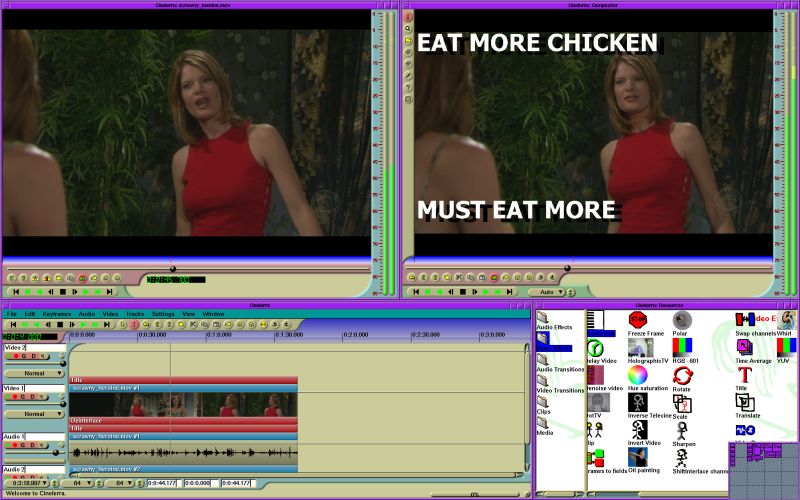
Cinelerra--unusably bad UI
The UI is ugly, slow, and poorly designed.
And when I say ugly, I mean UGLY.
REALLY, REALLY ugly.
Think of the worst-looking, slowest UI from a Windows 98-era hobby-project Visual Basic program that you've ever seen.
Now, imagine if it were even uglier and slower.
There, now you have Cinelerra.
I'm not trolling. If you think I am, then you've obviously never used this program. The UI is the equivilent of a website with heavy use of frames, blink tags, scrolling marquees, and "under construction" animated gifs. Seriously.
Don't believe me? OK then, I'll show you. There, that screenshot is a pretty good representation of what you'll see when you first open the program. Note the purple, teal, and tan color scheme. That's not a window manager theme, that's just this program. It always looks like that. Ugh. -
Re:a fully featured PC ....This is not a Google search outsourcing facility. Now to contradict myself by providing you with some positive reinforcement for your rudeness.
-
More of the same, people are blind.My music is already in Itunes Microsoft... If the media player 11 interfaces with my Ipod i'll maybe consider it, until then... i dont really care about the itunes like features.
I'm seeing more of that... like the recent WSJ rejection of all Linux because the distro tried would not work iTunes (and a few "complex" M$Office docs). It's too bad people don't see the magic combination of:
- Amarok, the awesome free music player.
- The Internet Archive's 34,000 concert Music Archive
- A music publisher that does not suck
- Cheap USB music players from walmart, orcheap good ones or software that makes expensive ones rock like they are worth the money.
The whole DRM fiasco is so avoidable and life without it is so much better. If work forces you to use Windoze, it sucks to be you but you don't have to let that take over your entertainment and home life.
By the way, the GUI that Xine makes does all the cool stuff from keyboard shortcuts you want from a video player. If you want a real video editor, go for kino or cinerella. M$ will never give you any of that any more than M$ Word can be used for publishing.
-
Re:No.
If they really wanted, Apple would do it as they try to make money from Quicktime.
http://heroinewarrior.com/download.php3
See it is already possible.
The thing with windows media is: They don't really care. There is windows monopoly out there and they don't feel the urge to support anything other than windows. It includes OS X too. -
ZoneMinder and other Linux software
There are several free Linux software projects which might or might not what you are looking for. The first thing that comes to mind is something called ZoneMinder which, if I am not mistaken, is a Linux home security sytem which uses remote wireless Internet cameras.
Then there is also the well known Myth TV project which among other things is mainly used by people who bouild their own Personal Video Recorders(PVR). Myth TV supports both HDTV, NTFS and possbly also some other video broadcast standards.
A third possiblility that comes to mind is VLC which is a cross-platform media player and streaming server.
And then there are various other video related programs for Linux such as TvTime the televison application, or MPlayer the movie player. Concievably even something like the Ekiga (formerly known as GnomeNetMeeting) might be relevant. Ekiga supports Full-Screen Videoconferencing. Ekiga supports Video4Linux and Firewire Cameras Support through plugins.
I have not taken the time to try to read what you had to say carefully enough to know for sure what your needs are, these is just what quickly came to mind. It may or may not be what you are looking for. I have used Linux as the desktop operating system for my two home computers for the last 6 years. I have never actually tried out most of the software that I mentions. The fun part of using Linux is that there are hundreds of great free Linux programs to download and tryout. A person could spend years trying out all the free Linux software.Many Linux video projects seem to be built building block fashion, using other previously written free Linux software, as dependencies. In many cases there are also various other free video projects which are sometimes just user friendly front ends for other free video software. I could not even begin to list all of those free Linux software projects for video and other things.
By the way, Linux has never had virus problems but, even so, there are free anti-virus programs available for Linux. The one that I use is Clam Anti-virus. There are also several good free firewalls avilable for Linux which allow you to control which IP ports are open or closed. There is one other interesting video project which is interesting but, probably not what you are looking for is the free movie studio in a Linux box.
I hope that something that I mentioned might be usesful. You can then decide if Linux is really what you want or not. I personally like it anyway.
-
Re:It's a nice sounding excuse.There's Kino, but if you want to do professional video editing, you're S.O.L.
Have you seen Cinelerra? (Or try the community fork here, Manual TWiki here). I found it to be pretty good, much better then Kino, but then I'm not a professional video editor.
-
rpms here
http://heroinewarrior.com/download.php3 The download page has rpms. Any of the binary links are links to rpms.
-
Re:Final Cut and Avid?How does this compare to FinalCut or Avid?
As far as I know, it doesn't at all. Cinelerra seems to have a different purpose than professional video editing, (as I had noted a few months ago by looking at their site and documentation).
For example, the very first thing done in editing is batch capturing the footage. Well, it doesn't look like Cinelerra supports that. From this relevant part of the manual:Because of the high cost of developing frame-accurate deck control mechanisms, the only use of batches now is recording different programs during different times of day
Sounds completely unrelated to the standard batch capturing, and seems to be more related to PVR type use or something.
As someone familiar with professional film/video editing, I actually always wished there would be a Linux alternative to Avid and FCP, but haven't seen any yet.
And I always wondered if Cinelerra could be of any use in a professional editing environment. Maybe for some special effects? Or some special format conversions? I don't know, and if someone has seen a use for it alongside Avid/FCP, it would be interesting to know.
Is Cinelerra a useful tool to add to an Avid or FCP editing room? -
Re:Is this an accurate statement?
Open Source software has often been acused of lacking in the graphical department. With the advent of more stable Inkscape 0.42.2 and user friendly Gimp 2.0 this has left us lacking only in the video department. Cinerella 2.0 was just released to close that gap. Coupled with alternatives such as diva , blender and others, what is linux and other Open Source operating systems still lacking?
-
Re:Home Office
For the video editing, you may also want to check out Cinelerra. It's a powerful non-linear editing suite that is focused towards professional and industrial users, and even though the hardware requirements on the site are severe, it works quite well on more moderate systems. There's also Kino and Lives, which I haven't had time to check out much. Jahshaka, which I've used a bit, seems alright. But I've had stability problems with it a lot.
-
Get a laptop?
Get a laptop with firewire and get something like Cinelerra or FCP, then just plug the camera into the laptop and use the direct capture in the software to record. You'll be able to record for as much disk space as you've got (use usb2 or firewire if you want to add an external drive for more space). That should work fine.
-
Re:Ewww... choose your tools
I thought VirtualDub was windows-only...
Have you tried:- Kino - a non-linear DV editor for GNU/Linux?
- Cinelerra - (Perhaps overkill...)
- mjpeg tools
-
Re:Mac notebook + firewire?
-
Re:not trolling, just a question
Check out the open source Cinelerra HD Editor. Also there is a company, Linux Media Arts that specializes in broadcast video solutions with Linux.
-
Re:Bah to your 'Hmph'
-
Re:speaking of open source video editing...
Cinelerra http://heroinewarrior.com/cinelerra.php3 appears to be powerful but I haven't figured it all out yet, and it dosen't seem to do minidv direct capture.
Kino http://kino.schirmacher.de/article/static/2 is also rather nice, and does support DV capture. It is less advanced as far as effects and transitions tho, and seems to have largely stopped developement. -
Re:Now My Desktop can be like my apartment
a video editor that was professional grade
Have you looked at Cinelerra? It looks fairly hardcore... alas, my computer's not fast enough for it by a long shot. -
Re:Cinelerra looks like something else
I have only limited experience with FCP & less with Avid, but Cinelerra DOES do all the basic editing tasks which I learned. Wikipedians also consider it to be NLE & a few of the acronym keywords you listed are in the docs. It is, at least, worth a shot.
-
Proper Clicky
Karma free: http://heroinewarrior.com/cinelerra.php3 -
Re:The quick answer is, "no."Yeah, those guys at Disney, Dreamworks, and ILM are real idiots for using Linux for their blockbuster films when it's not up to the task.
The truth is that Linux is a very capable video production platform, but also requires a more significant investment of time in lieu of an investment of money.
Kino is a good entry level one-track editor and has excellent video capture capabilities.
Cinelerra is an excellent advanced editor and compositor, supporting a multitude of professional features on an unlimited number of video and audio tracks.
DvdAuthor together with the gimp is a great solution for authoring DVDs. Its home page lists a number of gui front ends that have come a long way in the last year.
The best part of these applications is the excellent support offered by the developers. Scott at dvdauthor has responded to my email questions in under an hour before and averages less than 8 hours for a response. I witnessed a conversation on the cinelerra IRC channel in which a user mentioned wanting professional timecode support, and within an hour the requirements were clarified and preliminary work had already begun. Try getting that kind of response from Adobe, Sony, or Ulead. I myself will welcome emails anytime with questions about how everything fits together.
As an example of what is possible using only GPL software on Linux, let me tell you about my last wedding video. It was done all in 16:9 widescreen using two synchronized miniDV cameras captured via firewire. The full motion and sound menus on the DVD provide a choice of stereo or 5.1 surround, long or short versions of the video, full scene selection, and viewing of all the still photos taken at the wedding using the menu buttons. Effects include smooth transitions from black and white to color, animated picture-in-picture, slow motion, deinterlacing, color correction, and scrolling credits in my choice of true-type font.
I can't comment on ease of use compared to Windows or Mac because I haven't edited video on Windows since before XP came out and have never tried a Mac for video editing, but you can see from my example that it is possible to produce professional quality results with only GPL software and some investment of time to learn how to use it. My offer to help you get started via email always stands.
-
hw/swFor software, Cinelerra is the best editing suite out there. I haven't used Final Cut Pro, but Cinelerra is much more useful than iMovie. I haven't used Premiere is years, and Cinelerra is on par with what I remember of Premiere. Cinelerra should be able to do everything that you need.
I've only done DV over firewire capture, and for that I would guess that any old firewire card would be fine. For analog capture, I'd look into using a Hauppauge 250 for capture. Just `cat
The only thing that absolutely stinks about video on linux is the choice of mpeg codecs. I can do everything I need to create a decent looking movie, but once I mpegify it to burn it to dvd, the picture quality looks terrible (to my eyes, anyway. some people say it looks fine). I just got a Hauppauge 250 so I could do all my editing/compositing in DV, write that back to the camera via firewire, then capture the final cut with a dedicated hardware mpeg card over analog connections.
I actually looked into getting an old mac that I could stick in my garage and remotely mpegify my final cuts and burn them. At the time it was too much money for what I was doing (and I never did figure out how to script iMovie anyway), but it may be worth it to you.
-
some decent software
kino http://kino.schirmacher.de/
avidemux http://fixounet.free.fr/avidemux/
cinelerra http://heroinewarrior.com/cinelerra.php3 -
Re:Competition
Video editing -
Cinelerra perhaps - there are links to others on their site. Several mp3 players available, don't know how good they are. I just downloaded xmms-mp3 and am going to try it out... -
Re:Linux sound is start to pick up
There's also Cinelerra: "Render like a dentist!"
-
Quicktime isn't closed...
When it comes to media formats and players I've always seen Real And Apple/Quicktime as being two sides of the same dark coin. Both use closed formats with proprietary players with increasingly slow and bloated interfaces.
If by calling Quicktime closed/proprietary you mean completely open and documented, you'd be right. Quicktime is a container format. Quicktime supports many many completely open codecs. In fact, here is a GPLed Quicktime Player for Linux! It's the codecs that are closed. If you want to bash Sorenson then bash Sorenson.
Also, if you don't like the Quicktime player interface I suggest you try one of the alternatives such as Multiplex or NicePlayer (the later of which ranks in at 80K, how's that for not being bloated?)
-
Re:Cinelerra
And here is the link I forgot.
-
Re:Sourceforge...
One of the projects hosted there did so a long time ago (look at the links bottom left).
-
Ultra-Powerful and FREE Linux Authoring Software
Heroine Virtual Ltd. offers one of the most advanced "content creation systems" available, called Cinelerra. It runs on Linux, and it's FREE!! It's not for the faint of heart, but you'll have the power of the big boys.
-
Ultra-Powerful and FREE Linux Authoring Software
Heroine Virtual Ltd. offers one of the most advanced "content creation systems" available, called Cinelerra. It runs on Linux, and it's FREE!! It's not for the faint of heart, but you'll have the power of the big boys.
-
Useful Programs *Not Necessarily for DVD Authoring
-
Re:Whats this? Freshmeat?
Try Cinelerra.