Slashdot Mirror
Domain: smarthome.com
Stories and comments across the archive that link to smarthome.com.
Comments · 214
-
Re:How many...I've had problems using some single CFs with an X-10 appliance relay (the 2- or 3-wire plug-in kind). I plug it in, send the ON command from a nearby controller--OK so far--but when I send the OFF command, the relay turns the light right back on! Apparently the power draw of the CF is too much, so the relay thinks you manually turned on the lamp, and [re-]activates!
Note that this is only some CFs, as others (like the little 13w "MAX" ones from Ikea) work fine in an appliance controller.
I had a front door wired-in light with a CF to be automatically turned on by a Sundowner controller, so I installed a switch/relay in place of the regular switch, and aside from the loud "THUNK" noise when activated, it works fine. Mine had a pilot light, so I knew when the outside light was on.
-
Re:How many...I've had problems using some single CFs with an X-10 appliance relay (the 2- or 3-wire plug-in kind). I plug it in, send the ON command from a nearby controller--OK so far--but when I send the OFF command, the relay turns the light right back on! Apparently the power draw of the CF is too much, so the relay thinks you manually turned on the lamp, and [re-]activates!
Note that this is only some CFs, as others (like the little 13w "MAX" ones from Ikea) work fine in an appliance controller.
I had a front door wired-in light with a CF to be automatically turned on by a Sundowner controller, so I installed a switch/relay in place of the regular switch, and aside from the loud "THUNK" noise when activated, it works fine. Mine had a pilot light, so I knew when the outside light was on.
-
Enough room/electricity to expand
Real servers are rackable, in 19 inch wide, 42U (~72 inches I think ) high racks.
One UPS, hot swapable batteries are nice, but we fry as many APC brand controllers as we kill batteries. I like to have an independent AC line conditioner, on a serperate AC mains circuit (i.e. different 15A circuit breaker) so that those real servers with dual power supplies (hot swappable of course) go one to UPS, one to the line conditioner (for UPS failures). Have enough circuits (not just more plugs) to accomidate future growth. A Watts Up? or Kill-A-Watt meter are nice to measuring your electrical consumption.
Honestly with how swappable hardware RAID-5 disks, hot swappable power supplies, sensible power distribution, and practicing regular backup hygenie, downtime can be minimized to mere hours per year range or less with care and planning of the administrator(s).
I also love KVM over IP (I use an ) or ILO (Intergrated Lights Out management) for headless servers, and have a backup AC available for server rooms/closets.
For servers ideas look at HP Proliant DL380 or Dell PowerEdge 2850 series. -
I don't even know how you'd do this on a computer
I think you'd need a PBX system of some sort to do this. Something like http://www.smarthome.com/5217.HTML, but I don't specifically see the capability on this one, you'd need something more programmable.
-
Re:Advertising...
I don't understand why you people are getting on my case like I just committed some heinous crime. I won't buy X10 products, but have found many that I'd like to buy.
No one's getting on your case. You sounded (and still sound) confused by the distinction between the X10 protocol, and a specific company that happens to make products that use that protocol. The confusion is unfortunately common. I was trying to help.
How does not buying any X10 products make me a punisher of the X-10 protocol?
"X10 products" is an ambiguous identifier, that most people would parse as meaning "products using the X10 protocol". (Just as "Ethernet products" is taken to mean "any 802.3 hardware".)
If by "not purchasing X10 products" you mean "not buy products from X10 Wireless Technology/X10.com", great, we're all in agreement, and I'd just suggest you disambiguate your phrasing.
If you mean "not purchasing products based on the X10 protocol", I want to point out that just because X10 Wireless Technology/X10.com sucks eggs, that's reason to not buy, say, Black and Decker X10 products.
-
Re:X is better then X10
when you compare this though to X10s failure rate, which seems to be about 1 in 10, these would rock. They are MUCH more expensive though.
As for the AC, the idea is to use a sensor to measure temp vs. turn on AC from 1:00 to 3:00. See http://www.smarthome.com/3045B.html -
Re:X10
s X10 a standard, or a brand name? Is this the same company that pioneered outrageously annoying popup ads?
Both. And yes, X10 the company is the one that does the annoying pop-up ads. I don't have any experience with X10's (the company) stuff but I have used X10Pro (which seems to be an offshoot of X10 (the company)). I bought what was supposed to be a something load dimmer, but it made the fans hum anyways. Most of my light switches are Smarthome's SwitchLinc X10-based switches (now replaced with this Insteon stuff). The smarthome switches are very nice and high quality
X10 (the protocol) is used by many manufacturers, including X10, X10Pro, Leviton, Smarthome, ACT,.. the list goes on. The biggest problem with X10 is it's quite slow (it can take several seconds to transmit multiple commands), and because it uses signalling on the power line as the 120/240V alternating current sine wave crosses 0, it basically looks like 'noise'.. due to the simplicity, actualy noise is often misinterpreted as X10 commands. This has become more of a problem in the past few years as modern electronics are plugged in, but there are filters to block it (at additional $$).
I considerd Smarthome and ACT products, and ultimately chose smarthome because of the extensive amount of stuff they had. I wish Insteon had been announced slightly earlier.. I bought all my stuff just over a year before the Insteon products were released. On the plus side, they seem to at least be somewhat compatible. The products for other protocols (zigbee, some of the other wired ones that use Cat5, etc) were just more expensive or time-consuming to install. -
Star Trek Voice Command light switch
Forget all those fancy light automation kits, all you need is the Star Trek one http://www.smarthome.com/2017.html which gives you the power of voice commands such as "Computer, off"; simultaneously turning off the lights and your female partner.
-
X is better then X10
For all values of X. In particular, the values of X that really really look interesting are the ZWave things from smarthome.
http://www.smarthome.com/prodindex.asp?catid=50
There's another one called ZigBee that looks even better.
It's a brand new technology. They use radio communications, and a pretty neat broadcast algorithm that means your signals will get to their destination. Plus, you can get a response back. -
Re:Infrastructure would please me...
OK, I know what PVC conduit & armored & EMT are, but what's interduct? It seems to be a rare term in the US for small-scale use of what appears to be flexible raceway. Most refs I found on google are for large diameter runs, not residential use. smarthome has something they call resi-gard. Looks harder to pull through than smooth-walled conduit.
A more important question is how big a hole can you blow in joists without weakening them excessively? The shop behind my garage is framed with 2x4s. It was cheesy-panelled with surface-mounted EMT AC. I've gutted it & plan to drywall & re-floor it & insulate the ceiling (flat roof).
If I had space above the ceiling, I could run big raceway up there & run smaller pieces down the bays between joists, but I'm going to have to bore horizontal holes through joists unless I get creative with the sleepers used to space the drywall away from the ceiling to accomodate the insulation.
Modern houses are usually framed with 2x6s, so I guess this isn't a common concern. -
Insteon instead of X10
1) I don't work for Insteon but I appreciate their support. 2) I'm tired of X10 and their lack of support 3) so far Insteon works better than X10 I've started using Insteon and Insteon products. I still need to do a lot of work on the code to make it work under Misterhouse but I'm much more comfortable with the quality of the products than I am with X10's products.
-
Re:Convenience
Waoo!! =-O
this http://www.smarthome.com/ site they have the complete system as we envisioned it than, including the PC. Apperently the protocol is called X10
Free Life
Boaz -
Suggestions
1) Presumably you've looked into 'home automation' and suchlike? I've never used it, but I understand there is a home automation standard known as X10. A quick search for "X10 HVAC" reveals there's a few about.
2) You talk about VNCing in from work. A system that needs a PC on 24/7 probably won't lead to a net energy saving, since your computer is probably consuming more than 100W any time it's on. If you would have your computer on anyway, consider turning it off and getting a $10/month shell account somewhere for your server needs - that may well represent an overall saving for you.
3) Captive tappets rock my world. No stupid digital timer with a tedious 3-button interface, and much better than most other designs of mechanical timer. Not that appliccable to your needs, I know, but I thought I'd mention them anyway.
4) Get a radio-controlled system! I always thought they were a bad idea since you have the bother of batteries, but as I recently discovered, it means you don't have to mount the control unit anywhere, meaning you can keep it right by the door, or on a convenient shelf. Beats going into some upstairs cupboard to set things up - especially if you're changing it regularly.
Michael -
HAI Omnistat
I use a HAI Omnistat RC-80 computer controllable thermostat (available here for about $160, or cheaper on ebay), a serial cable (made from CAT 5 cable), and some software I wrote (available here) for computer control.
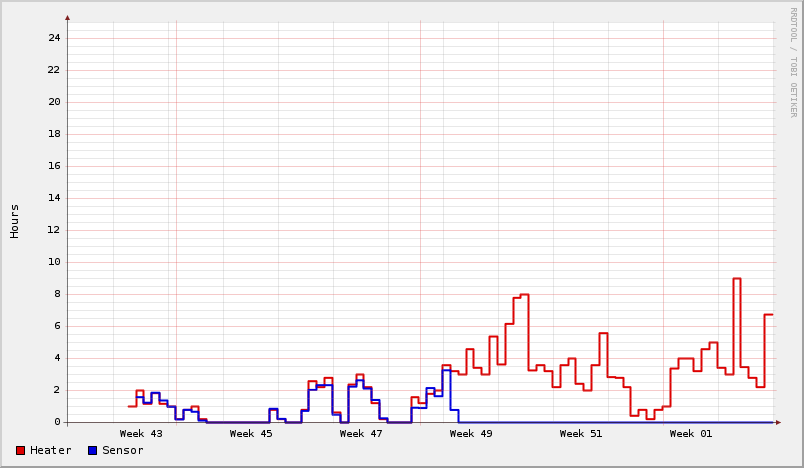
The thermostat operates on it's own (no risk of freezing pipes if the software chokes), but you can reprogram it through the serial port, including changing mode (heat/cool/off), temperature set point (seperate for heat and cool), the schedule for automatic setback for weekdays/saturday/sunday (4 times per day), or setting the clock. You can also read all the settings/current temperature from the thermostat. It even keeps track of how long the heater/AC has been on for the past week. I have a cron job that reads this everynight, does a difference based on the last nights reading, and generates graphs using rrdtool. (Example here).
With a little bit of procmail processing, I can send my server at home to get status information, or turn the heat up before I drive home from work. If you want to do dual zone, you can just get a second thermostat, you can put multiple thermostats on the same serial cable (I haven't tested that though). If you need more complex scheduling, a cron job can take care of that, and just reprogram the thermostat daily, or constantly.
-
Check out thermostat & security system integra
The HAI Omni security systems have really good integration with the HAI Omnistat programable thermostats. The Omni security systems have a very simple macro language for setting up commands based on security, timed, user input or security sensors and the result can be a change in thermostat settings. For example we have ours programmed to setback the thermostat to 60 after 10pm (11pm on weekends). After 5am if the motion sensor in the bathroom triggers (indicating I stumbled into the bathroom for a shower) the systems runs a series of "Wake up" events, including resetting the thermostat to 68. Once the last person leaves the house and arms the security system the thermostat sets back to 60 again until someone returns from work.
Since you have the walls open now is an excellent time to run wire for a hardwired security system (which are a little lower maintainence and cheaper than wireless systems). Having a monitored security system (with a sign out front) is a relatively good way to prevent breakins.
The security system can also be programmed to call you or the monitoring system if the inside temp drops below 45 degrees and you can add sensors for whatever suits you. (How about a water sensor by the washer/dryer and in the basement? Or a fuel level sensor on the oil tank?)
There is also the Elk M line of systems which lack direct thermostat intagration (although I think they too can control the Omni series of thermostats over a RS232 link). The Elk systems are much cheaper than the HAI and have support for Proximity cards for disarming/door unlocking but I have no experience with them. Both systems are available from Smarthome or other online retailers.
As someone else noted, setting back a thermostat will usually save money, but only if the thermostat is setback for several hours (the exact amount depends on how well your house is insulated and how much thermal mass it contains). You may want to experiment while watching some form of "runtime" meter attached to the furnace or thermostat. -
Re:Nothing for sale in a reasonable price range...
-
Got a programmer handy?
If you don't mind writing a script or two, you're not looking at something that's impossible on a lighter budget. The X10 standard is actually pretty sucky, but I put it in my old house and it worked out okay. Raised the value of the house roughy 10X what I put into it, too. Anyway, check out smarthome.com, specifically this product.
Disclaimer: I haven't used this specific product. I have used just about every other X10 product, though, and the smarthome site does a pretty good job of explaining how to set things up. I used to use a wireless transmitter on my Linux box and some scripts put together called "firecracker" to communicate. Simple cron jobs did the rest. If I recall, I also had a device that transmitted/received from a serial port to the power lines directly, but I don't know if they still sell those or not.
If you really want to control your heat and A/C this way, I STRONGLY suggest taking lots of temperature samples of where things are at and ensuring you aren't wasting energy because of poor control systems. One mistake in code and your bills will go wild. -
Got a programmer handy?
If you don't mind writing a script or two, you're not looking at something that's impossible on a lighter budget. The X10 standard is actually pretty sucky, but I put it in my old house and it worked out okay. Raised the value of the house roughy 10X what I put into it, too. Anyway, check out smarthome.com, specifically this product.
Disclaimer: I haven't used this specific product. I have used just about every other X10 product, though, and the smarthome site does a pretty good job of explaining how to set things up. I used to use a wireless transmitter on my Linux box and some scripts put together called "firecracker" to communicate. Simple cron jobs did the rest. If I recall, I also had a device that transmitted/received from a serial port to the power lines directly, but I don't know if they still sell those or not.
If you really want to control your heat and A/C this way, I STRONGLY suggest taking lots of temperature samples of where things are at and ensuring you aren't wasting energy because of poor control systems. One mistake in code and your bills will go wild. -
Re:Read the article
In fact, for a normal load, this power supply won't draw any more wall current than a 300 watt supply - but it will be able to draw a lot more if it needs to, without failing
Readings from a device such as a kill-a-watt Kill-a-watt vary, depending on computer load. I propose someone bites the bullet and tests the efficiency of this thing at idle, and at load, so we can see how much power it's wasting. -
Perceived "size" needs to happen another waythe immersion experience is relative to the size of the screen. No matter how big your TV screen is, you'd like to be watching a bigger one. If your screen is only a few inches large, I would guess that this distraction would be constant.
Sound does accomplish part of the immersion thing pretty well. When you've got some okay headphones on, even with the teeny screen, you can hear the rumble of the rush on Akaba in Lawrence of Arabia. You just can't see the wide screen image.
And you're right, music you listen to in parallel with other stuff, whereas video you have to focus on, and those are different. It's hard to see the convergence of the iPod player and portable DVD players any time soon. You'd need some sort of projection screen...
Or alternatively, you can make the size of the screen completely irrelevant by just bringing it closer to your eyes. When some Jonathan Ives type cooks up "TV Glasses" that don't look as "stylish and comfortable" (and headache-inducing) as this, then we'll be getting someplace. For portable video, you just can't be wedded to the physical screen across the room the way we are now. You have to approach the problem from another angle.
Jobs pitched video as a little perk added in the update to the top-end iPods, and that was just about right.
-
Re:Heat
Maybe a heat exchanger could be used, like this one. You could set it up to use outside air to cool air drawn from the inside. Of course, it was designed to allow homeowners to bring outside air into their homes without loosing/gaining much heat, but I would think it could be set up this way.
-
Here you go . . .The Scarecrow. Doesn't aim, just waits for victim to walk by before "firing", but should do the trick.
-
Re:Address space required?
URLs for the hardware I talked about:
Clicker: http://www.x10.com/automation/x10_kr22a.htm
Reciever: http://www.smarthome.com/4017.HTML
Computer Interface: http://www.smarthome.com/1132U.HTML.
Mr House software for Linux would also be a good start- it's very scriptable and would eliminate the need to write your own drivers. -
Re:Address space required?
URLs for the hardware I talked about:
Clicker: http://www.x10.com/automation/x10_kr22a.htm
Reciever: http://www.smarthome.com/4017.HTML
Computer Interface: http://www.smarthome.com/1132U.HTML.
Mr House software for Linux would also be a good start- it's very scriptable and would eliminate the need to write your own drivers. -
Dental picks
No, seriously, dental picks. Absolutely the best tool to unstick fans, lever CPU's and chips out of their sockets, retrieve tiny screws and parts wedged in crevices, the list goes on. Probably the tool I turn to most.
Another essential is a long T-15 Torx screwdriver. With it, you can disassemble any Tier 1 box really really quickly. Ever try to change a board in a Compaq without one? Can't be done.
Several known good crossover cables, you gotta have'em. Why dick around with a hub or a switch?
Fish tape , and a very long highly flexible pole (fishing rods work good) for running Cat5 in a plenum. Essential. With the rod alone, it cuts your time to run the cable by at least half, as well as the number of ceiling tiles you have to remove by half
Finally, a good hardware troubleshooting kit
hth -
Re:Looking forward to ZigBee home automation
Sure, there are actually a decent number of them but here are a few of my favorites (for z-wave and all home automation needs):
HomeSeer - Also the site of the home automation software I use. I is MS tech and only runs on Windows, but GREAT software with an AMAZING community of users. Check out the forums on this site for basically ANY home automation info and if it isn't there all us users are VERY willing to help anyone. This stuff is a love for lots of us
Automated Outlet - a great guy runs this who gives great service (not me
SmartHome - Another site I order from from time to time.
CocoonTechNot a reseller but another good HA site.
Let me know if there is any other info you'd like. Always happy to share home automation info -
Leapfrog + Tivo
using the Leapfrog wireless A/V transmitter http://www.smarthome.com/7656.html and wireless internet, I have done some wonderful tings with my tivo... The leapfrog has a wonderful picture but does not support HD. It broadcasts through a cinder block wall very well. It also broadcasts outside my house. The tivo box stays where the Coax connection is.
-
Re:Wow
Something like this might help you.
-
Re:As long as they don't
...hmmm... just to let you know, there is a jar-opener robot, but we'll keep the secret
-
Re:LED Replacement Bulbs
Unfortunately, neither of these companies tell me how many lumens they produce. I use higher wattage compact fluorescents (25-42 watts) that produce 1100-2000 lumens anywhere I read. The 36-LED light would probably be bright enough for normal use, but the rest would be relegated to accent lighting, which I don't waste energy on (that's what all the blinkenlights and the LCD monitors are for), or for the bathroom and bedrooms. And I found a new CFL for the bathroom...
-
Been around for years...
http://www.smarthome.com/8169.html
these things came out arround 1995, they used to cost $$$, but are now afordable. Unless this one requires no training it's nothing to jump up and down about. -
Re:All this needs
You are (understandably) confusing the company X10 with the X-10 protocol. Unfortunately, people only seem to remember those vastly annoying pop-ups. And the hot models, of course.
The similarity of their names is further compounded by the fact that the X10 cams are compatible with the X-10 protocol. -
Re:Very interesting concept
Not that I don't agree with you, but you do realize that the specs for a power supply list how much power it _can_ supply, not how much it _does_ supply at any given point?
For example, the server that I use for development, storage, MP3, SMTP, IMAP, HTTP, SMB, etc is an AMD 2600 with two (2) 200GB 7200 RPM drives and 1 GB RAM.
Even though it has a 400W power supply, I've measured that it uses 140W.
Regardless, your point still stands as the server costs about $15 / mo to run. -
SmartHome
Probably some interesting items that you can pickup here. I also strongly agree people mentioning leaving some empty conduit throughout your walls. This is a MUST for future expansion possibilities. It will keep install costs down for any future wiring you might need to do.
-
What you need is...
to check this place out, they have all kinds of x10 stuff- also if you're planning to integrate any kind of automation i recommend you have a look at this guy's page. If during the course of this process of gadgetizing you find yourself needing really odd custom items, try asking at your local wheelchair shop.
-
How about this?
You may have lots of old junk laying about but this is more elegent. http://www.smarthome.com/7664.html
-
Wireless Sound System
If you do not want wires at all, you extend your stereo rack with a Netgear MP101 or Netgear MP115.
You can use wireless speakers like these or, what is more geek like (and more expensive) is a new speaker system called pursonic. Check the pursonic homepage.
Now your speakers are your wall and your floor... -
New House?
When you say "new house" do you mean that it's being built for you right now? If so, forget the wireless idea immediately. Go to Home Depot, buy boxes of Cat5/6 cable, spools of coax, and heavy duty speaker cable. Pick out a closet somewhat close to your living/family room and make it the distribution hub for your new home. Get your butt down to the construction site and run coax, network, and speaker wires to all the rooms of the house from this central location. It also wouldn't hurt to run RCA, S-Video, and maybe even VGA or DVI from the closet to the expected location of your main TV.
Any wires that you do not plan to use right away can be left inside the walls (Take pictures of EVERYTHING before they sheetrock the place, you'll be glad you did later when you want to find the wires!). The rest of the stuff should have standard boxes that you can add the appropriate wall plates to later.
Smarthome is your friend for a lot of the finishing touches. I recommend a box like the ChannelPlus that allows you to insert your own audio/video on an unused cable channel. I did that and now I can watch DVDs or Movies coming from the computer in the closet on any TV in the house. ChannelPlus thoughtfully has IR devices that feed back up the coax line to the source so your remote controls will activate everything hidden in the closet.
I could go on and on about this- I've done it for my current home and will be building another home this year. I've already started thinking about improvements to my original layout -
What about...some other ideas:
-
Simple controller for remote control of A/C circuits - turn on/off, sense on/off, something like Smarthome or X10.
-
A robot with wifi link running embedded Linux
-
R/C car using wifi so you can drive it visually - geek NASCAR!
-
Wifi enabled dog collar; you train the dog with basic commands and then "drive" it just like the R/C car (and no, PETA need not be alarmed)
-
-
Re:What's X10?
Yeah, although if you want newer technology and better-quality stuff, check out Smarthome instead. (Plus, you're not directly giving money to the evil-pop-under-ad people.) Smarthome also has a decent What is X10? page.
-
Re:What's X10?
Yeah, although if you want newer technology and better-quality stuff, check out Smarthome instead. (Plus, you're not directly giving money to the evil-pop-under-ad people.) Smarthome also has a decent What is X10? page.
-
Re:$20 solution for a $1 problem
Use a timer. A basic four or six zone timer with battery backup will be far more cost effective and reliable than a computerized and connected solution.
Just like the urban legend you repeat, this is an exaggeration at best. Most of the smart controllers (e.g.) (e.g.) (e.g.) are based on relays which make them not connected. And you can still operate the valves manually.
A basic timer can't prevent overwatering. With a software solution (like the aforementioned MisterHouse) or controller-based solution (like a Stargate or an Ocelot, both of which have sprinkler system support) you have the ability to disable watering if there is rain (or better yet when there is rain in the forecast). I've even heard of systems disabling watering when the temperature drops below a certain point (to prevent icing) or when the windspeed is above a certain level (thanks to a pc-compatible weather station or simply pinging the National Weather Service feeds). When everything is connected, you have lots of options. View through the webcam shows your lawn a little brown? Go to your home's sprinkler page and turn that zone on for 20 minutes. It's a tinkerer's (or perfectionist's dream).
That being said, it will be more expensive if you do not also automate your home in other ways (lighting, HVAC, whole-house audio, etc.) but if you're into saving water, chances are you'll want to save energy, too. Sure, you can get timed HVAC controllers and motion-activated lighting. But when you have multiple disparate systems, all of which require "programming" in different ways, and none of which can be affected by the others... is that really simpler? -
Re:$20 solution for a $1 problem
Use a timer. A basic four or six zone timer with battery backup will be far more cost effective and reliable than a computerized and connected solution.
Just like the urban legend you repeat, this is an exaggeration at best. Most of the smart controllers (e.g.) (e.g.) (e.g.) are based on relays which make them not connected. And you can still operate the valves manually.
A basic timer can't prevent overwatering. With a software solution (like the aforementioned MisterHouse) or controller-based solution (like a Stargate or an Ocelot, both of which have sprinkler system support) you have the ability to disable watering if there is rain (or better yet when there is rain in the forecast). I've even heard of systems disabling watering when the temperature drops below a certain point (to prevent icing) or when the windspeed is above a certain level (thanks to a pc-compatible weather station or simply pinging the National Weather Service feeds). When everything is connected, you have lots of options. View through the webcam shows your lawn a little brown? Go to your home's sprinkler page and turn that zone on for 20 minutes. It's a tinkerer's (or perfectionist's dream).
That being said, it will be more expensive if you do not also automate your home in other ways (lighting, HVAC, whole-house audio, etc.) but if you're into saving water, chances are you'll want to save energy, too. Sure, you can get timed HVAC controllers and motion-activated lighting. But when you have multiple disparate systems, all of which require "programming" in different ways, and none of which can be affected by the others... is that really simpler? -
Re:They underestimated the price/size/quality.
Do an experiment. Turn everything in your house off and go find the electricity meter. Turn on each thing in your house individually and check the speed of the dial in the meter for each one
There a few websites (check out section three) out there that tell you how to use your electric meter (assuming it's an analog type with dials) to figure out how much power you are using at any given time. I can't use this at my house because I have a digital meter (LCD display only -- no wheel or dials) but it seems logical.
It basically means finding out the "Kh factor" on your meter (it should be printed on the faceplate somewhere) and counting how many seconds it takes for the wheel to make one complete revolution. Then use the following formula: (((3.6 x Kh factor) / seconds) x 1000). That'll give you an approximation of how many watts of power your house is using at any one moment. If you are a true geek or have nothing better to do you can turn off everything in the house and turn items on one at a time to figure out how much they draw -- or drop the $40 on a meter such as this one.
If you really want to get detailed you can start reading your meter and keep a log in a spreadsheet or database. Yes I'm do this -- I'm a geek.
-
Re:X10.com Has some interesting toys for this
In addition to an outdoor camera, you can get a motion detector and camera kit that turns on a VCR when triggered and also has a German Shepherd voice synthesizer, virtual Robo Dog. All kinds of gagets for a geek, and pretty simple to install even if you aren't. If you want to go for broke you can get the whole security system and program it to turn the lights on after the second time the robo dog barks. Or whatever -- be creative. Smart Home also has stuff (although some of its the same) if you want a 2nd source.
Finally, if you're in Bush Country, just go door-to-door with your good buddies Smith & Wesson (grin). -
Re:X10 Hardware?!
-
Re:I don't get it.
It's pointless because many of us are adjusting our temperature via the web already. RS232-Controllable thermostats have been around for years and can be controlled by every home automation software product available.
The one I use can be retrofit to communicate over your existing HVAC wires to a central controller. I use Misterhouse (open-source home automation software) to control it. Misterhouse has a web interface, but I rolled my own (BTW, I can also control my lights and my whole-house audio system, and I'm installing a sprinkler system which of course I'll add to the web interface).
If everything I have connected had its own IP address, its own web server, and its own interface, it would actually be less convenient. -
Already here....
Doing this over the phone has been possible for ages... with devices like this.
Also Dilbert's house is online.... And an Internet enabled washing machine, and this internet enabled microwave are onsale in the UK.. Interestingly aren't available at amazon.com yet -
A better solution
Proliphix's Internet-enabled thermostat
During those odd weather patterns, I've often thought it would be nice to adjust the temperature settings at home, or perhaps increase air circulation, etc. So I bought an OmniPro II home controller system, which does this--and more (lights, security, etc)--remotely. So, the Proliphix isn't the first of its kind... but it's still a "cool" idea -
Re:I get interference
I followed the engenius link, was reading about the product, and started to get really excited... Then I noticed that the engenius has been discontinued, and the only phones they had available were the same crap available at office slax or wurst buy. Too bad.