Slashdot Mirror
Domain: dansdata.com
Stories and comments across the archive that link to dansdata.com.
Comments · 538
-
Flawed Results
I hate to say it, but he has flawed results that do not demonstrate that the sticker is a placebo.
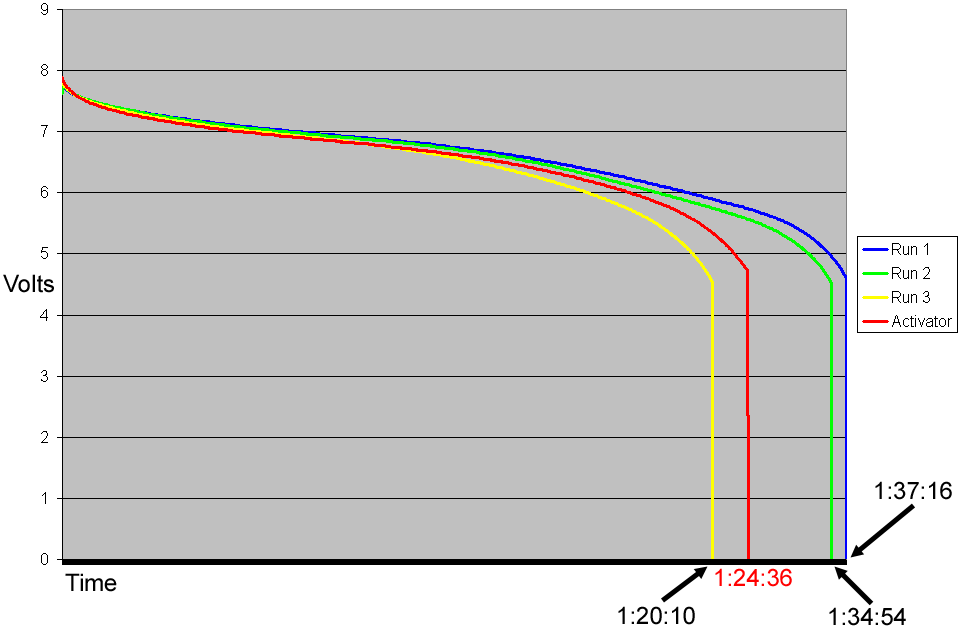
He used only one battery to do his test. He should have used two; one with the sticker and one without. By only using one battery, running 3 tests, then putting the sticker on and running a 4th test, he's introduced an additional variable into the equation. It could thereofre be argued that his graph (http://www.dansdata.com/images/batterylife/activa ted.gif) showed that the sticker IMPROVED the battery life (because it WAS an improvement over his 3rd test run). -
Re:You really should read this article
I hadn't noticed, until your post made me go back to look, that it was Dan's Data - the source of one of the best reviews I've ever read...
http://www.dansdata.com/kitten.htm -
Some hardware tips
You know that you want to keep the signal digital until it's as close to your amp as possible. Assuming your amplifier has an optical input, simply running fiber from a soundcard's optical output is the best choice. This puts the burden of clarity on the amplifier's internal DAC and power supply. Optical SPDIF seems capable of 15 meters on standard cable with normal drivers. Since the PC end is all digital, component choice is essentially irrelevant. PCI soundcards with optical outputs are common, so let reputation and support be your guide.
If your amp only accepts analog inputs, things get more complicated. A standalone SPDIF-analog converter seems obvious (and leaves a simple amplifier upgrade path in the future) but consider that such gizmos, while overpriced, usually include a heinously noisy wall-wart power supply. Ripple on the DAC's inputs translates to noise in your audio. Careful design can filter this crap, but caveat emptor. Do listening tests.
This can also be a problem with many of the USB audio devices available. Since they're powered from the USB, a bit of digital noise is inevitably coupled to the analog side. Component choice and careful design are essential here. I'd trust any of the big names to get this right. M-Audio and Edirol both make some slick little USB audio dongles with excellent analog stages. A plethora of USB and firewire audio interfaces are avilable.
If your PC is just a few meters from your stereo, then USB is probably the way to go. My first question would be about ground potential differences, between the USB signal and the amplifier's idea of analog signal ground. Feeding the whole mess from the same branch circuit is an easy way to sidestep the question, but I'm sure someone has tackled it. (Clueful? Please reply!)
If you're dealing with a longer distance, real networking may be the way to go. The idea here is to let your PC in the next room serve the files, but put enough intelligence in the hifi rack to do the decoding as well as the DAC step locally. This usually includes a display and interface of some sort, so you don't need to mess with wireless keyboards or whatever. Various network music players are available, with varying levels of software sophistication and hardware quality. I don't believe any of them include audiophile-quality components in the outputs, and power supply noise is usually an issue in these cheapie designs done by digital engineers without an analog bone in their bodies. If you can find one that supports raw WAV file input, give it a try and see if the audio quality suits you.
Most such players rely heavily on the ID3 tag info for database and display purposes, so tagless WAVs might be awkward at best. Alternately, "tune" the network player to an "internet radio station" which is really a stream running from your desktop's player software. The stream server can then stuff tag information into the stream's metadata, which will appear on the display.
Someone mentioned using the Airport Express as an output device that iTunes could throw digitized audio at. Cute, but I'd be skeptical of any analog components sitting so close to a power supply. Anyone done SNR measurements on this sucker? If it worked with software besides iTunes, it wouldn't suck so hard. -
Re:Biometrics
Read this. There is no problem faking them.
Not to mention that fingerprints are left EVERYWHERE. -
The Canonical HOW-TO Guide...
How to Destroy Your Computer, courtesy of Dan's Data
-
The Canonical HOW-TO Guide...
How to Destroy Your Computer, courtesy of Dan's Data
-
How to destroy your computer
This is a much better article on the subject.
-
How To Destroy Your Computer
Crap! Two links to Dan from me in one day (it's a great site).
Excerpt from the page:
"Many computer users perform their own hardware upgrades, and a distressing number of these result in insufficient damage to the system. Destroying your own computer is every user's right and is the pattern of behaviour expected by the manufacturers and, especially, repair personnel, whose very livelihood is put in peril by those users who perversely persist in correctly upgrading their equipment." -
Dans' Data
-
Not very
Dan of dansdata.com debunks the myth of 'secure' fingerprint readers in his review of a Lifeview Finger ID machine here.
-
Not very
Dan of dansdata.com debunks the myth of 'secure' fingerprint readers in his review of a Lifeview Finger ID machine here.
-
Re:Dvorak and me and studies and keyboards...
Hmm...
Personally, I use the Memorex spill-proof keyboard. I like the action of the keys, which have a good (though slightly weak) spring mechanism. I also like the fact that it is as small a keyboard as you are likely to find in a standard 104 key configuration. Its low cost doesn't hurt either. You can get one at target.com for about 15 bucks.
I've also heard good things about the old IBM keyboards. These have much tougher spring action, are a good bit noisier, and people swear by them. I've never used one. You can buy one at pckeyboard.com. There is an old review at dansdata.com.
As far as split key designs, I'm not aware of any that offer the features you want. There may be some, but I don't use a split keyboard and I haven't seen anybody that is passionate about any particular brand.
-
Re:Amazing explanation> Hmm? No chemical change? But it still breaks up molecules? WHOA.
-
Re:A worm that deletes everything.
Well, there's always hoping for this to happen....
-
Photo of the MP3 player.Well, dan over at www.dansdata.com reviewed the following over a year ago:
I assume that device was just a knockoff, but its still interesting to see the name being used. Here in the US there is such a demand for "retro" gear that such a player MIGHT just work. I see tons of 13-15 year olds with nintendo and atari gear, which they would never have even played before.
-
Photo of the MP3 player.Well, dan over at www.dansdata.com reviewed the following over a year ago:
I assume that device was just a knockoff, but its still interesting to see the name being used. Here in the US there is such a demand for "retro" gear that such a player MIGHT just work. I see tons of 13-15 year olds with nintendo and atari gear, which they would never have even played before.
-
The reason behind an mp3 player??
I wonder if the reason they want to make Commodore branded mp3 player is that there are already fake Commodore mp3 players on the market?
-
Exciting?As I recall, they claimed that part one of the article took something like 300 hours to put together. Seems like a lot of work to tell me that processors have become a lot faster in the last 10 years.
Actually I shouldn't give Tom's Hardware a hard time (like everyone else seems to). As articles go, the reviews of high-end ink-jets, the 8-channel RAID6 card and the Viewsonic media center were quite interesting (and a lot more recent than the CPU round-up too).
These days though, my favourite reviewer is Dan (who posts here now and then). Dan seems to understand that a million graphs showing you the statistically insignificant difference between the latest mobos / graphic cards / processors / ram sinks don't really make a great site. -
Anyone know of any honest review sites?
While its not exactly reviewing all the latest and greatest, www.dansdata.com [dansdata.com] is my favorite "independent" web review site. He usually sticks to cameras, small computer parts, and other neat electronics, but he's a no BS kinda guy who will say something sucks when it does. gf
-
Re:Many fans are fixableOnce you've ignored one noisy fan bearing and lost hardware and/or system reliability as a result, you become pretty good at picking the noise, even in a room full of computers
Why don't you just say you don't feel like writing articles over Christmas, instead of making up these bogus excuses. Failed fan. Yeah right
-
Many fans are fixableMost computer fans have the decency to make a racket for a while before their bearings are so damaged that the fan stops, or doesn't spin fast enough to keep its component cool. I actually use the USB/1394 box I reviewed here, and its fan started crapping out after not a whole lot of months of service. A squirt of oil silenced it, and it's been fine for quite a while now.
Once you've ignored one noisy fan bearing and lost hardware and/or system reliability as a result, you become pretty good at picking the noise, even in a room full of computers
-
Many fans are fixableMost computer fans have the decency to make a racket for a while before their bearings are so damaged that the fan stops, or doesn't spin fast enough to keep its component cool. I actually use the USB/1394 box I reviewed here, and its fan started crapping out after not a whole lot of months of service. A squirt of oil silenced it, and it's been fine for quite a while now.
Once you've ignored one noisy fan bearing and lost hardware and/or system reliability as a result, you become pretty good at picking the noise, even in a room full of computers
-
Re:Lian-li
Thumbs up on the Lian Li. The high end ones are stupidly expensive (I paid CDN$300 for mine (photos),) but they are beautiful, functional and well designed.
-
Re:13W could be dangerous...
No need. Dan already has. The photographic proof.
-
Re:13W could be dangerous...
No need. Dan already has. The photographic proof.
-
Re:Consumer audio
From over-unity speakers (200W watts output from a 10W wall-wart), to "better-sounding" fiber optic cable, no claim seems too outrageous or fraudulent for a great many consumer audio manufacturers.
I like Dans Data's various takes on Monster Cable myself. I have to admit that my ex-wife worked for one of their distributors many years ago and we got it really cheap. Those thick cables seemed to make the imported German Quadral speakers sound better. -
Re:Buy an online UPS
Or you can make something like this.
-
Re:Better yet
You could teach him not to touch your computer...
Bzzzt. Wrong. but thank you for playing. The problem with this is that then you can get into a "power struggle" with the kids. Below a certain age, they just do not understand, as their brains are not developed enough to have any sort of self-control. Above 1 year you might be able to teach them, but they start crawling around 6 months, so that is 6 months of problems. Also, the less that you tell your kids "no", the fewer problems that you will have. It is good to give your kids dicipline, but only fight the fights that you HAVE to (don't run into the street, don't go anywhere with strangers, don't touch the stove, etc). A little preparation now will save you headaches in the future.
I went through this myself (2 kids, currently 2 and 3-1/2), and let me tell you my experience.
My last computer was a Celeron 466 (old, I know, but it is tough to upgrade when supporting a wife and two kids). I had a desktop case (one meant to lay horizontal on your desk. That worked fine, as everything was out of reach.
But then I got the money to upgrade. Being a true geek, I had to build my own computer. HERE is the case that I chose. Yes, it is a little large, but it is great quality, has a great power supply, and it has a locking door over the drive bays and power switch. When this case is locked, the only thing that they can get into from the front is the USB/Firewire ports, which are not that interesting. The door also hides most of the blinking lights, and I can tell you from experience that kids love drive trays. Once kids get past a certain age, cable are boring. But flashing lights and buttons that do things are always interesting.
I have this case wedged between a desk and a small 2-drawer file cabinet, so the cables are mostly out of sight. Throw in a wireless keyboard/mouse combo and you can keep the cables to a minimum.
One more idea: Take an old computer (1 GHz or less) and give it to your kids. Pick up some cheap educational software from your local cheapo-department store or garage sale and throw it on there. Something like Alcohol 120% or similar may be very useful, as they will not ask you to chage CDs or try to do it themselves. Once your kids hit 2, then will start to figure out the mouse and can use it. This will also take the "mystery" of the computer away, so they will feel less of a need to play with yours.
Kids are a blessing. Have fun with them. I am also assuming that you either have a brand-new baby, or will be getting one soon. The older that your kids get, the more fun they are!
Also, you may want to look at the "Comparison and Conclusion" page at the bottom of this page. -
Re:RFID? Don't they mean RF?
Large enough capacitor=power to run the mouse 5 minutes after leaving the mouse pad.
Which is great if your playing minesweeper. I prefer games which don't require a break every 5 mins to reacharge my mouse.
And before you say 'just pause the game every 5 mins' - that just destroys the realism for games that rely on it (read:FPS), even if
you could get some magic capacitor that'd manage 5 mins @ 100mA @ 5v (mouse power consumption reference here).
Anyway, how's this very different than graphics tablets that have mice? (Like this Wacom one)
which granted its not optical, but it is wireless, runs on a USB pad, is arguably far more accurate, and definatly more flexible as an input device. -
Solution...
most of these seem to be cases with laptops.
Maybe we should do a phychological analysis of people before we give them a laptop, otherwise they get the shock-absorbant desktop option.
But this is good news for the consumer electronics market, the increasing trend in computer abuse promises more sales! -
Re:nice review, a few flawsAs for many other types of rechargeable batteries, it's actually better to discharge them completely before recharging, because of the so called "memory" effect.
For the last time, there is no memory effect.
-
Re:just hook it to the tap.
It might not clog up with rust, but if you have dissimilar metals in your system, galvanic corrosion can take you out. In Dan's case, he had a copper piped radiator and an aluminium block.
How to bake your CPU!
It should be noted that "dissimilar" metals could be as similar as two different alloys of copper. -
MaybeThen you are not a Mac User, your just happen to use a Mac.
I think the term you are looking for isn't "User" but rather Bigot . I use a Mac at work. I even like it. I even didn't mind adding Mac troubleshooting skills to my Windows and Linux skills-- it wasn't that different. I would even go so far as to say that I prefer doing 90% of my Real Work at a Mac. (Games are another story.) But I while I think the iPod is kinda cool, I'm not planning on replacing my Archos Jukebox 20 until it keels over dead... which, incidentally, won't be due to the batteries. I have better ways to waste my money than donating to the Church of Steve.
I'd also disagree slightly with the assessment of the review. Based on what's said, there may be some interest in the material to anthropologists (amateur and professional) who study computer nerds. If I see the book at Barnes & Noble, I might sit down and leaf through it for an hour or two. I might check it out if it hits the local library. I wouldn't spend real money on it, though.
-
Re:Big Wow.
http://www.dansdata.com/drivedocks.htm claims up to 60W can be pulled over firewire. -
That is SO true
I swear it's totally for real! Check this out if you don't believe me.
:) -
Re:i wouldnt"CASE: $50 (great? who cares. FCC compliant. Your computer won't run faster with a better case, and it won't last longer)"
Firstly, your system will last longer with a better case. Better cases allow for better cooling and heat dissipation. Higher temperatures and temperature variations will kill your chips and hard drives more quickly.
And 50 Dollars? I suggest you try working with high end cases from Lian Li, Antec, Thermaltake and Coolermaster. They typically start around $120. You will never go back to working with cheap $50 cases again. The high end ones feature far better design, ease of installation of parts, fan control and placement and precision craftsmanship. (I mean really, have you ever opened up a Power Mac and worked with it? It puts standard PC cases to shame. Everything is much more accessible and well placed. Even compared to what's in my Lian Li PC-6070. And did you know that the G5's have a liquid cooling system? Try finding a complete liquid cooling system for PCs and figuring out the cost of all the peltiers, piping, pumps, etc. Of course installing it requires voiding your mobo and CPU warranty by modding them. Try not to damage them during the H20 cooling install either, OK?
"Mouse and Keyboard: $20"
For what? A low quality no name mouse and POS lightweight keyoard? The keyboard and mouse are the actual parts of the computer you touch and you want to get high quality of both. Get a proper logitech MX series mouse and logitech, fujitsu, or keytronics keyboard (though nothing replaces my Model M) and there's $100 to spend.
"Power Supply: $30"
For $30 you can get a POS low quality power supply that won't nearly power a dual CPU machine and will then crap out and fry your hard drives. Try an Antec TruePower 550 for $100+ with thermal fan control that does not have the per-fan fine tuning that the G5 has.
-
Anyone know of any honest review sites?
While its not exactly reviewing all the latest and greatest, www.dansdata.com is my favorite "independent" web review site. He usually sticks to cameras, small computer parts, and other neat electronics, but he's a no BS kinda guy who will say something sucks when it does. jp
-
Anyone know of any honest review sites?
While its not exactly reviewing all the latest and greatest, www.dansdata.com [dansdata.com] is my favorite "independent" web review site. He usually sticks to cameras, small computer parts, and other neat electronics, but he's a no BS kinda guy who will say something sucks when it does. yc
-
A good review at Dan's Data
-
Best mouse ever..
...was the original Logitech MouseMan+, with the rubber on the sides and the buttons that extended to the edge of the mouse. Looked weird (ugly, even), but it's "the" mouse for (right-handed) people with big hands.
Then they completely screwed it up when they made the optical model, by reducing the size of the buttons (original on the right, optical models on the left and centre).
Currently, the best compromise is probably the "MX" series, also from Logitech (a company I don't like much, but they do manage to get it right now and then), especially the MX-500 and above. The main buttons are very well designed, and the side buttons are reasonable. The scroll wheel and the other buttons are too far back on the mouse, though; to reach them you have to either bend your fingers or move your hand back so it actually rests off the mouse.
And, of course, Logitech's mouse drivers are crap (can't even turn acceleration off completely). Stick to the default OS drivers and you'll be fine. -
DrivedockThe Drivedock is really nifty, and it is probably the smallest solution out there. Heat isn't a problem, however it leaves your hard drive with minimal protection from the elements. You can buy a bottom plate to protect the bottom hard drive circuitry from harm. It is rather expensive however.
Personally I use a no-name 2-bay 3.5" firewire enclosure with an aftermarket Zalman fan and a resistor on the fan to slow it down. Its very quiet and reasonably cool, and I rarely move it so the size isn't an issue.
-
So they're the culpritsI'd never previously bothered to check who was responsible for those almost invariably completely irrelevant ad-linked words on some sites - [random example]this article, for instance[/random example].
I can see how Vibrant's marketing people could spin this to potential clients, though. The relevance of their machine-generated ad-links is incredible. I mean, how could you possibly tell the difference between one of my link-infested reviews and a page where the word "developers" in a sentence about game programming is linked to this page? Later on, "PC" links, just as spookily perfectly, to the Dell.co.uk Back To School Sale.
Well, actually, that link's broken right now. But I'm sure that's just because of excessive server load from all the people clicking on it.
The Hostway link's there again, from "control panel", as in "graphics card driver control panel", on the next page. In that same paragraph the laser-like specificity of the term "computer system" triggered another perfect-bullseye Vibrant Media link, to some remote network admin software.
If site operators can get themselves some useful income by defacing their pages with these mouseover-box-triggering, reading-interrupting irrelevancies, then more power to 'em. Lord knows I've cluttered my own site with pop-ups and banners galore (which I encourage my readers to block). But Vibrant must have some bad-ass sales people if they can convince anyone to pay any significant amount of money for this kind of advertising.
-
So they're the culpritsI'd never previously bothered to check who was responsible for those almost invariably completely irrelevant ad-linked words on some sites - [random example]this article, for instance[/random example].
I can see how Vibrant's marketing people could spin this to potential clients, though. The relevance of their machine-generated ad-links is incredible. I mean, how could you possibly tell the difference between one of my link-infested reviews and a page where the word "developers" in a sentence about game programming is linked to this page? Later on, "PC" links, just as spookily perfectly, to the Dell.co.uk Back To School Sale.
Well, actually, that link's broken right now. But I'm sure that's just because of excessive server load from all the people clicking on it.
The Hostway link's there again, from "control panel", as in "graphics card driver control panel", on the next page. In that same paragraph the laser-like specificity of the term "computer system" triggered another perfect-bullseye Vibrant Media link, to some remote network admin software.
If site operators can get themselves some useful income by defacing their pages with these mouseover-box-triggering, reading-interrupting irrelevancies, then more power to 'em. Lord knows I've cluttered my own site with pop-ups and banners galore (which I encourage my readers to block). But Vibrant must have some bad-ass sales people if they can convince anyone to pay any significant amount of money for this kind of advertising.
-
So they're the culpritsI'd never previously bothered to check who was responsible for those almost invariably completely irrelevant ad-linked words on some sites - [random example]this article, for instance[/random example].
I can see how Vibrant's marketing people could spin this to potential clients, though. The relevance of their machine-generated ad-links is incredible. I mean, how could you possibly tell the difference between one of my link-infested reviews and a page where the word "developers" in a sentence about game programming is linked to this page? Later on, "PC" links, just as spookily perfectly, to the Dell.co.uk Back To School Sale.
Well, actually, that link's broken right now. But I'm sure that's just because of excessive server load from all the people clicking on it.
The Hostway link's there again, from "control panel", as in "graphics card driver control panel", on the next page. In that same paragraph the laser-like specificity of the term "computer system" triggered another perfect-bullseye Vibrant Media link, to some remote network admin software.
If site operators can get themselves some useful income by defacing their pages with these mouseover-box-triggering, reading-interrupting irrelevancies, then more power to 'em. Lord knows I've cluttered my own site with pop-ups and banners galore (which I encourage my readers to block). But Vibrant must have some bad-ass sales people if they can convince anyone to pay any significant amount of money for this kind of advertising.
-
I call BS on that "BS"Then again, any IT guy who is using HTML-enabled e-mail should have his geek license revoked in the first place.
Hell, I use it all the time. Of course, I read it using Unix mush, and a wetware-based html render engine. =) If they can infect that with a virus, I'm already in trouble by definition. I must say, it does make most of the phish and spam stand out.
My main objection to the test: ALL the URLs all failed my initial "phishing" test-- does the HTML text visible match the underlying source hyperlink? For the test, they were all linked to "#" with an a OnClick popup. The "mouse over" trick to show you what it's nominally linking to doesn't work in Safari.
Oddly, I was still able to get 10/10 due to sublteties in style difference between the legits and the fakes (which I wish I could concisely quantify). Given the department I work for emphasizes the importance of both communication and ethics, I find it interesting that there seems a link here between poor verbal skills and criminal intent. I wonder if it's because the more eloquent have better ways to scam a living, or perhaps because so many of the scammers are non-native English speakers of limited fluency....
-
Re:Microstar
Here's a review.
-
I know this
This can already be done with headphones anyway, using cards like SB Live (I think) and Aureal Vortex cards. Not good for cinema though, but for computer audio, it would work fine.
-
Re:HA
"Annoying people exist everywhere. The trick is to direct their annoying behaviour at your foes."
The Tribes 2 Annoying Bastard Guide -
In one word...
In one word: bullshit.
Just like the "face recognition systems" used to spot terrorists, or the "child protection" software that's supposed to recognise porn.
Not only is the success rate well below 90%, but, more importantly, it spits out thousands of false positives.
And this is without even considering their admission that their technique does not work on JPEG images, even at "90% quality". In other words, they admit it won't work at all in 99% of digital pictures.
These are all tasks that need so much computing power such smart algorithms, that the only system that can perform them with acceptable reliability is a trained human brain.
RMN
~~~ -
3 easy steps
From your PC to reality in 3 easy steps
1. Install Microsoft Windows(R) Me.
2. ???
3. destroy your computer