Slashdot Mirror
Domain: extensionsmirror.nl
Stories and comments across the archive that link to extensionsmirror.nl.
Comments · 96
-
Other good extensionsAutoCorrect not only allows you to fix common spelling errors automatically (using an autocorrect list that works similar to MS Office). You can also use it to define "abbreviations" for long bits of text you don't want to type repeatedly: addresses, instructions, HTML formatting characters, etc.
Slideshow is extremely useful for people who get a lot of pictures via email, and just want to look at them quickly.
-
Re:edit incomming mail
There is TB Header Tools Extension 0.6.6
http://www.extensionsmirror.nl/index.php?showtopic =1906&hl=header
But we want to change the *body* of the message -
Re:Non-IE Customers Not Wanted
That's okay, because non-IE websurfers probably won't see your ads, either.
-
Nothing new
Geocities has had this as far back as I can remember, this rule just means journal writers can't try and circumvent the displaying of ads on their journal, whether readers block them via say, Adblock Plus and the Filterset.G updater (look for the "Plus", not the original, and filterset is just below it, it is a set of filters maintained by people for Adblock) is another story
-
everyone should use
this is just a great extension for those of use that got 10+ extensions installed ListZilla
-
Re:What about IE?
undoclosetab must be installed as root. There are updated/other tools that have similar or better functionality, but this seems to be the only one for mozilla suite: Dorando's undoclosetab
-
External editors; Format=flowed
There is an extension for external editors. Furthermore, Thunderbird supports format=flowed text & wrapping seems fine to me for messages which were intended to be wrapped.
-
this is a known issue with 1.5 - here's the fix
This is Adblock causing you trouble. Many people are reporting the same trouble with 1.5 - having to resort to IE (ugh!!) to get java and flash to work properly. The fix is to uninstall Adblock extension and find the "Adblock Plus" extension. Here is the link - remember to uninstall Adblock first, restart browser, then go here: http://www.extensionsmirror.nl/extfirefox/Adblock
_ Plus_0.5.11_enh.xpi You might have to enable downloads from this site first. It works exactly like Adblock and best of all - Java and Flash work beautifully just as before. -
Re:What the hell is that called?
It's called Intellitext, and if you use Firefox with the Adblock extension (or better, Adblock Plus), you can block the script that creates the Intellitext, just as you can block banner ads, flash and iframes. Probably the extension I value most.
-
Re:8 out of 10 not compatible here
These extensions also give the message: "Disabled, not compatible with Firefox 1.5"
- Add Bookmark Here 0.5.3
- AI Roboform Toolbar for Firefox 6.5.2
- Bookmark All 1.1.1
- Cookie Toggle 0.8.1
- CookieCuller 1.2.0
- FLST 0.8.3
- Gcache 0.2.1
- Greasemonkey 0.5.3
- MiniT+ 20050216.6
- Objection 0.2
- Permit Cookies 0.6
- Print It! 0.3.6
- Scribe 0.21
- SecurePassword Generator 0.5.2
- StumbleUpon 2.02
- Super DragAndGo 0.2.4
- SwitchProxy Tool 1.3.2
- xMirror 0.2
Wish I would have waited a couple of weeks before I upgraded.
-
Re:8 out of 10 not compatible here
Redirect Remover. I think the update URL is bad, so here's the hompage as per Extension Mirror. You might want to try the home page's of your other extensions.
-
Re:The Answer is Plainadblock slows page opening down too much for me (with multiple tabs opening at once), i just use a hosts file.
i use:[RECOMMENDED]
[f + t + m] - conquery (context-menu searches) + mycroft plugins
[f] - openbook
[f + m] - optimoz: tweaks (sidebar autopopout)
[f] - translate[OPTIONAL]
[f] - autohide & tbx for better fullscreen
[f + t + m] - chromedit
[f] - copyurlplus
[f] - customize google
[f] - extended statusbar
[f + m] - image zoom
[f] - keyconfig
[f + m] - launchy
[f + t + m] - optimoz: mouse gestures
[f + m] - paste and go
[f] - permit cookies
[f + t + m] - preferential
[f] - target alert
[opt] - calendardozens more extensions available here: Update.Mozilla.Org and Extension Room and Pike's and Roachfiend and Extensions Mirror
-
here is a short list:
I use all of these: (the disabled ones are not compatible with 1.5rc1) Enabled Extensions: [20] - ChatZilla 0.9.68.5.1: http://www.hacksrus.com/~ginda/chatzilla/ - ColorZilla 0.8.3.1: http://www.iosart.com/firefox/colorzilla/ - Console 0.2.5: http://forums.mozillazine.org/viewtopic.php?t=318
1 02 - CuteMenus - Crystal SVG 0.9.9.20051027: http://www.extensionsmirror.nl/index.php?showtopic =4360 - DOM Inspector 1.8: http://www.mozilla.org/projects/inspector/ - Download Manager Tweak 0.7: http://dmextension.mozdev.org/ - eReader 0.3: http://www.gutenberg.org/ - Forecastfox 0.8.2.4: http://forecastfox.mozdev.org/ - FoxyTunes 1.1.5.3: http://www.foxytunes.org/firefox/ - FoxyTunes Skin - OnyxOrbs 1.14: http://www.foxytunes.org/firefox/skins/index.php?s kin=9 - GooglePreview 1.1.2: http://ackroyd.de/googlepreview/ - MR Tech Local Install 4.0: http://www.mrtech.com/extensions/ - Right Encoding 0.2.1: http://heygom.com/extensions/ - ShowIP 0.7.11: http://l4x.org/showip - Tabbrowser Preferences 1.2.8.7: http://216.55.161.203/theonekea/tabprefs/ - Talkback 1.5: http://talkback.mozilla.org/ - Translate 0.6.0.8: http://ctomer.com/ - x 0.6.3: http://cdn.mozdev.org/ - x.xpi : http://www.google.com/search?q=x.xpi - About Firefox: Soviet Edition 2005.0606.1555: http://mithgol.ru/Mozilla/Firefox/ Disabled Extensions: [9] - Bandwidth Tester 0.5.5: http://www.roundtwo.com/product/bandwidthtester - Customizable Toolbar Buttons 0.1.5: http://www.google.com/search?q=Customizable%20Tool bar%20Buttons - fireFTP 0.88.3: http://fireftp.mozdev.org/ - Launchy 4.0.0: http://gemal.dk/mozilla/launchy.html - Leet Key 0.4.4: http://leetkey.mozdev.org/ - PONG! 2.16: http://www.captaincaveman.nl/ - ReloadEvery 0.6.1: http://reloadevery.mozdev.org/ - Tab Mix 0.2.2.3: http://tabmix.blogspot.com/ - Tab X 0.9.1: http://clav.mozdev.org/ -
Re:General comments...
A nicer and newer version of Session Saver that works with this release is available from it's homepage or at ExtensionsMirror.
A newer version of Flashblock is available at MozDev.
It's a pain, but they do work much better than the versions available on Mozilla. -
Thanks!
-
Coral cache
Here or use the Firefox extension.
-
Re:That's Simple
If you happen to have Firefox installed at work, install the ChromEdit extension, and place this CSS into the userContent.css's of all the Firefox's:
div#contents > div#index > div#articles > div.storylinks {
display: none !important;
}
Productivity will increase -
Re:No problem at all
You can do it two ways (AFAI can remember):
- Start firefox as root (preferably from an xterm window), and follow LordSnooty's directions.
- Give yourself write access to the plugins' directory (/usr/lib/mozilla-firefox/searchplugins/ on my gentoo box), follow LordSnooty's directions.
That mozdev page also contains an extension that makes it easier to remove plugins, which is useful given that every update seems to reinstall the deault plugins.
-
Re:Can someone please explain to me...
FYI, someone did write an Undo Close Tab extension for Firefox.
-
Re:UI suggestionSessionSaver, mentioned by FhnuZoag, does (among other things) exactly what you want. (Choose `I'd like my browser restored [x] every startup, from: [my last session].')
An AC mentioned that Firefox `has the power to emulate what [anything else] innovates', which sounded sarcastic, but is to me one of the big selling points. Have something you like from another browser? Come on over to Firefox, where it'll do that and more. That is, Firefox can be all the best bits of every browser, after a little browsing on UMO or The Extensions Room (my favourite). I don't know of any other browser which supports this level of customisability (although I'm sure I'll be informed soon if there are any).
-
Re:My reasons for not switching.
OK then, let's go through them...
*AdBlock Plus
--Opera equivalent exists
*BugMeNot
Opera equivalent can be created
*CustomizeGoogle
Nope
*DictionarySearch
--Opera equivalent exists
*Farkit
Nope
*Gmail Notifier
I prefer the webmail to Opera's client
*Nuke Anything
-- I think you can do this with userjs, but it's a button on the toolbar, not just a right click away
*Plain Text Links
--Opera equivalent exists
*Switch Proxy Tool
Nope
*Greasemonkey
--Opera equivalent exists
Fair enough, most (but not all) of the functionality i've added extensions for can be (nearly) replicated in Opera, but the more general point I was trying to make with my particular list was that the extensibility of Firefox is much higher that that of Opera.
Spend some time going through the extensions at Extensions Mirror and tell me how many of them can be done in Opera. -
Firefox flaws fixable
am I the only one that noticed that at least four of the five Firefox UI "flaws" can be fixed with extensions?
first flaw: Retro Find
second flaw: Download Statusbar
third flaw: Clone Window
fifth flaw: Menu Editor -
Firefox flaws fixable
am I the only one that noticed that at least four of the five Firefox UI "flaws" can be fixed with extensions?
first flaw: Retro Find
second flaw: Download Statusbar
third flaw: Clone Window
fifth flaw: Menu Editor -
Firefox flaws fixable
am I the only one that noticed that at least four of the five Firefox UI "flaws" can be fixed with extensions?
first flaw: Retro Find
second flaw: Download Statusbar
third flaw: Clone Window
fifth flaw: Menu Editor -
Firefox flaws fixable
am I the only one that noticed that at least four of the five Firefox UI "flaws" can be fixed with extensions?
first flaw: Retro Find
second flaw: Download Statusbar
third flaw: Clone Window
fifth flaw: Menu Editor -
Re:UI suggestion
I can reorder the tabs in Firefox 1.0.6... All it requires is an extension... Now to figure out which one does it for me...
http://www.extensionsmirror.nl/index.php?showtopic =161 MiniT+ that's the ticket. -
Re:FireFox web page in IEFor those of you using IE View:
There is a tab extension to the extension available that allows you to use IE from within an FF tab. (Opens up a tab using IE view)
You can find it Here.
-
Re:Funny...
Too bad the guy didnt know about the "View Formatted Source" Extension for firefox (Bigger shame since he is a part of the mozilla foundation). http://www.extensionsmirror.nl/index.php?showtopi
c =3565 Enjoy. Rahul -
The Future of Firefox is another 5 MB download...
Coding misstep forces new Firefox release
http://news.com.com/Coding+misstep+forces+new+Fire fox+release/2100-1002_3-5792635.html?tag=nefd.top
well....at least we have extensions.... here's my list:
TextZoom - because I'm blind as a bat
Adblock - use with Filterset.G from http://www.pierceive.com
Session Saver - saves tab sessions _when_ firefox crashes
Web Developer - lot of web dev options
IE View - click to view in IE
Target Alert - let's me know what I'm clicking on
ForecastFox - show forecast
FindBar Switch - makes the find bar toogle hide/un-hide with CTRL+F
Download Statusbar - much better than the download window/popup
SpellBound - because my spelling sux -
Re:In other news...
What would happen if Microsoft stopped Hotmail from displaying properly in any other browser, there would be some very big critics giving them an ego bashing...
Fucking up most Hotmail links by pointing 95% of them to Javascript scripts instead of regular links looks like a first step to me.
In fact, it was such a retarded move that some people went through the trouble of creating an extension to reverse this change back -
Re:Thanks Opera!
I think it's doing more harm than good in skewing statistics in favor of MS. Thus, more web sites assume more people are using IE and don't care about the alternatives. When does the cycle end? We need all the numbers we can get to pound it into people's heads that Windows+IE isn't the only platform out there. You'd think a company whose flagship product is a web browser would care about making the web less tailored to their competition.
By the way, how come Firefox renders just fine (except Slashdot *cough*) without reporting itself as IE? -
Re:FireSomething
Get the repacked version http://www.extensionsmirror.nl/extfirefox/Firesom
e thing_1.6.0_rep.xpi -
Firefox makes it easy to clear
Firefox 1.1 will have it built in for easy access and "one click" clearing of sensitive info, but in the mean time the best one to use is "The Cleaner" extension which puts a little target icon in Firefox's statusbar which you can customise to clear only what you want (You may need to update version string to install):
http://www.extensionsmirror.nl/index.php?showtopic =1173
Also CCleaner will erase all the sort of info you want erased to keep your browsing safe from prying eyes (Windows only):
http://www.ccleaner.com/
HTH -
Re:Luckily we have...
Just find a repack. Try here. I'm pretty sure that's it. If not, google it.
-
Or maybe another hidden use...
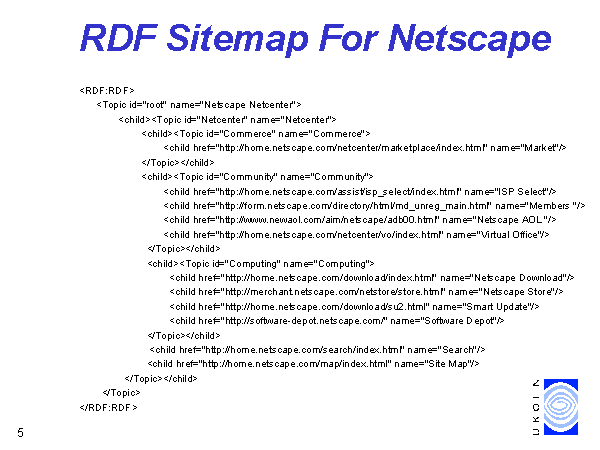
Navigation is sometimes the hardest part on the internet. A tree structure is sometimes the second easiest way of searching/browsing for information (1st being keyword searching). So maybe if more web designers set up server side solutions, it will lower the burden on web designers. More importantly, move navigation away from web designers to users just as Google displaced content from web designers unto Searchers. So instead of overburdening web servers like this Firefox extension Firefox extension with screenshot which automatically generates a sitemap br crawling a site. Sites can access a sitemap using a favicon.ico like or link rel="sitemap.rdf or sitemap.xml" protocol. Just as netscape NAVIGATOR originally proposed a while back. I think web designers should pay attention - at least those that don't use flash for their whole site. The web is slowly become a database of content rather than style. See the webmonkey wired article on netscape sitemap feature Sitemap rdf or the sitemap slide here Slide from seminar
-
Re:Fast back
undoclosetab extension:
http://www.extensionsmirror.nl/lofiversion/index.p hp/t226.html -
Re:RTFA! Phoenix! and Marketshare?
It was called Phoenix, not FoxFire!
Yep, Phoenix first until 0.6 I think, then Firebird (because of trademark issues with Phoenix Technologies), then Firefox with the release of... was it 0.8?... because a Firebird project already existed (OSS database)
And there was born Firesomething, allowing me to browse the web with my neato Mozilla Spacesloth -
Re:Fucking Moron
Possible, yes, probably, easily I doubt it, GM is heavy Javascript/DOM tuning. You can find Greasemonkey on The Extensions Mirror BTW, and you may want to check Platypus, which is basically an "interface" to Greasemonkey (allows you to modify a website, and if you need it you can save your modifications as a GM script)
-
Re:Fucking Moron
Possible, yes, probably, easily I doubt it, GM is heavy Javascript/DOM tuning. You can find Greasemonkey on The Extensions Mirror BTW, and you may want to check Platypus, which is basically an "interface" to Greasemonkey (allows you to modify a website, and if you need it you can save your modifications as a GM script)
-
Re:back/forward
I believe you can do that with Mouse Gestures.
-
Re:When it gets more stable...
As many others have repeatedly stated, the Slashdot rendering bug has been repaired already. Until Firefox 1.1, based on Gecko 1.8 (which contains the fix) is released, you can use the Slashfix extension, or alternately force a page reflow by changing the font size.
As for Firefox stability in general, did you follow the installation instructions? There are some pitfalls associated with the installation process, especially if you are upgrading from a previous version. The MozillaZine Knowledge Base is a good place to start. -
Undoclosetab-extension
You can use the extension undoclosetab for bringing back the last closed tab
And the IEView extension should work for 1.x.. I wouldn't know as I don't run Windows - but I've seen other people using it.
-
Undoclosetab-extension
You can use the extension undoclosetab for bringing back the last closed tab
And the IEView extension should work for 1.x.. I wouldn't know as I don't run Windows - but I've seen other people using it.
-
Use favicon picker and make your own favicons!
Make your own favicons for webpages without, and assign them using the favicon picker extension.
I'm doing exactly the same as you, I've got a set of buttons for all my "popular" bookmarks. At the top. However, some sites doesn't have a favicon, then I just gimp one pretty quick (usually based on the logo of the page) and use that using the favicon picker extension. Normally I also send the webadmin of the site the favicon along with a description on how to use it. (If they want to use it)
-
RoundTwo is not for geeks!
Disclaimer: I'm one of the mods on The Extensions Mirror, which is now hosted by RoundTwo.
Folks, from what I have read on their site, RoundTwo is not appealing to geeks. They're not trying to force geeks to pay for stuff that they can get themselves, i.e. extensions and support and the like. I get the impression that they are offering extension support and bundling for corporations which want to adopt Firefox but also want a centralized entity that they can moan at when it doesn't work.
Their stance of 'adopting' extensions and providing infrastructure for the developers to leverage for that purpose is genius, IMO - it gives the extension authors the resources to improve and maintain their extensions, and it gives RoundTwo a direct line to the authors, which makes it far easier to get the author's attention if something is broken, which is critical if they really intend on creating Firefox 'distributions' with extensions bundled in, like what bdeonline is doing with Black Diamond Firefox.
Sure, they've got the usual amount of marketing jargon out there right now, but considering that they've been supporting Mozilla software for a while now, I suspect that this is going to be the core of their business model. -
Re:how do you hack Firefox to give your sweety a kMy first thought was "Ew", but my second thought was "You know, there's probably an extension for that". And here's what I found with a cursory search:
Feed Me Links Toolbar - The Feed Me Links extension for Firefox/Mozilla shares and manages your links via any computer or browser. Tag links to classify them, share tags and links via email or comment discussions, browser your friends' links, etc.
If these aren't precisely what you wanted, check again tomorrow.Firefox Bookmark Share - Firefox Bookmark Share allows you to store your Firefox bookmarks, upload and download from your browser and share them with your friends and much more. All you need to do is sign up for an account, download the plugin and you're all set. The extension will create a folder in your bookmarks named "Firefox BM Share for [username]". This folder will be uploaded and downloaded.
-
Re:how do you hack Firefox to give your sweety a kMy first thought was "Ew", but my second thought was "You know, there's probably an extension for that". And here's what I found with a cursory search:
Feed Me Links Toolbar - The Feed Me Links extension for Firefox/Mozilla shares and manages your links via any computer or browser. Tag links to classify them, share tags and links via email or comment discussions, browser your friends' links, etc.
If these aren't precisely what you wanted, check again tomorrow.Firefox Bookmark Share - Firefox Bookmark Share allows you to store your Firefox bookmarks, upload and download from your browser and share them with your friends and much more. All you need to do is sign up for an account, download the plugin and you're all set. The extension will create a folder in your bookmarks named "Firefox BM Share for [username]". This folder will be uploaded and downloaded.
-
Re:What it really does.
It doesn't do shit here, because I use the FlashBlock extension. Highly recommended. It replaces each Flash object on a page with a logo, which you can then click to play it (or not). And you can whitelist certain sites (e.g., homestarrunner.com) so you don't have to click there.
In this case I saw the GNAA logo, so I knew not to click.
There's also an option in Firefox that's supposed to prevent pop-ups from plugins (like this), but I don't have that handy. You can search for it on the MozillaZine forums. -
Re:extension link
More seriously, I've changed my extensions link to point to http://www.extensionsmirror.nl/ . (You can change it via extensions.getMoreExtensionsURL in about:config.) It's far more complete and up-to-date than the official site.
-
Re:On Behalf...
Oh man, tell me about it... with the Scrapbook and Session Saver Firefox extensions and mouse with a middle button... well, let's just say the concept of "spare time" has got very interesting around here. So, are there any *better* success stories of an open approach to knowledge in existence, or is Wikipedia pretty much the Best Damn Thing since sliced bread?