Slashdot Mirror
Domain: gnucash.org
Stories and comments across the archive that link to gnucash.org.
Comments · 203
-
Re:Why's Parent "Funny?"
Update: I've just discovered GnuCash, a GPL-developed personal finance management program. I'll cross Quicken off the list!
-
Re:Chasing the Windows Rainbow...
It's a blind shot but maybe GnuCash can do what you need? GnuCash supports HBCI, does your bank?
-
Re:Why people stay on WindowsPhoto-album organizers? I didn't know there was an open source photo organizer.
If you want accounting software for Linux, try: GnuCash
or
Gnucash is similar to Quickbooks and handles multiple currencies. SQL-Ledger runs on a webserver, so you can run it either on the same computer, or from a webbrowser on a different computer.
Both are open source. There are other projects too, but you ought to do the research yourself.
-
Re:Gnucash?
So all GnuCash lacks is a button that automagically does the download and import? I assume the export/import procedure is a part of the OFX spec, and I assume you're being honest when you say you're a fan of F/OS Software. If so, why don't you file a detailed feature request?
-
Re:Gnucash?
You cannot use Gnucash to download transactions from the bank or do bill-pay right from the register.
Have you tried it lately? Here's a snippet from the feature list:
Small Business Accounting Features
Simplify managing a small business with Customer and Vendor tracking, Invoicing and Bill Payment, and Tax and Billing Terms.OFX Import
GnuCash is the first free software application to support the Open Financial Exchange protocol that many banks and financial services are starting to use.HBCI Support
GnuCash is the first free software application to support the German Home Banking Computer Information protocol, allowing German users to perform statement download and initiate bank transfers and direct debits.Improved Import Transaction Matching
The development of OFX and HBCI support has also resulted in an improved transaction matching system that more accurately recognizes duplicate transactions during file import. -
Re:What version is he using?
No, but you can use a program to manage your personal finances and download porn... but only on Linux.
-
who cares?
Mind you, one may well care that Apple is in good financial condition, and measuring that is complex, but ultimately it comes down the net worth, and projection of future net worth. Given a constant net worth, the consequence of holding debt is not even the cost the of the interest, because the same cash you could use to pay off the debt, you could instead use to earn interest, so really the cost of the debt is (tax issues aside) the interest that must be paid on it, minus the risk-free interest you could earn with the cash (e.g. you could buy 10 year treasuries, paying I think around 4%).
The true meaning here is mainly psychological, and the fact that obviously to pay off debt, and to want to pay off debt, you need to actually have the money to do so, and not need that money for another purpose.
Paying off a debt, no matter how big, is net-worth neutral.
To help ensure modding up, and if you want a better grasp on why this is so, read up on the philosophy behind gnucash, particularly the concept of double entry accounting. -
GnuCash is pretty much there nowIf you try Gnucash you will find it pretty much ok for single user accounting. What is interesting is the international support, For example, if you are an american living/working in Germany, then it is kind of useful to have German book keeping standards but retain an English GUI.
Quick-books can't properly handle multiple currencies whilst GnuCash seems to have no problems. You may have as many currencies as you want then balance them out at any time with a current or historical exchange rate. QB Professional is really not suitable for anything more than very simple stuff, it is closed and not extensible.
-
A common problem I think, not easy to solve
I think this is a common problem. I run a business myself, with two friends. We've just started, but we're looking into getting things like customer related software in order before doing anything serious about ourselves. I've worked voluntary with organisations and economy before, and I know things screw up if things are not kept track of.
I think your questions are hard to answer, and even though I have searched a lot for software (not online shopping/CC, we send invoice by mail since we're only doing business inside Norway) I have yet to find anything free and useful.
We've really considered doing it ourselves, making a simpe customer registration and management system with a web frontend. Using f.i. perl modules, you can create Excel documents with tabular data, and such. So that might be a thing to do. If you accept a tiny bit of manual work, that is. Of course, that tiny bit isn't that tiny after you've got hundred customers to bill.
But at least, I know that GnuCash has some functions regarding invoicing and customer registry, but I haven't really had the time to try it out. The rest of GnuCash is good, though, so there should be a hope. So far we can keep track of our economy, and if it works, GnuCash might do our customers as well, even generating invoices.
Good luck, and I hope this post will create some feedback for myself as well. Feel free to email me if you want to discuss, by the way. -
they're called HYPERLINKS
It took me all of 2 minutes with Google trying to find links for all the software you mentioned - and greatly enriches your post.
Other than that, thanks for the pointers.
====
ImageMagick
K3b - DVD/CD burner software
Plone - The most mature open source CMS.
Mamboserver - Not as mature or featurefull as Plone, but very nice as well.
OfflineIMAP - Simple, reliable, powerful
Kstars - and KDE Technology in general
The ones that are almost there but could use a hand to make them more intuitive:
GNUCash - Can't wait for their Gtk2 version.
Mr. Project
KOffice - has a great technological underpinning. -
How often do you really need to look at old bills?I just throw then in a box. Once a year, I search down for anything more than a couple years old and throw away anything beneath it. Other than a tax audit, I can't imagine I would ever need to look at them after they have been paid. Same thing for receipts and invoices, they go in the box.
If you want to track money, having the paper is not nearly as useful as entering the data into a financial program. Try GnuCash or something of that ilk.
Delivery menus are different story. I keep them under a magnet on the fridge. If you get a nice rare earth magnet that can hold a half inch stack of menus, that problem is easy to solve (get at least the half inch cubes).
Any solution that requires every document to be scanned is not going to work for you if you can't even file the documents. what are the chances you are going to get around to that stack of stuff to be scanned?
Invest in a magnet, a big box, and a good paper shredder.
-
This was the part that jumped out:
Financial Software I use Quicken and TurboTax mainly because I have for years and I think they are both very good products. I know GNU Cash (www.gnucash.org) is an option and I am actually playing around with it right now but it will be a hard move for me. Not only because of differences in features but the learning curve.
[Bruce Perens writes: I haven't looked at these closely yet. I actually still have one Windows machine in my home, and need it for TurboTax. I still have Quicken on it, but think I could move off of Quicken if I had to.]
Yes, the lack of an Open Source tax program with the stature of GNUCash is one reason that old LoseME laptop still kicks around.
Does GNUCash use an RDBMS on the back-end? It would be cool to have everything in SQLite, so that you could write arbitrary queries against it.
So many cool ideas, finite lifespan. -
Re:That would work...
Tried GnuCash? What features does it lack? If your current financial software can output OFX or QIF, GnuCash can import them.
-
Re:What we really need... gnucash?Further to the parent...
-
Two more Free Software acc packs
Don't forget that GNUcash and SQL Ledger already exist and are both GPL'd.
-
Re:Mozilla needs it
One Mom wants an open-source replacement for Quicken!
My contribution for the day: http://www.gnucash.org/
-
If you have any cash left...
...after buying that new system, you might want to keep track of it with GnuCash
-
Re:Be realisticThis just isn't true anymore. OpenOffice.org is a perfectly capable office suite and recent compatability with Office has been pretty good in most cases. Performance has also improved, and will be perfectly acceptable on a relatively new computer.
Outside of Office software, Audacity is a great free audio editor
SciTE or the java-based Jedit are good text editors.
The GIMP is a good image editor, available here for Windows.
Mozilla or one of its components for mail/web browsing
For media playing you might want to try Zinf (formerly FreeAmp), Foobar2000 (nice light weight music player), WinAMP for Windows. MPlayer is a good video player for Linux (and Windows) and XMMS is a capable music player for Linux.
Celestia is a nice space exploration program.
Jabber is good for instant messaging or Trillian or GAIM if you need to chat on MSN, AIM, ICQ etc.
GNUCash is a capable accounting program.
Oh yeah, and for email, I suggest setting up an IMAP server on an old machine and using that to store your email. This can be quite difficult, though allows you to browse your email from Linux and Windows. Thunderbird is rock solid and good even though only in the early stages of development.
-
BASIC wasn't even worth $2/hrAside from my opinions on the lack of worth of BASIC (which are admittantly subjective), Gates was wrong then, as he has been many times since (he didn't see the need for the internet, for example).
Who can afford to do professional work for nothing? What hobbyist can put 3-man years into programming, finding all bugs, documenting his product and distribute for free?
All I need to do to answer that is provide a few links:
Free Software Foundation
Debian GNU/Linux OS
GNOME Desktop
KDE Desktop
GnuCash Financial Manager
this list could be many orders of magnitude longer
Obviously, thousands and thousands and thousands of people can do this. We have in GNU/Linux and the BSD's OS' which are either equal to or far superior to their proprietary equivalents.
Service-based business models have cropped up around Free Software. Indeed, Free Software is the best software to use if you want to engage in a service-based business model, since it makes service easier, as bugs are more easy to track and fix. Furthermore, many companies donate some of their programmers to work on Free Software, to fill (or help fill) needs that they may have. Finally, many programmers contribute to Free Software on a part-time basis. -
Microsoft Money?
I had no idea MS Money was that good. Is anyone going to patch gnucach for this? Will I have to wait for Quicken to do it first?
I mean, just think how useful it would be if I could have bills introduced into the Senate from my OSS program anytime I couldn't legally use (or afford) something. Hell, maybe they could implement it for the EU as well. That would be kick ass. -
Mac OS X?
Not only could I find nothing about it on the GnuCash site, a search of the same turned up nothing. Face it, this is an app that is poorly designed (Linux users should be insulted they're the target of this mess) and will not work on any reasonable desktop system it is intended for. That is, this is something made for Linux users who must suffer with no alternatives, not for Mac or Windows users who can spend a couple hundred on an existing app that actually works with their system and gets things done. The target market is the (financial) desktop, but the project completely neglects that Linux has no real inroads into that market. Hell, one look at their listed Software Requirements and it's pretty clear they don't have this thing targeted for any common desktop system, Linux or otherwise, let alone Mac OS X. This seems like a project that is best off left to die so that someone who knows what they're doing can sweep up the fractured remains and make something useful out of it.
-
Re:It's too hard to compileThis is also my biggest gripe about GnuCash. I tried building it a year or more ago (probably a few years ago, actually), and there were just SO many dependencies that it became a huge cluster to try to get working.
Now, don't get me wrong, I like building stuff from source as much as the next Slashdotter, but these guys just use way too many external libraries.
There current "Software Requirements" page lists these dependencies (some or all of which may be required):
- Gtk+, Gnome, Glade -- I have no problem with these as they're pretty much standard issue now
- Guile -- This is a complete bitch to build and install, in my experience. I understand the need for scripting in an application like this, but why not pick a good language like Perl
- G-wrap, slib -- some more Scheme stuff that just seems like crap they needed because they were too lazy to write some of their own code
- GtkHTML -- do you really need a HTML parser in an accounting program? Why not just use Mozilla to display your HTML?
- libghttp -- same thing here. HTTP isn't THAT complicated, especially for what they're using it for. Write it yourself and save us a download.
- Gnome XML -- No one NEEDS to save their accounting data in some XML file format? What's wrong with the standard Quicken format that everyone is used to or even a nice, simple text file that I can munge with vi?
I've actually been using Moneydance for the last few months to manage my finances. I know that it is Satan's accounting program, being written in Java and all, but you have to admit that its quite easy to download and install, especially if all you're interested in is balancing your checkbook a couple of times a year.
-
Re:Windows MessengerHowever, if they're not logged in, then there should be no conflicts with that user -- right? It's a problem, but the effects of the failure case shouldn't be that damaging most of the time, except for the case where the person logs in immediately after the message was sent, and then immediately tries to launch the database.
Extension of your point: all instant messaging systems I can think of will have the same limitation. AIM, Jabber, iChat (not that that's relevant here), MSN, etc. will not queue up messages for users when they aren't logged in. I seem to remember that ICQ would store up messages, but how many people use ICQ anymore? In any case, the only IM server that can reasonably be run by yourself is Jabber, and as far as I know (I welcome corrections) it won't queue up messages.
As some in this thread have said, Jabber is probably the best band-aid over this particular problem, but fixing the multiuser aspects of the database software is the true cure. If Quickbooks Pro can do the job, it should be considered. Alternatively -- and this may be a stretch, depending on your needs & your trust in free software -- GnuCash can be configured to run PostgreSQL as the back-end data storage. This should address all the concurrency & stability issues beautifully; the only issue is that, as near as I can tell, this is still a beta quality feature, and the database schema seems to be evolving.
That and GnuCash might run more happily on Linux, which could scotch the idea if you're really an all XP shop...
If that's the case, the QBpro is probably the safest option -- it should be examined.
-
Re:All well and good, but...
Why in the hell does it have to be so fragmented?
Welcome to the wonderful world of Linux on the desktop. But if you think this is bad, try install GnuCash from scratch. -
Scheme
GnuCash has basic business methods coded in a very C++ish dialect of C. However the main stuff is coded in Scheme making it relatively easy to extend. It can be a little slow to load though. It also has a bit done in Perl.
-
Re:Quality? Not.I would challenge that "top 25" that you talk about. There are a lot of good programs out there within the top 100 if not further down the activity scale.
I agree that CVS is a good example of how the process works, but you should be more favourable to it. Someone produced a solution and it hit a dead-end. It is still adequate for a lot of people but it isn't ClearCase. However, all that code is available for refactoring into another project which will be better. Such a solution is not possible for closed source software unless it is within the vendor.
I would suggest that you look at another project: GnuCash which has changed massively over its lifetime. Stable releases were just that and the implementation details largely opaque to the user. EFfectively, between stable 1.6 and 1.8 was a massive fork. All managed with CVS.
-
GnuCash
Can Quickbooks export a QIF or OFX file? If so, you might want to look at GnuCash for your finance package. It takes a bit of work to get all the dependent packages taken care of, but using fink, or fink + FinkCommander, it's not too bad. I ended up not using the QIF import, though, and just started cold-turkey, inputting data into GnuCash. Worked fine for me.
I can't say much for MoneyDance, the other main financial package option. -
Moneydance
-
Gnucash is just fineA user's comment on this review at madpenguin.org states the obvious: What about GnuCash? It turns out that GnuCash is very comparable to this product in terms of features, and for somebody who'd rather stick with free software, there should be no rational need to buy MoneyDance.
I've been using GnuCash for my personal accounting for a year and a half now, and I must say that it's absolutely enough for all that I need (I'm a freelance consultant), and lots of interesting new features are on the horizon.
-
Re:Thanks but no thanksDrunken Coward wrote:
I'll wait until something free (as in beer and speech) before I think it's secure enough for my data, thanks.
How about GNU Cash? I've been using it for almost two years now and am very, very pleased with it. It is GPLed, so it is both free beer and speech.The new business features allowed me to replace SQL-Ledger with it. I'm happily generating invoices and handling payroll with GNU Cash 1.8.2 now.
-
And from the Open Source corner...
I direct your attention to GnuCash.
I've never used it, but it certainly seems like a worthy contender. -
Re:IRS and corporate welfare
The UK government already allow you to submit your tax return in an XML document. Some information about the schema and the like are on GovTalk Last year I used the free TaxCalc Lite to submit my tax return. If you take a look at the files installed by the application you'll see that it is composed almost entirely from XML & XSLT documents. A related example is the German Home Banking Computer Interface supported by GnuCash
-
Other countries: HBCI online banking in Germany
For non-U.S. residents it is a bit suprising that all geeks here really only discuss the monetary/banking system inside the U.S.. Please please listen: In other countries things are alreay waaay different.
E.g. I mean, here in Germany we have a banking system with fully functioning direct deposit/direct debits which can be used by almost everybody, not only big business. These direct money transfers work at small cost (probably $0.10-$0.30 per transaction, but not something like 1% of the amount) and usually with at most 1-2 days of delay. This is the reason why something like Paypal wasn't necessary at all in Germany -- the German banks already offer these services by themselves.
We have the bank-independent online banking protocol HBCI, with a free implementation here and GnuCash supporting it. This means that for a direct deposit (money transfer) I can directly enter the destination account in a GUI form in GnuCash, enter my secret RSA key passphrase, and *pow* the money goes its way. Same way for statement retrieval -- no screen scraping anymore or browser incompatibilities. HBCI is a full protocol so all these business actions are fully specified in that protocol, and no web browser is needed anymore.
cstim
-
Also GnuCash 1.8.0...
GnuCash 1.8.0 was released February 3; haven't seen much mention of it anywhere, but since "a good finance program" is one of the things so many people say Linux is missing, I thought it would be worth mentioning. The new GnuCash features scheduled transactions, popular OFX and HBCI formats (think downloading from your bank), and other woundrous new stuff and fixes...
-
That is their choiceThis may be one way the vendor has figured a way to release the product as open source but still make money off of it. There is nothing that says they have to create any documentation about it at all.
In fact, some people have suggested to the company that they work for, that in view of how i makes the vast percentage of its revenue charging for configuring, setting up and maintaining the software they develop, that it might be worth it to open source the product and give the software away, but charge for everything else. So if you're really broke you can get it for free, or if you want to look at it before putting it on your machines, you can do that. But if you want anything else, even instructions on how to install or use it, you have to pay something.
Why is this such a problem for you? Is it that you think they should give everything away? They have to eat, too. If you don't like it, don't agree to their terms. Since the source code is available without restrictions, take the time and effort to study the code and learn how it works, pay someone else to do that, or pay them and/or agree to their restrictions.
Has anyone noticed there are no open-source tax preparation or payroll software programs? (If I am wrong, someone e-mail me). Because those aren't very sexy for programmers to work with - which means that people aren't volunteering to do them for free - and because they require constant maintenance. (Not [merely] because of bugs, but because the tax laws and payroll processing rules change every year.)
Someone has to pay for the maintenance since this is not something your average programmer either wants to do for free (in the case of a payroll product) or has the resources to do on his own (in the case of a tax preparation program.)
Now, I know that there is GNU Cash as a workalike for Quicken but I know of no open-source software for mundane apps like payroll or tax preparation, and if there were, I can't see how we could expect them to be kept up to date without significant resources to handle the average of 10,000 tax law changes yearly. And that's just the U.S.
Every country has its own rules and thus a tax package to handle the U.S. Internal Revenue Service (IRS) rules would be worthless for Canada Customs and Revenue Agency (CCRA) or for the UK's Inland Revenue (IR). Or the other tax authorities in the other 160+ jurisdictions around the world, almost all collecting some form of income tax. Then there's the 30+ states in the U.S. that also impose taxes on income, provinces in Canada (if they do, I'm not sure) and other subdivisions of governments elsewhere.
Now, some of these agencies are providing on-line tax preparation over their websites, but the method to do this is not open source, and would you expect to pay the lowest possible tax by using, or would you really want to trust, a tax package developed by the taxing authority?
Historical note: the typical quote "The power to tax is the power to destroy" was originally written by U.S. Chief Justice John Marshall as "That the power of taxing by the States may be exercised so as to destroy..." McCulloch v. Maryland 4 Wheat. 316 (1819), the first case declaring a statute void for violating the constitution.
Paul Robinson <Postmaster@paul.washington.dc.us>
http://paul.washington.dc.us -
Re:QFX is basically just OFX
GNUCash can import OFX/QFX files.
-
Re:Try GNUcash...
I used Quickbooks a *long* time ago to help out with my father's small business. For myself, I've been using GNUcash
I last looked at Gnucash about three years ago, and at the time I found it:
- Tricky to install, with lots of dependencies
- Pretty rough user inteface
but, and this is the important thing, under active development. Just now I did apt-get install gnucash, and two minutes later I'm in the tutorial. Wow, big difference. The interface is GTK, which in my experience tends to imply slower project progress on the gui front, but leaves you with much shorter startup times and snappier response, compared to the same thing in QT/KDE, and runs fine under KDE, which suits me just fine.
The new user manual is a work in progress, but the parts that are done are really nice to look at, loaded with screen shots just like a commercial product. But of course, not loaded with nags and advertisements, unlike a commercial product.
I didn't go deeper than taking a quick look at the docs, but my impression from what I've heard people say about it is, it's usable. That's good enough for me. Once any OSS project gets to "usable", you know it's just going to keep getting better from there. Plus, this is the kind of code I like to build from source and do a little hacking on. I suppose that if somebody hasn't already done it by the time I need it, making a nice interface for printing cheques would be fun. What I'd be thinking in terms of is:
One-time setup:
- Scan in the blank cheques so they can be usedas wallpaper for a print preview
- Switch to a forms view of the cheque table with the scanned cheques as the wallpaper.
- Drag the amount field etc into proper position against the wallpaper
Now, to do a print a cheque run:
- First, get the whole cheque run into a table view, so you can see all the cheques and the
effects on account balances
- Now flip to the forms view with the cheque wallpaper. You should be able to page up/down
to see each cheque that's going to be printed
- Load the cheques in the printer and go
- In case of something mis-printed, you need to be able to cancel the obliterated cheques in
the database as "spoiled" and issue new ones, with new numbers but otherwise identical. This
happens all the time, so it has to be efficient to get back on track here. Of course, the accounts
have to be seen to be correct after all this!
So, the idea it's all wysiwyg, which is just the space I like to be in when I'm doing something as dull as accounting. I.e., I'd rather spend a week coding up a drool-mindless easy interface, once, than waste a minute or two fiddling around with a crude interface every time, especially the first time, trying to get the fields in the right places.
Anyway, crude cheque printing or not, this package looks like it's ready for real work. -
Too bad GNUcash isn't up to speed yet.
I think someday GNUcash might be a pretty good alternative. We're using QBPro 99 and I've often thought about upgrading but they charge an arm and a leg so I haven't.
I tried using GNUcash on a personal level but it was missing some vital features so I'll wait until it's got some more functionality. -
Try GNUcash...
I used Quickbooks a *long* time ago to help out with my father's small business. For myself, I've been using GNUcash for about a year, and I'm fairly pleased. Some of the reporting options could use some work, but it keeps track of all my data, and that's the important part. Quick look at their website indicates a new stable version is on the way, with some things that might help you, although the faxing/emailing features don't seem to be on the radar...
- Small Business Accounting Features:
GnuCash now can be used for Customer and Vendor tracking, Invoicing and Bill Payment,
and using different Tax and Billing Terms in a small business.
- OFX Import:
GnuCash is the first free software application to support the Open Financial Exchange
protocol that many banks and financial services are moving to use. The development of
OFX and HBCI support has also resulted in an improved transaction matching system that
more accurately picks duplicate transactions.
-
Re:Joke if you may, Timothy
The hell?
Yes, Linux is harder than Windows at the moment. But it's not the epic quest you make it out to be. For 90% of the software I use, I don't bother with tarballs and compiling anymore. I just grab an RPM and install it and am on my way. For all of the traditional "desktop" software I use (spreadsheet, word processor, personal finance software, web browser, email client, I simply rely on what comes with Red Hat Linux and Ximian Desktop. Everyone once in a while I run Red Carpet, select all of the updates and hit "Next." Amazingly easy, freeing me up to do more interesting things (like writing new software).
You bizarrely claim that 99.1% of people who are attracted to free software and are willing to accept that is is harder to use end up giving up. If the above is "too hard", then they weren't really ready for something harder to use than Windows. (Heck, they probably aren't ready for something as exciting as installing Windows from scratch.) You're making numbers up and you know it.
The figures prove what? That an operating system and supporting software developed by people with a fraction of the budget and advertising of Apple are successfully gaining market share? That it's impossible for any operating system (even the heavily hyped MacOS X) to make serious inroads against the Microsoft monopoly? You can't prove anything with the figures other than Microsoft owns the game, Apple keeps a sizable minority, and Linux slowly grows. We can't know that if the reason Linux has such a small share is because people are trapped by the Microsoft monopoly, aren't aware of Linux due to lack of advertising, have actually tried Linux but found it too difficult, aren't interesting in exploring new options because their system shipped with Windows and works fine for now.
Your parents run Windows for a reason, and trust me -- it's not because it looks that incredible. It's just easier to use, and easier to get support for. End of story.
Bwuhuhahahahaha! Sure. Fine. Not.
My parents loath Microsoft and Windows. The "support" they've gotten is entirely "try rebooting" and "try reinstalling". My dad recently spent a weekend fighting with various drivers unsuccessfully. My dad purchases a great deal of maintenance software to try and keep his system stable. My mom struggles to keep her old games working under new Windows operating systems. (And before you complain, "but it's third party publishers that are the problem", the same is true for Linux. If you stick with your distribution's publisher (and perhaps Ximian), you'll find you get a very easy to install and use system that's stable.)
My parents don't use Windows because they like it or that they feel it's easy to use. They use Windows because it's all they've ever known.
Finally, yes, IRC is full of assholes. Duh. Big shock. It turns out that most of IRC is full of assholes, including the non-Linux channels. The Windows support channels are full of assholes. The music dicussion channels are full of assholes. The abuse support channels are full of assholes. It's the nature of anonymous communication. Fortunately, I haven't bothered looking at IRC for a long time. When I run into problems I check the mailing list archives and the FAQ. If I don't find details, then a politely phrased query to a mailing list provides useful answers. And I only ever need go to this trouble when I chose to be daring and try software that didn't come with my distribution. And only if the software has problems (less than 1% of the time). This is an exceptional case, not the general one (unless your general case involves lots of trying experimental software).
-
Re:Java!
And quicken too..
How bout gnucash -
Here are some links:
I'm very interested in this subject, also. Here are some links:
SQL Ledger Accounting
Hansa Business Solutions
Compiere
Cheap & easy business accounting with Linux
Nola
STFB
Open source Java projects for business and accounting. But... Is Java slow and with non-standard GUIs? A prisoner of Sun politics?
Open Systems Accounting Software
GNU Cash. Impressive.
Slashdot discussed personal finance packages. Thoughts: Where does "personal finance" end and business finance begin? Wouldn't it be better just to have one package for all accounting, so that you didn't have to learn more than one? But business accounting software has been difficult to use. Accounting software requires much more learning than word processing software. Learning more than one may reduce the quality of your life, not raise it. -
GnuCash
Try GNUCash. It comes with most distros, its open source, and it is probably the best accounting software I have used. GNUCash is arguably as good as Quicken.
Take a look at some screen shots. -
GnuCash
Try GNUCash. It comes with most distros, its open source, and it is probably the best accounting software I have used. GNUCash is arguably as good as Quicken.
Take a look at some screen shots. -
HBCI: Browser no longer necessary
German Banks support an online banking standard called HBCI. Since two weeks ago, GnuCash supports this protocol through the excellent OpenHBCI library. All you German
HBCI basically offers a NEW interface to online banking. No Web server, no Browser, no compatibility issues. HBCI (Home Banking Computer Interface) is a bank-independent standard that defines the communication between an arbitrary finance application and any arbitrary HBCI-capable bank server. Roughly half of the banks in Germany offer home banking access through HBCI. The OpenHBCI library enables programmers of finance applications to seamlessly integrate HBCI functionality into their programs, without having to know anything about HBCI details. HBCI business actions, like for example statement retrieval, bank transfer initiation or issuing of debit notes, can easily be invoked through very few lines of application program code.
cstim
-
gnucash
The only application I use for a non-hobby purpose outside of work. I'm not sure it's so easy to run it on windows, though.
-
Prices...
-
That's nice.
If I wanted to endure Quicken's forced registration, ceaseless marketing spam, and in-program ads, and it's requirement that you funnel online access to your accounts through Intuit, I'd sign right up. But I don't, so I've switched to GNUcash and haven't looked back.
-
Runs Great!!! Fonts Look better in Win32 X
I love it and have been running it for a while. I use blackbox as my WM since I only run programs over the network it doesn't get in the way and leaves a tiny footprint.
I get by day to day with Kmail, GnuCash, Red-Carpet and a few other miscellaneous apps that I run over the in-house LAN.
As the subject says I noticed that programs use the same fonts whether I run the program on the Mandrake box locally or over the network, however when I run the progs over the network to the Windows machine all the fonts look nice....??!?!? Is that a feature? I think most the programs just plain look nicer in the Win32 port... maybe I'm delusional...... anything's possible. -
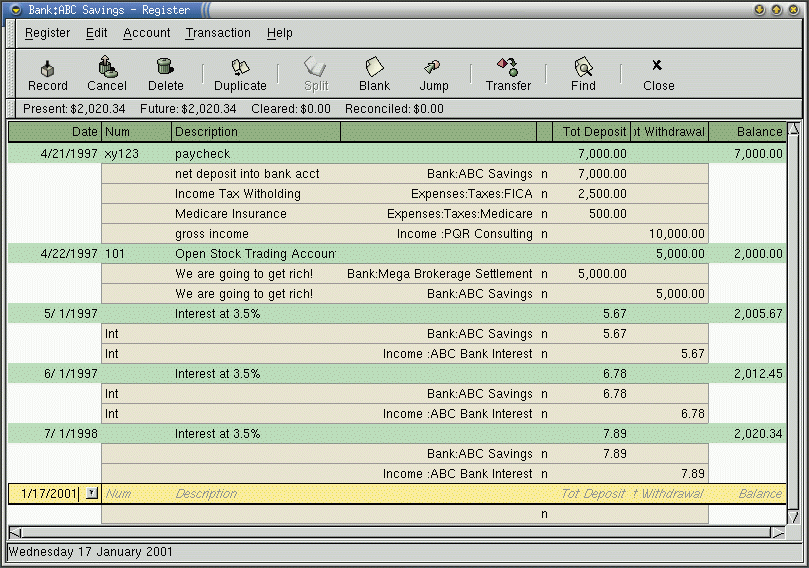
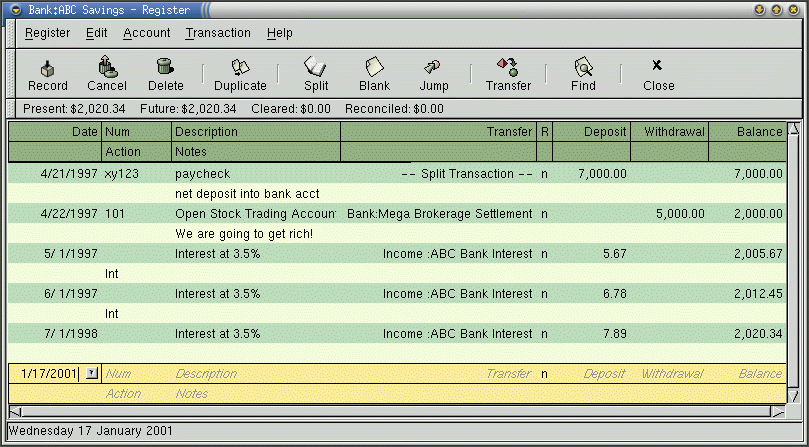
Re:GNUCashI use gnucash, not even the latest version, and I just added a description a transaction. I have used it for more than a year, through several versions, and it has always had that giant blank "description" field sitting right there in the register window.
Have a few screen shots:
http://www.gnucash.org/images/gnome-1.6/savings-j
o urnal.gifhttp://www.gnucash.org/images/gnome-1.6/savings-d
o uble.gifOr am I somehow completely misunderstanding what you mean by "add a description to a transaction" ?
My objections to gnucash are that it requires too many librarys for functions that I never use due to in the integration with gnome, and that it doesn't have a text-only mode of interfacing with it.