Slashdot Mirror
Domain: logitech.com
Stories and comments across the archive that link to logitech.com.
Comments · 617
-
Re:Not to be celebrated
What I find interesting about the story of PC input devices is that the trackball was never really advanced as a better alternative to mice.
How many millions of cases of RSI (and often, associated medical costs) could have been prevented simply by using a trackball, which you work only with a few fingers instead of your arm and wrist.
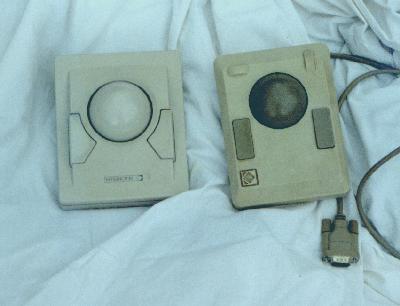
I've been using trackballs since Kensington came up with the classic "expert" (the one on the left here, for those that don't remember).
Nowadays I use an old Trackman Marble FX at home. Unfortunately it's not made anymore, and it doesn't have a scroll wheel, which is pretty much its only drawback (if you have one of those in the box you can hoist it on eBay for $400, they're that sought after) as well as a newer Logitech Marble Mouse, which unfortunately also does not have a scroll wheel. I avoid TBs that have to worked with the thumb, because they're less precise.
A few years ago I was hoping Logitech would come up with a revised TrackMan, but instead they committed the idiocy of releasing the most stupid product concept of all time: a cordless trackball. Sigh.
-
Re:Not to be celebrated
What I find interesting about the story of PC input devices is that the trackball was never really advanced as a better alternative to mice.
How many millions of cases of RSI (and often, associated medical costs) could have been prevented simply by using a trackball, which you work only with a few fingers instead of your arm and wrist.
I've been using trackballs since Kensington came up with the classic "expert" (the one on the left here, for those that don't remember).
Nowadays I use an old Trackman Marble FX at home. Unfortunately it's not made anymore, and it doesn't have a scroll wheel, which is pretty much its only drawback (if you have one of those in the box you can hoist it on eBay for $400, they're that sought after) as well as a newer Logitech Marble Mouse, which unfortunately also does not have a scroll wheel. I avoid TBs that have to worked with the thumb, because they're less precise.
A few years ago I was hoping Logitech would come up with a revised TrackMan, but instead they committed the idiocy of releasing the most stupid product concept of all time: a cordless trackball. Sigh.
-
No, Skype.
Ekiga is fine and all, but he said he was looking for cross platform support for MAC users as well. This rules out Ekiga, unless there is a plain SIP application for Macs that I don't know about.
Why not use Skype? There is a Windows, a Mac, and a Linux version. I use the Linux version to videochat from my Ubuntu Linux laptop (using a Logitech Quickcam Pro for Notebooks) with my Dad on his Mac, and he uses his Mac version to talk with Windows people. Yes, it's not Open source, but it DOES work and it's FREE (as in beer) to use, as long as you aren't placing calls to POTS numbers. Even then, the charge is minimal.
Ekiga not only cannot recognize my camera (for reasons I cannot explain, especially when crappy little "Cheese" can see it!) But because it's a plain vanilla SIP application, I basically can't use it because everybody I know uses Skype, which isn't plain SIP compatible! I realize the compatibility issue is Skype's fault, But the market has spoken, and all the people I would WANT to have a video chat with use Skype. So I use it.
It sounds very much like the Submitter is in this boat. If he tries to Use Ekiga he's going to still be stuck in the same boat. He should just use Skype.
-
Re:Platform?
or the Logitech Edge - http://www.logitech.com/index.cfm/products/details/US/EN,CRID=2166,CONTENTID=10717
wireless keyboard with touchpad
been eyeing one off for a multimedia machine - but cannot justify the price at the moment , though that should decrease over time. -
Re:I call this progress.
Finally an alternative to the mouse.
Hmm I very much doubt it.
Using something like a Wii mote for controlling the cursor on a PC screen is rather stupid unless you using it to control a game. Consider trying to type something and then needing to move the cursor to some other place. If you had a mouse this is fairly simple by moving the hand onto the mouse and just moving it in two dimensions. Now consider the same action either the Wii like mote you end up having to pick it (it does not look like it will slide easily) up which means you are now moving the pointing device in three dimensions. Does RSI actually mean anything?
Of course you could have one of these and get the best of both worlds although to be fair the Wii mote device does allow more control of a game but for normal business screen work the mouse is still king. -
Re:I call this progress.
A trackball is the only way to go. And not one of those painful thumb ones either, those are only good for making your thumb and wrist sore and swollen. My personal favorite.
-
Re:In theory, I'll agree.
As I understand it, that is what the Logitech MX Air does. Haven't tried it though (and with that price I can see why it's not very popular).
-
Re:The end of one-handed surfing?
I don't think the Wii remote is all that useful for a computer mouse. Of course you could always try the following mouse since IMHO it is definately sexier and is more flexible than a Wii remote and it works on all PC's now.
-
Re:In theory, I'll agree.
There already are "air mice" that work on desktops. Logitech makes one.
-
Why are these things more than 200$?
We can get an Intel D945GCLF Little Falls Mainboard with a built-in Atom 1.6 GHz for 80$, 512MB RAM for around 15$. An external brand-name keyboard is only worth 15$, a 9" screen is probably only 50$ (if we go LVDS or whatever direct connections are called), a battery shouldn't be more than 20$ and we can buy 4GB CompactFlash cards for less than 20$.
Since these are all retail prices, my question is: where's the 200$ laptop?
-
Re:The only thing I want to know...
Why don't they sell keyboards without these stupid windows-keys?
The Windows and Menu keys make fine Super, Meta and Compose keys which are useful in a number of ways especially if you happen to write complex text (this is assuming you run Unix, if you run Windows, the Windows keys are supposed to actually be useful). I just wish it said so on the keycaps instead of having the Microsoft ads.
I've often wondered how I could cleanly relabel those keys but I'm not really very good at this kind of thing. And I want a quiet keyboard so things like the "Das Keyboard" are right out (using a Logitech UltraX at the moment which suits me just fine, flat and quiet). -
Logitech DiNovo Mini
http://www.logitech.com/index.cfm/keyboards/keyboard/devices/3848&cl=us,en
I was demonstrating this to a friend a week ago and he asked about the range, I said I wasn't sure, so I walked outside, across the road and down two doors and I could still type and use the built in mousepad thing. Well over 40 meters. Works out of the box with Ubuntu. Battery lasts for a month without recharging. I combine this with a Logitech Harmony 785 and MythTV, very happy with the results. -
Re:Advice?
I picked up one of these about 1 year ago because it claimed to have a long range (60' as I recall.. I can't seem to find mention of it now...). It was to be used in our small conference room, so the range only had to be about 15' feet. It wouldn't even work reliably at 10'. In fact, at 10' there were tremendous delays and "skipping" with both the mouse and the keyboard. Horrible product. This was not going through walls or in an area with a lot of interference.
-
Asus have missed a trick here
They should have found or made the extra space necessary to get a laptop-sized optical drive in there (Nintendo have with the similar-sized Wii). One of those desktop Eee's with a DVD drive would be a killer client-only box for MythTV (so long as you can turn DVI-out into appropriate TV-in).
It's dinky, stylish enough to have in your living room, presumably pretty quiet, cheap, and more powerful than reusing an old box. What's not to like? (and if you get the bluetooth option, you can get One of these, or something similar but cheaper) -
Re:Fanbois, have you actually tried one?
$69 for a keyboard isn't particularly expensive. True, keyboards around that price usually have whiz-bang features, but not always.
G11 Gaming Keyboard - $69 (And while I like the feel of it for gaming, it sucks to do real work on!)
Das Keyboard II - $79.99
For an outfit as small as Unicomp seems to be, a somewhat minor markup over what it'd cost from somebody else is pretty reasonable. -
Re:Well, for one thing..
I think you have some very good points here, but I wanted to correct you on your comments about Logitech, as they do not only support Microsoft; they do also support Mac OS X, more so for mice than keyboards, although under keyboard+mouse sets, they do offer a Mac-specific choice and a Mac/Win choice. So basically, they still don't support Linux, but they do not only support Microsoft. Plus, even if you're not using a Logitech-branded device, if it's branded by a computer-manufacturer, chances are that it may be made by Logitech.
Personally, I generally dislike media keyboards since the additional keys are a waste of space, if you map a key combination to do whatever function the media button would, but I've pretty much exclusively owned and used Logitech mice for as long as I can remember (since the early 1990s, I think).
However, just because X.org/Gnome/KDE/etc. may not support all of the buttons on your keyboard, there is software out there that will let you map these buttons. You may want to take a look at Keytouch, for example.
Still, it's definitely preferable to have it just work, fresh out of the box.
-
Re:Well, for one thing..
I think you have some very good points here, but I wanted to correct you on your comments about Logitech, as they do not only support Microsoft; they do also support Mac OS X, more so for mice than keyboards, although under keyboard+mouse sets, they do offer a Mac-specific choice and a Mac/Win choice. So basically, they still don't support Linux, but they do not only support Microsoft. Plus, even if you're not using a Logitech-branded device, if it's branded by a computer-manufacturer, chances are that it may be made by Logitech.
Personally, I generally dislike media keyboards since the additional keys are a waste of space, if you map a key combination to do whatever function the media button would, but I've pretty much exclusively owned and used Logitech mice for as long as I can remember (since the early 1990s, I think).
However, just because X.org/Gnome/KDE/etc. may not support all of the buttons on your keyboard, there is software out there that will let you map these buttons. You may want to take a look at Keytouch, for example.
Still, it's definitely preferable to have it just work, fresh out of the box.
-
Re:Well, for one thing..
I think you have some very good points here, but I wanted to correct you on your comments about Logitech, as they do not only support Microsoft; they do also support Mac OS X, more so for mice than keyboards, although under keyboard+mouse sets, they do offer a Mac-specific choice and a Mac/Win choice. So basically, they still don't support Linux, but they do not only support Microsoft. Plus, even if you're not using a Logitech-branded device, if it's branded by a computer-manufacturer, chances are that it may be made by Logitech.
Personally, I generally dislike media keyboards since the additional keys are a waste of space, if you map a key combination to do whatever function the media button would, but I've pretty much exclusively owned and used Logitech mice for as long as I can remember (since the early 1990s, I think).
However, just because X.org/Gnome/KDE/etc. may not support all of the buttons on your keyboard, there is software out there that will let you map these buttons. You may want to take a look at Keytouch, for example.
Still, it's definitely preferable to have it just work, fresh out of the box.
-
Re:Well, for one thing..
I think you have some very good points here, but I wanted to correct you on your comments about Logitech, as they do not only support Microsoft; they do also support Mac OS X, more so for mice than keyboards, although under keyboard+mouse sets, they do offer a Mac-specific choice and a Mac/Win choice. So basically, they still don't support Linux, but they do not only support Microsoft. Plus, even if you're not using a Logitech-branded device, if it's branded by a computer-manufacturer, chances are that it may be made by Logitech.
Personally, I generally dislike media keyboards since the additional keys are a waste of space, if you map a key combination to do whatever function the media button would, but I've pretty much exclusively owned and used Logitech mice for as long as I can remember (since the early 1990s, I think).
However, just because X.org/Gnome/KDE/etc. may not support all of the buttons on your keyboard, there is software out there that will let you map these buttons. You may want to take a look at Keytouch, for example.
Still, it's definitely preferable to have it just work, fresh out of the box.
-
Re:Well, for one thing..
I think you have some very good points here, but I wanted to correct you on your comments about Logitech, as they do not only support Microsoft; they do also support Mac OS X, more so for mice than keyboards, although under keyboard+mouse sets, they do offer a Mac-specific choice and a Mac/Win choice. So basically, they still don't support Linux, but they do not only support Microsoft. Plus, even if you're not using a Logitech-branded device, if it's branded by a computer-manufacturer, chances are that it may be made by Logitech.
Personally, I generally dislike media keyboards since the additional keys are a waste of space, if you map a key combination to do whatever function the media button would, but I've pretty much exclusively owned and used Logitech mice for as long as I can remember (since the early 1990s, I think).
However, just because X.org/Gnome/KDE/etc. may not support all of the buttons on your keyboard, there is software out there that will let you map these buttons. You may want to take a look at Keytouch, for example.
Still, it's definitely preferable to have it just work, fresh out of the box.
-
Re:You don't say?
There's a happy medium to be found in computer peripherals.
I use the Das Keyboard II. (I used to use an IBM Model M I got from an old PS/1, but I missed the Windows key.) $80 isn't cheap, but it's a dream to type on, and built like a tank. All the keys make happy click-click-click! noises, too. (But then again, I am a computer science major. I spend a lot of time on this thing.)
I've also been really happy with the Logitech G5 mouse. The weights are mostly gimmicky, but were handy for the one I got for my parent's computer - my mother-dearest can pop them out and use a lighter mouse. (She now refuses to work on any other computer, because the mouse is different.) It's really comfortable and tracks well, but it only has one side button, which bugs me somewhat.
(No, I don't work for either company. But, if you are a Logitech employee and would like to send me a check, I have a PayPal account!)
-
Re:Why do they continue to put DVDs on these thing
I use a laptop no longer sold, that I bought from Rock Direct (rockdirect.co.uk). It's quite nice
I have used it (and others) without a mouse. It's very usable. I still prefer to have a mouse.
When I'm actually mobile (the current beast is a portable desktop replacement, useful for me living between two locations at the moment) the mouse is an annoyance as there's no surface for it. That's a tiny proportion of my overall laptop usage, and the rest of the time I genuinely love my mouse.
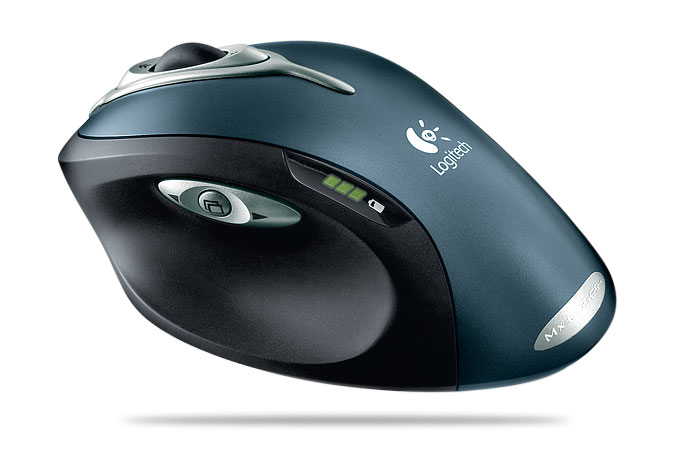
(anyway, you haven't seen my mouse. It's sexy in ways that oughtn't be possible for something that doesn't vibrate. and it doesn't actually need a surface to use it while mobile! http://www.logitech.com/index.cfm/mice_pointers/mice/devices/3443&cl=gb,en ) -
Re:What happened to the joystick?Wow, is there anyway to hook a 2600 style controller up to my Mac? I need to get my fix! I do not think my Logitech Precision is up to the task! I bought a "Stelladaptor 2600 to USB Interface" from AtariAge, but I don't see it listed on their website now. It worked fairly well in the Atari 800 emulator under OS X. I haven't tried it in a while - I really should.
-
Re:What happened to the joystick?
My lord that game seemed like a marketing strategy to sell more 2600 controllers.
My sister and I learned the best way for us to play that game - sitting on the floor, with the controller being held between the soles of our feet (one foot on the right side, one on the left), leaving hands free to move that controller back and forth like no one's business.
For some reason I also really got the timing for the pole vault down pretty well. I think my score on that would almost match the scores on the rest of the events combined.
Wow, is there anyway to hook a 2600 style controller up to my Mac? I need to get my fix! I do not think my Logitech Precision is up to the task! -
Whoever does it...
...don't expect it to be cheap. And I mean that even if Apple produces such a thing, the Logitech diNovo is going to seem cheap by comparison.
Judging by the pictures on this site: Optimus Mini, the backplane for the full blown 103 key version must be staggeringly complex, not to mention extemely difficult to manufacture within the confines of a standard-sized keyboard. Plus, a regular keyboard must be able to withstand normal typing, unlike the three-button jobbie; you have to wonder at the amount of abuse a standard flex-pcb can withstand. I'm seriously concerned about that aspect.
It's no wonder that the street price for these things is going to be so high; I think that the sheer complexity of mass-producing such a beast reliably is probably the only thing standing between us and our uber OLED planks.
Cheers~ -
Re:So...my soundsystem did notice. it's not like you need over 1k gear to notice the difference on lossless formats.
(posted while listening to White Riot - The Clash) -
Re:What I really wonderAs a long time user of a larger trackball, I actually hate the tiny marble-style thumb trackballs that seem to be prevalent in today's models. I'd much prefer a ball that can be used with the pointer/middle finger, leaving the thumb and pinky to do the majority of the button-mashing.
There's no real equivalent to it for consoles (unless you want to hook it up directly to a PS3), but have you considered the Marble Mouse? I use my index and middle fingers to control the trackball and my thumb/ring finger for buttons. The only issue I've ever had with it is the lack of a scroll wheel.
I actually prefer it in FPS games to a normal mouse, because I can make much smaller movements and get the same results. I'm actually halfway decent with the hitscan and one-hit-one-kill types of weapons too, so it can't be that bad. -
Re:What I really wonderNow think replacing the right stick with a small, thumb-operated trackball. They do sell them you know. I use this. I got it when my shoulder started hurting after playing too many FPS. That isn't a thumb-operated one, but they have those too.
-
Less than obvious solution?
Here's a less obvious solution that might just fit your needs:
Most HDTVs these days have VGA inputs. A 15-dollar VGA cable should do the trick, and most XP installs will recognize the HD resolution and scale a desktop fairly well. Once you've hooked up the laptop to the tv, get yourself a wireless keyboard with a trackpad built in (like the Logitech Mediaboard Pro and as a bonus, it works with the PS3 too) and you should be set. -
Re:Not actually computer use that causes it...
I had a lot of problems with the mouse as well. I don't use it a lot as it is, but I went back to a trackball after about 9 years of using a mouse.
The one that I linked is quite ergonomic and keeps the hand in a more natural position. I haven't had any problems since getting it. The only annoying part was getting used to using my fingers to move the trackball instead of the thumb (my old trackball was a thumb-type) but now I'm past that I won't use a mouse at home again. -
Re:Logitech Marble mouse USBIndeed a lovely trackball. Also makes you wonder how well the article submitter did a search. In the time that he wrote this submission, he could have just went to the logitech site and found the marble mouse. How could he not have found it? It is a trackball that is not to be moved by your thumb (I a get sore thumb just from the idea). And can be used for both hands. Also it doesn't cost as much as the kensington ones. I can't tell you if it is better than the Kensington because I don't own the Kensington. Since they have a different form, and for me it is very easy to lay my hand around the marble mouse in a steady and relaxed position, I can't imagine that with the square kensington.
I bought mine just to try out something different. The first two weeks were horrid, it is especially difficult if you have some drop-down menu with sub-menus, you'll spend 3 times just to get there. My hand seemed to hurt more than before during that time, but it went away pretty fast. By now it is as comfortable for me as a normal mouse, actually a bit more comfortable. I keep it on the left side of my keyboard and my mouse unused on the right side, except when I play ut, it really misses the scroll wheel there (suggestions?), and I end up randomly moving the direction. Maybe it needs getting used to in games, but when you constantly lose, you end up going back to the mouse instead
What I also wonder: how come there are about 600 answers and only a few mention this mouse, which is actually the only real answer to what this guy was asking for?
-
Re:Trackball
I switched from mouses to trackballs some 7 years ago and my wrist problems vanished. I had a Logitech Cordless TrackMan Wheel since quite recently, and was fairly happy with it. I chose it because it felt so nice in the store. It took two months however to became used to it, and I think my thumb never got quite as accurate as I was with a mouse. Most importantly I felt it (the thumb, not the device) became less accurate after years of using it.
Now I'm using a Logitech Cordless TrackMan Optical, and I've been happy with it. I got used to it in a matter of days at most, and I can do more precise work with it.
To a mouse I'm not going back. I don't do graphics design. -
Re:Trackball
I switched from mouses to trackballs some 7 years ago and my wrist problems vanished. I had a Logitech Cordless TrackMan Wheel since quite recently, and was fairly happy with it. I chose it because it felt so nice in the store. It took two months however to became used to it, and I think my thumb never got quite as accurate as I was with a mouse. Most importantly I felt it (the thumb, not the device) became less accurate after years of using it.
Now I'm using a Logitech Cordless TrackMan Optical, and I've been happy with it. I got used to it in a matter of days at most, and I can do more precise work with it.
To a mouse I'm not going back. I don't do graphics design. -
Not only have I switched to a trackball...I've also switched hands. I'm a graphic artist, right handed, but use a Logitech Marble Mouse USB with my left hand--old skool, but it has a central trackball (so I can actually switch back to the right hand if I wanted), and the ball isn't tennis-ball sized like some of those Kensington's. A few years ago, I started to get sharp pains in my right wrist, so, to "preserve" my wrist, I switched input devices AND hands. I wasn't ambidextrous or anything, but just couldn't deal with the discomfort.
Five years later, im ALMOST as proficient in doing clipping paths with my left as my right.
-
Hand v Thumb
I use hand trackballs instead of thumb trackballs and find them much easier to use. I have a Trackball Explorer at work and a Cordless TrackMan Optical at home. I used to have the Microsoft one at both home and work but went wireless at home. The Logitech one is superior; while the Microsoft one is actually really nice, it requires a lot of maintenance (it gets insanely dirty and starts to skip and drag). The main issue for me is that the thumb trackballs have always required extremely precise movement and perfectly still hands, lots of dexterity, while largely ignoring the rest of the hand. The hand trackballs make much better, IMHO, use of the space.
-
Re:Trackball
Another Marble Mouse fan here. I'll give it up when they pry my cold dead fingers off of it.
-
Logitech Cordless TrackMan optical
Not seen a mention for my weapon of choice yet:
http://www.logitech.com/index.cfm/mice_pointers/tr ackballs/devices/189&cl=us,enUsed to swear by the Marble Mouse but I now prefer TrackMan as I find it more comfortable as it holds the wrist at a more natural angle and has a scroll wheel.
Combined with a short, laptop style, keyboard with a separate USB number pad ( http://www.yellowgrey.com/desk.jpg ) I have eliminated the pains I used to get in my right hand from using a mouse and right shoulder I used to get from reaching across the numpad for the trackball.
-
Re:Trackball
The big trackballs don't seem to do it for me. By far my most favorite trackball is the basic Logitech Trackman. I've been using it for several years, switching over and trying different trackballs, but I always go back to this one. Your hand is resting comfortably, the ball is perfectly positioned and I have yet to run into a situation where my thumb would be tired - dunno, maybe it's the gamer in me.
As for precision, it's pretty good. I do game with it, some counterstrike, but mostly WoW pvp. What I do find to be a hinderance in sheer gaming performance, however is in certain games where you need fast jerky movement over small areas (an RTS, like starcraft, or when you need to move quickly and click on raid members to heal in WoW), nothing beats a mouse - well, maybe a tablet?
As for work stuff, I've never really had it hinder me when drawing out some artwork using vector graphics. One thing to get used to is clicking and dragging, mostly because users are most comfortable using the weight of their palm to control the mouse while dragging, the way the trackball is designed it doesn't let you do that. So if you're click/dragging something along, sometimes you can accidentally release the button while moving your thumb. Doesn't happen often, but it can occur, mostly in places where you are using a trackball on a nonsolid surface, like the arm of a sofa or on your knee or something. I've had much worse luck trying to click-drag with larger trackballs, but I don't have large fingers. YMMV.
My initial reasoning for getting it was because I didn't have enough desk space.
-
i have a Logitech Marble Mouse from 1996
i have gone through about 5 computers in that time, but i have consistently migrated the trackball. it just needs to have the accumulated lint picked out when response gets a little sluggish once every 3 months or so. i swear by the thing. superior to a mouse, superior to your regular big bowling ball trackballs, and superior to the other goofy flavors of trackball that puts the ball off center. on all measures of ergonomics: ease of use (smaller desk footprint), comfort and safety (very comfortable, more natural than a regular mouse), etc
although if you are a graphics artist, you probably want the precision from a heavy trackball. but if you are regular computer user, you cannot go wrong updating to the thing:
Marble Mouse -
I love my Logitech thumb trackball
http://www.logitech.com/index.cfm/mice_pointers/t
r ackballs/devices/166&cl=us,en Been using this mouse from the first gen back in the late 90's and have kept buying the newer models when the old ones wear out. No thumb fatigue ever, and its way more precise that most mice I use (I'm an IT professional, I handle a lot of mice). I highly recommend you give it a shot, its only US$30 for a corded version. -
Logitech Marble
I use one of the Logitech Marble's ( http://www.logitech.com/index.cfm/mice_pointers/t
r ackballs/devices/156&cl=us,en ).. unfortunately it was the largest trackball I could find for $100 at the time.. Initially I wasn't sure it would suit my needs (mostly just ergonomics), and it wasn't a 'thumb' only style..
I never tried any real Graphics Art type stuff with it however... i've found it's easy enough to 'lock' the left-right movement of the ball by using the side of my middle finger on the side of the ball, but I can't imagine how you would do the same with horizontal movement.
Aside from that, it's been great for me.. I really like that I don't have to worry about trying to move a mouse in the semi-confined area I have for a work desk. -
Logitech Trackman Wheel
I swear by the Logitech Trackman Wheel, viewable here. My wrist doesn't hurt like it did when I used a regular mouse.
They have a cordless version, but it's USB-based. If they made a Bluetooth version, it would be perfect.
-
Logitech Trackman Wheel
I swear by the Logitech Trackman Wheel, viewable here. My wrist doesn't hurt like it did when I used a regular mouse.
They have a cordless version, but it's USB-based. If they made a Bluetooth version, it would be perfect.
-
Logitech Marble Mouse
I'm not a graphics artist and I use a Logitech USB Marble Mouse. The ball's about an inch in diameter. Costs about £20. ( http://www.logitech.com/index.cfm/business/produc
t s/mice_pointers/devices/156&cl=gb,en ). I switched about 6 months ago when I started getting twinged in my wrist. Not had a problem since. -
Re:Problem is button abuse, not buttons
The harmony remote is one attempt at reducing the complexity - you trade complexity up front (you need to program the remote with your devices) for simplicity later. The above mentioned 65 year old had no problem watching TV with the harmony remote - on a system an order of magnitude more complicated than his.
I presume you're talking about one of these, most likely the Harmony 1000 since all the rest look as complicated as other remotes. The reason the designers were able to take away so many buttons from the device is that they stuck a giant full-color LCD screen on it and gave it an intuitive-looking GUI (sounds something like how the iPhone was designed, doesn't it?).
-
Re:Problem is button abuse, not buttons
The harmony remote is one attempt at reducing the complexity - you trade complexity up front (you need to program the remote with your devices) for simplicity later. The above mentioned 65 year old had no problem watching TV with the harmony remote - on a system an order of magnitude more complicated than his.
I presume you're talking about one of these, most likely the Harmony 1000 since all the rest look as complicated as other remotes. The reason the designers were able to take away so many buttons from the device is that they stuck a giant full-color LCD screen on it and gave it an intuitive-looking GUI (sounds something like how the iPhone was designed, doesn't it?).
-
Re:Logo required? Blech.
Nah. Don't agree.
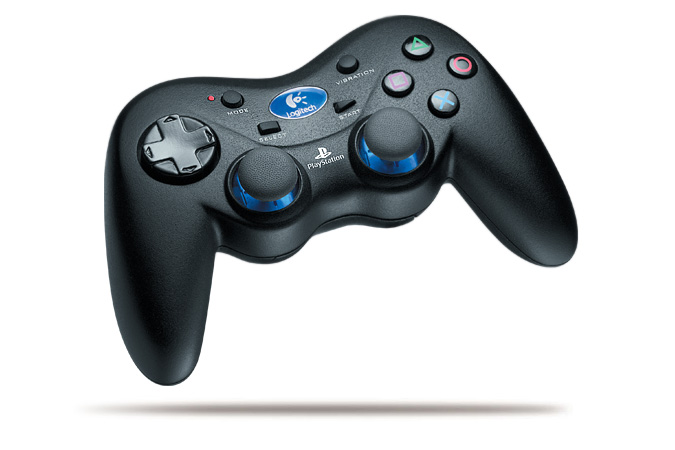
http://www.logitech.com/repository/367/jpg/2646.1. 0.jpg
Better than the Sony-one.
It's wireless. It's rounded, better to hold. There's *one* thumbswitch rather than the braindead 4-buttons-allthough-theyre-one-under-the-shell of the PS2 original controller. I personally also find it prettier than the original controller, but that's a matter of taste I guess. -
Re:Using mouse hurts!!!
I've never understood the trackball crowd (and I tried one for awhile). Simply put: the way our thumbs work is very sub-optimal for pointing.
I couldn't agree with you more - that's why I use the Logitech Marble Mouse instead of a classical trackball. By putting the track ball in the center, it moves the burden away from the thumb and shifts it to the fingers. I don't even really use my fingers, I just keep my hand flat on the ball and roll it around. That shifts the burden of movement further up my arm, allowing my to keep my wrist neutral and alleviate the strains that cause my RSI/carpal tunnel to flare up.
Having buttons on either side of the ball is a plus too, it allows me to handle mouse operations better, and one can emulate a middle-mouse button by "squeezing" the device (clicking left & right at the same time).
The other thing I do for my RSI/carpal tunnel is to use a Wacom Graphire Tablet The tablet is even better than the trackball, since the act of holding the stylus again shifts all of the burden of movement up one's arm, allowing the wrist to stay neutral and get some relief.
In actuality, I use both of them at my place of work. I have my tablet on my left (I'm a southpaw), my trackball on my right, and shift between whenever I feel one hand is receiving too much attention. I tend to favor the tablet, particularly for extended mouse operation. I fall back to the trackball whenever I feel my hand getting too tense from being in the same position for too long.
Naturally, I use the keyboard as much as I possibly can. (Thank heavens for keyboard shortcuts and vi!
Those mouse alternatives, coupled with an ergonomic keyboard, keyboard tray, and better overall ergonomic posture from head to toe and I've learned how to manage my carpal tunnel condition.
It used to be so bad three years ago that I couldn't carry a full mug of coffee, my hands were so weak from the ill effects of bad posture. Now, I am rarely plagued by it, and I often spend up to 10 to 14 hours a day on the computer.
I've never had surgery, nor any kind of treatment. -
Re:A fine blend
Sadly, my middle mouse button(scrollwheel) doesn't close firefox tabs in my newer Logitech & MS mouse like my old MS Intellimouse Explorer used to.
You can use SetPoint to remap mouse buttons to keystrokes. (MX1000) Personally, I map the "application switch" key on the thumb grip to CTRL-W for close. Then leave one of the arrows next to it for Back, though Forward is next to useless, so I map that to fullscreen my SageTV window. Then I remap the horizontal scroll to CTRL-ALT-LEFT and CTRL-ALT-RIGHT to skip forward/back 5 secs in iTunes, and the up and down arrow on top to SPACE for play/pause and CTRL-+ to increase font-size. Though it would be nice if iTunes shortcuts were global so I didn't need the window on top.
Who needs more keyboard shortcuts? I'd be happy with just a few more buttons on my mouse. I find myself using mouse only when browsing, listening, watching, basically relaxing, and it is wireless, so that can be across the room like a remote. But other common tasks like CTRL-T (new tab) and CTRL-L (focus address bar) can be done from keyboard just fine, because I'm about to type something anyway.
I'd be very unhappy at this point to not have a close window button beneath my thumb though. So convenient for browsing multiple tabs. -
Re:Article Text
I stopped reading after the first paragraph. A tablet? Orders of magnitude more expensive? What?
That was hardly a good reason to stop reading any of the articles. You yourself mentioned that you don't like using a tablet as an input device, and I don't blame you -- I don't draw and can't stand using a pen for anything other than drawing. The article is about how we software dudes over-use mouse input, and does a fair job backing that point up, regardless of the "an order of magnitude" hyperbole.
That said, the hyperbole isn't that far from the truth. Let's look at the math, and since TFA was talking USian, and since Euros are worth like 30% more than U.S. Dollars, let's normalize the costs. For the sake of argument, let's use values from the manufacturer's online American-version store, rather than third-party distributors, and let's ignore shipping costs. Yes, the items in question are likely cheaper elsewhere.
The cheapest digital tablet direct from WACOM costs a hundred bucks (99.95 U.S. Dollars). In contrast, the cheapest non-travel mouse from Logitec runs around fifteen bucks (14.95 U.S. Dollars). A tablet is nearly 7 times more expensive than a mouse in U.S. dollars. Now, you're right, that's not exactly a full order of magnitude difference, but it is two thirds of an order of magnitude difference, and that's strong enough to support a slight exaggeration, regardless of the veracity of the claim that a tablet is a better input device than a mouse.