Slashdot Mirror
Domain: dlink.com
Stories and comments across the archive that link to dlink.com.
Comments · 237
-
Re:Yes please
Do people no longer buy their own modems/routers....?
I used to use my own Motorola Surfboard cable modem, but now use my ISP's Cisco 3212 EMTA VoIP/cable modem (as it's required for phone service and I can use the included DOCSIS 3.0 8x4 cable modem w/o extra charge), but I have my own DLink DSR 250 (router) and separate DLink DAP 2660 (WiFi AP). All my switches and NICs are Gbit.
-
Re:Yes please
Do people no longer buy their own modems/routers....?
I used to use my own Motorola Surfboard cable modem, but now use my ISP's Cisco 3212 EMTA VoIP/cable modem (as it's required for phone service and I can use the included DOCSIS 3.0 8x4 cable modem w/o extra charge), but I have my own DLink DSR 250 (router) and separate DLink DAP 2660 (WiFi AP). All my switches and NICs are Gbit.
-
Re:Read the specs.
D-Link have had a few routers like this for the past few years, they call it "SmartBeam"; for example the DSL-3590L.
-
Can you google?
I just tried google and found D-Linkthat has an FTP client and http+https So you could let the website access the camera for updates. Bit of scripting should solve it.
-
D-Link DCS-933L
http://us.dlink.com/products/c...
-
Re:It isn't only Windows 8
You've apparently never had to deal with buggy Linux drivers. I've been fighting with a buggy nVidia implementation ever since I switched it to be my Linux server. It has never quite worked right on Linux (Fedora, Ubuntu), but since it's a server, it's not a big deal.
I DID find out the hard way when they changed mdadm to HALT BOOT when *ANY* array is degraded, and then not give a useful error message.
If your Windows PC is getting BSODs, either it's hardware fault, or it's a bad driver. (Or possibly a driver-level virus). If the hardware is actually supported by that version of Windows, you should investigate further. There may not be a good driver, but you should be able to at least identify the issue I would start with the NIC driver. I had a D-Link DUB-E100 USB NIC. The Win7 x64 driver would cause the same issues you're having now.
-
Amazon Glacier for cheap offsite.
Amazon Glacier has really changed my backup strategy since this time last year - I now push all my own, generated content (ie: pictures, documents, things I could never get back if I lost everything) up to Glacier using the free Windows client, Fast Glacier. In February I was charged $0.13 by Amazon for storing ~8Gb of data. I tend to push new content up as and when I create it (for example, after I process holiday snaps, or get back from a day out).
Day to day file changes are now handled by Windows 8's File History feature where my changes are pushed to a small NAS (Dlink DNS-320) in my shed (technically off site?) over a Homeplug AV ethernet link. For added security I use the legacy Windows Backup application (still present in Windows 8) to create ~ monthly snapshots of the system which I store on a 320Gb external HDD. This drive is one of two which go back and forth between my parents house each time I got and visit. These disks are encrypted using Microsoft Bitlocker drive encryption.
I should get around to properly encrypting my NAS in the shed, I've been looking at encfs.
-
Can we apply this to home security cameras?
This conversation resonates with a topic I've been looking into for some time now: wireless security cameras.
DLink, among others, sells wireless security cameras; they were pretty cheap ($60 before rebate) at Fry's.
Supposedly these are easy to set up: you put one at home, let it hook up to your home wireless router, and it will take pictures which it will upload to DLink; then while you are vacationing in the alps or Bahamas, you can get on the internet and look at how the thieves are (or, more hopefully, are not) breaking into your empty house.
The thing is, not only am I basically telling the Internet world that I have an empty house to break into, but there is a device in my home which could be trying to root my other devices on my network, and which would have a legitimate reason to be talking to some outside agency. For all I know, there could be malware on the camera under the control of DLink, or some renegade (former?) employee at DLink, or not at all related to DLink (the way some iPods came preinstalled with Windows malware).
Is there some sort of encryption and security that can be put into/around these cameras to keep it from doing anything underhanded? The only thing I can think of is to stop it from phoning home altogether (ie. don't use the DLink SeeYourOwnHome.Dlink.com type video upload service and just store stuff on my home server), but maybe other Slashdotters can come up with something more creative.
I admit this is not exactly the type of "Encrypted Digital Camera/Recording Devices" that the OP was talking about (the original question is more about protecting the camera from the outside), but I thought I'd use the opportunity to draw on the Slashdot wisdom about protecting the rest of my home from the camera.
Thanks for any ideas or links you can provide.
-
Re:That explains a lot
So you made a suggestion to the people whose job it is to solve customer issues, you were obnoxious and vague... and you're upset that they didn't understand what you were getting at?
http://www.dlink.com/us/en/home-solutions/contact-d-link
Fill in your name, email address, select "Marketing" or "Sales" - since you're asking for a *feature* in a future iteration of their product, and not *support* for the model you just purchased.Type in something like: "I recently purchased a DLINK DIR-835 router. I was surprised to see that there are no link lights on the unit indicating which individual LAN connections are active. I think this is a poor design decision, because (insert a couple brief reasons / description of your rationale here). In future similar products, please consider including link lights, as they are tremendously helpful for troubleshooting purposes, as I described above. I have had generally good experience with your products, but consider this lack of link lights to be a definite negative point in my consideration of future purchases, and future recommendations of your products for friends and family."
If you have any relevant experience or credentials that might add some weight to your request, also include them.
Click "Submit".
Your suggestion will make its way to engineering, because Marketing and Sales are the people who need to entice you to buy their product. A reasonable, logical request for a missing feature (you know, one that doesn't call them idiots) that's sent to Sales & Marketing will go much farther than insults masquerading as feature requests sent to Support as a problem ticket.
-
Re:sounds a bit facebooky
Sure, windfall now, but next month when IPv6 day comes and all the IPv6 sites stay lit, they'll be worth a rapidly diminishing amount.
ArsTechnica has a nice piece about IPv6 and why it's not going to be such a disaster thing after all, add to that the IPv6-capable home routers that are actually being made (at last!) and the ISPs who are rolling out IPv6 networking to their customers... and it's all looking rosy.
The good thing about World IPv6 day this time is that it won't be turned off after a day.
It's about time that IPv6 became widely available. This should start w/ ISPs, who can provide DS or DS-lite to customers still needing IPv4 access. Other than that, since they'll ultimately have to convert anyway, they should get the ball rolling.
Other customers should do it whenever they plan equipment upgrades, so that this conversion accompanies such changes.
-
sounds a bit facebooky
Sure, windfall now, but next month when IPv6 day comes and all the IPv6 sites stay lit, they'll be worth a rapidly diminishing amount.
ArsTechnica has a nice piece about IPv6 and why it's not going to be such a disaster thing after all, add to that the IPv6-capable home routers that are actually being made (at last!) and the ISPs who are rolling out IPv6 networking to their customers... and it's all looking rosy.
-
Re:Cisco E-series wireless rouer still have no IPv
The launch site includes a list of participating home router vendors, where Cisco and D-Link are both listed with links where they list what routers of theirs currently have IPv6 support.
The Cisco list has several Linksys E-series routers.
Not to say it isn't about bloody time. Selling non-IPv6 network equipment in this day and age is practically a scam. -
Re:first poster has no problems with dlink
So than, you are saying that this router isn't extreme, isn't N, or has very little memory?
http://www.dlink.com/products/?pid=663
I can't see its memory, but everything else looks right.
-
Re:Search them all
It is sobering to know that even outside the USA, our employers, ISPs and cellphone companies can log us to a 6 month to a 2 year period, but we can't pass on the buck to someone else to rightly defend ourselves. There's no real mac address logging* in the consumer routers out there [And we know those macs are easily faked, and a neighbor with a netbook or (rooted?) smartphone just needs to drive-by download from us to make it look like our IP is all that's needed]. Supposing macs were "unhackable" and good enough for lawyers, it's useless that routers DO NOT log robber signal strength. That might let poor victims in a college dorm judge just what search radius is sane to expand into. The real culprit doesn't have to be anchored to a wall near you: gigs worth of mp3s and movies over the course of a few days can be easily stolen by malicious passers-by via the growing market of tablets, netbooks and Wifi cellphones who can root a phone and spoof their mac address.
* I have owned many routers, but they only log an IP address and time. Though my stock firmware DLINK 825 router did have a clear association of a date to an IP address, old lines FIFO'd automatically after about 14 pages of 15 entries. A single day takes care of that little buffer if you test with an open WiFI and enable all log items.
This page shows how logs are treated. I have DD-WRT now so I can't check exactly, but IIRC, the problem was that when I returned home and wanted to naively mac-ban neighbors out of my open AP, the log would say "I gave 192.168.1.50 to a computer (an unidentified mac)." I would need to be lucky because the only place to find that neighbor's mac is in the Wireless Clients table menu... which itself OUGHT TO have a permanent log. Since the neighbor would be gone by the time I came to check, I was forced to just close everything up. -
Re:Search them all
It is sobering to know that even outside the USA, our employers, ISPs and cellphone companies can log us to a 6 month to a 2 year period, but we can't pass on the buck to someone else to rightly defend ourselves. There's no real mac address logging* in the consumer routers out there [And we know those macs are easily faked, and a neighbor with a netbook or (rooted?) smartphone just needs to drive-by download from us to make it look like our IP is all that's needed]. Supposing macs were "unhackable" and good enough for lawyers, it's useless that routers DO NOT log robber signal strength. That might let poor victims in a college dorm judge just what search radius is sane to expand into. The real culprit doesn't have to be anchored to a wall near you: gigs worth of mp3s and movies over the course of a few days can be easily stolen by malicious passers-by via the growing market of tablets, netbooks and Wifi cellphones who can root a phone and spoof their mac address.
* I have owned many routers, but they only log an IP address and time. Though my stock firmware DLINK 825 router did have a clear association of a date to an IP address, old lines FIFO'd automatically after about 14 pages of 15 entries. A single day takes care of that little buffer if you test with an open WiFI and enable all log items.
This page shows how logs are treated. I have DD-WRT now so I can't check exactly, but IIRC, the problem was that when I returned home and wanted to naively mac-ban neighbors out of my open AP, the log would say "I gave 192.168.1.50 to a computer (an unidentified mac)." I would need to be lucky because the only place to find that neighbor's mac is in the Wireless Clients table menu... which itself OUGHT TO have a permanent log. Since the neighbor would be gone by the time I came to check, I was forced to just close everything up. -
Re:They are better than what the cable cos. provid
Ah, ok - well then I stand by my point
http://iomega.com/iomegatv-media-center/
http://www.wdc.com/en/products/WDTV/
http://usa.asus.com/Multimedia/Digital_Media_Player/OPlay_HD2/
http://delive.netgear.com/
http://www.dlink.com/products/?pid=318 -
Re:Tor
Once some one has your mac address (assuming they have the real one) they know the manufacturer of your device. From there they can figure out where it was sold and they tie that to a credit card or bank card if you didn't pay cash.
Are you telling me that if I tell you 00:50:ba:* you can identify where I bought my NIC? And you can tie it to my credit card? You must be a spook in full collusion with D-Link (for the credit card and inventory records), in which case the mac address reveal is probably the least of my worries. If you look in my windows while you're wardriving, you might even see me, too!
-
D-Link DNS-321
From D-Link, http://www.dlink.com/products/?pid=666:
The availability of four different hard drive modes (Standard, JBOD, RAID 0, and RAID 1) allows you to choose the configuration best suited for your needs. Standard mode creates two separately accessible hard drives. JBOD combines both hard drives into one for maximum space efficiency. RAID 0 combines all drives in a ‘striped’ configuration, splitting data evenly across the hard disk drives to provide the highest performance, while RAID 1 causes the drives to mirror each other, providing maximum protection. If one drive fails while configured as RAID 1, the unaffected drive will continue to function as a single drive until the failed drive is replaced.I have a few of these in my AV setup. One is Raid 1, for stuff that I can't
replace, pictures, home movies, important docs, etc. The others are JBOD.Accessible via UPnP for your AV setup
Not expensive for what it does...
Google Products listing: http://goo.gl/4KT6c
Last I checked (a year ago) it would accept up to
2x 1.5TB drives. And I started with two spare 250's,
when I got my first one, and JBOD'd them into a
half TB. Which was really nice.[ If anyone else is considering it... if you have
spare SATA's laying around, this thing is GREAT! ]Oh yeah, fast too on the ethernet, giga ethernet.
-AI
-
Re:I'm fine with this
-
D-Link DIR-615
D-link has a Wireless N 300 router, listed on their site for $65 (so you could probably find it a little cheaper than that at other resellers). The DIR-615, which claims to be IPv6 ready. As someone else mentioned, the Apple Airport routers also support IPv6.
It is a bit disappointing that there's only a few models with built-in IPv6 support, but at least they're starting to make them. As more ISP's role out IPv6, the OEMs will start putting out more devices that support it. I think the problem right now is that there's virtually no demand for IPv6 support from customers, because no ISPs are offering IPv6 connectivity (that too will be changing, probably, soon - I think Comcast and a small number of other ISPs are starting too look into IPv6).
-
Re:C'mon. It's a cool page
Been told RALink is Linux-Friendly.
I have an 802.11b/g USB dongle kicking around somewhere that uses one of their chips; getting it working was almost trivial.
The worst, I had was an Atheros based chip, but on all machines I had wireless problems with this worked.
I've had fairly good luck with their chips. First one was a CardBus 802.11a/b/g card I used with one of my notebooks that didn't come with WiFi; I continued using it with a newer machine whose built-in Broadcom WiFi didn't start working right in Linux until more than a year after I bought it. Most recently, I picked up one of these for a MythTV frontend. 802.11n still doesn't work (not even with the carl9170 driver in the just-released Linux 2.6.37), but it's worked well enough at 802.11a to stream HD MPEG-2 (as well as less bandwidth-intensive formats) for the past few months. At some point, 802.11n will probably start working. It'd be nice to have it now, but it's not been a deal-breaker.
-
Re:Crazy....
We agree that most people get their router from the ISP, and like I said, that's what's not "upgraded" to levels where IPv6 is built-in. Even wireless is not included on those Time Warner routers for people paying hefty cable bills.
I wanted to stress that there are existing consumer routers with IPv6 support. The crime is that mine doesn't say it's IPv6 compliant, and even its website says nothing in its overview page. You'd have to accidentally discover its IPv6 options through their forums or the emulator.
The industry ALREADY started putting out IPv6, but it's just at niche and expensive tiers that highlight gaming features... sales/marketing have no idea what IPv6 is and that they should advertise ipv6 to capitalize on what people like you, with the desire in mind but incomplete knowledge, could be spending good cash on. So, shame on the ones giving us IPv6 silently, and on the ones who have nothing to give.
-
Re:what do projectors have to do with community?
Depending on your situation, some of the 802.11g phones are pretty good and avoid all the hassle of carrier restrictions. They work at work and at home, where else do you ever go? My campus is working with the city right now to roll out WAPs on telephone poles in the vicinity, extending our wifi fabric out into the nearby streets. With WiMax coming out, this is looking like a practical alternative to cell providers in the near future.
Examples: Cisco WIP310, Linksys by Cisco WIP330, D-Link DPH-541, Alfa Color wireless VoIP (Sorry for the Amazon links, couldn't find some manufacturer pages quickly) -
Re:WD HD Live is your friend.
I have two of these (WB HD Live) one wired and one wireless. I am very happy with the performance. Not many bells & whistles but it gets the job done. I would recommend it. However http://www.dlink.com/boxeebox Boxee Box seems to do all this and more (at about twice the price) but it's not available until November. I will probably get myself a boxee box for xmass
-
Use D-Link Drive Enclosures - we do :-)
We have a similar problem at the Mad Lab - we generate a lot of data (from our digital studio and other projects), we need access all the time, and we need reliable storage.
At first we were putting lots of drives into a PC -- but that led to problems. For one thing there was a single point of failure (main board, power supply, take your pick). Another problem was that the system was loud and power hungry. Then there was the backup problem -- there was no efficient way to do it without building another system just like it --- you can't ship TB of data off-site via the 'Net for backups, it just isn't practical. Then to make matters worse we decided we couldn't do anything else with the server without putting our data at risk... that was the last straw for me -- The server was overkill for the task and couldn't be used for anything else. I was stuck in a paradigm - I knew better - but I'd forgotten that temporarily...
Then I hit upon the solution of using D-Link 2-Bay network storage devices. http://www.dlink.com/products/?pid=509 These little guys are reliable, solid, efficient, and affordable. They're also pretty green because they will spin down when you're not using them thus saving power and POH time on the drives.
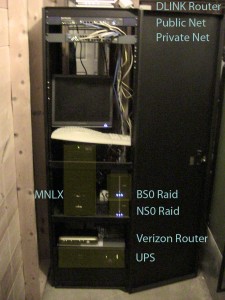
We use them in pairs: NS0 for storage, and BS0 for backup. With a firmware upgrade they will do NFS - so we have one of our servers map the two devices and then rsync NS0 to BS0 once per day. Newer versions may have the NFS capability built in (it was on it's way, it was beta firmware when we did it).
Now we have the key features of the high-end NAS solutions we use in data centers, but we have it on the cheap. The solution is scalable (more storage, more enclosures), reliable (mirrored drives all around, fast and easy to access (NFS or Samba - take your pick), provides redundancy (outboard power supply for each enclosure - easy to swap, separate controller for each pair of drives), and easy to manage (what's not to love about a scheduled rsync task via nfs for automated backups?).
We can easily access the data from either windows or *nix boxen on the internal network without any trouble. When we need to access the data from outside the Mad Lab we shell into a server and sftp what we need from there.
Here is a pic of the two of them in the rack: http://www.lifeatwarp9.com/wp-content/uploads/2010/01/MadRackBefore-225x300.jpg We've been using this setup for quite a while now and it's been dead solid. When we need to expand we just plug in another unit and map it. We've also installed this kind of configuration in customer facilities to manage backups and solve other storage problems on the cheap.
_M
-
I built a full HTPC.
Recently I finished my basement and so here is my setup. I originally had the PC in one of those small HTPC cases but it would not hold the new Radeon 5770 I bought so I could also use this computer to game on.
Here is a picture: http://picasaweb.google.com/xoltri/BasementReno#5449208554917435106
I don't have an entertainment unit yet to put the PC in. But it is completely silent and obviously it does everything. And playing Modern Warfare 2 on a 52" TV at 1920x1080 with ultra settings blew my mind.
For my other TV upstairs I will probably just get one of those small boxes that connects to the TV and stream stuff off of my NAS. Dlink is coming out with one that looks interesting: http://www.dlink.com/boxeebox
-
It can be done
What you are looking for is MoCa Alliance approved stuff. MoCa 1.1 can do 175/175. Verizon Uses Moca Equipment with their fios installs . The problem is its expensive. Dlink has this http://www.dlink.com/products/?pid=668 but its $239 This is the Moca Alliance webpage. Its a list of certified products. http://www.mocalliance.org/industry/certified_products.php
-
Re:That's not how coax works
Really? You might try telling that to Netgear or D-Link or any of the other companies that make Coaxial Ethernet Bridges.
This whole story could have been avoided if the poster knew the right term to Google.
-
Re:DGL-4500 users left screwed
If anyone has a DGL-4500 router, and experiences constant lockups with it (forced to power cycle the unit); your not alone. Apparently, there is a bug with DNS forwarding that started with firmware rev 1.21. It's been since July 2009, and the best you can hope for is an update still in beta. We are talking about their newest high-end gaming router here with extra features that make a nice small office router too.
As it stands, users of this model are furious. Some are threatening a class-action lawsuit against them. By all means, please read through the D-Link forum before you think about buying one of their products. http://forums.dlink.com/index.php?board=144.0
Odd, I have this model... and with v1.15 (2008/10/29) the admin page says I have the latest version of the firmware. I wonder if they stopped pushing anything that came later.
-
DGL-4500 users left screwed
If anyone has a DGL-4500 router, and experiences constant lockups with it (forced to power cycle the unit); your not alone. Apparently, there is a bug with DNS forwarding that started with firmware rev 1.21. It's been since July 2009, and the best you can hope for is an update still in beta. We are talking about their newest high-end gaming router here with extra features that make a nice small office router too.
As it stands, users of this model are furious. Some are threatening a class-action lawsuit against them. By all means, please read through the D-Link forum before you think about buying one of their products.
http://forums.dlink.com/index.php?board=144.0 -
Re:It looks like crap
It looks like an interesting experiment. I've been using their DSM-750 for a year or so and although it's missing some of the more advanced features of something like MythTV (no imdb lookups, no cover browsing) it's been a pretty nice way to get away from the computer and enjoy my media without burning everything to coasters. I agree the design of this thing is terrible (for a piece of functional hardware) but if it does marginally well I'm sure we'll see other vendors take a more tasteful approach in the near-future.
-
Re:It looks like crap
It doesn't fit into the entertainment center paradigm.
FFS, it doesn't fit into an entertainment center, period. Nor can anything be stacked on top of it. Plus it's needlessly hard to manufacture, find components for, and assemble. This is quite possibly the most horribly designed piece of consumer gear I've ever seen in my life.
ATTENTION LOSERS WHO WANT TO COPY APPLE: Design doesn't just mean making it look neat. Apple's stuff looks flashy but it actually works. (Most of the time, anyway.) And if your design only looks "neat" to 14-year-old males, you should throw it right the fuck away and never venture down that path again. Seriously, this thing looks like a prop from a bad SciFi (excuse me, SyFy) movie-of-the-week, or maybe a Roomba from Eureka that gains sentience and starts causing problems.
-
Re:Whoa!
D-Link DIR-655
http://www.dlink.com/products/?pid=530
The latest firmware update basically had an ad in it trying to sell me on a service, but other than that, I really love the router.
The only thing that would make the router better is if it were one of the WRT routers I could drop Linux on.
-
Re:Sir, step away from the wall jack ...
Why a PBX? If youre that serious then run your own wire. For existing wire you can buy a little VOIP box that will run through you existing wiring and ring your analog phones. I got one of these for 5 dollars when I first gave up on a land line. Ive since gotten rid of it and do cell-only, but it works.
-
Re:free food
Granted d'link has had a solution waiting for you for the past few years with its wireless security camera line, using this would be cheaper by half (100+$20 webcam vs $350).
-
Re:something similar
My housemate has something similar. It's the typical NAS with two drives, but the cool part is the web interface. It's a D-link DNS 323 (company link: http://www.dlink.com/products/?pid=509).
I'd say the d-link beats the Microsoft research team's device (even though gumstix is awesome). No pc required and it can sit anywhere on your network.
Hey, do me a favor? Test the download speed on the local network with that thing. I have a Synology 108. Peaks at about 8MByte/sec (30GB/hr) with large single files, but craps out at 1.5MB/sec for lots of little files...
-
something similar
My housemate has something similar. It's the typical NAS with two drives, but the cool part is the web interface. You can c&p torrent urls straight into it and even manage all your existing torrents through the web interface. So every computer in the house has a central torrent location. When it's time to play L4D we don't have to go around checking which machine is sucking all the band, we just log into the NAS and pause the torrents.
Just went and looked at it. It's a D-link DNS 323 (company link: http://www.dlink.com/products/?pid=509).
I'd say the d-link beats the Microsoft research team's device (even though gumstix is awesome). No pc required and it can sit anywhere on your network.
-
As someone who's done this (for a few years now)..
A few quick points:
Disclaimer: your mileage, needs and interests may vary.
1) I liked MythTV on Ubuntu which I most recently installed using Mythbuntu. The Xbmc derivatives look nice, but never so compelling I actually used one (because I was already using something I liked).
2) If you plan to use it, consider not fscking with it. Having a TV on the fritz because you tweak the software constantly can sometimes be pretty annoying (maybe mostly to the *other* people).
3) Consider 2 disks. Maybe it's just me, but after a few reinstals/etc I occasionally get sloppy and screw up my partitioning.
4) Keep a hobby PC to play around (if you like to) with and let the HTPC just work TM.
5) If you have a (non-geek) wife, consider not going the home-build route and using a Xbox or something like (which, after 4 or so years is what I use, exclusively) the D-Link DSM-750 (along with a DNLA server like the cross-platform Twonky) this way you end up with a slim, attractive, wireless (803.11n), fanless, HD streaming media device that will allow you to plug your previously computer-bound content (Ogg and MKV included) directly into your HDTV (without having hassle with it).
Of all the solutions I've used this has worked the best for me. But like I said, your ymmv (and I'd be curious to hear about it). -
Re:Hack your AP
One approach which worked for me (but which may or may not be directly useful to the OP, since my particular issue was poor reception in a large building built out of metal/foam sandwich panels) was to buy myself a repeater and an omnidirectional 7dBI antenna like this which I stuck to a ceiling at an appropriate location. I had to tweak the output level of the originating AP down a bit so that my laptop didn't insist on trying to use that signal instead of the "louder" one.
-
Re:D-Link and Cisco routers support IPv6
The DIR-615 rev C1 supports IPv6 in firmware version 3.00. According to D-Link's support site, that firmware is shipping.
-
Re:D-Link and Cisco routers support IPv6
The DIR-615 rev C1 supports IPv6 in firmware version 3.00. According to D-Link's support site, that firmware is shipping.
-
Re:D-Link and Cisco routers support IPv6
ftp://ftp.dlink.com/Gateway/dir615_revC/Manual/dir615_revC_manual_300.pdf start at their page 48, does native, pppoe, 6to4, 6in4
-
Re:Maybe
I think D-Link's tech support and marketing is wrong. According to ipv6ready.org, the DIR-615 rev C1 supports IPv6 in firmware version 3.00. According to D-Link's support site, that firmware is shipping.
-
Use firmware without secure spot?
I have this router. I ended up dodging the secure spot "feature" by going to: ftp://ftp.dlink.com/Gateway/dir655/Firmware/ and downloading the non securespot version of the 1.21 firmware I've been running that for a while and I haven't seen any DNS weirdness as of yet... Get it before D-link pulls it.
-
Link to download it without securespot
I have this router and it's worked really well - has been very stable and has a whole lot of really nice features - I do a lot of remote stuff both ways too and from work - not to mentioned bittorrent and binaries, webcams. Never have a problem, never have to reboot it.
Additionally the router has a feature that can email you when a new update comes out, the download page had a link for 1.21 with securespot and 1.21 without - I checked out what it was and decided against it. As others have mentioned. Below is the link I used:
ftp://ftp.dlink.com/Gateway/dir655/Firmware/dir655_firmware_121_no_securespot.zip
I agree with how most people feel, that they need to be a little more upfront - a lot of the people here aren't going to want that feature - however, there are some people who may - among other things I think it has parental controls, it's like websense for the home user.
When you're updating the firmware on any device and not paying attention to the changes and what they actually do you're going to end up getting fucked, - especially when it comes to consumer home devices like these.
-
Re:Slashdot Editors, Do Some Editing
From the goddamn article:
So, you can turn it off. Not only that, but as of 9/30 there's a separate link at their firmware download page for the DIR-655 that says (in plain view, in a sensible spot): Click here for Firmware 1.21 WITHOUT SecureSpot 2.0
Plus, upgrading your firmware "just because". Why?
Double flame to you buddy.
1) I wouldn't call "WITHOUT SecureSpot 2.0" in plain view. It's not like SecureSpot means anything to me. It has the name Secure so it sounds like something I would want. Now if they named it KickInTheBalls 2.0 or maybe SlapInTheFace 3.2 I would know to avoid it. SecureSpot means nothing to me.
2) Upgrading firmware on a firewall/router why? Are you kidding me? You're going to be-little people who pro-actively secure their main entry point to the outside world. From now on you should lose your Slashdot posting privs.
-
Why not download the version without Securespot?
Its clearly listed on their website.. http://support.dlink.com/products/view.asp?productid=DIR-655
-
Slashdot Editors, Do Some EditingFrom the goddamn article:
Hi Brandon, What you experienced was not an Attempt to "Hijack" your connection. In fact what it is an added feature called "Secure Spot", It is software that is built into the router, which is used to replace or work along with your firewall/Antivirus/Antispam software. It also provides more parental controls. This feature does require a subscription if you want to use it but it is entirely optional. This feature replaces a hardware device that we had that did the same tasks. The DSD-150. You can disable this feature by logging into the router and clicking the Advanced Tab and Secure Spot on the left side. D-Link Customer Service
So, you can turn it off. Not only that, but as of 9/30 there's a separate link at their firmware download page for the DIR-655 that says (in plain view, in a sensible spot): Click here for Firmware 1.21 WITHOUT SecureSpot 2.0
Should they have included that in a readme/changelog for the firmware? Maybe, but since they were all too happy to tell you how to turn it off, this really doesn't seem like a huge offense to me.
Conclusion? Non-story.
Plus, upgrading your firmware "just because". Why?
-
Set top video conferencing appliance
I am sure that there are other similar products, and at under $150 a piece, something like the DLink DVC-1000 here: http://www.dlink.com/products/?sec=1&pid=8 would be hard to beat in terms of simplicity.
-
Quality counts
I had to think for a few minutes to remember which router I owned. After I configured it the way I wanted I have not needed to reboot or login to it for any reason. I have a D-link DIR 655 http://support.dlink.com/products/view.asp?productid=DIR-655. After trying several routers to replace the one that finally fried after two years I settled on this D-link.