Slashdot Mirror
Domain: epanorama.net
Stories and comments across the archive that link to epanorama.net.
Comments · 66
-
Re:Hardware Security
Your friend is most likely lying. The phones in the switch (specifically for QC) would only hear one side of the conversation. If you hear both sides, there was an echo issue (and the conversation wouldn't continue between the two parties).
If the speaker was connected to a local loop, then it would hear both sides. (While I agree it should not have been connected to a local loop, I would not be surprised if (occassionally) it was.)
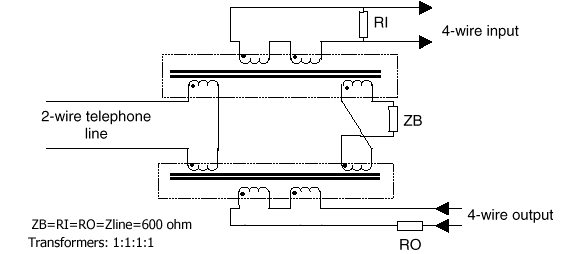
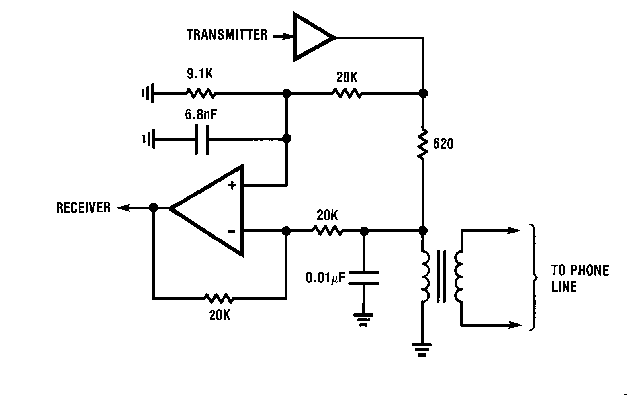
Phones designed for use with traditional land lines have echo-suppression circuits. As do the equipment at the switching office. This was done to avoid the cost of a third wire and because using either earth or electrical ground was too noisy.
An old design: http://www.epanorama.net/circu...
A somewhat modern design: http://www.epanorama.net/circu...
Also, very early telephone designs did not have echo suppression. I have one that one of my grandmothers bought at an auction (a certificate of legal sale was included with the phone). In theory, it is compatible with the current land line system, though I have never tried it. It is very similar to this: http://oldphoneman.com/images/...
-
Re:Hardware Security
Your friend is most likely lying. The phones in the switch (specifically for QC) would only hear one side of the conversation. If you hear both sides, there was an echo issue (and the conversation wouldn't continue between the two parties).
If the speaker was connected to a local loop, then it would hear both sides. (While I agree it should not have been connected to a local loop, I would not be surprised if (occassionally) it was.)
Phones designed for use with traditional land lines have echo-suppression circuits. As do the equipment at the switching office. This was done to avoid the cost of a third wire and because using either earth or electrical ground was too noisy.
An old design: http://www.epanorama.net/circu...
A somewhat modern design: http://www.epanorama.net/circu...
Also, very early telephone designs did not have echo suppression. I have one that one of my grandmothers bought at an auction (a certificate of legal sale was included with the phone). In theory, it is compatible with the current land line system, though I have never tried it. It is very similar to this: http://oldphoneman.com/images/...
-
Re:Dongle Bells!
Surprise, surprise, surprise. Looks like the Atari joysticks were digital after all.
-
Re:Physical Access
Yes, but not for charging. If you are paranoid you can buy or make a USB cable that is only for charging (data lines disconnected) and your charger will still operate normally and at full speed. If you make such a cable for your iOS device it will only charge at low speed.
You can repeat that as often as you like, it's still wrong. For fast charging, all you needs is a 4 resistors connected in the right way to the data pins at the USB end. No data connection is needed to the iOS device.
http://www.epanorama.net/blog/2010/08/18/apple-charger-secrets/
It's got fuck all to do with DRM, you are severely misinformed, or more likely just imagining how it might work rather than looking it up.
-
Re:Modems are hard to come by now
Whoops, my bad.
Hmmm interesting, I dunno I have a few laying around in the garage. You can probably pull the same thing out of most any cheep transistor radio and get "close nuff fo guvment werk" or just google POTS telephone schematic and see what they are exactly and then find them cheap at radio shack or on the net.
This might be a helpful link.
-
Re:No.No. From your own link's description of power in the US:
Buildings with more than two branch circuits will have both 120 and 240 V available.
If you would like more you can look up split phase. Just one tasty morsel from it:
In countries whose standard phase to neutral voltage is 120 V, lighting and small appliances are connected between a live wire and the neutral. Large appliances, such as cooking equipment, space heating, water pumps, clothes dryers, and air conditioners are connected across the two live conductors and operate at 240 V, requiring less current and smaller conductors than would be needed if the appliances were designed for 120 V operation.
Ah here is another random page I got off google:
Residential houses are typilly wired using "normal 220/110 wiring" where there are two 110V live wires (180 degrees in phase with each other) and they share a common neutral wire. Normal electrical outlets are wires between one 110V live wire and the common neutral wire. Some high current loads (air conditioning etc.) are wired between two phase wires so they get full 220V voltage.
In other words, you're wrong, but don't let that stop you from pontificating about due diligence and so forth.
-
Re:Dimmer Savior!
Get a reverse-phase dimmer then. They work a lot better with CFLs.
-
Re:Do it like Cox.
You do if you're an electronics geek and already have an oscilloscope. You can build something like this pretty easily.
-
Re:Serial AND Parallel
"I realize you're joking (and I agree that the parallel port is useless), but RS232 is still pretty useful."
You may want to re think that. Take a look here.
http://www.epanorama.net/circuits/parallel_output.html
And here
http://www.hardwaresecrets.com/article/233
And here
http://www.phanderson.com/stamp/intro/intro.html
And here
http://www.maxim-ic.com/appnotes.cfm/an_pk/3230
For your average PC user the parallel port is pretty useless. But for a hardware hacker they are great! -
Some useful links...
Here goes some useful links to electronics resources in the web:
Mag Lab Education - Electricity and Magnetism: A to Z
Make Magazine - all about hobbyst stuff - try searching here for "multimeter", or "soldering", or "PCB"...
Microelectronics Videos - very good videos about microelectronics and fiber optics
UVA Virtual Lab - Amazing multimedia resources covering many aspects of electricity and magnetism
ePanorama - practical projects, texts, tutorials, and many more...
MIT OpenCourseWare - if you want to go really deep in theory...
anyone wants to complete this list??? -
Re:Sigh
First, when did I mention that gigabit would be enough for anybody?
Second, I put a timeline on cat6 - 15 years. That means that I figure new installations will be rare in 10, semi-obsolete in 15, legacy in 20. Please note that I said 'unusably obsolete', this is a much different standard than 'don't need more'.
The simple fact is that if a couple of Gigs were available in most homes, then the apps would show up
Cat6 will support 'a couple of gigs' rather easily.
As for my estimate, consider: 10base2 was designed in 1985. 10baseT was 1990. It is still used today, 17 years later, although rarely. 100BaseT came in 1995 - and still dominates the market 12 years later. 1999 saw the standard set for gigabit over copper - only in the last year or so have we seen the introduction of consumer level gigabit switches. Rather than buying gigabit switches people are buying 802.11 wireless products, mostly G* at this point (54 mbit half duplex MAX), combined with some vender specific dual channel stuff giving you 108mbit theoretical max, still half duplex.
So I think that a rough guess of 15 years before it becomes 'legacy'(IE support is rare, expensive, or unavailable), is not out of line.
*Draft N is faster in at least some conditions, but doesn't play as nicely with others nearby(dual channel operation, when there's only 3 nonoverlapping channels). This wouldn't be so bad if it wasn't that I've only seen two products that take advantage of the fact that the draft N standard allows the usage of the 802.11a 5ghz channels. -
Re:Too much wire/cable BS
Except that I don't "download" my movie soundtracks from my DVD player to my receiver and then to my speakers before pressing "play" - this has to happen in real-time and reach each of my six speakers in the proper order and without interference at any level.
The data is traveling over dedicated circuits with short runs. It's not even a high speed data link shows the max speed of data transmission of 3Mhz, with a 6Mhz clock. An appropriate length of Cat3 could handle that, much less a $5 cat 6 cable.
People consider cables to be unimportant with digital signals because they confuse ages old analog "snow" with a series of digital 1s and 0s. The "snow" doesn't go away when you convert to digital, instead it turns into pixelization or blocky bits on the screen, motion blur, etc. As for the sound arena it turns into hums, pops, crackles or gaps in the sound
IE Digital bit errors are MORE visible and hearable than analogue distortion. People don't worry about cable as much with digital data for the reason I mentioned - As long as the distortions don't start flipping bits, you're getting the same signal out as you put in.
when the signal is interrupted by any of the hundreds of sources of RFI / EMI in a residential setting. (That, or the power shifting as a major appliance is turned on/off during the viewing period).
Like these aren't present in businesses? If it was such a bit deal, why does my UTP network work at speeds 100X that of audio traffic?
People like to jump on the "Monster is evil!" bandwagon because the cables are horrifically over priced. I'll admit that their margins are absurd, but to compare a proper THX grade monster cable to a $10-15 store-bought jobbie? Please.
I have. I prefered the $10 RCA cables I got from Radioshack a while back over the $40 Monster equivalent. I think you're confusing the <$5 bargain basement cables with 'decent generics'. The problem I have with stores like best buy and walmart is that they often jump directly from the ultra-cheaply built yumcha brand to decent quality but highly priced monsters.
Let's look a bit of the spectrum:
$6.99 Gold Plated!
$14.99 Oxygen Free!
$16.99 Copper Shield
Now, is there anybody here who believes that they'd be able to hear the difference between these three cables when used to transmit digital data? -
Re:From what I understand...
Shielding a 2m audio interconnect cable will provide no benefit, and might cause much harm.
Set your cell phone behind your stereo and tell me that again. RF is a problem if it is enough to be detected in a non-linear circuit such as an amplifier stage.
Lay an unshielded interconnect cable next to the amplifier power cable and tell me that again..
Inductive coupling is an issue not to be ignored. The lack of the ability to pick up a 60 HZ radio signal is no reason to disregard capacitive pick-up from the power cord or inductive pickup from any power wire carrying current, such as the wire powering the baseboard heater.
If you manage to form a ground loop, you can create a ground loop big enough to actually recieve interference!
This is absolutely true! Ground loops is a common problem in the improper installation of sound gear. Proper layout of power, ground, and signal wiring is the job of a good studio audio engineer. Proper use of balanced cable, equipment selection to use balanced inputs to reject common mode noise, and other aspects are all part of the design of a quality sound system installation.
Here is a link to some information on common grounding errors. Of note is item 8.
http://www.ese.upenn.edu/rca/instruments/misctutorials/Ground/grd.html
Here is a good paper regarding with dealing with the subject. It's a little lengthly, but that's the diffrence between understanding the concepts and buying a $7000 cable that won't fix the problem.
http://www.epanorama.net/documents/groundloop/index.html
Anyone who has done extensive audio work has had to deal with this.
from the article..
Usually ground loops are an after-the-fact type of problem in which the end-user blames the installer, the installer blames the manufacturer, and actually nobody is at fault. Neither the manufacturer nor the installer can usually predict where a loop will occur. Only after the system is installed can it be determined if a problem will exist.
Ground loop problems can be corrected and avoided. It is important for the dealer, isntallee and the end user to be aware that this problem can occur. It is a good idea to design the system to avoid most obvious source of this kind of problems, and then be prepared still to face some problems when starting to use the system. A ground loop problem may occur at several points in the system, and each occurrence of the problem must be corrected individually.
In my work in the audio field, this was one of the top 3 issues I had to deal with and the most time consuming. -
Re:From what I understand...
All you need is an appropriate length of oxygen free copper cable/wire with sufficient shielding and appropriate gauge. All but the lowest of low end OEM cables meet these needs. Beyond this, there is zero difference in cables other than packaging and branding. Any perceived difference is in the listeners head.
Close but a few facts are left out. Lets touch base on speaker cable and what it needs to do. It needs to move electric power from one place to another. Along the way it needs to keep most of the power (all cable has resistance and loss even superconductors which have a bit less). In moving power is should deliver all frequencies the same.
Now back to your statement... oxygen free copper cable/wire Hmm, the first step seems to trend to snake oil. I'll grant you that oxygen free has lower resistance than plain copper, but how much? Is it worth the money? Would the money be better spent on maybe a larger wire size? You will find the lack of copper wire resistance tables for copper wire and oxygen free copper wire almost completely absent. The reason is because the change is almost not measurable. If it essentially makes no change, why spend the money.
Copper wire facts are easy to find and are well docummented.
http://www.otherpower.com/cgi-bin/webbbs/webbbs_config.pl?noframes;read=6346
http://www.stealth316.com/2-wire-resistance.htm
http://www.epanorama.net/documents/wiring/wire_resistance.html
http://amasci.com/tesla/wire1.txt
http://www.thelenchannel.com/1wire.php
On the other hand the data on oxygen free seems to be tied up in perceptions and not solid facts. Where are the tables?
http://www.freepatentsonline.com/20060198757.html
http://mobile-emotions.com/speakerwire_faq.html?1062644160781
http://www.roger-russell.com/wire.htm
http://www.patentstorm.us/patents/5443665-description.html
http://www.cda.org.uk/megab2/elecapps/pub122/sec72.htm
"Oddly enough, it isn't the freedom of oxygen in copper wire that makes any difference. The process of removing oxygen also removes the impurity of iron and it's this impurity that can cause the resistance to be slightly higher."
Could someone please define and give a measurement to me for Slightly higher? As in is the change enough to spend money on? Until someone publishes a table, I would assume slightly higher is slightly less than the measuring test equipment. A larger wire size is a measurable change. Oxygen free as far as I am concerned is below the threshold of measurement.
Beyond this, there is zero difference in cables other than packaging and branding.
OK here I disagree with you again. The number of strands and twist in the wire affect the ability of a wire to withstand repeated flexing. When I worked doing some TV studio stuff, I had to show some of the features of some of the cable to the staff. The low loss and low price was a draw to the PHB who thought he was a studio engineer. I showed him the flaw in his reasoning when I held up a 3 foot piece of coax and pushed out a ceiling tile. Then I held up a 1 foot length of super flex which had much poorer response and the 1 foot length flopped over like a piece of braided nylon rope. The signal loss for the studio was a trade off for cable that stood up well following the cameras without breaking. A cable that lays flat instead -
Choose your subject.
Like other people said: once Mimms is easy, Horowitz and Hill. I've learned a lot from epanorama's tutorials, and some from web-ee -- both are collections of other sites.
But my strongest advice would be: figure out what you want to do and focus on that. Saying you want to learn more about electronics is like saying you want to learn more about languages -- and you can do that, it's called linguistics, but if you want to learn a language that's a different proposition.
If you're an audiophile, learn about amplifiers: concentrate on analog and find some older books about tubes.
If you're into automation, learn about interfacing: some digital, some transducers, don't sweat transistor theory or analog stuff much.
If you're into programming, spend your time on digital and get a cheap PIC programmer.
Just don't try to teach yourself everything. You'll only become frustrated. -
Re:Still loss of quality
Your post is complete flamebait,
No, it's the facts. You just happen to be a flamer, so anything you don't like is flaimbait to you.
I, however, am going to avoid all of your flames and rantings.Of course, I'm sure you're aware that switching lossy formats every time is going to slow this iterative decay down.
It will TRADE that delay for OTHER artifacts. Typically, discarding MUCH more of the audio, and now having the artifacts of both audio codecs.Now consider your output WAV as a lossless source,
It isn't. It has lost most of the waveform. That's the whole reason why you don't call lossy codecs "lossless".That high quality 320/Q0 MP3, like all the others you've seen, will sound no different.
No, it won't. Not at all. That you personally can't hear the difference can't possibly change that fact.SPDIF has no predefined sample rate.
"SPDIF interface supports 3 standard sample rates: 48kHz, 44.1kHz and 32kHz. All other sample rates are impossible to transmit. Nevertheless, most audio cards support only 48kHz output."
http://ac3filter.net/forum/viewtopic.php?t=10
"Allowed sampling frequencies (Fs) of the audio:
* 44.1kHz from CD
* 48 kHz from DAT
* 32 kHz from DSR "
http://www.epanorama.net/documents/audio/spdif.htm l
Good enough?Don't take my word for it. I know your $0.26 stock soundcard doesn't do that. Go buy a $10 SBLive and see for yourself.
I've been doing digital audio back when you were probably still in diapers. It's just a shame you don't know how stupid most all of your claims sound to anyone who knows anything about digital audio, PC soundcards, lossy audio encoding, etc.the SPDIF "don't copy" flag might be set, and that may not work either. SPDIF does have a "don't copy" flag.
SCMS is entirely ignored by every soundcard I've ever come across (you've clearly never tried), so you'll have to try harder.I know perfectly freaking well that I can record unDRM'd shit this way, why would I test that?
Well, for one thing, to prove that what your getting isn't anywhere near lossless, even though you think so.I don't know what little goofball stuff happens in this process....
There's plenty you don't know, yet you feel the need to give advice on these very subjects.but like I said to him, your pet Dolphin isn't going to know the difference,
This is just sad at this point. You're convinced of a lot of things you've clearly never checked on. What's your evidence for this statement, and don't even try to tell me it's your years of experience. -
Re:Not PCM
I'm using PCM all the time, and I have never noticed any weird bits. I believe any 75ohm cable will do the trick, as long as the distance is no more than a few feet. This page has a lot of technical details about S/PDIF.
Some time ago, before I bought a new motherboard with S/PDIF coax (and toslink) output, I used an old SBlive card for digital audio. I didn't quite have the right plug though, I think there was supposed to be some 4-pin minijack of some sort, but a little fiddling revealed that a 3-pin minijack also would do the trick. the cable was long as heck, at least 5 meters, and was coiled up behind the PC. Whenever I turned on the TV, or the 17" CRT monitor I had back then, the signal would drop out for half a second. I wonder if that cable was 75ohm. -
Other useful progs
A promising program you may want to evaluate is http://ktechlab.org/ ktechlab. You can also find an extensive list of available progs at http://www.epanorama.net/links/software.html.
-
Re:Hint for building a music box from crappy parts
Yikes, a lot of replies. I like yours best though
While an optical connection would be fun, I like to build my own audio equipment (well, amplifiers at this point) but I'm not quite to the point of building in optical inputs -
Re:Did a bunch of research on this in 2003 - moreHave to reply to myself here -
DIY links for building your own system
- WinLIRC - open source IR receiver/decoder software.
- Girder - freeware that controls you PC - will work with winLIRC to control any program
- IR2PC - some guy in Germany who sells an IR receiver for RS232 for $20
- IRTrans - another guy in Germany who designed a high performance IR transmitter/receiver.
- www.evation.com - make an IR software system for controlling WinAMP, but looks configurable.
- www.mp3remote.com - the whole package for $14
- software for talking to your serial port
- Epanoramana - excellent collection of links
- Another useful collection of links
- IRAssistant - free software
-
Did a bunch of research on this in 2003Start by finding the Korean, Hong Kong or Chinese company that will create your remotes FAR cheaper than a local company. Here are some starters. Not sure if the links still work.
All kinds of IR remote control overview information here
oems
- www.celadon.com - oem
manufacturers of remotes ( http://www.keyspan.com/products/usb/remote/#other
I mages - sample Celadon customer) - www.customremote.com - no prices on website.
- http://www.innotechsystems.com
- www.ruwido.com - high-end austrian company that designs cool remotes
- The manufacturer of www.einstruction.com's remote.
- http://www.factorydirect.co.uk/factorydirectprodu
c ts/irproducts/irproducts.html - these guys are cheaper than celadon and in the UK - ----
- www.celadon.com - oem
manufacturers of remotes ( http://www.keyspan.com/products/usb/remote/#other
-
Re:My Super-Bad Computer Speakers
Actually,
they usually are true.
But most users don't know how to interpret the numbers.
For instance, when they said you speaker system is "1000 Watts" I'm pretty sure they meant the PMPO (Peak Music Power) rating, which means:
(According to http://www.epanorama.net/documents/audio/amplifier _power.html)
"So called "music power". This power figure tells the power which the amplifier can maximally supply in some conditions. PMPO rating gives the highest measuring value, but this info is quite useless, because there is no exact standard how PMPO power should be measured.
The reason for this power rating was to show the max capability of equipment for recreating strong musical transients like kettle drums and the like. Similar thing (music power rating) was used in the sixties, and I think it assumed a square wave that swung the whole supply range of the output stage. This alone gives them a factor of two over a clean sine wave note. But the ugliest thing they did was to assume that the high power lasted such a short period of time that the power supply caps would hold the voltages steady without any drooping. In the real world, an under powered PS could be hidden by this ruse and the PMPO might be a factor of 10 or more higher than what could be sustained on a nice instrumental performance.
Forget what adverts say about peak power or other "power terms" because they are not standardized and anyway comparable between equipments. Just look for "RMS continuous Power" or other reliable power rating (like DIN power). "
Generally, there isn't any direct mapping between PMPO and RMS (Root Mean Square) since every manufacturer formulates his own PMPO measurements....
Most of the time the RMS value of a speaker is about 10 times lower than the PMPO rating.
Which in your case, Means ~100 Watt RMS (This is VERY good for a single channel... but it's kind'a low for a large multi-speaker system).
Hope this helps. -
Re:It actually helps a lot...
Despite that, this kind of feedback is great. PCs need a wider array of 'generic output' devices which can be tailored to people's needs.
if you want lights (LEDs actualy), check out http://www.epanorama.net/circuits/parallel_output. html I build one myself for the sake of trying it. It's really easy and really cheap. I don't really have any use for it, but it's basically one or more LEDs at the end of a parallel port cable. programming it is also pretty easy. could easily be used for that kind of stuff... -
What the crap is that?
I've never heard of a current-loop TTY interface. Can you tell me what the heck that is?
Though Google tells me it may be a solved problem.
--grendel drago -
Re:Use TOSLINK instead
I would just like to confirm what you say about TOSLINK. My PC is currently too far from my receiver for my optical cables to stretch, so I have to use the SPDIF connection. Every time there is an electrical event in my house (heating, fridge, freezer, kettle switching) the audio cuts out for a second or so.
This is most likely due to faulty wiring and/or a ground loop. The linked page provides a very good description of the problem.. Unfortunately, it's usually quite hard to locate a ground loop, and they are fairly common in older homes. -
Re:Inverter + chargerTo eny electricians, the MIDI/Game port is available on most computer sound cards and has an 8-bit ADC built in. Calibrated to 0-5VDC I believe.
Calibrated? Game port? Muhahaha!
The 'ADC' in the game ports of traditional PC hardware is nothing more than a pulse generator modulated on the input voltage. The PC triggers the pulse, and then keeps polling until the pulse finishes. By timing how long the pulse was, the PC can estimate the voltage.
The result of this is that polling the game port is extremely inaccurate and very processor-intensive, because the output of the pulse generator needs to be polled continuously.
(If you've ever used gpm, you might notice it supports joysticks under Linux. Yep, that was my fault. I had to put in code to slow down the polling rate because otherwise the machine just ground to a halt, spending all its time busy waiting on the joystick I/O port.)
More documentation than you ever wanted to know can be found here.
Modern game ports, of course, use real ADCs.
-
Re:350W Power Supply
here's another article.
-
Pricey
Going to the store page reveals that a 0.3W transmitter costs a wild $140. Yes, there's an LCD and menus, but no self-respecting budget-minded geek would lay down that much money to broadcast music over a short distance.
There's plenty of circuit designs at ePanorama that are relatively simple and powerful. DIY; save your money and your honor. -
Re:literally speaking, no
Well, actually, SPDIF requires 6MHz bandwidth. As far as the 75 ohm impedance: I didn't pull it out of my ass, it's specified by the relevant standard (IEC958), and it's not some kind of audiophile debate. Basically, it's the impedance of standard TV coax. Pick up any book about radio and read about impedances. Here's a link to a short description of SPDIF, in case you are curious: here.
As for your link: don't believe everything you read. The Audioholics article shows many gross misunderstandings. For instance, the reason direction is marked on some high-end cables is for optimal grounding, not because cable manufacturers don't know audio is AC. Also, they seem to have failed physics when they claim that a battery cannot do anything if the circuit is not complete. Ever hear of FETs?
Cable quality certainly makes a difference for just about any application, including audio. Even a "digital" protocol like USB imposes a number of requirements on the cable quality. Cable quality for sensitive analog signals is even more critical. If you have a few hundred thousand dollars' worth of test equipment, you can probably quantify the differences, calculate bit error rates, and so on. It's easier to just listen, though. -
Who cares!XCP® successfully protects the content from unauthorised copying.
Who cares? I've got an old 1989 Sony (!) CD player with an optical digital output, and a CMI8738 sound card with a digital input. I cannot imagine this copy protection scheme to violate existing SPDIF standards (mind you, "SPDIF" stands for "Sony/Philips Digital Interface", see also here). So - nobody able of getting an older CD player and a 50$ sound card will be too impressed by any backwards compatible CP scheme. This is ridiculous.
The CP vendor's web site says "It is a robust solution providing the highest levels of protection against casual piracy while ensuring full playability." which says all. This is not (and cannot be) targeted against the professional pirates in Asia who make and sell millions of copies, but against you and me and Joe User.
-
hello operator
make an intercom out of some telephones and basic circuitry
perhaps make two versions of one of them - one of raw components simply wired together and another of components on a circuit board -
Re:Another problem was the disk drive alignment
You can build or buy an interface to use 9 pin joysticks on intel hardware. There are many places that have the plans, and here's one. I'll build you one if you're not addicted to solder smoke. I'll charge you a lot, but I'll do it.
In regards to your drive: it may be out of alignment, and proper alignment is a bitch, but you can take the cover off and see if the read/write head is dirty. You can clean it with a q-tip and alcohol. Also, make sure that the rails that the head rides on are properly lubricated. WD-40 works, but doesn't last long. Also, don't spray it.
Another lesser problem with 1541's is spin rate. This doesn't happen often, but it's easily adjusted. You can find a printable document out there on the IntarWeb that's got a cut-out disk on it with some marks. You tape the disk to the spindle of your 1541 and then you can use a florescent light or a television (not a monitor) to view the spinning disk. When it's properly adjusted the marks will appear stationary. Think wagon wheels in old westerns.
Also, sorry for being so late to the party here.
Also 2: I <3 Amiga too. -
Re:Emulation is NOT the same thing
> You cant emulate the 'feel' of having the real thing in your hands.
More or less you can.
Three years ago or so, I built a device described in a joystick driver for linux that plugs into the parallel port, and on the other end of that cable is a box with 4 NES plugs, 2 SNES plugs, 4 9-pin DIN for sega (MS and G), and two connectors I dont recal the name of for the TG-16 pads.
They were aligned in the box in rows for players 1-4.
You plug one controller of any type in for each player, and load the driver (it autodetected which controller was there only on load at the time) and they show up as standard joysticks.
I know the drivers now support PSX, N64, and Dreamcast controllers as well.
I'm sure I also ran accrost a driver for windows to do the same (Never checked it out though)
For more info, see:
Linux joystick driver site
and
TV Game Joystick interfacing docs -
Re:Other links
I was thinking of posting some other links so you wouldn't have to look around, but in true hacker spirit, I think you should DIY.
Just kidding. For the electronics types:
http://discovercircuits.com/
http://www.epanorama.net/ -
Some of my favorites:
For electronic parts, you just can't possibly leave out the Electronic Goldmine. They've been around a long time, and in my experience offer the best surplus stuff you can find while charging the least they can get away with. Their bagged assortments are good, and their Electronic Surprise box is actually a good deal if you don't mind sorting through a box of jumbled parts. They also carry many standard components to round out whatever project you're doing.
If you ever want to build a CNC machine, check out TurboCNC. It's "shareware" in the sense that you are free to download and use the fully-functional, nagless program...and what a program it is. TurboCNC 3 has been used by thousands of hobby CNC'ers, and just recently TurboCNC 4 was released with lots of rewritten code, vastly improved user interface, and better stepping rates. This program will pulse stepper motors up to 30KHz on a junker 486 computer with parallel port, depending on the timer hardware. Version 4 adds Pentium timer support, resulting in pulse rates beyond 100,000Hz. The price rose from $20 to $60 with the release of the new version, but that price is if you feel like supporting Dave and his team, and will get you the full sourcecode to the program.
For cheap PCBs: nobody can beat Olimex. Yeah, they're based out of Bulgaria, and the first setup of payment can be a little tricky. But you'll get a double-sided board with plated holes, solder mask, and silkscreen...about $25 for 6" x 4" board. What's even better is that you can send them a number of files, then give them a sketch of how you want the boards arranged and repeated in the 6"x4" area...and they will panelize and cut them out for you, free. That's impressive if you've ever checked out the costs of doing something similar with other PCB houses. Many of them give the impression that it's like cheating to try to get more than one board out of the standard board size, even if your design only requires a few square inches. With Olimex I've gotten up to ten boards for that cheap price. It kind of makes you wonder what other ways you can use outsourcing, instead of whining about it and trying to make the government give your old job back.
By the way, this list has a long way to go before it's the most exhaustive I've seen. For the ultimate in DIY electronics articles and links, try ePanorama, it's been around a long time. -
Re:Anyone know a good electronics book? And Dvorak
> 1. Does anyone know a good book to start with for learning electronics with hands on projects? I had a class in college but it seems like eons ago,
If you don't mind reading online literature, check out epanorama's links for the basics. It's no book, but it's a place to get started. Google around for beginner's electronic projects. Check out discovercircuits also. -
Safety
Sorry, my last comment stopped when my connection went down.
If you plan on having any cables running above the ground for significant distances use fibre optic. I don't know how much fibre optic equipment costs, but I would rather pay the price to get 1000Base-SX/LX than use 10Base-T, 100Base-TX, or 1000Base-TX, and lose everything when it gets struck by lightning. The metal shield is *EARTHED*, and guess where lightning goes.
Have a look Here, and Here
Hope it helps. -
Safety
Sorry, my last comment stopped when my connection went down.
If you plan on having any cables running above the ground for significant distances use fibre optic. I don't know how much fibre optic equipment costs, but I would rather pay the price to get 1000Base-SX/LX than use 10Base-T, 100Base-TX, or 1000Base-TX, and lose everything when it gets struck by lightning. The metal shield is *EARTHED*, and guess where lightning goes.
Have a look Here, and Here
Hope it helps. -
Safety
If you plan on having any cables running above the ground for significant use fibre optic. I don't know how much fibre optic equipment costs, but I would rather pay the price to get 1000Base-SX/LX than use 10Base-T, 100Base-TX, or 1000Base-TX, and lose everything when it gets struck by lightning. The metal shield is *EARTHED*, and guess where lightning goes.
Have a look Here, and Here
Hope it helps. -
Safety
If you plan on having any cables running above the ground for significant use fibre optic. I don't know how much fibre optic equipment costs, but I would rather pay the price to get 1000Base-SX/LX than use 10Base-T, 100Base-TX, or 1000Base-TX, and lose everything when it gets struck by lightning. The metal shield is *EARTHED*, and guess where lightning goes.
Have a look Here, and Here
Hope it helps. -
Re:improvementsI wouldn't go so far as to call NTSC "elegent", though it is clever especially with regards to how it implemented colour. PAL is a much cleaner standard, as the europeans (as they often did) took what they saw as flaws in NTSC and implemented things differently. Though PAL has a lower frame rate (25 as apposed to 30), it has a higher resolution and doesn't requier a TINT or HUE control, and the colour is better. When there are problems in the signal, with PAL you will see weaker colour, but with NTSC you can see the wrong colour (ie "green faces"). SECAM (the french standard) is even better because it uses FM modulation for colour, so it eliminates both these problems, though it has its issues (you can't "mix" two SECAM signals together, which makes it a pain for some professionals).
Check out this link to read more on it. Also this link has some interesting info.
-
An excellent wired/wireless solutionFor a theater group with which I work, I built an inexpensive intercom system that uses standard corded or cordless telephones. The [simple] schematics I used can be found at http://www.epanorama.net/documents/telecom/teleph
o ne_intercom.html -- just scroll down to the "Theatre intercom circuit".Basically, it mimics a standard phone line, and any telephone device you plug in can communicate with the others. You can run long cables and use splitters [nearly] to your heart's content. For about $30-$50 per station (hundreds less than a real, however superior, Clear-Com system), you can purchase corded or cordless headset telephones which work nearly as well.
If you do that, be sure to get phones with mute capability; and if you go cordless, be sure to check on battery life and try to get phones that don't beep too loudly. You might even need to disassemble the cordless phone and disable the internal beeper to make it silent.
Two things that are really nice about true Clear-Com systems is that (1) they can be operated silently (i.e., without beeping), and (2) their mute/talk controls can be operated by feel alone -- you don't need to look at a mute LED to determine whether or not you're muted. Those features are hard to come by on unmodified corded and cordless phones.
In general, a theater intercom system needs to be absolutely reliable, and should also be full-duplex (which walkie-talkies are not, but telephones are). I'd shy away from creating a custom wireless soultion with unproven technology -- it will take much more time to develop and won't be as reliable. If anything goes wrong during a show, or if reception isn't good enough, you've got big trouble.
-
Adapting the Epyx 500XJYes, I remember the Epyx 500XJ. It was absolutely the best joystick I ever used. Its body was molded to fit my hand in a relaxed position, and all contacts (including each joystick direction) were made with microswitches, which were very durable and responsive. The Atari / Commodore model had only one button, but the Sega model had two.
I just got a couple of these joysticks from ebay, and am going to build an adapter so I can use them with MAME. I found two circuits on the net for this purpose:
This link has a wealth of information on older game controller hardware.
This one has another (perhaps simpler) circuit design, with diagrams in postscript format. (Use gsview to view them on Windows.)
-
Re:or a joystick?
I'd have to agree with you. I've seen too many overkill PC-powered projects that could be done instead with a few parts for a few dollars.
Any other readers interested? Start your quest for knowledge here: link -
Re:Industrial Controller.
I have no clue what these guys used. I'm very much a DIY'er myself though, so I'd recommend starting your adventure here:
epanorama
-
Re:So sad
How do you get rid of nasty infections? Autoclave! Heat things up enough to smoke out all those nasty hoomins and things can get back to normal around here.
As for volcanos, it looks like the production of CO/CO2 in eruptions can have an effect on global warming. It turns out, however, that the ash/SO2 released into the atmosphere has a cooling effect. It also helps scatter sunlight, allowing for more robust tree growth which leads to more carbon being taken out of the atmosphere.
So, all we need to happen is for the Yellowstone (NetBSD) volcano to erupt (supposed to be violent enough to wipe out hoomanity) and fill the skys with enough ash and SO2 to bring on Fimbulwinter to slow down global warming. Or have a big rock smack into the Indian Ocean. -
epanorama
epanorama is a very useful expansive digital resource.
-
1000 Watt PMPO ~= 83 W RMS
PMPO measurement is quite useless, because there is no exact standard how PMPO power should be measured.
You have to divide by 10 or 12 in fact. Not 2.
Seeing the size of the amplifier, you can guess that it can't be a 1000 W RMS.
Take a true amplifier (like mine, a Yamaha)
it's about a 110 W (true RMS) and weights about 811.3 lbs.
So not a big news in fact. See that PMPO is still a live, 8 years later.
(See This page )
But question is : Will it be supported by Linux ? -
Ground Loop Isolator
I had the same problem while trying to play DVD audio from my PC to my home stereo.
I bought an "Audio System Ground Loop Isolator" (# 270-054A) from Radio Shack for $20CDN... problem solved.
Here is a link to some info on the problem and possible solutions. -
Have a broken laptop?
Dedicated hardware is great... but sometimes you can do things yourself aswell.
I was lucky enough to get my hands on a broken Compaq Evo N160 with a broken screen (read: destroyed). Otherwise it was fine.
The bottom line: now I have a DVD/DivX/MP3/Anything player. And it's compact too. A laptop is even surprisingly cool looking without a screen.
PS. If you have a crappy TV like I do and it doesn't understand S-Video (you get a black and white picture), take a look here.