Slashdot Mirror
Domain: free.fr
Stories and comments across the archive that link to free.fr.
Comments · 1,346
-
Re:Nice hat. Tinfoil?OH! Of course!; What was I thinking?; I must be out of my mind to not have not seen the 'glaring hole' in my argument. I can't believe I didn't think about checking for an ID on the corpse. I wish I'd thought of that before I played dumb and hoped you wouldn't see why my showing ID at the gate was stupid.
Showing your ID at the gate along with a ticket with your name on it allows the airline to tell your family that yes, you boarded the plane that is currently burning, sinking, or that shattered into a million pieces, but no, we haven't found the body yet. Nor do we expect to, since the largest piece of that particular plane is about the size of a tire. Which, incidentally, is still burning, having been doused by 24,000 gallons of airline fuel that covered it when it fell apart 1/2 hour ago. Sorry. We'll of course pay you for your loss, instead of
What any of this has to do with your freedom, right to privacy or anything else is completely secondary to the reason the airlines started recording who was on which flight.
-
How about this result dated back 1998 ?
1998: Differential Collisions in SHA-0
by Florent Chabaud & Antoine Joix
http://fchabaud.free.fr/English/Publications/sha.p df
It presents the algorithm, an actual collision found and the conclusion, quote, "...our attack will therefore be totally inefficient on SHA1."
It didn't generate that much noise back in 1998. I'm wondering if it has to do with stock market... -
you don't need any CD, floppy nor USB key
you don't need any CD, floppy nor USB key to boot most linux installers. Feeding the kernel and the initrd image to LILO or GRUB or LOADLIN is enough. You just need some operating system already working on the machine.
http://marc.herbert.free.fr/linux/win2linstall.htm l -
Raid 0 + Some other tools = XP HeavenRaid 0, in a well-planned system, can provide that extra "oomph!" that makes a great XP system a near-perfect one (IMHO).
I can understand why some feel that the risk doesn't justify the means, but if you plan the system out ahead of time, you can eliminate most risk. For instance...
Most motherboards with built in Raid these days also have an IDE bus built in as well. If you plan out some partitions for your documents, program data (custimizations, ini's, whatever preferences specific to your install), as well as partitions for downloads and warez storage, you can store these on the IDE drive(s), and then install your OS, programs, and temp/swap space on the (presumably SATA) Raid 0 array.
Thus if your array drives go down, your data, your documents, and any software you've downloaded and/or stored are safe on the IDE drives. Simply reformat/install the SATA drives, reinstall your software, re-point the software and OS at your IDE-based drives, and you're back in business. You retain the speed of the Raid 0 array for everything except loading and saving files. If you're really anal about speed, you can even setup a partition on the Raid 0 array for working on files (Like an audio/video work area, for instance. You could store your master copies on the IDE drives, and then your working copies on the faster Raid drives).
Something I personally do is to also have a partition on the Raid 0 side for program installation seperate from the OS install. Not all programs allow you to relocate their preferences; some store them in their installation directory. In such cases, you can usually preserve customizations by reinstalling over an old copy, which this method helps with. You can format your OS partition and reinstall to your hearts content, and your program specific data is often left untouched on the programs directory. This isn't 100% guarantee, but it's another step towards preventing data loss, and time wasted having to reconfigure.
All in all, Raid 0, when properly used, will reduce startup times for your programs, as well as your OS. In addition, your entire system will feel snappier due to the data read increases on your virtual memory/swap reads and writes. Cache is also affected, as is such things as surfing through a browsers history and such.
There's lots more you can do to tweak out your system. I don't want to turn this into an DIY article, so here's a few references if you're interested:- MS Powertoys - In addition to many other things, this will assist you with relocating your document and data directories. Also, you can speed up the menu response times considerably
- ATNotes - Best free sticky notes I've came across!
- Stardock/Object Desktop - Tons of GUI-related tweak and skinnig options
- XP Smoker - Good all around hardware/software tweaker
- AutoHotKey - Omigod! I just discovered this. Get it now!! It's probably the closest to Appescript I've seen yet for the PC, it's OSS, and it's awsome!!
- AltDeskOne of the better virtual desktop programs I've found for the PC. There's better and faster ones out there, but this is one of the few who's behavior I like w/multiple monitors
Anyway... Plenty of other tweaks and programs out there, but this is probably plenty for now. I really should finish that book I keep starting about this crap install of trying to cram it into threads anyway... 8)=
My original point was/is that Raid 0 is a great technology, and can greatly speed an already great system. But if you're the type of person who just will setup a box once with Raid 0 for everything, never consider backups, or other methods to really take advantage of your PC's technology -
WINE and other things PC
-
Re:I like Linux but...
Use WINE + qEMU. http://fabrice.bellard.free.fr/qemu/
-
Re:Any available?
Try qemu. I have it running on Fedora, hosting a FreeBSD guest, and am looking at Windows compatibility. Sadly Solaris 9 shits itself, but who knows in the future....
-
Re:What about QEMU
I never heard and never seen this, maybe you are wrong or is something in QEMU roadmap.
If you look at QEMU FAQ you will see this:
"Is QEMU a virtualizer or an emulator ?
QEMU is an emulator. It means that it converts each target CPU instruction into host instructions. Therefore, it emulates any supported target processor on any supported host processor."
Anyway using dynamic translation you can get good speeds at the cpu emulation, not the same as doing total binary translation, but you can get something usable, but not productive(only in special cases like using DOS in QEMU -> you can get better results than DOSBOX and Freedos+DOSEMU) -
Re:Neither are that great
No I hadn't. But thanks for link.
-
Re:Win4Lin is dead, so what are the Linux options?
I have a windows app I need to run at home for work, but I have sworn off windows at home. Along came qemu http://fabrice.bellard.free.fr/qemu/. I got windows 98 installed under it VERY EASILY. It is free and open source. This site http://dad-answers.com/qemu/howto/qemu-win98-howt
o -
Office Apps...
They may just find that it will be cheaper to run VMWare, or now the Free qemu, to run their office apps.
I hope that one of these days Wine will be the solution of choice.
-
Atari ST abuse
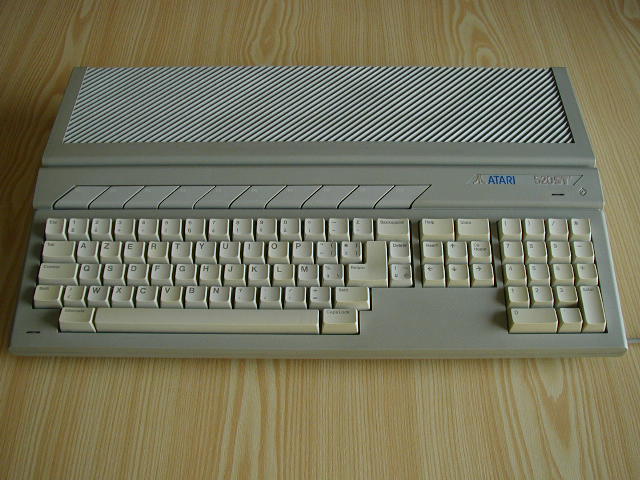
Some years ago, I was running a "RTC" on an Atari 520 STF (with just a floppy and no HD, incidentally). RTC means "Réseau Téléphonique Commuté", which is equivalent to PSTN (Public Switched Telephone Network). By extension, this is also the name which was given to the telematic servers running on this network, using the French Minitel. Roughly said, this was a kind of BBS.
The Atari was running almost 7/7, 24/24, without any cooling device. I had however to turn it off from time to time for different reasons. Progressively, the power supply began to show failure signs at startup. It was taking more and more time to get full power. There were some funny waves on the screen and, furthermore, there was not enough energy to start the floppy drive motor. But after a few seconds, the screen was almost ok and the drive was able to read the floppy again. Later, "a few seconds" became "a few minutes". But it was still working in the end -
Re:going to smoke cable
A french provider Free offers phone + TV (50 channels and counting) + 4Mbps/512kbps DSL for 30 euros ($35) a month... With no restriction whatsoever on the use of the DSL connection.
And national phone communications are free.
There has been quite a violent battle between the ISPs here, and we now have very good offers. And very good prices. -
Re:Drugs and ANY SPORT29 winners? There have been a lot more than 29 winner in the history of the tour . Where are you pulling this number from? And would you care to back up this assertion with a link?
Actually, it is since 1945. Note that anti-doping control are done only since 1967:
Here are winners of TdF, who have been involved in doping one day.
Armstrong is counted in, because he failed to provide a medical justification for corticoid prior starting the Tour as mandated(he did provide one later). Corticoid is a doping product ; however it is tolerated if it is justified by medical reasons (for instance, asthma). For some reason, nowadays, half of the racers of the tour de France suffers from asthma, so this is a very minor sin for Armstrong. Anyway: Jan Ullrich was positive to amphetamins in 2002, Indurain was controlled positive to Salbutamol in 1994, Pantani had hematocrit level above an unbelievable 60% in 1993 and 1995 (also 52% in 1999 - must have a loosy doctor), Bjarne Riis had 56% hematocrit level in 1995 (and when he won in 1996, he was nickamed "Mister 60%" among over racers, but there was no official test presented -nowadays he is Team CSC director), Pedro Delgado used Probenecide in 1988 (positive on the TdF, but not excluded, and wo n it), Bernard Hinault refused once a control in 1982, Laurent Fignon took amphetamines in 1987 and 1989, and so on.
Cyclists of the 60's getting pissed at an anti-doping regulation has absolutely ZERO relevance to any supposed doping that's happening today. You know that sayi ng in the stock market, right? Past performance does not guarantee future result s?
Except that this illustrate a culture of doping, when did you estimate that doping stopped? And how did this occur, since the first racers who would not use dru gs were at a disadvantage?
"Culture" does help predict future results... for instance there was a doctor which was caught for practicing doping (because the doping failed and had bad results) in the 1960s, he became later head of the UCI (international cycling organi zation) - the same which now refuses to accept the "2 years exclusion on doping" law, promoted by the world anti-drug agency. So they stick to stupid "1 to 6 month exclusions" (or in the case of high hematocrit rate, to 15 days exclusions).
Nowadays, 3 top teams have all their racers with hematocrit levels of 47-48% (the limit is 50%, the natural male range is 40-50%). EPO is increasing the hematocrit level for 10 days, and can be detected for 3 days - draw your conclusions.
And there are many loosy checks, for instance, in 1997 TdF, UCI did not ever control the hematocrit level of the first and second (Jan Ullrich, Richard Virenque). Actually, I can't remember when a leader or top racer had been controlled positive during or after the race, and then been excluded or stripped of his title. I'm also terribly fed up, when I see racers admitting they have used drugs, while they never have been caught positive. (David Millar) ; apparently the police has incredibly much better results in detecting doping than UCI.
As opposed to Major League Baseball, which refuses to test players?
The effect of doping on performance is probably lower in Baseball than on a whole lengthy grueling TdF race - even in marathon they race only for 2-2.5 hours.
-
Re:An Example
I uploaded a snapshot here.
Jerome -
Re:I wonder...
-
Re:No, these tools don't do that.Free software hasn't kept up in this area.
As a former employee of one of the big three in CAE (Mentor Graphics) and as someone who keeps in touch with people in the industry at companies such as Synopsys, Cadence, and (yes) OrCad, I can testify that building this type of tool requires a large amount of specialized knowledge, effort, and testing to bring to life. And, when the tool works, the job has just begun as you need models, both device and process, to feed them. It is a testament to the dedication of a few very motivated people that projects like Open Cores (which seems to have been down for the past few days), GHDL, and others are made available to the public.
Given the size of today's designs, the days of putting together a four-state logic simulator in a couple weeks of work is long over. Given the technical depth needed to do this work today, it's not a surprise that this is a niche market where open source isn't doing very well.
-
Re:Custom VMWare environment or hardware?
Bochs and VMWare are two different types of emulators; bochs emulates a lot more, as I understand. However, qemu is a open source and much faster virtual machine. Though VMWare is probably still faster than qemu, qemu is an improvement over bochs, in terms of speed.
Also, remember how much you paid for qemu and bochs. Generally it's under a dollar. (Data transfer costs) VMWare costs several hundred dollars, but you do get the CD, box and associated items made from dead trees. -
Re:Newton...Too bad the Apple Newton didn't come with WiFi...
It didn't come with it, but the good news is, you can run a Newton with WiFi!
You can do it two ways:
- Use a card that is compatible with Hirochi's drivers.
- Use a Newton compatible ethernet card and a wireless ethernet bridge.
-
Re:BeOS had that in 1999
Yeah, no kidding -- I remember using BeOS 4.5 and 5.0 [paid version!] and thinking that the application grouping was such an obviously good idea -- as plenty of screenshots will illustrate -- that I couldn't see why this idea wasn't being ripped off in the Windows taskbar.
But then, of course, Be was chased out of town and Windows put in substantially the same interface into XP when it came out. As forseen by prophesy -- Microsoft never saw a good idea that they weren't above flagrantly stealing for their next major release.
But then, I've whined about such things already on Slashdot, as have others I'm sure...
-
Re:OK, so MS has had this since winXP...
Yeah, no kidding -- I remember using BeOS 4.5 and 5.0 [paid version!] and thinking that the application grouping was such an obviously good idea -- as plenty of screenshots will illustrate -- that I couldn't see why this idea wasn't being ripped off in the Windows taskbar.
But then, of course, Be was chased out of town and Windows put in substantially the same interface into XP when it came out. As forseen by prophesy -- Microsoft never saw a good idea that they weren't above flagrantly stealing for their next major release.
But then, I've whined about such things already on Slashdot, as have others I'm sure...
-
Re:"The answer to that is yes"It's too bad Win4Lin doesn't have an open source alternative to help move along in that direction
Try QEMU. It can run any version of Windows and is pretty fast. I haven't compared it to Win4Lin, since I don't own that program, but give it a shot.
-
Re:Windows on DOS on Linux?
Yes.
Oh you want specifics? Well first of all, get QEmu and install it. Now install the DOS of your choice, but sadly not FreeDOS as Windows is too unstable on it. Install Windows 3.11 on top of DOS.
Dunno about running it on DOSemu or DOSBOX. If you replaced FreeDOS with MS-DOS or PC-DOS on DOSemu it might work..who knows? -
Re:Yay!
>>the hardest thing *yet* was figuring out vi so I
>>could edit menus for fluxbox
by all means keep practicing with vi, but you do know that fluxconf is your friend?
it comes with fluxmenu. it's separate from fluxbox, so you need to download and compile it.
http://devaux.fabien.free.fr/flux/ -
Is this the same thing...that croquer was talking about in April? Translation:
(Translation:
2004-04-07 - Reasons of the G5 delay
(...) The new G5s are not yet announced and available because a customer is buying the entire output: U.S. governmental agencies have decided that from June 2005, no sensible data will hosted on Windows machines any more. Too many security holes and risks. They ordered 80,000 G5 xServe and Powermacs from Apple.
2004-04-08 - G5 delay (continued)
Around 70 U9 (cf. below) have been ordered by large goverment agencies, like NSA... About ten institutional laboratories already received the supercomputer, equipped with 1024 G5 processors @ 2.6 GHz. That already makes over 10,000 G5, a major part of IBM's production d'IBM => shortage.
The U9 project will officially be announced next fall in a version equipped with PPC975 @ 3 GHz, available to the wealthy (about 3 M$ per unit).)
-
Re:DScaler
Downloaded it. Installed it. Ran it. Selected my video source (which showed up black, even though it shows a channel in my other tuner software). Tried clicking the File menu to monkey with it, CRASHED AND BURNED.
Very nice indeed.
FWIW, I'm using a new XP install and my system is always very stable. Video card is an ATI AIW Radeon.
I recommend MyTV for viewing. -
I use a nifty little freeware program, ATNote
Personally, I have a tendency to forget the small details. You know, the ones that come back to byte you in the ass in a BIG way.
I had been trying to get organized at my new job and I was looking for something as well.
I came across a Post-It like solution for the computer, much like whats currently in Gnome and I am pretty sure KDE. Its called ATNote and its freeware. Its a nice little program with alarms and sticky-like windows that stick to your Windows desktop if thats what you use (I have to at work like most people out there). It has some nifty features. Alarms, changing colors for different stickys, translucency, and resizeable.
Its really helped me remember things. I just have to have that type of stuff right in my face or I will lose the note or forget about it.
It may well be worth the look.
-
Re:Wine or QemuAnd yes, QEMU can run BSD as well as MSWindows.
It's pretty cool. You can have a debian system and run windows alongside netbsd alonside redhat, each in their
-
Re:Wine or QemuOther than wine however, QEmu (http://fabrice.bellard.free.fr/qemu/) is a nice speed driven emulator that will do full on emulation of a system.
I second the thought that QEmu's entire-system-emulation is a great approach. I'm no expert, but it gives me some feeling of being better "sandboxed" so rogue applications don't escape from the emulated system.
But perhaps the coolest, this Fabrice Bellard guy who wrote QEmu is the same guy behind the ffmpeg library and the TinyCC C compiler, his own emacs clone, and the linmodem project. Quite the impressive guy in the open source world.
-
Re:Great, for a free package
ml-POV, a patched version of POV-Ray, allows you to use high dynamic range images (HDRI) for lighting--that's about as close as you'll get to real-world lighting in POV-Ray right now. I also wrote a pseudo-solution for the standard POV-Ray.
-
Some better images here
There's an image of her actually rowing the beast , which puts the contraption in human perspective.
-
Pics
Here are some more pics of her canoe and a pic of her too
-
Re:I'm sorry, but this looks like crapOOOOOOOOO! debris runs under wine everyone!
NOOOOOOOOOOO! GRANDMAPORN!?!?!
I sure hope to god debris doesn't "randomly" crawl over to http://sup3rsonik.free.fr/Delirium/Delirium4.htm next!
(why do i have a link to that page in the first place?)
-
Photos of Anne Quemere
-
Re:Geek news???
-
Re:My survey response
In practice we will hopefully evolve to where the
calculator does pretty formatting of the formula
(a la Mathematica), presents it to you to verify
that it is correct, then calculate.
I had a sharp 9300 in highschool, it did that, it was nice...
Then I switched to an HP48gx and I never looked back... -
we've known since 1761
we've known since 1761
-
Magazine covers are likely not faked...While I can't explain the page 666 reference on the "ferris wheel o' death" image, I can vouch that the images are likely accurate.
I have many old Popular Mechanix and Popular Science (and a few old Popular Electronics, etc) from the 30's-60's - and the old issues most certainly had wacky imagery on the covers - I have one showing these huge planes (like, Spruce Goose size or larger!) getting a "boost" for launching by rolling down a very tall and big "ski jump"-type ramp, catupulting off it into the sky! I have another issue, which at least looks more real, but is scary in the image it portrays (Science and Mechanics, April 1963): "Wonderful Machine That Stops Parkinson's Disease" - shows this guy laying on the table with these probes in his head (no "halo" or anything like you would see in a real radiographic surgery today - don't twitch!) - the crazy thing is while this is an illustration, the inside article shows the real thing, and no halo there either! Supposedly developed at the "State University of Iowa Hospital", the equipment being developed by the "University of Illinois" - it supposedly worked via ultrasound. This is a real article, real pictures - enough information for you to follow it up if you so wished (makes you wonder if it worked?)...
The image published of the "Ion Propelled Aircraft" (Popular Mechanics, Aug 1964) - that is a real issue, I am looking at it on my desk right now (cost me $5.00 to buy the issue, originally priced at 35 cents!). What is interesting about this article (if you read the actual article), you would see what was being demonstrated are actually what we
Finally, yes, these magazines were dedicated to helping the common man learn about science and technology, and the impact they had on the normal joe's life. In most of them (the good ones), there were many "do-it-yourself" artciles on building all manner of devices and such, from simple barbeque grills, to more complex devices (answering machines, garage door openers, electric edgers, helicopters, small planes, small cars, both gas and electric, etc). At the time, people were more willing to build such devices (people also were less stupid - and less litigious - probably because TV wasn't as prevalent) - many items shown were either not available for the homeowner, or only at a great cost (many articles showed how to build things that could be bought for much more, out of stuff most people would throw away - for example, the electric sidewalk edger I mentioned used a discarded vacuum cleaner motor for power). All of this "do-it-yourself" stuff declined rapidly throughout the 70's-80's, and these magazines all dropped off, or changed radically from what they once were - leaving the husks of "Popular Science" and "Popular Mechanics" as they are today.
Sad, really - and reflects an even sadder state for the people of today's society - who couldn't "DIY" to save their life, it seems...
-
Re:What is ..
It's a fast cpu-emulator with JIT compilation and such. About 100 times faster than bochs.
QEMU -
The Zaurus is really geeks dream.
The Zaurus is a tiny linux box. A powerful, tiny linux box. The first thing you should do when you get a Z is wipe the OS and instead install the excellent OpenZaurus (OZ). OZ is better than the original Linux install in nearly every respect. Don't think of your Z as a PDA, it's more like a tiny laptop. Some of the things I do with mine:
email: I recently compiled Mutt with a IMAP header cache patch. One of the most powerful email clients in the palm of my hand
wireless sniffing: As you know, Kismet rules the land of wireless sniffers. Pop a wireless card in your Z (or get a 6000
mp3/ogg playing: Using either Opie-Player2 or the excellent tkcplayer. Unfortunatly, I can't use the tkcplayer on the very latest version of OpenZaurus, not because it won't run (because it DOES almost start up when using "runcompat" but then tells me it can't run on this platform-- which it CAN otherwise it wouldn't be able to tell me that
Video playing: using a port of the best linux movie player mplayer. I've encoded a bunch of movies down to ~200MB with great results. You can pop a couple of these on a 512MB card for those long flights
Coding: Of course, I've got gcc and perl loaded on the puppy. Hell, without perl I wouldn't be able to run Chaosreader, makes those long hotel stays much more interesting
Exploit testing
A couple of hints and tricks:
1) If you want to extend your battery life while doing things like mp3 playing or wardriving, grab something like Qoverclock and use it to UNDERCLOCK your Z. Turn down (or off) the display as well. Poke at it a bit and realize you can easily make a shell script to do without the GUI.
2) To maximize your space on root, ram, sd and cf, the single best thing to use is UCLX which works just like UPX. UCLX/UPX are executeable file compressors-- you compress your executable and when you run it it decompresses (to ram) on the fly. The compression it uses is AT LEAST as good as gzip (or better) and the decompression is very fast. When using slower media like SD (or even CF) you'll find that executables will run FASTER compressed then they would uncompressed-- the CPU can decompress much smaller exe faster than the much larger uncompressed exe could be loaded from media and run.
3) When choosing a root/ram disk size for OpenZaurus, it's a good idea to pick a small root with a much larger ram disk. If (when) you need more ram, you can simply make some ramdisk swap files.
4) While you can run gcc right on the Z, it's also nice to us a cross compiler on your (much faster) desktop and then just cp the binary over. If you're too lazy to do cross compiles (or don't want to set up a ton of additional packages like ncurses, etc), you can also just ssh into the IPAQ development cluster and compile your code there. Typically it will run without issue-- sometimes you may want/need to statically link your programs or just grab the libraries from the ipaq and throw 'em on your Z. I haven't found a single thing yet I couldn't get to run.
5) Assuming you grab the required libraries, you can run basically all of the sw in th -
Re:hmmm can we say flamebait?From Christian Marillat's package repository (http://marillat.free.fr/). Mostly stuff that can't be in Debian because they're not sufficiently Free (lame, mplayer, video codecs, dvd stuff, etc.)
gee@duck:~$ dpkg -s video-dvdrip
Package: video-dvdrip
Status: install ok installed
Priority: optional
Section: graphics
Installed-Size: 1208
Maintainer: Christian Marillat <marillat@debian.org>
Architecture: i386
Version: 1:0.50.18-0.0
Depends: perl (>= 5.6.0-16), perl-modules (>= 5.8.1-1) | libstorable-perl, libgtk-perl, libgtk-pixbuf-perl, transcode (>= 2:0.6.6), imagemagick, fping, libevent-perl
Recommends: xine-ui, subtitleripper, video-dvdrip-doc
Suggests: mjpegtools, ogmtools (>= 0.972), cdrdao, mkisofs, cdrecord, vcdimager, mplayer, rar-2.80
Description: Perl front end for transcode
dvd::rip is a full featured DVD copy program written in Perl. It provides
an easy to use but feature-rich Gtk+ GUI to control almost all aspects of
the ripping and transcoding process. It uses the widely known video
processing swissknife transcode and many other Open Source tools. -
HC11/HC12, from Motorola (AKA Freescale)
I think anyone who is anyone who knows anything about 16bit MCUs knows about the Motorola HC12 family and it's 8bit predecessor the HC11. The HC11/HC12 is well supported by GCC, binutils and friends (also check out http://www.gnu.org/software/m68hc11/) which is also nicely packaged under Debian/GNU unstable and testing.
HC12/HCS12 devices are extremely easy to debug and develop software for. There is a fantastic Java-based simulator here. If you don't have dev tools that natively understand Motorola's BDM (Background Debugging Module) protocol, you can use a second HC12 configured as a "pod" device interfaced via BDM pins to the target, which will get you a very powerful interactive debugging console via DBug12 (example session here).
I've been doing a lot of work with the 9S12DP256 device. It has 256KiB FLASH, 12KiB SRAM, 4KiB EEPROM, 112QFP, 16 10bit A/D channels, CAN, 2xSCI, 3xSPI, etc etc. and clocks up to 25MHz.
Although HC11s are cheap and easy to come by in 1off quantitites from various retailers, the only HC12s most have available (such as Farnell) are the newer HC9S12 devices such as the one I've just mentioned.
What's the problem with this? Well on paper, nothing. These are extremely powerful devices. I'm going to use the MC9S12A64 in production; these are just $9.80 USD from Arrow.
The problem is that what with the HCS12 core and the family's peripherals being relatively new, Motorola Semiconductor is restructuring (renaming to Freescale Semiconductor), there are a godawful huge number of bugs. The most crippling being so far, SCI interrupts being basically useless (can only rely on having one INTR configured), not to mention PLL config deficiencies, BDM defects, etc.
It isn't too bad if you read the erratta sheet FIRST before chasing your tail and banging your head off the desk.
From the HC11/HC12 GCC port pages, here's a list of tested evaluation boards. Of these I've worked with the Technological Arts Adapt912, which, whilst a fine board, is quite expensive.
For a HCS12-based device (actually uses the same IC I've discussed), check out the Adapt9S12, but again at $159 USD it isn't cheap. The best bargain I've found is the MiniDragon+ which actually has more packed on the PCB than the Adpat9S12 and is $89 USD for students/schools/hobbyists. And at still less than the Adapat9S12 price is the super-deluxe-mercedes decadance model the full Dragon12 evaluation board, with on-board LCD, 2xRS485 sockets, 2xRS232 sockets, 7segment displays, speaker, IR, etc.
I can highly recommend the evbplus.com (aka Wytec) boards, but in doing so I must disclose that I have recieved the MiniDRAGON+/Dragon12 (fr -
HC11/HC12, from Motorola (AKA Freescale)
I think anyone who is anyone who knows anything about 16bit MCUs knows about the Motorola HC12 family and it's 8bit predecessor the HC11. The HC11/HC12 is well supported by GCC, binutils and friends (also check out http://www.gnu.org/software/m68hc11/) which is also nicely packaged under Debian/GNU unstable and testing.
HC12/HCS12 devices are extremely easy to debug and develop software for. There is a fantastic Java-based simulator here. If you don't have dev tools that natively understand Motorola's BDM (Background Debugging Module) protocol, you can use a second HC12 configured as a "pod" device interfaced via BDM pins to the target, which will get you a very powerful interactive debugging console via DBug12 (example session here).
I've been doing a lot of work with the 9S12DP256 device. It has 256KiB FLASH, 12KiB SRAM, 4KiB EEPROM, 112QFP, 16 10bit A/D channels, CAN, 2xSCI, 3xSPI, etc etc. and clocks up to 25MHz.
Although HC11s are cheap and easy to come by in 1off quantitites from various retailers, the only HC12s most have available (such as Farnell) are the newer HC9S12 devices such as the one I've just mentioned.
What's the problem with this? Well on paper, nothing. These are extremely powerful devices. I'm going to use the MC9S12A64 in production; these are just $9.80 USD from Arrow.
The problem is that what with the HCS12 core and the family's peripherals being relatively new, Motorola Semiconductor is restructuring (renaming to Freescale Semiconductor), there are a godawful huge number of bugs. The most crippling being so far, SCI interrupts being basically useless (can only rely on having one INTR configured), not to mention PLL config deficiencies, BDM defects, etc.
It isn't too bad if you read the erratta sheet FIRST before chasing your tail and banging your head off the desk.
From the HC11/HC12 GCC port pages, here's a list of tested evaluation boards. Of these I've worked with the Technological Arts Adapt912, which, whilst a fine board, is quite expensive.
For a HCS12-based device (actually uses the same IC I've discussed), check out the Adapt9S12, but again at $159 USD it isn't cheap. The best bargain I've found is the MiniDragon+ which actually has more packed on the PCB than the Adpat9S12 and is $89 USD for students/schools/hobbyists. And at still less than the Adapat9S12 price is the super-deluxe-mercedes decadance model the full Dragon12 evaluation board, with on-board LCD, 2xRS485 sockets, 2xRS232 sockets, 7segment displays, speaker, IR, etc.
I can highly recommend the evbplus.com (aka Wytec) boards, but in doing so I must disclose that I have recieved the MiniDRAGON+/Dragon12 (fr -
Re:Limitations: Speed?
Yes. However, someone should try running Windows98 under QEMU. QEMU can emulate an x86 host now (I installed Windows Server 2003 under QEMU and it worked fine; it was usuable in speed), and it runs on ARM machines. Bochs isn't really good for much anymore, QEMU beats it in everything.
(In case you're wondering QEMU can emulate PREP and x86 hosts and run on ARM, PPC, x86, SPARC, and more. It can also translate (for example) Linux/x86 binaries to run on PPC so you can use wine on a PPC. As I said, it's really really cool. Take a look at their site or the OS Support Table. Have fun!) -
Re:Limitations: Speed?
Yes. However, someone should try running Windows98 under QEMU. QEMU can emulate an x86 host now (I installed Windows Server 2003 under QEMU and it worked fine; it was usuable in speed), and it runs on ARM machines. Bochs isn't really good for much anymore, QEMU beats it in everything.
(In case you're wondering QEMU can emulate PREP and x86 hosts and run on ARM, PPC, x86, SPARC, and more. It can also translate (for example) Linux/x86 binaries to run on PPC so you can use wine on a PPC. As I said, it's really really cool. Take a look at their site or the OS Support Table. Have fun!) -
Re:sony vaio
Vaios are some of the best-supported mobile systems available for Linux. Even the funky dials, switches and displays are supported by the sonypi project [...] It just makes sense for Sony to use hardware that won't cause headache for its users.
Eh? The sonypi project clearly says on their front page:
Please note that this driver was created by reverse engineering the Windows driver and the ACPI BIOS, because Sony doesn't agree to release any programming specs for its laptops. If someone convinces them to do so, drop me a note.
Is that the level of support or "making sense" something that only Sony can provide? This stuff just works in Linux, thanks to sonypi driver developers, and no thanks to Sony. -
Re:As long as developers can make their pages fit
The scrolling requirement is not the hard part. When Opera came out with a mobile platform "Small Screen" version of their browser, Daniel Glazman responded by developing a simple Javascript bookmarklet for Netscape and Mozilla browsers called "PDAize that will turn almost any web page into a PDA-size version of itself, eliminating the need to scroll horizontally. It was simply a matter of applying a new stylesheet, and using Javascript to resize images. Check it out, it's pretty nifty.
-
Re:sony vaio
In my experience, Vaios are some of the best-supported mobile systems available for Linux. Even the funky dials, switches and displays are supported by the sonypi project. I suspect it's because Linux has had great success in the East, even prompting some vendors to ship dual-booting Windows/Linux laptops. It just makes sense for Sony to use hardware that won't cause headache for its users.
-
Re:Cheap generic routers with third party firmware
Silly preview... http://mark.cabiling.free.fr/mobilemesh/ The URL is here : Link
-
Re:Cheap generic routers with third party firmware