Slashdot Mirror
Domain: m0k.org
Stories and comments across the archive that link to m0k.org.
Comments · 71
-
Re:Fine but you have to use Azureus
What's wrong with Azureus? Is there a better open-source client out there that I'm not aware of?
Well, 'better' will always lead to a fight. But personally, I prefer Transmision.
You can also try Deluge.
YMMV
-
Re:Dear Hollywood
I use a program called Handbrake, which converts the DVDs into a MPEG-4 file. Using the H.264 codec, one can maintain near-DVD quality, with file sizes in the 750MB to 1GB for each movie.
I've been able to play these files on my TV with an Apple TV, and I've played them by burning them to a DVD and playing them on an XBox 360. (I don't run XP MCE or Vista, which allows you to stream to the 360, so I don't know if that will work or not) -
Also does H.264!Why not just use Handbrake? An awesome DVD to MPEG-4 converter for Mac, Windows, and Linux. http://handbrake.m0k.org/ [m0k.org] Watch him put the Apple logo on this open source software. Don't forget, Handbrake does H.264 as well! Much better video codec (takes longer to encode, obviously), and with an avi container you can keep the AC-3 audio track intact (or turn into mp3/aac if that's not important to you). Huzzah!
Now that I think about it, I've only run Handbrake on a Mac...does the Win version also do H.264? -
Handbrake
Why not just use Handbrake? An awesome DVD to MPEG-4 converter for Mac, Windows, and Linux. http://handbrake.m0k.org/ Watch him put the Apple logo on this open source software.
-
Re:What do you Want to Pay?
Actually, the DVD ripping process is trivial with Handbrake, unless I misunderstand the reason you'd need to be scripting something. It'd be nice if you didn't have to go through the rather lengthy conversion, but there's nothing particularly technical involved.
-
Re:No way...
Every application? http://handbrake.m0k.org/
Not so much... -
Re:This reminds me....
Handbrake has been happily ripping DVDs to my hard drive for a while now... and its FREE... and its for Mac, Windows, and Linux. What more could you ask for? (cept maybe an easy import function from inside iTunes)
-
Re:Shooting themself in the foot
I used to use Azureus until I noticed that it was often using as much as 120+ mb of ram. I don't use any of the features of Azureus besides the actual downloading capabilities, so I decided to look for a lighter weight torrent client and found Transmission. The highest I've seen it in terms of memory useage is about 25 mb of ram, and the interface is much much simpler, so I much prefer it to Az.
-
Re:Slysoft is GOOD STUFF
Although their Windows version has a ways to go, HandBrake is fantastic for ripping/encoding DVDs in one fell swoop. 99% of the time, 'it just works'.
The more recent versions have made it a bit less "mac-like" (ie. they added a whole lot more configuration options), but it's still dead-on simple to use. -
Re:uTorrent
I would suggest Transmission. It's very OSX'y and works very well.
Get it here:
http://transmission.m0k.org/ -
Re:uTorrent
I've never used uTorrent, but check out Transmission for your Mac.
-
Re:uTorrent
You might want to try out Transmission http://transmission.m0k.org/, which is IMO the best torrent client for Mac Os X and has the least bloat I've seen yet. Azureus is horrible bloat with tons of unnecessary features.
-
Re:uTorrent on Windows, Transmission on OSX
I feel the same way... uTorrent is perfect on Windows, a good alternative on OSX is Transmission. I used to use Azureus and since it got bundled with that crap beta thing they did it sucks. Then I switched to XTorrent, which in idea it sounds good, but it sucks as well. Later on I got so frustrated I tried other torrent apps for Mac like:
Tomato Torrent is a very plain alternative, seriously lacking in eye-candy and begging for a new icon (and maybe a new name too). It's based on the official BitTorrent client. I think it desrves a mention because I know a few people who swear by it. It comes with an AppleScript file that you can place in folders you want to download to. When you want to download a torrent to a specific folder, you just drag the
Bits on Wheels is a slightly out-dated (last updated Sep. '05), yet popular Mac BitTorrent client. It claims to be "the first 100% native BitTorrent client for the Macintosh" as it is written in Objective-C and Cocoa. Bits on Wheels is freeware but not Open Source. One of its main features is a visual 3D Swarm with which you can observe what's actually going on under the hood, how many seeders and leechers you're connected to and the bits transferring between everyone. Bits on Wheels is very OSeXy (heh!), it's how I'd imagine the default OS X BitTorrent downloader to look if there was one. bits on wheels sawrmIf not to use the first native OS X B.T. client, I'd download it just to fly around in 3D chasing bits.
And lets not forget the grandaddy of them all, Bram Cohen's self-titled BitTorrent application. It's gotten kind of confusing since he named the protocol, his company and his application all BitTorrent. BitTorrent OSX is a very (and I mean very) basic application. It's as feature-full as Safari's download box and that's not saying much. Now some people wouldn't mind something like that, but if you're looking for simplicity Transmission is a much better choice. BitTorrent OSX also takes an age to start up on my MacBook Pro.
Transmission is my current Mac B.T. client of choice. TransmissionIt's an Open Source project, maintained by the developer of the popular Mac DVD ripping application, HandBrake. Transmission does its job well. A neat feature it offers is the ability to view download and upload rates in the dock, so I don't even have to open up the program to check how my downloads are going. Another great thing Transmission does is copy the
For the different torrent apps I mentioned here you can go to:
Bit Torrent OSX: http://www.bittorrent.com/
Transmission: http://transmission.m0k.org/
Tomato Torrent: http://sarwat.net/BitTorrent/
Bit On Wheels: http://www.bitsonwheels.com/
Hope that helps!
Kil -
Re:uTorrent
I've never used uTorrent, but my favorite torrent app for Mac by far is Transmission. Just thought I'd mention it since it took me a while to find a torrent app I liked on OSX.
Cheers. -
Re:uTorrent
Give "Transmission" a try, I used it for a while, but have since moved to using rtorrent in a screen session on my server instead.
http://transmission.m0k.org/ -
Transmission
Transmission is a very lightweight Bittorrent Client for Linux, Mac OS X, BeOS and BSD. It has minimal CPU, RAM or HD requirements and is very stable. There's even a tiny CLI version if you choose to be ultra-efficient.
-
Re:Is it?
/me waves.
Yeah, terabyte media servers are cheaper and nicer every single day. And so easy to get, too. If you know where to look, a pair of 500GB IDE drives will run you about $200. Throw those in an older computer, make sure you've got plenty of cooling in the case, and top with a Linux distro of some kind. For best results with a Windows client PC, get DVD43 and the latest Handbrake to rip your collection. OSX just needs Handbrake, and Linux, I imagine, just needs dvd::rip. -
Not Entirely Accurate and Not Entirely Catastophic
From the article itself, it appears that, since acquiring uTorrent, a closed-source C++ BitTorrent client for Windows, Bittorrent, inc. has decided to keep it closed source, and also to make it the new "mainline" BitTorrent. The old "mainline" client, which is open-source, written in Python (with wx for the graphics) and is generally cross-platform, last I checked, will continue to be maintained as a "reference implementation", but might not always track the latest protocol updates to uTorrent. Full documentation on the protocol will apparently come with an "SDK license", which they claim is "easy to get".
Well, first of all they ARE doing a few things that contradict the spirit of free software. Their main client app will be closed source, and although the reference implementation will apparently continue to be free, protocol docs require you to acquire a special license. A few years ago, these moves would have tightened Bittorrent inc's grip on the world of bt clients in general.
Now, however, the landscape is different. I can't produce statistics for all torrent users in general, but when I take a look at my peers in my preferred client, KTorrent, there seems to be a near dead-heat for most popular client between uTorrent and Azureus (also open source), with certain alternative clients like Transmission, Bitrocket, and KTorrent making frequent appearances, as well (and all 3 of those examples? also open source). Although uTorrent certainly remains a big player, it doesn't confer upon BitTorrent, inc. the ability to dictate major compatibility-breaking protocol changes by fiat. The fact that the main implementation of BT was open source to start basically stops things from being ruined by more restrictive licensing now.
-
Re:HandBrake.
Yeah, it's Mac and Linux only, and I think the Linux version doesn't have a GUI yet. Thankfully, I don't care.
That's odd, I seem to recall downloading and installing a GUI Windows version about a week or so ago...
Yep, according to the website, I did. -
Re:The numbers
I didn't RTFA, but where in those numbers are the people who rip DVDs but don't share the resulting movies? Or did they just assume that everyone with DVD copying/ripping software were using it for copyright infringement?
I rip DVDs sometimes using a nice little program called Handbrake. I guess it's illegal to crack the encryption, but I don't let others copy my movies. I use Handbrake so that I can put my movies on my laptop, mostly for when I travel. That way, I can have several movies with me without needing to carry around physical DVDs. Handbrake also allows you to encode files for specific devices, like the iPod and the AppleTV, which I believe should also be considered a fair use of the copyrighted material. It's format shifting, not infringement.
Are those people included in the 1.5%?
-
Handbrake
We only have a couple of window A.C. units in our house, and our DVD player (a PS2) is hooked up to our downstairs TV. Needless to say, it makes watching movies on the dog days of summer a drag. I use handbrake to rip my own DVD's and then put them on my video iPod. With a cheap cable, I can hook it up to the small TV in my bedroom so my wife and I can watch our movies in bed in the cool air. And no, they are not porn.
-
Re:Your confusion
There's plenty of great Mac apps that are freeware and
-
You got that right.
HandBrake is your friend.
With the size of today's hard drives, carrying around physical DVDs to watch on one's Powerbook just seems silly. Rip 'em (I personally think most movies look fine using MPEG-4 2-pass, target size of 700MB) and chuck 'em on your hard drive; uses a lot less battery power and it's one less thing to have to keep in your laptop bag. -
Re:Works For MeYou might want to read this:
http://handbrake.m0k.org/forum/viewtopic.php?p=383 9&sid=8ef154d0c7e60ccd6ca7e1b64d38edbe
By the way, the "Good" Main Feature in 'ZOOM' is only 2.97GB in size, so think about it for a New York Second: the DVD is 7.95GB in volume, or so the Finder's Get Info tells us, so we're paying for 5GB of CRAPOLA/GARBAGE from the nice engineers at Sony's DVD mastering house. Isn't that an amazing thought? 3GB of movie, and 5GB of CRAPOLA in 'ZOOM'! That's what you get from our favorite masters of the DVD, and we here at the MTR Project are happy to say this: It still isn't good enough to prevent backup by R-14!
-
I wonder if it's the zero length cell issue.
I wonder if it's the zero length cell protection scheme with which the handbrake folks have been fighting.
http://handbrake.m0k.org/forum/viewtopic.php?start =30&t=266
-LLM -
Handbrake
By the way, it's worth knowing that Handbrake was finally recently recently upgraded in conjunction with a merge with Mediafork.
-
Re:iTunes
for mac, try handbrake/mediafork. As previously mentioned, they are made for this purpose. Mediafork is essentially the newer version of handbrake, but because of a long sordid affair (which you can read about on their website if you really want to know) they had to change the name, although it may be changing back to handbrake now . . .
-
Re:Double whammy in Apple's favor
Handbrake is getting close to being a one-stop DVD ripper to iPod formats.
-
Re:Why can't I import my DVDs?
Well you can
-
Re:Does this thing...
Handbrake can rip directly from encrypted DVD's as well. Also check out a fork of Handbrake called "MediaFork". (The official version of Handbrake has not be under active development for some time)
http://handbrake.m0k.org/
Ok, I spoke too soon, it looks like MediaFork and handbrake are being re-merged -
Re:This whole article is an embarrassment to Slash
>2) Playing videos you have, for some reason, in H.264 format
You can use Handbrake http://handbrake.m0k.org/?page_id=2 to rip DVD into H.264. Free, easy, tri-platform. I think the handbrake guys are still working out the Apple TV details so it can be a one-click conversion. -
Re:Does this thing...
Check out Handbrake.
-
HmmMost of these are not Mac-only, but here is my list of essentials:
- Transmission (Get the latest beta; the 'official' version hasn't been updated in awhile)
- VLC
- iTunes
- Seamonkey
- TextWrangler
- MS Word
That's all I can think of now.
-
Re:How about Apple TV
H.264 is another name for the video compression scheme for MPEG-4, and is fairly common on the Macintosh. As someone else has noted you can rip DVDs on the Macintosh with Handbrake; I've ripped about two dozen DVDs using this program to put them on my iPod. And H.264 will also play on the PSP. (Originally I was ripping movies so I could download them to my PSP, prior to getting my 5G iPod.)
Not supporting MPEG-2 makes sense: compared to MPEG-4 the standard is extremely bloaty, especially for a 40 gig drive. (I have a ReplayTV which uses MPEG-2, and 1 gig translates to 1 hour of TV, if you are willing to watch a pixellated fuzzy mess. That same 1 gig translates to 1 hour of TV on MPEG-4 for something that is absolutely beautiful and clear.) -
Re:Not aimed *only* at iPods
Hmm, I'm buying a video iPod, but only because I plan on using Handbrake to load my own por.... er, videos on it. Unless you are SUUUPERRR impatient, just get the DVD and rip it to your iPod.
I always viewed the iTunes store as a quick convenience - not my one stop shopping for UBER-HIGHEST-QUALITY video and music. It's like grovery shopping at the 7-11 - bad quality and expensive - but convenient. -
Re:What's the difference?
If I buy a CD, I can stick it in my computer and rip it into iTunes. That's legal, right?
If I buy a DVD, why can't I do the same thing? Rip it into iTunes, put it on my iPod, import it into other programs and play with it, etc.
I've used HandBrake version 0.7.1 on my Mac (there's a Linux version) to rip over 25 of my DVD's into iTunes to put on my iPod. It works great.
I'm not aware of any legal issues with this for personal viewing of personally owned DVD's. -
Mac solution
For those wanting a nice solution for the Mac, that doesn't need any hax0r skills: http://handbrake.m0k.org/ .
I don't get anything for sharing this with you, I just like the software. Oh and its open source -
Cost vs Time
Playing around with my new 80GB iPod, I've learned quite a bit about everything involved in producing efficient rips of data stored on protected media like DVDs. Depending on the intended use of the content in question, you may actually find it more efficient in terms of time vs cost to simply buy iTunes video content than to attempt a rip yourself.
I've been sampling different methods of DVD ripping since yesterday and have discovered the most efficient way to rip a DVD while retaining overall data quality is to go through a series of three different applications... at least on the Macintosh side of things.
- Mac The Ripper
It seems there is a huge issue with trying to rip directly from the optical drive that often results in several hours of time used to obtain potentially buggy and incomplete data from a DVD. By using this utility to copy the raw DVD data directly to your hard drive, you'll find your DVD ripper will function much faster and much more reliably in a single pass, than it would with ripping straight from the DVD media itself. A 90 minute movie can be copied in about 10 minutes, and then ripped in realtime... rather than taking upward of three hours to obtain the same results.
- Handbrake
This utility converts raw DVD data to a Quicktime-compatible format of your choosing. To ensure easy compatibity with the iPod, try out the new Instant Handbrake software. Despite being a bit buggy and in the beta stages, the results it produces are impressive. When used with raw dvd content stored on a fast hard drive, you can achieve a complete conversion in realtime or faster.
- iSquint
This utility simplifies the process of ensuring your ripped files are in a format that conforms to iPod-playable standards. Depending on the intended use (portable viewing or viewing on a TV screen) you can store a full 90 minute movie using H.264 encoding within 250-500MB of space with very little loss in visual quality. This may add about 2 hours to the ripping process, but is easily worth it for the assurance you've performed the process correctly on your first attempt.
All three of the above utilities are freeware/open source and readily downloadable at any time.
As for CDs though, the ripping process is so trivial, there's no point in not buying a CD of a band you like, when you might well end up spending just as much on the individual DRM-infected tracks. -
Re:Upgrade your old videos?
They need to offer a 1 week "grace" period where videos can be upgraded, but I don't think that they will.
The telltale is that they also removed the discount for purchasing an entire season of a TV show - you now have to buy episodes individually. It's a sneaky way for them to increase the price without changing the apparent cost (if you see what I mean). It also gives them an easy way to deny upgrades because you previously got a discount and the current product is "worth" more.
For me, it only re-affirms that ripping a DVD to the format of your choice is the best way to avoid the idiotic thrashings of the media companies that only have their own interests in mind. Amazon.com's 2 day shipping on DVDs + Handbrake is a far better solution for end-users than buying anything from iTunes.
And I'm also annoyed that my G5 iPod can suddenly play 640x480 movies with the new firmware update, when previously Apple had said that 480x480 was the max. So not only are my iTunes downloads now obsolete - so are the video files that I'd encoded myself. Grrr. -
Re:iTV
As yet, I have not seen anything telling us definitively whether or not we will be able to rip copys of previously purchased DVD's for playback on an iPod.
That's because it's not "legal" in many jurisdictions, including the US.
I wasn't saying that iTunes or iTV would do this; what I'm saying is that it's definitely going to be technically possible, and in fact it's possible right now, in one step, with tools like:
http://handbrake.m0k.org/
But it won't be iTunes itself that does it for you; you'll still have to rip it with another tool first, such as HandBrake. But you can then certainly import into iTunes, play via iTV, or put on your iPod (and you can put it into iTunes and sync it to your iPod today). -
Re:Movie downloads are horribly overpriced!A typical movie, if compressed by half, will fit on a standard 4.5 GB DVD
Using the H.264 codec, which Apple is pushing with Quicktime 7, a movie will handily compress to 700MB. I used Handbrake I compressed The Life Aquatic to less than 700MB at fullsize. The results were amazing. I am sure this is what they will use for downloaded movies. Plus, it makes it easier to squeeze 'em onto video iPods.
-
Re:The List
Same list, with links:
10 - Transmission
9 - Potion Factory
8 - Podcast Maker
7 - Transmit
6 - Quinn
5 - AppZapper
4 - AcQuisition
3 - CoverFlow
2 - Newsfire
1 - Delicious Library -
Re:well
I used Azureus on a mac intel, and it performed very poorly. 30 second loads on the yonah. I strongly suggest anyone using the same set up to switch to transmission. It not only loads faster, but I've seen improved download speeds.
-
Re:well
And for the Mac, there's Transmission, an open source Cocoa-native client that looks and feels like it was actually written by a true-blue Mac user with a sense of taste. Caveat: it doesn't support distributed tracking (yet). But for most torrents, it's the leanest, most Mac-like client out there.
-
Re:Load of CrapIt is not faster than the G5 period!
It sure the hell is. I have a 2.0x2 G5 desktop machine and one of the new 1.66 GHz Core Duo Mac Minis. Running Handbrake, the mini is easily twice as fast.
-
Re:boot camp made me buy a mac
Welcome to the other side
I think the tools you are looking for are:
- HandBrake (free, but donations welcome)
- Toast ($$)
For your Unix stuff:
- Darwin Ports
- Fink
and for others:
- Version tracker
and mac games:
- Inside Mac Games
Also be sure to check out Adiumx.com, vlc, MPlayer OS X and the software from omnigroup.com -
Top 10?
I only counted 6.
Torsmo
http://torsmo.sourceforge.net/
ImageMagick
http://imagemagick.org/
Aterm
http://aterm.sourceforget.net/
Root-tail
http://www.goof.com/pcg/marc/root-tail.html
Quod Libet
http://sacredchao.net/quodlibet
Transmission
http://transmission.m0k.org/
-
Re:What about .264
> Ripping a DVD is a rather different problem than H.264 encoding.
No kidding? Maybe I wasn't clear:
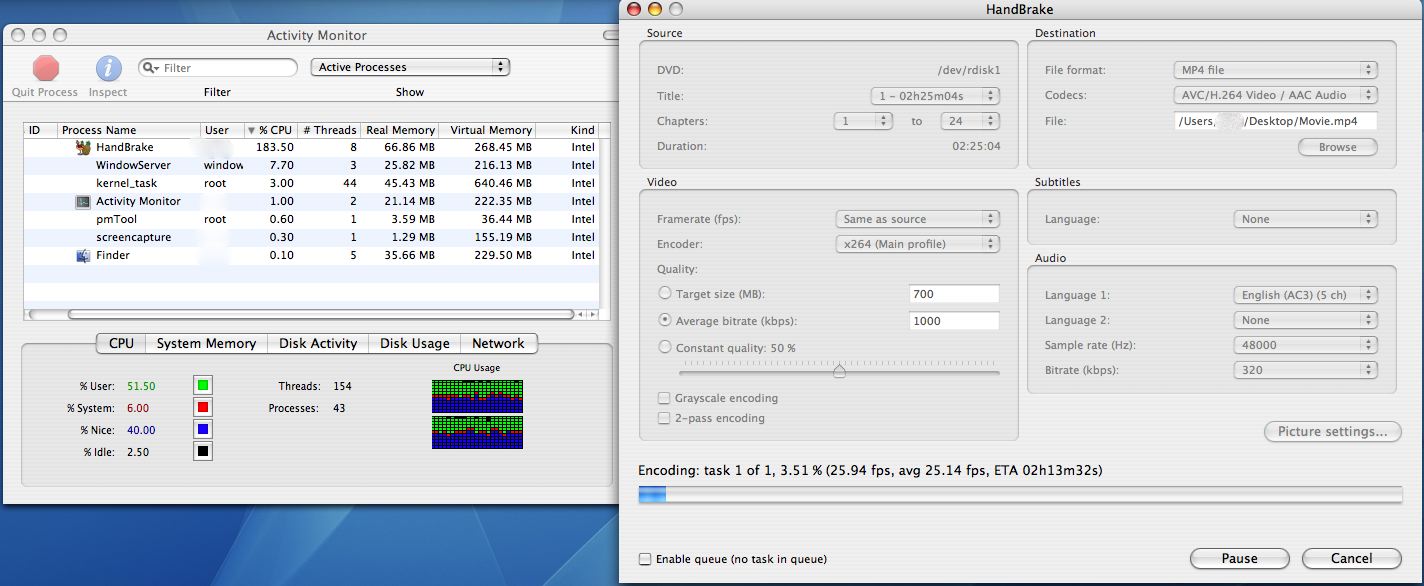
This image http://download.m0k.org/handbrake/images/HandBrake -2006011800.jpg clearly depicts a 2 hour, 25 minute piece of video being ripped from a CD and transcoded into H.264 and that the time it will take to rip, decode and re-encode this piece of video is 2 hours, 13 minutes. -
Re:What about this...
-
Re:Counterpoint
Give Handbrake a go. It's worked really well for me on my Mac Mini.
It can encode using ffmpeg or XviD (iirc), and the audio in MP3 or MP4 (i.e. AAC).