Slashdot Mirror
Domain: mini-itx.com
Stories and comments across the archive that link to mini-itx.com.
Comments · 638
-
Re:In the market for something like this also
Just try a mini-ITX board, of which there are many designs.
Many are designed with 12v DC input specifically for auto use but obviously can also be powered by an external brick. I use a number of these for various purposes, including servers, and find them pefectly adequate for use.
Try here, although there are many other suppliers: http://mini-itx.com/
-
Re:VESA-mountable PCs
Nice. There's also Mini-Itx.com with many different boards and cases. They're like larger, beefier Raspberri Pi's and should be able to power 2-3 monitors each I think.
-
adequate $$ hw exists
mini-pcs can be pricey, but there are alternatives that run Linux/XMBC. This is far from a thoroughly list, but they are relatively recent pieces of hardware:
http://www.mini-itx.com/store/?c=85
http://www.tomshardware.com/news/gigabyte-brix-pc-gaming-iris-pro-5200-haswell,24246.html
http://www.itxcanada.com/products/VIA_EPIA_P910_10Q_Pico_ITX_Motherboard_1_0GHz_VIA_Quad_Core_E_Processor-1166-0.html
http://www.ebay.de/itm/Jynxbox-TV-BOX-HD-Amlogic-8726-1080p-XBMC-MELE-F10-PRO-MIC-Speaker-Remote-/400549785064?clk_rvr_id=546961982081Simple Android Hardware could do the trick and the price is less-expensive:
http://en.mele.cn/products/show/31.htm
http://www.ebay.de/itm/MINIX-NEO-X7-Android-4-2-Quad-Core-2GB-DDR3-WIFI-XBMC-1080p-Rii-mini-N7-Remote-/400566821009?pt=Netzanschluss&hash=item5d43a4a091
http://www.cloudsto.com/mk902-pc/rikomagic-mk902-quad-core-16gb-flash-dhl-express-shipping-detail.htmlMost inexpensive android ARM-based hardware do not have gigabit ethernet on the hardware because the SOC's can't achieve more than 470~Mbps..
Intel/AMD motherboards are true-Gigabit ethernet. Gamers would tend to agree this is important for network gameplay. Gamers also tend to purchase PC-Hardware because you can buy gamer-specific optimized network equipment to give you a competitive edge when playing. It's take it or leave it with consoles unless you do mod it yourself. Oh wait, Sony doesn't make open-hardware, so the consumer will go for the open-hardware. It's important to have gigabit ethernet if you intend on running any kind of web server/mail server on your open software system in order for it to be an optimal experience for the user while not costing a fortune for a general-purpose hardware rather than single-purpose game-console appliance hardware. The other added advantage about pc's and mini-pc's over android devices and consoles is that you can create content with them rather than simply consume content with them. Keep in mind content is not king. The consumer is.From what I remember slashdot was a place to talk about stuff related to linux. The word "slashdot" and the logo
-
Re:The easy way
I'll give you another item to add to the very very short list of stuff you need to make this work. we got 1. XBMC so 2. PICO motherboard and to help promote one of my favorite sites.. check out http://www.mini-itx.com/
-
Re:Why?
I don't know, I mean this looks pretty easy...
-
Why, mini-cluster, of course!
http://www.mini-itx.com/projects/cluster/?p
The example at the URL above is quite old, but a good starting point. Just use a dozen cheap mini-itx cards with -- let's say -- Intel Core i5 and voilà! Probably the cheapest way to go, and, also much easier to program than using CUDA and nVidia. Hook the whole thing in a gigabit switch
I'll let the experts debate the best CPU for that job, but AMD should also have some nice products on offer.
-
Cute, but still waiting for pico-ITX systems
fully-featured computers would be a bit more useful to system integrators...
I'm
http://www.mini-itx.com/67219812The fit PC2 is pretty neat, but they still need binary blob drivers for Intel's crappy PowerVR GPU, which severely limits Linux distribution... if they had that form factor with an ION chipset I'd be sticking those little buggers all over the place
-
This was already done in 2003
This was accomplished years ago http://www.mini-itx.com/projects/c64/
-
Re:Poor lawyers
Unibody : not an innovation, maybe new to the laptop market but car makers have been using the "monocoque chassis" for a bit longer. GREAT APPLICATION OF EXISTING TECHNOLOGY! also, magnetic joints where around as early as 2001 used mostly for deep fryers. http://archives.cnn.com/2001/US/07/03/deep.fryers/... so not an innovation, a very smart idea though to include into a premium laptop... GREAT APPLICATION OF EXISTING TECHNOLOGY! mac mini - 2006; http://www.mini-itx.com/news/2006/01/, looks like "mini" pc's had been out for a while. its hardly innovative to bring specialized equipment to the mainstream, its certainly a challange that Apple has met well. GREAT APPLICATION OF EXISTING TECHNOLOGY! Don't get me wrong, Apple is very good at what they do and by focusing efforts on user experience instead of innovation have gotten them where they are today, if they focused on innovation instead of user experience you would probably have a sub par product and apple wouldn't be anywhere near as successful as it is, not to mention clumsier devices with a higher price tag.
-
Re:I'd consider the families a little differently.
There are also BTX, which was an Intel attempt at a smaller format but which has been superseded by micro-ATX and flex-ATX since they, unlike BTX, are compatible with ATX cases.
I think I mentioned DTX, which AMD introduced specifically for HTPC and such.
Intel also had WTX specifically for servers and high-end workstations. It was even larger than EATX, but the extra size is really unnecessary these days since you can get dual-socket boards in EATX. Most quad-socket boards are in a form factor called SSI MEB, which is about the same size WTX was. There are also SSI CEB and SSI MEB in that SSI family. Notice Wikipedia knows little about SSI.
Then there's the ETX and XTX family which are actually COM systems rather than true motherboards.
Then there's all the non-?TX stuff like NLX, LPX, EBX, EPIC, and a few more besides. Then there are all the proprietary boards out there.
For a pretty good comparison of the more common formats, Wikipedia has a computer motherboard form factor article and several individual articles for ATX, NLX, LPX, etc.
Then there's formfactors.org which, as the name suggests, is a whole site dedicated to documenting and reporting news updates on motherboard form factors. They have comparisons, specs, guides, info on testing equipment for system designers and builders, and list news on updates to specs and such on their main page.
Then there are embedded systems company sites and small-board enthusiast sites like smallformfactor.com (industry journal), mini-itx.com (small system enthusiasts_), pc104.com (list of PC/104 part suppliers), PC/104 Consortium, and places like Embedded Planet which sells embedded computer stuff including even more specialized small form factors, like AMC, PCI, microPCI, PrPMC, and other "industrial" form factors that typically require a chassis and backplane system designed for rack mounting in the industrial control or telecommunications applications.
-
Re:optical illusion
That "Deco" style case is lovely... My wife would even allow that in the living room, methinks
But would she allow the Manga Doll case there?
Maybe changing the Doll to look like a french maid girl? -
Re:optical illusion
Yeah, I was paging through that slide show thinking "hideous, hideous, also hideous
I mean, individuals can make cases that are so much more attractive
http://mini-itx.com/projects/decobox/
http://mini-itx.com/projects/rundfunker/
http://mini-itx.com/projects/toasterpc/page3.aspI was looking for a case for an htpc recently, and the only useful case I could find that didn't come with un-covered front (usb, fiwi, headphone) ports was a Silverstone LASCALA LC16M. Seriously, one case?
-
Re:optical illusion
Yeah, I was paging through that slide show thinking "hideous, hideous, also hideous
I mean, individuals can make cases that are so much more attractive
http://mini-itx.com/projects/decobox/
http://mini-itx.com/projects/rundfunker/
http://mini-itx.com/projects/toasterpc/page3.aspI was looking for a case for an htpc recently, and the only useful case I could find that didn't come with un-covered front (usb, fiwi, headphone) ports was a Silverstone LASCALA LC16M. Seriously, one case?
-
Re:optical illusion
Yeah, I was paging through that slide show thinking "hideous, hideous, also hideous
I mean, individuals can make cases that are so much more attractive
http://mini-itx.com/projects/decobox/
http://mini-itx.com/projects/rundfunker/
http://mini-itx.com/projects/toasterpc/page3.aspI was looking for a case for an htpc recently, and the only useful case I could find that didn't come with un-covered front (usb, fiwi, headphone) ports was a Silverstone LASCALA LC16M. Seriously, one case?
-
Re:why is the Via C7 not more popular?
Many people seem to run completely motionless Via C7 boxes, including by modding this motherboard - although more likely is that you'd start off buying a fanless board. They're commonly available clocked at 1GHz, though 1.2-1.5GHz fanless seems possible.
That was pretty accurate about three years ago when I built a fanless mythtv box. Still running great.
Now a days they're all 1.2GHz on a designed to be fanless, off the shelf board. ATOM based boards claim to have a higher marketing speed. No idea if they actually crunch numbers any faster, first stage in the proc might be a
http://www.mini-itx.com/store/?c=2
The reason for slow speed growth in that market sector is lack of interest... I play full screen video on my 3 year old mythtv box... so a 20% faster processor, other than emptying my wallet, would provide
-
GBPVR strongly recommended!
I used to run Myth ~2 years ago, but got fed up with issues and linux in general (ok, so kill me slashdot). Then I switched to SageTV which was nice for a while.
IR control: At the time I used WinLirc to transmit IR to control my Dish network box and it worked pretty well. Needed a custom script to take SageTV's channel changing format and translate it to WinLirc's format, but worked after some tweaks. Not sure about motorola but don't see why it would be a problem with enough work - LIRC has a great resource for IR codes. [I was using a homebrew IR blaster... basically an IR diode and a resistor hanging off the DTR line of the serial port]
Built a new HTPC 2 months ago with Win XP for simplicity and netflix access. I tried both GB-PVR and MediaPortal. Mediaportal looks flashier, but the UI is much slower and lacks a few key features... which is why I went back to GB-PVR. I've been very happy. Very few crashes, but should probably setup a weekly reboot for insurance. Yeah it's not open source, but it's still free. There's a plugin for GBPVR which will let you launch Zinc for all your streaming content, including netflix. There's a FANTASTIC web interface, including the ability to stream any of your recordings (think Slingbox). There's a plugin to control uTorrent. And GBPVR can work directly with a media extender like Popcorn Hour, if you don't want to have another PC for another room. [Though you can build a whole mini PC for the other room for the same cost as a popcorn hour]
A friend of mine tried Windows 7's media center features and is very happy. His small daughters can run it, including playing back all of their DVD's that he has ripped to a server.
In the unlikely event that anyone is actually interested:
TUNER: I built the HTPC with a Hauppauge 1600 tuner card. Initially intending to get free ATSC over the air, I discovered I could get the same channels from my cable provider in clear QAM without needing the antenna. (Cable is for cable modem only). The digital side of the tuner can record more than 1 stream as long as it's on the same physical RF channel. Plus I can use the analog tuner simultaneously for standard-def recording. So I can record 2+ shows at once, from one card.
MOTHERBOARD: I put that in a mini itx case on an intel atom 330 mobo with s-video output and built in spdif audio (though I did have to make my own cable for the spdif). Svideo was useful until I got a better TV. Mobo only has VGA output, so that limited my HDTV selection slightly, but not bad. The whole thing (tuner, mobo, case, ram, HD) was http://www.newegg.com/Product/Product.aspx?Item=N82E16813121359
review, explaining video capability at 1080p: http://www.mini-itx.com/reviews/atoms/default.asp?page=8GUIDE DATA: setup was a pain (and a real learning curve about digital TV), but now that I got it all figured out I'm getting it for free using MC2XML.
Good DTV / QAM Channel references:
http://www.silicondust.com/hdhomerun/channels_us
http://www.antennaweb.org/aw/welcome.aspx
http://www.titantv.com/
http://www.fcc.gov/mb/engineering/maps/ -
Re:Find a cheap machine...
a large number of boards these days have on board 19V or 12V DC barrel plugs on them. There is also always the option of buying one of the many cases around that just use a pico PSU http://www.logicsupply.com/products/picopsu_90 and this case http://www.logicsupply.com/products/5677 has a small round cutout that you could use to replace the internal PSU with any dc-dc board you liked. http://mini-itx.com/store/?c=2#p4027 motherboard for example draws ~6 watts, and when used with something like a CF-IDE adapter, it might draw 10-15 watts. It's a lot more expensive than an router though. even a SOHO ones. A lot more flexible though.
It's not like you are trying to build a gaming system in a small case and even then most gaming machines don't pull much over 500W at max load. -
Atom 330 - Intel Desktop Board D945GCLF2
How about the Intel Desktop Board D945GCLF2? It's cheap, 64bit, dual-core, supports HT etc... Need I say more? It replaced my old Dual P3 setup...
-
Re:Control Card?
http://www.dynamicarcade.co.uk/pictures/Matchbox_mini.jpg
That's my home router (I got sick of my real home router locking up on me, and wanted a mini-itx to tinker with). Built from a Jetway J7F2 Fanless 1.2GHz Eden C7 Mini-ITX Motherboard with Jetway 3x Gigabit LAN Motherboard Module, 512 MB of DDR2-667, and a 4GB compact flash card in a laptop-hdd-bay-mountable CF adapter, all in a Thin Client Fanless case. Running linux, with IPTables for NAT.
Something like that should be plenty powerful enough.Incidentally if anyone knows how to set a linux machine with a dynamic public IP up as an IPv6 tunnel (6to4 presumably) for my LAN, that would be awesome to know.
-
Re:Control Card?
http://www.dynamicarcade.co.uk/pictures/Matchbox_mini.jpg
That's my home router (I got sick of my real home router locking up on me, and wanted a mini-itx to tinker with). Built from a Jetway J7F2 Fanless 1.2GHz Eden C7 Mini-ITX Motherboard with Jetway 3x Gigabit LAN Motherboard Module, 512 MB of DDR2-667, and a 4GB compact flash card in a laptop-hdd-bay-mountable CF adapter, all in a Thin Client Fanless case. Running linux, with IPTables for NAT.
Something like that should be plenty powerful enough.Incidentally if anyone knows how to set a linux machine with a dynamic public IP up as an IPv6 tunnel (6to4 presumably) for my LAN, that would be awesome to know.
-
Re:Control Card?
http://www.dynamicarcade.co.uk/pictures/Matchbox_mini.jpg
That's my home router (I got sick of my real home router locking up on me, and wanted a mini-itx to tinker with). Built from a Jetway J7F2 Fanless 1.2GHz Eden C7 Mini-ITX Motherboard with Jetway 3x Gigabit LAN Motherboard Module, 512 MB of DDR2-667, and a 4GB compact flash card in a laptop-hdd-bay-mountable CF adapter, all in a Thin Client Fanless case. Running linux, with IPTables for NAT.
Something like that should be plenty powerful enough.Incidentally if anyone knows how to set a linux machine with a dynamic public IP up as an IPv6 tunnel (6to4 presumably) for my LAN, that would be awesome to know.
-
DC to ATX power regulator
-
Re:Computers are cheap - just get another box.
Or just buy one of these http://www.mini-itx.com/store/?c=53... It even comes with the benefit of being environmentally friendly. IE, soon you'll, become obsessed with the smell of your farts, buy a hybrid, shave your head, and grow a soul patch, wear crocheted scarves, masturbate to "An inconvenient truth," or... not...
-
Why a card?
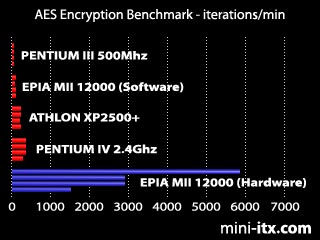
Why have an addin card? The acceleration hardware isn't all that complicated. Hell, VIA put it into their proccessors- look at the huge difference it makes. Even if the graph is best-case scenario, that x86 compatable processor is dynamite with encryption.
-
disruptive?
Nice, but I don't think this is as big a deal as all that. More along the lines of price pressure than anything else. I may buy one, because it is so cheap. Even if I don't, I'm glad everyone else will have to lower their prices now. I've always felt they put on too big a price premium for the small size, considering the generally low performance of the class as a whole.
There are many similar devices already out there. There's the much beloved Linksys WRT54GL. I have a Soekris. Not the most friendly plug and play device ever. I find it easier to update the CF drive by removing it and mounting it on a desktop system and editing files that way, rather than connecting via a serial port terminal. Gumstix is another. Lots of super micro mini ATX form bricks (mini-itx) out there too. Expensive though.
-
Re:Reading it wrong
It looks like there is indeed a passive cooled atom board
-
Re:Off topic
that's doubtful. all three of those solutions are about half the price of the cheapest Atom netbook. perhaps an Atom 330 w/ a generic mini-ITX motherboard would be cheaper than the C7 + EPIA, but a VIA C3 CPU/motherboard combo starts at around $60. and general-purpose processing power isn't what VIA processors aim towards. if you buy a VIA processor, it's going to be for:
- its ridiculously fast encryption capabilities due to VIA's Padlock Security Engine. in AES benchmarks the VIA CoreFusion Luke (based off of the 1 GHz Nehemiah C3 core) performs 13x faster than a 2.4 GHz P4--while using almost 1/7th the amount of power (TDP of 10W versus 67.6W). meanwhile, the 1.2 GHz C3 performs 6x faster than the 3 GHz P4.
- low power consumption->low heat output->longer battery life and less noise. using a 16 stage fully-pipelined superscalar architecture w/ a specialized 128-bit vector FPU (2 in the VIA Nano), SWAR/SIMD instruction sets, out-of-order execution & advanced branch prediction, and on-die encryption & twin RNGs, VIA processors achieve the highest per-Watt performance of just about any processor on the market.
- their multimedia-specific design. VIA embedded processors are exceptionally well suited to multimedia applications when paired with VIA's robust digital media IGP chipsets. not only do they possess on-die Floating Point "media" units, but by offloading processor-intensive tasks like video encoding/decoding and audio processing to off-die coprocessors, VIA embedded systems handle multimedia applications extremely efficiently. because of hardware-accelerated video processing, VIA systems can often match the performance of systems with twice their clock speed.
- hacker-friendly open hardware. features like LVDS connectors, LPC interface, pico-ITX form-factor, Linux support, etc. make VIA embedded solutions perfect for building set-top boxes, embedded devices, and personal hacking projects.
it's simply silly to try to compare Intel Atom netbooks with VIA embedded systems that are designed specifically for embedded multimedia applications. a netbook doesn't come with dual monitor support, TV out, S/PDIF, MPEG-2/4 hardware acceleration, a video capture interface, HDTV encoding, video de-blocking, etc. if you build a VIA set-top box, you're obviously not going to use it for gaming or to run Windows Vista. but as a set-top box, VIA solutions are more than adequate. so any additional processing power is just meaningless dicksizing with no real world benefits.
besides, the C7's successor--the VIA Nano--wipes the floor with the Intel Atom in multimedia encoding (LAME mp3 audio encoding, Windows Media Encoder video encoding, DivX movie encoding, Vista Movie Maker, TMPG VOB to WMV, etc.), HD video playback (1080p), and even in general-purpose computing performance.
-
Re:and to think, some people made fun of...
You might like to see what I've been keeping an eye on then:
This site has kind of a turn-key feel to it for my hobby needs:
http://damnsmalllinux.org/store/motherboards/EPIA_5000Here is some other mini board news etc.
http://www.mini-itx.com/and of course, newegg is your friend:
http://www.newegg.com/Product/Product.aspx?Item=N82E16813121342I'm experimenting with the various junk cases I've got in order to do something that is retro, not steampunk, and qualifies as a useful hack. Seeing an old VCR in the entertainment cabinet is cool, better if it is a mythtv system with wireless keyboard/mouse. Small odd looking cases is just some how more aesthetic than standard white box cases that 'look' like computers. I bought a computer credenza recently (used for $20) that needed a leg repaired. I'm thinking about embedding the mobo etc. in the underside of the desk. That won't require small parts etc. just some plexiglass to keep fingers and cats out of the electronics.
-
mini-itx.com will rip you off
Sometimes you just get nowhere and have to take the loss. But never forget it, and warn other people.
If you buy from http://mini-itx.com/ you will not get your goods.
-
Re:Well
You're just not good enough at case-modding then!
People have already managed to put them in beverage containers:
http://www.mini-itx.com/projects/bubbacomp/
http://metku.net/index.html?sect=view&n=1&path=mods/whiskypc/index_eng
-
Re:VIA and Mini/Pico-ITX
Is this what you want?:
http://www.mini-itx.com/store/They have full systems like:
http://www.mini-itx.com/store/configure.asp?sid=HUSH-B1 -
Re:VIA and Mini/Pico-ITX
Is this what you want?:
http://www.mini-itx.com/store/They have full systems like:
http://www.mini-itx.com/store/configure.asp?sid=HUSH-B1 -
Other solution/alternative...
This same thing was asked roughly 9 months ago which got me thinking about my own solution. At first I was going to set up something like FreeNAS in a VM (easy backup, save states, etc.) but soon realized I needed more.
What I have now is a dedicated machine with four 500 gig HDDs in RAID 0+1 (I wanted 1+0 but I couldn't find the option and it's too late now).
In addition to a place on the network to store all my excessive files I can also use it for things like downloading media with Miro and sharing the media with TVersity, which allows me to stream media to my 360 etc.
In addition I added an RSYNC relationship (with deltacopy) between it and my primary PC for backing up and it is running JungleDisk (attached to Amazon's S3) for auto backup offsite.
It also is there if I want to rip and re-encode a DVD to DivX but still use my main machine for something else.
This is probably more than you were asking for but it is working pretty well for me.
If you wanted a low-power solution you could set all the above up with one of those mini-itx VIA boards (just buy a bulky enough PSU). The only devices I have are the five HDDs and a rarely used DVD-ROM. It doesn't actually take a lot of watts even with a normal board.
VIA mini-itx resource:
http://www.mini-itx.com/DeltaCopy:
http://www.aboutmyip.com/AboutMyXApp/DeltaCopy.jspTVersity:
http://tversity.com/JungleDisk:
http://www.jungledisk.com/Amazon S3:
http://aws.amazon.com/s3 -
Re:Space-constrained?
And I second this, I have a VIA Samuel 2 with this adapter and this picoPSU-120.
Totally silent and enough for my 2 * 320GB disks. Running samba/nfs for my files and apache for my low traffic site.
-
Re:Space-constrained?
And I second this, I have a VIA Samuel 2 with this adapter and this picoPSU-120.
Totally silent and enough for my 2 * 320GB disks. Running samba/nfs for my files and apache for my low traffic site.
-
Re:Mini-ITX Solutions
I would also like to recommend http://www.mini-itx.com/ which I've used for various bits in the past.
-
Re:Mini-ITX and Blades
I had similar thoughts when I read tfa.
I buy all my mini-itx stuff from here :
http://www.mini-itx.com/
I recently wanted to do RAID1 in a case that only fitted one 3.5" HDD - and it was the space for a low profile 3.5" HDD too.
I used their adapter to fit in two 2.5" drives into the space of a single 3.5" drive. Works really well
I really recommend that site.. -
Re:Power
There's always VIA and the Nano-ITX systems. They are slightly larger than this (10cm x 10cm) but they are available, inexpensive, well tested, and have all the stats published. Check out http://www.mini-itx.com/ for more info and cool cases.
-Rick -
Imagine MythTV box with CELL
-
Your point ?
Your point seems to be a question.
Anyhoo, there's nothing uber special about Flash, you can just put a CF/SD card in an IDE/SATA adapter and attach it to a suitable computer, such as one of the fanless EPIAs, that one even has dual gige. -
Re:Didn't we already do this...
-
Re:Didn't we already do this...
we already have small: pico itx
-
Re:Apple ALWAYS loses in my house
With Apple, not-so-much. You could run MacOS X, Linux, and Windows. Very flexible.
I wouldn't put Linux in that list. Most Linux distributions don't seem to work with specific components well in Macs, like wireless or the webcam etc.
Some other x86 systems are fully supported with Linux distributions, such as some Dell systems.Apple also uses standard components...like memory and hard drives. If they're available from third parties, where's the lock in?
Most of the lower end Apple hardware don't you simply add a new soundcard, switch a graphic card, unlike the generic x86 systems with similar specifications - This is annoying as some people such as me would be happy with the cost and hardware of a Mac Mini after just upgrading the graphic card for gaming. But because you are unable to upgrade/change most of the hardware in the lower end models, you're forced to buy the more expensive ones. The only system I am aware of that lets you properly change things around is the Mac Pro... But if you've already bought that, chances are you won't need to change anything since it's insanely powered.
Of course, the only hardware that lets you run OS X comes from Apple and the only company Apple is currently authorizing people to run OS X on is themselves. That is where the lock-ins come in.Truth be told, Dell and other large vendors have non-standard motherboards and power supplies, so you aren't any more locked in than you would have been with Apple.
I haven't seen a non-standard power supply in Dell machines since 2002. As for motherboards, they seem interchangeable just fine with other systems. The only issue you may have is that Dell cases are different from regular standard x86 cases, the motherboards may not fit in a another case properly and vice versa. But this isn't that large of a issue in the first place since people rarely replace motherboards and if they do - the cost for a new case isn't that big.The only way you won't be locked in with hardware is to build your own out of readily available components. The problem is that you tend to end up with an over-sized piece of hardware. People want small and sleek nowadays.
There are vendors like Mini-ITX out there. I don't think that is a problem. -
Re:Well if you read what I wrote
The point was to remove the battery, thus no internal power backup, thus pulling the plug would mean that it's lights-out. In other words, I don't want something that pulls out more easily, I want it to be more difficult, and for safely add some traction-pads on the bottom.
So despite the "fapping" comment made by the subsequent poster, I definitely do not want something that's easier to disconnect, so really that response was pretty much mac fanboism by somebody who hadn't really read my post anyways.
I read your post. You specifically said:
Perhaps something that clicks into place but isn't a pain to remove
That is exactly what the Magsafe does. Why would mentioning that a product that fulfills part of your request (but just so happens to be from Apple) make my post fanboism? If I had mentioned the Dell Magsafe would you have replied in the same fashion?
I was aware that it did not fulfill all of your requirements. That is because your requirements were nonsensical. Who wants a laptop without a battery? You had mentioned that the extra space could be used for extra cooling capacity, but the battery is far more useful. Have you ever been working on something important and the power goes out? No problem if you have a laptop. Big problem if you don't.
If you want a laptop without a battery so that you can have a compact desktop, buy a desktop. They're getting remarkably compact now themselves.
-
sounds like a mini-ITX
See here.
-
Mod parent up
I was going to post the same thing. It was the first thing that popped into my head after reading the headline.
Another group is producing much the same thing commercially, in a nice case and all. A 4 node Core 2 1.8Ghz with 1 gig ram per node and 2x 250Gb storage is about $7000 (USD)
(Wonder how that stacks up to what he built speed/cost wise, though I'd bet the Via cluster beats all in power use (140W max load))
See the link at Mini-ITX
http://www.mini-itx.com/2007/02/26/the-octimod-min i-itx-cluster
Company site
http://ainkaboot.co.uk/octimod.php -
Re:Actually... Microwulf might well be revolutiona
One of the problems with supercomputers is that there aren't really very many of them, because of the size and cost. It means that the tools you use to run your supercomputing applications are similarly unusual. The skills to use and develop on parallel systems are then equally scarce. Access to a supercomputer isn't exactly common.
Revolutionary? Everything old is new again...
http://www.mini-itx.com/projects/cluster/
http://news.taborcommunications.com/msgget.jsp?mid =494184&xsl=story.xsl -- 8 way parallel cluster that fits on an airplane for under 3 grand
http://www-03.ibm.com/systems/bladecenter/ -- a 7U chassis that holds 14 blades, and is a bit spendy, but not completely unreasonable for some situations
http://www.linuxjournal.com/article/8177 -- My personal favorite, this page talks about several small portable miniclusters that have been made over the last six or seven years...
Yes, 8 cores of Athlon64 is faster than 8 cores of low power VIA CPU's from several years ago, but the concept isn't revolutionary, and there isn't a lot of headline worthy engineering that goes into a project like this... I'm sure it's a very handy tool, and I'm not suggested it shouldn't have been built, or that it was entirely trivial to build, but in the end, it's just four ordinary motherboards and ethernet. -
4 psus, isn't that a waste?Sure, nothing beats off-the-shelf components... but powering 4 motherboards using 4 separate PSUs sounds like waste!
Look at this design: http://www.mini-itx.com/projects/cluster/. It uses DC-DC converters on each motherboards (mini-itx, so low power), a single 12V PSU and a UPS for regulation:
The DC-DC converters require a clean, well-regulated 12VDC source. I chose to use a heavy duty 60 ampere 12VDC switching power supply capable of delivering 60 amperes peak current which I ordered from an online electronics test equipment supplier. Since badly conditioned AC power is potentially damaging to expensive computing equipment, I use a 1 KVA UPS purchased at an office supply store to make sure the cluster can't be "bumped off" by power line glitches and droputs.
-
Re:Hard drive connection
I suspect that was just a crapilly written article, the specs in the review on mini-itx.com ( http://www.mini-itx.com/reviews/pico-itx/ ) certainly don't say or imply that it is only for flash.
-
Re:pirce & why not fanless?
Sure, I can answer the questions.
1) It was a generic PC heatsink component, cannot recall the brand, but it had the standard pair of screw-type clips at opposite corners and these fitted into the provided holes quite nicely. I removed the supplied heatsink & fan. I guess yours just isn't the right size? Thankfully mine fitted perfectly.
2) It's a Nehemiah N10000, I use the on-board video - S-video mainly.
3) That's easy, I removed the HD and went for PXE/NFS booting! Removing the HD cut out a lot of the noise. You should know that I use Myth purely for downloaded AVIs and the rest, no TV capture. So no huge data stream issues. Also I didn't put an optical drive in, relying on the network for ISOs
4) Yup, the brick supplied with the Cubid 2799 Dual PCI Mini-ITX Case
I'm afraid that if you're after a really quiet system, the CPU fan is only one of the worries. I had to miss out on broadcast TV and optical media to achieve the silent operation on a budget.