Slashdot Mirror
Domain: xlr8yourmac.com
Stories and comments across the archive that link to xlr8yourmac.com.
Comments · 210
-
Re: Disabling advertising on Slashdot
-
Re:Not the first time
It was in the updater for iTunes 2, and if you a) had your library on a second hard drive and b) if the hard drive had a space for the *first character* of the name (eg, " Music") it would erase the drive.
-
Re:AirDrop
As the previous poster said about Parallels,
> They eventually found the bug and fixed it... in Parallels 3. Their solution to the problem of
> selling me a product that was not fit for purpose was for me to give them more moneyAnd I'd bet they both learned this trick from the MSOffice team.
Nope. Apple has known this forever. The Rev.1 B&W G3 macintosh had a UDMA data corruption error. Apple's "fix" was to either buy FWB toolkit and disable UDMA (and half a disk's performance!) or to buy a mac ATA card which, due to the mac tax, would cost literally four times as much as buying the same card for the PC, with a different ROM. When they rolled the old TechInfo Library (TIL) into the modern Apple Knowledge Base (KB) they imported articles before and after the one where they describe this problem, but they deleted the article on B&W G3 data corruption in an attempt to hide the fact that they told their customers that they had to spend more money because the product they purchased did not in fact meet specifications (didn't do ATA correctly.) Early Sun UltraSparc machines which I have used personally have the same chip and don't have the same bug.
Nobody has anything to teach Apple about blaming the victim or hiding the evidence.
-
Re:Doubtful
Rumours are though that they're finally getting rid of their proprietary 30 pin connector. Of course, they'r replacing it with a smaller proprietary connector. I'm assuming that they have some sort of adapter, as this does give people a good excuse to extract themselves from the lock-in if they have to replace docks, etc, anyway.
The OTHER rumor is that the new smaller connector will be mechanically compatible with micro-USB, so you could use a micro-USB cable in it directly. If you plug in a proprietary cable, you get much more.
Which isn't really unusual - this already exists as MHL (mobile high-speed link) - as a way to get HDMI through a connector that works a lot like micro-USB. You plug in a micro-USB cable and it connects like USB. You plug in a MHL cable and get HDMI output.
Of course, I do have questions about the 12V and 20V outputs - first, 20V isn't exactly common in a PC (especially at 5A). Firewire was spec'd up to 30V, and even then plugging in a Firewire device into a Mac was risky because the devices were tested on PC hosts (with host cards only supporting 12V) rather than a Mac (which provides up to max spec'd voltage). It has resulted in destruction of many firewire hubs untested with the higher end of the spec'd voltages. It's only a matter of time until someone accidentally misprograms their USB descriptors and then *bang*!
-
Re:New solid state storage
Haven't they been saying that for a few decades now? Rotational media will be around for a long time to come, barring any real shattering breakthroughs in solid state media. Some markets, such as laptops and workstations which value speed over capacity, will likely transition to SSDs being the norm within the next 5 years or so, but when you need a lot of storage you'll still turn to hard drives for at least another decade or two. Given that hard drive technology is still having breakthroughs, it will be some time before SSDs can catch up in overall capacity, nevermind price per GB/TB.
SSDs have already surpassed hard drives in capacity, with 16TB being offered on a single SSD. SSDs are less than $1 a gigabyte. True, much more than hard drives, but 11 years ago when hard drives were $3 a gigabyte and 7 years ago hard drives were 50 cents/gb. Now hard drives are less than 1 cent a gigabyte, so how long do you think it will take SSDs to get there?
SSDs have the huge advantage that everyone wants them. Every device needs fast access and transfer rates with low power usage in as small a space as possible. More devices means more sales means lower prices as they ramp up production. I have a feeling that by the end of 2012 people won't even be considering a hard drive in a PC anymore, everyone will just buy SSDs.
Hard drives will never win the capacity war, not when they can currently put 64 gigabytes on a space smaller than your fingernail and that includes the memory controller and case. -
Re:Huh?
-
Re:Apple just used special in house rulers!
Well, the G4 was very fast. example: http://www.xlr8yourmac.com/G4ZONE/photoshop_1GHzPCvsG4.html
Intel only became competitive when Moore's Law turned all the x86 crap irrelevant (in terms of die size). And then they went down the P4 fiasco.
Too bad IBM didn't improve the G5 (I'm sure it wasn't very easy for them. And of course, Intel has lots of R&D there)
-
Re:Three options...
The haters are out this morning:
"... Shrink, I want to kill. I mean, I wanna, I
wanna kill. Kill. I wanna, I wanna see, I wanna see blood and gore and
guts and veins in my teeth. Eat dead burnt bodies. I mean kill, Kill,
KILL, KILL." And I started jumpin up and down yelling, "KILL, KILL,""http://www.arlo.net/resources/lyrics/alices.shtml
RISC blows CISC away: [skip or walk]
http://en.wikipedia.org/wiki/Reduced_instruction_set_computing#RISC_design_philosophy
- so much so, that they still bolt it on CISC [with some success]
[Don't bother with the subheading "Diminishing benefits", it's BS, look at IBM's POWER]
RISC vs. CISC:
http://www-cs-faculty.stanford.edu/~eroberts/courses/soco/projects/2000-01/risc/risccisc/
Our G5 x2 2.5 is soon to be a companion to our Xserve x2 1.33 [redundant DNS].
Just add:Swift Data 200:
http://www.transintl.com/store/category.cfm?Category=2490
Inside your Power Mac G5:
http://support.apple.com/kb/HT1305
"catastrophic coolant leak":
http://www.xlr8yourmac.com/systems/G5_CoolantLeak_Repair/G5_CoolantLeak_Repair_p1.html
-
Re:If they're trying to keep it secret
I've never seen an update break anything.
iTunes 2.0 erased partitions due to a nasty directory expansion bug. I wasn't bit by this, but I would have been if I downloaded the update right away. Since then, I've been happy to wait 2 weeks for folks like you to be my guinea pig. Please keep posting your reaction to updates, I need to know if it's safe for me to dl! kthxbai. -
Re:Welcome back to the 90s
""Compare how fast 3.5" capacity went from 1G->500G to how relatively slowly its inched from 500G->2000G."
First 1GB hard drive came out around 1994 or 1995. It took 10 years until the first 500GB HD came out in 2005. Then the first 2TB drive came out in 2009, 4 years later. So basically, what the hell are you talking about?"
First, I need links.
First 100gb, 2001
First 500gb, 2005
First 2tb, 2009
I'd love to find older stories but any page before 2000 doesn't rank well on Google.
Anyway, Quantum you're right, we went from 500gb to 2tb in 4 years, while the trip from 1gb to 500gb took a little over ten years. -
Re:Release cycles?
I think the problem you are thinking of was an iTunes update that would erase hard drives due to an error in the install script.
http://www.xlr8yourmac.com/OSX/itunes2_erased_drives.html -
Re:ATI Cards in a MAC... never again
It was the Radeon X1900XT. I had both the original and the updated versions cards. The machine was basically used for World of Warcraft (Which isn't hard on a GPU by any standard). http://www.xlr8yourmac.com/Graphics/X1900XT_Overheating/ATI_X1900_artifacts.html is a convenient rundown on the issues with the card. And yes, I prefer the current NVidia mess. At least I know what I'm getting. The X1900XT issues were related strictly to the Apple versions of the cards. It was stupid when I had to reseat the card at least 5 times to get the machine to boot (It would fail boot bios checks and hang). Since I put in the 8800 GT, I've had no issues. Not one. As I said, I would never trust any Mac with an ATI product in it after that mess.
-
Re:Several things to add here...Third (and most important, perhaps), he should likely have been aware that on a Macbook the drive is a user-replaceable part. Unlike some PowerBooks which require almost total disassembly.
-
Chatter, but the zeolots are saying it too
The real fanboys, the guys who have been very loyal to Apple since the earliest days, are giving it mixed reviews. The silly arbitrary changes are frustrating, and many of them are experiencing an alphabet soup of problems.
Just to pull out a few of the litany of gripes:
The Back To My Mac feature appears to go insane if it can't contact the mothership (but fortunately most people are clever enough to realize
The gratuitous arbitrary changes (menus, useless icons, reduced Dock functionality, etc...) to the interface are cited as frustrating and obnoxious.
Time Machine is a mixed bag, causing awful slowdowns for some users.
Of course, not everything is bad and many people are also very pleased with it, but there's an undercurrent of frustration. It sounds like a lot of them would agree that 10.5 was released half baked.
The real point, however, is that many of these complaints are coming from the ultra-ulta-fanboys. Consider, for example, the things expatriates of the defunct xlr8yourmac.com bulletin board are saying (see the MacOSX and Leopard boards for a most enlightening glimpse in to their minds on this matter): BD AQUA'S Fish and Macquarium
[Background: the xlr8yourmac bulletin boards were, until they collapsed several years ago, the center of gravity for much of the Mac enthusiast and modding world. Apparently the much diminished but core group has managed to hang together and retreat to a free forum site following the collapse of their original digs. These are very hardcore Mac boosters.] -
Mac Pro- 80 gigaflops
The Mac Pro 8 core has been clocked in excess of 80 gigaflops. See below:
http://xlr8yourmac.com/systems/8-core_mac_pro/8-co re_Mac_Pro_reports.html -
Re:A few thoughts
I have upgraded my old G3 iMac a few times, and that was complicated...
Complicated as in disassembling the shell, depending on the model, but not complicated as in having to use special equipment, as all you need are a screwdriver (preferably magnetic), maybe a Leatherman toolkit (specifically the pincers), precautions to avoid static electricity, as well as a visual guide: http://www.xlr8yourmac.com/.
Going one notch further, when I upgraded the hard disk on my Indigo G3 http://www.faqintosh.com/risorse/en/guides/hw/imac /imacg3dvhd/, it was a nerve-wracking thought to take apart an additional level of parts, but after the job was done, I was amazed at how simple a procedure it actually was, as well as the fact that it took less than an hour. A month later, a friend asked me to help him upgrade the hard disk on his G3. He was very nervous about it, yet I actually did it in half the time and it was even, you know, fun. As a bonus, for my troubles, I was treated to several mugs of draft beer at a local tavern.
As for RAM chips and the new Macs? I'd guess it takes less than five minutes to do it, just open a little hatch, fit the chip in the slot and you're good to go! -
Re:Microsoft should worry until...
If anyone is interested in getting the most out of an older Mac, please see this example site. http://www.xlr8yourmac.com/
I recently refurbed a Pismo (with the nice bronze keyboard.) New HD, Wireless (3rd party, and found it immediately), and Battery. This is a 6 - 7 year old computer, yet runs Tiger flawlessly, and since it had firewire back then, I will getting an external HD for Time Machine.
I could have upgraded it to a G4, but as a secondary machine, decided there was no need. -
NVidia bug OR memory upgrade issue?
(Couldn't access the article's screen capture - site's bandwidth exceeded.)
I did some googling around, and it appears that Mac Pro systems have been known to Kernel Panic in a number of cases after a memory upgrade. Have you considered that you might have TWO (intermittent) problems?
According to this http://www.xlr8yourmac.com/systems/Mac_Pro/mac_pr
o _ram.html upgrade memory should have larger heatsinks than standard heatsinked FB-Dimms. It has links to: memory test utilities, ECC correction reports, and most notably:FYI - Page 2 of PC site Anandtech's Mac Pro upgrades article has comments on using standard heatsink FB-Dimms (which some readers previously reported worked ok so far at least, although others have noted ECC error corrections)
"We had no problems running all of our benchmarks with the standard (flat heatsink) Crucial FB-DIMMs; however, if we ran a memory stress test for even just a short period of time the modules quickly reported correctable ECC errors. (Apple system profiler memory status section) Apple's original modules did not generate any ECC errors, so it looks like the additional cooling is necessary under the most extreme situations." (emphasis added)
Questions:
- What brand of memory did you upgrade with? Apple? Crucial? Kingston? Other?
- Did your memory have the standard-sized or larger-sized heat sinks?
- What memory stress tests have you run?
- Were any ECC errors reported?
- What was the distribution of memory in your system? (which boards of what size and manufacture in which risers?)
- If you pull the original memory and use just the upgrade memory, does the problem still exist?
Hope this helps!
-
NVidia bug OR memory upgrade issue?
(Couldn't access the article's screen capture - site's bandwidth exceeded.)
I did some googling around, and it appears that Mac Pro systems have been known to Kernel Panic in a number of cases after a memory upgrade. Have you considered that you might have TWO (intermittent) problems?
According to this http://www.xlr8yourmac.com/systems/Mac_Pro/mac_pr
o _ram.html upgrade memory should have larger heatsinks than standard heatsinked FB-Dimms. It has links to: memory test utilities, ECC correction reports, and most notably:FYI - Page 2 of PC site Anandtech's Mac Pro upgrades article has comments on using standard heatsink FB-Dimms (which some readers previously reported worked ok so far at least, although others have noted ECC error corrections)
"We had no problems running all of our benchmarks with the standard (flat heatsink) Crucial FB-DIMMs; however, if we ran a memory stress test for even just a short period of time the modules quickly reported correctable ECC errors. (Apple system profiler memory status section) Apple's original modules did not generate any ECC errors, so it looks like the additional cooling is necessary under the most extreme situations." (emphasis added)
Questions:
- What brand of memory did you upgrade with? Apple? Crucial? Kingston? Other?
- Did your memory have the standard-sized or larger-sized heat sinks?
- What memory stress tests have you run?
- Were any ECC errors reported?
- What was the distribution of memory in your system? (which boards of what size and manufacture in which risers?)
- If you pull the original memory and use just the upgrade memory, does the problem still exist?
Hope this helps!
-
Re:For the record...
Regardless, the "high processor load" comment is completely and totally wrong. It is predominantly a problem in master/slave configuration, with only a small number of devices misbehaving in single-drive configurations. I'd be happy to point you to a series of citations for that fact.
You can point me to all the citations you want, but I have some of my own.
DATA Corruption Tester: Reader Tim Seufert sent his data corruption tester for download here. He thought his rev 1 B&W G3 was Ok with a replacement IDE drive (master only/single drive) but noted that he still discovered corruption was happening. This is why the safest way to add drives (or use a modern IDE drive) with a rev 1 is to use a PCI IDE card. See this FAQ Apple G3 section for Tim's comments and to download his tester. (http://www.xlr8yourmac.com/G3-ZONE/yosemite/IDE/
i ndex.html)And further, from the same site:
" There is a potential for data loss or data corruption with certain Ultra DMA hard drives when transfering data at the full ultra dma speed on the new Blue and White G3's. Western Digital AC420400D, Maxtor 90840D6, and the Quantum Bigfoot TX series. Symptoms include the inability to copy or open data files, launch applications, or even installing an OS. A quick test is to open a self mounting disk image file (a file created by Apple's DiskCopy 6.2 or above). If an error occurs while opening this file, you most likely have the problem." (http://forums.xlr8yourmac.com/action.lasso?-data
b ase=faq.fp3&-layout=FaqList&-response=answer.faq.l asso&-recordID=32933&-search)or
Another WD Expert 18GB/B&W G3 Owner Reports Problems: I received a mail from another reader that said all 3 of his WD Expert 18GB Drives installed in a B&W G3 exhibit the
I can no longer find the entry on where it says that it happens mostly when the CPU is peaked out. I can speak from experience, though, that it does not affect only slave drives, because I have run into and solved this problem myself with only a single drive in the system. I went with the FWB Toolkit method, to change the drive to PIO, because it was just a hobby machine and I had no intention of keeping it. A 300MHz G3 is too slow for any practical use except fileserving, the machine does not have enough drive bays to be ueful as a fileserver, and there's no point in a G4 upgrade because the system bus will hamper the performance of the upgraded processor and I'm not paying for something I can only use half of.
And, ultimately, the biggest problem here is that Apple actually deleted the description of the problem from the techinfo library in an apparent attempt to hide the issue from the public - that, in my opinion, is much more serious than the fact that the problem existed in the first place.
-
Re:For the record...
Regardless, the "high processor load" comment is completely and totally wrong. It is predominantly a problem in master/slave configuration, with only a small number of devices misbehaving in single-drive configurations. I'd be happy to point you to a series of citations for that fact.
You can point me to all the citations you want, but I have some of my own.
DATA Corruption Tester: Reader Tim Seufert sent his data corruption tester for download here. He thought his rev 1 B&W G3 was Ok with a replacement IDE drive (master only/single drive) but noted that he still discovered corruption was happening. This is why the safest way to add drives (or use a modern IDE drive) with a rev 1 is to use a PCI IDE card. See this FAQ Apple G3 section for Tim's comments and to download his tester. (http://www.xlr8yourmac.com/G3-ZONE/yosemite/IDE/
i ndex.html)And further, from the same site:
" There is a potential for data loss or data corruption with certain Ultra DMA hard drives when transfering data at the full ultra dma speed on the new Blue and White G3's. Western Digital AC420400D, Maxtor 90840D6, and the Quantum Bigfoot TX series. Symptoms include the inability to copy or open data files, launch applications, or even installing an OS. A quick test is to open a self mounting disk image file (a file created by Apple's DiskCopy 6.2 or above). If an error occurs while opening this file, you most likely have the problem." (http://forums.xlr8yourmac.com/action.lasso?-data
b ase=faq.fp3&-layout=FaqList&-response=answer.faq.l asso&-recordID=32933&-search)or
Another WD Expert 18GB/B&W G3 Owner Reports Problems: I received a mail from another reader that said all 3 of his WD Expert 18GB Drives installed in a B&W G3 exhibit the
I can no longer find the entry on where it says that it happens mostly when the CPU is peaked out. I can speak from experience, though, that it does not affect only slave drives, because I have run into and solved this problem myself with only a single drive in the system. I went with the FWB Toolkit method, to change the drive to PIO, because it was just a hobby machine and I had no intention of keeping it. A 300MHz G3 is too slow for any practical use except fileserving, the machine does not have enough drive bays to be ueful as a fileserver, and there's no point in a G4 upgrade because the system bus will hamper the performance of the upgraded processor and I'm not paying for something I can only use half of.
And, ultimately, the biggest problem here is that Apple actually deleted the description of the problem from the techinfo library in an apparent attempt to hide the issue from the public - that, in my opinion, is much more serious than the fact that the problem existed in the first place.
-
Re:For the record...
The same chip was used inside Sun Ultra 1, 2 and 5 systems, without errors. So what if some PC hardware has the same problem? Either the problem is not in the chip or it is possible to circumvent it because the ultrasparcs using the same chip do not exhibit the same problem.
To my knowledge, the UltraSparc never included that particular revision of the CMD646. BTW, my bad, it was revision 5 of the CMD646, not revision 1 as I stated previously. Regardless, the "high processor load" comment is completely and totally wrong. It is predominantly a problem in master/slave configuration, with only a small number of devices misbehaving in single-drive configurations. I'd be happy to point you to a series of citations for that fact.
Needing active termination (or some wonky substitute thereof) for fast-narrow SCSI is not ahead of its time. It's behind the time, because other computers did not share the same problem.
Yeah, and I'm not sure why that is. I guess other fast-narrow SCSI chips are level triggered instead of edge triggered on the REQ line. It's a really ugly problem, and seeing the description of the problem gives me a good idea of why passive termination can be wonky at times....
-
Re:Why quad?
My problems have mainly been with Pyro Firewire enclosures. After getting several varieties of these enclosures with different back panel configurations, one of them wouldn't work with the size of drive placed in it. I'd feared I'd lost a lot of captured video, but the drive worked inside the G3 case. I found I could use some of the external power supplies with the enclosure but not others, but no distinguishing characteristics between the power bricks, and all had identical connectors. I only trust ATAPI drives to them now.
Last enclosure I've used is an Adaptec, but I kept getting dropped frames in Final Cut Pro using it (patched to run on a non-AGP Mac). I just couldn't get fast enough drive access to keep up. Internal drives don't give me any problems.
But come to think about it, my Firewire ports on the G3 died recently and I had to get a PCI card for Firewire instead to access the Canopus DV bridge. Still 400, not 800. Using the new interface may address the access speed problems I had.
And now I'm about to fit a 550W ATX power supply into the G3 case. then add a extra multidrive bay to one of the existing bays in the case (I can fit 4 drives nose down in the front drive bay using this bay, after moving the power switch, though I won't be putting in that many drives due to cooling issues). I found a web page that says I need to cut a wire to not send -5V to Gnd, but the supply I have doesn't even have a wire to that pin anyway. Could it be because this supply is designed for both 20- and 24-pin power? I may not even need the ATX power extension cable.
I've already learned (the hard way) about this particular G3 model's inability to have two drives on one of its built-in ATA drive connectors. It corrupted both master and slave. I have put in an ATA PCI card and only use the built-in interface for the (relatively small) boot drive and DVD burner.
Oh if only there were instructions on how to safely slave two power supplies together, I could use one for the motherboard and DVD burner and the other dedicated just to powering drives in a second case. There are devices you can hook up to a power supply to power them up for testing purposes without a motherboard, but they warn that using them for extended periods will burn out the power supply.
As you see I can barely get by using the G3 for SD DV video, but I know I'm going to want to start experimenting with HD. It sounds like it really has to be a G5 or Intel to do that. -
Re:A less crappy list.
Ben Wilson is an editor at MacFixIt
Mike Breeden is from Accelerate Your Mac. He might run it, but I'm not sure.
All I really know about Nigel Kersten is that he wrote SirAdmin.
Meh. Not a sterling list... -
Re:What a great list!
Another name missing from the list (if it was a list about people that are actually doing stuff) is Ryan Rempel. Ryan Rempel is the creator of X-Post-Facto, software that allows people with older legacy macs to run OS X.
-
Re:You must be new here. QWZX
Bullshit. Whenever there is a *wide-scale* issue, Apple responds very quickly.
Yes, they tell you to fuck off very quickly. Ever hear of a UDMA data corruption issue with the Revision 1 B&W G3?
The Rev. 2 b&w G3 uses a different motherboard, has an additional drive bracket, incorporates a new IDE controller chip (marked 402), and includes a faster version of the ATI Rage 128 video card. 350 MHz and 400 MHz models may have either motherboard; 450 MHz and faster versions always have the Rev. 2 board from the factory. The new IDE controller improves slave drive support and solves a drive corruption problem.
When buying a blue & white G3, insist on getting a Revision 2 system. The best way to make sure you're getting a Rev. 2 motherboard is the "402" marking on the CMD646 IDE controller chip. See Accelerate Your Mac! for more details on differences between these motherboard revisions.
And here is the page on Acclerate Your Mac! that lets you download the data corruption test tool.
Ah, finally! I found the page that talks about the data corruption problem in the first place. There's also a page on B&W G3 problems in general, but it's not as interesting.
Apple's solution (they pulled this article from the KB when they moved their old pages to the new support pages) was to either buy FWB Toolkit and install a driver that will put the drive in PIO mode, which costs you significant CPU time and reduces throughput, or to buy an add-in IDE host adapter card and hook your UDMA drives up to that.
You can trust Apple all you want, but I think that makes you an idiot. After they fucked over early adopters of the bondi blue G3, then they hid the evidence!
-
Re:You must be new here. QWZX
Bullshit. Whenever there is a *wide-scale* issue, Apple responds very quickly.
Yes, they tell you to fuck off very quickly. Ever hear of a UDMA data corruption issue with the Revision 1 B&W G3?
The Rev. 2 b&w G3 uses a different motherboard, has an additional drive bracket, incorporates a new IDE controller chip (marked 402), and includes a faster version of the ATI Rage 128 video card. 350 MHz and 400 MHz models may have either motherboard; 450 MHz and faster versions always have the Rev. 2 board from the factory. The new IDE controller improves slave drive support and solves a drive corruption problem.
When buying a blue & white G3, insist on getting a Revision 2 system. The best way to make sure you're getting a Rev. 2 motherboard is the "402" marking on the CMD646 IDE controller chip. See Accelerate Your Mac! for more details on differences between these motherboard revisions.
And here is the page on Acclerate Your Mac! that lets you download the data corruption test tool.
Ah, finally! I found the page that talks about the data corruption problem in the first place. There's also a page on B&W G3 problems in general, but it's not as interesting.
Apple's solution (they pulled this article from the KB when they moved their old pages to the new support pages) was to either buy FWB Toolkit and install a driver that will put the drive in PIO mode, which costs you significant CPU time and reduces throughput, or to buy an add-in IDE host adapter card and hook your UDMA drives up to that.
You can trust Apple all you want, but I think that makes you an idiot. After they fucked over early adopters of the bondi blue G3, then they hid the evidence!
-
Re:You must be new here. QWZX
Bullshit. Whenever there is a *wide-scale* issue, Apple responds very quickly.
Yes, they tell you to fuck off very quickly. Ever hear of a UDMA data corruption issue with the Revision 1 B&W G3?
The Rev. 2 b&w G3 uses a different motherboard, has an additional drive bracket, incorporates a new IDE controller chip (marked 402), and includes a faster version of the ATI Rage 128 video card. 350 MHz and 400 MHz models may have either motherboard; 450 MHz and faster versions always have the Rev. 2 board from the factory. The new IDE controller improves slave drive support and solves a drive corruption problem.
When buying a blue & white G3, insist on getting a Revision 2 system. The best way to make sure you're getting a Rev. 2 motherboard is the "402" marking on the CMD646 IDE controller chip. See Accelerate Your Mac! for more details on differences between these motherboard revisions.
And here is the page on Acclerate Your Mac! that lets you download the data corruption test tool.
Ah, finally! I found the page that talks about the data corruption problem in the first place. There's also a page on B&W G3 problems in general, but it's not as interesting.
Apple's solution (they pulled this article from the KB when they moved their old pages to the new support pages) was to either buy FWB Toolkit and install a driver that will put the drive in PIO mode, which costs you significant CPU time and reduces throughput, or to buy an add-in IDE host adapter card and hook your UDMA drives up to that.
You can trust Apple all you want, but I think that makes you an idiot. After they fucked over early adopters of the bondi blue G3, then they hid the evidence!
-
Re:You must be new here. QWZX
Bullshit. Whenever there is a *wide-scale* issue, Apple responds very quickly.
Yes, they tell you to fuck off very quickly. Ever hear of a UDMA data corruption issue with the Revision 1 B&W G3?
The Rev. 2 b&w G3 uses a different motherboard, has an additional drive bracket, incorporates a new IDE controller chip (marked 402), and includes a faster version of the ATI Rage 128 video card. 350 MHz and 400 MHz models may have either motherboard; 450 MHz and faster versions always have the Rev. 2 board from the factory. The new IDE controller improves slave drive support and solves a drive corruption problem.
When buying a blue & white G3, insist on getting a Revision 2 system. The best way to make sure you're getting a Rev. 2 motherboard is the "402" marking on the CMD646 IDE controller chip. See Accelerate Your Mac! for more details on differences between these motherboard revisions.
And here is the page on Acclerate Your Mac! that lets you download the data corruption test tool.
Ah, finally! I found the page that talks about the data corruption problem in the first place. There's also a page on B&W G3 problems in general, but it's not as interesting.
Apple's solution (they pulled this article from the KB when they moved their old pages to the new support pages) was to either buy FWB Toolkit and install a driver that will put the drive in PIO mode, which costs you significant CPU time and reduces throughput, or to buy an add-in IDE host adapter card and hook your UDMA drives up to that.
You can trust Apple all you want, but I think that makes you an idiot. After they fucked over early adopters of the bondi blue G3, then they hid the evidence!
-
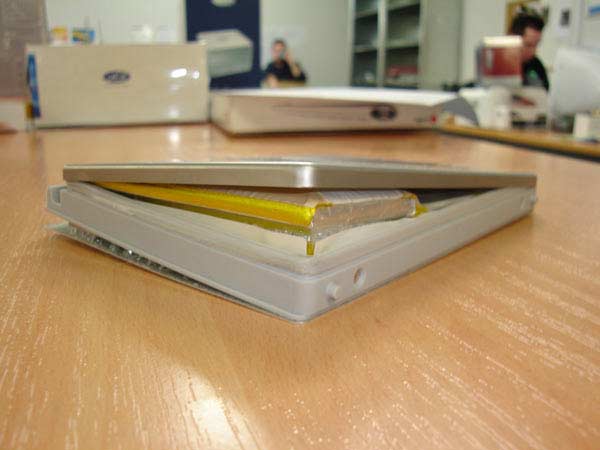
Who is the battery supplier?
Probably a good idea to avoid them...
Sad thing is that Apple gets the bad press over it.
Here's a much more disturbing photo of one of those batteries. It was posted on Accelerate Your Mac on June 15. -
Who is the battery supplier?
Probably a good idea to avoid them...
Sad thing is that Apple gets the bad press over it.
Here's a much more disturbing photo of one of those batteries. It was posted on Accelerate Your Mac on June 15. -
Re:OS X rocks
> First of all, OS X is a UNIX based operating system
Mac OS X is based on darwin, which is based on NeXT, which is based on the Mach kernel and contains code from the BSD implementation of a 'Unix-like' operating system.
> (with a perfectly good user interface layer like no other UNIX has) t
Only systems which are fully compliant with and of course certified to the Single UNIX Specification qualify as "UNIX" (others are called "UNIX system-like" or Unix-like). MacOSX, is UNIX-like.
> that is rock solid in comparison to any other desktop OS, that supports all modern standards that 99% of the computing world expects on a computer.
Where is Gopher support (I have it on windows, linux)?
Why doesn't the FTP client that comes with the system support uploading?
Why is the IMAP implementation (in mail.app) worse than Outlook's and thunderbird's (See sieving script issues)?
Why isn't there ANSI support in the termianl application?
Why isn't there a usable java implementation for the platform (MacOSX's java framework is completely broken for standard java UI elements)?
> And does nearly all of its tasks better than a comparable computer running the latest Windows OS.
I guess these are lies:
http://www.xlr8yourmac.com/archives/apr06/040506.h tml
http://reviews.cnet.com/Apple_Boot_Camp_beta/4505- 3672_7-31826794-2.html?tag=nav
http://www.macfixit.com/article.php?story=20060405 225344882
> Not to mention that you can run 99% of your UNIX programs on it.
Frigging hell, you've never had to deal with signals under MacOSX, or do all those terrible UI compatability hacks to get a GTK application working. It's a lot easier under Windows with CYGWIN.
> OS X. Because friends don't let friends run GNOME.
I don't like Gnome much either, tried KDE 3.5.2 (my prefered enviroment)? I find the entire desktop enviroment provided by KDE is quite adquate for most people's needs. Unfortunately MacOSX and KDE both fail at having a speedy browser (the default browser that comes with the system). This is where Windows wins. -
Re:Downward spiral.
Well, not to take the wind out of your sails, but Apple did provide daughtercard processor upgrades. In fact, they designed their 7500/8500/9500 computers just for this. The upgrades were simple, and, depending on which model you had, a great improvement in performance. Of course, there are third-party options being offered all the time for certain Mac models, even ones for which Apple does not/has not sold the upgrades themselves.
You may have (just barely) missed this period, as you entered right when beleaguered was the word du jour.
You can search to find more here. Note that Apple is an option as a processor upgrade option. Search and you will find more than a few examples. (Results pages are not static.) -
Re:5.1 sound output?
Yes, it has optical out and I just found this: http://www.xlr8yourmac.com/audio/Intel_CPU_iMac_A
u dio.html confirming that you can use it for 5.1 and 6.1. -
Re:Same Good looksThe concern of myself and many other mac users is the Photoshop/Illustrator/Final Cut/Shake performance.
Regarding Final Cut:Some reportedly won't launch at all, like Final Cut Pro 5 and Logic 7. I tried launching FCP 4.5 and it wouldn't run, saying that I needed an AGP card. I tried to tell it that PCIe video cards are much better, but it wouldn't listen.
There are ways to make it install and allow itself to be run, but I wouldn't be confident it would run smoothly until a Universal Binary is built. Reports have it that not everything will run under Rosetta. -
Re:Arts and Crafts time
Good point. Plus with an Apple product it's not as easy as ordering a new motherboard, processor, and RAM and then sticking it in the old case. I've got a PC100 memory Wintel machine that I could get a new processor, mobo, and RAM for the price of changing out my 128 simms for 256. But I've found upgrading processors on G4 towers to be a good way of squeezing a bit more good out of my initial investment. At work (they were PC only so I brought in my own Mac) I have an old 433 mhz digital audio mac that I upgraded to 1.33 ghz with an Other World Computing card (cost $200-300). The upgrade card features more cache than the original processor, so you really notice the speed improvement. Did the same thing with a 733 G4 tower (Quicksilver) I had lent to my nephew. He really notices the difference, and has a lot more luck with streaming video on web sites like ESPN. Here's a great site for user reviews of upgrades to old macs (processors, drives, video cards, etc.): http://www.xlr8yourmac.com/
-
Re:I'd be worriedSheesh. It's an Apple. Just remove the frikin panel being etched if you're going to do that. It's really not that hard. See?
-WS
-
Re:Front Row integration?
If you've hacked FrontRow to play on your other Macs, don't d/l the 10.4.3 update that came out today. It breaks the hacked frontrow. See http://www.xlr8yourmac.com/ for details.
-
Re:QuadG5 power user questions...
BUT.. this top end Quad G5 configuration has me astonished, especially the +$1650 nVidia Quadro FX 4500. I was thinking of investing in a nice 30in Cinema Display and a QuadG5, for applications like FCP, Maya, Shake, and Motion. But I wonder if it's really worth spending that kind of money on a video card, I mean jeez, that card alone is almost as much as a basic dualcore-2Ghz G5 CPU! Is this card going to really give a performance boost to make it worth that kind of money? It's not like I'm going to do the fancy tricks this card is capable of, like stereographic LCD glasses, dual 30in screens, etc.
Why not just wait for Apple to add the 7800GT to the BTO list? Given that it (mistakingly or otherwise) appeared in the specs, one can only assume that sooner or later it'll actually be orderable, and show up in the BTO list.
My office is already baking from the hot exhaust of my dual-1Ghz MDD with 4 drives, I bet a similar quadG5 config really will kick out the heat and suck up the power. It's 60 degrees outside but I'm still running the air conditioning because without it, my CPU heats my tiny office up to about 90 degrees even under moderately light CPU use.
Google for CHUD 3.5.2 and Nap mode and read http://www.xlr8yourmac.com/feedback/MDD_CHUD_feedb ack.html. My dual-1.25 MDD's nominal CPU temperature dropped 20-30 degrees after installing it and enabling Nap mode. (I only have 2 disks inside mine, but still -
Re:No firewire, USB 2.0
I think the MDD actually *does* have USB 2.0 (at least some models do), it's just that the OS X drivers don't support that specific USB chipset. I think someone had created some drivers that supposedly got them working a couple of years ago.
There's some information here about it. -
Re:I have to ask
There is one more reason. The machines doing real business.
Check http://www.xlr8yourmac.com/index.html , 64bit mathematica is disabled after yesterdays security update for OS X and Apple pulled automatic update right now. (If you have problem, check site, shows workaround)
So, e.g. a petrol company, university will apply the patch allowing hundreds of hours of processing power (money) lost?
Broadcast is even harder, you can't allow 1/10 sec downtime on some machines. -
Re:Why does the Mac version run much slower?
I've got most of the bells and whistles dialed down (one notch above the lowest possible terrain distance, for instance) and I'm rarely getting over 30 FPS in realistic playing conditions.
Nor do I think I'm alone:
http://www.xlr8yourmac.com/games/mac_wow_performan ce.html
It seems that a lot of Mac users are rather complacent with game performance, but I have a PC to directly compare with, and I smell that something is amiss here. -
Re:The specs on the Intel PowerMacBased upon the specs and pictures of the box the Intel PowerMac it is most likely an Intel Desktop Board D915GUX.
Actually, based on the specs you linked to, I think it's more likely an Intel D945GTP motherboard. The necessary features that the D945GTP has built-in (and the D915GUX lacks) are SATA-2 (945 chipset) and FireWire 400.
The D945GTP also accepts dual-core processors. I bet someone will needlessly benchmark a dual-core Pentium D OS X development system against a dual-processor G5 PowerMac.
-
The specs on the Intel PowerMac
Based upon the specs and pictures of the box the Intel PowerMac it is most likely an Intel Desktop Board D915GUX. This has the GMA900 onboard graphics adapter and DDR-2 memory that xlr8yourmac.commentioned. It also has the same layout as the photos of the PowerMac board.
-
Re:I don't know about "merging"Apple is producing PCs from next year. PCs with Pentiums and BIOSes. Yes, it's true. Yes, that's what's been announced. Yes, that's what's been discussed everywhere. Take a look at http://www.xlr8yourmac.com/ if you really don't believe me.
Sorry.
-
Re:OSX on generic Intel HW
First, Intel chips wont be replacing the G5's anytime soon. Benches of Tiger running on Pentium 4's with Rhapsody got destroyed by Tiger on a G5.
Do you have a link that backs up the latter claim? The article you link to is about Rosetta's emulation under Tiger on a P4 vs "native" G5, not anyone benchmarking "Tiger with Rhapsody" (however you'd run that, I assume you mean someone pulled out an old Intel Rhapsody disk running it on a P4 and compared it to Tiger on a G5)?And the quoted figures are actually quite impressive, an emulated (not natively compiled) app running on a new P4 will probably run about as fast as it would on whatever Mac the purchaser of the P4 Mac was replacing, as speeds seemed to hover around the 30-60% of a G5 range. Most Mac users do not have a G5.
Meanwhile, according to xlr8yourmac, native app performance on the P4 developer's box looks pretty good, better than a dual 2.7GHz G5 in some cases.
Not a bad processor. I have problems with a lot of what Apple's doing, but it does look like they're picking a decent processor and making it work.
-
No Openfirmware?There's no Open Firmware on the new machines. The developer docs say that apps requiring it won't be supported, and the developer systems from Apple just have a Phoenix BIOS on board. See http://www.xlr8yourmac.com/ for a breakdown.
Wow, talk about a step backwards. Isn't openfirmware the reason powerbooks sleep and come out of standby immediately (unlike my windows laptops... all of them take approx 5-15 seconds to wake up)
Apparently, the machines boot Windows just fine. No hacking required to install it at all, it seems.Does this mean they can dual-boot also? If so, the developer box sounds VERY interesting (ie, no iLife, but hey).
-
Re:openfirmware...
There's no Open Firmware on the new machines. The developer docs say that apps requiring it won't be supported, and the developer systems from Apple just have a Phoenix BIOS on board. See http://www.xlr8yourmac.com/ for a breakdown.
Apparently, the machines boot Windows just fine. No hacking required to install it at all, it seems. -
Re:Death of Mac gamesNo, it's a BIOS. And yes, he said Apple wouldn't do anything to preclude running Windows. Not having a BIOS would be a pretty significant preclusion.
It's a crying shame. Open Firmware on the Intel architecture would be a vast improvement. But it makes sense, with modern graphics cards requiring an Intel architecture and PC BIOS to start up. Apple would pretty much be guaranteeing a continuation of "Mac version" graphics cards if it went non-standard here. Apple would also not be able to take advantage of the huge amount of third party R&D in the PC market.
I assume you're one of the morons (hey, you started the insults) that was claiming Intel would be making PowerPCs right until the very end, correct? Look, sorry to tell you this, but Apple is going into the IBM PC clone business. It's sad. It's unfortunate. But that's what's happening. From now on, they're using two things to distinguish themselves from the herd: a different OS, and a passion for style. That's it.
-
OS X for a generic x86 PCAlthough everyone is saying that OS X won't run on generic x86 hardware, everything I've been reading suggests that it should be possible. There will be limitations, but so long as Apple doesn't have a special mobo built with some sort of "Apple verifier" that OS X will check, it doesn't look like a problem.
The devkit runs a P4 660, a stock proccessor that you can buy on newegg, it has Intel GMA integrated graphics, but will support existing (and future) PC video cards so long as the vendors have supplied a OS X driver. 533MHz DDR2 memory, SATA-2 hard drive. Firewire 400, USB 2, Pheonix BIOS. There is already a list out of wireless adapters that do and don't work with x86 OS X. I haven't read anything about the ethernet controller, but it is most likely a Realtek or something similar.
1)So best case senario, the x86 version of OS X will run on any PC with commodity hardware so long OS X drivers are available.
2)Mid case senario 1: OS X will require a certain Intel chipset (such as the 945G) and any mobo with that chipset will run OS X.
3)Mid case senario 2: OS X will require the same model Intel motherboard that Apple will be shipping with.
4)Worst case senario, OS X will require an "available to Apple only" motherbard and won't run on any other board.
Cases 1 & 2 would require minimal to no investment to get me running OS X on my existing P4 box. Case #3 would be something I would do with my next PC, but still very easy to manage. Cases 2 & 3 aren't even likely, or even feasible, beacause of upgrading issues. Case #4 would be the existing Apple lock-in.
Apple has been moving towards commodity hardware for years. The existing G5's use IDE hard & optical drives, a PCI bus for expansion cards, and 8X AGP. Now that Apple will be moving to an x86 proccessor, the only thing Apple could do to prevent OS X on a "Dell" would be a "Apple-Inside" chip.