Slashdot Mirror
Domain: pinouts.ru
Stories and comments across the archive that link to pinouts.ru.
Comments · 54
-
Re:Microsoft seem determined
That only makes sense if buying the Xbox Only version was cheap and easy. For sake of argument, lets say it is.
It will take http://pinouts.ru/ maybe a week and a half to post the specs, and some enterprising Chinese company will make a converter.
Or you could bread-board your own. -
HTC mini usb
I think it's interesting to note that htc developed a 12 pin connector compatible with standard mini usb cables and their connector, yet apple, who is supposed to be the father of all things innovative has to create a whole new proprietary connector to get 8 pins. http://pinouts.ru/images/htc_headset.gif
-
Re:Simply amazing
The game shown here would probably be easier if somebody hacked an origninal NES controller to the 9-pin connector and modified the program a little to read the new voltage values available with the extra couple of buttons.
No need to hack a controller, just use an SMS controller. They already use a DB9, are pin compatible with Atari, and they have two buttons instead of one. Or try a Genesis controller, they're mostly pin compatible, the extra buttons just have to be read differently.
-
Re:Just use micro USB already!
No reason? Here are the pinouts for the Apple dock connector. Are you saying MHL can replace them all? If the answer is no, then there is a reason.
-
Re:SNES9x source code should help
You can also find SNES controller, cartridge and video connector pinouts at pinouts.ru.
-
Re:Standard connectors? LOL you wish!
The EU regulation has an loophole, which means that as long as Apple puts a dock to micro-USB adaptor in the box they comply. As to the dock vs micro-USB issue, most people seem to be missing the fact that the dock connector does a lot more than USB. It also contains audio line in and out, component and s-video, serial, USB, and FireWire (not in recent ones). USB is a step backwards. A modern replacement for the dock should ideally contain display port or HDMI video and a switchable line out / S/PDIF or similar. Personally, I'd love to see Thunderbolt ports on mobile devices.
-
Re:Standard connectors? LOL you wish!
I'm sort of confused, what do you think the cable does?
Yes I can see that. On a small device like a phone or ipod there's only room for a couple connectors. Also each connector eats up space on the inside and cuts into battery life. Headphones are a requirement for the ipod and a high value connector on ipad and iphone also. Apple has added one more connector for all the other uses. The current connector does at least:
- power
- usb
- firewire
- stereo audio out
- stereo microphone in
- volume up and down
- track up and down
- play/pause
- menu
- composite video
- internal speaker disableI suspect you're overlooking all the other functions on that cable, and seeing it as merely a power/USB cable, when it's much more than that.
(full dock connector specs at http://pinouts.ru/PortableDevices/ipod_pinout.shtml)And the accessories you're bemoaning are using a connector that is ten years old. Lets look at some other 10 year old connectors, like scsi, ps/2, serial, adb. None of those are a standard jack on new hardware anymore. It IS a shame to have just bought an accessory that uses a connector that is about to be vintage'd, but it has to happen sooner or later. Let it go. Replace a few old accessories. Buy a new cable or two. And enjoy the next ten years before it inevitably happens again. Go sit on your porch and shake your cane, "Back in MY DAY we didn't have that new-fangled dock connector! All we had was this BIG OLD one, and we LIKED it!"
Apple just did a similar update with their power connector, the magsafe. It didn't change function much, just got a little slimmer. But Apple is selling an inexpensive adapter so you can continue to use your old spare power brick or charge-from-display. I suspect they will do something like that with the dock connector, and there will likely be 3rd party adapters available also. Such an adapter won't work with most of your "drop-in" accessories, but that can't really be helped. Most of those had problems anyway when a new model of ipod came out, and many of them addressed this problem by having changeable dock inserts. Maybe your accessory manufacturer will release an adapter kit.
On a somewhat off-topic note, I was hoping Apple was going to upgrade the magport so the center pin was optical for a digital link. The second power adapter I keep at home could have had my external display, ethernet, usb hub, backup hard drive, and speakers all plugged into it. When I got home I'd snap in just the one magsafe cable and be instantly attached to everything. Instead, I come home and have to plug in six cables, several of which really don't handle frequent use well. I wish I had a dock connector for my laptop like I do for my iphone.
-
Re:Standard connectors? LOL you wish!
Audio In, Audio Out, Video Out, Auto Power Off (depending on resistor value), Dock detection, and others...
-
Re:11 pins, free of charge
Look at the pinout:
http://pinouts.ru/PortableDevices/ipod_pinout.shtmlI'm going to guess with a high confidence that they are losing analog video pins (3), Firewire pins (6, including 12V power pins), and probably consolidating some of the ground and reserved pins.
Another connector redesign issue may be to address some shielding issues - as they move to high frequency HDMI video connections, the original connector may have had some challenges there.
-
Re:Standard connectors? LOL you wish!
Do any of the USB connectors have the other 15 (ish) pins needed to do everything else the dock connector does?
You *do* realize it's not just a 30-pin (or now 19-pin) USB connector, yes?
-
Re:Doubtful
A question remains: will companies like Apple, who have used proprietary chargers and connectors for years despite the prevalence of the USB standard, adopt the new cable?
I can't imagine they will, even with their recent EPEAT flip-flop. What I can't figure out is if they are just trying to keep their products distinct or they don't like it when someone else has a really good idea or what. They've already chosen Thunderbolt as their new adapter of choice, and while they'll never use that for the iFamily of products (since so many people won't/can't buy machines with that connectivity), I can't imagine they'll cave to the USB standard now. I do hope I'm wrong though.
Their current connector does a lot more than USB, so probably no.
-
Re:Do Russians contribute anything useful?
they have pinouts for everything!
-
Re:iPod was a side project
Why develop a proprietary cable instead if using USB, or even their own Firewire?
http://pinouts.ru/PortableDevices/ipod_pinout.shtml
The dock connector allows a dumb,cheap device to control the iPod (volume, next song, previous song) just by sending the correct electrical signal to the correct pins and has pins for line level sound in/sound out and video. How do you propose you cheaply make accessories that work with the iPod by using USB? It would be a lot more expensive for an accessory maker to implement the functionality through USB.
And a simple proof for that is that no media player has a USB remote interface.
-
Re:You really have no idea what you are talking ab
For years they pushed AppleTalk over TCP/IP, even after OS X. Apple supported Windows networking and Samba
SMB support has been built in since 10.3
Firewire over USB.
I have firewire ports on both my Dell and Sony. Firewire is not "Apple's" standard, it is an IEEE standard and Apple is part of the licensing pool. Just as there is a licensing pool for USB.
They have a custom Dport connector (proprietary connector on open standard)
What is a DPort? Do you mean DisplayPort? The mini-DisplayPort that Apple uses was accepted by VESA.
iWhatever has a proprietary USB connector.
So what "standard" is there that is able to duplicate this functionality cheaply?
http://pinouts.ru/PortableDevices/ipod_pinout.shtml
Or do you expect a $20 boom box to implement a USB host controller?
Apple's been actively rejecting the standards other people use, open or otherwise. There is no HDMI on Mac products,
The Mac Mini has an HDMI port. All other Macs have DisplayPort. DisplayPort is not an Apple proprietary connector. Dell and other manufacturrers have been selling monitors with DisplayPorts for years.
No VGA ports (every projector has a VGA port, mac users just couldn't connect to them without headaches),
You mean "headaches" such as using a DVI to VGA connector? In fact it has just been recently that at least Mac Minis didn't come bundled with DVI to DisplayPort adapters.
tried forcing ZipDisks when everyone was using floppy disks,
Only a few Macs had optional Zip Disk support. All Macs came with 3.5" disk drives up until the iMacs.
2007 Macs still did not have +/- DVD writers (they choked on -R blank DVD's)
According to this site:
http://apple-history.com/Every Mac introduced in 2007 had built in DVD +/- drives
Firewire and Thunderbolt are not open standards, they are proprietary and Apple charge a fee for their use.
Apple is part of the licensing pool for Firewire. The licensing pool and operates under FRAND. Just like most other standards (mpeg, mp3, H.264, etc,).
Thunderbolt was created by Intel.
That's why everyone uses USB and the laptop I just bought does not have a IEEE 1394 connector.
Well both my Dell and Sony have firewire. There is also a fee to use USB.
If you want to legally sell something with an Ipod connector (I.E. a car stereo or Ipod dock), you need to pay Apple a licensing fee. So not open, in fact, that's almost as far from open as you can get.
If you want to legally use a DVD Player there is a licensing fee....
I think you need to start taking your medication again, you're clearly seeing things that aren't there.
You're not exactly batting a hundred....
-
Re:iPod was a side project
Why develop a proprietary cable instead if using USB, or even their own Firewire?
http://pinouts.ru/PortableDevices/ipod_pinout.shtml
The dock connector allows a dumb,cheap device to control the iPod (volume, next song, previous song) just by sending the correct electrical signal to the correct pins and has pins for line level sound in/sound out and video. How do you propose you cheaply make accessories that work with the iPod by using USB? It would be a lot more expensive for an accessory maker to implement the functionality through USB.
-
Re:Yes and no
How come I can't plug my MP3 player into my car? (Hint: If iPods were Mass Storage Devices and they used a regular USB cable like mine/most others do, this would work.)
Because people like to use the Library functionality of the iPod. I had a 4GB MP3 player that every time you went to play by Artist it had to scan the whole thing and figure out what was going on. (and it wasn't even full) I couldn't imagine how long that would take on a 120GB iPod.
All of the playlists, genius playlists, library, etc are handled by iTunes.
As far as the cable, have you seen what the iPod Pinout does? It's not just USB data.
-
Hooray, nit-picking!
...difference between GB and Gb.
Let's pretend for a moment that the suffix was correctly capitalised. Was that so hard? But you feel it necessary to write personal insults because of a misused "shift"? Wow. Definitely appropriate reaction.
[RE: 5 wires]... Mini-USB
Yes, that would be a plug, note I said "wires". That 5th pin (if it's present at all) is always connected to ground in reality and never appears as a wire. It's the one whose role is being replaced by a protocol change in USB 3.0 because nobody ever implemented it. The cable itself always has 4 wires.
[RE: disingenuous]... perhaps you don't understand the word?
The author knows a reasonable amount about Intel involvement, including their presence in the USB working group. Despite knowing this, you are of the opinion that the author genuinely avoided learning that Intel were the originators?
Disingenuous: Adjective: Not candid or sincere, typically by pretending that one knows less about something than one really does.
Still seems applicable.I am quite confident you'll reply again and am looking forward to reading it. I promise I'll make an effort to check back too, though I have a tendency to lose interest with those who can't tell the difference between wit and Tourette's Syndrome.
-
Lots of problems with your Codec
Claims of 5GB/s aren't even backed by the USB working group which says 3.2GB/s will realistically be the upper limit.
Clearly you fail to understand the difference between GB and Gb. Reread the article, and then don't come back to comment until you're a nerd.
All existing cable and plug combinations remain backwards compatible, but the article claims otherwise, there are only some introduced permutations that won't work.
The author first claims it won't work, then claims that they will. It seems like the first time he meant to say that you won't get the speed advantage of USB3 if you plug into USB2. You are both wrong.
And when did USB 2.0 become 5 wires?
Mini-USB, please try to keep up, if you can. And I know you can't.
The author attacks Intel about foot-dragging on the USB 3.0 spec rather disingenously since it was Intel that lead the charge on USB 1.0, 1.1 and 2.0. It was their technology originally.
There's nothing disingenuous about it, and you don't understand the situation if you try to apply that word. Or perhaps you don't understand the word? The foot-dragging is only made more apparent due to intel's backing of LightPeak. Are you paying attention to the same world as the rest of us?
But what can one expect from a technology website that censors the word 'assuming' (comes out as ***uming, I shit you not!).
The article is crap. Unfortunately, you did not pick on its weak points except relating compatibility, and then you failed. Try harder.
-
For the trolls asking "why not just use USB?"
See:
http://pinouts.ru/PortableDevices/ipod_pinout.shtmlhttp://en.wikipedia.org/wiki/Dock_connector#Apple_30_pin_dock_connector
In addition to USB signals, the dock connector provides, Left/Right Line in/out, Control signals to/from accessories like radio clocks, Video out, S-Video Luminance, S-Video Chrominance output, VGA out and it also used to provide firewire data signals on older iPod models.
-
Re:Not surprising
Maybe you aren't using Powerchute, because if you were you would definitely need an APC cable. In fact, the smart features require a different cable from the "dumb" Back-Ups.
Not true for the "smart" units; RX and TX are pins 1 and 2 on the UPS DB9 connector. If you're using powerchute then short 1,4 and 7,8 on the host side so it will "detect" the cable. It's still RS-232, the cable isn't magic. Here's a handy table.
-
Re:secret resistors abound
It looks more like a way to signal to the iPhone that it can go ahead and "fast charge" by pulling 1A, or "slow charge" by pulling 0.5A. They just didn't tell anyone about how to do it.
As for your dell power supply, just get one of those "ATX power" extension things, cut in half, "scramble" the wires in the right way, get a working dell PSU, and then start selling it. see http://pinouts.ru/Power/dell_atxpower_pinout.shtml for the pinouts.
-
Re:Advice for Stella users
I don't think you are right about that.
Atari joysticks and paddles do not use a serial interface. Just because they use a DB-9 does not mean that they are serial devices.
The Atari Joy stick uses four digital switches for the direction and one for the fire button.
The paddles use pots that must be read using and analog to digital converter.Here are the pin outs for the Atari port http://pinouts.ru/Inputs/JoystickAtari2600_pinout.shtml
And here are the pin outs for the DB-9 serial port http://www.quatech.com/products/images/db9pinout_male.gif
Yea I built my own joystick using mercury switches and PVC back in the early 80s so I hacked these bad boys way back when.
I also built a wireless one using DTFM encoder decoders chips and two cheap walkie talkies back in the day as well.Not legal but I don't think anyone cared. -
Pinouts.ru
Check out the Videogame Connector Pinouts at Pinouts.ru. Many of them include suggestions for connecting them directly to a PC.
You could also get something like the Ultimarc U-HID or I-PAC. Many MAME users have been using these for years to adapt the controls in their arcade cabinets to work with PCs. You'll have to wire up a connector to let you plug in whatever kind of joystick you want but the flexibility means you can use it with several different controller types.
-
Re:Use the Coax as a wirepull for the cat5
Only two pairs are used in standard duplex Ethernet. The other four conductors are occasionally used for Power over Ethernet. See the pinout.
That was true only on 10/100BaseT. Gigabit Ethernet uses all four pairs, bidirectionally. PoE uses the same wires as the data, adding a constant voltage to the differential signal.
-
Re:Use the Coax as a wirepull for the cat5
Only if you are using 10/100. Gigabit ethernet uses all 8 pairs.
-
Re:Use the Coax as a wirepull for the cat5
I'm no expert, but isn't cat5 4x twisted pair? So eight conductors, not four? Glancing at a cable I have handy, it appears to have eight contacts. I assume this means a differencing technique at the receiving end? Or is there actually a common?
Only two pairs are used in standard duplex Ethernet. The other four conductors are occasionally used for Power over Ethernet. See the pinout.
-
Re:Good news...
The proper way to trick a RAZR: http://pinouts.ru/CellularPhones-A-N/razrv3_charger_pinout.shtml
-
Re:I hope Apple adopts this
Barely. You'd think it would be as simple as supplying +5VDC and ground to make it charge, like most other mini-USB-equipped devices with a rechargeable battery. But in Motorola's infinite wisdom, this will only result in the screen displaying "Unauthorized Charger."
According to pinouts.ru, and my own experience, Motorola's mini-usb plug is anything but universal. It takes some cross-pinning and a resistor to make the phone charge from a dumb +5VDC power source, or the correct driver installed on an attached computer.
-
Re:Mini-USB Lockin, there are ways
You might be able to modify your Garmin charger to work with the Motorola by adding a resistor. You could even do the mod in a USB extension cable.
-
old concept
already been done http://pinouts.ru/
-
Re:instantly slashdotted
It was - someone already mentioned Pinouts.ru, for example. Still, it's a more than welcome adition. Searching for pinouts can be very frustrating sometimes, specially for discontinued hardware/parts.
-
Re:A couple of points (pins!?)
The real strength of something like this (versus various otherwise-great resources such as pinouts.ru is that once you've accomplished the difficult task of locating, implementing, and verifying a pinout, you can just go ahead and post your results so that the rest of the world doesn't have to duplicate your effort.
Please don't treat wikis as just a resource to be consumed. Don't assume that someone, somewhere, is tending the light at the end of the tunnel. Contribute what you learn.
-
No standard connectors in 1983
The PCjr's serial port, monitor port, joystick ports, keyboard port, and others used different connectors from the IBM PC. In fact they were not only non-standard connectors, but completely proprietary connectors that couldn't be found on any other computer.
People, this is 1983. All connectors were "non-standard". Nowadays we're used to a standard connector and pinout for RS-232 and parallel ports on the back of PCs. But in 1983, exactly one model of computer used them: the IBM PC. It didn't more than a couple years for people to realize that the only way to compete with the IBM PC was to be extremely compatible with it. But when the PC Jr. came out, everybody (especially IBM) used business and sales models that paid no attention to the idea that computers and their components could be commodified.
Small qualification: the use of 25-pin D-shaped connectors with specific pinouts was part of the RS-232 standard. But 25-conductor, straight-across cables cost, and you actually didn't need most of those signals for typical applications. So making cables that would connect some random computer to some random modem or serial printer was a serious black art. There was even a book on the subject.
(Jerry Pournelle once wrote that he used internal modems because he could never remember the pinouts he needed to make cables. But by the time he wrote this, RS-232 pinouts had been standardized and cheap pre-made modem cables were in all the stores. Pournelle is the original know-it-all ignoramus computer pundit.)
Parallel printer cables were even worse. They all used the Centronic de-facto standard on the printer side. But to save money, everybody used 25-pin D connectors at the computer side, and the way the 36 Centronics signals mapped to those 25 computer pins was different for every manufacturer. It took IBM to standardize the pinout, and also to standardize making the printer connector female so you didn't accidentally plug a modem into it.
-
Re:Not just better than the current i-phone...
A couple of comments:
- The cable can't be changed - it isn't just a USB cable, it transfers many other things too
- Support for replaceable cards take more space than just adding the flash in the phone. You need a slot, room around the slot, pins etc. I've got a replaceable card in my current phone, but it's been inserted since I bought it.
- MMS - I sent maybe two of them last year. Email is a lot better. I wish there was an easy way to send my pictures as email from my N95, but the builtin email client sucks to bad to be used and I can't find the pictures inside the gmail app I downloaded.
I agree with you on many points, though - so I don't have an iphone yet, just an ipod touch:
- Bluetooth. I don't care about file transfer, but I do care about audio profiles, syncing and tethering
- Cut and paste. I have a password management app that syncs with my mac, and typing strong, generated passwords in the web browser is more fun than I want
- Notifications and/or background apps. I want IM
- And I want skype and Gizmotalk
That said, what I like about the iPod (and thus iphone, I guess), is that while it doesn't try to do everything (like my Nokia) it does what it does well(unlike my Nokia). Web browsing, email, media are all much, much better than on my N95- and the app store is light years ahead on the situation on Nokia with random downloadable apps everywhere which I can't really update and have to find/download whenever I upgrade the firmware.
-
Re:Pretty easy list
The iPod connector itself already has a USB port stuffed into it, along with TTL serial, dedicated power, audio in & out, and some other stuff:
http://pinouts.ru/Devices/ipod_pinout.shtml
For those of us without X-Treme soldering skills, here's an easier way to get at them:
-
Re:And why the hell do I need a driver for this?
I looked and I stand corrected, apparently it depends on the phone, directions and schematics are available here: http://pinouts.ru/CellularPhones-A-N/razrv3_charger_pinout.shtml and here: http://krhainos.tk/motoplug.jpg
Aaron Z -
Apple connector
While I too wouldn't mind a more standard charging connector, I see no reason why a mini-usb for getting power, AND a custom plug with more ability than simply power and a slow one to one data comm protocol for one host (the PC)
http://pinouts.ru/Devices/ipod_pinout.shtml
That link shows both the iPod and iPhone connector. I am actually in the process of designing some nice attachments to the iPhone using a combination of USB, firewire, and a ttl serial port.
None of those things outside of the one USB connection would be found in USB.Mini-USB won't let me get composite video out, or audio out to plug in my car stereo, or audio IN.
However, the practice of bastardizing the USB jack so it is only useful for power, and rare (or nonexistent) data purposes, totally needs to die.
I mean, I can understand if the phone doesn't Have those abilities at all, then of course the USB jack shouldn't. But just using iPhone as an example, plugging it in with the USB connector only makes it show up as a camera device to access pictures. Nothing else. And those antics are BS and should go.
-
Re:oh-so-special?
Excellent point. Just to head off other people talking out of their ass (wishful thinking, I know), the pinout for the iPod/iPhone connector ought to be required reading before commenting on what it can and can't do. That connector provides interfaces for USB and Firewire, audio in/out, video out (composite and s-video), serial, and dedicated power.
It's not an ideal situation, but a single cable covers just about every possible use case. That's a big deal, ergonomically, and it means Apple can standardize internally on an interface across multiple product lines.
It's unfortunate: the knee-jerk reaction to "we need a universal charger" will miss the opportunity to standardize on a SINGLE interface cable for mobile devices, rather than using USB for power and data, a headphone jack for audio output, and who knows what proprietary arrangement for audio input and video output.
-
the oh-so-special adaptor is more than just USB...
To be fair, the iPod dock connector carries more than just USB. And the USB dock cables work on pretty much any model iPod.
-
Re:USB connectors
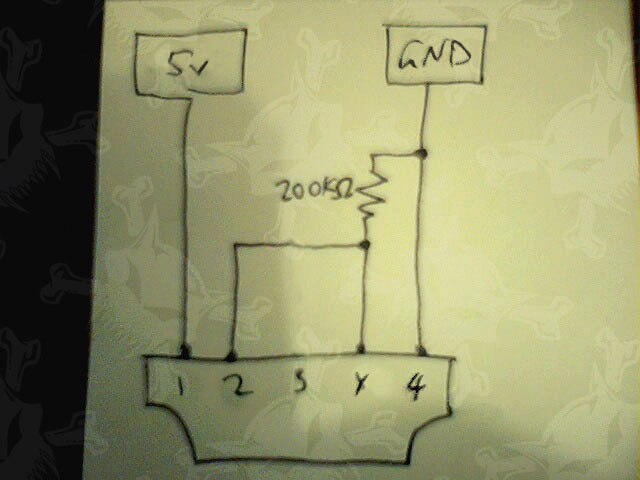
Motorola's "USB" cables include a 200kOhm resistor.
-
Re:USB connectors
Someone's already done that reverse engineering for you: http://pinouts.ru/CellularPhones-A-N/razrv3_charger_pinout.shtml.
-
Re:But...
Be careful; there's mini USB and faux mini-USB. The Motorola RAZR, for example, has a mini USB connector but plugging it into a garden variety USB cable will NOT charge the battery.
-
Re:USB is the answer
The iPhone comes with a dock connector which plugs into a USB port. This in turn plugs into a 5v USB wall wart, if you don't have a computer's USB port handy. And this cable can be had on amazon.com for 4 dollars. In other words, you're missing out on a phone that a lot of people like because of the hassle of carrying around a cable that is USB at one end rather than both ends.
I'd also point out that in this case USB does not do "everything these idiotic proprietary connectors will do AND MORE." Here's the pinout. The iPod / iPhone doc connector standard has dedicated lines for stereo audio both in and out, composite and S-video out, 3.3/5v, 5v, and 12v power, device type, and Firewire, USB, and serial connector data. Basically, the dock allows for both Firewire and USB operation, and direct a/v in (and out!) without additional expensive encoders and decoders. It's a perfectly reasoned engineering response to being in a mixed computing environment with an audio and video entertainment product.
I too am sick of devices which don't charge over USB. But decrying the iPhone over a 4 dollar USB adaptor cable seems like you're howling at the moon for being so close. There are a million reasons to decry the iPhone over anticompetitive practices... the cable seems like the least objectionable.
-
Re:USB is the answer
Too bad Motorola phones won't actually charge on a USB connection. You need to add a resistor, or it'll light up, refuse to charge and shut down.
-
Re:IDE Compatibility Issues
I also have a few no-moving-parts machines running with various cheap Chinese CF-to-IDE adapters, some of which are a few years old. They are all, unilaterally, quite slow. For what they're doing (a web browser for Thottbot, a processor for audio, and an antique 386 laptop running antique Slackware), speed isn't important -- and the 386 will obviously not work with DMA anyway -- but it'd be nice if they booted faster.
Which pin should I be investigating at to see if this might be part of the problem? Looking at a CF pinout doesn't show me anything obvious.
-
Re:This is going nowhere.
pins x & 4 are shorted (actually a small resistor) at the phone end on a Moto USB charger. You can easily mod a standard one to work, there's instructions on the web. E.g. http://pinouts.ru/CellularPhones-A-N/razrv3_charger_pinout.shtml
Other similar phones use different but similar schemes. -
Re:No offence,
Much as I hate replying to my own post, I dug this up and then forgot to add the link: http://pinouts.ru/Devices/ipod_pinout.shtml. Useful if you feel like getting a little hacky; interesting even if you don't.
-
.ru
http://pinouts.ru.../ sounds just like the site I'd rely on when hacking my $500 iPhone... [pause]
-
Re:Block Emulation in Compact Flash
Sadly, I can only provide a few tantalising hints. Not because I'm sitting on the information, but because very few people have written about this, and I haven't yet tried it myself.
Wikipedia on xD cards
Instructions to fit an xD card to a Mattel Juicebox
A comment on LWN from Wookey, who knows a lot about flash
xD card pinout
My best advice is to ask people on the linux-mtd mailing list for specific details. -
Re:zero
You mean the video camera plug? Like this?
If that's what you mean, then you can cross-reference that diagram with this one.
Note that there is a mono version of that cable as well.