Slashdot Mirror
Domain: quietpc.com
Stories and comments across the archive that link to quietpc.com.
Comments · 88
-
Re:What I would love to see...
Ryzens don't run hot but you do need to pay attention to the TDP as always. Now we are seeing some fanless Ryzen designs coming into the market. Looks like the Ryzen 3 2200U would be fine in a NUC form factor, with its 15-25 Watt power envelope. A respectable 2 core/4 thread part. I haven't seen any Ryzen NUC-like offerings yet but there seem to be a lot of folks asking for them.
-
Re:Is this a joke?
I loved them because they were 1.5v rather than 1.2 volts.
-
Re:competition
Try EBL. Same tech as Eneloop, larger capacity, lower charge cycling.
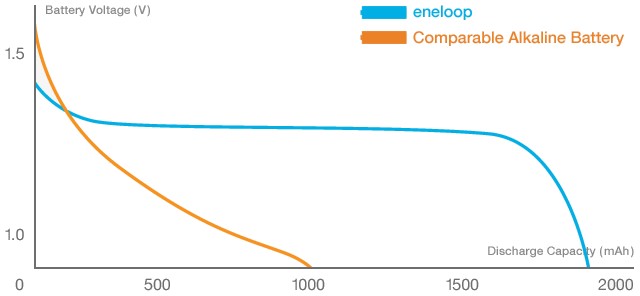
Alkaline batteries are terrible, anyway. They start off at 1.5V, then immediately drop to 1.2V in a steep discharge curve. Then they slide down until they're dead at 0.8V. NiMH start at 1.2V, hold roughly level for like twice as long, then suddenly fall off a cliff.
This is pretty representative. Lithiums go from like 4.1V to 3.5V or so immediately, then hold level for their entire discharge cycle, before finally falling off sharply. You can greatly extend the life of Li+ or Li-Po by halting charge at the high end of their stable voltage curve--basically at 95%-98% charge capacity, instead of going to 100%.
Just say no to Alkaline batteries.
-
Re:Sure
Fanless computer that can definitely run Windows.
-
Put quiet fans in.
Put quiet fans in. Noctua are the probably the best large fans - for use as CPU, PSU and case fans mostly, my Noctua fans have been going for many years now. I had a heatsink so big on my previous 95W quad core that it didn't even need a fan!
Video cards can also be adapted to take quiet fans but that's not always easy. Either replace the PSU fan or the PSU.
CPU and GPU fans thresholds can usually be altered to make them quieter when idling. (sometimes via the BIOS menu).
See sites like http://www.quietpc.com/ and http://www.silentpcreview.com/
-
Can you break it in half?
With a ~150watt GPU, plus the rest of the system, you are going to have quite a time with heat dissipation in any case that is sufficiently waterproof. Even fairly impressive looking passive heatsinks are surprisingly feeble compared to the usual 'few heatpipes, bunch of fins, actual airflow' designs that normal PC hardware uses. Even if you can add enough of them to your computer's case, you still need an excellent thermal path from the CPU and GPU to the case(for reference, Zalman released a somewhat ridiculous case for this purpose a number of years back. As you can see from the photos, the design requires a pretty substantial number of custom heatpipes for the CPU and GPU to be in meaningful thermal contact with the big passive cooler side panels, while a custom PSU had to be used to keep that part cool. It also cost $1,500)
You may also run into trouble, even if CPU and GPU are OK; with high internal air temperatures: most PC gear has a variety of other heat sources(basically anything with electricity involved, VRMs, motherboard chipsets, RAM, etc.) that are typically ignored for water cooling purposes; but which depend on a modest flow of reasonably cool air to stay within their limits. A fanless PC with decent convection might be OK; but a sealed box isn't going to cut it.
If you can get away with it, your best bet would likely be breaking the problem into two parts: the sealed computer case, with waterblocks on the CPU and GPU, and a radiator with fan for cooling the air sealed in the case and keeping it moving for the benefit of lesser components; and the radiator module, which pumps coolant back into the computer case and cools the heated coolant coming out.
This should allow you to fully seal the computer side of things(with the exception of the necessary data and power connections, for which IP-rated connections are available, and the input and output hose fitting) without it cooking and dying; and leaves only the radiator, pump, and possibly a fan outside the sealed case in the radiator module. Given the demands of vehicle engine cooling and the common need for fully submersible pumps, both are available in very waterproof versions, and the heat dissipation of the radiator should actually improve if it's being sprayed down.
If cold is a concern, you'll of course need to use antifreeze in the coolant, and a temperature sensor in the computer module that either activates an internal heater, reduces coolant flow rate, or both, to allow the computer module to remain at a safe temperature. -
Zalman heat-sink case
A computer case that doubles as the heat-sink FTW!
-
Re:10 yr warranty hah
You just need to increase the surface area.
eg: Fanless heatsink for 95W TDP CPU's: http://www.quietpc.com/nof-ice...There are a few cases with integrated heat sinks capable of 95W CPU's: http://quietpc.co.uk/st-fc10
-
Re:was annoying on XBMC for me
Probably not a terrible idea - don't they tend to have lower power consumption / run cooler? I got this thing for my xbmc box;
http://www.quietpc.com/products/vga-cards/msi-n210-md512h
Fanless, which is nice for noise.
-
Simple server
SuperMicro X7SLA-H board (E150 when I bought it more than a year ago)
A couple of WD Greens(E100 each at the moment)
A low power silent PSU (E100) (WARNING: this one has no ground and therefore no decent surge protection. Always combine with an external surge protector)
Some RAM that fits (E50) (FreeNas advises 1 GB/ TB of harddisk, but will function perfectly under low loads with much much less)
A case (free if you have one idling in the attic)
FreeNAS (free).
Total: E600 for 3x 1,5 TB (3Tb under raid 5), expandable quite a bit with PCI-E Sata cards (E50 for 4 devices. Raid controllers are overrated for home use. Soft raid gives les trouble if the hardware dies) -
Re:short answer: you don't, go for slow, silent fa
I had a similar - if completely different problem. I got fed up trying to work with the constant whirr of my GPU/CPU fans coming from my desktop PC. After a bit of experimentation (replacing fans with quieter ones), I finally plumped for some of this stuff, and the results are pretty impressive. If you're an extreme overclocker it's probably not for you, but for everyone else it's a godsend!
-
Storage
Perhaps not the most creative use, but it seems every single item I connect to my PC needs a different cable - mostly USB, but there are so many versions to choose from these days. Plus other stuff like headphones, a portable hard disc, spare batteries for cordless mouse etc. Generally I'd got a pile of bits and pieces centred around a desktop with 7 empty 5.25" bays.
I've got a few of these: http://www.quietpc.com/gb-en-gbp/products/caseaccessories/kama-cabinet-abk - they're just little storage drawers, but they're helpful for organising all the bits that go with the PC.
-
Silent HDD coolers
I only ever use the 5.25" bays, and find the 3.5" ones useless.
For example:
http://www.quietpc.com/gb-en-gbp/products/harddrivesolutions/smartdrive-neo
takes a conventional 3.5" disk, and both cools and quietens it.The effect is quite dramatic: I cannot hear my PC at all.
(I already put a silent CPU heatsink in, and a very-quiet PSU). -
Neat USB-to-HDD (IDE/SATA) gadget
I use a Scythe Kama Connect 2 USB gadget. It plugs straight into SATA, normal IDE, and laptop IDE drives. You connect the other side to your PC with USB2, and plug it into the mains. It's the easiest way I've found to read old disks - no need to open your case, no need to worry about mounting the drive. (The drive & adapter just sit on your desk).
And on re-reading what I just wrote it sounds like an advert. So I ought to clarify that I don't work for Scythe, QuietPC, or any of the other companies involved. I'm just a happy owner of one of these (and we've got a couple at work, so it's not just me that thinks they're good).
-
Re:Calculations are a bit off
Bwahahahaha! Come, join us on the dark side! Your descent into madness has begun!
BTW, there is a specialist retailier in NZ: http://www.quietpc.com/nz/. Another good shop is http://www.ascent.co.nz/, as they have a huge range of computer accessories. -
Re:How About A Power Consideration?
I want to upgrade my graphics card, but my options are limited without having to upgrade my 300 watt power supply
You could look for fanless video cards; they're probably low-ish power since that's less heat to lose efficiently.
Or read The Techreport's power and noise page in their 6800GS review. None of them topped 300 watts. -
The day I killed TWO pcs...
(Disclaimer: I have built dozens of systems and am normally very competent)
OK, this was very late (2:0am) and I was EXTREMELY tired - DON'T mess inside pcs at 2:00am, especially when tired...
I decided to install my shiny new Zalman Super flower cooler into the kids computer as it was in the living room and quite loud. I had to remove the memory to install the cooler, which I did without a problem. When I was re-installing the memory, I noticed that the cooler fins were fouling one of the memory sticks, in fact I had to kinda bend some of the fins out the way to get the memory in. Somehow, the fact that the memory was touching the cooler fins didn't register as being significant...
I turned on, and BANG!
OMG! I realised what a VERY stupid thing I had just done...
What did I do next?
well, I had to determine what parts had blown...
Memory? CPU? Mobo? so of course, I decided to test the easiest thing first, so....
I took the memory stick out that had been touching the fins..... and installed it into my primary computer!!! (All rational thought had obviosuly looong gone!)
I turned on my main machine - nothing. OK, I thought, that memory is bad. I'll put the original memory back in my primary machine...
Turned on, NOTHING!
At this point, the full horror of what VERY VERY VERY stupid things I had just done hit me. I looked closely at the memory I blew up, and there was an actual hole burned in it and several melted tracks...
I ended up replaced two motherboards, two cpus and 4 memory sticks - I just didn't know what parts were safe and didn't want to risk blowing anything else up. I know that I definetley killed the CPU, memory and mobo on the first computer, as each had melty-burney bits on them - in fact, there was quite an impressive hole in the cpu!
The zalman ended up in the trash too...
Upside was I got two much faster systems. It was a very expensive mistake. -
Re:sorry to be offtopic
but has anyone know how/tried to silence a dual opteron box?
someone said earlier in the comments that if you had a big enough heatsink, you could make any system fanless.
Really big heatsinks. -
Re:On a related question: which video card?
You can passive cool up to a 5700 (some here) using one of these.
So, a silent card with 256MB that should pretty happily play HL2. Most of the models have dual-head, some have video in/out too. -
Re:Solderless is not the way to go
Of course, you can always install a dashboard like Avalaunch and change the voltage on the fan to slow it down and reduce the noise a bit, although i'm not sure what happens when you boot into XBMC or whatever. I don't bother because my 250Gb HD is probably louder, and my sound system even more so
Of course, you could just replace the fan if you are that bothered - if I remember correctly they are just standard 80mm PC fans. Maybe something from Quiet PC or similar? -
Re:Cooling
"...and the box sounds like a jet-engine taking off..."
Have a look at Quiet PC - they have a huge range of components and fans specifically aimed at reducing noise. I have just invested in some case fans myself after (not?) hearing them in action in a friends recording studio. -
Re:SIlence is a pipe dream for me
Yep. Here. I have one. Combined with a quiet CPU cooler the only way I can be sure the machine is on is to ping it.
-
Want a completely silent PC?
Zalman have brought out a computer case that is completely silent - no fans or moving parts of any kind, which means no dust. Has support for P4 and Athlon64 (but no Athlon XP sadly).
-
Dynamic sitehere is the contents.. It goes without saying that even a moderately fast CPU these days requires a fast-spinning (read noisy) fan to avoid the risk of overheating. Combine that with a PSU fan, GPU fan, chipset fan and one or more case fans and your average PC can so easily become a major distraction. And it's not just the sound from fans that can cause annoyance. A high proportion of the noise created by PCs can also emanate from the hard disk(s), particularly while 'seeking', or from any optical drives that have been installed. Just imagine then trying to follow the dialogue in your favourite DVD movie with the constant din of your computer in the background.
It doesn't even have to be a particularly loud sound to be distracting - a relatively quiet noise containing a strong tonal component such as a high frequency whine or a low frequency hum can be just as irritating to some people. Fortunately, there are now numerous noise elimination products available to purchase, either as add-on components or devices that replace the existing cooling fans in your system - these components are designed to reduce the sound of a noisy PC to barely a whisper.
Sounds too good to be true? Well, specialist component supplier QuietPC certainly doesn't think so and has provided us with a range of silencing products for testing. The effectiveness of each noise-reducing component has been assessed subjectively based on the different acoustic features in each instance, and also from noise measurements taken using a high-quality sound level meter.
So, if you fancy the idea of creating your own near-silent PC but are unsure of the best place to start, or are just keen to learn what the latest IT noise control technology has to offer, you should find this feature interesting.
-
Please learn how to use links.Please learn how to use links.
<a href="http://www.quietpc.com/uk/harddrive.php#hdr
yields: anti-vibration mounts and heatpipe cooleru bbermo">anti-vibration mounts</a> and <a href="http://www.quietpc.com/uk/harddrive.php#zm2h c1">heatpipe cooler</a> -
Please learn how to use links.Please learn how to use links.
<a href="http://www.quietpc.com/uk/harddrive.php#hdr
yields: anti-vibration mounts and heatpipe cooleru bbermo">anti-vibration mounts</a> and <a href="http://www.quietpc.com/uk/harddrive.php#zm2h c1">heatpipe cooler</a> -
Best site around
These guys here have great products and ship all over.
-
In case it hasnt been said
www.quietpc.com
This site has a lot of tips and equipment, including case and cpu fans, to silence your PC. -
Re:Tinnitus information from ATA
If you're looking for something quiter, then try one of these. I have one in my computer. It was a very good purchase, now all I hear is my PSU, so that'll have to be sorted out next.
-
Cool question...I just ordered my hardware for a MythTV based box two days ago after researching it for a long time. This is the shopping list I came up with.
- MSI MATX I865PEM2-ILS
- Samsung black combo 52X24X52+16X CD-RW/DVD
- WAG311GE Netgear Wireless
- Intel P4 2,6GHz 800/512K
- Hauppauge WinTV PVR 350
- MSI GeForce FX5200 TD128 with DVI and TV-OUT
- 512MB PC400 DDRAM
- Maxtor Dmax Plus9 200Gb 7200RPM 8Mb SATA
- Coolermaster ATC 620C-BX1
The reasoning for the different items are as follows:
A similar model of the motherboard got good reviews by Toms Hardware Guide (yes, I know some people in
Samsung...didn't matter much as long as it had DVD and CD-RW capabilities, black front was a nice touch though.
WAG311GE, one of few cards that support A, B and G wireless networking. Supported in Linux by the MadWifi drivers, unfortunately not truly open source, but neither are any other ABG card drivers.
Intel processor, I usually like Athlons but temperature (and thereby cooling requirements) is much more important in this box than speed.
Hauppage, well supported by MythTV and able to do MPEG2 recording and playback in hardware.
MSI GeForce, has VGA, DVI and TV-Out, also fanless and really cheap. Closed drivers but that's kinda hard to avoid.
Maxtor drive, I really wanted a more quiet Seagate but the SATA models were kind of impossible to find in any nearby store for decent prices. Also most stores seemed to have the ones with the least storage capacity.
Coolermaster, the case isn't "designed" to be a HTPC case (such as this one) which means it doesn't have the same silly price tag. It was also the exact same width as my stereo components (well, 3mm wider) and similar color.
Now all I have to do is wait...
-
QuietPC.com?
I'm having the same problem. My athlon fan is constantly changing its volume and it's driving me nuts, especially during those all nighter Comp Sci assignments.
I was about to buy some fans from www.quietpc.com when this thread came up.
Has anyone had any experience with the products on this site? Their prices seem to be much better than thinkgeek's. -
How to resolve pesky fan noise...
Buy some stuff from Quiet PC. Maybe some lower RPM ball-bearing fans and shit.
-
Re:Let's get serious on quiet
try quietpc.com. that'll be easier that rerouting your ductwork.
-
Happy customer of www.quietpc.com
take a look here I'm well pleased with their stuff.
-
Re:My Silent PC
Radeon 8500 with the stock fan
That's got to be the noisiest component left in it then surely? Unless it's not a 60mm..
A couple of months ago I decided to silence my machine. I nipped to QuietPC.comand got a Zalman silent heatsink for my GPU, 2 quiet case fans and a SilentDrive(tm) to enclose (and silence) my hard-disk. I already had a quiet enough PSU and a Zalman Flower on my 1800+.
The result is that I can sleep in the same room as the box (my goal), but it isn't silent. When I lay my head down to rest and the house is quiet the hum from the remaining fans is very audible. However if you come into my room in the day, you can't tell its on unless you stop still and actively listen for it.
I've found that low frequency sounds are quite soporiferous. However the SilentDrive doesn't entirely mask the high pitched whine of my Maxtor 740DX (also the SilentDrive's build quality is absolute poo) and it is that sound that I hear quite clearly on those nights that I just can't quite get to sleep. Interestingly too, the resistor slowed Zalman casefans are far louder than the Enermax PSU fans. Does anyone know if I dare reduce the voltage on the case fans even more?
I have a coolermaster case, so I figured the sound gets transfered easily through the entire metal body. I was right; I made myself some rubber washers and isolated all the fans from the case and the difference in noise was very noticeable. So I figure I shouldn't have fallen in love with the sexy metallic sheen of the Coolermaster and bought the budget Dabs.com like I had originally planned
All in all the Athlon idles at 38C and at 100% load it gets to about 51C, so I might deactivate the case fans and see how that goes.
Basically I was disapointed with the QuietPC products, they work ok, but they rip you off - the case fans were standard Zalmans, but on their site no brand is mentioned and all the products listed are overpriced. Also the results were not as good as I hoped.
But anyway back to the Radeon stock fan. Removing my NVidia 440MX stock fan was the most noticeable change I made! Zalman GPU passive coolers are pretty cheap. It may be worth checking them out if you want that little bit more silence for your dad's box.
-
Maybe the next iMac will do the job for you...Analysis of a patent Apple filed a while back pertaining to a possible iMac, hardcore, casemod, that could potentially offer what you want built right into the case...
Meanwhile, for external data I'll probably settle with the still very cool DIGN Case with a really sweet software configurable LCD panel...
-
jeez.. i can't believe no one posted this already
QuietPC.com
These guys have a lot of stuff to make yr life quieter / cooler, including the old flower heatsink thingys.
The little radial socket-370 coolers are luvverly - have two in my dual PIII and never raises a sweat.
B. -
Keeping it silent
If venting into a wall ain't your thing, have a look at Quiet PC have some slightly more conventional ways - low noise fans, quiet PSUs, hard drive acoustic insulation. Looks pretty good, yet to try any of it though...
-
Re:Sound proofing
If the sound does become a problem, how about adding a little sound proof (dampening) enclosure around it?
I have my hard drive in an acoustic enclosure from www.quietpc.com, and have been very happy with it. The only drawbacks are that hotter drives may overheat, and you need to put the whole thing in a 5.25" drive bay.
-
Re:Sound proofing
If the sound does become a problem, how about adding a little sound proof (dampening) enclosure around it?
I have my hard drive in an acoustic enclosure from www.quietpc.com, and have been very happy with it. The only drawbacks are that hotter drives may overheat, and you need to put the whole thing in a 5.25" drive bay.
-
Re:noise.
You can have a virtually silent PC without sacrificing full x86 compatibility. Usually you'd have to build it yourself nowadays, but one of the quietest PCs I've ever encountered is a Compaq with a P2.
Check quietpc.com for some very quiet PSUs. VIA C3 is the best processor for low noise, because it can run fanless. P4s are slightly better than Athlons, but you can run either very quietly by getting a low-end model and putting on a very good heatsink with low-noise fan.
Don't forget to get a fanless motherboard and graphics card, and quiet HD such as a Seagate Barracuda. -
Re:Help!
I use quietpc in the UK, but they have a Canadian outlet too. As far as the UK operation is concerned I recommend it highly.
-
Good and QUIET!
I bought this power supply about a year ago. Not only is it as quiet as they tout, it's been a real work horse for me. I have a Lian-Li case, all drive bays filled (from time to time, not constanly ALL hooked up, but...), this thing keeps on running.
I highly recomend checking these folks out. -
40 dB is quiet but not ground-breaking nor silent
PC Power & Cooling have an off the shelf P4 model called the Sleekline that is now running at 39-40dB with the new motherboard rev.
The Compaq EVO D510 ultra-small desktop is rated at 19 dB. The mini-tower model with expansion capabilities is 22 dB.
The Signum Data FutureClient does away with fans altogether and uses fluid cooling for the ultimat ein silence. Unfortunately, it isn't available in the US (yet).
Apparently, interest for silent PCs is greater in Europe, probably because of more stringent workplace ergonomics laws in countries such as Sweden.
A few other links for Silent PCs:
-
40 dB? That's supposed to be quiet?
Using the components from QuietPC you can achieve less than 30 dB. You can't even hear this level in a quiet room.
Hmmm... in reading the article, they mention that the sound readings were taken right next to the power supply, so that may be why they are so high.
-
Re:Any good uk source for Via Eden?
Quiet PC are UK based and sell all manner of quiet/silent fans, PSUs, enclosures etc. I haven't shopped there but I know people who have with no problems. Be warned - it's not cheap.
-
QUIET home-built PCsThe biggest complaint: "too loud of fans"
Unfortunately it adds cost to remove noise (sigh) but I'm quite pleased with the way my last home-built PC came out. Nice fast box with raid-striped drives and far, far less noise than any other PC in my house (or at work for that matter).
Check out QuietPC.com -- they are a Canadian company but they recently added online ordering in the US and UK. The "flower cooler" for my AMD Athlon XP 1900+ works like a champ. Took a few days longer to receive the stuff I ordered from QuietPC than it did to get the stuff I ordered at the same time from Googlegear, but I live a lot closer to Googlegear.
-
UK Quiet PC accessories
www.quietpc.com carries some quality gear for making a machine quieter. I have purchased the silent PSU from their range and it's made a huge difference. There's still noise from the CPU fan and the GeForce fan, but they are next on my list
-
Re:Air flow and Antec casesI wonder whether it's wise to use a magnetised screwdriver near a computer case, as ocaddiction.com seems to suggest... seems like the same kind of problem as having permanent markers near a white-board - it's only a matter of time before someone uses the wrong tool for the job...
Oh, and "buy a decent case" seems like pretty good advice to me - I certainly prefer my Antec over the several cheap-and-nasty cases I also have, even though it's not quiet - try here for components with less-noise-more-money...
-
QuietPC Fans
If you want an almost silent fan, check these out. Very cool.