Slashdot Mirror
Domain: gnufoo.org
Stories and comments across the archive that link to gnufoo.org.
Comments · 52
-
Re:MacBook Pro
Incidentally, I wonder if anybody around here has any experience using PC keyboards and mice with Macs?
As long as they are USB, PC mice are fully supported out of the box -- no problem.
The same is true for PC keyboards, with a few annoyances. All the functions are available, but the Mac-specific ones are on non-obvious keys, which is somewhat annoying. The following is as found out experimentally on my Logitech officially-PC-only keyboard, for which there is no Mac driver available, in combination with my PowerMac G5:
- The Windows/Start key is the Command (cloverleaf) key. The Alt (= Option) and Command keys are on opposite locations than on a Mac keyboard.
- F12 is the eject key. (On the Logitech keyboards the function keys are only reachable by turning the "Mode F" indicator on.)
- Pause/Break is the "increase brightness" key, Scrl Lk (Scroll Lock) is the "decrease brightness" key (on the Logitech keyboards, the latter one is only reachable by turning the "Mode F" indicator off).
- The Volume and Mute controls work as indicated on the keyboard.
There are utilities available with which you can switch the Command and Option keys around so that on PC keyboards they are on the location you would expect. I use uControl on Mac OS X 10.3.9 (Panther) to achieve this, but it doesn't run on 10.4 (Tiger). The uControl webpage refers to fKeys as an alternative for Tiger, but it doesn't seem to have the Option and Command key reversal feature, so I don't know how to get that functionality for Tiger. I imagine there must be something out there, but I can't be bothered to look it up right now.
I hope this helps.
-
Re:Will it have a fan?http://gnufoo.org/ucontrol/ looks like it should work. And if you get a Dual upgrade and underclock them, like say the dual 1.5 and underclock to dual 1 GHz processors, that should only cause the fan to spin up if you really really need it to. Macs are really good about fan usage too. If you have enough RAM to keep your data in RAM, you won't need to use the hard drive either.
Example, my Rev. C PowerBook often times doesn't run up its fan when I am out and about, but at home with dual monitors+6 different apps I can't really hear the fan because I'm playing iTunes!
-
Re:The most important one..
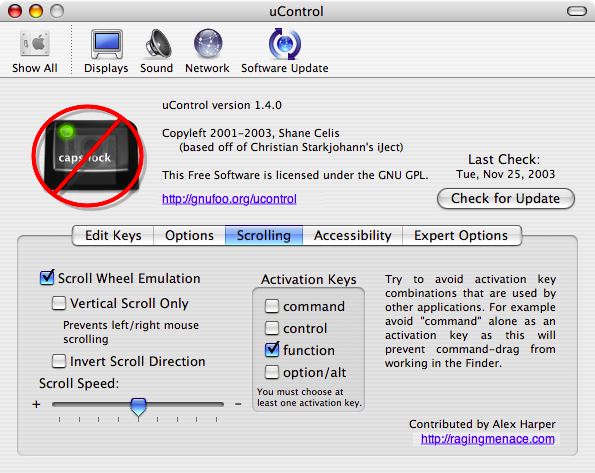
have a glance at uControl. Turns the up-down and left-right motion into a scrolling actaion (a la the wheel) when you press "fn" while sliding your finger on the touchpad.
I use it on my iBook and it's quite comfortable to hit the 'fn' key with your pinky. -
Re:HERE.
Supposedly this is coming in Tiger, but if you want to use a regular ps/2 keyboard in Panther, you can use uControl, an open-source system preferences panel that allows you to remap any modifiers to any others, as well as a couple of other things.
I'm using an IBM model M, plugged into a $5 ps/2 - USB adapter right now, with no problems.
-
Re:The un-sung hero - TextEdit
My quibble is that TE doesn't respond to the home and end keys. Minor issue though, as my old Mac (keyboard) didn't even have those keys, but I am getting accustomed to their presence.
It does use them, it just doesn't do what you expect. The Human Interface Guidelines say that home should scroll to the top left corner of the document (w/o moving the insertion point) and end should scroll to the bottom of the document (again, w/o moving the insertion point).
To move the insertion point to the beginning/end of the line, you are supposed to hit command-left or command-right arrow. Or in Cocoa applications such as TextEdit, emacs fans can use Control-A and Control-E. (Cocoa's text systems supports a large subset of the common emacs editing commands by default.)
Luckily the Cocoa text system can have its keyboard commands changed. Apple's documentation is here. (Note: Apple renames documents and changes their URL structure occasionally, so if you're looking at this in two years and the link is broken, well, it ain't my fault.)
See also this page which includes some information about changing key bindings.
Specifically, you want to bind key \UF729 (home) to "moveToBeginningOfLine:" and key \UF72B (end) to "moveToEndOfLine:". By default, they're bound to "scrollToBeginningOfDocument:" and "scrollToEndOfDocument: ".
See the list of "Action methods" on this page for a list of methods which you can bind to keys.
Note that Carbon programs won't be affected
-
Re:Reinvent
Sidetrack and uControl use basically the same machanism for implementing trackpad scrolling--in fact, the same guy wrote the code in both utilities. See?
-
Re:Reinvent
Yeah, and I still haven't heard of smooth (as opposed to notched) mouse wheels *searches Google to make sure*
Actually, these exist. I distinctly remember buying a crappy PS/2 mouse at Clas Ohlsonwhich featured a notchless scroll wheel like you describe. I'm not 100%, but I think it was manufactured by A4Tech.
It was pretty annoying though. It wouldn't let you scroll pixel by pixel. The "notches" were still there, but implemented by software.
Not to mention, I prefer a mouse that doesn't scroll just because I look at it the wrong way. It'd be way too easy to scroll by mistake.
Another idea I've seen, is a mouse (also made by a cheap company, Typhoon. It used a trackball for 2-d scrolling. God, that was annoying! It was rather uncomfortable to get that scrolling straight and not jumping left and right all the time. Also notchless, and thus way too easy to trip.
My conclusion? Notchless is a bad idea if you want to implement a scroll wheel. The notches are there for a reason. Actually, I'm pretty much sure that you could modify several popular scroll mice to make them notchless, as the few I've opened actually was using optical sensors to detect motion rather than switches, anyway, and the notches are only there to prevent spurious scrolling.
The best scrolling mechanism I've used is on my iBook. I use a third-party tool called uControl to enable scrolling using my touchpad. Unlike SideTrack or similar Windows drivers, uControl will let you use your trackpad for mostly stepless 2D scrolling, when depressing the Fn modifier key (or other modifier key of choice.) Very handy.
Hope this helps! -
Re:OS X
There is a thid-party app to change key-mappings via a GUI...
uControl. http://gnufoo.org/ucontrol/ucontrol.html/ -
uControl
-
uControl
-
Re:Scrolling trackpad
Sidetrack never worked right for me and it also replaces Apple's driver with a buggy one. I LOVE uControl. When you hold down the Fn key you can scroll with the trackpad. Much more elegant and predictable solution.
-
Ever heard of Ucontrol?
UControl Mapping control to caps lock since you were in diapers....
-
Re:Is the mini really that cheap?
I think that the Windows key maps to Command/Apple. The placement's a bitch, because Alt is to the direct left of space bar on Windows keyboards and in between Ctrl and Command on Apple keyboards. There are tools, such as uControl, that enables you to remap this, however.
-
Re:Macs are USB *only*
Ahh, but that's where ucontrol comes in
http://gnufoo.org/ucontrol/ucontrol.html
can map out that pesky caps lock key and have your apple key.
The modem M keyboard is a tank, and it's too bad there isn't a version of it currently. -
Re:What About my Model M Keyboard?
couldn't he use uControl to fix that ?
-om
-
Re:Bleh..
it doesn't address what I consider to be the main limitation of wireless keyboards: not having the little caps/num/scroll-lock lights on them.
I'd rather that my wireless keyboard not have caps/num/scroll-lock *BUTTONS*.... they are useless remnants of an older age. Just look how Scroll Lock has been repurposed for use in kvms.... and when i'm on a PC, I pop the num-lock keycap off... otherwise I hit it about 1/6th of the time I go for the 7 key. uhg.
(Posted by someone who's done something about his Caps Lock key...)
Getting back on topic, a wireless mouse that requires a pad rather than batteries has been around for ages and ages. [link] -
Re:Switcher links
Another useful app is uControl, a keyboard remapper. I mainly downloaded it to turn my touchpad into a vertical scroll bar (hold down Ctrl-Fn and mouse movement translates into scrolling), but it does a lot more besides.
-
Re:you have got to be joking
For your mac laptop, take a look at uControl. It won't totally negate your desire for a scroll wheel, but it will cut it down quite a bit. Plus, it's open source.
-
Re:Here's the official way of remapping keys:
The behaviour of the caps lock key on ADB keyboards (like those built in to all apple laptops) is a bit broken, as it does not send a normal key release signal to the keyboard handler. This means that considerable trickery is required to correctly map caps lock to a modifier key.
uControl is the only utility that can correctly remap the caps lock key on all OS X based computers.
-
Re:How do I map CAPS to ESC on a Mac?
You want uControl.
-
uControl nixes Caps Lock on Mac OS X
uControl is a nice little Mac OS X hack that disables/remaps Caps Lock and other modifier keys on PowerBooks.
I also used it to remap the "Enter" key to the right of the spacebar on my 15" TiBook to "Command" -- I have no clue why Apple thought that was a good idea, but uControl saved the day.
It's very well designed -- if it thinks there's going to be a conflict when booting into an upgraded OS it will disable itself (vs. barfing and causing a system panic...) -
Re:No linux until ctrl in right place
ou can map anything like you ever want in x-windows(and heck, in linux too).
Even on ADB keyboards? I.e., the Linux keyboard driver on Macs and/or the XFree86 keyboard handling code on Macs deals with the "sticky" caps lock key (as mentioned on the Web site for uControl:
Technical Question: I thought caps lock key event behavior was wired into the hardware; hence, there's no key up for caps lock. How did you do it?
After playing with iJect, I started to believe the same thing. When caps lock on was turned on, you got a key down event. When caps lock was turned off, you got a key up event. At that point I thought I was sunk. No one wants a sticky control key. Fortunately, in between those two events are "special" events which can be directly correlated with the regular key up, key down events. So by looking at both the regular and special events, you can make the caps lock simulate a standard key up/down sequence.
The uControl page thanks "the Linux PPC folks" for information on how to do "ADB muckery" to eliminate the need to hold down the "fn" key to get function keys, so perhaps information on how to deal with the Caps Lock key was also passed by the LinuxPPC people to the uControl people or by the uControl people to the LinuxPPC people (or independently discovered by both, or passed on to both by some third source, or...).
And, although "a program to do it only exists in Mac OS X" is (probably) erroneous", "modern keyboards are USB, use one you like" (the statement to which I was responding) isn't necessarily the right answer, either (as somebody might have a laptop and want to swap Caps Lock and Control on its built-in keyboard, or might want a cheaper fix for their Caps Lock/Control problem than a replacement keyboard - although I have managed to get used to the standard "ctrl" key placement even when using {Micro}EMACS).
-
What about uControl + 10.3.4?
Anybody using uControl? I can't update until I know my caps -> control change will still work. 1.4.3 is the latest release, but it's for 10.3.x -> 10.3.3.
-
Re:TWO mouse button mod for powerbook?
I believe uControl lets you set the 'tap' function on the trackpad to work as right-click instead of just duplicating the button. Depending on what you want, that might be close enough for you.
-
Re:oops be careful who you shit on.
Command-Option-DoubleClick-Q? Somebody must've switched your OSX install over to the Emacs keybindings!
-
Re:uControl doesn't work
Actually according to the author's home page he has gotten the
-
uControl doesn't work
The biggest problem for me is that uControl apparently doesn't work, so I won't be able to swap control and caps-lock if I upgrade. Since my hands are hard-wired to find the control key to the left of the 'a' key, this is a showstopper for me.
Does anybody know of any other way to swap control and capslock on an Apple Powerbook (ti, 866MHz)? Xmodmap apparently doesn't work either. This copy of panther is burning a hole in my pocket..
-
Re:What's with the function keys and OS X updates?
Among its other useful features, uControl claims to make the function keys work the way you want. And it's GPLed.
-
Re:TrackPoint keyboardsYes, but be aware the conversion isn't perfect. I went through two - one would have a problem where the mouse would go nuts once every hour, the other generally works but I've had a few occasions where keyboard repeat goes nuts, and the first time you press a key after a reboot (such as when you enter your password) causes four characters to be typed. I'm not sure what characters - I know it happens when you hit SHIFT, so...
The second one I got from Amazon and is made by Micro Innovations.
This is what I use at work, partially because I use a KVM. At home I've used IBM's old compact trackpoint USB keyboard and the one they're selling at the moment which has a somewhat redundant trackpad on it. Both are three button, so if you feel like splurging... (but remember the latest doesn't have a Windows key, which means you need to use a tool like uControl to use it effectively. Also these keyboards vary radically in feel)
-
This exists for OS XThere's a nifty utility called uControl that lets you do something very similar in Mac OS X.
On my PowerBook, I have the Function key bound such that when it's held down, the trackpad becomes a giant 2D scroller. On my desktop system, I have it configured so that pressing Control-Option-Command turns the mouse into a giant 2D scroller. I find both of these very useful, very often.
-
A "Grab" Button
This is ridiculous. Scroll wheels, scroll nipples, and embedded trackballs are a tendon-pain-inducing and unnecessarily complex and kludgey way to implement a hardware interface for scrolling. I second the suggestion of this guy, who would rather have a "grab button" on his mouse. Hold down the "grab" button, and you can scroll the contents of the focused (or perhaps the under-the-mouse) content by dragging in whatever direction you like. I used to have something like this rigged on my old Mac with Scrollability (shareware) and in OS X with uControl (GPL'd). I found both solutions far more comfortable than my scroll wheel, though I'd love to see this supported more seamlessly (e.g., scroll more smoothly, work everywhere (even in graphics programs), and don't make me kludge it together with mouse-button-triggered modifier keys). After all, we already have one perfectly good tracking device; why stack another tracking device on top of it? This solution should work even on trackballs. Whadday'all think?
-
Re:dump the caps lock
you need uControl. You're welcome.
-
Re:dump the caps lock
did you try google (lazy ass) uconrol
-
Ctrl key still retarded, I see
Why on earth can't someone make a powerbook keyboard with the control key in the right place? I defy anybody to type a ctrl-a with their left hand, with the ctrl key one key to the RIGHT of the fn key in the corner, without either rotating their entire hand from the wrist, or inflicting major tendon damage. Don't even TRY ctrl-q.
Apple's own full-sized keyboards put the control key in the lower left corner where it belongs, although it should REALLY go where caps lock is. Why must they have it out of place on the powerbooks?
Yes, I know about the software mapping utilities such as uControl, which I use, but they all have quirks and have a nasty tendency to cause kernel panics on system upgrades. If someone comes up with a "programmers's keyboard," I've got a nice pile of money to throw at them. -
Re:What about the trackpad?
Not quite, but uControl offers similar functionality: You can scroll via trackpad by pressing the function key (configurable).
It's mainly a keyboard-remapping software - the trackpad stuff is just an added bonus. -
Re:Make it a single ball for 1 hand
People have done it with software. It's just patented, so everyone who's done it has been forced to remove it from their product. For an example, see uControl, a Mac keyboard control panel app, which did just that. "Did" is the operative word here.
-
Re:Key Changes Across OSYou are pointing out what I believe is the original poster's real problem.
Macs do not let you arbitrarily map keys, as you can do in X11. If you don't like what scroll lock does, make it a backspace key (see xmodmap manpage or look here for a graphical front-end). Won't even triigger the LED anymore if you do that. If you want it to do some function, write a program that listens on the root window for the scroll lock press and then sends some "message" to the foreground window (this is how mwheel works - "message" is in quotes because this can get quite complex).
Now I know some Mac fanatic is going to point me to Apples KeyBindings documentation or uControl, but these are extremely limited compared to what you can do in X11. I'll admit that Apple's keybindings thing is pretty neat - this page contains a list of functions that you can bind (system-wide) to certain keys or combinations of keys. If you don't like the fact that backslash is taking up an entire key on your Macintosh, bind it to uppercaseWord or whatever.
It's funny how the original poster complains about tilde but makes no mention of caps lock, the truly useless key on the keyboard. Perhaps caps lock made sense when people were using typewriters, but it makes zero sense when you can accomplish the same thing through software. Occasionally I would like caps lock when I type in a longish macro name (in C, that's what I do all day). Of course I'm not going to enable caps lock (heresy!). I simply wrote a small emacs lisp function that (just look through the current keyboard map and write a replacement function for self-insert-command - gets a little tricky if you want to preserve how kill ring functions (undoes groups of insertions), but not too hard).
Anyway, the problem is not with keyboards but with systems programmers who don't realize that it's necessary to define system-wide keybindings in a flexible manner (this includes rebinding things like caps lock, alt, windows key, windows right-menu key, command, number pad separately from number keys, etc). This goes against any human interface guidelines (consistency, simplicity, etc.), but my mother has no use for backslash or brace or bracket, whereas I use these as much as any other key in C. Different people have different needs.
-
Re:Apple Laptop Keyboards Unsuitable for Unix User
Not that you would actualy care because that would shoot your entire troll to all hell, but there is a wonderful utility out there called uControl
Availible right here it will allow you to MAP THE CONTROL KEY TO THE CAPSLOCK KEY or any other god damned key you choose. So now that your problem is solved, go buy a mac and stop posting this over and over. -
Re:Difficult Comparisons
If I had one thing to change, it would be the fact that the power book has both a "return" and "enter" key. As a developer, I could really use another control key to make my emacs life easier.
You should try uControl. Does just what you want. -
I have six words for you...
Go here.
SHUT THE FUCK UP! -
We don't vote people into office; we vote them outThis is an excellent page, the only problem is if you want to print the page and take it with you to the polls it's over 5 pages long.
So I took the contents of the blog and created this page that allows you to filter the representatives of your particular state. Making it easy to take with you to the polls and stick it to your states representatives.
-
Sleeping Keyboard Troll
-
Re:Apple Laptop Keyboards Unsuitable for Unix User
Try uControl to remap the key.
-
Slashdot subvertedNow that the whole Slashdot crew has TiBooks, be prepared to see a lot more trivial stories like this about them.
According to the Los Angeles Times, the KGB has discovered that if you hold your Powerbook sideways, you get this cool portrait view with the picture on its side. Also, check out a way to flip the fn and ctrl keys. Neat!
P.S. I have one, too.
-
Re:Apple Laptop Keyboards Unsuitable for Unix UserYou can't remap a key in Mac OS X???
It's impossible! umm except for this.... [uControl] started out as a simple hack to remap the caps lock key to a control key, but has since evolved into a fairly sophisticated means of remapping many of the modifier keys on your keyboard to any other modifier keys you wish.
-
Re:Does Apple Want Unix/DSP/Embedded/Engineering M
First, OS X supports two-button-mice *natively*. You can buy any non-apple off-the-shelf two-button USB laser mouse for ultra cheap and plug it in any not-too-old mac laptop's *two* USB ports. If there is a 3-button USB mouse out there, i bet you it'll just work on a mac laptop (or desktop), in the worst case you might have to install a vendor-supplied driver.
Apple hardware has *for years* supported USB peripherals, and that includes mice AND keyboards.
ADB serial ports for keyboards have been gone for a WHILE. As far as keyboard remapping, there is a slew of 3rd party OSX shareware and "how-to's" out there that'll help you do just that. Keep in mind that the Alpha Geek Community is switching in *strides* over to OS X, thereby building a very strong support-base. Check out a couple of my switching experience stories to give you a small idea of *some* of the slew of cool things you can do with OS X.
Futhermore, Apple hardware has been increasingly following mainstream peripheral and other device specifications: VGA monitor ports, ATA drive controllers, PCI extension slots. You can pretty-much buy a mac, gut it out, and fill-it up with non-apple components. But at least you have a base system that *just works*, and works well at that.
Please define "Unix Look and Feel". Are you talking about Solaris CDE? Are you talking about GNOME? KDE? I've got X11 and a slew of window managers and other X11 apps installed and running on OS X, using Fink. I would highly recommend that you get used to OS X's Aqua interface which is quite intuitive and powerful.
-
It is...
Actually, you can remap caps lock to control using ucontrol in OS X. There's a linux patch to do the equivalent as noted in the post you linked to. It was based on the stuff from ucontrol (called icontrol back then).
I used that patch in Linux and ucontrol in OS X for almost a year without too many big problems. Occasionally you'd have to hit caps lock (ctrl) when coming back from sleep. Nothing too big.
Now are you going to stop your whining?
-
Re:Then get your OSX virtual desktops, already!!
Accually you can switch the capslock and control keys you just have to edit a XML file.
http://www.gnufoo.org/macosx/ -
Re:But can I put the CTRL key where it belongs?
If that's really what's holding you back (and I doubt it is): check this out
-
Sure!
There are a number of utilities that map the Caps Lock key (as well as other keys) to other functions:
UControl
Command And Control
DoubleCommand (next version will do Caps Lock)