Slashdot Mirror
Domain: typematrix.com
Stories and comments across the archive that link to typematrix.com.
Comments · 39
-
Re:Not even close
I agree... but let's give a link, shall we?
-
Re:6 is on the wrong side
6 on the left half is a side effect of the continued stupidity of staggered key columns.
He should have used a TypeMatrix as his base to work from.
-
Re:Best keyboard
In my opinion, the best keyboard for over a decade is the "whatever the cheapest keyboard Microsoft is selling".
It may be less-awful than those from manufacturers who try hard to do something special and fail, but it's certainly not the best keyboard around.
I recommend one of these:
http://typematrix.com/Or for the cheapskates among us:
-
Standard sizes & interchangable
Input devices are the most important part of any computer, yet we don't worry about keyboards/mice on desktops, because we know we can swap them with something we prefer, at will. With laptops, we're stuck with the cheap junk that's included. And worse, we're stuck with the economics laptop makers are under, and we don't want to pay $500 extra for a high-end laptop, just to get a $20 keyboard we like.
If laptop makers standardized on a few sizes of keyboard, and made them easy to slide in and out and swap with a different model, life would be good...
It's POSSIBLE for laptop makers to get it right and include a great keyboard with their laptops. There are innumerable awesome small keyboards out there. In fact, I use nothing but ultra compact keyboards for my home computers, because the ergonomics of super-flat are best, and the lack of a keypad on the side makes reaching over for the mouse vastly quicker and easier. To make an awesome laptop, start with a keyboard like this one: http://typematrix.com/
But the odds of them doing that are far too slim, and there's just too little incentive to ever expect it to happen. The input market is far too specialized. Instead, just make the parts interchangeable, and not only will your core customers be happy with their input options even on the cheapest laptops, but your products will also sell better to non-English speakers, who want a very different keyboard.It's long overdue.
-
Re:Old Farts and Model M's
Laptop keyboards don't have-to suck. Go look at http://typematrix.com/
Laptop style keys, but nice and BIG and lined-up properly. No crazy laptop crap like moving the PGUP/Dn keys around, and requiring the use of a Fn key.
-
Re:delete key? what?
Get a Man's keyboard. I never have that problem on my Model Ms.
Same here...
The IBM Model M: The World's Greatest PC Keyboard!!!
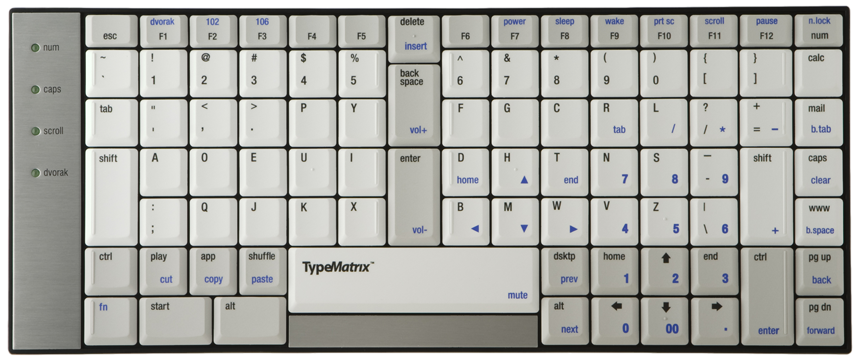
http://www.typematrix.com/shop/images/products/2030-dvorak.png
I've had the previous version of this for years and I love it, but as a tool for self defense it would probably fare little better than a box of aluminum foil... with the teeth pulled off, so you couldn't even like, saw at someone's neck.
-
Re:Caps Lock Key
The TypeMatrix keyboard I have at both home and work (Dvorak model highly recommended!) uses a large Shift key in place of caps lock. There is a caps lock but it's deliberately placed on the right side of the keyboard. I just wish it was the CTRL key that was larger instead, but it's still a great design.
-
Trust your personal experience
I use Dvorak and I love it, I certainly see it as superior to QWERTY for typing English (but not other languages), because of its ergonomics, speed, and accuracy. I don't care what some journalist says, I trust my personal experience. You should, too: buy a Dvorak keyboard and try it. The one I use is the Typematrix, which is both Dvorak and QWERTY (useful if you are just now learning Dvorak, or if you change the keyboard between computers, or if you want to use Dvorak for English and QWERTY for another language as I do).
-
Typematrix
I have found typematrix a very nice keyboard for Dvorak lovers. I use it for coding and everything else. I have the PS/2 version, not the newer USB version, which has a few changed keys. I like it for its big Shifts, central Enter/Backspace, its small size, its matrix layout, and its built-in Dvorak/Qwerty support (so no OS modification is needed). The latter is important in case you type English in Dvorak and another language in Qwerty, if you share the keyboard with Qwertyers or you are just learning Dvorak.
-
TypeMatrix
My favorite keyboard is the TypeMatrix 2030-DV. It's an ergonomic, small, portable, straight-key, Dvorak-layout keyboard (they also sell QWERTY and blank layouts). I'm only 21 and started to have RSI symptoms from typing/programming a lot -- this keyboard has made those go away and I can type even faster than before. They finally started selling them again: http://www.typematrix.com/
-
My keyboard: TypeMatrix dvorak
I use TypeMatrix keyboards with Dvorak skins and I love them! I also have Plum keyboards but I don't really like them much. I also have laser projection virtual keyboards (their error rate isn't low though). From the article I liked the wearable keyboard, though. I will probably buy it, because I think it will be useful for as I use laptops while standing or walking. I have also seen AlphaGrip at shops and they are also interesting. Another company with interesting products is Maltron. Data hands look nice too. However, I have found my TypeMatrix a very good choice and I like it for its small size and a design which is comfortable while maintaining compatibility with Qwerty. This is important for me as I know to type fast in Dvorak only in English. For other languages I am still stuck with Qwerty for fast typing as I didn't bother to learn Dvorak for non-English languages. TypeMatrix has built-in Qwerty and Dvorak modes so I don't need any changes in software to make it switch between the two depending on which language I type.
-
sounds good
I use trackballs, and many times I find myself trying to hold them vertically to ease the pain on my hands. I plan to try a vertical mouse (or vertical trackball if I can find one) soon. As a side note, if you suffer from pain on your hands you should use an ergonomic keyboard as well, preferably one with Dvorak layout. I use TypeMatrix keyboards and they have helped my hands a lot.
-
Re:Vim
Speed is not the main reason to switch to Dvorak. It's a nice benefit but the main reason for me is the comfort due to less finger stretching and movement and the even distribution of typing alternating between both hands.
The only downside I have found is the movement of shortcut keys. The main one being the X,C,V for cut, copy, paste. But I bought a typematrix http://typematrix.com/ keyboard that has separate keys for these operations anyway. Overall the benefits far outweighed the drawbacks for me.... -
Staggered columns versus matrix keyboards
Damn, they created such an innovative keyboard and they destroyed it by using staggered columns. I personally use TypeMatrix (QWERTY and Dvorak) and Plum keyboards that have a matrix layout, similar to the numeric keypad. You have to use one to understand how much better it is. I would definitely buy an Optimus keyboard if it had a matrix layout, but I have no intention to return to a staggered columns layout just for OLED keycaps.
-
Stop What Hurts and Change Out Often
Most people have horrible posture when typing, resting their arms on corners, extending their hands far out to the right (past the vestigal number pad) to mouse, keeping their head at an awkward angle that distorts their spine's natural curves..
First off, she should listen to her body. If something hurts, stop doing it. This is the fair warning that her body is giving her. She can take breaks-- walk once around the building, refill her water glass, stretch in place, shake her hands. Use a timer in Outlook that goes off every twenty minutes at first until the symptoms show continued improvement.
Second, she should avoid Repetive Motions as much as possible. Break the habit. Mix things up frequently.
* Switch mousing hands regularly.
* Always rest hands in the lap.
* Adjust or fix the lighting. (reduces muscle tension and eye strain)
* Adjust the monitor height.
* Switch out the effing keyboard for something without an attached number pad.
* Get a keyboard that is the right size for her body frame.
* Attach multiple mice to her system for instant switching.
* Get an adjustable keyboard tray.
* Learn and use keyboard shortcuts.
* Change positions several times a day.
* Get an adjustable monitor stand. (and replace the monster CRT with an LCD)
* Automate her crap work.
Touchpad mice let her use her thumb, pinky, palm, even her knuckles if her hand is being too sensitive. It's easy enough to attach both a touchpad and a normal (but ergonomic) mouse to the system so that she can switch between them according to the action/gesture and what her hand is feeling that moment.
I'm pissed that I missed the boat on the Touchstream keyboard/mice/touchpads, but the TypeMatrix keyboards are a great second-place winner. The keyboards come in a small and large size, with the small one suitable for most people. They also fit correct posture more naturally, by getting rid of the oh-so-stupid staggered key layout, and by separating the left and right sizes a little, and adding extra enter/backspace keys in the center for good measure.
I got one for someone at our work with chronic pain, and she had no problem adjusting to the new layout in hours. Her condition has improved a lot, and she credits the keyboard and better lighting. (I tried to get her to use a touchpad mouse, but it completely ignored her touch.)
At my desk, I have the TypeMatrix keyboard, a regular mouse for precision-work, and a Cirque touchpad for normal mousing. (The touchpad is 9 years old, and still works great.) I put a large box on the side table so that I can also stand and use my personal laptop for the 40% of my work that is internet crap and web-development. When I'm web browsing (er, researching), I can actually kick back in my chair, and do everything just with the touchpad. Change positions!
(I have considered the Kenesis split keyboard but it was too big and pricey for me at the time. I call it a fine third choice.) -
Typematrix
This keyboard saved my wrists. It eliminates the twisting and straining to reach the back space and enter keys. http://www.typematrix.com/
-
Try a TypeMatrix
I've been using a TypeMatrix for a little over a year. The points I like are the non staggered keys, and, on the model I use, a Dvorak switch and labels. It took a little getting used to, but I find it well worth it. The arrow keys are easily reached with the right hand. The price isn't bad either at around $100.
The only drawback I've found are the insert, home, end, page up and page down keys as they are function shifted from the F8 through F12 keys. Hardly a problem, I just remapped them.
TypeMatrix
Jon -
TypeMatrix
I've heard and read about Dvorak keyboards before, and this article made me want to go buy one. I realize that I could just remap my current keyboard, but I would like something with all the keys marked. When I did a quick froogle search, I came up with this site: http://www.typematrix.com/dvorak/ I have *never* seen a keyboard like that. Has anyone used them? Are they comfortable? Whats the deal with the orthogonal layout?
-
typematrix dvorak keyboard
I read on slashdot somewhere that switching between the two layouts (Dvorak and QWERTY) is easier if you have two styles of keyboards. I suppose that is the case because I do switch between the two layouts fairly often. The dvorak keyboard I use is typematrix keyboard. Rarely will I reach for the wrong key on one of the keyboards but if I don't really think too much about "where the key is" I do fine.
-
Re:Buy a split Keyboard
These are much better split keyboard designs:
http://www.typematrix.com/
http://www.maltron.com/
http://www.kinesis.com/ -
Going beyond Dvorak, Qwerty, etc.
It's not just a keyboard layout (QWERTY/Dvorak) that is important, but have the keys are physically organized. Even most of the so-called natural keyboards have the keys at an angle, which is a holdover from the old manual style keyboards with rods. There is absolutely no reason why they should be organized that way today. http://www.typematrix.com/ has both QWERTY and the Dvorak keyboards. And yes, you can toggle between the two layouts. I chose this keyboard because there is less strain on the fingers when the fingers don't have to move at an angle, and yes, they have documentation supporting this. I started typing in my early teens and started programming in my early 20s. I am now turning 50 this year . About five years ago, I made the switch. Not only to Dvorak , but to a TypeMatrix Dvorak keyboard. It was not an easy switch, but I'm very glad that I did it . I now have one TypeMatrix keyboard at home, one at work, and one in my laptop case. This makes it very easy for me to stay in a TypeMatrix environment. I also have a keyboard splitter with a QWERTY attached, so others can use my machine at work . No matter how right it is to switch or how unreasonable the old way is, people especially in the United States are reluctant to change. I gave up the fight to switch to metrics along time ago. I also had a bear of the time convincing people to get a hard drive instead of you just using their good old floppies. Now I'm trying something totally new altogether. I'm getting away from using a keyboard as much as possible, and beginning to explore the possibilities of hands-free programming using dictation. http://www.codevox.com/ Like my switch to Dvorak, I expect a long learning curve, and I'm just at the beginning of this. However like using Dvorak, I expect it to be a big win in the long run. By the way, this post was dictated by voice.
-
Trying Typematrix...
For those looking to try an easier-on-the-fingers & thumbs keyboard: http://www.typematrix.com/ Dvorak & QWERTY layout. Spacebar and such is moved from the thumb position to the center- separating the hands.
-
Re:Victum of Marketing
It looks like it would require pretty unnatural finger motions to use.
You may have had a bad experience with a vertically aligned keyboard, but this statement is pretty ridiculous...
For one thing, I'm typing this on a vertically aligned keyboard right now. I was looking for new keyboards because even ergonomic ones made my fingers, hands, wrists, and even arms (to a lesser extent) hurt significantly, even after only a couple hours of typing. This keyboard has improved the situation greatly. In addition, I type much more quickly now. -
Re:Victum of Marketing
when is someone gonna make a keyboard thats more grid-like so wasd lines up
Uhh, years ago: http://www.typematrix.com/
Really nice keyboard BTW. -
Re:Calculator key?
Everytime I go shopping of a new keyboard, I spend HOURS looking for a decent one, that isn't larger than my modest desk,that does not have more superfluous buttons than actual keys.
I certainly agree with you there. Modern keyboards really drive me crazy. You might like the one I use now: http://www.typematrix.com/
(disclaimer, I have no links at all to that company) -
Re:Still not right: Feature List
Not only ergonomic, but Adjustably ergonomic
Oh, so it adjusts from tolerably bad ergonomics, to incredibly bad ergonomics? Good adjustment. So-called ergonomic keyboards are so incredibly un-ergonomic that it's ridiculous.
I have a keyboard recomendation for you: http://www.typematrix.com/dvorak/
It's Dvorak-switchable, but does not meet any of the other points you listed. However, it's the best keyboard I've ever used, and vastly different from any others I've seen... Note: I have absolutely no affiliation with the company. -
Re:New hardware
I swear by my two kinesis keyboards
They're very good, but I'd recomend you check out the typematrix which I prefer, even over the much more expensive kinesis.
-
Re: The DVORAK Rumor
close enough: http://www.typematrix.com/
-
Re:Still using PS/2 style keyboard and mouse ports
I have a couple $100+ PS/2 keyboards
I dug mine out of several hundreds in a dumpster. Cost to me 0.0.
Your keyboards may be nominally better than the $1 OEM pieces of crap that most people use, but that certainly doesn't mean it can hold a candle to the keyboards I use.
The daily strain my hands felt hasn't reappeared at all since the day I switched. I also type noticably faster (although my accuracy hasn't hit 100%) -
Re:Same here
Check this out: the TypeMatrix EZR2030. They're not available yet (in production now) but I'm getting two right off the line. Same size as a laptop keyboard, same key action, thin and flat (in fact small enough to carry in your laptop bag), plus it has other neat features like putting the Enter and Backspace keys in the center of the keyboard where your stronger index fingers can use them. Oh, and it switches between Dvorak (which I use) and Qwerty. No wrist rest though - but you can get one of those separately.
-
Re:Flawed natural keyboardsPlease see my other post in this topic about the TypeMatrix EZ-Reach keyboards. They are a series of split keyboards with the number keys under the *correct* hands, as you requested.
They cost $99 but are well worth the money, IMHO. I have used these for nearly a year, and I love them.
Product URL: TypeMatrix EZ-Reach
Another suggestion would be the DataDesk SmartBoard line of keyboards. I have not tried these keyboards yet, but the design is very appealing.
Good luck!
-
Try the TypeMatrix EZ-Reach keyboards...I strongly recommend that you try the TypeMatrix line of ergonomic keyboards. I've been using their standard EZ-Reach model for nearly a year, and I absolutely love it.
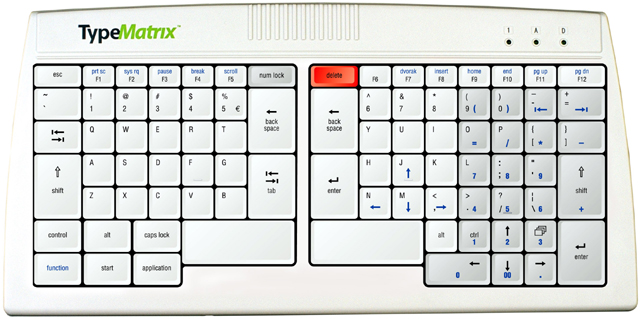
The EZ-Reach is about 14 inches wide, and can easily be transported in most laptop bags or portfolio cases. It is thin (less than 0.75 inches) and very portable. It has an embedded numeric keypad (similar to what you'd find on a laptop computer) which can be enabled at your discretion, or ignored altogether.
EZ-Reach has a very symmetrical design, with almost equal key layouts on both sides. It can be placed in front of a monitor and you can sit straight-on, without having to twist your body (or neck) during typing.
Since it has no extra numeric keypad, you can place your mouse closer to your typing area - this applies to lefties, and especially to righties (like me).
The key technology feels like a *very good* laptop keyboard. The keys have a scissor mechanism and a thin profile which makes them flat and easy to hit, with a minimum of vertical displacement. I have found the feeling to be very crisp and rich in tactile feedback; normal keyboards feel too "mushy" to me now.
The key layout is patterned in a matrix fashion, without any of the vestigial staggered-key pattern of the (arguably) archaic design of the original typewriter. Motion studies have shown that fingers move more naturally when they move straight up-and-down, and the staggered key layout increases risk of RSI. The TypeMatrix EZ-Reach is one of only three keyboards that I have found which lays out the keys in this fashion. Here are the others:
This is perhaps the strongest advantage of using the EZ-Reach; your fingers take some time to adjust to the matrix, but once you get used to it, you'll have a hard time going back. Finger motion for me seems more logical and more intuitive on the TypeMatrix layout than with any other keyboard design. Also, the centrally-placed Backspace, Tab, and Enter keys can be hit by the stronger index fingers, rather than the weaker pinky fingers. This also makes a difference at the end of a long day of coding or document editing.If you ever have the urge to learn the DVORAK keyboard layout, you can switch the layout of the EZ-Reach with a single function-key (Function+F7). This toggles the mode between QWERTY and DVORAK. TypeMatrix sells (at least) three versions of this keyboard, all with the same guts but differently labeled keycaps: one for plain QWERTY, one for plain DVORAK, and a dual-labeled QWERTY+DVORAK version. The operation of all three models is identical.
One of the very few disadvantages of the EZ-Reach is the fact that the Home/End/PgUp/PgDown keys are overlaid on top of F9-F12, and require the Function key in order to be activated. This is somewhat annoying for me, but I've found a way to re-map the keys in Linux (using xmodmap) such that I sacrifice the F9-F12 keys in order to use the text navigation commands. On the other hand, I use a FingerWorks iGesture NumPad for most of my cursor control, so I can access those commands using gestures as well. (TypeMatrix is working a new keyboard design that addresses this limitation. Please contact them directly to learn more about it.)
The other disadvantage (and this one depends on your preference) is that this keyboard only comes with a PS/2 interface. I use all-USB setups wherever possible, so I have to use a PS/2-to-USB converter (which introduces a few quirks of its own), but it generally works very well. I've had several conversations with TypeMatrix customer support, and they do plan to introduce USB keyboards in the near future.
Your mileage may vary. I really love the TypeMatrix design and philosophy, and the keyboard works very well for me.
Disclaimer: I don't work for TypeMatrix, but I love the company and their products.
-
micro keyboard
I just got a cool looking micro (or mini) keyboard at Fry's for 15 bucks. It's like a laptop. I remember on my old Apple II GS the keyboard didn't have all those extra number pad keys. I thought I was missing out. Now I got my PC and I've come full circle replacing my big keyboard. See the thing is the reaching for the mouse. With a bigger keyboard you gotta reach farther. Since most of those keys are redundant I don't really miss them.
I also feel a lot more symetrical now.
I really like my new setup. Only thing is I'm not really sure where the backspace is because there's no "whitespace" to differenciate. (I touch type. Dvorak.) I've learned to feel for the enter and go up two.
Too many newbies have bad ergonomics in the furniture. Right now I'm at my schools computer lab. They have the drawer that hangs underneath the desk. The drawer is not wide enough to accomodate the big keyboard and the mouse, so the mouse is on the desk. It's on different elevations. Bad idea. With my micro board it all fits. I did it yesterday, but today they saw me and they objected to me switching keyboards.
There are foot mice. That would elimate reaching completly. I think I gotta try that. What about a tongue operated mouse?
I hate how computing is so qwerty biased. Most programmers don't consider how their bindings don't work for dvoark. One big beef is the Control C X V. Those are really inconvinient for dvorakers. Is there a macro type program that will cut and paste will wheel double clicks? My whell click, double wheel, and double right click are unused. Can I bind them to something somehow?
Dvorak rules.
Check out the typematrix . The keys aren't raked.
-
TypeMatrix.com...
...should have hired a hand model.
-
Re:Bah
While the Dvorak(only)-labeled version is currently out of stock (not out of production.. they are just waiting on the factory), they do have a DUAL labeled version (ie both DVORAK and QWERTY labeled). All versions come with the ability to switch from DVORAK to QWERTY (and back), and if you have a version that only has either labeling, you can get a set of alphabet stickers with it for free that work very well.
And I can only second that getting this keyboard will help your aching fingers. I love it
(disclaimer: yes, i do maintain their website... so i am associated with them. nevertheless i think it's a great keyboard. get one!) -
Re:Bah
Get a better keyboard! It'll cost less than a new computer.
Hmm, unfortunately, their Dvorak-labeled version seems to be out of production. Well, the QUERTY version has a button to switch the keymapping. Just add some keyboard labels (for you non-touch-typists), and you are all set. -
2 suggestions
I have two different suggestions, depending on the type of keyboard you prefer.
If you prefer the laptop style keyboard (as in thin keys and very little noise from the keyboard), go with the TypeMatrix keyboard. It's a dvorak style key layout, although the keys are reprogrammable, with laptop style keys and all sorts of special keys. Additionally, the keys go straight up and down, rather than at angles. A picture is available here. My roommate uses one and loves it.
Alternatively, if you are a big fan of the "kacink" (tactile feedback) style keyboard, go with the old IBM keyboard. If you don't want it making so much noise, put a piece of foam under the keyboard. Aparently, the reason they are so noisy is the table underneath acts as a resonating board, so the foam dampens this effect. -
2 suggestions
I have two different suggestions, depending on the type of keyboard you prefer.
If you prefer the laptop style keyboard (as in thin keys and very little noise from the keyboard), go with the TypeMatrix keyboard. It's a dvorak style key layout, although the keys are reprogrammable, with laptop style keys and all sorts of special keys. Additionally, the keys go straight up and down, rather than at angles. A picture is available here. My roommate uses one and loves it.
Alternatively, if you are a big fan of the "kacink" (tactile feedback) style keyboard, go with the old IBM keyboard. If you don't want it making so much noise, put a piece of foam under the keyboard. Aparently, the reason they are so noisy is the table underneath acts as a resonating board, so the foam dampens this effect. -
The BMW of Keyboards
Get the TypeMatrix keyboard. It was like $100, but I've been using it for a year and it's awesome. Basic features are that it's really slim, and the keys press lightly like a laptop keyboard. Also, it has a hard-wired switch for Dvorak, with both QWERTY and Dvorak letters etched into the keyboard. Highly recommended for the er33t.