Slashdot Mirror
Domain: notebookreview.com
Stories and comments across the archive that link to notebookreview.com.
Comments · 139
-
Re:TrueCrypt or Wait for On Drive Upgrades
6.1a won't even install on my Inspiron 9400, giving me a "memory parity error" on the initial reboot test for full drive encryption.
Have you run memtest86+ and let it go for at least two full tests? Could be one of your sticks is bad.
I don't think you understand how bad the Inspiron 9400 is. Don't get me wrong I absolutely love mine when it's working right but...
1) I'm on my 3rd hard disk. Never lost a laptop hard disk on a previous machine
2) I've had NMI parity errors that appear to be either hardware related (video card overheating) or driver related (that was the fix for me - replaced video and wireless drivers). There may be multiple causes. The following thread is now on it's 68th page (not a typo). I have since seen one NMI error but that's in about 6 months whereas with other drivers they happened daily.
http://forum.notebookreview.com/showthread.php?t=92036&page=68
3) I had an issue with a non-paged memory pool leak that took some weeks to track down and was causing it to slowly leak memory until the pool was exhausted and the laptop blue screened (usually if it's been running for 24 hours, with or without hibernation in between). What fixed it? A reset of the bios. Something I considered a last resort before re-sinstalling the OS having exhausted windows debugging tools to track down a process. Unbelievable.
Oh and memtest, prime95, HD Tune (SMART) and Dell's own diagnostics report no errors.
My advice: If you've got an Inspiron 9400 working right, leave the OS alone and stick to installing or uninstalling apps. This has been a cheap laptop until you consider the amount of time I've spent on it!
-
Truth
If this is true, the only thing preventing me from having gesture support is software.
Truth. Synaptics recently upgraded many of its Windows trackpads to multitouch (works on a 3-year-old Acer)
-
Re:Looking for a netbook, but bigger
-
Re:RAM still helps the file cache.
That's my point.
My laptop is ASUS G1s which is labelled as "gaming" and should not be using cheap chips.
I run Linux and cannot cope with high I/O loads despite the CPU power and the memory bandwidth.
So I argue I/O subsystem is the bottleneck. -
For more information...
...on the expected hardware specifications, see Notebook Review: http://forum.notebookreview.com/showthread.php?t=348239
-
Products fit form factors
There's an "average" laptop size that's a pretty damned good mix between size, cost, usability, and portability. In my current laptop, I decided to go for the wider screen and bigger laptop, and I don't like it as much as my smaller, lighter, "standard" sized previous model. (a Dell 600m) While I've seen much smaller laptops, I figure they are probably in much the same camp as my larger, heavier, more annoying laptop - they deviate from a standard size that has proven to be an awfully good set of compromises over years of time.
Phones are as big as they are because people like them that size. I don't mind the brick that is my home cordless phone because I don't live with it in my pocket. My Razr cell phone, on the other hand, is delightful primarily because of its minute form factor and it's compatibility with and accessibility from my jeans pocket.
Deviating from the "standard" form factor is very risky - the value of finding a new "right size" is high, but the chances of getting it right is very low. Dell blew it on my current laptop, it's too big and heavy for me to love.
-
Re:"Just Works" is a myth.
Second post
I actually stand corrected though - because there are ONLY official Vista 32 drivers out there. And you don't seen to be the only one struggling with this laptop.... Dell has really messed up on this one. Did they have a XP pre-install option for the laptop? Or was it only a Vista or Ubuntu laptop? -
Re:What linux ACTUALLY needs
Then compare price versus capabilities.
This Gateway FX, with Broadcom wireless sitting two desks down from mine can't get above 7MB/sec over wireless on Windows, meanwhile my Thinkpad R61E with Intel 3945 gets over 40MB/sec running Ubuntu, over the same Wireless.
I find that by buying hardware that supports Free Software, I get higher quality, more stability, and better support.
It also seems that the majority of anecdotes surrounding Windows' poor performance is blamed on poor hardware or badly written drivers. I find that the same is true of Linux.
-
Re:Ubuntu isn't getting slower, no.
RTFA jackass. The laptop they used had a fucking core duo. It was a Lenovo T60.
-
Re:Sigh...
I can't link to it because of Dell's site, but for about $100 more Dell currently has an XPS 1330 which whips the Macbook in virtually every respect: much better graphics, much more RAM and HDD, significantly faster CPU, bigger battery, better connectivity, and so on. Mysteriously, the reviewer has instead selected a relatively poor quality Dell as a comparison point.
I'm curious about a few things.
First, your claim of "much better graphics". Is a GeForce 8400M (the best video card on an XPS 1330) significantly better than a GeForce 9400M (the MacBook video card)? Their names would suggest otherwise - Nvidia's naming system says one is a medium-end 8th generation video card, while the other is an equivalent medium-end 9th generation.
Second, the closest I can find to "about $100 more" is the $150 more $1449 M1330, which comes with a T8300. If $150 is negligible, then the 2.4GHz MacBook for another $150 more has an even better P8600. (Personally, I'm not sure how much I'd really feel a 20% difference in CPU speed; it doesn't sound like anything dramatic.)
Third, I'm not sure how a "bigger battery" is better; I'd assume people would prefer a lighter and smaller battery. Perhaps you meant a longer battery life? According to Notebook Review, on an M1330 with the best non-deforming battery and aforementioned video card, you get 3 and a half hours browsing the web. Having used a MacBook advertised for 5 hours of battery life, I've gotten around 4 hours browsing the web, so I'd assume the new MacBook is comparable.
I would agree that the XPS M1330 is better, it is a non-trivial $150 more expensive, and I wouldn't say it's as much better as you say it is.
-
There were photos too
-
They've missed the Best ChoiceThe Sager NP8660 http://www.notebookreview.com/default.asp?newsID=4590 can be configured with a 9800M GT and T9600 for far less than the FLAMING GAY ORANGE Asus G50V. Plus, it is 15.4" (The fastest 15.4" laptop ever made) The Asus G50V is 15.4, sports the far weaker 9700M, and since it has two hard drive bays it's nearly as large as a 17" and did I mention it only comes in FLAMING GAY ORANGE? You can get a 1920x1200 MATTE screen for the Sager, instead of those glossy screens that morons love so much that hardly any other laptop manufacturer still uses them. I had a G1S, it was nice but I think it's the last decent Asus product that will ever be made. Their giant Republic of Gamers emblem, and blue blinken light bonanza plastered over a giant candy tangerine shell, it's just too tacky. Asus is so dead to me.
And if you have been given a liquidity injection recently, you can even get the x9100 and have all the fun that the Alienware kids are having. If not, as your attorney, I advise you to just buy it anyway and file for bankruptcy when the time comes.
-
But it's not just the manufacturers...
I've seen several reputable review sites doing the same thing. "We'll charge the battery, sit the system over here doing *ABSOLUTELY NOTHING*, time how long the battery lasts, and report the result as INSANE!!!!!"
http://www.notebookreview.com/default.asp?newsID=4569 (quickest example)
Of course, as soon as you run a DVD Run-Time test, or an actual "real-use" battery test (Like Batterymark or MobileMark) you may see battery times that are an hour better than laptops from 2 years ago. An improvement? Yes. Worthy of words like "INSANE"? Hardly. 10 hours, if I don't touch it, does me ZERO good on a flight, or while waiting in the airport. Why not just put it in standby and report a battery life of "days", or power it off completely and report a battery life of "years". (Either way, it's just as functional, right?)
So, yes, the vendors are mixing up the Kool-Aid (tm) but shame on those in the press who continue to drink it.
-
Re:AMDs problem.
-
Lots of feeds from me
I have quite a few, many of which have someredundancies, but I just don't want to miss out on information
They are also cathegorized:
1.) Games
- www.areagames.de - quite decent german gaming site, especially important for local releases
- www.gametrailers.com - a lot of junk I don't care about, but every now and then very good HD vids
- http://news.filefront.com/ (Gaming Today) - Great gaming Feed
- http://sarcasticgamer.com/wp - Often funny, and good comments on things
- http://www.thelastboss.com/ - Was my favorite, giving lots of Vids and stuff, but it seems to be dead since over a year2.) General Tech
- http://feeds.computerworld.com/Computerworld/News - A little too ITish at times, but great comments and opinions
- http://www.dailytech.com/ - Most of the time the right amout of ITism, but few opinions and trivia
- http://www.chip.de/rss/rss_tests.xml - A lot of reviews on different produkts
- http://slashdot.org/ - Could be more ITish at times, but good general articles make up for that3.) Handy Stuff (in German mobile = handy, so this is a wordplay)
- http://www.areamobile.de/ - Not so good on the hardware part, but great for knowing releases and new contracts in Germany
- http://feeds.computerworld.com/Computerworld/Handhelds/News - Again good comments and opinions
- http://www.engadgetmobile.com/ - Very good for hardware and some trivia
- http://news.google.com/news?q=i-mate+7150&output=rss - Was looking forward to that device is it looks dead to me...
- http://www.slashphone.com/ - Kind of redundant with Engadget mobile, might get the axe, but still a good feed.4.) Hardware
- http://www.anythingbutipod.com/ - Good MP3-Player feed, updated seldomely, but is still good
- http://aqua-computer.de/newsfeed_de.rss - A RSS feed of a watercooling company
- http://www.notebookcheck.com/ - Good reviews on new models, updated infrequently
- http://www.notebookjournal.de/rss/notebookjournal_news_feed.xml - Notebook news, updated infrequently
- http://www.notebookjournal.de/rss/notebookjournal_tests_feed.xml - Notebook reviews, very good, updated infrequently
- http://www.notebookreview.com/ - Great page for getting first looks on the new or upcoming top notebooks
- http://www.themp3players.com/ - Also on MP3 player, updated very seldomely
- http://www.hardwarezone.com/ - Good on general hardware (graphics cards and stuff)5.) Science
- http://news.bbc.co.uk/go/rss/-/1/hi/sci/tech/default.stm - Good articles but sometimes too much on legislation and stuff
- http://www.nytimes.com/services/xml/rss/nyt/Science.xml - Also great with some good long interesting articles
- http://sciencenow.sciencemag.org/ - A very good quick view on what has been discovered or researched6.) Stuff
- -
Re:Pixel pitch is too small for me
I dunno. I have a 1680*1050 15.4" LCD. If I run it at any non native resolution it looks completely awful to me. Luckily most software these days copes ok with changing the DPI from 96 to 120.
Other people seem to agree -
http://forum.notebookreview.com/showthread.php?t=139040 -
Re:Service pack 3?
I still like the 10.4 dock better, it's not quite as featurefull but it is easier to see.
Use DockTweak to change the Dock's looks. -
Re:Cantenna?
Super Cantenna SCB10
http://www.notebookreview.com/default.asp?newsID=2859
The best homemade one according to this article is fabricated from a Nally chunky soup can.
http://www.turnpoint.net/wireless/cantennahowto.html -
Cantenna
Here are a couple links. The second link shows a test resulting in a wifi signal (although poor) going 1.2 miles.
Coffee Can antenna
Cantenna test -
Re:Vista hopes
THIS!
I went through that back in October with a dv9500t. With an nlite cd and this guy's help:
http://forum.notebookreview.com/showthread.php?s=7d8e79c9b259119a55b4c9c41a3fd572&t=165319
I was finally able to install XP with a working video driver.
I really like the hardware, but damn them to hell for forcing Vista down my throat. -
Re:Give it to them for free
Actually MS has already agreed to do that. XP will be kept alive for ultraportables.
http://www.notebookreview.com/default.asp?newsID=4345
And I'm sure there are enough corporate customers rejecting Vista that it will be keep being sold on other machines too, at least until the next Windows release.
It's no biggie really, they just need to keep providing security updates. And they're committed to that anyway until 2014. I guess adding a few years to that doesn't cost much.
http://support.microsoft.com/lifecycle/?LN=en-us&p1=3223&x=14&y=9#
Actually I wish they just commit to selling XP and providing security patches for 20 years or something. It wouldn't cost them much and it runs a hell of lot better than Vista on low end hardware. In fact for most machines, it's pretty much the best OS ever. -
Re:ThinkPads still use non-reflective screens
I couldn't recommend this enough - perform a clean vista install using these instructions;
http://forum.notebookreview.com/showthread.php?t=144783
The key on the bottom of your T61p (that came with vista+bloatware) will register a clean install of Vista Ultimate without having to call Microsoft's support line. -
keyboard layout is still a showstopper
First, I agree that Thinkpads are the best out there. They are more robust and more usable than anything else, with the exception of the first run of T60s when Lenovo first broke away from IBM. Unfortunately, the key placement has moved me to purchase Dells for my company instead.
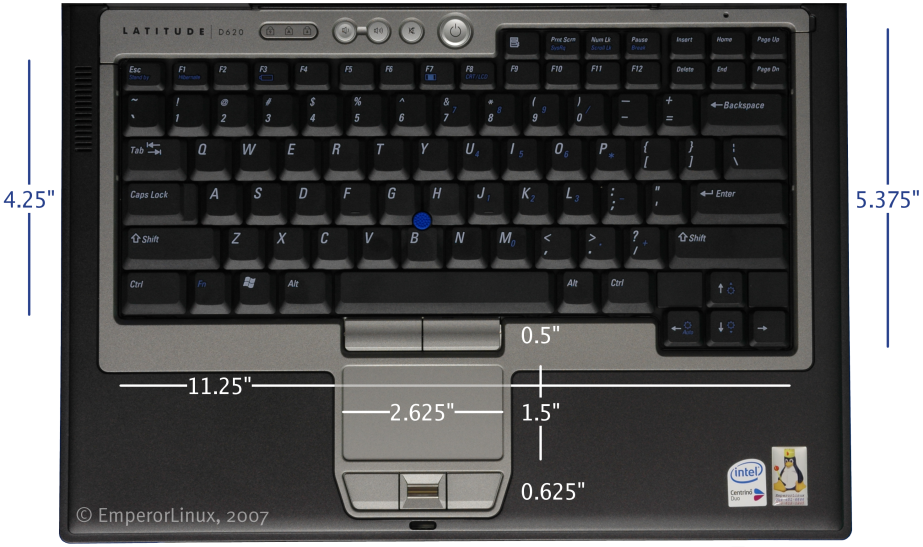
For reference, here are some pictures for keyboard comparison:
Thinkpad X300
Dell D420 keyboard
Macbook Pro Air keyboardEscape and the Function key are in the wrong places
Apple's go the lack of a second mouse button (alleviated by multi-touch?) and Fn out of place, Lenovo has Esc and Fn out of place (plus funky web buttons blocking your fingers from arrow keys). I go with Dell.
Yes, I use ctrl:nocaps. Not so easy to set up (or convince of its usefulness) for my Thinkpad-based Windows users, but they'll get Dells when they're upgraded in a few months.
-
Re: Lenovo X61 HAHAHAHA
Troll.
The X61 has excellent reviews, infact I own one myself. Under "light" use (and I'm sure that Excel falls under light use), I can get 7 hours out of the battery with wireless enabled, if I'm watching XViD with VLC I can get about 4 hours out of the battery.
The hard disk is not slow at all, I'm running Windows XP and boot time is under a minute on the machine and is sufficient for most tasks. -
Re:huge power consumption
Curious myself, I found some benchmarks somewhere measuring wireless usage...
http://www.notebookreview.com/default.asp?newsID=3597&article=wireless+and+battery+power
Seems like a "regular" (g/n) wireless radio uses between 0.5W and 1.5W depending on what its doing... while the 5-Gbps device uses 2W while transferring significantly faster (but over a way shorter distance)...
I didn't see any measurements in mW, but whatever. -
m200 - Well built Toshiba
My Toshiba m200 tablet has been the best laptop of the many I've owned. At just over 4lbs with a nice 12" 1400x1050 screen. It has taken 4 years of everyday pro use with the only faults occurring in the power supply cable and the Hitachi hard drive after 2 years..
Used to be laptops were only high-end, but now there is this insidious split between expensive "student" laptops and cheap "pro" laptops. Once noble product lines are now polluted with lame cases and keyboards, etc.
So I disagree with your point re: Toshibas. I intend to upgrade to a nextgen tablet which includes all the goodness without the compromises the interim models make.. hate that low vertical res.. numbers less than 1000 remind me of the old days. -
lenovo already has ultralight...
>If this is true, then Lenovo looks to have some heavy competition for the Macbook Air
Lenovo already has a computer in the ultralight space, the X61. The X61 has almost identical specs to the macboook air, at a much lower price and significantly higher clockspeed.
http://www.notebookreview.com/default.asp?newsID=3765
Looking at this new machine, I really like that they've lowered the weight more and slightly increased the screen size; however, I have to wonder what the point of a 1440X900 resolution is at 13' inches.
I also have to ask what the point of including a touch pad is, when you have one of those "keyboard nipple" trackpoints. The trackpoints are so ridiculously and unambiguously superior to a touch pad, that it just seems like a waste of space.
The third issue with the new spec, is that it is still VGA output instead of DVI output. Pretty much all modern monitors have DVI inputs, so I don't see the point of going with the old standard.
Finally, I'm not convinced of the benefits of a flash harddrive. If they are saving weight, that's nice (although I'm not sure they are lighter). However, it's a pretty small drive, and it is a myth that flash drives are faster. Flash drives have better random access, but slower sequential access, and most accesses are sequential. Things are going to seem *slower* moving to flash, not faster. -
Re:Good news, everyone!
-
Toshiba portege has replaceable batteries.
Do you want a laptop that is 0.16" to 0.76" thick? Go grab a ruler and put that in perspective. There is no way in hell you're going to do that with a standard external battery.
Toshiba has been doing it with their portege series for quite a while now. Here's their latest ultraportable/thin laptop (Portege R500) where they even managed to cram an optical drive into the thing: http://www.notebookreview.com/default.asp?newsID=3769
You can even go to their older products like the Portege R100 which has a maximum thickness of 19.8mm (.78 inches) as well as a removable battery but no optical drive.
-
It's disturbing to see how many people think Vista
... just crashes randomly of its own accord.
Here: http://forum.notebookreview.com/showthread.php?t=120228/ -
Re:Enbrace the wide screen!
Comaq nx9420. There must be others.
-
Re:Link to the photos
How about some videos, complete with size comparison against a 15.4"'er.... Note the funny 'hey, a USB-memory just works on linux, huh?!' stuff in there. Hilarious if it weren't so sad.
-
Re:User Site
A nice review (with videos) here: http://forum.notebookreview.com/showthread.php?p=2604764
-
How about laptop memory card readers?
I have a card reader on my laptop (Hp Dv2000) and the memory card reader (accommodates SD, XD, and a few others) has never worked at all in Linux. I know laptop hardware is incredibly proprietary, but some basic support at the very least would be nice.
-
Nah. I've got the REAL list.For me a cool gadget is. . .
A. A GPS device.
B. A pocket cutting torch capable of melting steel. (Still sci-fi AFIK)
C. A white LED flashlight. (My nomination for coolest, most elegant tech solution of the decade.)
D. An Asus Eee. (To replace my workhorse HP Jornada 800
with the busted hinge.)
E. A lightsaber.
F. A Trump Deck, (Amber)
G. A Leatherman Mini (Still the very best folding pliers ever made)
H. A SPACE 1999 stun gun (Campy as camp can be, but I was seven at the time, and the bar was forever set for cool space weaponry. Note the handy "Stun/Kill" toggle switch.)
I. A Pentel Brush Pen.
J. Afterbite mosquito bite instant relief.
K. A lock pick gun (You have to have a locksmith license to own one in most states.)
L. A humble pencil. --Possibly the best writing instrument ever invented. Still used today!
M. A candle lantern. (Burns for hours, folds up neat and tidy. Best with the bees wax candles.)
That's all I can think of for now. The Sonic Screwdriver is certainly neat, but with one of those, you can pretty much do away with about half the items on the above list.
Oh, and the reason the Leatherman Mini is the best version of the now ubiquitous folding pliers on the market is that nobody has yet made a pair which when closed is as small, and when open is as large, AND (very important) which has a smooth grip that doesn't bite into your palms when you apply pressure. I find it somewhat astonishing that it was one of the very first models ever to grace the market place, and nobody has come close since. I still regularly use my original pair purchased fifteen years ago. Rugged, useful, small, comfortable to use. --The only thing I'd do to improve upon it is to remove the knife and file, which would make it even smaller and lighter than it currently is.
Japanese twinkie-iPhoney-too-small-keypad bits of fluff seem kind of utterly useless to me.
-FL -
Re:Yeah except I prefer speed over power saving
That's because flash is extremely slow for writes.. somewhere in the neighborhood of 4MB/s. I've personally never seen faster in my testing, even so-called "60x" or "96x" chips. Better flash may well exist, but I doubt they're using anything faster in commodity hard drives.
As for the power savings, I imagine the bulk of the savings comes from using non-volatile RAM, so constant power isn't required for the cache. A few extraneous spin-ups *might* be avoided, but you don't really want to keep writes cached any longer than necessary. Maybe the savings are significant, but even if it's 20% more efficient, and the HD accounts for, say, 20% of your power consumption (which seems to be a generous estimate), that's only a 4% savings overall. It may useful in conjunction with other power-saving methods perhaps, but seems fairly useless on its own. Perhaps worse than useless, if performance is at all important to you. -
Re:Yes, you're being silly
My Asus G1S says "Made in Taiwan" on the back.
I think most Taiwanese manufacturers could sell you a computer which was designed and assembled in Taiwan rather than the PRC if you asked them - they take the difference very seriously indeed. And nothing annoys the Chinese government more than Taiwan. -
Re:the t series
My company has ordered about four T60s so far. While we've never had a problem with an older T-series laptop, two of our T60s broke with questionable mainboard issues (mouse/keyboard use locks system, won't boot, batteries are bricks two months after warranty expires).
We now buy Dell. The D830 is roughly equivalent to the T60, or the D630 if you want the lighter widescreen. Dells use the NVIDIA Quadro graphics card, which makes Linux easier to use, plus it has very good support for dual-head (using either the dock or a GXM, which lets you go dual-1920x1200 or triple-1280x1024). I've found the Dell keyboard layout preferable to the Lenovo keyboard layout, specifically the placement of Ctrl vs. Fn and Esc vs F1.
-
Re:Price differencethat machine I link to [Eee PC] is actually better than the OLPC
"Better" in raw performance spec. But I very much doubt it will be as durable, easy to repair, have as long battery life as the OLPC. Give one of each to two village kids and in 6 months see which is working, which is a doorstop.
A few minutes finds reviews like:
http://www.notebookreview.com/default.asp?newsID=3829
Nevertheless, it would have a place, but not in the more rugged environment the OLPC is designed for.
The build is as you would expect for a budget $250 PC, a little shaky. It felt and looked like plastic and if this thing were stepped on I'm sure the result would not be pretty. Having said that, it didn't feel like it was made of something as thin as milk jug plastic. You'd probably want to just put it in a rigid case if you were carrying it in a backpack with a bunch of books, I'm sure a Calculus and Biology book smashed up against it could also have bad results. -
Re:Ubuntu drive partition
Well you make one good point, and that is that dual boot isn't a good option, if you want Linux go buy a 250 dollar Eee PC when they get released.
But most people want to do have dual boot, but it is hard to do if you haven't done it before, I thought it was hard the first time I did it. That's why I haven't done dual boot installs much, they are a pain, and you get all nervous when installing. Now sure I've never lost any data from doing dual boot but I've lost lots and lots of time, and I've seen other people loose time over it. It sucks.
But you truly don't get it. You and everyone have a bad understandng of what is needed, and think we geeks are elitist for not helping you out more. But the problem is really hard to solve, and it's VERY unsexy and boring, it's not just newbies who hates to grub with MS filesystem, BIOS and partition tables. Can you understand why Linux/BSD folks aren't that happy with cleaning up after Microsofts mess? -
Re:Yes but the question is
Actually yes, it will. It was designed from the beginning to be compatible with Windows XP. Asus will even include Windows XP drivers with the laptop, though what form (SD card? CD?) hasn't been stated. Also the Windows key has been replaced on the latest versions with a Home key.
Much more up-to-date article can be found here http://www.notebookreview.com/default.asp?newsID=3 829 -
Re:Sigh. This is news?
Enjoy this preview of the linux-based mini-laptop ASUS Eee.
Personally I'd really like to see 1GiB memory instead of 512MiB, especially with DDR2 as low is it is. Yes, even if it draws a bit more energy. I believe being able to cache and collate flash-writes would be worth it.
Man, I hope the powertop the fuck out of the bundled apps.
-
It is the LED backlight screen
I am betting that the main factor reducing the thickness would be the LED-backlit LCD screens. Sony has had them in their VAIO TX and SZ lines for about a year now and they rock(that was one of the reason I bought a Sony instead of an Apply laptop). The screen is just about 3mm thick and it makes a considerably brighter screen and lighter laptop.
A comparison review of MacBook Pro and Sony VAIO SZ (with lots of pics) Note: This is different from the amazingly awesome superthin and superbright(and superexpensive) OLED screens that Sony is coming out with later this year. Click here for pics
-
Re:How about color quality?
Quantization issues are well understood, it doesn't take a color guru to understand that. However, name-dropping digitaldog as you leap to conclusions about the new display is total bullshit. Claiming that the new displays have improved gamut is pure, baseless speculation at this point. Furthermore, I've read reliable explanations for why notebook LED displays can't be wider gamut.
Wow, you really do know how to turn on the charm, don't you?
I do have to say yes, you're right that I've speculated about wider gamut on the new MBP LED displays, as have a lot of other sources, from folks posting in messageboards to MacInTouch to MacWorld. Much of this speculation concerns comparisons to NEC's nice LED-backlit display that claims to recreate "107% of the AdobeRGB colorspace". (Yes I realize, the backlighting on the NEC display is almost certainly quite different from that of the new MacBook Pro).
I've looked for a bit and don't find Apple making any claims at all about wider gamut for the new MBP LED displays. So yep, all speculation at this point. I deserve a spanking for thinking I'd seen Apple claiming wider gamut when that impression was mainly created by my conflation of "news" coverage and people raving in blogs and fora with what Apple had actually announced. It'd be nice to see Apple make some claims about what the display will do, but they're probably smarting about such things this week.
I wasn't "name-dropping" Andrew Rodney to try and grab some cred, buddy. Frankly, my own favorite color management guru passed away recently. I just figured that if I was going to mention Rodney's name, I should point to his site.
Andrew Rodney weighs in on LED- vs. CCF-illuminated displays in this forum post discussing the new MacBook Pro machines - though he doesn't specifically address the MBP display, which one might or might not assume he's seen.
And BTW, Rodney links to his own site in his
-
Re:Capture Peripherals Are the Red-Headed
If the Macbook webcam shocked you, then you must not have seen the HP dv series webcams, because they are waaay worse.
And the Dell M1210 webcam? Absolutely terrible...so grainy...almost unusable. So bad, in fact, I wanted to destroy someone's career at Dell. And that's before I found that the supplied drivers BSOD constantly on even a fresh factory install: http://forum.notebookreview.com/showthread.php?t=9 8714
No, my friend, the Macbook web cam is excellent in comparison.
And the Lenovo 3000 V100 is even better, and that's what shocked me.
Check it out: http://www.notebookreview.com/default.asp?newsID=2 968 -
Re:Capture Peripherals Are the Red-Headed
If the Macbook webcam shocked you, then you must not have seen the HP dv series webcams, because they are waaay worse.
And the Dell M1210 webcam? Absolutely terrible...so grainy...almost unusable. So bad, in fact, I wanted to destroy someone's career at Dell. And that's before I found that the supplied drivers BSOD constantly on even a fresh factory install: http://forum.notebookreview.com/showthread.php?t=9 8714
No, my friend, the Macbook web cam is excellent in comparison.
And the Lenovo 3000 V100 is even better, and that's what shocked me.
Check it out: http://www.notebookreview.com/default.asp?newsID=2 968 -
Re:Yeah, they're butt ugly.
Well, it boils down to a subjective determination either way, but the difference IMO is that the Macbooks look pretty "square," overall, in terms of being composed of straight lines, only with beveled edges to take off the sharp points. The Dells, on the other hand, not only have rounded corners but also seem to have some rounded design elements too (particularly right in front, although I suppose this is intended as a wrist rest) and this is emphasized by the two-tone plastic.
I admit that I'm probably biased, since I find the Macbooks more attractive overall, but when I just try to concentrate on "squareness" and "cleanness," the Dell seems to be lacking something that the Macbook has.
Anyway, to each his/her own. At the end of the day it's probably like comparing wristwatches or other objects that are fundamentally a combination of function and image.
Dell: http://www.dell.com/content/products/productdetail s.aspx/inspn_1501?c=us&l=en&s=dhs&cs=19 (Inspiron series)
Apple: http://www.apple.com/macbook/macbook.html and http://www.apple.com/macbookpro/
IBM/Lenovo: http://www-05.ibm.com/se/news/archive/images/compu ters/thinkpad/ThinkPad_T30/TH008889.jpg (this is the older IBM design) http://www.notebookreview.com/assets/9513.jpg (the newer "3000 series" Lenovo design, which looks like ass in comparison)
Personally I like the looks of the old-school IBMs most of all, just because they seem to have really followed the form-follows-function approach and the geek in me appreciates that; but the Apple ones are admittedly very sleek.
On the whole -
Re:What are the facts of the case?
From what I can tell, there's a bug with the user's laptop and some "USB-to-serial thing" according to his forum post. Whatever it did, it managed to get the BIOS to set a password. The user decides this is because they installed Linux, and the BIOS is "only for Windows Vista" and therefore locks out non-Windows OSes.
He then links to another post as "proof" which you'll not never mentions any non-Windows OS. My guess is that it's the "USB-to-serial thing" that's causing some bug in the BIOS that corrupts parts of the CMOS, causing a password to be set. (As an added bonus, if it's truly random data, it could be an untypable password.)
So, nothing to do with running Linux, and everything to do with the "USB-to-serial" thing that the user used. At least, that's my guess.
-
Turtle Beach Audio Advantage Micro works GREAT!
It's a USB audio card the size of a thumb drive. Its ground is completely isolated from the computer, and as such it is dead quiet - this is especially great in laptops. I have Shure e3 headphones and if you ran them directly into my laptop you'd hear clicks and pops as the HDD was operating.
Here's a link:
http://www.notebookreview.com/default.asp?newsID=2 788
The TBAAM is pretty much the best value upgrade for a laptop's audio out. -
Re:Don't believe a word
Yeah, Microsoft users are much better
There are zealots on both sides of the fence. Some of them have more sense than others.