Slashdot Mirror
Domain: howtogeek.com
Stories and comments across the archive that link to howtogeek.com.
Comments · 360
-
Re:Easy one...
-
Re:Easy one...
Every DLL loaded and running in a Windows machine has a purpose, and you can google it to find out what it is. There is no magic here, and even though the code is not opensource, its fully known what just about every part of windows is doing.
Really? Let's see the first google hit on conhost.exe. Read that and tell me what conhost.exe does. From the article it seems that it "fixes the way how the scrollbars are drawn in cmd window and why drag&drop from explorer to cmd did not work". Well either that's not true and then the purpose of conhost.exe is not known even in the most popular article talking about it, or it is true and then it explains why the battery life is so short.
-
Re:I'd worry about this
Shift+F8 is a possibility, although the window for being able to press it can be prohibitively short:
"The trick is to hold the Shift button and mash the F8 key, this will sometimes boot you into the new advanced “recovery mode”, where you can choose to see advanced repair options." ( http://www.howtogeek.com/107511/ ) -
Re:Cross device integration
-
Re:Your best bet is
Android 4.3 now has multiple user capabilities, where features can be disabled: http://www.howtogeek.com/170191/share-your-android-tablet-and-keep-your-privacy-with-a-guest-account/
I'd say have 3 accounts: Admin, for Kindergarten use (no games), and for play time (Kiddie has to ask a parent for the password)...
-
Secure Boot says no... for now
Well the MS design intent is for all WinRT devices to be locked down.
Microsoft mandates that Secure Boot on Windows RT devices isn’t user-configurable, so you won’t be able to remove Windows RT and install Linux or another operating system.
Since MS Secure Boot has already been cracked, it will probably be a matter of time.
-
Re:UEFI?
You can't turn off SecureBoot on ARM-based surfaces, only on Intel-based ones (eg. Surface Pro).
-
Chris Hoffman's reasonings...An informative point by point breakdown (by HowToGeek's Chris Hoffman) of why he still is using Windows 7...
http://www.howtogeek.com/145984/why-i-still-use-windows-7-after-a-year-of-trying-to-like-windows-8/
-
Re:Let's predict the headlines of the future:
It's pretty easy to get the QuickLaunch bar back in windows 7.
HowToGeek.com has a good article on it.
I'm not sure what you are talking about anchoring... it moves to the right side of the screen just fine.
The addition of pinned tasks and multi-window support is a nice addition.
-
Re:Children, children...
Games that require an always-on connection will still require one whether or not they're on Steam. Steam itself has an Offline mode which is a bit of a buggy hassle, but can make subway rides / airplane flights pleasantly less introspective.
-
Currently develop with vs. plan to develop with
You should be able to see the rules for free by joining the Apple Developer program.
In the interest of fairness to iOS, I'm trying to build an accurate walkthrough to do so. So I logged in using my Apple ID, got "Sorry, you cannot access this page.", clicked Member Center, and then under "Professional Profile", I selected Games as the primary market, and got this:
[Stop sign] Please correct the errors noted below.
You must select at least one Apple platform with which you develop.
Which Apple platforms do you develop with? Select all that apply.
[ ] iOS
[ ] Mac OS X
[ ] SafariIt appears one is required to have already bought a Mac in order to truthfully complete this page of the Apple Developer Registration form, as Apple has confirmed discontinuation of Safari for Windows. Seeing "Legal agreement" as the next step and remembering "you warrant and represent" clauses in other sites' TOS, I'm trying to be careful not to lie on this form. Can I safely assume that "you develop with" was a typo for "you plan to develop with"?
Sincerity mode please; I'm trying to be fair to Apple, so please be fair to me.
-
Re:All maximized all the time
how about this:
android floating appsthis is a samsung only thing, but someone could get it working on other android devices:
galaxy note split screen -
Walk while working; eat healthier; look outside
Great link. Speaking of "mileage", a treadmill workstation can help too, by providing some extra extraneous input and thus supporting focus on the task at hand.
http://www.squidoo.com/walkingwhileworkingConsider that the original poster said her or she has no problem mowing the lawn to completion -- which entails walking.
Eating better (especially veggies and omega 3s) and getting adequate vitamin D can help improve general concentration as well. A list of key health links I put together:
http://www.changemakers.com/discussions/discussion-493#comment-38823Having a real window to look out from can probably help, too, since it is distracting, but it is good for the eyes and brain to look far away at naturally lit surroundings.
Humans were not adapted through evolutionary forces for apparently hundreds of thousands of years to sit all day in one place in isolation, day after day after day for years at a time, just making some small finger motions and staring straight ahead. Such humans probably tended to starve, atrophy, not reproduce, and/or get eaten. So, it's actually "natural" that it is hard for anyone to do that (let alone be healthy doing that), even with an occasional bathroom break or pizza run thrown in there now and then. See for example:
http://www.howtogeek.com/93822/sitting-is-killing-you-infographic/And while this link is about escaping the "Pleasure Trap" of eating poorly, perhaps it applies to escaping the multi-tasking trap of thinking that makes you feel more productive long-term?
http://www.drfuhrman.com/library/article16.aspxI agree that limiting distracting notifications can make a big difference too. Every interruption costs something to recover.
Of course, these recommendations I make or agree with are from a more introverted perspective of a programmer, where introverts tend to have a lot of internally-generated stimulation. Extroverted people doing different sorts of task may thrive on lots more chaos and may benefit from a higher level of external stimulation. See:
http://en.wikipedia.org/wiki/Extraversion_and_introversion#Biological_factors
"Eysenck proposed that extraversion was caused by variability in cortical arousal. He hypothesized that introverts are characterized by higher levels of activity than extraverts and so are chronically more cortically aroused than extraverts."So, another possibility is just that the original poster might be extroverted and better suited for some other type of work involving a lot of people-oriented interactions? Whereas the fact that you or I might seek to minimize distractions (and can do that) might reflect being more introverted overall?
-
Re:Edit your hosts file
Yes, it does.
-
Re:Disable SSID Broadcast
Nerd card status: Revoked.
-
Re:Downgrade?
-
Re:Two factor authentication
The Google Authenticator thing is open source etc -- you can add it to PAM (on Linux), so you can authenticate for SSH or sudo.
I followed this a while ago, and didn't have any problems: http://www.howtogeek.com/121650/how-to-secure-ssh-with-google-authenticators-two-factor-authentication/ (although I haven't kept using it, it was just an experiment).
There were some notes on making the implementation more secure, but I can't find the bookmark.
-
Re:Turn off wifi
With root (pretty much the only way to use Android as a power user) you can selectively revoke permissions from an app:
http://www.howtogeek.com/115888/how-to-restrict-android-app-permissions/
Also, DroidWall blocks internet access, which is an easy way to let apps read your contacts or calendar or whatever, but then not do shit with it.
-
Re:Enough with the Autoplay
Most significant browsers have a setting to enable click to load plugins:
http://howto.cnet.com/8301-11310_39-57536917-285/enable-click-to-play-for-chrome-plug-ins/
http://www.howtogeek.com/123986/how-to-enable-click-to-play-plugins-in-firefox/ -
Re:Pain
Little late to the discussion, but here. Get your old style menus back...
-
Re:two choices
Actually its even easier than that, windows media Center has parental controls so you can require a password before it will play above a certain rating, and you can always hide the folders that have the R rated movies as WMC won't have any problem playing from hidden folders, just put in your password when it comes time to watch your R rated movies and tada! It all works easy peasy.
If you would like to have all the artwork and synopsis and the full nine yards but don't feel like doing all that work I'd suggest just following this simple how to which provides links to the two little freeware programs that will set the whole thing up and do all the work for you. if you want the movies hidden from prying eyes when you first run Yammm which is the program that takes care of all the metadata and artwork simply check "hide playlist members" under settings (if you forget you'll find the config in your all programs or can type yam from the start box) and that is all there is to it, if the kid goes to the folder all he will see is an empty folder, the actual video files will be hidden. Too easy and you really don't have to do anything, just let it run its service (less than 35Mb when its downloading the artwork) and ignore it.
One word for the impatient, because the dev didn't want to slam the free movie DB he has it take its time downloading artwork, I've found with around 300 movies it takes about a day for the whole thing to be updated, but of course you can fire up WMC right away, it'll just take about a day for all the artwork and data about each individual movie to be integrated into WMC. But once it does...wow, you have a full synopsis with art, date the movie was made, genre, its all filled out, and of course for young and old its easier to just click on the poster of the movie you want instead of reading down a list,
so give it a try, I've been using this on my HTPCs as well as my own PC for a few months now and its great and if you add more movies later simply rerun file2folderGUI again, takes less than 10 seconds and it'll put everything in the correct folder format so the metadata can be applied.
-
Re:A couple things that kept me from upgrading...
3. Multi Monitor support was changed (Task bar now goes across all monitors).
I agree with your first 2 points, but most people would consider #3 a feature. It's also optional: http://www.howtogeek.com/wp-content/uploads/2012/04/image205.png.
-
Re:He's right.
I haven't tried Win8 (tho am unimpressed by what I've seen of Metro, and I detest swiping/touchscreen stuff), but here's some bitching from a friend who works the tech end of a large clone shop:
===
http://www.howtogeek.com/107511/how-to-boot-into-safe-mode-on-windows-8-the-easy-way/
http://forums.mydigitallife.info/threads/36817-How-to-boot-to-safe-mode-on-Windows-8-Pro-MSDN-versionWe just found this one out. There's no more safe mode selection screen. To get it on most PCs you have to boot into the OS FIRST, then tell it to reboot into Safe Mode.
Apparently no one bothered to ask "What if your problem is that you can't boot to the login screen?"
Shift-F8 is supposed to do what F8 did, but I tried it three times and I couldn't get it to go.
===
And some further griping about the single window issue, which I can't find in my inbox offhand, but the gist was that you can only have a single window open for a given app, and Win8 forcibly shuts down any others. He tried it several times, several different ways, same result.That alone would kill it for me, since I think it's normal to have multiple instances/windows open all the time.
Now, if someone with 15 years professional tech experience couldn't get it to work, how easy could it be for the average user??
-
Re:Maybe
What are the major differences between Mint over Ubuntu other than the obvious benefit of having a classic desktop GUI..
This seems like a good overview: http://www.howtogeek.com/115041/htg-explains-whats-the-difference-between-ubuntu-linux-mint/
Changes in the directory structure? Driver support? Packages available? etc?
AFAIK they're practically identical except for the extra Mint goodness...
And would it be easy to switch to Mint (and possibly back) without having to reinstall anything?
You can boot from a live CD.
-
Re:Detection is cheaper
>Windows 8 has taken care of that.
Wait, what?
*google*
http://www.howtogeek.com/122404/how-to-block-websites-in-windows-8s-hosts-file/
Hnnnnngggggg....
--
BMO -
How to Secure SSH with Google Authenticators
-
Re:Finally!
-
Pixelserv on DD-WRT
Already does this.. for free.. http://www.howtogeek.com/51477/how-to-remove-advertisements-with-pixelserv-on-dd-wrt/
-
Re:Multiple emulators; non-360 controllers; law
If you have games for several different emulated platforms, each emulator will need it set up once. In addition, each native PC game supporting gamepads will need it set up once.
I summed this up in my previous post, you can pick convenience or choice. You seem to be against the choice of using your desired input method, why? If people want convenience they have it (why not simply use an original system, best of both worlds, authentic control and convenience of things just working!) I think options are a good thing and the emulation scene is bigger than ever with more games, more emulators, more people interested.
I own an Xbox 360 Controller and have found its directional pad imprecise compared to Nintendo 64 and PlayStation controllers run through adapters, and I seem to remember other reviewers agreeing with me.
It's a valid observation and I've encountered this as well. At least there is an option of using the N64 controller on a PC unlike the Wii.
Did the defendants in Sony v. Tenenbaum and Capitol v. Thomas-Rasset like free?
Must be why The Pirate Bay is not a popular site any longer?
XInput works only with the Xbox 360 Controller on Windows operating systems
Windows is what 90% of people run, especially if you're a gamer, and the Xbox 360 controller is one of the most popular PC gaming input methods. Your argument is about convenience, Xinput makes things pretty convenient. Here is a nice list of emulators including pictures of getting them to work with Xbox 360 controller.
I was under the impression that building a business around providing "an old modded XBOX" to customers would get one arrested under anti-circumvention statutes.
Who said anything about building a business? I thought we were discussing playing games many people may have already purchased (especially if you're 30+) and I'm recommending using things most people already have or can acquire cheaply. Not everyone wants or needs to buy a Wii just to play old games when they've got something around the house which'll do the job.
-
Re:open WiFi?
For instance, my Optimus's Wi-Fi again shows an error, although I am sure that a hack is causing since when I reset the device when it's out of range from this home's signal the Wi-Fi works fine. And now the tablet (as of recently) can't access this home's open Wi-Fi, though it works fine when at other outside hot-spots.
The ssid could be hidden, other hotspots could be using the same ssid, the DHCP on the router could be misconfigured, your phone could be buggy (in addition to the DHCP misconfiguration), and yes, someone could even be intercepting your traffic by spoofing the open hotspot. Etc.
Considering the ambiguity of your report, the only thing that "I'm sure" of -- is actually almost nothing. For instance, this "my Optimus's Wi-Fi again shows an error" really doesn't tell me anything unless you specify the exact error it's giving you. And when I hear someone say "I reset the device" when talking about an Android phone, I really have no idea what they meant by "reset". Does that mean the user reset to factory defaults? Turned off the wi-fi on the phone? Long-pressed and clicked on forget the network? Turned off the phone? Turned off the phone and pulled out the battery for 30 seconds?
Are there any good (free?) security apps out there that would actually prevent this from occurring?
Security tools?
Yes, the hotspot is probably already equipped with one, it's just no enabled -- which is too bad. You should really ask your landlord to change the ssid, enable DHCP, disable ssid hiding (if enabled), use WPA2 authentication and use a good password on the hotspot itself.
And speaking of good third party security (or battery-saving) apps on Android, if you have some already installed, you should consider uninstalling them for a little while to see if they're not the ones causing the actual problem you're having. Third-party security apps on Android are pretty awful in terms of generating bugs, since many of them use undocumented and unsupported features of Android to try achieve their aim.
And yes, you could consider going through a VPN and encrypt your communications as much as you can, if you really don't want someone to able to impersonate the open hotspot and steal your data that way, but if the hotspots' DHCP server is the one that's causing the problem, then there is really nothing a VPN can do to fix your DHCP issues (if that's the case, your VPN won't work properly either anyway, and you'll probably still be get the same error message).
-
Re:Signal isn't chaning, the noise floor is
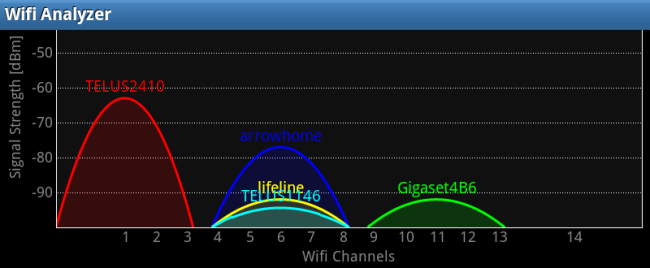
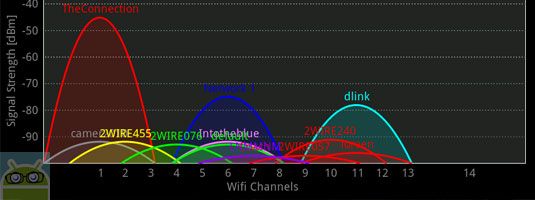
The other reply to your question (from guruevi) is correct. There's also the problem of "duty cycle" (there are other terms) which is basically how much noise is in the air on a channel. This is basically how much space is between the noise. When you have a crowded room with everyone trying to get online on a channel, they are all waiting for their turn to talk. The fewer people you have, naturally you have more time between transmissions. The more people you have, the less and less time there is between. It's like the difference between speaking slowly and those auctioneer guys who speed right along and are almost hard to understand because there's no space between their words to process what you're hearing. When you get a spectral analyzer out and look at the duty cycle on a channel in a crowded neighborhood (maybe an apartment complex), you'll see many access points (wireless routers usually) on each channel. If you look at say, channel 1, you have a duty cycle for the access points on that channel, and you have contribution to that from overlapping channels (2 and 3). So if you are using channel 3, you are contributing to the duty cycle (thus degrading performance and throughput) of channels 1 through 6. In return, those channels contribute to your noise as well.
The best practice is to keep the overlapping channels clean so that you don't get interrupted by those adjacent channels. The best possible graph you want to see in an analysis tool like inSSIDer on the 2.4 GHz view is 3 humps, spanning channels "0"-3, 4-9, and 10 to 13. In Europe you can use up to channel 14 as well. You'll get in trouble here in the US though.
I'm not really familiar with posting things in
http://www.howtogeek.com/wp-content/uploads/2012/02/wifi-analyzer-header.pngSo here's the trick to using JUST 1,6, and 11. Signal strength. You can share channel 1 with as many neighbors as you want, but in order for it to be effective, you need to have roughly a 20 dBm advantage over the signale from the nearest AP using the same channel, in the area you want to use your AP. If you have that much of a difference in signal strength, it's good enough to have a good experience on wireless.
Here's an example where, if the signal from other APs are weak enough compared to your own, it doesn't matter that they are overlapping your channels because you can trump them with sufficient signal strength to talk from your client device to the AP.
http://i251.photobucket.com/albums/gg286/TGrayman/Axis%20Wireless/crowded-Copy.jpgSo, if you have a scenario like that one, be courteous like the the taller ones and use the proper channels.
Here is an idea of what proper channel layout should be. If you have the opportunity to help your neighbors tweak their APs, I'd suggest channel planning it for the benefit of everyone.
http://www.horus4it.net/en/images/image002.jpgI hope this helps. There is probably a lot more I could explain on this but I'm currently working a large event in Vegas and we're currently troubleshooting this very problem. Everyone comes in with a personal hotspot and just stomps all over the free wifi we are providing them. I wish there were a good way to educate people. It's just too technical for the lay person though.
-
World of Goo would be a good start.
World of Goo is a great kid-friendly game, in addition to being a good game full-stop. It is mouse-only, but some of the puzzles would be very challenging (in a good way!) for a small child. Don't expect him to beat the whole thing though. So that's a good first one. Another good game (although it requires some more advanced reading skills) is Wind and Water: Puzzle Battles: http://www.howtogeek.com/92615/wind-and-water-puzzle-battles-an-awesome-game-for-linux-and-windows/ I wouldn't pull this one out right after World of Goo though. So you should look for a few other games to put in between these two.
-
Re:nothing like a holodeck
The beaming effect was light shining on aluminum powder.. It still seems to me like the 'shaping it like the people' part wasn't easy to do. (You manually have to cut mattes the shape of the people, right?)
-
Re:free as in beer
"Free as in beer" is a concept generally associated with Richard Stallman. He was trying to explain his concept of free software. The basic idea is that when you say free beer, you mean that you don't want to pay money for it. When you say free speech, you mean that you don't want it to be restricted. Stallman's concept of free software was for it to be free like speech should be, not free like we wish beer was.
Links (from googling "free as in beer"):
http://en.wikipedia.org/wiki/Gratis_versus_libre
http://c2.com/cgi/wiki?FreeAsInBeer
http://www.howtogeek.com/howto/31717/what-do-the-phrases-free-speech-vs.-free-beer-really-mean/ -
Re:Why is Linux's SSD performance so terrible?
Linux default config is optimized for spinning platters. You have to tweak a few things to get the best performance.
-
Re:You know what else is a cognitive burden?
So in Win7, I either have to install 3rd party programs to manage the windows, or use the *Task Manager*?? You'd think Windows would do windows better.
Note: the Task Manager hack does not work on my machine with a dual monitor setup.
-
Um... pixelserv exists.
Really? People are still debating this? I run pixelserv on my router, and I haven't seen an ad in... I can't remember. http://www.howtogeek.com/51477/how-to-remove-advertisements-with-pixelserv-on-dd-wrt/ Also, I pay for bandwidth. Why would I accept "POSTAGE DUE" on the junk mail in my mailbox?
-
Re:How about..
Apparently it saves screen space. At least for the morons that can't maximize their app, and like methodically looking for disjoint UI elements. Personally I think it's the non-idea of a brain-dead mac user.
Anyway, try this, if you must use Ubuntu, and not, for example, Linux Mint.
-
Re:Not a chance
KDE4 caused me to switch to Gnome... and then unity came along and I'm not sure where to go next!
Here?: http://mate-desktop.org/
e.g.:
http://www.howtogeek.com/110052/how-to-install-the-mate-desktop-go-back-to-gnome-2-on-ubuntu/
http://www.webupd8.org/2012/04/mate-desktop-12-released-install-it-in.html
-
Re:Who cares?
they really need to be worried about giving up the home users because $99 for Student is just too high.
MS Office Home and Student for Windows and OSX consistently tops the software bestseller lists at Amazon.com, Walmart.com, etc., etc., etc. The price of the Home edition has never been an obstacle to sales.
OneNote is one of the overlooked gems in recent versions of Microsoft Office. OneNote makes it simple to take notes and keep track of everything with integrated search, and offers more features than its popular competitor Evernote. One way it is better is its high quality optical character recognition (OCR) engine. One of Evernote's most popular features is that you can search for anything, including text in an image, and you can easily find it. OneNote takes this further, and instantly OCRs any text in images you add. Then, you can use this text easily and copy it from the image.
OCR anything with OneNote 2007 and 2010
Most buy the three-seat version of Office Home, retail boxed.
Office University Edition is $99 at Walmart,com (Word. Excel. Publisher. OneNote. Outlook. Publisher. Access.) Student ID required.
If you use Office at work the chances are quite good that MS Office Pro can be yours for $9.95. Microsoft Home Use Program
MS Office Home will ship with every WinRT tablet.
The truth is that the real cost of an office suite is in consumables. Ink, toner and paper.
Free software saves you next to nothing.
-
Re:All part of their retro-COBOL strategy
Freaking Office 2010 with the ribbon crap confuses the heck out of me, because I can never find the function I want.
You need to install UBitMenu. It creates a new tab with the old 2003 menus, so you can at least find things. Their main site is down at the moment, but if you google it you can find it on a download site.
-
Re:Security vs. Creativity
Hiding your SSID isn't a security feature.
Very true.
My brother-in-law has an equally... er... effective strategy. He set his SSID to "broken" in hopes that people wouldn't see that and decide not to try to use it. He also has WPA2 with a reasonable password, though.
-
Re:Security vs. Creativity
-
Re:timely question
Sorry, missed the part about it being a laptop. Googling "windows keyboard lock" returns http://www.howtogeek.com/howto/11570/disable-the-keyboard-with-a-keyboard-shortcut-in-windows/
-
Re:no huge surprise .. nokia is engineered to fail
Therein likely lies the problem. Monochrome is pretty decently looking in dark theme, especially since people who use it want to focus on the code in the first place in any case (and the point of monochrome is really to let you do that - let the editor be the focal point due to its syntax highlighting being the only blot of color in the IDE). But have you tried the light theme for any considerable period of time?
I have to admit I never did spend much time in the light theme. I was hit by the bug where I ended up with a light editor window though. Easy enough work around and I was motivated to change it quick as I'm not a fan of sitting in front a white screen of long periods. Dark is so much easier on the eyes. When you are in front of a computer all day the little things make a difference (treating your eyes well, , having a good keyboard (such as a mechanical to ease strain) etc).
For VS2010, there was this. It doesn't do all, but at least it lets you change colors. Matthew said in a comment there that he'll try to find the time to update it for VS11 sometime after the release.
Thanks for pointing out the "Visual Studio Color Theme Editor". I'll keep an eye out for when that's updated. Hopefully Matthew gets a chance to work on it before RTM.
As one of the guys who works on it (and especially the "smooth" part... I hope you do like the new background solution load experience!), I'm really glad to hear it. Just keep filing those bugs for when it's not stable, or when performance is not on par with what you'd expect in some specific scenario, or when you see something obviously silly in the UI - especially the new or revamped stuff (e.g. like this).
Kudos to the VS11 team. I'm using VS11 on two machines right now. One is an old desktop with a Pentium Dual-Core E6700 which was running 2008 Pro and 2010 express. VS11 feels quicker and smoother than the previous version on that machine. It absoluteness flies on my laptop (i7-2670qm). So far I haven't found any real bugs, but if I do I'll be sure to file reports (and attempt to file good ones, as we know how rare those are).
It's funny. Straight out of University I was pretty anti-MS. I ran linux primarily through University and even after graduating my wife (girlfriend at the time) and I ran Ubuntu and OS X at home exclusively. I ended up having to use Windows and MS tools when I took a job doing
I'll admit I'm still not a big fan of Windows, but Win7 is pretty usable and leaves little to complain about (lack of built-in virtual desktop solution is a bummer). I just view windows as a necessary evil if I want to use VS (just as MonoDevelop is necessary if I want to set breakpoints for Unity3d). -
Re:Ubuntu + MATE
save yourself the time and just install xubuntu (XFCE)
MATE is very quick and easy to install on Ubuntu, including 12.04:
http://www.howtogeek.com/110052/how-to-install-the-mate-desktop-go-back-to-gnome-2-on-ubuntu/
Xfce is another good choice, though. If you start with a standard Ubuntu and just add the xfce4 package rather than installing Xubuntu, you end up with something quite similar to Ubuntu before Unity - most of the Gnome apps work well under xfce, and you get the standard default selection of software rather than 'lightweight' alternatives (LibreOffice instead of Abiword/Gnumeric, etc.).
-
Re:Excellent
Without MATE, Linux Mint 12 wouldn't even be an option for me (I'd stick with 11).
I might say the same for Ubuntu 12.04 (though to be fair, I could also live with Xfce). I just installed MATE 1.2 on the latest 12.04 beta and it works like a charm, as here:
http://www.howtogeek.com/110052/how-to-install-the-mate-desktop-go-back-to-gnome-2-on-ubuntu/
For my money, Gnome 2/MATE is still the best available desktop for Linux. I've tried the other approaches to taming Gnome 3 (Cinnamon, the classic 'fallback mode' panel, even Unity) and all currently seem lacking in comparison, with more limited features, or lower performance on resource-limited systems, or (in the case of Unity) annoying design choices. The benefits to developers of building a desktop on the Gnome 3 foundation (ease of maintenance, etc.) are all very well, but as an end-user, I'm going to go for the more responsive, fully-featured alternative. The situation may be different in a year or two, but right now MATE remains my top choice.
-
Re:Hipsters ASSEMBLE
(Now, to wait for sanely available purchases and software support to allow that use...)
If you're looking to use an iPad as a 2nd monitor, then this might be what you are looking for.
http://www.howtogeek.com/100886/how-to-use-your-ipad-as-a-second-monitor-for-your-pc-or-mac/ -
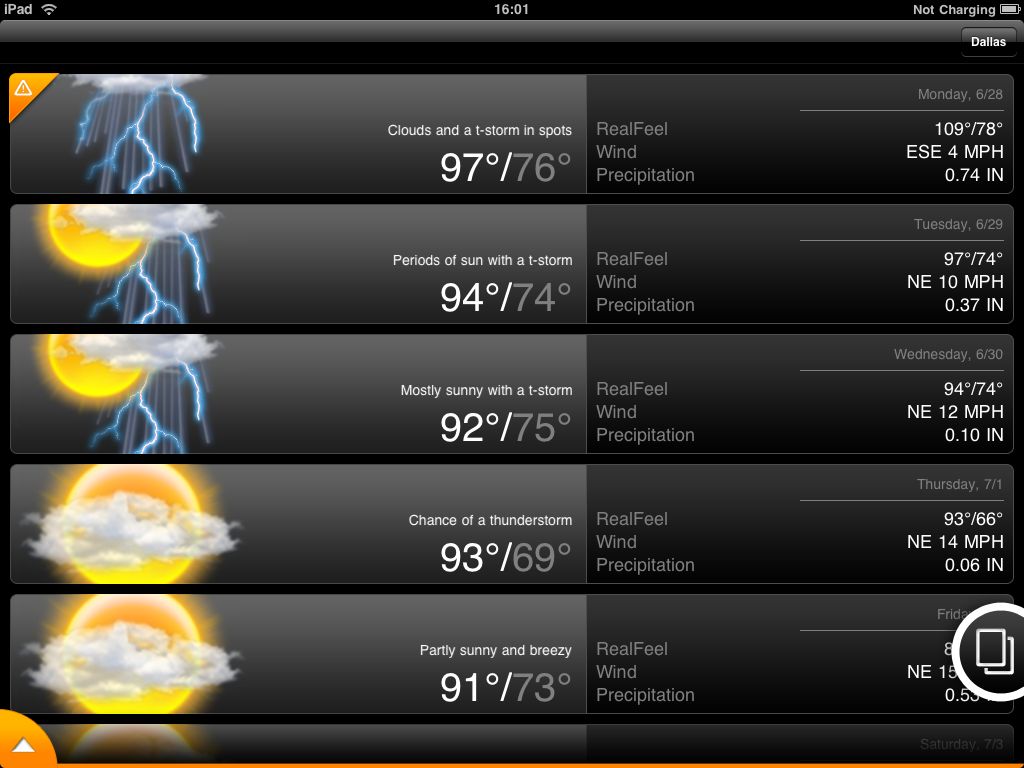
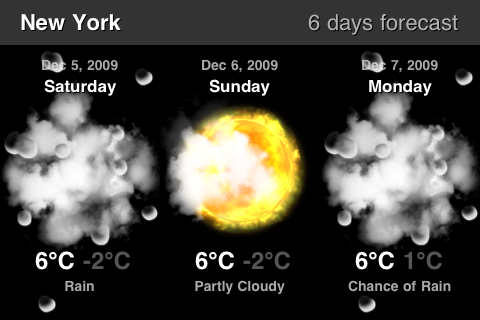
Here are a bunch of unique weather app designs
Challenge accepted. Weather app designs that don't look like Apple's:
And it keeps going with the unique designs.
All of these look just fine and aren't inconvenient.
-
Re:And?